mirror of
https://github.com/publiclab/image-sequencer.git
synced 2025-12-07 17:00:02 +01:00
Compare commits

1 Commits
MargaretAN
...
error-mess
| Author | SHA1 | Date | |
|---|---|---|---|

|
3077601a2f |
35
.github/ISSUE_TEMPLATE.md
vendored
35
.github/ISSUE_TEMPLATE.md
vendored
@@ -1,35 +0,0 @@
|
||||
### Please describe the problem (or idea)
|
||||
|
||||
> What happened just before the problem occurred? Or what problem could this idea solve?
|
||||
|
||||
|
||||
|
||||
> What did you expect to see that you didn't?
|
||||
|
||||
|
||||
|
||||
### Please show us where to look
|
||||
|
||||
http://sequencer.publiclab.org...
|
||||
|
||||
|
||||
### What's your PublicLab.org username?
|
||||
|
||||
> This can help us diagnose the issue:
|
||||
|
||||
|
||||
|
||||
### Browser, version, and operating system
|
||||
|
||||
> Many bugs are related to these -- please help us track it down and reproduce what you're seeing!
|
||||
|
||||
|
||||
****
|
||||
|
||||
## Thank you!
|
||||
|
||||
Your help makes Public Lab better! We *deeply* appreciate your helping refine and improve this site.
|
||||
|
||||
To learn how to write really great issues, which increases the chances they'll be resolved, see:
|
||||
|
||||
https://publiclab.org/wiki/developers#Contributing+for+non-coders
|
||||
16
.github/PULL_REQUEST_TEMPLATE.md
vendored
16
.github/PULL_REQUEST_TEMPLATE.md
vendored
@@ -1,16 +0,0 @@
|
||||
Fixes #[Add issue number here.]
|
||||
|
||||
Make sure these boxes are checked before your pull request (PR) is ready to be reviewed and merged. Thanks!
|
||||
|
||||
* [ ] tests pass -- look for a green checkbox ✔️ a few minutes after opening your PR -- or run tests locally with `rake test`
|
||||
* [ ] code is in uniquely-named feature branch and has no merge conflicts
|
||||
* [ ] PR is descriptively titled
|
||||
* [ ] ask `@publiclab/reviewers` for help, in a comment below
|
||||
|
||||
> We're happy to help you get this ready -- don't be afraid to ask for help, and **don't be discouraged** if your tests fail at first!
|
||||
|
||||
If tests do fail, click on the red `X` to learn why by reading the logs.
|
||||
|
||||
Please be sure you've reviewed our contribution guidelines at https://publiclab.org/contributing-to-public-lab-software
|
||||
|
||||
Thanks!
|
||||
25
.github/config.yml
vendored
25
.github/config.yml
vendored
@@ -1,25 +0,0 @@
|
||||
# Configuration for welcome - https://github.com/behaviorbot/welcome
|
||||
|
||||
# Configuration for new-issue-welcome - https://github.com/behaviorbot/new-issue-welcome
|
||||
|
||||
# Comment to be posted to on first time issues
|
||||
newIssueWelcomeComment: |
|
||||
Thanks for opening your first issue here! Please follow the issue template to help us help you 👍🎉😄
|
||||
If you have screenshots to share demonstrating the issue, that's really helpful! 📸 You can [make a gif](https://www.cockos.com/licecap/) too!
|
||||
# Configuration for new-pr-welcome - https://github.com/behaviorbot/new-pr-welcome
|
||||
|
||||
# Comment to be posted to on PRs from first time contributors in your repository
|
||||
newPRWelcomeComment: |
|
||||
Thanks for opening this pull request! `Dangerbot` will test out your code and reply in a bit with some pointers and requests.
|
||||
There may be some errors, **but don't worry!** We're here to help! 👍🎉😄
|
||||
# Configuration for first-pr-merge - https://github.com/behaviorbot/first-pr-merge
|
||||
|
||||
# Comment to be posted to on pull requests merged by a first time user
|
||||
firstPRMergeComment: |
|
||||
Congrats on merging your first pull request! 🙌🎉⚡️
|
||||
Your code will likely be published to https://sequencer.publiclab.org in the next few days.
|
||||
In the meantime, can you tell us your Twitter handle so we can thank you properly?
|
||||
Now that you've completed this, you can help someone else take their first step!
|
||||
See: [Public Lab's coding community!](https://code.publiclab.org)
|
||||
|
||||
# It is recommended to include as many gifs and emojis as possible
|
||||
45
.npmignore
45
.npmignore
@@ -1,45 +0,0 @@
|
||||
# Logs
|
||||
logs
|
||||
*.log
|
||||
npm-debug.log*
|
||||
|
||||
# Runtime data
|
||||
pids
|
||||
*.pid
|
||||
*.seed
|
||||
|
||||
# Directory for instrumented libs generated by jscoverage/JSCover
|
||||
lib-cov
|
||||
|
||||
# Coverage directory used by tools like istanbul
|
||||
coverage
|
||||
|
||||
# Grunt intermediate storage (http://gruntjs.com/creating-plugins#storing-task-files)
|
||||
.grunt
|
||||
|
||||
# node-waf configuration
|
||||
.lock-wscript
|
||||
|
||||
# Compiled binary addons (http://nodejs.org/api/addons.html)
|
||||
build/Release
|
||||
|
||||
# Optional npm cache directory
|
||||
.npm
|
||||
|
||||
# Optional REPL history
|
||||
.node_repl_history
|
||||
|
||||
.DS_Store
|
||||
|
||||
*.swp
|
||||
todo.txt
|
||||
test.js
|
||||
output.txt
|
||||
output/
|
||||
|
||||
examples/
|
||||
icons/
|
||||
|
||||
.travis.yml
|
||||
Gruntfile.js
|
||||
yarn.lock
|
||||
153
CONTRIBUTING.md
153
CONTRIBUTING.md
@@ -10,13 +10,13 @@ Most contribution (we imagine) would be in the form of API-compatible modules, w
|
||||
* [README.md](https://github.com/publiclab/image-sequencer)
|
||||
* [Contributing Modules](#contributing-modules)
|
||||
* [Info File](#info-file)
|
||||
* [Ideas](#Contribution-ideas)
|
||||
* [Ideas](#ideas)
|
||||
|
||||
****
|
||||
|
||||
## Contribution-ideas
|
||||
## Contribution ideas
|
||||
|
||||
See [this issue](https://github.com/publiclab/image-sequencer/issues/118) for a range of ideas for new contributions and links to possibly helpful libraries, or you can solve an [existing issue](https://github.com/publiclab/image-sequencer/labels/module). Also see the [new features issues list](https://github.com/publiclab/image-sequencer/labels/new-feature).
|
||||
See [this issue](https://github.com/publiclab/image-sequencer/issues/118) for a range of ideas for new contributions, and links to possibly helpful libraries. Also see the [new features issues list](https://github.com/publiclab/image-sequencer/labels/new-feature).
|
||||
|
||||
### Bugs
|
||||
|
||||
@@ -35,18 +35,23 @@ Any module must follow this basic format:
|
||||
```js
|
||||
module.exports = function ModuleName(options,UI) {
|
||||
|
||||
options = options || {};
|
||||
UI.onSetup(options.step);
|
||||
var output;
|
||||
// Module requirements have been simplified in version 3, see https://github.com/publiclab/image-sequencer/blob/master/CONTRIBUTING.md#contributing-modules
|
||||
|
||||
function draw(input,callback) {
|
||||
|
||||
UI.onDraw(options.step); // tell the UI to "draw"
|
||||
|
||||
var output = function(input){
|
||||
/* do something with the input */
|
||||
return input;
|
||||
}
|
||||
|
||||
this.output = output(input); // run the output and assign it to this.output
|
||||
options.step.output = output.src;
|
||||
callback();
|
||||
UI.onComplete(options.step); // tell UI we are done
|
||||
}
|
||||
|
||||
return {
|
||||
@@ -58,57 +63,6 @@ module.exports = function ModuleName(options,UI) {
|
||||
}
|
||||
```
|
||||
|
||||
Image Sequencer modules are designed to be run either in the browser or in a Node.js environment. For dynamically loaded modules, that means that any uses of `require()` to include an external library must be compiled using a system like `browserify` or `webpack` to ensure browser compatibility. An example of this can be found here:
|
||||
|
||||
https://github.com/tech4gt/image-sequencer
|
||||
|
||||
If you wish to offer a module without browser-compatibility, please indicate this in the returned `info` object as:
|
||||
|
||||
module.exports = [
|
||||
ModuleName,
|
||||
{ only: ['node'] }
|
||||
];
|
||||
|
||||
If you believe that full cross-compatibility is possible, but need help, please open an issue on your module's issue tracker requesting assistance (and potentially link to it from an inline comment or the module description).
|
||||
|
||||
Any Independent Module Must follow this basic format
|
||||
```js
|
||||
function ModuleName(options,UI) {
|
||||
|
||||
var output;
|
||||
|
||||
function draw(input,callback) {
|
||||
|
||||
var output = function(input){
|
||||
/* do something with the input */
|
||||
return input;
|
||||
}
|
||||
|
||||
this.output = output(input); // run the output and assign it to this.output
|
||||
callback();
|
||||
}
|
||||
|
||||
return {
|
||||
options: options,
|
||||
draw: draw,
|
||||
output: output,
|
||||
UI: UI
|
||||
};
|
||||
}
|
||||
|
||||
module.exports = [ModuleName,{
|
||||
"name": "ModuleName",
|
||||
"description": "",
|
||||
"inputs": {
|
||||
// inputs here
|
||||
}
|
||||
/* Info can be defined here or imported from a json file */
|
||||
// require('./info.json') This only works in node
|
||||
// In a module compiled with browserify or webpack, a require() can be used to
|
||||
// load a standard info.json file.
|
||||
];
|
||||
```
|
||||
|
||||
|
||||
### options
|
||||
|
||||
@@ -130,18 +84,9 @@ The `draw` method should accept an `input` parameter, which will be an object of
|
||||
```js
|
||||
input = {
|
||||
src: "datauri of an image here",
|
||||
format: "jpeg/png/etc",
|
||||
// utility functions
|
||||
getPixels: "function to get Image pixels. Wrapper around https://npmjs.com/get-pixels",
|
||||
savePixels: "function to save Image pixels. Wrapper around https://npmjs.com/save-pixels",
|
||||
lodash: "wrapper around lodash library, https://github.com/lodash",
|
||||
dataUriToBuffer: "wrapper around https://www.npmjs.com/package/data-uri-to-buffer",
|
||||
pixelManipulation: "general purpose pixel manipulation API, see https://github.com/publiclab/image-sequencer/blob/master/src/modules/_nomodule/PixelManipulation.js"
|
||||
format: "jpeg/png/etc"
|
||||
}
|
||||
```
|
||||
For example usage for pixelManipulation see https://github.com/publiclab/image-sequencer/blob/master/src/modules/Invert/Module.js
|
||||
|
||||
**The module is included in the browser inside a script tag and since the code runs directly in the browser if any other module is required apart from the apis available on the input object, it should be either bundled with the module code and imported in es6 format or the module code must be browserified before distribution for browser**
|
||||
|
||||
The draw method is run every time the step is `run` using `sequencer.run()`.
|
||||
So any calculations must go **into** the `draw()` method's definition.
|
||||
@@ -226,25 +171,32 @@ The default "loading spinner" can be optionally overriden with a custom progress
|
||||
```js
|
||||
module.exports = function ModuleName(options,UI) {
|
||||
|
||||
options = options || {};
|
||||
UI.onSetup(options.step);
|
||||
var output;
|
||||
|
||||
function draw(input,callback,progressObj) {
|
||||
|
||||
/* If you wish to supply your own progress bar you need to override progressObj */
|
||||
|
||||
progressObj.stop() // Stop the current progress spinner
|
||||
|
||||
progressObj.overrideFlag = true; // Tell image sequencer that you will supply your own progressBar
|
||||
progressObj.overrideFlag = true; // Tell image sequencer that you will supply your own progressBar
|
||||
|
||||
/* Override the object and give your own progress Bar */
|
||||
progressObj = /* Your own progress Object */
|
||||
|
||||
UI.onDraw(options.step);
|
||||
|
||||
var output = function(input){
|
||||
/* do something with the input */
|
||||
/* do something with the input */
|
||||
return input;
|
||||
};
|
||||
|
||||
this.output = output();
|
||||
options.step.output = output.src;
|
||||
callback();
|
||||
UI.onComplete(options.step);
|
||||
}
|
||||
|
||||
return {
|
||||
@@ -265,70 +217,3 @@ See existing module `green-channel` for an example: https://github.com/publiclab
|
||||
The `green-channel` module is included into the core modules here: https://github.com/publiclab/image-sequencer/blob/master/src/Modules.js#L5-L7
|
||||
|
||||
For help integrating, please open an issue.
|
||||
|
||||
## Meta Module
|
||||
|
||||
IMAGE SEQUENCER supports "meta modules" -- modules made of other modules. The syntax and structure of these meta modules is very similar to standard modules. Sequencer can also genarate meta modules dynamically with the function `createMetaModule` which can be called in the following ways
|
||||
|
||||
```js
|
||||
// stepsString is a stringified sequence
|
||||
sequencer.createMetaModule(stepsString,info)
|
||||
|
||||
/* stepsArray is the array of objects in this format
|
||||
* [
|
||||
* {name: "moduleName",options: {}},
|
||||
* {name: "moduleName",options: {}}
|
||||
* ]
|
||||
*/
|
||||
sequencer.createMetaModule(stepsArray,info)
|
||||
```
|
||||
|
||||
A Meta module can also be contributed like a normal module with an info and a Module.js. A basic Meta module shall follow the following format
|
||||
|
||||
|
||||
```js
|
||||
// Module.js
|
||||
module.exports = function metaModuleFun(){
|
||||
this.expandSteps([
|
||||
{ 'name': 'module-name', 'options': {} },
|
||||
{ 'name': 'module-name', options: {} }
|
||||
]);
|
||||
}
|
||||
```
|
||||
|
||||
```json
|
||||
// Info
|
||||
{
|
||||
"name": "meta-moduleName",
|
||||
"description": "",
|
||||
"length": //Integer representing number of steps in the metaModule
|
||||
}
|
||||
```
|
||||
|
||||
```js
|
||||
//index.js
|
||||
module.exports = [
|
||||
require('./Module.js'),
|
||||
require('./info.json')
|
||||
]
|
||||
```
|
||||
|
||||
All of the above can also be combined together to form a single file module.
|
||||
|
||||
```js
|
||||
// MetaModule.js
|
||||
module.export = [
|
||||
function (){
|
||||
this.expandSteps([
|
||||
{ 'name': 'module-name', 'options': {} },
|
||||
{ 'name': 'module-name', options: {} }
|
||||
]);
|
||||
},
|
||||
{
|
||||
"name": "meta-moduleName",
|
||||
"description": "",
|
||||
"length": //Integer representing number of steps in the metaModule
|
||||
}
|
||||
]
|
||||
```
|
||||
The length is absolutely required for a meta-module, since sequencer is optimized to re-run minimum number of steps when a step is added in the UI which is 1 in the case of normal modules, if the added step is a meta-module the length of the sequence governs the number of steps to re-run.
|
||||
78
Gruntfile.js
78
Gruntfile.js
@@ -1,50 +1,50 @@
|
||||
module.exports = function(grunt) {
|
||||
grunt.loadNpmTasks("grunt-browserify");
|
||||
grunt.loadNpmTasks("grunt-contrib-uglify-es");
|
||||
grunt.loadNpmTasks("grunt-browser-sync");
|
||||
|
||||
require("matchdep")
|
||||
.filterDev("grunt-*")
|
||||
.forEach(grunt.loadNpmTasks);
|
||||
grunt.loadNpmTasks('grunt-browserify');
|
||||
grunt.loadNpmTasks('grunt-contrib-uglify');
|
||||
|
||||
grunt.initConfig({
|
||||
pkg: grunt.file.readJSON("package.json"),
|
||||
require('matchdep').filterDev('grunt-*').forEach(grunt.loadNpmTasks);
|
||||
|
||||
watch: {
|
||||
options: {
|
||||
livereload: true
|
||||
grunt.initConfig({
|
||||
|
||||
pkg: grunt.file.readJSON('package.json'),
|
||||
|
||||
watch: {
|
||||
options : {
|
||||
livereload: true
|
||||
},
|
||||
source: {
|
||||
files: [
|
||||
'src/*.js',
|
||||
'src/*/*.js',
|
||||
'Gruntfile.js'
|
||||
],
|
||||
tasks: [ 'build:js' ]
|
||||
}
|
||||
},
|
||||
source: {
|
||||
files: ["src/**/*", "Gruntfile.js"],
|
||||
tasks: ["build:js"]
|
||||
}
|
||||
},
|
||||
|
||||
browserify: {
|
||||
dist: {
|
||||
src: ["src/ImageSequencer.js"],
|
||||
dest: "dist/image-sequencer.js"
|
||||
}
|
||||
},
|
||||
browserify: {
|
||||
dist: {
|
||||
src: ['src/ImageSequencer.js'],
|
||||
dest: 'dist/image-sequencer.js'
|
||||
}
|
||||
},
|
||||
|
||||
uglify: {
|
||||
dist: {
|
||||
src: ["./dist/image-sequencer.js"],
|
||||
dest: "./dist/image-sequencer.min.js"
|
||||
}
|
||||
},
|
||||
browserSync: {
|
||||
dev: {
|
||||
options: {
|
||||
watchTask: true,
|
||||
server: "./"
|
||||
uglify: {
|
||||
dist: {
|
||||
src: ['./dist/image-sequencer.js'],
|
||||
dest: './dist/image-sequencer.min.js'
|
||||
}
|
||||
}
|
||||
}
|
||||
});
|
||||
|
||||
/* Default (development): Watch files and build on change. */
|
||||
grunt.registerTask("default", ["watch"]);
|
||||
grunt.registerTask("build", ["browserify:dist", "uglify:dist"]);
|
||||
grunt.registerTask("serve", ["browserify:dist", "uglify:dist", "browserSync", "watch"]);
|
||||
});
|
||||
|
||||
/* Default (development): Watch files and build on change. */
|
||||
grunt.registerTask('default', ['watch']);
|
||||
|
||||
grunt.registerTask('build', [
|
||||
'browserify:dist',
|
||||
'uglify:dist'
|
||||
]);
|
||||
|
||||
};
|
||||
|
||||
145
README.md
145
README.md
@@ -10,13 +10,13 @@ Image Sequencer is different from other image processing systems in that it's _n
|
||||
* produces a legible trail of operations, to "show your work" for evidential, educational, or reproducibility reasons
|
||||
* makes the creation of new tools or "modules" simpler -- each must accept an input image, and produce an output image
|
||||
* allows many images to be run through the same sequence of steps
|
||||
* works identically in the browser, on Node.js, and on the command line
|
||||
* works identically in the browser, on Node.js, and on the commandline
|
||||
|
||||
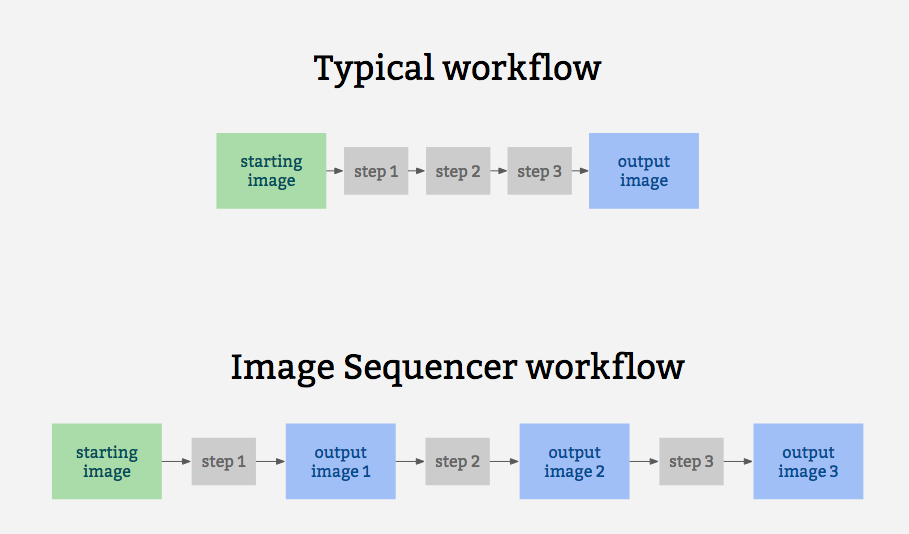
|
||||
|
||||
It is also for prototyping some other related ideas:
|
||||
|
||||
* filter-like image processing -- applying a transform to an image from a given source, like a proxy. I.e. [every image tile of a satellite imagery web map](https://publiclab.org/notes/warren/05-10-2018/prototype-filter-map-tiles-in-real-time-in-a-browser-with-imagesequencer-ndvi-landsat)
|
||||
* filter-like image processing -- applying a transform to any image from a given source, like a proxy. I.e. every image tile of a satellite imagery web map
|
||||
* test-based image processing -- the ability to create a sequence of steps that do the same task as some other image processing tool, provable with example before/after images to compare with
|
||||
* logging of each step to produce an evidentiary record of modifications to an original image
|
||||
* cascading changes -- change an earlier step's settings, and see those changes affect later steps
|
||||
@@ -45,20 +45,7 @@ A diagram of this running 5 steps on a single sample image may help explain how
|
||||
|
||||
## Installation
|
||||
|
||||
This library works in the browser, in Node, and on the command line (CLI), which we think is great.
|
||||
|
||||
### Unix based platforms
|
||||
You can set up a local environment to test the UI with `sudo npm run setup` followed by `npm start`
|
||||
|
||||
### Windows
|
||||
Our npm scripts do not support windows shells, please run the following snippet in PowerShell.
|
||||
```powershell
|
||||
npm i ; npm i -g grunt grunt-cli ; grunt serve
|
||||
```
|
||||
In case of a port conflict please run the following
|
||||
```powershell
|
||||
npm i -g http-server ; http-server -p 3000
|
||||
```
|
||||
This library works in the browser, in Node, and on the commandline (CLI), which we think is great.
|
||||
|
||||
### Browser
|
||||
|
||||
@@ -67,7 +54,7 @@ Just include [image-sequencer.js](https://publiclab.github.io/image-sequencer/di
|
||||
### Node (via NPM)
|
||||
|
||||
(You must have NPM for this)
|
||||
Add `image-sequencer` to your list of dependencies and run `$ npm install`
|
||||
Add `image-sequencer` to your list of dependancies and run `$ npm install`
|
||||
|
||||
### CLI
|
||||
|
||||
@@ -93,13 +80,13 @@ Image Sequencer can be used to run modules on an HTML Image Element using the
|
||||
modified. `steps` may be the name of a module or array of names of modules.
|
||||
|
||||
Note: Browser CORS Restrictions apply. Some browsers may not allow local images
|
||||
from other folders, and throw a Security Error instead.
|
||||
form other folders, and throw a Security Error instead.
|
||||
|
||||
```js
|
||||
sequencer.replaceImage(selector,steps,optional_options);
|
||||
```
|
||||
|
||||
`optional_options` allows passing additional arguments to the module itself.
|
||||
`optional_options` allows to pass additional arguments to the module itself.
|
||||
|
||||
For example:
|
||||
|
||||
@@ -108,14 +95,6 @@ For example:
|
||||
sequencer.replaceImage('#photo',['invert','ndvi-red']);
|
||||
```
|
||||
|
||||
### Data URL usage
|
||||
|
||||
Since Image Sequencer uses data-urls, you can initiate a new sequence by providing an image in the [data URL format](https://developer.mozilla.org/en-US/docs/Web/HTTP/Basics_of_HTTP/Data_URIs), which will import into the demo and run:
|
||||
|
||||
[Try this example link with a very small Data URL](http://sequencer.publiclab.org/examples/#src=data:image/jpeg;base64,/9j/4AAQSkZJRgABAQAAAQABAAD/2wBDAAYEBQYFBAYGBQYHBwYIChAKCgkJChQODwwQFxQYGBcUFhYaHSUfGhsjHBYWICwgIyYnKSopGR8tMC0oMCUoKSj/2wBDAQcHBwoIChMKChMoGhYaKCgoKCgoKCgoKCgoKCgoKCgoKCgoKCgoKCgoKCgoKCgoKCgoKCgoKCgoKCgoKCgoKCj/wAARCAAQABADASIAAhEBAxEB/8QAFQABAQAAAAAAAAAAAAAAAAAAAAf/xAAUEAEAAAAAAAAAAAAAAAAAAAAA/8QAFQEBAQAAAAAAAAAAAAAAAAAABgj/xAAUEQEAAAAAAAAAAAAAAAAAAAAA/9oADAMBAAIRAxEAPwCdABykX//Z&steps=invert{})
|
||||
|
||||
To produce a data URL from an HTML image, see [this nice blog post with example code](https://davidwalsh.name/convert-image-data-uri-javascript).
|
||||
|
||||
## CLI Usage
|
||||
|
||||
Image Sequencer also provides a CLI for applying operations to local files. The CLI takes the following arguments:
|
||||
@@ -125,10 +104,8 @@ Image Sequencer also provides a CLI for applying operations to local files. The
|
||||
-b | --basic | Basic mode only outputs the final image
|
||||
-o | --output [PATH] | Directory where output will be stored. (optional)
|
||||
-c | --config {object} | Options for the step. (optional)
|
||||
--save-sequence [string] | Name space separated with Stringified sequence to save
|
||||
--install-module [string] | Module name space seaprated npm package name
|
||||
|
||||
The basic format for using the CLI is as follows:
|
||||
The basic format for using the CLI is as follows:
|
||||
|
||||
```
|
||||
$ ./index.js -i [PATH] -s step-name
|
||||
@@ -144,24 +121,15 @@ The CLI also can take multiple steps at once, like so:
|
||||
|
||||
But for this, double quotes must wrap the space-separated steps.
|
||||
|
||||
Options for the steps can be passed in one line as JSON in the details option like
|
||||
Options for the steps can be passed in one line as json in the details option like
|
||||
```
|
||||
$ ./index.js -i [PATH] -s "brightness" -c '{"brightness":50}'
|
||||
$ ./index.js -i [PATH] -s "brightness" -d '{"brightness":50}'
|
||||
|
||||
```
|
||||
Or the values can be given through terminal prompt like
|
||||
|
||||
|
||||
<img width="1436" alt="screen shot 2018-02-14 at 5 18 50 pm" src="https://user-images.githubusercontent.com/25617855/36202790-3c6e8204-11ab-11e8-9e17-7f3387ab0158.png">
|
||||
|
||||
`save-sequence` option can be used to save a sequence and the associated options for later usage. You should provide a string which contains a name of the sequence space separated from the sequence of steps which constitute it.
|
||||
```shell
|
||||
sequencer --save-sequence "invert-colormap invert(),colormap()"
|
||||
```
|
||||
|
||||
`install-module` option can be used to install new modules from npm. You can register this module in your sequencer with a custom namespace separated with the npm package name. Below is an example of the `image-sequencer-invert` module.
|
||||
```shell
|
||||
sequencer --install-module "invert image-sequencer-invert"
|
||||
```
|
||||
|
||||
The CLI is also chainable with other commands using `&&`
|
||||
|
||||
@@ -196,7 +164,7 @@ CORS Restrictions). To sum up, these are accepted:
|
||||
* DataURLs
|
||||
|
||||
return value: **none** (A callback should be used to ensure the image gets loaded)
|
||||
The callback is called within the scope of a sequencer. For example:
|
||||
The callback is called within the scope of a the sequencer. For example:
|
||||
(addSteps is defined later)
|
||||
|
||||
```js
|
||||
@@ -210,7 +178,7 @@ In this case, only `'SRC'`.
|
||||
|
||||
### Adding steps to the image
|
||||
|
||||
The `addSteps` method is used to add steps to the image. One or more steps can
|
||||
The `addSteps` method is used to add steps on the image. One or more steps can
|
||||
be added at a time. Each step is called a module.
|
||||
|
||||
```js
|
||||
@@ -236,35 +204,13 @@ modules.
|
||||
sequencer.run();
|
||||
```
|
||||
|
||||
Sequencer can be run with a custom config object
|
||||
Additionally, an optional callback can be passed to this method.
|
||||
|
||||
```js
|
||||
// The config object enables custom progress bars in a node environment and
|
||||
// ability to run the sequencer from a particular index(of the steps array)
|
||||
|
||||
sequencer.run(config);
|
||||
|
||||
```
|
||||
|
||||
The config object can have the following keys
|
||||
|
||||
```js
|
||||
config: {
|
||||
progressObj: , //A custom object to handle progress bar
|
||||
index: //Index to run the sequencer from (defaults to 0)
|
||||
}
|
||||
```
|
||||
|
||||
Additionally, an optional callback function can be passed to this method.
|
||||
|
||||
```js
|
||||
sequencer.run(function callback(out){
|
||||
sequencer.run(function(out){
|
||||
// this gets called back.
|
||||
// "out" is the DataURL of the final image.
|
||||
});
|
||||
sequencer.run(config,function callback(out){
|
||||
// the callback is supported by all types of invocations
|
||||
});
|
||||
```
|
||||
|
||||
return value: **`sequencer`** (To allow method chaining)
|
||||
@@ -273,7 +219,7 @@ return value: **`sequencer`** (To allow method chaining)
|
||||
### Removing a step from the sequencer
|
||||
|
||||
The `removeSteps` method is used to remove unwanted steps from the sequencer.
|
||||
It accepts the index of the step as an input or an array of the unwanted indices
|
||||
It accepts the index of the step as an input, or an array of the unwanted indices
|
||||
if there are more than one.
|
||||
|
||||
For example, if the modules ['ndvi-red','crop','invert'] were added in this order,
|
||||
@@ -293,7 +239,7 @@ return value: **`sequencer`** (To allow method chaining)
|
||||
### Inserting a step in between the sequencer
|
||||
|
||||
The `insertSteps` method can be used to insert one or more steps at a given index
|
||||
in the sequencer. It accepts the index where the module is to be inserted, the name of
|
||||
in the sequencer. It accepts the index where the module is to be inserted, name of
|
||||
the module, and an optional options parameter. `index` is the index of the inserted
|
||||
step. Only one step can be inserted at a time. `optional_options` plays the same
|
||||
role it played in `addSteps`.
|
||||
@@ -309,25 +255,15 @@ sequencer.insertSteps(index,module_name,optional_options);
|
||||
|
||||
return value: **`sequencer`** (To allow method chaining)
|
||||
|
||||
### Importing an independent module
|
||||
|
||||
The `loadNewModule` method can be used to import a new module inside the sequencer. Modules can be downloaded via npm, yarn or CDN and are imported with a custom name. If you wish to load a new module at runtime, it will need to avoid using `require()` -- unless it is compiled with a system like browserify or webpack.
|
||||
|
||||
```js
|
||||
const module = require('sequencer-moduleName')
|
||||
sequencer.loadNewModule('moduleName',module);
|
||||
```
|
||||
|
||||
|
||||
## Method Chaining
|
||||
|
||||
Methods can be chained on the Image Sequencer:
|
||||
* loadImage()/loadImages() can only terminate a chain.
|
||||
* run() can not be in the middle of the chain.
|
||||
* If the chain starts with loadImage() or loadImages(), the following methods are
|
||||
applied only to the newly loaded images.
|
||||
* If no name is provided to the image, a name will be generated for it. The name will
|
||||
be of the form "image<number>". For Ex: "image1", "image2", "image3", etc.
|
||||
be of the form "image<number>". For ex: "image1", "image2", "image3", etc.
|
||||
|
||||
Valid Chains:
|
||||
```js
|
||||
@@ -384,7 +320,7 @@ return value: **none**
|
||||
### Adding Steps on Multiple Images
|
||||
|
||||
The same method `addSteps` is used for this. There's just a slight obvious change
|
||||
in the syntax that the image name has to be supplied too. `image_name` as well as,
|
||||
in the syntax that the image name has to be supplied too. `image_name` as well as
|
||||
`module_name` in the following examples can be either strings or arrays of strings.
|
||||
|
||||
```js
|
||||
@@ -435,7 +371,7 @@ The `run` method also accepts an optional callback just like before:
|
||||
});
|
||||
```
|
||||
|
||||
JSON input is also acceptable.
|
||||
JSON Input is also acceptable.
|
||||
|
||||
```js
|
||||
sequencer.run({
|
||||
@@ -474,7 +410,7 @@ return value: **`sequencer`** (To allow method chaining)
|
||||
### Inserting steps on an image
|
||||
|
||||
The `insertSteps` method can also accept an `image_name` parameter. `image_name`
|
||||
may be an array. Everything else remains the same. JSON Input is acceptable too.
|
||||
may be an array. Everything else remains the same. JSON Inout is acceptable too.
|
||||
|
||||
```js
|
||||
sequencer.insertSteps("image",index,"module_name",o);
|
||||
@@ -493,47 +429,6 @@ sequencer.insertSteps({
|
||||
```
|
||||
return value: **`sequencer`** (To allow method chaining)
|
||||
|
||||
## Saving Sequences
|
||||
|
||||
IMAGE SEQUENCER supports saving a sequence of modules and their associated settings in a simple string syntax. These sequences can be saved in the local storage inside the browser and inside a JSON file in node.js. sequences can be saved in node context using the CLI option
|
||||
|
||||
```shell
|
||||
--save-sequence "name stringified-sequence"
|
||||
```
|
||||
|
||||
In Node and the browser the following function can be used
|
||||
```js
|
||||
sequencer.saveSequence(name,sequenceString)
|
||||
```
|
||||
|
||||
The function `sequencer.loadModules()` reloads the modules and the saved sequences into `sequencer.modules` and `sequencer.sequences`
|
||||
|
||||
|
||||
## String syntax
|
||||
|
||||
Image sequencer supports stringifying a sequence which is appended to the url and hence can then be shared. An example below shows the string syntax for `channel` and `invert` module
|
||||
```
|
||||
channel{channel:green},invert{}
|
||||
```
|
||||
|
||||
Sequencer also supports the use of `()` in place of `{}` for backward compatibility with older links. (This syntax is deprecated and should be avoided as far as possible)
|
||||
```
|
||||
channel(channel:green),invert()
|
||||
```
|
||||
|
||||
Following are the core API functions that can be used to stringify and jsonify steps.
|
||||
```js
|
||||
sequencer.toString() //returns the stringified sequence of current steps
|
||||
sequencer.toJSON(str) // returns the JSON for the current sequence
|
||||
sequencer.stringToJSON(str) // returns the JSON for given stringified sequence
|
||||
sequencer.importString(str) //Imports the sequence of steps into sequencer
|
||||
sequencer.importJSON(obj) //Imports the given sequence of JSON steps into sequencer
|
||||
```
|
||||
|
||||
Image Sequencer can also generate a string for usage in the CLI for the current sequence of steps:
|
||||
```js
|
||||
sequencer.toCliString()
|
||||
```
|
||||
|
||||
## Creating a User Interface
|
||||
|
||||
|
||||
61378
dist/image-sequencer.js
vendored
Normal file → Executable file
61378
dist/image-sequencer.js
vendored
Normal file → Executable file
File diff suppressed because one or more lines are too long
2
dist/image-sequencer.min.js
vendored
2
dist/image-sequencer.min.js
vendored
File diff suppressed because one or more lines are too long
367
docs/MODULES.md
367
docs/MODULES.md
@@ -1,38 +1,7 @@
|
||||
Documentation of various Modules
|
||||
===
|
||||
|
||||
List of Module Documentations
|
||||
|
||||
1. [Crop](#crop-module)
|
||||
2. [Segmented-Colormap](#segmented-colormap-module)
|
||||
3. [FisheyeGl](#fisheyeGl-module)
|
||||
4. [Average](#average-module)
|
||||
5. [Blend](#blend-module)
|
||||
6. [Blur](#blur-module)
|
||||
7. [Brightness](#brightness-module)
|
||||
8. [Channel](#channel-module)
|
||||
9. [Colorbar](#colorbar-module)
|
||||
10. [Colormap](#colormap-module)
|
||||
11. [Contrast](#contrast-module)
|
||||
12. [Convolution](#convolutioon-module)
|
||||
13. [DecodeQr](#decodeQr-module)
|
||||
14. [Dynamic](#dynamic-module)
|
||||
15. [Edge-Detect](#edge-detect-module)
|
||||
16. [Gamma-Correction](#gamma-correction-module)
|
||||
17. [Gradient](#gradient-module)
|
||||
18. [Histogram](#histogram-module)
|
||||
19. [Import-image](#import-image-module)
|
||||
20. [Invert](#invert-module)
|
||||
21. [Ndvi](#ndvi-module)
|
||||
22. [Ndvi-Colormap](#ndvi-colormap-module)
|
||||
23. [Overlay](#overlay-module)
|
||||
24. [Resize](#resize-module)
|
||||
25. [Rotate](#rotate-module)
|
||||
26. [Saturation](#saturation-module)
|
||||
|
||||
|
||||
|
||||
## crop-module
|
||||
## Crop Module (crop)
|
||||
|
||||
This module is used to crop an image.
|
||||
|
||||
@@ -55,7 +24,7 @@ Where `options` is an object having the properties `x`, `y`, `w`, `h`. This diag
|
||||
* `options.h` : half of image height
|
||||
|
||||
|
||||
## segmented-colormap-module
|
||||
## Segmented Colormap Module (segmented-colormap)
|
||||
|
||||
This module is used to map the pixels of the image to a segmented colormap.
|
||||
|
||||
@@ -79,7 +48,7 @@ where `options` is an object with the property `colormap`. `options.colormap` ca
|
||||
|
||||
* A custom array.
|
||||
|
||||
## fisheyeGl-module
|
||||
## FisheyeGl (fisheye-gl)
|
||||
|
||||
This module is used for correcting Fisheye or Lens Distortion
|
||||
|
||||
@@ -99,333 +68,3 @@ where `options` is an object with the following properties:
|
||||
* scale : The ratio to which the original image is to be scaled (0 to 20; default 1.5)
|
||||
* x : Field of View x (0 to 2; default 1)
|
||||
* y : Field of View y (0 to 2; default 1)
|
||||
|
||||
## average-module
|
||||
|
||||
This module is used for averaging all the pixels of the image.
|
||||
|
||||
#### Usage
|
||||
|
||||
```js
|
||||
sequencer.loadImage('PATH')
|
||||
.addSteps('average',options)
|
||||
.run()
|
||||
```
|
||||
|
||||
## blend-module
|
||||
|
||||
This module is used for blending two images .
|
||||
#### Usage
|
||||
|
||||
```js
|
||||
sequencer.loadImage('PATH')
|
||||
.addSteps('blend',options)
|
||||
.run()
|
||||
```
|
||||
|
||||
where `options` is an object with the following properties:
|
||||
* offset: step of image with which current image is to be blended(Two steps back is -2, three steps back is -3 etc; default -2)
|
||||
* func: function used to blend two images (default : function(r1, g1, b1, a1, r2, g2, b2, a2) { return [ r1, g2, b2, a2 ] })
|
||||
|
||||
## blur-module
|
||||
|
||||
This module is used for applying a Gaussian blur effect.
|
||||
#### Usage
|
||||
|
||||
```js
|
||||
sequencer.loadImage('PATH')
|
||||
.addSteps('blur',options)
|
||||
.run()
|
||||
```
|
||||
|
||||
where `options` is an object with the following property:
|
||||
* blur : Intensity of Gaussian blur (0 to 5; default 2)
|
||||
|
||||
## brightness-module
|
||||
|
||||
This module is used for changing the brightness of the image.
|
||||
|
||||
|
||||
#### Usage
|
||||
|
||||
```js
|
||||
sequencer.loadImage('PATH')
|
||||
.addSteps('brightness',options)
|
||||
.run()
|
||||
```
|
||||
|
||||
where `options` is an object with the following property:
|
||||
* brightness : brightness of the image in percentage (0 to 100; default 100)
|
||||
|
||||
## channel-module
|
||||
|
||||
This module is used for forming a grayscale image by applying one of the three primary colors.
|
||||
|
||||
#### Usage
|
||||
|
||||
```js
|
||||
sequencer.loadImage('PATH')
|
||||
.addSteps('channel',options)
|
||||
.run()
|
||||
```
|
||||
|
||||
where `options` is an object with the following property:
|
||||
* channel : color of the channel (red, green, blue; default green)
|
||||
|
||||
## colorbar-module
|
||||
|
||||
This module is used for displaying an image with a colorbar.
|
||||
|
||||
#### Usage
|
||||
|
||||
```js
|
||||
sequencer.loadImage('PATH')
|
||||
.addSteps('colorbar',options)
|
||||
.run()
|
||||
```
|
||||
|
||||
where `options` is an object with the following properties:
|
||||
* colormap : Name of the Colormap(default, greyscale, stretched, fastie, brntogrn, blutoredjet, colors16; default: default)
|
||||
* x : X-position of the image on which the new image is overlayed (default 0)
|
||||
* y : Y-position of the image on which the new image is overlayed (default 0)
|
||||
* h : height of resulting cropped image (default : 50% of input image width )
|
||||
|
||||
## colormap-module
|
||||
|
||||
This module is used for mapping brightness values (average of red, green & blue) to a given color lookup table, made up of a set of one more color gradients.
|
||||
|
||||
#### Usage
|
||||
|
||||
```js
|
||||
sequencer.loadImage('PATH')
|
||||
.addSteps('colormap',options)
|
||||
.run()
|
||||
```
|
||||
|
||||
where `options` is an object with the following property:
|
||||
* colormap : Name of the Colormap ( greyscale, stretched, fastie, brntogrn, blutoredjet, colors16)
|
||||
|
||||
## contrast-module
|
||||
|
||||
This module is used for changing the contrast of the image.
|
||||
|
||||
#### Usage
|
||||
|
||||
```js
|
||||
sequencer.loadImage('PATH')
|
||||
.addSteps('contrast',options)
|
||||
.run()
|
||||
```
|
||||
|
||||
where `options` is an object with the following property:
|
||||
* contrast : contrast for the given image (-100 to 100; default : 70)
|
||||
|
||||
## convolution-module
|
||||
|
||||
This module is used for performing image-convolution.
|
||||
|
||||
#### Usage
|
||||
|
||||
```js
|
||||
sequencer.loadImage('PATH')
|
||||
.addSteps('convolution',options)
|
||||
.run()
|
||||
```
|
||||
|
||||
where `options` is an object with the following properties:
|
||||
* constantFactor : a constant factor, multiplies all the kernel values by that factor (default : 1/9)
|
||||
* kernelValues : nine space separated numbers representing the kernel values in left to right and top to bottom format(default : 1 1 1 1 1 1 1 1 1)
|
||||
|
||||
## decodeQr-module
|
||||
|
||||
This module is used for decoding a QR in image (if present).
|
||||
|
||||
#### Usage
|
||||
|
||||
```js
|
||||
sequencer.loadImage('PATH')
|
||||
.addSteps('decode-qr',options)
|
||||
.run()
|
||||
```
|
||||
## dynamic-module
|
||||
|
||||
This module is used for producing each color channel based on the original image's color.
|
||||
|
||||
#### Usage
|
||||
|
||||
```js
|
||||
sequencer.loadImage('PATH')
|
||||
.addSteps('dynamic',options)
|
||||
.run()
|
||||
```
|
||||
|
||||
where `options` is an object with the following properties:
|
||||
* red : expression for red channel (R, G, B and A as inputs; default r)
|
||||
* green : expression for green channel (R, G, B and A as inputs; default g)
|
||||
* blue : expression for blue channel (R, G, B and A as inputs; default b)
|
||||
* monochrome: fallback for other channels if none provided (default : r+g+b/3)
|
||||
|
||||
## edge-detect-module
|
||||
|
||||
This module is used for detecting images.
|
||||
#### Usage
|
||||
|
||||
```js
|
||||
sequencer.loadImage('PATH')
|
||||
.addSteps('edge-detect',options)
|
||||
.run()
|
||||
```
|
||||
|
||||
where `options` is an object with the following properties:
|
||||
* blur : Intensity of Gaussian blur (0 to 5; default 2)
|
||||
* highThresholdRatio : Upper Threshold Ratio ( default : 0.2)
|
||||
* lowThresholdratio : Lower Threshold Ratio ( default : 0.2)
|
||||
|
||||
## gamma-correction-module
|
||||
|
||||
This module is used for applying gamma correction.
|
||||
#### Usage
|
||||
|
||||
```js
|
||||
sequencer.loadImage('PATH')
|
||||
.addSteps('gamma-correction',options)
|
||||
.run()
|
||||
```
|
||||
|
||||
where `options` is an object with the following property:
|
||||
* adjustment : Inverse of actual gamma factor (default 0.2)
|
||||
|
||||
## gradient-module
|
||||
|
||||
This module is used for finding gradient of the image.
|
||||
#### Usage
|
||||
|
||||
```js
|
||||
sequencer.loadImage('PATH')
|
||||
.addSteps('gradient',options)
|
||||
.run()
|
||||
```
|
||||
|
||||
## histogram-module
|
||||
|
||||
This module is used for calculating histogram of the image.
|
||||
#### Usage
|
||||
|
||||
```js
|
||||
sequencer.loadImage('PATH')
|
||||
.addSteps('histogram',options)
|
||||
.run()
|
||||
```
|
||||
|
||||
where `options` is an object with the following property:
|
||||
* gradient : boolean value used to toggle gradient along x-axis (true or false; default true)
|
||||
|
||||
## import-image-module
|
||||
|
||||
This module is used for importing a new image and replacing the original with it.
|
||||
#### Usage
|
||||
|
||||
```js
|
||||
sequencer.loadImage('PATH')
|
||||
.addSteps('import-image',options)
|
||||
.run()
|
||||
```
|
||||
|
||||
where `options` is an object with the following property:
|
||||
* url : url of the new image (local image url or data url;default : "./images/monarch.png")
|
||||
|
||||
## invert-module
|
||||
|
||||
This module is used for inverting the image.
|
||||
#### Usage
|
||||
|
||||
```js
|
||||
sequencer.loadImage('PATH')
|
||||
.addSteps('invert',options)
|
||||
.run()
|
||||
```
|
||||
|
||||
## ndvi-module
|
||||
|
||||
This module is used for applying ndvi technique to the image.
|
||||
#### Usage
|
||||
|
||||
```js
|
||||
sequencer.loadImage('PATH')
|
||||
.addSteps('ndvi',options)
|
||||
.run()
|
||||
```
|
||||
|
||||
where `options` is an object with the following property:
|
||||
* filter : filter for NDVI (blue or red; default red)
|
||||
|
||||
## ndvi-colormap-module
|
||||
|
||||
This module is used for demonstrating ndvi and colormap properties consecutively.
|
||||
#### Usage
|
||||
|
||||
```js
|
||||
sequencer.loadImage('PATH')
|
||||
.addSteps('ndvi-colormap',options)
|
||||
.run()
|
||||
```
|
||||
|
||||
## overlay-module
|
||||
|
||||
This module is used for overlaying an Image over another .
|
||||
#### Usage
|
||||
|
||||
```js
|
||||
sequencer.loadImage('PATH')
|
||||
.addSteps('overlay',options)
|
||||
.run()
|
||||
```
|
||||
|
||||
where `options` is an object with the following properties:
|
||||
* x : X-position of the image on which the new image is overlayed (default 0)
|
||||
* y : Y-position of the image on which the new image is overlayed (default 0)
|
||||
* offset : offset to the step on which the output of the last step is overlayed (default -2)
|
||||
|
||||
## resize-module
|
||||
|
||||
This module is used for resizing an image.
|
||||
#### Usage
|
||||
|
||||
```js
|
||||
sequencer.loadImage('PATH')
|
||||
.addSteps('resize',options)
|
||||
.run()
|
||||
```
|
||||
|
||||
where `options` is an object with the following property:
|
||||
* resize : Percentage value of resize (default 125%)
|
||||
|
||||
## rotate-module
|
||||
|
||||
This module is used for rotating an image.
|
||||
#### Usage
|
||||
|
||||
```js
|
||||
sequencer.loadImage('PATH')
|
||||
.addSteps('rotate',options)
|
||||
.run()
|
||||
```
|
||||
|
||||
where `options` is an object with the following property:
|
||||
* rotate : angular value for rotation in degrees (between 0 and 360; default 0)
|
||||
|
||||
## saturation-module
|
||||
|
||||
This module is used for changing the saturation of the image.
|
||||
#### Usage
|
||||
|
||||
```js
|
||||
sequencer.loadImage('PATH')
|
||||
.addSteps('saturation',options)
|
||||
.run()
|
||||
```
|
||||
|
||||
where `options` is an object with the following property:
|
||||
* saturation : saturation for the new image (between 0 and 2; default 0)
|
||||
|
||||
|
||||
|
||||
@@ -23,29 +23,14 @@ h1 {
|
||||
color: #445;
|
||||
}
|
||||
|
||||
.center-align {
|
||||
display: flex;
|
||||
justify-content: center;
|
||||
text-align:center;
|
||||
}
|
||||
|
||||
.header {
|
||||
text-align: center;
|
||||
}
|
||||
|
||||
.panel {
|
||||
margin-left: 20px;
|
||||
margin-right: 20px;
|
||||
}
|
||||
|
||||
.nomargin {
|
||||
margin: 0 !important;
|
||||
}
|
||||
|
||||
.form-control {
|
||||
padding: 0px 0px;
|
||||
}
|
||||
|
||||
#dropzone {
|
||||
padding: 30px;
|
||||
margin: 0 20% 30px;
|
||||
@@ -105,10 +90,6 @@ h1 {
|
||||
margin: 20px auto;
|
||||
}
|
||||
|
||||
#add-step-btn{
|
||||
margin-left: 10px;
|
||||
}
|
||||
|
||||
#addStep .labels {
|
||||
text-align: right;
|
||||
padding: 6px;
|
||||
@@ -126,107 +107,3 @@ h1 {
|
||||
text-align: center;
|
||||
margin: 10px;
|
||||
}
|
||||
#save-seq {
|
||||
display: block;
|
||||
margin: 0 auto;
|
||||
min-width: 250px;
|
||||
}
|
||||
.info {
|
||||
padding: 8px;
|
||||
text-align: center;
|
||||
}
|
||||
#gif {
|
||||
display: block;
|
||||
margin: 0 auto;
|
||||
min-width: 250px;
|
||||
}
|
||||
#dwnld {
|
||||
max-width: 500px;
|
||||
margin: 20px auto;
|
||||
margin-left: 5px;
|
||||
}
|
||||
|
||||
#gif_element {
|
||||
display: block;
|
||||
margin: 0 auto;
|
||||
width: 100%;
|
||||
height: auto;
|
||||
}
|
||||
|
||||
.move-up {
|
||||
position: fixed;
|
||||
bottom: 50px;
|
||||
right: 40px;
|
||||
z-index: 3;
|
||||
display: none;
|
||||
z-index:1000;
|
||||
}
|
||||
.move-up button {
|
||||
background:transparent;
|
||||
border:none;
|
||||
}
|
||||
.move-up button:active:hover {
|
||||
padding-right:4px !important;
|
||||
margin-right:2px;
|
||||
}
|
||||
.move-up i {
|
||||
font-size:60px;
|
||||
opacity:0.5;
|
||||
color:#BABABA;
|
||||
}
|
||||
|
||||
.btn-circle{
|
||||
min-width: 80px;
|
||||
min-height: 80px;
|
||||
text-align: center;
|
||||
display: flex !important;
|
||||
flex-direction: column;
|
||||
padding: 6px 0;
|
||||
font-size: 12px;
|
||||
line-height: 1.42;
|
||||
border-radius: 10px;
|
||||
margin-left: 5px;
|
||||
margin-right: 5px;
|
||||
}
|
||||
.radio{
|
||||
cursor:pointer;
|
||||
overflow: hidden;
|
||||
height: 80px;
|
||||
width: 80px;
|
||||
margin-left: 5px;
|
||||
margin-right: 5px;
|
||||
}
|
||||
|
||||
.radio-group {
|
||||
margin-bottom: 20px;
|
||||
}
|
||||
|
||||
#stepRemovedNotification {
|
||||
background-color: #808b96;
|
||||
padding:4px;
|
||||
color:white;
|
||||
border-radius:3px;
|
||||
font-size:2rem;
|
||||
position:fixed;
|
||||
bottom:8px;
|
||||
left:45%;
|
||||
min-width:14rem;
|
||||
text-align:center;
|
||||
display:none;
|
||||
}
|
||||
|
||||
.no-border {
|
||||
border: 0px;
|
||||
}
|
||||
|
||||
.i-over {
|
||||
position: absolute;
|
||||
left: 15px;
|
||||
top: 15px;
|
||||
z-index: 2;
|
||||
color: white;
|
||||
}
|
||||
|
||||
.i-small {
|
||||
left: 25px;
|
||||
}
|
||||
|
||||
420
examples/demo.js
420
examples/demo.js
@@ -1,254 +1,208 @@
|
||||
window.onload = function() {
|
||||
function generatePreview(previewStepName, customValues, path) {
|
||||
var previewSequencer = ImageSequencer();
|
||||
|
||||
function insertPreview(src) {
|
||||
var img = document.createElement('img');
|
||||
img.classList.add('img-thumbnail')
|
||||
img.classList.add('no-border');
|
||||
img.src = src;
|
||||
$(img).css("max-width", "200%");
|
||||
$(img).css("transform", "translateX(-20%)");
|
||||
var stepDiv = $('#addStep .row').find('div').each(function() {
|
||||
if ($(this).find('div').attr('data-value') === previewStepName) {
|
||||
$(this).find('div').append(img);
|
||||
}
|
||||
});
|
||||
}
|
||||
function loadPreview() {
|
||||
previewSequencer = previewSequencer.addSteps('resize', { resize: "40%" });
|
||||
|
||||
if (previewStepName === "crop") {
|
||||
console.log(customValues);
|
||||
previewSequencer.addSteps(previewStepName, customValues).run(insertPreview);
|
||||
}
|
||||
else {
|
||||
previewSequencer.addSteps(previewStepName, { [previewStepName]: customValues }).run(insertPreview);
|
||||
}
|
||||
}
|
||||
previewSequencer.loadImage(path, loadPreview);
|
||||
}
|
||||
|
||||
|
||||
sequencer = ImageSequencer();
|
||||
|
||||
function refreshOptions() {
|
||||
// Load information of all modules (Name, Inputs, Outputs)
|
||||
var modulesInfo = sequencer.modulesInfo();
|
||||
console.log(modulesInfo)
|
||||
// Load information of all modules (Name, Inputs, Outputs)
|
||||
var modulesInfo = sequencer.modulesInfo();
|
||||
|
||||
var addStepSelect = $("#addStep select");
|
||||
addStepSelect.html("");
|
||||
|
||||
// Add modules to the addStep dropdown
|
||||
for (var m in modulesInfo) {
|
||||
if (modulesInfo[m] && modulesInfo[m].name)
|
||||
addStepSelect.append(
|
||||
'<option value="' + m + '">' + modulesInfo[m].name + "</option>"
|
||||
);
|
||||
}
|
||||
// Null option
|
||||
addStepSelect.append('<option value="none" disabled selected>More modules...</option>');
|
||||
}
|
||||
refreshOptions();
|
||||
|
||||
// UI for each step:
|
||||
sequencer.setUI(DefaultHtmlStepUi(sequencer));
|
||||
|
||||
// UI for the overall demo:
|
||||
var ui = DefaultHtmlSequencerUi(sequencer);
|
||||
|
||||
// find any `src` parameters in URL hash and attempt to source image from them and run the sequencer
|
||||
if (getUrlHashParameter('src')) {
|
||||
sequencer.loadImage(getUrlHashParameter('src'), ui.onLoad);
|
||||
} else {
|
||||
sequencer.loadImage("images/tulips.png", ui.onLoad);
|
||||
// Add modules to the addStep dropdown
|
||||
for(var m in modulesInfo) {
|
||||
$('#addStep select').append(
|
||||
'<option value="'+m+'">'+modulesInfo[m].name+'</option>'
|
||||
);
|
||||
}
|
||||
|
||||
$("#addStep select").on("change", ui.selectNewStepUi);
|
||||
$("#addStep #add-step-btn").on("click", ui.addStepUi);
|
||||
// Initial definitions
|
||||
var steps = document.querySelector('#steps');
|
||||
var parser = new DOMParser();
|
||||
var reader = new FileReader();
|
||||
|
||||
//Module button radio selection
|
||||
$('.radio-group .radio').on("click", function() {
|
||||
$(this).parent().find('.radio').removeClass('selected');
|
||||
$(this).addClass('selected');
|
||||
newStep = $(this).attr('data-value');
|
||||
console.log(newStep);
|
||||
//$("#addStep option[value=" + newStep + "]").attr('selected', 'selected');
|
||||
$("#addStep select").val(newStep);
|
||||
ui.selectNewStepUi();
|
||||
ui.addStepUi();
|
||||
$(this).removeClass('selected');
|
||||
});
|
||||
// Set the UI in sequencer. This Will generate HTML based on
|
||||
// Image Sequencer events :
|
||||
// onSetup : Called every time a step is added
|
||||
// onDraw : Called every time a step starts draw
|
||||
// onComplete : Called every time a step finishes drawing
|
||||
// onRemove : Called everytime a step is removed
|
||||
// The variable 'step' stores useful data like input and
|
||||
// output values, step information.
|
||||
// See documetation for more details.
|
||||
sequencer.setUI({
|
||||
|
||||
$('#download-btn').click(function() {
|
||||
$('.step-thumbnail:last()').trigger("click");
|
||||
return false;
|
||||
});
|
||||
onSetup: function(step) {
|
||||
|
||||
$('body').on('click', 'button.remove', ui.removeStepUi);
|
||||
$('#save-seq').click(() => {
|
||||
sequencer.saveSequence(window.prompt("Please give a name to your sequence..."), sequencer.toString());
|
||||
sequencer.loadModules();
|
||||
refreshOptions();
|
||||
});
|
||||
if (step.options && step.options.description) step.description = step.options.description
|
||||
|
||||
var isWorkingOnGifGeneration = false;
|
||||
step.ui = '\
|
||||
<div class="row step">\
|
||||
<div class="col-md-4 details">\
|
||||
<h3>'+step.name+'</h3>\
|
||||
<p><i>'+(step.description || '')+'</i></p>\
|
||||
</div>\
|
||||
<div class="col-md-8">\
|
||||
<div class="load" style="display:none;"><i class="fa fa-circle-o-notch fa-spin"></i></div>\
|
||||
<a><img alt="" class=“img-thumbnail” /></a>\
|
||||
</div>\
|
||||
</div>\
|
||||
';
|
||||
|
||||
$('.js-view-as-gif').on('click', function(event) {
|
||||
// Prevent user from triggering generation multiple times
|
||||
if (isWorkingOnGifGeneration) return;
|
||||
var tools =
|
||||
'<div class="tools btn-group">\
|
||||
<button confirm="Are you sure?" class="remove btn btn btn-default">\
|
||||
<i class="fa fa-trash"></i>\
|
||||
</button>\
|
||||
</div>';
|
||||
|
||||
isWorkingOnGifGeneration = true;
|
||||
step.ui = parser.parseFromString(step.ui,'text/html');
|
||||
step.ui = step.ui.querySelector('div.row');
|
||||
step.linkElement = step.ui.querySelector('a');
|
||||
step.imgElement = step.ui.querySelector('a img');
|
||||
|
||||
var button = event.target;
|
||||
button.disabled = true;
|
||||
|
||||
|
||||
try {
|
||||
// Select all images from previous steps
|
||||
var imgs = document.getElementsByClassName("step-thumbnail");
|
||||
|
||||
var imgSrcs = [];
|
||||
|
||||
for (var i = 0; i < imgs.length; i++) {
|
||||
imgSrcs.push(imgs[i].src);
|
||||
}
|
||||
|
||||
var options = {
|
||||
'gifWidth': imgs[0].width,
|
||||
'gifHeight': imgs[0].height,
|
||||
'images': imgSrcs,
|
||||
'frameDuration': 7,
|
||||
}
|
||||
|
||||
gifshot.createGIF(options, function(obj) {
|
||||
if (!obj.error) {
|
||||
// Final gif encoded with base64 format
|
||||
var image = obj.image;
|
||||
var animatedImage = document.createElement('img');
|
||||
|
||||
animatedImage.id = "gif_element";
|
||||
animatedImage.src = image;
|
||||
|
||||
|
||||
var modal = $('#js-download-gif-modal');
|
||||
|
||||
$("#js-download-as-gif-button").one("click", function() {
|
||||
// Trigger download
|
||||
download(image, "index.gif", "image/gif");
|
||||
|
||||
// Close modal
|
||||
modal.modal('hide');
|
||||
})
|
||||
|
||||
var gifContainer = document.getElementById("js-download-modal-gif-container");
|
||||
|
||||
// Clear previous results
|
||||
gifContainer.innerHTML = '';
|
||||
|
||||
// Insert image
|
||||
gifContainer.appendChild(animatedImage);
|
||||
|
||||
|
||||
// Open modal
|
||||
modal.modal();
|
||||
|
||||
button.disabled = false;
|
||||
isWorkingOnGifGeneration = false;
|
||||
if(sequencer.modulesInfo().hasOwnProperty(step.name)) {
|
||||
var inputs = sequencer.modulesInfo(step.name).inputs;
|
||||
var outputs = sequencer.modulesInfo(step.name).outputs;
|
||||
var merged = Object.assign(inputs, outputs); // combine outputs w inputs
|
||||
for (var paramName in merged) {
|
||||
var isInput = inputs.hasOwnProperty(paramName);
|
||||
var html = "";
|
||||
var inputDesc = (isInput)?inputs[paramName]:{};
|
||||
if (!isInput) {
|
||||
html += "<span class=\"output\"></span>";
|
||||
} else if (inputDesc.type.toLowerCase() == "select") {
|
||||
html += "<select class=\"form-control\" name=\""+paramName+"\">";
|
||||
for (var option in inputDesc.values) {
|
||||
html += "<option>"+inputDesc.values[option]+"</option>";
|
||||
}
|
||||
html += "</select>";
|
||||
} else {
|
||||
html = "<input class=\"form-control\" type=\""+inputDesc.type+"\" name=\""+paramName+"\">";
|
||||
}
|
||||
var div = document.createElement('div');
|
||||
div.className = "row";
|
||||
div.setAttribute('name', paramName);
|
||||
var description = inputs[paramName].desc || paramName;
|
||||
div.innerHTML = "<div class='det'>\
|
||||
<label for='" + paramName + "'>" + description + "</label>\
|
||||
"+html+"\
|
||||
</div>";
|
||||
step.ui.querySelector('div.details').appendChild(div);
|
||||
}
|
||||
});
|
||||
}
|
||||
catch (e) {
|
||||
console.error(e);
|
||||
button.disabled = false;
|
||||
isWorkingOnGifGeneration = false;
|
||||
$(step.ui.querySelector('div.details')).append("<p><button class='btn btn-default btn-save'>Save</button></p>");
|
||||
|
||||
function saveOptions() {
|
||||
$(step.ui.querySelector('div.details')).find('input,select').each(function(i, input) {
|
||||
step.options[$(input).attr('name')] = input.value;
|
||||
});
|
||||
sequencer.run();
|
||||
}
|
||||
|
||||
// on clicking Save in the details pane of the step
|
||||
$(step.ui.querySelector('div.details .btn-save')).click(saveOptions);
|
||||
}
|
||||
|
||||
if(step.name != "load-image")
|
||||
step.ui.querySelector('div.details').appendChild(
|
||||
parser.parseFromString(tools,'text/html')
|
||||
.querySelector('div')
|
||||
);
|
||||
|
||||
steps.appendChild(step.ui);
|
||||
},
|
||||
|
||||
onDraw: function(step) {
|
||||
$(step.ui.querySelector('.load')).show();
|
||||
$(step.ui.querySelector('img')).hide();
|
||||
},
|
||||
|
||||
onComplete: function(step) {
|
||||
$(step.ui.querySelector('.load')).hide();
|
||||
$(step.ui.querySelector('img')).show();
|
||||
|
||||
step.imgElement.src = step.output;
|
||||
step.linkElement.href = step.output;
|
||||
|
||||
function fileExtension(output) {
|
||||
return output.split('/')[1].split(';')[0];
|
||||
}
|
||||
|
||||
step.linkElement.download = step.name + "." + fileExtension(step.output);
|
||||
step.linkElement.target = "_blank";
|
||||
|
||||
if(sequencer.modulesInfo().hasOwnProperty(step.name)) {
|
||||
var inputs = sequencer.modulesInfo(step.name).inputs;
|
||||
var outputs = sequencer.modulesInfo(step.name).outputs;
|
||||
for (var i in inputs) {
|
||||
if (step.options[i] !== undefined &&
|
||||
inputs[i].type.toLowerCase() === "input") step.ui.querySelector('div[name="' + i + '"] input')
|
||||
.value = step.options[i];
|
||||
if (step.options[i] !== undefined &&
|
||||
inputs[i].type.toLowerCase() === "select") step.ui.querySelector('div[name="' + i + '"] select')
|
||||
.value = step.options[i];
|
||||
}
|
||||
for (var i in outputs) {
|
||||
if (step[i] !== undefined) step.ui.querySelector('div[name="'+i+'"] input')
|
||||
.value = step[i];
|
||||
}
|
||||
}
|
||||
},
|
||||
|
||||
onRemove: function(step) {
|
||||
step.ui.remove();
|
||||
}
|
||||
|
||||
});
|
||||
|
||||
sequencer.loadImage('images/tulips.png', function loadImageUI() {
|
||||
|
||||
// look up needed steps from Url Hash:
|
||||
var hash = getUrlHashParameter('steps');
|
||||
|
||||
if (hash) {
|
||||
var stepsFromHash = hash.split(',');
|
||||
stepsFromHash.forEach(function eachStep(step) {
|
||||
sequencer.addSteps(step);
|
||||
});
|
||||
sequencer.run();
|
||||
}
|
||||
|
||||
});
|
||||
|
||||
$('#addStep select').on('change', selectNewStepUI);
|
||||
|
||||
function selectNewStepUI() {
|
||||
var m = $('#addStep select').val();
|
||||
$('#addStep .info').html(sequencer.modulesInfo(m).description);
|
||||
}
|
||||
|
||||
function addStepUI() {
|
||||
var options = {};
|
||||
var inputs = $('#options input, #options select');
|
||||
$.each(inputs, function() {
|
||||
options[this.name] = $(this).val();
|
||||
});
|
||||
if($('#addStep select').val() == "none") return;
|
||||
// add to URL hash too
|
||||
var hash = getUrlHashParameter('steps') || '';
|
||||
if (hash != '') hash += ',';
|
||||
setUrlHashParameter('steps', hash + $('#addStep select').val())
|
||||
sequencer.addSteps($('#addStep select').val(),options).run();
|
||||
}
|
||||
|
||||
$('#addStep button').on('click', addStepUI);
|
||||
|
||||
|
||||
function removeStepUI(){
|
||||
var index = $('button.remove').index(this) + 1;
|
||||
sequencer.removeSteps(index).run();
|
||||
// remove from URL hash too
|
||||
var urlHash = getUrlHashParameter('steps').split(',');
|
||||
urlHash.splice(index - 1, 1);
|
||||
setUrlHashParameter("steps", urlHash.join(','));
|
||||
}
|
||||
|
||||
$('body').on('click','button.remove', removeStepUI);
|
||||
|
||||
|
||||
// image selection and drag/drop handling from examples/lib/imageSelection.js
|
||||
sequencer.setInputStep({
|
||||
dropZoneSelector: "#dropzone",
|
||||
fileInputSelector: "#fileInput",
|
||||
takePhotoSelector: "#take-photo",
|
||||
onLoad: function onFileReaderLoad(progress) {
|
||||
var reader = progress.target;
|
||||
var step = sequencer.images.image1.steps[0];
|
||||
step.output.src = reader.result;
|
||||
sequencer.run({ index: 0 });
|
||||
step.options.step.imgElement.src = reader.result;
|
||||
updatePreviews(reader.result);
|
||||
},
|
||||
onTakePhoto: function (url) {
|
||||
var step = sequencer.images.image1.steps[0];
|
||||
step.output.src = url;
|
||||
sequencer.run({ index: 0 });
|
||||
step.options.step.imgElement.src = url;
|
||||
}
|
||||
});
|
||||
setupFileHandling(sequencer);
|
||||
|
||||
if ('serviceWorker' in navigator) {
|
||||
navigator.serviceWorker.register('sw.js', { scope: '/examples/' })
|
||||
.then(function(registration) {
|
||||
const installingWorker = registration.installing;
|
||||
installingWorker.onstatechange = () => {
|
||||
console.log(installingWorker)
|
||||
if (installingWorker.state === 'installed') {
|
||||
location.reload();
|
||||
}
|
||||
}
|
||||
console.log('Registration successful, scope is:', registration.scope);
|
||||
})
|
||||
.catch(function(error) {
|
||||
console.log('Service worker registration failed, error:', error);
|
||||
});
|
||||
}
|
||||
|
||||
if ('serviceWorker' in navigator) {
|
||||
caches.keys().then(function(cacheNames) {
|
||||
cacheNames.forEach(function(cacheName) {
|
||||
$("#clear-cache").append(" " + cacheName);
|
||||
});
|
||||
});
|
||||
}
|
||||
|
||||
$("#clear-cache").click(function() {
|
||||
if ('serviceWorker' in navigator) {
|
||||
caches.keys().then(function(cacheNames) {
|
||||
cacheNames.forEach(function(cacheName) {
|
||||
caches.delete(cacheName);
|
||||
});
|
||||
});
|
||||
}
|
||||
location.reload();
|
||||
});
|
||||
|
||||
function updatePreviews(src) {
|
||||
$('#addStep img').remove();
|
||||
|
||||
var previewSequencerSteps = {
|
||||
"brightness": "20",
|
||||
"saturation": "5",
|
||||
"rotate": 90,
|
||||
"contrast": 90,
|
||||
"crop": {
|
||||
"x": 0,
|
||||
"y": 0,
|
||||
"w": "(50%)",
|
||||
"h": "(50%)",
|
||||
"noUI": true
|
||||
}
|
||||
}
|
||||
|
||||
Object.keys(previewSequencerSteps).forEach(function(step, index) {
|
||||
generatePreview(step, Object.values(previewSequencerSteps)[index], src);
|
||||
});
|
||||
}
|
||||
|
||||
if (getUrlHashParameter('src')) {
|
||||
updatePreviews(getUrlHashParameter('src'));
|
||||
} else {
|
||||
updatePreviews("images/tulips.png");
|
||||
}
|
||||
};
|
||||
}
|
||||
|
||||
@@ -29,7 +29,6 @@
|
||||
}
|
||||
</style>
|
||||
|
||||
<script src="../node_modules/jquery/dist/jquery.min.js"></script>
|
||||
<script src="../dist/image-sequencer.js"></script>
|
||||
</head>
|
||||
|
||||
|
||||
2839
examples/gifshot.js
2839
examples/gifshot.js
File diff suppressed because it is too large
Load Diff
@@ -3,193 +3,76 @@
|
||||
<html>
|
||||
|
||||
|
||||
<head>
|
||||
<head>
|
||||
|
||||
<meta name="viewport" content="width=device-width, initial-scale=1.0">
|
||||
<meta http-equiv="content-type" content="text/html; charset=UTF8">
|
||||
<meta name="theme-color" content="#428bca">
|
||||
<link rel="icon" sizes="192x192" href="../icons/ic_192.png">
|
||||
<link rel="manifest" href="manifest.json">
|
||||
|
||||
<title>Image Sequencer</title>
|
||||
|
||||
<script src="../node_modules/jquery/dist/jquery.min.js"></script>
|
||||
<script src="../node_modules/bootstrap/dist/js/bootstrap.min.js"></script>
|
||||
<script src="../src/ui/prepareDynamic.js"></script>
|
||||
<script src="../dist/image-sequencer.js" charset="utf-8"></script>
|
||||
<script src="lib/urlHash.js" charset="utf-8"></script>
|
||||
<script src="lib/defaultHtmlStepUi.js" charset="utf-8"></script>
|
||||
<script src="lib/defaultHtmlSequencerUi.js" charset="utf-8"></script>
|
||||
<script src="lib/intermediateHtmlStepUi.js" charset="utf-8"></script>
|
||||
<script src="demo.js" charset="utf-8"></script>
|
||||
<!-- for crop module: -->
|
||||
<script src="../node_modules/imgareaselect/jquery.imgareaselect.dev.js"></script>
|
||||
<script src="gifshot.js" type="text/javascript"></script>
|
||||
|
||||
<!-- Download.js for large files -->
|
||||
<script src="../node_modules/downloadjs/download.min.js" type="text/javascript"/>
|
||||
|
||||
<script src="lib/scrollToTop.js"></script>
|
||||
|
||||
</head>
|
||||
<meta name="viewport" content="width=device-width, initial-scale=1.0">
|
||||
<meta http-equiv="content-type" content="text/html; charset=UTF8">
|
||||
<link rel="icon" sizes="192x192" href="../icons/ic_192.png">
|
||||
|
||||
|
||||
<body>
|
||||
<title>Image Sequencer</title>
|
||||
|
||||
<link href="../node_modules/bootstrap/dist/css/bootstrap.min.css" rel="stylesheet">
|
||||
<link href="../node_modules/font-awesome/css/font-awesome.min.css" rel="stylesheet">
|
||||
<script src="../node_modules/jquery/dist/jquery.min.js"></script>
|
||||
<script src="../node_modules/bootstrap/dist/js/bootstrap.min.js"></script>
|
||||
<script src="../dist/image-sequencer.js" charset="utf-8"></script>
|
||||
<script src="lib/urlHash.js" charset="utf-8"></script>
|
||||
<script src="lib/imageSelection.js" charset="utf-8"></script>
|
||||
<script src="demo.js" charset="utf-8"></script>
|
||||
|
||||
<!-- for crop module: -->
|
||||
<link href="../node_modules/imgareaselect/distfiles/css/imgareaselect-default.css" rel="stylesheet">
|
||||
<link rel="stylesheet" href="demo.css">
|
||||
</head>
|
||||
|
||||
<div class="container-fluid">
|
||||
|
||||
<header class="text-center">
|
||||
<h1>Image Sequencer</h1>
|
||||
<p>
|
||||
A pure JavaScript sequential image processing system, inspired by storyboards. Instead of modifying the original image, it
|
||||
creates a new image at each step in a sequence.
|
||||
<a href="https://publiclab.org/image-sequencer">Learn more</a>
|
||||
</p>
|
||||
<p>
|
||||
Open Source
|
||||
<a href="https://github.com/publiclab/image-sequencer">
|
||||
<i class="fa fa-github"></i>
|
||||
</a>
|
||||
by <a href= "https://publiclab.org" title = "Publiclab Website"><i class = "fa fa-globe"></i> Publiclab</a>
|
||||
</p>
|
||||
</header>
|
||||
<body>
|
||||
|
||||
<link href="../node_modules/bootstrap/dist/css/bootstrap.min.css" rel="stylesheet">
|
||||
<link href="../node_modules/font-awesome/css/font-awesome.min.css" rel="stylesheet">
|
||||
<link rel="stylesheet" href="demo.css">
|
||||
|
||||
<div class="container-fluid">
|
||||
|
||||
<header class="text-center">
|
||||
<h1>Image Sequencer</h1>
|
||||
<p>
|
||||
A pure JavaScript sequential image processing system, inspired by storyboards. Instead of modifying the original image, it creates a new image at each step in a sequence.
|
||||
<a href="https://publiclab.org/image-sequencer">Learn more</a>
|
||||
</p>
|
||||
<p>
|
||||
Open Source <a href="https://github.com/publiclab/image-sequencer"><i class="fa fa-github"></i></a> by <a href="https://publiclab.org">Public Lab</a>
|
||||
</p>
|
||||
</header>
|
||||
|
||||
<div id="dropzone">
|
||||
<p><i>Select or drag in an image to start!</i></p>
|
||||
<center><input type="file" id="fileInput" value=""></center>
|
||||
</div>
|
||||
|
||||
<section id="steps" class="row"></section>
|
||||
|
||||
<hr />
|
||||
|
||||
<section id="addStep" class="panel panel-primary">
|
||||
<div class="form-inline">
|
||||
<div class="panel-body">
|
||||
<div style="text-align:center;">
|
||||
<select class="form-control input-lg">
|
||||
<option value="none" disabled selected>Select a new step...</option>
|
||||
</select>
|
||||
<button class="btn btn-success btn-lg" name="add">Add Step</button>
|
||||
</div>
|
||||
<br />
|
||||
<p class="info" style="padding:8px;">Select a new module to add to your sequence.</p>
|
||||
</div>
|
||||
</div>
|
||||
</section>
|
||||
|
||||
<div id="dropzone">
|
||||
<p>
|
||||
<i>Select or drag in an image to start!</i>
|
||||
</p>
|
||||
<center>
|
||||
<input type="file" id="fileInput" value="" accept="image/*"><br />
|
||||
<button type="button" id="take-photo">Take a Photo</button>
|
||||
<video id="video" width="400" height="300" style="display:none"></video>
|
||||
<a href="#" id="capture" style="display:none" class="btn btn-primary btn-md">Click Picture</a>
|
||||
<a href="#" id="close" style="display:none" class="btn btn-default btn-md">Close</a>
|
||||
<canvas id="canvas" width="400" height="300" style="display:none"></canvas>
|
||||
</center>
|
||||
</div>
|
||||
|
||||
<section id="steps" class="row">
|
||||
<div id="load-image"></div>
|
||||
</section>
|
||||
<script type="text/javascript">
|
||||
|
||||
<hr />
|
||||
<div class="row">
|
||||
<div class="col-sm-8">
|
||||
<section id="addStep" class="panel panel-primary">
|
||||
<div class="form-inline">
|
||||
<div class="panel-body">
|
||||
<p class="info">Select a new module to add to your sequence.</p>
|
||||
<div class="row center-align radio-group">
|
||||
<div>
|
||||
<div class="radio" data-value="brightness">
|
||||
<i class="fa fa-sun-o fa-4x i-over"></i>
|
||||
</div>
|
||||
<p>Brightness</p>
|
||||
</div>
|
||||
<div>
|
||||
<div class="radio" data-value="contrast">
|
||||
<i class="fa fa-adjust fa-4x i-over"></i>
|
||||
</div>
|
||||
<p>Contrast</p>
|
||||
</div>
|
||||
<div>
|
||||
<div class="radio" data-value="saturation">
|
||||
<i class="fa fa-tint fa-4x i-over i-small"></i>
|
||||
</div>
|
||||
<p>Saturation</p>
|
||||
</div>
|
||||
<div>
|
||||
<div class="radio" data-value="rotate">
|
||||
<i class="fa fa-rotate-right fa-4x i-over"></i>
|
||||
</div>
|
||||
<p>Rotate</p>
|
||||
</div>
|
||||
<div>
|
||||
<div class="radio" data-value="crop">
|
||||
<i class="fa fa-crop fa-4x i-over"></i>
|
||||
</div>
|
||||
<p>Crop</p>
|
||||
</div>
|
||||
</div>
|
||||
<div class="center-align">
|
||||
<select class="form-control input-lg" id="selectStep">
|
||||
<!-- The default null selection has been appended manually in demo.js
|
||||
This is because the options in select are overritten when options are appended.-->
|
||||
</select>
|
||||
<button class="btn btn-success btn-lg" name="add" id="add-step-btn">Add Step</button>
|
||||
</div>
|
||||
</div>
|
||||
</div>
|
||||
</section>
|
||||
|
||||
<section id="sequence-actions" class="panel">
|
||||
<div class="panel-body">
|
||||
|
||||
<div class="row center-align">
|
||||
<button class="btn btn-primary btn-lg" name="save-sequence" id="save-seq">Save Sequence</button>
|
||||
<button class="btn btn-primary btn-lg js-view-as-gif" id="gif">View GIF</button>
|
||||
</div>
|
||||
|
||||
|
||||
<div class="modal fade" id="js-download-gif-modal" tabindex="-1" role="dialog">
|
||||
<div class="modal-dialog" role="document">
|
||||
<div class="modal-content">
|
||||
<div class="modal-header">
|
||||
<button type="button" class="close" data-dismiss="modal" aria-label="Close"><span aria-hidden="true">×</span></button>
|
||||
<h4 class="modal-title">Your gif is ready</h4>
|
||||
</div>
|
||||
<div class="modal-body">
|
||||
<div id="js-download-modal-gif-container">
|
||||
<!-- Gif should appear here -->
|
||||
</div>
|
||||
</div>
|
||||
<div class="modal-footer">
|
||||
<button type="button" class="btn btn-default" data-dismiss="modal">Done</button>
|
||||
|
||||
<button id="js-download-as-gif-button" class="btn btn-primary">Download</button>
|
||||
</div>
|
||||
</div>
|
||||
</div>
|
||||
</div>
|
||||
|
||||
</div>
|
||||
</section>
|
||||
|
||||
</div>
|
||||
<div class="col-sm-4">
|
||||
<section id="dwnld" class="panel panel-primary">
|
||||
<div class="form-inline">
|
||||
<div class="panel-body">
|
||||
<div style="text-align:center;">
|
||||
<button class="btn btn-success btn-lg" id="download-btn" name="download">Download PNG</button>
|
||||
</div>
|
||||
</div>
|
||||
</div>
|
||||
</section>
|
||||
</div>
|
||||
</div>
|
||||
|
||||
<form class="move-up" action="#up">
|
||||
<button><i class="fa fa-arrow-circle-o-up"></i></button>
|
||||
</form>
|
||||
|
||||
<footer>
|
||||
<hr style="margin:20px;"><center><a class="color:grey;" id="clear-cache">Clear offline cache</a></center>
|
||||
</footer>
|
||||
|
||||
<script type="text/javascript">
|
||||
$(function() {
|
||||
var sequencer;
|
||||
})
|
||||
</script>
|
||||
|
||||
</body>
|
||||
</script>
|
||||
|
||||
</body>
|
||||
|
||||
</html>
|
||||
|
||||
@@ -1,83 +0,0 @@
|
||||
function DefaultHtmlSequencerUi(_sequencer, options) {
|
||||
|
||||
options = options || {};
|
||||
var addStepSel = options.addStepSel = options.addStepSel || "#addStep";
|
||||
var removeStepSel = options.removeStepSel = options.removeStepSel || "button.remove";
|
||||
var selectStepSel = options.selectStepSel = options.selectStepSel || "#selectStep";
|
||||
|
||||
function onLoad() {
|
||||
importStepsFromUrlHash();
|
||||
if (!$('#selectStep').val())
|
||||
$(addStepSel + " #add-step-btn").prop("disabled", true);
|
||||
handleSaveSequence();
|
||||
}
|
||||
|
||||
// look up needed steps from Url Hash:
|
||||
function importStepsFromUrlHash() {
|
||||
var hash = getUrlHashParameter("steps");
|
||||
|
||||
if (hash) {
|
||||
_sequencer.importString(hash);
|
||||
_sequencer.run({ index: 0 });
|
||||
}
|
||||
setUrlHashParameter("steps", sequencer.toString());
|
||||
}
|
||||
|
||||
function selectNewStepUi() {
|
||||
var m = $(addStepSel + " select").val();
|
||||
$(addStepSel + " .info").html(_sequencer.modulesInfo(m).description);
|
||||
$(addStepSel + " #add-step-btn").prop("disabled", false);
|
||||
}
|
||||
|
||||
function removeStepUi() {
|
||||
var index = $(removeStepSel).index(this) + 1;
|
||||
sequencer.removeSteps(index).run({ index: index - 1 });
|
||||
// remove from URL hash too
|
||||
setUrlHashParameter("steps", sequencer.toString());
|
||||
//disable save-sequence button if all steps are removed
|
||||
handleSaveSequence();
|
||||
}
|
||||
|
||||
function addStepUi() {
|
||||
if ($(addStepSel + " select").val() == "none") return;
|
||||
|
||||
var newStepName = $(addStepSel + " select").val();
|
||||
|
||||
/*
|
||||
* after adding the step we run the sequencer from defined step
|
||||
* and since loadImage is not a part of the drawarray the step lies at current
|
||||
* length - 2 of the drawarray
|
||||
*/
|
||||
var sequenceLength = 1;
|
||||
if (sequencer.sequences[newStepName]) {
|
||||
sequenceLength = sequencer.sequences[newStepName].length;
|
||||
} else if (sequencer.modules[newStepName][1]["length"]) {
|
||||
sequenceLength = sequencer.modules[newStepName][1]["length"];
|
||||
}
|
||||
_sequencer
|
||||
.addSteps(newStepName, options)
|
||||
.run({ index: _sequencer.images.image1.steps.length - sequenceLength - 1 });
|
||||
|
||||
//enable save-sequence button if disabled initially
|
||||
handleSaveSequence();
|
||||
|
||||
// add to URL hash too
|
||||
setUrlHashParameter("steps", _sequencer.toString());
|
||||
}
|
||||
|
||||
function handleSaveSequence(){
|
||||
var stepCount=sequencer.images.image1.steps.length;
|
||||
if(stepCount<2)
|
||||
$(" #save-seq").prop("disabled", true);
|
||||
else
|
||||
$(" #save-seq").prop("disabled", false);
|
||||
}
|
||||
|
||||
return {
|
||||
onLoad: onLoad,
|
||||
importStepsFromUrlHash: importStepsFromUrlHash,
|
||||
selectNewStepUi: selectNewStepUi,
|
||||
removeStepUi: removeStepUi,
|
||||
addStepUi: addStepUi
|
||||
}
|
||||
}
|
||||
@@ -1,258 +0,0 @@
|
||||
// Set the UI in sequencer. This Will generate HTML based on
|
||||
// Image Sequencer events :
|
||||
// onSetup : Called every time a step is added
|
||||
// onDraw : Called every time a step starts draw
|
||||
// onComplete : Called every time a step finishes drawing
|
||||
// onRemove : Called everytime a step is removed
|
||||
// The variable 'step' stores useful data like input and
|
||||
// output values, step information.
|
||||
// See documetation for more details.
|
||||
function stepRemovedNotify() {
|
||||
if ($('#stepRemovedNotification').length == 0) {
|
||||
var notification = document.createElement('span');
|
||||
notification.innerHTML = ' <i class="fa fa-info-circle" aria-hidden="true"></i> Step Removed ';
|
||||
notification.id = 'stepRemovedNotification';
|
||||
|
||||
$('body').append(notification);
|
||||
}
|
||||
|
||||
$('#stepRemovedNotification').fadeIn(500).delay(200).fadeOut(500);
|
||||
}
|
||||
function DefaultHtmlStepUi(_sequencer, options) {
|
||||
|
||||
options = options || {};
|
||||
var stepsEl = options.stepsEl || document.querySelector("#steps");
|
||||
var selectStepSel = options.selectStepSel = options.selectStepSel || "#selectStep";
|
||||
function onSetup(step, stepOptions) {
|
||||
if (step.options && step.options.description)
|
||||
step.description = step.options.description;
|
||||
|
||||
step.ui =
|
||||
'\
|
||||
<div class="container">\
|
||||
<div class="row step">\
|
||||
<div class="col-md-4 details">\
|
||||
<h3>' +
|
||||
step.name +
|
||||
"</h3>\
|
||||
<p><i>" +
|
||||
(step.description || "") +
|
||||
'</i></p>\
|
||||
</div>\
|
||||
<div class="col-md-8">\
|
||||
<div class="load" style="display:none;"><i class="fa fa-circle-o-notch fa-spin"></i></div>\
|
||||
<a><img alt="" style="max-width=100%" class="img-thumbnail step-thumbnail"/></a>\
|
||||
</div>\
|
||||
</div>\
|
||||
</div>\
|
||||
</div>';
|
||||
|
||||
var tools =
|
||||
'<div class="tools btn-group">\
|
||||
<button confirm="Are you sure?" onclick="stepRemovedNotify()" class="remove btn btn btn-default">\
|
||||
<i class="fa fa-trash"></i>\
|
||||
</button>\
|
||||
<button class="btn insert-step" style="margin-left:10px;border-radius:6px;background-color:#fff;border:solid #bababa 1.1px;" >\
|
||||
<i class="fa fa-plus"></i> Add\
|
||||
</button>\
|
||||
</div>';
|
||||
|
||||
var util = IntermediateHtmlStepUi(_sequencer, step);
|
||||
|
||||
var parser = new DOMParser();
|
||||
step.ui = parser.parseFromString(step.ui, "text/html");
|
||||
step.ui = step.ui.querySelector("div.container");
|
||||
step.linkElements = step.ui.querySelectorAll("a");
|
||||
step.imgElement = step.ui.querySelector("a img");
|
||||
|
||||
if (_sequencer.modulesInfo().hasOwnProperty(step.name)) {
|
||||
var inputs = _sequencer.modulesInfo(step.name).inputs;
|
||||
var outputs = _sequencer.modulesInfo(step.name).outputs;
|
||||
var merged = Object.assign(inputs, outputs); // combine outputs w inputs
|
||||
|
||||
for (var paramName in merged) {
|
||||
var isInput = inputs.hasOwnProperty(paramName);
|
||||
var html = "";
|
||||
var inputDesc = isInput ? inputs[paramName] : {};
|
||||
if (!isInput) {
|
||||
html += '<span class="output"></span>';
|
||||
} else if (inputDesc.type.toLowerCase() == "select") {
|
||||
html += '<select class="form-control target" name="' + paramName + '">';
|
||||
for (var option in inputDesc.values) {
|
||||
html += "<option>" + inputDesc.values[option] + "</option>";
|
||||
}
|
||||
html += "</select>";
|
||||
} else {
|
||||
let paramVal = step.options[paramName] || inputDesc.default;
|
||||
html =
|
||||
'<input class="form-control target" type="' +
|
||||
inputDesc.type +
|
||||
'" name="' +
|
||||
paramName +
|
||||
'" value="' +
|
||||
paramVal +
|
||||
'" placeholder ="' +
|
||||
(inputDesc.placeholder || "");
|
||||
|
||||
if (inputDesc.type.toLowerCase() == "range") {
|
||||
html +=
|
||||
'"min="' +
|
||||
inputDesc.min +
|
||||
'"max="' +
|
||||
inputDesc.max +
|
||||
'"step="' +
|
||||
inputDesc.step + '">' + '<span>' + paramVal + '</span>';
|
||||
|
||||
}
|
||||
else html += '">';
|
||||
}
|
||||
|
||||
var div = document.createElement("div");
|
||||
div.className = "row";
|
||||
div.setAttribute("name", paramName);
|
||||
var description = inputs[paramName].desc || paramName;
|
||||
div.innerHTML =
|
||||
"<div class='det'>\
|
||||
<form class='input-form'>\
|
||||
<label for='" +
|
||||
paramName +
|
||||
"'>" +
|
||||
description +
|
||||
"</label>\
|
||||
" +
|
||||
html +
|
||||
"\
|
||||
</form>\
|
||||
</div>";
|
||||
step.ui.querySelector("div.details").appendChild(div);
|
||||
}
|
||||
|
||||
function toggleSaveButton() {
|
||||
$(step.ui.querySelector("div.details .btn-save")).prop("disabled", false);
|
||||
focusInput();
|
||||
}
|
||||
|
||||
$(step.ui.querySelectorAll(".target")).on('change', toggleSaveButton);
|
||||
|
||||
$(step.ui.querySelector("div.details")).append(
|
||||
"<p><button class='btn btn-default btn-save' disabled = 'true' >Apply</button><span> Press apply to see changes</span></p>"
|
||||
);
|
||||
|
||||
function focusInput() {
|
||||
$(step.ui.querySelector("div.details .target")).focus();
|
||||
}
|
||||
|
||||
function saveOptions(e) {
|
||||
e.preventDefault();
|
||||
$(step.ui.querySelector("div.details"))
|
||||
.find("input,select")
|
||||
.each(function(i, input) {
|
||||
step.options[$(input).attr("name")] = input.value;
|
||||
});
|
||||
_sequencer.run({ index: step.index - 1 });
|
||||
|
||||
// modify the url hash
|
||||
setUrlHashParameter("steps", _sequencer.toString());
|
||||
// disable the save button
|
||||
$(step.ui.querySelector("div.details .btn-save")).prop("disabled", true);
|
||||
}
|
||||
|
||||
// on clicking Save in the details pane of the step
|
||||
$(step.ui.querySelector("div.details .btn-save")).click(saveOptions);
|
||||
$(step.ui.querySelector("div.details .input-form")).on('submit', saveOptions);
|
||||
}
|
||||
|
||||
if (step.name != "load-image") {
|
||||
step.ui
|
||||
.querySelector("div.details")
|
||||
.appendChild(
|
||||
parser.parseFromString(tools, "text/html").querySelector("div")
|
||||
);
|
||||
$(step.ui.querySelectorAll(".insert-step")).on('click', function() { util.insertStep(step.ID) });
|
||||
|
||||
// Insert the step's UI in the right place
|
||||
if (stepOptions.index == _sequencer.images.image1.steps.length) {
|
||||
stepsEl.appendChild(step.ui);
|
||||
$("#steps .container:nth-last-child(1) .insert-step").prop('disabled',true);
|
||||
if($("#steps .container:nth-last-child(2)"))
|
||||
$("#steps .container:nth-last-child(2) .insert-step").prop('disabled',false);
|
||||
} else {
|
||||
stepsEl.insertBefore(step.ui, $(stepsEl).children()[stepOptions.index]);
|
||||
}
|
||||
}
|
||||
else {
|
||||
$("#load-image").append(step.ui);
|
||||
}
|
||||
}
|
||||
|
||||
var inputs = document.querySelectorAll('input[type="range"]')
|
||||
for (i in inputs)
|
||||
inputs[i].oninput = function(e) {
|
||||
e.target.nextSibling.innerHTML = e.target.value;
|
||||
}
|
||||
|
||||
function onDraw(step) {
|
||||
$(step.ui.querySelector(".load")).show();
|
||||
$(step.ui.querySelector("img")).hide();
|
||||
}
|
||||
|
||||
function onComplete(step) {
|
||||
$(step.ui.querySelector(".load")).hide();
|
||||
$(step.ui.querySelector("img")).show();
|
||||
|
||||
step.imgElement.src = step.output;
|
||||
var imgthumbnail = step.ui.querySelector(".img-thumbnail");
|
||||
for (let index = 0; index < step.linkElements.length; index++) {
|
||||
if (step.linkElements[index].contains(imgthumbnail))
|
||||
step.linkElements[index].href = step.output;
|
||||
}
|
||||
|
||||
// TODO: use a generalized version of this
|
||||
function fileExtension(output) {
|
||||
return output.split("/")[1].split(";")[0];
|
||||
}
|
||||
|
||||
for (let index = 0; index < step.linkElements.length; index++) {
|
||||
step.linkElements[index].download = step.name + "." + fileExtension(step.output);
|
||||
step.linkElements[index].target = "_blank";
|
||||
}
|
||||
|
||||
// fill inputs with stored step options
|
||||
if (_sequencer.modulesInfo().hasOwnProperty(step.name)) {
|
||||
var inputs = _sequencer.modulesInfo(step.name).inputs;
|
||||
var outputs = _sequencer.modulesInfo(step.name).outputs;
|
||||
for (var i in inputs) {
|
||||
if (step.options[i] !== undefined) {
|
||||
if (inputs[i].type.toLowerCase() === "input")
|
||||
step.ui.querySelector('div[name="' + i + '"] input').value =
|
||||
step.options[i];
|
||||
if (inputs[i].type.toLowerCase() === "select")
|
||||
step.ui.querySelector('div[name="' + i + '"] select').value =
|
||||
step.options[i];
|
||||
}
|
||||
}
|
||||
for (var i in outputs) {
|
||||
if (step[i] !== undefined)
|
||||
step.ui.querySelector('div[name="' + i + '"] input').value =
|
||||
step[i];
|
||||
}
|
||||
}
|
||||
}
|
||||
|
||||
function onRemove(step) {
|
||||
step.ui.remove();
|
||||
$("#steps .container:nth-last-child(1) .insert-step").prop('disabled',true);
|
||||
}
|
||||
|
||||
function getPreview() {
|
||||
return step.imgElement;
|
||||
}
|
||||
|
||||
return {
|
||||
getPreview: getPreview,
|
||||
onSetup: onSetup,
|
||||
onComplete: onComplete,
|
||||
onRemove: onRemove,
|
||||
onDraw: onDraw
|
||||
}
|
||||
}
|
||||
50
examples/lib/imageSelection.js
Normal file
50
examples/lib/imageSelection.js
Normal file
@@ -0,0 +1,50 @@
|
||||
function setupFileHandling(_sequencer, dropzoneId, fileInputId) {
|
||||
|
||||
dropzoneId = dropzoneId || "dropzone";
|
||||
var dropzone = $('#' + dropzoneId);
|
||||
|
||||
fileInputId = fileInputId || "fileInput";
|
||||
var fileInput = $('#' + fileInputId);
|
||||
|
||||
var reader = new FileReader();
|
||||
|
||||
function handleFile(e) {
|
||||
|
||||
e.preventDefault();
|
||||
e.stopPropagation(); // stops the browser from redirecting.
|
||||
|
||||
if (e.target && e.target.files) var file = e.target.files[0];
|
||||
else var file = e.dataTransfer.files[0];
|
||||
if(!file) return;
|
||||
|
||||
var reader = new FileReader();
|
||||
|
||||
reader.onload = function onFileReaderLoad() {
|
||||
var loadStep = _sequencer.images.image1.steps[0];
|
||||
loadStep.output.src = reader.result;
|
||||
_sequencer.run(0);
|
||||
loadStep.options.step.imgElement.src = reader.result;
|
||||
}
|
||||
|
||||
reader.readAsDataURL(file);
|
||||
}
|
||||
|
||||
fileInput.on('change', handleFile);
|
||||
|
||||
dropzone[0].addEventListener('drop', handleFile, false);
|
||||
|
||||
dropzone.on('dragover', function onDragover(e) {
|
||||
e.stopPropagation();
|
||||
e.preventDefault();
|
||||
e.dataTransfer.dropEffect = 'copy'; // Explicitly show this is a copy.
|
||||
}, false);
|
||||
|
||||
dropzone.on('dragenter', function onDragEnter(e) {
|
||||
dropzone.addClass('hover');
|
||||
});
|
||||
|
||||
dropzone.on('dragleave', function onDragLeave(e) {
|
||||
dropzone.removeClass('hover');
|
||||
});
|
||||
|
||||
}
|
||||
@@ -1,118 +0,0 @@
|
||||
function IntermediateHtmlStepUi(_sequencer, step, options) {
|
||||
function stepUI() {
|
||||
return '<div class="row insertDiv">\
|
||||
<div class="col-md-6" style="margin-top:5%">\
|
||||
<section id="insertStep" class="panel panel-primary">\
|
||||
<div class="form-inline">\
|
||||
<div class="panel-body">\
|
||||
<p class="info">Select a new module to add to your sequence.</p>\
|
||||
<div class="row center-align radio-group">\
|
||||
<div>\
|
||||
<button type="button" class="btn btn-default btn-circle btn-xl radio" data-value="brightness">\
|
||||
<i class="fa fa-sun-o fa-4x"></i>\
|
||||
</button>\
|
||||
<p>Brightness</p>\
|
||||
</div>\
|
||||
<div>\
|
||||
<button type="button" class="btn btn-default btn-circle btn-xl radio" data-value="contrast">\
|
||||
<i class="fa fa-adjust fa-4x"></i>\
|
||||
</button>\
|
||||
<p>Contrast</p>\
|
||||
</div>\
|
||||
<div>\
|
||||
<button type="button" class="btn btn-default btn-circle btn-xl radio" data-value="saturation">\
|
||||
<i class="fa fa-tint fa-4x"></i>\
|
||||
</button>\
|
||||
<p>Saturation</p>\
|
||||
</div>\
|
||||
<div>\
|
||||
<button type="button" class="btn btn-default btn-circle btn-xl radio" data-value="rotate">\
|
||||
<i class="fa fa-rotate-right fa-4x"></i>\
|
||||
</button>\
|
||||
<p>Rotate</p>\
|
||||
</div>\
|
||||
<div>\
|
||||
<button type="button" class="btn btn-default btn-circle btn-xl radio" data-value="crop">\
|
||||
<i class="fa fa-crop fa-4x"></i>\
|
||||
</button>\
|
||||
<p>Crop</p>\
|
||||
</div>\
|
||||
</div>\
|
||||
<div class="center-align">\
|
||||
<select class="form-control input-lg" id="selectStep">\
|
||||
<!-- The default null selection has been appended manually in demo.js\
|
||||
This is because the options in select are overritten when options are appended.-->\
|
||||
</select>\
|
||||
<button class="btn btn-success btn-lg" name="add" id="add-step-btn">Add Step</button>\
|
||||
</div>\
|
||||
</div>\
|
||||
</div>\
|
||||
</section>\
|
||||
</div>';
|
||||
}
|
||||
function selectNewStepUi() {
|
||||
var m = $("#insertStep select").val();
|
||||
$("#insertStep .info").html(_sequencer.modulesInfo(m).description);
|
||||
$("#insertStep #add-step-btn").prop("disabled", false);
|
||||
}
|
||||
insertStep = function(id) {
|
||||
var modulesInfo = _sequencer.modulesInfo();
|
||||
var parser = new DOMParser();
|
||||
var addStepUI = stepUI();
|
||||
addStepUI = parser.parseFromString(addStepUI, "text/html").querySelector("div")
|
||||
step.ui
|
||||
.querySelector("div.step")
|
||||
.insertAdjacentElement('afterend',
|
||||
addStepUI
|
||||
);
|
||||
var insertStepSelect = $("#insertStep select");
|
||||
insertStepSelect.html("");
|
||||
// Add modules to the insertStep dropdown
|
||||
for (var m in modulesInfo) {
|
||||
if (modulesInfo[m] !== undefined)
|
||||
insertStepSelect.append(
|
||||
'<option value="' + m + '">' + modulesInfo[m].name + "</option>"
|
||||
);
|
||||
}
|
||||
|
||||
$('#insertStep #add-step-btn').prop('disabled', true);
|
||||
|
||||
insertStepSelect.append('<option value="none" disabled selected>More modules...</option>');
|
||||
$('#insertStep .radio-group .radio').on("click", function() {
|
||||
$(this).parent().find('.radio').removeClass('selected');
|
||||
$(this).addClass('selected');
|
||||
newStep = $(this).attr('data-value');
|
||||
insertStepSelect.val(newStep);
|
||||
selectNewStepUi();
|
||||
insert(id);
|
||||
$(this).removeClass('selected');
|
||||
});
|
||||
$(step.ui.querySelector("#insertStep select")).on('change', selectNewStepUi);
|
||||
$(step.ui.querySelector("#insertStep #add-step-btn")).on('click', function() { insert(id) });
|
||||
}
|
||||
|
||||
function insert(id) {
|
||||
|
||||
options = options || {};
|
||||
var insertStepSelect = $("#insertStep select");
|
||||
if (insertStepSelect.val() == "none") return;
|
||||
|
||||
var newStepName = insertStepSelect.val()
|
||||
$('div .insertDiv').remove();
|
||||
var sequenceLength = 1;
|
||||
if (sequencer.sequences[newStepName]) {
|
||||
sequenceLength = sequencer.sequences[newStepName].length;
|
||||
} else if (sequencer.modules[newStepName][1]["length"]) {
|
||||
sequenceLength = sequencer.modules[newStepName][1]["length"];
|
||||
}
|
||||
_sequencer
|
||||
.insertSteps(id + 1, newStepName).run({ index: id });
|
||||
|
||||
// add to URL hash too
|
||||
setUrlHashParameter("steps", _sequencer.toString());
|
||||
|
||||
}
|
||||
return {
|
||||
insertStep
|
||||
}
|
||||
}
|
||||
@@ -1,17 +0,0 @@
|
||||
$(document).ready(function($){
|
||||
$(function(){
|
||||
$(window).scroll(function(){
|
||||
if ($(this).scrollTop() > 100){
|
||||
$('.move-up').fadeIn();
|
||||
} else {
|
||||
$('.move-up').fadeOut();
|
||||
}
|
||||
});
|
||||
$('.move-up button').click(function(){
|
||||
$('body,html').animate({
|
||||
scrollTop: 0
|
||||
}, 800);
|
||||
return false;
|
||||
});
|
||||
});
|
||||
});
|
||||
@@ -1,21 +0,0 @@
|
||||
{
|
||||
"short_name": "IS",
|
||||
"name": "Image Sequencer",
|
||||
"icons": [
|
||||
{
|
||||
"src": "../icons/ic_192.png",
|
||||
"type": "image/png",
|
||||
"sizes": "192x192"
|
||||
},
|
||||
{
|
||||
"src": "../icons/ic_512.png",
|
||||
"type": "image/png",
|
||||
"sizes": "512x512"
|
||||
}
|
||||
],
|
||||
"start_url": "/examples/#steps=",
|
||||
"background_color": "#428bca",
|
||||
"display": "standalone",
|
||||
"scope": "/examples/",
|
||||
"theme_color": "#428bca"
|
||||
}
|
||||
@@ -1,35 +0,0 @@
|
||||
const staticCacheName = 'image-sequencer-static-v3';
|
||||
|
||||
self.addEventListener('install', event => {
|
||||
console.log('Attempting to install service worker');
|
||||
});
|
||||
|
||||
self.addEventListener('activate', function(e) {
|
||||
console.log('[ServiceWorker] Activate');
|
||||
e.waitUntil(
|
||||
caches.keys().then(function(cacheNames) {
|
||||
return Promise.all(
|
||||
cacheNames.filter(function(cacheName){
|
||||
return cacheName.startsWith('image-sequencer-') &&
|
||||
cacheName != staticCacheName;
|
||||
}).map(function(cacheName){
|
||||
return caches.delete(cacheName);
|
||||
})
|
||||
);
|
||||
})
|
||||
);
|
||||
});
|
||||
|
||||
self.addEventListener('fetch', function(event) {
|
||||
event.respondWith(
|
||||
caches.open(staticCacheName).then(function(cache) {
|
||||
return cache.match(event.request).then(function (response) {
|
||||
return response || fetch(event.request).then(function(response) {
|
||||
if(event.request.method == "GET")
|
||||
cache.put(event.request, response.clone());
|
||||
return response;
|
||||
});
|
||||
});
|
||||
})
|
||||
);
|
||||
});
|
||||
BIN
icons/ic_512.png
BIN
icons/ic_512.png

Binary file not shown.
|
Before Width: | Height: | Size: 48 KiB |
332
index.js
332
index.js
@@ -1,11 +1,11 @@
|
||||
#!/usr/bin/env node
|
||||
|
||||
require("./src/ImageSequencer");
|
||||
sequencer = ImageSequencer({ ui: false });
|
||||
var Spinner = require("ora");
|
||||
require('./src/ImageSequencer');
|
||||
sequencer = ImageSequencer({ui: false});
|
||||
var Spinner = require('ora')
|
||||
|
||||
var program = require("commander");
|
||||
var readlineSync = require("readline-sync");
|
||||
var program = require('commander');
|
||||
var readlineSync = require('readline-sync');
|
||||
|
||||
function exit(message) {
|
||||
console.error(message);
|
||||
@@ -13,199 +13,153 @@ function exit(message) {
|
||||
}
|
||||
|
||||
program
|
||||
.version("0.1.0")
|
||||
.option("-i, --image [PATH/URL]", "Input image URL")
|
||||
.option("-s, --step [step-name]", "Name of the step to be added.")
|
||||
.option("-o, --output [PATH]", "Directory where output will be stored.")
|
||||
.option("-b, --basic", "Basic mode outputs only final image")
|
||||
.option("-c, --config [Object]", "Options for the step")
|
||||
.option("--save-sequence [string]", "Name space separated with Stringified sequence")
|
||||
.option('--install-module [string]', "Module name space seaprated npm package name")
|
||||
.parse(process.argv);
|
||||
.version('0.1.0')
|
||||
.option('-i, --image [PATH/URL]', 'Input image URL')
|
||||
.option('-s, --step [step-name]', 'Name of the step to be added.')
|
||||
.option('-o, --output [PATH]', 'Directory where output will be stored.')
|
||||
.option('-b, --basic','Basic mode outputs only final image')
|
||||
.option('-c, --config [Object]', 'Options for the step')
|
||||
.parse(process.argv);
|
||||
|
||||
if (program.saveSequence) {
|
||||
var params = program.saveSequence.split(' ');
|
||||
sequencer.saveSequence(params[0], params[1]);
|
||||
console.log("\x1b[32m", "Your sequence was saved successfully!!");
|
||||
} else if (program.installModule) {
|
||||
console.log(
|
||||
"\x1b[33m%s\x1b[0m",
|
||||
"Please wait while your Module is being Installed...\nThis may take a while!"
|
||||
);
|
||||
// Parse step into an array to allow for multiple steps.
|
||||
if(!program.step) exit("No steps passed")
|
||||
program.step = program.step.split(" ");
|
||||
|
||||
// User must input an image.
|
||||
if(!program.image) exit("Can't read file.")
|
||||
|
||||
// User must input an image.
|
||||
require('fs').access(program.image, function(err){
|
||||
if(err) exit("Can't read file.")
|
||||
});
|
||||
|
||||
// User must input a step. If steps exist, check that every step is a valid step.
|
||||
if(!program.step || !validateSteps(program.step))
|
||||
exit("Please ensure all steps are valid.");
|
||||
|
||||
// If there's no user defined output directory, select a default directory.
|
||||
program.output = program.output || "./output/";
|
||||
|
||||
// Set sequencer to log module outputs, if any.
|
||||
sequencer.setUI({
|
||||
|
||||
var params = program.installModule.split(' ');
|
||||
var spinner = Spinner("Now Installing...").start();
|
||||
require('child_process').execSync(`npm i ${params[1]}`)
|
||||
sequencer.saveNewModule(params[0], params[1]);
|
||||
sequencer.loadNewModule(params[0], require(params[1]));
|
||||
spinner.stop();
|
||||
console.log("\x1b[32m%s\x1b[0m", "Your module was installed successfully!!");
|
||||
} else {
|
||||
// Parse step into an array to allow for multiple steps.
|
||||
if (!program.step) exit("No steps passed");
|
||||
program.step = program.step.split(" ");
|
||||
onComplete: function(step) {
|
||||
|
||||
// Get information of outputs.
|
||||
step.info = sequencer.modulesInfo(step.name);
|
||||
|
||||
for (var output in step.info.outputs) {
|
||||
console.log("["+program.step+"]: "+output+" = "+step[output]);
|
||||
}
|
||||
|
||||
}
|
||||
|
||||
});
|
||||
|
||||
// User must input an image.
|
||||
if (!program.image) exit("Can't read file.");
|
||||
|
||||
// User must input an image.
|
||||
require("fs").access(program.image, function(err) {
|
||||
if (err) exit("Can't read file.");
|
||||
});
|
||||
|
||||
// User must input a step. If steps exist, check that every step is a valid step.
|
||||
if (!program.step || !validateSteps(program.step))
|
||||
exit("Please ensure all steps are valid.");
|
||||
|
||||
// If there's no user defined output directory, select a default directory.
|
||||
program.output = program.output || "./output/";
|
||||
|
||||
// Set sequencer to log module outputs, if any.
|
||||
sequencer.setUI({
|
||||
onComplete: function(step) {
|
||||
// Get information of outputs.
|
||||
step.info = sequencer.modulesInfo(step.name);
|
||||
|
||||
for (var output in step.info.outputs) {
|
||||
console.log("[" + program.step + "]: " + output + " = " + step[output]);
|
||||
// Finally, if everything is alright, load the image, add the steps and run the sequencer.
|
||||
sequencer.loadImages(program.image,function(){
|
||||
console.warn('\x1b[33m%s\x1b[0m', "Please wait \n output directory generated will be empty until the execution is complete")
|
||||
|
||||
//Generate the Output Directory
|
||||
require('./src/CliUtils').makedir(program.output,()=>{
|
||||
console.log("Files will be exported to \""+program.output+"\"");
|
||||
|
||||
if(program.basic) console.log("Basic mode is enabled, outputting only final image")
|
||||
|
||||
// Iterate through the steps and retrieve their inputs.
|
||||
program.step.forEach(function(step){
|
||||
var options = Object.assign({}, sequencer.modulesInfo(step).inputs);
|
||||
|
||||
// If inputs exists, print to console.
|
||||
if (Object.keys(options).length) {
|
||||
console.log("[" + step + "]: Inputs");
|
||||
}
|
||||
}
|
||||
});
|
||||
|
||||
// Finally, if everything is alright, load the image, add the steps and run the sequencer.
|
||||
sequencer.loadImages(program.image, function() {
|
||||
console.warn(
|
||||
"\x1b[33m%s\x1b[0m",
|
||||
"Please wait \n output directory generated will be empty until the execution is complete"
|
||||
);
|
||||
|
||||
//Generate the Output Directory
|
||||
var outputFilename = program.output.split('/').slice(-1)[0];
|
||||
if (outputFilename.includes('.')) {
|
||||
// user did give an output filename we have to remove it from dir
|
||||
program.output = program.output.split('/').slice(0, -1).join('/');
|
||||
}
|
||||
else {
|
||||
outputFilename = null;
|
||||
}
|
||||
require("./src/CliUtils").makedir(program.output, () => {
|
||||
console.log('Files will be exported to "' + program.output + '"');
|
||||
|
||||
if (program.basic)
|
||||
console.log("Basic mode is enabled, outputting only final image");
|
||||
|
||||
// Iterate through the steps and retrieve their inputs.
|
||||
program.step.forEach(function(step) {
|
||||
var options = Object.assign({}, sequencer.modulesInfo(step).inputs);
|
||||
|
||||
// If inputs exists, print to console.
|
||||
if (Object.keys(options).length) {
|
||||
console.log("[" + step + "]: Inputs");
|
||||
|
||||
// If inputs exists, print them out with descriptions.
|
||||
Object.keys(options).forEach(function(input) {
|
||||
// The array below creates a variable number of spaces. This is done with (length + 1).
|
||||
// The extra 4 that makes it (length + 5) is to account for the []: characters
|
||||
console.log(new Array(step.length + 5).join(' ') + input + ": " + options[input].desc);
|
||||
});
|
||||
|
||||
if(program.config){
|
||||
try{
|
||||
program.config = JSON.parse(program.config);
|
||||
console.log(`The parsed options object: `, program.config);
|
||||
}
|
||||
|
||||
// If inputs exists, print them out with descriptions.
|
||||
catch(e){
|
||||
console.error('\x1b[31m%s\x1b[0m',`Options(Config) is not a not valid JSON Fallback activate`);
|
||||
program.config = false;
|
||||
console.log(e);
|
||||
}
|
||||
}
|
||||
if(program.config && validateConfig(program.config,options)){
|
||||
console.log("Now using Options object");
|
||||
Object.keys(options).forEach(function (input) {
|
||||
options[input] = program.config[input];
|
||||
})
|
||||
}
|
||||
else{
|
||||
// If inputs exist, iterate through them and prompt for values.
|
||||
Object.keys(options).forEach(function(input) {
|
||||
// The array below creates a variable number of spaces. This is done with (length + 1).
|
||||
// The extra 4 that makes it (length + 5) is to account for the []: characters
|
||||
console.log(
|
||||
new Array(step.length + 5).join(" ") +
|
||||
input +
|
||||
": " +
|
||||
options[input].desc
|
||||
);
|
||||
var value = readlineSync.question("[" + step + "]: Enter a value for " + input + " (" + options[input].type + ", default: " + options[input].default + "): ");
|
||||
options[input] = value;
|
||||
});
|
||||
|
||||
if (program.config) {
|
||||
try {
|
||||
var config = JSON.parse(program.config);
|
||||
console.log(`The parsed options object: `, config);
|
||||
} catch (e) {
|
||||
console.error(
|
||||
"\x1b[31m%s\x1b[0m",
|
||||
`Options(Config) is not a not valid JSON Fallback activate`
|
||||
);
|
||||
program.config = false;
|
||||
console.log(e);
|
||||
}
|
||||
}
|
||||
if (program.config && validateConfig(config, options)) {
|
||||
console.log("Now using Options object");
|
||||
Object.keys(options).forEach(function(input) {
|
||||
options[input] = config[input];
|
||||
});
|
||||
} else {
|
||||
// If inputs exist, iterate through them and prompt for values.
|
||||
Object.keys(options).forEach(function(input) {
|
||||
var value = readlineSync.question(
|
||||
"[" +
|
||||
step +
|
||||
"]: Enter a value for " +
|
||||
input +
|
||||
" (" +
|
||||
options[input].type +
|
||||
", default: " +
|
||||
options[input].default +
|
||||
"): "
|
||||
);
|
||||
options[input] = value;
|
||||
});
|
||||
}
|
||||
// Add the step and its inputs to the sequencer.
|
||||
sequencer.addSteps(step, options);
|
||||
});
|
||||
|
||||
var spinnerObj = { succeed: () => { }, stop: () => { } };
|
||||
if (!process.env.TEST)
|
||||
spinnerObj = Spinner("Your Image is being processed..").start();
|
||||
|
||||
// Run the sequencer.
|
||||
sequencer.run({ progressObj: spinnerObj }, function() {
|
||||
// Export all images or final image as binary files.
|
||||
sequencer.exportBin(program.output, program.basic, outputFilename);
|
||||
|
||||
//check if spinner was not overriden stop it
|
||||
if (!spinnerObj.overrideFlag) {
|
||||
spinnerObj.succeed();
|
||||
console.log(`\nDone!!`);
|
||||
}
|
||||
});
|
||||
});
|
||||
});
|
||||
|
||||
// Takes an array of steps and checks if they are valid steps for the sequencer.
|
||||
function validateSteps(steps) {
|
||||
// Assume all are valid in the beginning.
|
||||
var valid = true;
|
||||
steps.forEach(function(step) {
|
||||
// If any step in the array is not valid (not a property of modulesInfo), set valid to false.
|
||||
if (!sequencer.modulesInfo().hasOwnProperty(step)) {
|
||||
valid = false;
|
||||
}
|
||||
// Add the step and its inputs to the sequencer.
|
||||
sequencer.addSteps(step, options);
|
||||
});
|
||||
|
||||
var spinnerObj = Spinner('Your Image is being processed..').start();
|
||||
|
||||
// Run the sequencer.
|
||||
sequencer.run(spinnerObj,function(){
|
||||
|
||||
// Return valid. (If all of the steps are valid properties, valid will have remained true).
|
||||
return valid;
|
||||
}
|
||||
// Export all images or final image as binary files.
|
||||
sequencer.exportBin(program.output,program.basic);
|
||||
|
||||
//Takes config and options object and checks if all the keys exist in config
|
||||
function validateConfig(config_, options_) {
|
||||
options_ = Object.keys(options_);
|
||||
if (
|
||||
(function() {
|
||||
for (var input in options_) {
|
||||
if (!config_[options_[input]]) {
|
||||
console.error(
|
||||
"\x1b[31m%s\x1b[0m",
|
||||
`Options Object does not have the required details "${
|
||||
options_[input]
|
||||
}" not specified. Fallback case activated`
|
||||
);
|
||||
return false;
|
||||
}
|
||||
}
|
||||
})() == false
|
||||
)
|
||||
return false;
|
||||
else return true;
|
||||
}
|
||||
//check if spinner was not overriden stop it
|
||||
if(!spinnerObj.overrideFlag) {
|
||||
spinnerObj.succeed()
|
||||
console.log(`\nDone!!`)
|
||||
}
|
||||
|
||||
});
|
||||
|
||||
});
|
||||
|
||||
});
|
||||
|
||||
// Takes an array of steps and checks if they are valid steps for the sequencer.
|
||||
function validateSteps(steps) {
|
||||
|
||||
// Assume all are valid in the beginning.
|
||||
var valid = true;
|
||||
steps.forEach(function(step) {
|
||||
// If any step in the array is not valid (not a property of modulesInfo), set valid to false.
|
||||
if (!sequencer.modulesInfo().hasOwnProperty(step)) {
|
||||
valid = false;
|
||||
}
|
||||
});
|
||||
|
||||
// Return valid. (If all of the steps are valid properties, valid will have remained true).
|
||||
return valid;
|
||||
}
|
||||
|
||||
//Takes config and options object and checks if all the keys exist in config
|
||||
function validateConfig(config_,options_){
|
||||
options_ = Object.keys(options_);
|
||||
if (
|
||||
(function(){
|
||||
for(var input in options_){
|
||||
if(!config_[options_[input]]){
|
||||
console.error('\x1b[31m%s\x1b[0m',`Options Object does not have the required details "${options_[input]}" not specified. Fallback case activated`);
|
||||
return false;
|
||||
}
|
||||
}
|
||||
})()
|
||||
== false)
|
||||
return false;
|
||||
else
|
||||
return true;
|
||||
}
|
||||
8785
package-lock.json
generated
8785
package-lock.json
generated
File diff suppressed because it is too large
Load Diff
48
package.json
48
package.json
@@ -1,13 +1,11 @@
|
||||
{
|
||||
"name": "image-sequencer",
|
||||
"version": "2.2.3",
|
||||
"version": "1.3.0",
|
||||
"description": "A modular JavaScript image manipulation library modeled on a storyboard.",
|
||||
"main": "src/ImageSequencer.js",
|
||||
"scripts": {
|
||||
"debug": "TEST=true node ./index.js -i ./examples/images/monarch.png -s invert",
|
||||
"test": "TEST=true tape test/**/*.js test/*.js | tap-spec; browserify test/modules/image-sequencer.js test/modules/chain.js test/modules/meta-modules.js test/modules/replace.js test/modules/import-export.js test/modules/run.js test/modules/dynamic-imports.js | tape-run --render=\"tap-spec\"",
|
||||
"setup": "npm i && npm i -g grunt grunt-cli",
|
||||
"start": "grunt serve"
|
||||
"debug": "node ./index.js -i ./examples/images/monarch.png -s",
|
||||
"test": "tape test/**/*.js test/*.js | tap-spec; browserify test/modules/image-sequencer.js test/modules/chain.js test/modules/replace.js | tape-run --render=\"tap-spec\""
|
||||
},
|
||||
"repository": {
|
||||
"type": "git",
|
||||
@@ -23,42 +21,38 @@
|
||||
"url": "https://github.com/publiclab/image-sequencer/issues"
|
||||
},
|
||||
"dependencies": {
|
||||
"bootstrap": "~3.4.0",
|
||||
"buffer": "~5.2.1",
|
||||
"bootstrap": "~3.2.0",
|
||||
"buffer": "~5.0.2",
|
||||
"commander": "^2.11.0",
|
||||
"data-uri-to-buffer": "^2.0.0",
|
||||
"downloadjs": "^1.4.7",
|
||||
"fisheyegl": "^0.1.2",
|
||||
"font-awesome": "~4.7.0",
|
||||
"font-awesome": "~4.5.0",
|
||||
"get-pixels": "~3.3.0",
|
||||
"image-sequencer-invert": "^1.0.0",
|
||||
"imagejs": "0.0.9",
|
||||
"imgareaselect": "git://github.com/jywarren/imgareaselect.git#v1.0.0-rc.2",
|
||||
"jquery": "^3.3.1",
|
||||
"jquery": "~2",
|
||||
"jsqr": "^0.2.2",
|
||||
"lodash": "^4.17.5",
|
||||
"ndarray-gaussian-filter": "^1.0.0",
|
||||
"ora": "^3.0.0",
|
||||
"ora": "^2.0.0",
|
||||
"pace": "0.0.4",
|
||||
"readline-sync": "^1.4.7",
|
||||
"save-pixels": "~2.3.4",
|
||||
"urify": "^2.1.1"
|
||||
"urify": "^2.1.0"
|
||||
},
|
||||
"devDependencies": {
|
||||
"browserify": "16.2.3",
|
||||
"grunt": "^1.0.3",
|
||||
"grunt-browser-sync": "^2.2.0",
|
||||
"browserify": "13.0.0",
|
||||
"data-uri-to-buffer": "^2.0.0",
|
||||
"grunt": "^0.4.5",
|
||||
"grunt-browserify": "^5.0.0",
|
||||
"grunt-contrib-concat": "^1.0.1",
|
||||
"grunt-contrib-uglify-es": "^3.3.0",
|
||||
"grunt-contrib-watch": "^1.1.0",
|
||||
"image-filter-core": "~2.0.2",
|
||||
"image-filter-threshold": "~2.0.1",
|
||||
"looks-same": "^4.1.0",
|
||||
"matchdep": "^2.0.0",
|
||||
"tap-spec": "^5.0.0",
|
||||
"grunt-contrib-concat": "^0.5.0",
|
||||
"grunt-contrib-uglify-es": "git://github.com/gruntjs/grunt-contrib-uglify.git#harmony",
|
||||
"grunt-contrib-watch": "^0.6.1",
|
||||
"image-filter-core": "~1.0.0",
|
||||
"image-filter-threshold": "~1.0.0",
|
||||
"looks-same": "^3.2.1",
|
||||
"matchdep": "^0.3.0",
|
||||
"tap-spec": "^4.1.1",
|
||||
"tape": ">=4.7.0",
|
||||
"tape-run": "^5.0.0",
|
||||
"tape-run": "^3.0.0",
|
||||
"uglify-es": "^3.3.7"
|
||||
},
|
||||
"homepage": "https://github.com/publiclab/image-sequencer",
|
||||
|
||||
@@ -1,5 +1,34 @@
|
||||
// add steps to the sequencer
|
||||
function AddStep(_sequencer, image, name, o) {
|
||||
return require('./InsertStep')(_sequencer,image,-1,name,o);
|
||||
// add steps to the sequencer
|
||||
function AddStep(ref, image, name, o) {
|
||||
|
||||
function addStep(image, name, o_) {
|
||||
var moduleInfo = ref.modules[name][1];
|
||||
|
||||
var o = ref.copy(o_);
|
||||
o.number = ref.options.sequencerCounter++; // gives a unique ID to each step
|
||||
o.name = o_.name || name || moduleInfo.name;
|
||||
o.description = o_.description || moduleInfo.description;
|
||||
o.selector = o_.selector || 'ismod-' + name;
|
||||
o.container = o_.container || ref.options.selector;
|
||||
o.image = image;
|
||||
o.inBrowser = ref.options.inBrowser;
|
||||
|
||||
o.step = {
|
||||
name: o.name,
|
||||
description: o.description,
|
||||
ID: o.number,
|
||||
imageName: o.image,
|
||||
inBrowser: ref.options.inBrowser,
|
||||
ui: ref.options.ui,
|
||||
options: o
|
||||
};
|
||||
var UI = ref.events;
|
||||
var module = ref.modules[name][0](o,UI);
|
||||
ref.images[image].steps.push(module);
|
||||
|
||||
return true;
|
||||
}
|
||||
|
||||
addStep(image, name, o);
|
||||
}
|
||||
module.exports = AddStep;
|
||||
|
||||
@@ -2,7 +2,7 @@ const fs = require('fs')
|
||||
|
||||
|
||||
|
||||
/*
|
||||
/*
|
||||
* This function checks if the directory exists, if not it creates one on the given path
|
||||
* Callback is called with argument error if an error is encountered
|
||||
*/
|
||||
|
||||
105
src/ExportBin.js
105
src/ExportBin.js
@@ -1,73 +1,60 @@
|
||||
var fs = require('fs');
|
||||
var getDirectories = function(rootDir, cb) {
|
||||
fs.readdir(rootDir, function(err, files) {
|
||||
var dirs = [];
|
||||
if (typeof (files) == "undefined" || files.length == 0) {
|
||||
cb(dirs);
|
||||
return [];
|
||||
}
|
||||
for (var index = 0; index < files.length; ++index) {
|
||||
var file = files[index];
|
||||
if (file[0] !== '.') {
|
||||
var filePath = rootDir + '/' + file;
|
||||
fs.stat(filePath, function(err, stat) {
|
||||
if (stat.isDirectory()) {
|
||||
dirs.push(this.file);
|
||||
}
|
||||
if (files.length === (this.index + 1)) {
|
||||
return cb(dirs);
|
||||
}
|
||||
}.bind({ index: index, file: file }));
|
||||
var dirs = [];
|
||||
if(typeof(files)=="undefined" || files.length == 0) {
|
||||
cb(dirs);
|
||||
return [];
|
||||
}
|
||||
for (var index = 0; index < files.length; ++index) {
|
||||
var file = files[index];
|
||||
if (file[0] !== '.') {
|
||||
var filePath = rootDir + '/' + file;
|
||||
fs.stat(filePath, function(err, stat) {
|
||||
if (stat.isDirectory()) {
|
||||
dirs.push(this.file);
|
||||
}
|
||||
if (files.length === (this.index + 1)) {
|
||||
return cb(dirs);
|
||||
}
|
||||
}.bind({index: index, file: file}));
|
||||
}
|
||||
}
|
||||
}
|
||||
});
|
||||
}
|
||||
|
||||
module.exports = function ExportBin(dir = "./output/", ref, basic, filename) {
|
||||
|
||||
// If user did not give an output filename so we can continue without doing anything
|
||||
dir = (dir[dir.length - 1] == "/") ? dir : dir + "/";
|
||||
if (ref.options.inBrowser) return false;
|
||||
fs.access(dir, function(err) {
|
||||
if (err) console.error(err)
|
||||
module.exports = function ExportBin(dir = "./output/",ref,basic) {
|
||||
dir = (dir[dir.length-1]=="/") ? dir : dir + "/";
|
||||
if(ref.options.inBrowser) return false;
|
||||
fs.access(dir, function(err){
|
||||
if(err) console.error(err)
|
||||
});
|
||||
if (filename && basic) {
|
||||
for (var image in ref.images) {
|
||||
var steps = ref.images[image].steps;
|
||||
var datauri = steps.slice(-1)[0].output.src;
|
||||
var ext = steps.slice(-1)[0].output.format;
|
||||
var buffer = require('data-uri-to-buffer')(datauri);
|
||||
fs.writeFile(dir + filename, buffer, function() { });
|
||||
getDirectories(dir,function(dirs){
|
||||
var num = 1;
|
||||
for(var d in dirs){
|
||||
if(dirs[d].match(/^sequencer(.*)$/)==null) continue;
|
||||
var n = parseInt(dirs[d].match(/^sequencer(.*)$/)[1]);
|
||||
num = (n>=num)?(n+1):num;
|
||||
}
|
||||
}
|
||||
else {
|
||||
getDirectories(dir, function(dirs) {
|
||||
var num = 1;
|
||||
for (var d in dirs) {
|
||||
if (dirs[d].match(/^sequencer(.*)$/) == null) continue;
|
||||
var n = parseInt(dirs[d].match(/^sequencer(.*)$/)[1]);
|
||||
num = (n >= num) ? (n + 1) : num;
|
||||
}
|
||||
fs.mkdir(dir + 'sequencer' + num, function() {
|
||||
var root = dir + 'sequencer' + num + '/';
|
||||
for (var image in ref.images) {
|
||||
var steps = ref.images[image].steps;
|
||||
if (basic) {
|
||||
var datauri = steps.slice(-1)[0].output.src;
|
||||
fs.mkdir(dir+'sequencer'+num,function(){
|
||||
var root = dir+'sequencer'+num+'/';
|
||||
for(var image in ref.images) {
|
||||
var steps = ref.images[image].steps;
|
||||
if(basic){
|
||||
var datauri = steps.slice(-1)[0].output.src;
|
||||
var ext = steps.slice(-1)[0].output.format;
|
||||
var buffer = require('data-uri-to-buffer')(datauri);
|
||||
fs.writeFile(root + image + "_" + (steps.length - 1) + "." + ext, buffer, function() { });
|
||||
}
|
||||
else {
|
||||
for (var i in steps) {
|
||||
var datauri = steps[i].output.src;
|
||||
var ext = steps[i].output.format;
|
||||
var buffer = require('data-uri-to-buffer')(datauri);
|
||||
fs.writeFile(root + image + "_" + i + "." + ext, buffer, function() { });
|
||||
}
|
||||
fs.writeFile(root+image+"_"+(steps.length-1)+"."+ext,buffer,function(){});
|
||||
}
|
||||
else{
|
||||
for(var i in steps) {
|
||||
var datauri = steps[i].output.src;
|
||||
var ext = steps[i].output.format;
|
||||
var buffer = require('data-uri-to-buffer')(datauri);
|
||||
fs.writeFile(root+image+"_"+i+"."+ext,buffer,function(){});
|
||||
}
|
||||
}
|
||||
});
|
||||
});
|
||||
}
|
||||
}
|
||||
})
|
||||
});
|
||||
}
|
||||
|
||||
@@ -1,27 +1,25 @@
|
||||
if (typeof window !== 'undefined') { isBrowser = true }
|
||||
else { var isBrowser = false }
|
||||
require('./util/getStep.js');
|
||||
if (typeof window !== 'undefined') {window.$ = window.jQuery = require('jquery'); isBrowser = true}
|
||||
else {var isBrowser = false}
|
||||
|
||||
ImageSequencer = function ImageSequencer(options) {
|
||||
|
||||
var sequencer = (this.name == "ImageSequencer") ? this : this.sequencer;
|
||||
|
||||
options = options || {};
|
||||
options.inBrowser = options.inBrowser || isBrowser;
|
||||
options.sequencerCounter = 0;
|
||||
|
||||
function objTypeOf(object) {
|
||||
return Object.prototype.toString.call(object).split(" ")[1].slice(0, -1)
|
||||
|
||||
function objTypeOf(object){
|
||||
return Object.prototype.toString.call(object).split(" ")[1].slice(0,-1)
|
||||
}
|
||||
|
||||
function log(color, msg) {
|
||||
if (options.ui != "none") {
|
||||
if (arguments.length == 1) console.log(arguments[0]);
|
||||
else if (arguments.length == 2) console.log(color, msg);
|
||||
|
||||
function log(color,msg) {
|
||||
if(options.ui!="none") {
|
||||
if(arguments.length==1) console.log(arguments[0]);
|
||||
else if(arguments.length==2) console.log(color,msg);
|
||||
}
|
||||
}
|
||||
|
||||
|
||||
function copy(a) {
|
||||
if (!typeof (a) == "object") return a;
|
||||
if (!typeof(a) == "object") return a;
|
||||
if (objTypeOf(a) == "Array") return a.slice();
|
||||
if (objTypeOf(a) == "Object") {
|
||||
var b = {};
|
||||
@@ -32,145 +30,121 @@ ImageSequencer = function ImageSequencer(options) {
|
||||
}
|
||||
return a;
|
||||
}
|
||||
|
||||
|
||||
function makeArray(input) {
|
||||
return (objTypeOf(input) == "Array") ? input : [input];
|
||||
return (objTypeOf(input)=="Array")?input:[input];
|
||||
}
|
||||
|
||||
|
||||
var image,
|
||||
steps = [],
|
||||
modules = require('./Modules'),
|
||||
sequences = require('./SavedSequences.json'),
|
||||
formatInput = require('./FormatInput'),
|
||||
images = {},
|
||||
inputlog = [],
|
||||
events = require('./ui/UserInterface')(),
|
||||
fs = require('fs');
|
||||
|
||||
|
||||
|
||||
if (options.inBrowser) {
|
||||
for (o in sequencer) {
|
||||
modules[o] = sequencer[o];
|
||||
}
|
||||
sequences = JSON.parse(window.localStorage.getItem('sequences'));
|
||||
if (!sequences) {
|
||||
sequences = {};
|
||||
window.localStorage.setItem('sequences', JSON.stringify(sequences));
|
||||
}
|
||||
}
|
||||
|
||||
steps = [],
|
||||
modules = require('./Modules'),
|
||||
formatInput = require('./FormatInput'),
|
||||
images = {},
|
||||
inputlog = [],
|
||||
events = require('./ui/UserInterface')(),
|
||||
fs = require('fs');
|
||||
|
||||
// if in browser, prompt for an image
|
||||
// if (options.imageSelect || options.inBrowser) addStep('image-select');
|
||||
// else if (options.imageUrl) loadImage(imageUrl);
|
||||
|
||||
function addSteps() {
|
||||
var this_ = (this.name == "ImageSequencer") ? this : this.sequencer;
|
||||
var args = (this.name == "ImageSequencer") ? [] : [this.images];
|
||||
|
||||
function addSteps(){
|
||||
var this_ = (this.name == "ImageSequencer")?this:this.sequencer;
|
||||
var args = (this.name == "ImageSequencer")?[]:[this.images];
|
||||
var json_q = {};
|
||||
for (var arg in arguments) { args.push(copy(arguments[arg])); }
|
||||
json_q = formatInput.call(this_, args, "+");
|
||||
|
||||
inputlog.push({ method: "addSteps", json_q: copy(json_q) });
|
||||
|
||||
for(var arg in arguments){args.push(copy(arguments[arg]));}
|
||||
json_q = formatInput.call(this_,args,"+");
|
||||
|
||||
inputlog.push({method:"addSteps", json_q:copy(json_q)});
|
||||
|
||||
for (var i in json_q)
|
||||
for (var j in json_q[i])
|
||||
require("./AddStep")(this_, i, json_q[i][j].name, json_q[i][j].o);
|
||||
|
||||
for (var j in json_q[i])
|
||||
require("./AddStep")(this_,i,json_q[i][j].name,json_q[i][j].o);
|
||||
|
||||
return this;
|
||||
}
|
||||
|
||||
function removeStep(image, index) {
|
||||
|
||||
function removeStep(image,index) {
|
||||
//remove the step from images[image].steps and redraw remaining images
|
||||
if (index > 0) {
|
||||
if(index>0) {
|
||||
thisStep = images[image].steps[index];
|
||||
thisStep.UI.onRemove(thisStep.options.step);
|
||||
images[image].steps.splice(index, 1);
|
||||
images[image].steps.splice(index,1);
|
||||
}
|
||||
//tell the UI a step has been removed
|
||||
}
|
||||
|
||||
function removeSteps(image, index) {
|
||||
|
||||
function removeSteps(image,index) {
|
||||
var run = {}, indices;
|
||||
var this_ = (this.name == "ImageSequencer") ? this : this.sequencer;
|
||||
var args = (this.name == "ImageSequencer") ? [] : [this.images];
|
||||
for (var arg in arguments) args.push(copy(arguments[arg]));
|
||||
|
||||
var json_q = formatInput.call(this_, args, "-");
|
||||
inputlog.push({ method: "removeSteps", json_q: copy(json_q) });
|
||||
|
||||
var this_ = (this.name == "ImageSequencer")?this:this.sequencer;
|
||||
var args = (this.name == "ImageSequencer")?[]:[this.images];
|
||||
for(var arg in arguments) args.push(copy(arguments[arg]));
|
||||
|
||||
var json_q = formatInput.call(this_,args,"-");
|
||||
inputlog.push({method:"removeSteps", json_q:copy(json_q)});
|
||||
|
||||
for (var img in json_q) {
|
||||
indices = json_q[img].sort(function(a, b) { return b - a });
|
||||
run[img] = indices[indices.length - 1];
|
||||
indices = json_q[img].sort(function(a,b){return b-a});
|
||||
run[img] = indices[indices.length-1];
|
||||
for (var i in indices)
|
||||
removeStep(img, indices[i]);
|
||||
removeStep(img,indices[i]);
|
||||
}
|
||||
// this.run(run); // This is creating problems
|
||||
return this;
|
||||
}
|
||||
|
||||
|
||||
function insertSteps(image, index, name, o) {
|
||||
var run = {};
|
||||
var this_ = (this.name == "ImageSequencer") ? this : this.sequencer;
|
||||
var args = (this.name == "ImageSequencer") ? [] : [this.images];
|
||||
var this_ = (this.name == "ImageSequencer")?this:this.sequencer;
|
||||
var args = (this.name == "ImageSequencer")?[]:[this.images];
|
||||
for (var arg in arguments) args.push(arguments[arg]);
|
||||
|
||||
var json_q = formatInput.call(this_, args, "^");
|
||||
inputlog.push({ method: "insertSteps", json_q: copy(json_q) });
|
||||
|
||||
|
||||
var json_q = formatInput.call(this_,args,"^");
|
||||
inputlog.push({method:"insertSteps", json_q:copy(json_q)});
|
||||
|
||||
for (var img in json_q) {
|
||||
var details = json_q[img];
|
||||
details = details.sort(function(a, b) { return b.index - a.index });
|
||||
details = details.sort(function(a,b){return b.index-a.index});
|
||||
for (var i in details)
|
||||
require("./InsertStep")(this_, img, details[i].index, details[i].name, details[i].o);
|
||||
run[img] = details[details.length - 1].index;
|
||||
require("./InsertStep")(this_,img,details[i].index,details[i].name,details[i].o);
|
||||
run[img] = details[details.length-1].index;
|
||||
}
|
||||
// this.run(run); // This is Creating issues
|
||||
return this;
|
||||
}
|
||||
|
||||
// Config is an object which contains the runtime configuration like progress bar
|
||||
// information and index from which the sequencer should run
|
||||
function run(config, t_image, t_from) {
|
||||
let progressObj, index = 0;
|
||||
config = config || { mode: 'no-arg' };
|
||||
if (config.index) index = config.index;
|
||||
|
||||
if (config.mode != 'test') {
|
||||
if (config.mode != "no-arg" && typeof config != 'function') {
|
||||
if (config.progressObj) progressObj = config.progressObj;
|
||||
delete arguments['0'];
|
||||
}
|
||||
}
|
||||
else {
|
||||
arguments['0'] = config.mode;
|
||||
|
||||
function run(spinnerObj,t_image,t_from) {
|
||||
let progressObj;
|
||||
if(arguments[0] != 'test'){
|
||||
progressObj = spinnerObj
|
||||
delete arguments['0']
|
||||
}
|
||||
|
||||
var this_ = (this.name == "ImageSequencer") ? this : this.sequencer;
|
||||
var args = (this.name == "ImageSequencer") ? [] : [this.images];
|
||||
var this_ = (this.name == "ImageSequencer")?this:this.sequencer;
|
||||
var args = (this.name == "ImageSequencer")?[]:[this.images];
|
||||
for (var arg in arguments) args.push(copy(arguments[arg]));
|
||||
|
||||
var callback = function() { };
|
||||
|
||||
var callback = function() {};
|
||||
for (var arg in args)
|
||||
if (objTypeOf(args[arg]) == "Function")
|
||||
callback = args.splice(arg, 1)[0];
|
||||
|
||||
var json_q = formatInput.call(this_, args, "r");
|
||||
|
||||
require('./Run')(this_, json_q, callback, index, progressObj);
|
||||
|
||||
if(objTypeOf(args[arg]) == "Function")
|
||||
callback = args.splice(arg,1)[0];
|
||||
|
||||
var json_q = formatInput.call(this_,args,"r");
|
||||
|
||||
require('./Run')(this_, json_q, callback,progressObj);
|
||||
|
||||
return true;
|
||||
}
|
||||
|
||||
|
||||
function loadImages() {
|
||||
var args = [];
|
||||
var sequencer = this;
|
||||
for (var arg in arguments) args.push(copy(arguments[arg]));
|
||||
var json_q = formatInput.call(this, args, "l");
|
||||
|
||||
inputlog.push({ method: "loadImages", json_q: copy(json_q) });
|
||||
var json_q = formatInput.call(this,args,"l");
|
||||
|
||||
inputlog.push({method:"loadImages", json_q:copy(json_q)});
|
||||
var loadedimages = this.copy(json_q.loadedimages);
|
||||
|
||||
|
||||
var ret = {
|
||||
name: "ImageSequencer Wrapper",
|
||||
sequencer: this,
|
||||
@@ -182,255 +156,55 @@ ImageSequencer = function ImageSequencer(options) {
|
||||
setUI: this.setUI,
|
||||
images: loadedimages
|
||||
};
|
||||
|
||||
|
||||
function load(i) {
|
||||
if (i == loadedimages.length) {
|
||||
if(i==loadedimages.length) {
|
||||
json_q.callback.call(ret);
|
||||
return;
|
||||
}
|
||||
var img = loadedimages[i];
|
||||
require('./ui/LoadImage')(sequencer, img, json_q.images[img], function() {
|
||||
require('./ui/LoadImage')(sequencer,img,json_q.images[img],function(){
|
||||
load(++i);
|
||||
});
|
||||
}
|
||||
|
||||
|
||||
load(0);
|
||||
}
|
||||
|
||||
function replaceImage(selector, steps, options) {
|
||||
|
||||
function replaceImage(selector,steps,options) {
|
||||
options = options || {};
|
||||
options.callback = options.callback || function() { };
|
||||
return require('./ReplaceImage')(this, selector, steps, options);
|
||||
options.callback = options.callback || function() {};
|
||||
return require('./ReplaceImage')(this,selector,steps,options);
|
||||
}
|
||||
|
||||
|
||||
function setUI(UI) {
|
||||
this.events = require('./ui/UserInterface')(UI);
|
||||
}
|
||||
|
||||
var exportBin = function(dir, basic, filename) {
|
||||
return require('./ExportBin')(dir, this, basic, filename);
|
||||
|
||||
var exportBin = function(dir,basic) {
|
||||
return require('./ExportBin')(dir,this,basic);
|
||||
}
|
||||
|
||||
|
||||
function modulesInfo(name) {
|
||||
var modulesdata = {}
|
||||
if (name == "load-image") return {};
|
||||
if (arguments.length == 0) {
|
||||
for (var modulename in this.modules) {
|
||||
modulesdata[modulename] = modules[modulename][1];
|
||||
}
|
||||
for (var sequencename in this.sequences) {
|
||||
modulesdata[sequencename] = { name: sequencename, steps: this.sequences[sequencename] };
|
||||
}
|
||||
}
|
||||
else {
|
||||
if (modules[name])
|
||||
modulesdata = modules[name][1];
|
||||
else
|
||||
modulesdata = { 'inputs': sequences[name]['options'] };
|
||||
if(name == "load-image") return {};
|
||||
if(arguments.length==0)
|
||||
for (var modulename in modules) {
|
||||
modulesdata[modulename] = modules[modulename][1];
|
||||
}
|
||||
else modulesdata = modules[name][1];
|
||||
return modulesdata;
|
||||
}
|
||||
|
||||
// Genates a CLI string for the current sequence
|
||||
function toCliString() {
|
||||
var cliStringSteps = `"`, cliOptions = {};
|
||||
for (var step in this.steps) {
|
||||
if (this.steps[step].options.name !== "load-image")
|
||||
cliStringSteps += `${this.steps[step].options.name} `;
|
||||
for (var inp in modulesInfo(this.steps[step].options.name).inputs) {
|
||||
cliOptions[inp] = this.steps[step].options[inp];
|
||||
}
|
||||
}
|
||||
cliStringSteps = cliStringSteps.substr(0, cliStringSteps.length - 1) + `"`;
|
||||
return `sequencer -i [PATH] -s ${cliStringSteps} -d '${JSON.stringify(cliOptions)}'`
|
||||
}
|
||||
|
||||
// Strigifies the current sequence
|
||||
function toString(step) {
|
||||
if (step) {
|
||||
return stepToString(step);
|
||||
} else {
|
||||
return copy(this.images.image1.steps).map(stepToString).slice(1).join(',');
|
||||
}
|
||||
}
|
||||
|
||||
// Stringifies one step of the sequence
|
||||
function stepToString(step) {
|
||||
let inputs = modulesInfo(step.options.name).inputs || {}, op = {};
|
||||
|
||||
for (let input in inputs) {
|
||||
|
||||
if (!!step.options[input] && step.options[input] != inputs[input].default) {
|
||||
op[input] = step.options[input];
|
||||
op[input] = encodeURIComponent(op[input]);
|
||||
}
|
||||
|
||||
}
|
||||
|
||||
var configurations = Object.keys(op).map(key => key + ':' + op[key]).join('|');
|
||||
return `${step.options.name}{${configurations}}`;
|
||||
}
|
||||
|
||||
// exports the current sequence as an array of JSON steps
|
||||
function toJSON() {
|
||||
return this.stringToJSON(this.toString());
|
||||
}
|
||||
|
||||
// Coverts stringified sequence into an array of JSON steps
|
||||
function stringToJSON(str) {
|
||||
let steps;
|
||||
if (str.includes(','))
|
||||
steps = str.split(',');
|
||||
else
|
||||
steps = [str];
|
||||
return steps.map(stringToJSONstep);
|
||||
}
|
||||
|
||||
// Converts one stringified step into JSON
|
||||
function stringToJSONstep(str) {
|
||||
var bracesStrings;
|
||||
if (str.includes('{'))
|
||||
if (str.includes('(') && str.indexOf('(') < str.indexOf('{'))
|
||||
bracesStrings = ['(', ')'];
|
||||
else
|
||||
bracesStrings = ['{', '}'];
|
||||
else
|
||||
bracesStrings = ['(', ')'];
|
||||
|
||||
if (str.indexOf(bracesStrings[0]) === -1) { // if there are no settings specified
|
||||
var moduleName = str.substr(0);
|
||||
stepSettings = "";
|
||||
} else {
|
||||
var moduleName = str.substr(0, str.indexOf(bracesStrings[0]));
|
||||
stepSettings = str.slice(str.indexOf(bracesStrings[0]) + 1, -1);
|
||||
}
|
||||
|
||||
stepSettings = stepSettings.split('|').reduce(function formatSettings(accumulator, current, i) {
|
||||
var settingName = current.substr(0, current.indexOf(':')),
|
||||
settingValue = current.substr(current.indexOf(':') + 1);
|
||||
settingValue = settingValue.replace(/^\(/, '').replace(/\)$/, ''); // strip () at start/end
|
||||
settingValue = settingValue.replace(/^\{/, '').replace(/\}$/, ''); // strip {} at start/end
|
||||
settingValue = decodeURIComponent(settingValue);
|
||||
current = [
|
||||
settingName,
|
||||
settingValue
|
||||
];
|
||||
if (!!settingName) accumulator[settingName] = settingValue;
|
||||
return accumulator;
|
||||
}, {});
|
||||
|
||||
return {
|
||||
name: moduleName,
|
||||
options: stepSettings
|
||||
}
|
||||
}
|
||||
|
||||
// imports a string into the sequencer steps
|
||||
function importString(str) {
|
||||
let sequencer = this;
|
||||
if (this.name != "ImageSequencer")
|
||||
sequencer = this.sequencer;
|
||||
var stepsFromString = stringToJSON(str);
|
||||
stepsFromString.forEach(function eachStep(stepObj) {
|
||||
sequencer.addSteps(stepObj.name, stepObj.options);
|
||||
});
|
||||
}
|
||||
|
||||
// imports a array of JSON steps into the sequencer steps
|
||||
function importJSON(obj) {
|
||||
let sequencer = this;
|
||||
if (this.name != "ImageSequencer")
|
||||
sequencer = this.sequencer;
|
||||
obj.forEach(function eachStep(stepObj) {
|
||||
sequencer.addSteps(stepObj.name, stepObj.options);
|
||||
});
|
||||
}
|
||||
|
||||
function loadNewModule(name, options) {
|
||||
|
||||
if (!options) {
|
||||
return this;
|
||||
|
||||
} else if (Array.isArray(options)) {
|
||||
// contains the array of module and info
|
||||
this.modules[name] = options;
|
||||
|
||||
} else if (options.func && options.info) {
|
||||
// passed in options object
|
||||
this.modules[name] = [
|
||||
options.func, options.info
|
||||
];
|
||||
|
||||
} else if (options.path && !this.inBrowser) {
|
||||
// load from path(only in node)
|
||||
const module = [
|
||||
require(`${options.path}/Module.js`),
|
||||
require(`${options.path}/info.json`)
|
||||
];
|
||||
this.modules[name] = module;
|
||||
}
|
||||
return this;
|
||||
}
|
||||
|
||||
function saveNewModule(name, path) {
|
||||
if (options.inBrowser) {
|
||||
// Not for browser context
|
||||
return;
|
||||
}
|
||||
var mods = fs.readFileSync('./src/Modules.js').toString();
|
||||
mods = mods.substr(0, mods.length - 1) + " '" + name + "': require('" + path + "'),\n}";
|
||||
fs.writeFileSync('./src/Modules.js', mods);
|
||||
}
|
||||
|
||||
function createMetaModule(stepsCollection, info) {
|
||||
var stepsArr = stepsCollection;
|
||||
if (typeof stepsCollection === 'string')
|
||||
stepsArr = stringToJSON(stepsCollection);
|
||||
var metaMod = function() {
|
||||
this.expandSteps(stepsArr);
|
||||
return {
|
||||
isMeta: true
|
||||
}
|
||||
}
|
||||
return [metaMod, info];
|
||||
}
|
||||
|
||||
function saveSequence(name, sequenceString) {
|
||||
const sequence = stringToJSON(sequenceString);
|
||||
// Save the given sequence string as a module
|
||||
if (options.inBrowser) {
|
||||
// Inside the browser we save the meta-modules using the Web Storage API
|
||||
var sequences = JSON.parse(window.localStorage.getItem('sequences'));
|
||||
sequences[name] = sequence;
|
||||
window.localStorage.setItem('sequences', JSON.stringify(sequences));
|
||||
}
|
||||
else {
|
||||
// In node we save the sequences in the json file SavedSequences.json
|
||||
var sequences = require('./SavedSequences.json');
|
||||
sequences[name] = sequence;
|
||||
fs.writeFileSync('./src/SavedSequences.json', JSON.stringify(sequences));
|
||||
}
|
||||
}
|
||||
|
||||
function loadModules() {
|
||||
// This function loads the modules and saved sequences
|
||||
this.modules = require('./Modules');
|
||||
if (options.inBrowser)
|
||||
this.sequences = JSON.parse(window.localStorage.getItem('sequences'));
|
||||
else
|
||||
this.sequences = require('./SavedSequences.json');
|
||||
}
|
||||
|
||||
|
||||
return {
|
||||
//literals and objects
|
||||
name: "ImageSequencer",
|
||||
options: options,
|
||||
inputlog: inputlog,
|
||||
modules: modules,
|
||||
sequences: sequences,
|
||||
images: images,
|
||||
events: events,
|
||||
|
||||
|
||||
//user functions
|
||||
loadImages: loadImages,
|
||||
loadImage: loadImages,
|
||||
@@ -442,27 +216,12 @@ ImageSequencer = function ImageSequencer(options) {
|
||||
setUI: setUI,
|
||||
exportBin: exportBin,
|
||||
modulesInfo: modulesInfo,
|
||||
toCliString: toCliString,
|
||||
toString: toString,
|
||||
stepToString: stepToString,
|
||||
toJSON: toJSON,
|
||||
stringToJSON: stringToJSON,
|
||||
stringToJSONstep: stringToJSONstep,
|
||||
importString: importString,
|
||||
importJSON: importJSON,
|
||||
loadNewModule: loadNewModule,
|
||||
saveNewModule: saveNewModule,
|
||||
createMetaModule: createMetaModule,
|
||||
saveSequence: saveSequence,
|
||||
loadModules: loadModules,
|
||||
|
||||
|
||||
//other functions
|
||||
log: log,
|
||||
objTypeOf: objTypeOf,
|
||||
copy: copy,
|
||||
|
||||
setInputStep: require('./ui/SetInputStep')(sequencer)
|
||||
copy: copy
|
||||
}
|
||||
|
||||
|
||||
}
|
||||
module.exports = ImageSequencer;
|
||||
|
||||
@@ -1,31 +1,20 @@
|
||||
const getStepUtils = require('./util/getStep.js');
|
||||
|
||||
// insert one or more steps at a given index in the sequencer
|
||||
function InsertStep(ref, image, index, name, o) {
|
||||
if (ref.sequences[name]) {
|
||||
return ref.importJSON(ref.sequences[name]);
|
||||
}
|
||||
|
||||
function insertStep(image, index, name, o_) {
|
||||
if (ref.modules[name]) var moduleInfo = ref.modules[name][1];
|
||||
else {
|
||||
console.log('Module ' + name + ' not found.');
|
||||
}
|
||||
|
||||
var o = ref.copy(o_);
|
||||
o.number = ref.options.sequencerCounter++; //Gives a Unique ID to each step
|
||||
o.name = o_.name || name || moduleInfo.name;
|
||||
o.description = o_.description || moduleInfo.description;
|
||||
o.name = o_.name || name;
|
||||
o.selector = o_.selector || 'ismod-' + name;
|
||||
o.container = o_.container || ref.options.selector;
|
||||
o.image = image;
|
||||
o.inBrowser = ref.options.inBrowser;
|
||||
|
||||
if (index == -1) index = ref.images[image].steps.length;
|
||||
if(index==-1) index = ref.images[image].steps.length;
|
||||
|
||||
o.step = {
|
||||
name: o.name,
|
||||
description: o.description,
|
||||
url: o.url,
|
||||
ID: o.number,
|
||||
imageName: o.image,
|
||||
inBrowser: ref.options.inBrowser,
|
||||
@@ -33,33 +22,12 @@ function InsertStep(ref, image, index, name, o) {
|
||||
options: o
|
||||
};
|
||||
var UI = ref.events;
|
||||
|
||||
// define the expandSteps function for sequencer
|
||||
ref.modules[name].expandSteps = function expandSteps(stepsArray) {
|
||||
for (var i in stepsArray) {
|
||||
let step = stepsArray[i];
|
||||
console.log(step['name'])
|
||||
console.log(step['options'])
|
||||
ref.insertSteps(index + Number.parseInt(i), step['name'], step['options']);
|
||||
// ref.addSteps(step['name'], step['options']);
|
||||
}
|
||||
}
|
||||
|
||||
// Tell UI that a step has been set up.
|
||||
o = o || {};
|
||||
|
||||
if (!ref.modules[name][1].length) {
|
||||
UI.onSetup(o.step, { index: index });
|
||||
ref.images[image].steps.splice(index, 0, ref.modules[name][0](o, UI));
|
||||
} else {
|
||||
ref.modules[name][0](o, UI);
|
||||
}
|
||||
var module = ref.modules[name][0](o,UI);
|
||||
ref.images[image].steps.splice(index,0,module);
|
||||
|
||||
return true;
|
||||
}
|
||||
|
||||
insertStep(image, index, name, o);
|
||||
ref.steps = ref.images[image].steps;
|
||||
|
||||
}
|
||||
module.exports = InsertStep;
|
||||
|
||||
@@ -2,29 +2,40 @@
|
||||
* Core modules and their info files
|
||||
*/
|
||||
module.exports = {
|
||||
'average': require('./modules/Average'),
|
||||
'blend': require('./modules/Blend'),
|
||||
'blur': require('./modules/Blur'),
|
||||
'brightness': require('./modules/Brightness'),
|
||||
'channel': require('./modules/Channel'),
|
||||
'colorbar': require('./modules/Colorbar'),
|
||||
'colormap': require('./modules/Colormap'),
|
||||
'contrast': require('./modules/Contrast'),
|
||||
'convolution': require('./modules/Convolution'),
|
||||
'crop': require('./modules/Crop'),
|
||||
'decode-qr': require('./modules/DecodeQr'),
|
||||
'dynamic': require('./modules/Dynamic'),
|
||||
'edge-detect': require('./modules/EdgeDetect'),
|
||||
'fisheye-gl': require('./modules/FisheyeGl'),
|
||||
'histogram': require('./modules/Histogram'),
|
||||
'gamma-correction': require('./modules/GammaCorrection'),
|
||||
'gradient': require('./modules/Gradient'),
|
||||
'import-image': require('./modules/ImportImage'),
|
||||
'invert': require('image-sequencer-invert'),
|
||||
'ndvi': require('./modules/Ndvi'),
|
||||
'ndvi-colormap': require('./modules/NdviColormap'),
|
||||
'overlay': require('./modules/Overlay'),
|
||||
'resize': require('./modules/Resize'),
|
||||
'rotate': require('./modules/Rotate'),
|
||||
'saturation': require('./modules/Saturation')
|
||||
'channel': [
|
||||
require('./modules/Channel/Module'),require('./modules/Channel/info')
|
||||
],
|
||||
'brightness': [
|
||||
require('./modules/Brightness/Module'),require('./modules/Brightness/info')
|
||||
],
|
||||
'edge-detect':[
|
||||
require('./modules/EdgeDetect/Module'),require('./modules/EdgeDetect/info')
|
||||
],
|
||||
'ndvi': [
|
||||
require('./modules/Ndvi/Module'),require('./modules/Ndvi/info')
|
||||
],
|
||||
'invert': [
|
||||
require('./modules/Invert/Module'),require('./modules/Invert/info')
|
||||
],
|
||||
'crop': [
|
||||
require('./modules/Crop/Module'),require('./modules/Crop/info')
|
||||
],
|
||||
'colormap': [
|
||||
require('./modules/Colormap/Module'),require('./modules/Colormap/info')
|
||||
],
|
||||
'decode-qr': [
|
||||
require('./modules/DecodeQr/Module'),require('./modules/DecodeQr/info')
|
||||
],
|
||||
'fisheye-gl': [
|
||||
require('./modules/FisheyeGl/Module'),require('./modules/FisheyeGl/info')
|
||||
],
|
||||
'dynamic': [
|
||||
require('./modules/Dynamic/Module'),require('./modules/Dynamic/info')
|
||||
],
|
||||
'blur': [
|
||||
require('./modules/Blur/Module'),require('./modules/Blur/info')
|
||||
],
|
||||
'saturation': [
|
||||
require('./modules/Saturation/Module'),require('./modules/Saturation/info')
|
||||
]
|
||||
}
|
||||
|
||||
@@ -1,11 +1,10 @@
|
||||
// Uses a given image as input and replaces it with the output.
|
||||
// Works only in the browser.
|
||||
// Works only in the browser.
|
||||
function ReplaceImage(ref,selector,steps,options) {
|
||||
if(!ref.options.inBrowser) return false; // This isn't for Node.js
|
||||
var tempSequencer = ImageSequencer({ui: false});
|
||||
var this_ = ref;
|
||||
if (window.hasOwnProperty('$')) var input = $(selector);
|
||||
else var input = document.querySelectorAll(selector);
|
||||
var input = document.querySelectorAll(selector);
|
||||
var images = [];
|
||||
for (var i = 0; i < input.length; i++) {
|
||||
if (input[i] instanceof HTMLImageElement) images.push(input[i]);
|
||||
@@ -13,25 +12,14 @@ function ReplaceImage(ref,selector,steps,options) {
|
||||
|
||||
function replaceImage (img, steps) {
|
||||
var url = img.src;
|
||||
// refactor to filetypeFromUrl()
|
||||
var ext = url.split('?')[0].split('.').pop();
|
||||
var ext = url.split('.').pop();
|
||||
|
||||
var xmlHTTP = new XMLHttpRequest();
|
||||
xmlHTTP.open('GET', url, true);
|
||||
xmlHTTP.responseType = 'arraybuffer';
|
||||
xmlHTTP.onload = function(e) {
|
||||
var arr = new Uint8Array(this.response);
|
||||
|
||||
// in chunks to avoid "RangeError: Maximum call stack exceeded"
|
||||
// https://github.com/publiclab/image-sequencer/issues/241
|
||||
// https://stackoverflow.com/a/20048852/1116657
|
||||
var raw = '';
|
||||
var i,j,subArray,chunk = 5000;
|
||||
for (i=0,j=arr.length; i<j; i+=chunk) {
|
||||
subArray = arr.subarray(i,i+chunk);
|
||||
raw += String.fromCharCode.apply(null, subArray);
|
||||
}
|
||||
|
||||
var raw = String.fromCharCode.apply(null,arr);
|
||||
var base64 = btoa(raw);
|
||||
var dataURL="data:image/"+ext+";base64," + base64;
|
||||
make(dataURL);
|
||||
|
||||
65
src/Run.js
65
src/Run.js
@@ -1,59 +1,24 @@
|
||||
const getStepUtils = require('./util/getStep.js');
|
||||
|
||||
function Run(ref, json_q, callback, ind, progressObj) {
|
||||
if (!progressObj) progressObj = { stop: function() { } };
|
||||
function Run(ref, json_q, callback,progressObj) {
|
||||
if(!progressObj) progressObj = {stop: function(){}}
|
||||
|
||||
function drawStep(drawarray, pos) {
|
||||
if (pos == drawarray.length && drawarray[pos - 1] !== undefined) {
|
||||
var image = drawarray[pos - 1].image;
|
||||
if (ref.objTypeOf(callback) == "Function" && ref.images[image].steps.slice(-1)[0].output) {
|
||||
var image = drawarray[pos-1].image;
|
||||
if(ref.objTypeOf(callback) == 'Function') {
|
||||
var steps = ref.images[image].steps;
|
||||
var out = steps[steps.length - 1].output.src;
|
||||
var out = steps[steps.length-1].output.src;
|
||||
callback(out);
|
||||
return true;
|
||||
}
|
||||
}
|
||||
|
||||
// so we don't run on the loadImage module:
|
||||
if (drawarray[pos] !== undefined) {
|
||||
var image = drawarray[pos].image;
|
||||
var i = drawarray[pos].i;
|
||||
var input = ref.images[image].steps[i - 1].output;
|
||||
|
||||
ref.images[image].steps[i].getStep = function getStep(offset) {
|
||||
if (i + offset >= ref.images[image].steps.length) return { options: { name: undefined } };
|
||||
else return ref.images[image].steps.slice(i + offset)[0];
|
||||
};
|
||||
ref.images[image].steps[i].getIndex = function getIndex() {
|
||||
return i;
|
||||
}
|
||||
|
||||
for (var util in getStepUtils) {
|
||||
if (getStepUtils.hasOwnProperty(util)) {
|
||||
ref.images[image].steps[i][util] = getStepUtils[util];
|
||||
}
|
||||
}
|
||||
|
||||
// Tell UI that a step is being drawn.
|
||||
ref.images[image].steps[i].UI.onDraw(ref.images[image].steps[i].options.step);
|
||||
|
||||
// provides a set of standard tools for each step
|
||||
var inputForNextStep = require('./RunToolkit')(ref.copy(input));
|
||||
|
||||
ref.images[image].steps[i].draw(
|
||||
inputForNextStep,
|
||||
function onEachStep() {
|
||||
|
||||
// This output is accessible by UI
|
||||
ref.images[image].steps[i].options.step.output = ref.images[image].steps[i].output.src;
|
||||
|
||||
// Tell UI that step has been drawn.
|
||||
ref.images[image].steps[i].UI.onComplete(ref.images[image].steps[i].options.step);
|
||||
|
||||
drawStep(drawarray, ++pos);
|
||||
},
|
||||
progressObj
|
||||
);
|
||||
ref.images[image].steps[i].draw(ref.copy(input), function onEachStep() {
|
||||
drawStep(drawarray, ++pos);
|
||||
},progressObj);
|
||||
}
|
||||
}
|
||||
|
||||
@@ -62,14 +27,14 @@ function Run(ref, json_q, callback, ind, progressObj) {
|
||||
for (var image in json_q) {
|
||||
var no_steps = ref.images[image].steps.length;
|
||||
var init = json_q[image];
|
||||
for (var i = 0; i < no_steps - init; i++) {
|
||||
for(var i = 0; i < no_steps - init; i++) {
|
||||
drawarray.push({ image: image, i: init + i });
|
||||
}
|
||||
}
|
||||
drawStep(drawarray, ind);
|
||||
drawStep(drawarray,0);
|
||||
}
|
||||
|
||||
function filter(json_q) {
|
||||
function filter(json_q){
|
||||
for (var image in json_q) {
|
||||
if (json_q[image] == 0 && ref.images[image].steps.length == 1)
|
||||
delete json_q[image];
|
||||
@@ -77,11 +42,8 @@ function Run(ref, json_q, callback, ind, progressObj) {
|
||||
}
|
||||
for (var image in json_q) {
|
||||
var prevstep = ref.images[image].steps[json_q[image] - 1];
|
||||
while (
|
||||
typeof prevstep == "undefined" ||
|
||||
typeof prevstep.output == "undefined"
|
||||
) {
|
||||
prevstep = ref.images[image].steps[--json_q[image] - 1];
|
||||
while (typeof(prevstep) == "undefined" || typeof(prevstep.output) == "undefined") {
|
||||
prevstep = ref.images[image].steps[(--json_q[image]) - 1];
|
||||
}
|
||||
}
|
||||
return json_q;
|
||||
@@ -89,5 +51,6 @@ function Run(ref, json_q, callback, ind, progressObj) {
|
||||
|
||||
var json_q = filter(json_q);
|
||||
return drawSteps(json_q);
|
||||
|
||||
}
|
||||
module.exports = Run;
|
||||
|
||||
@@ -1,14 +0,0 @@
|
||||
const getPixels = require('get-pixels');
|
||||
const pixelManipulation = require('./modules/_nomodule/PixelManipulation');
|
||||
const lodash = require('lodash');
|
||||
const dataUriToBuffer = require('data-uri-to-buffer');
|
||||
const savePixels = require('save-pixels');
|
||||
|
||||
module.exports = function(input) {
|
||||
input.getPixels = getPixels;
|
||||
input.pixelManipulation = pixelManipulation;
|
||||
input.lodash = lodash;
|
||||
input.dataUriToBuffer = dataUriToBuffer;
|
||||
input.savePixels = savePixels;
|
||||
return input;
|
||||
}
|
||||
@@ -1 +0,0 @@
|
||||
{"sample":[{"name":"invert","options":{}},{"name":"channel","options":{"channel":"red"}},{"name":"blur","options":{"blur":"5"}}]}
|
||||
@@ -1,76 +0,0 @@
|
||||
/*
|
||||
* Average all pixel colors
|
||||
*/
|
||||
module.exports = function Average(options, UI){
|
||||
|
||||
options.blur = options.blur || 2
|
||||
var output;
|
||||
|
||||
options.step.metadata = options.step.metadata || {};
|
||||
|
||||
function draw(input,callback,progressObj){
|
||||
|
||||
progressObj.stop(true);
|
||||
progressObj.overrideFlag = true;
|
||||
|
||||
var step = this;
|
||||
|
||||
function changePixel(r, g, b, a){
|
||||
return [r,g,b,a]
|
||||
}
|
||||
|
||||
// do the averaging
|
||||
function extraManipulation(pixels){
|
||||
var sum = [0,0,0,0];
|
||||
for (var i = 0; i < pixels.data.length; i += 4) {
|
||||
sum[0] += pixels.data[i + 0];
|
||||
sum[1] += pixels.data[i + 1];
|
||||
sum[2] += pixels.data[i + 2];
|
||||
sum[3] += pixels.data[i + 3];
|
||||
}
|
||||
|
||||
sum[0] = parseInt(sum[0] / (pixels.data.length / 4));
|
||||
sum[1] = parseInt(sum[1] / (pixels.data.length / 4));
|
||||
sum[2] = parseInt(sum[2] / (pixels.data.length / 4));
|
||||
sum[3] = parseInt(sum[3] / (pixels.data.length / 4));
|
||||
|
||||
for (var i = 0; i < pixels.data.length; i += 4) {
|
||||
pixels.data[i + 0] = sum[0];
|
||||
pixels.data[i + 1] = sum[1];
|
||||
pixels.data[i + 2] = sum[2];
|
||||
pixels.data[i + 3] = sum[3];
|
||||
}
|
||||
// report back and store average in metadata:
|
||||
options.step.metadata.averages = sum;
|
||||
console.log("average: ", sum);
|
||||
// TODO: refactor into a new "display()" method as per https://github.com/publiclab/image-sequencer/issues/242
|
||||
if (options.step.inBrowser && options.step.ui) $(options.step.ui).find('.details').append("<p><b>Averages</b> (r, g, b, a): " + sum.join(', ') + "</p>");
|
||||
return pixels;
|
||||
}
|
||||
|
||||
function output(image, datauri, mimetype){
|
||||
|
||||
// This output is accessible by Image Sequencer
|
||||
step.output = {
|
||||
src: datauri,
|
||||
format: mimetype
|
||||
};
|
||||
}
|
||||
|
||||
return require('../_nomodule/PixelManipulation.js')(input, {
|
||||
output: output,
|
||||
changePixel: changePixel,
|
||||
extraManipulation: extraManipulation,
|
||||
format: input.format,
|
||||
image: options.image,
|
||||
callback: callback
|
||||
});
|
||||
|
||||
}
|
||||
return {
|
||||
options: options,
|
||||
draw: draw,
|
||||
output: output,
|
||||
UI: UI
|
||||
}
|
||||
}
|
||||
@@ -1,4 +0,0 @@
|
||||
module.exports = [
|
||||
require('./Module'),
|
||||
require('./info.json')
|
||||
]
|
||||
@@ -1,7 +0,0 @@
|
||||
{
|
||||
"name": "Average",
|
||||
"description": "Average all pixel color",
|
||||
"inputs": {
|
||||
},
|
||||
"docs-link":"https://github.com/publiclab/image-sequencer/blob/main/docs/MODULES.md"
|
||||
}
|
||||
@@ -1,67 +0,0 @@
|
||||
module.exports = function Dynamic(options, UI, util) {
|
||||
|
||||
options.func = options.func || "function(r1, g1, b1, a1, r2, g2, b2, a2) { return [ r1, g2, b2, a2 ] }";
|
||||
options.offset = options.offset || -2;
|
||||
|
||||
var output;
|
||||
|
||||
// This function is called on every draw.
|
||||
function draw(input, callback, progressObj) {
|
||||
|
||||
progressObj.stop(true);
|
||||
progressObj.overrideFlag = true;
|
||||
|
||||
var step = this;
|
||||
|
||||
// convert to runnable code:
|
||||
if (typeof options.func === "string") eval('options.func = ' + options.func);
|
||||
|
||||
var getPixels = require('get-pixels');
|
||||
|
||||
// convert offset as string to int
|
||||
if(typeof options.offset === "string") options.offset = parseInt(options.offset);
|
||||
|
||||
// save first image's pixels
|
||||
var priorStep = this.getStep(options.offset);
|
||||
|
||||
getPixels(priorStep.output.src, function(err, pixels) {
|
||||
options.firstImagePixels = pixels;
|
||||
|
||||
function changePixel(r2, g2, b2, a2, x, y) {
|
||||
// blend!
|
||||
var p = options.firstImagePixels;
|
||||
return options.func(
|
||||
r2, g2, b2, a2,
|
||||
p.get(x, y, 0),
|
||||
p.get(x, y, 1),
|
||||
p.get(x, y, 2),
|
||||
p.get(x, y, 3)
|
||||
)
|
||||
}
|
||||
|
||||
function output(image, datauri, mimetype) {
|
||||
|
||||
// This output is accessible by Image Sequencer
|
||||
step.output = { src: datauri, format: mimetype };
|
||||
|
||||
}
|
||||
|
||||
// run PixelManipulatin on second image's pixels
|
||||
return require('../_nomodule/PixelManipulation.js')(input, {
|
||||
output: output,
|
||||
changePixel: changePixel,
|
||||
format: input.format,
|
||||
image: options.image,
|
||||
inBrowser: options.inBrowser,
|
||||
callback: callback
|
||||
});
|
||||
});
|
||||
}
|
||||
|
||||
return {
|
||||
options: options,
|
||||
draw: draw,
|
||||
output: output,
|
||||
UI: UI
|
||||
}
|
||||
}
|
||||
@@ -1,4 +0,0 @@
|
||||
module.exports = [
|
||||
require('./Module'),
|
||||
require('./info.json')
|
||||
]
|
||||
@@ -1,17 +0,0 @@
|
||||
{
|
||||
"name": "Blend",
|
||||
"description": "Blend two chosen image steps with the given function. Defaults to using the red channel from image 1 and the green and blue and alpha channels of image 2. Easier to use interfaces coming soon!",
|
||||
"inputs": {
|
||||
"offset": {
|
||||
"type": "integer",
|
||||
"desc": "Choose which image to blend the current image with. Two steps back is -2, three steps back is -3 etc.",
|
||||
"default": -2
|
||||
},
|
||||
"blend": {
|
||||
"type": "input",
|
||||
"desc": "Function to use to blend the two images.",
|
||||
"default": "function(r1, g1, b1, a1, r2, g2, b2, a2) { return [ r1, g2, b2, a2 ] }"
|
||||
}
|
||||
},
|
||||
"docs-link":"https://github.com/publiclab/image-sequencer/blob/main/docs/MODULES.md"
|
||||
}
|
||||
@@ -1,32 +1,33 @@
|
||||
module.exports = exports = function(pixels, blur) {
|
||||
let kernel = kernelGenerator(blur, 1), oldpix = pixels;
|
||||
kernel = flipKernel(kernel);
|
||||
|
||||
for (let i = 0; i < pixels.shape[0]; i++) {
|
||||
for (let j = 0; j < pixels.shape[1]; j++) {
|
||||
let neighboutPos = getNeighbouringPixelPositions([i, j]);
|
||||
let acc = [0.0, 0.0, 0.0, 0.0];
|
||||
for (let a = 0; a < kernel.length; a++) {
|
||||
for (let b = 0; b < kernel.length; b++) {
|
||||
acc[0] += (oldpix.get(neighboutPos[a][b][0], neighboutPos[a][b][1], 0) * kernel[a][b]);
|
||||
acc[1] += (oldpix.get(neighboutPos[a][b][0], neighboutPos[a][b][1], 1) * kernel[a][b]);
|
||||
acc[2] += (oldpix.get(neighboutPos[a][b][0], neighboutPos[a][b][1], 2) * kernel[a][b]);
|
||||
acc[3] += (oldpix.get(neighboutPos[a][b][0], neighboutPos[a][b][1], 3) * kernel[a][b]);
|
||||
module.exports = exports = function(pixels,blur){
|
||||
let kernel = kernelGenerator(blur,1)
|
||||
kernel = flipKernel(kernel)
|
||||
var oldpix = pixels
|
||||
|
||||
for(let i=0;i<pixels.shape[0];i++){
|
||||
for(let j=0;j<pixels.shape[1];j++){
|
||||
let neighboutPos = getNeighbouringPixelPositions([i,j])
|
||||
let acc = [0.0,0.0,0.0,0.0]
|
||||
for(let a = 0; a < kernel.length; a++){
|
||||
for(let b = 0; b < kernel.length; b++){
|
||||
acc[0] += (oldpix.get(neighboutPos[a][b][0],neighboutPos[a][b][1],0) * kernel[a][b]);
|
||||
acc[1] += (oldpix.get(neighboutPos[a][b][0],neighboutPos[a][b][1],1) * kernel[a][b]);
|
||||
acc[2] += (oldpix.get(neighboutPos[a][b][0],neighboutPos[a][b][1],2) * kernel[a][b]);
|
||||
acc[3] += (oldpix.get(neighboutPos[a][b][0],neighboutPos[a][b][1],3) * kernel[a][b]);
|
||||
}
|
||||
}
|
||||
pixels.set(i, j, 0, acc[0]);
|
||||
pixels.set(i, j, 1, acc[1]);
|
||||
pixels.set(i, j, 2, acc[2]);
|
||||
pixels.set(i,j,0,acc[0])
|
||||
pixels.set(i,j,1,acc[1])
|
||||
pixels.set(i,j,2,acc[2])
|
||||
}
|
||||
}
|
||||
return pixels;
|
||||
|
||||
|
||||
|
||||
return pixels
|
||||
|
||||
|
||||
|
||||
//Generates a 3x3 Gaussian kernel
|
||||
function kernelGenerator(sigma, size) {
|
||||
function kernelGenerator(sigma,size){
|
||||
|
||||
/*
|
||||
/*
|
||||
Trying out a variable radius kernel not working as of now
|
||||
*/
|
||||
// const coeff = (1.0/(2.0*Math.PI*sigma*sigma))
|
||||
@@ -46,39 +47,39 @@ module.exports = exports = function(pixels, blur) {
|
||||
// })
|
||||
// })
|
||||
// result = result.map(arr=>arr.map(val=>(val + 0.0)/(sum + 0.0)))
|
||||
|
||||
|
||||
// return result
|
||||
|
||||
|
||||
return [
|
||||
[2.0 / 159.0, 4.0 / 159.0, 5.0 / 159.0, 4.0 / 159.0, 2.0 / 159.0],
|
||||
[4.0 / 159.0, 9.0 / 159.0, 12.0 / 159.0, 9.0 / 159.0, 4.0 / 159.0],
|
||||
[5.0 / 159.0, 12.0 / 159.0, 15.0 / 159.0, 12.0 / 159.0, 5.0 / 159.0],
|
||||
[4.0 / 159.0, 9.0 / 159.0, 12.0 / 159.0, 9.0 / 159.0, 4.0 / 159.0],
|
||||
[2.0 / 159.0, 4.0 / 159.0, 5.0 / 159.0, 4.0 / 159.0, 2.0 / 159.0]
|
||||
];
|
||||
[2.0/159.0,4.0/159.0,5.0/159.0,4.0/159.0,2.0/159.0],
|
||||
[4.0/159.0,9.0/159.0,12.0/159.0,9.0/159.0,4.0/159.0],
|
||||
[5.0/159.0,12.0/159.0,15.0/159.0,12.0/159.0,5.0/159.0],
|
||||
[4.0/159.0,9.0/159.0,12.0/159.0,9.0/159.0,4.0/159.0],
|
||||
[2.0/159.0,4.0/159.0,5.0/159.0,4.0/159.0,2.0/159.0]
|
||||
]
|
||||
}
|
||||
function getNeighbouringPixelPositions(pixelPosition) {
|
||||
let x = pixelPosition[0], y = pixelPosition[1], result = [];
|
||||
|
||||
for (let i = -2; i <= 2; i++) {
|
||||
let arr = [];
|
||||
for (let j = -2; j <= 2; j++)
|
||||
arr.push([x + i, y + j]);
|
||||
|
||||
result.push(arr);
|
||||
}
|
||||
return result;
|
||||
}
|
||||
|
||||
function flipKernel(kernel) {
|
||||
let result = [];
|
||||
for (let i = kernel.length - 1; i >= 0; i--) {
|
||||
let arr = [];
|
||||
for (let j = kernel[i].length - 1; j >= 0; j--) {
|
||||
arr.push(kernel[i][j]);
|
||||
function getNeighbouringPixelPositions(pixelPosition){
|
||||
let x = pixelPosition[0],y=pixelPosition[1]
|
||||
let result = []
|
||||
for(let i=-2;i<=2;i++){
|
||||
let arr = []
|
||||
for(let j=-2;j<=2;j++){
|
||||
arr.push([x + i,y + j])
|
||||
}
|
||||
result.push(arr);
|
||||
result.push(arr)
|
||||
}
|
||||
return result;
|
||||
return result
|
||||
}
|
||||
|
||||
function flipKernel(kernel){
|
||||
let result = []
|
||||
for(let i =kernel.length-1;i>=0;i--){
|
||||
let arr = []
|
||||
for(let j = kernel[i].length-1;j>=0;j--){
|
||||
arr.push(kernel[i][j])
|
||||
}
|
||||
result.push(arr)
|
||||
}
|
||||
return result
|
||||
}
|
||||
}
|
||||
@@ -1,34 +1,45 @@
|
||||
/*
|
||||
* Blur an Image
|
||||
*/
|
||||
module.exports = function Blur(options, UI) {
|
||||
|
||||
module.exports = function Blur(options,UI){
|
||||
options = options || {};
|
||||
options.blur = options.blur || 2
|
||||
|
||||
//Tell the UI that a step has been set up
|
||||
UI.onSetup(options.step);
|
||||
var output;
|
||||
|
||||
function draw(input, callback, progressObj) {
|
||||
|
||||
function draw(input,callback,progressObj){
|
||||
|
||||
progressObj.stop(true);
|
||||
progressObj.overrideFlag = true;
|
||||
|
||||
|
||||
// Tell the UI that a step is being drawn
|
||||
UI.onDraw(options.step);
|
||||
|
||||
var step = this;
|
||||
|
||||
function changePixel(r, g, b, a) {
|
||||
return [r, g, b, a]
|
||||
|
||||
function changePixel(r, g, b, a){
|
||||
return [r,g,b,a]
|
||||
}
|
||||
|
||||
function extraManipulation(pixels) {
|
||||
pixels = require('./Blur')(pixels, options.blur)
|
||||
|
||||
function extraManipulation(pixels){
|
||||
pixels = require('./Blur')(pixels,options.blur)
|
||||
return pixels
|
||||
}
|
||||
|
||||
function output(image, datauri, mimetype) {
|
||||
|
||||
function output(image,datauri,mimetype){
|
||||
|
||||
// This output is accessible by Image Sequencer
|
||||
step.output = { src: datauri, format: mimetype };
|
||||
|
||||
step.output = {src:datauri,format:mimetype};
|
||||
|
||||
// This output is accessible by UI
|
||||
options.step.output = datauri;
|
||||
|
||||
// Tell UI that step has been drawn.
|
||||
UI.onComplete(options.step);
|
||||
}
|
||||
|
||||
|
||||
return require('../_nomodule/PixelManipulation.js')(input, {
|
||||
output: output,
|
||||
changePixel: changePixel,
|
||||
@@ -37,11 +48,11 @@ module.exports = function Blur(options, UI) {
|
||||
image: options.image,
|
||||
callback: callback
|
||||
});
|
||||
|
||||
|
||||
}
|
||||
return {
|
||||
options: options,
|
||||
draw: draw,
|
||||
draw: draw,
|
||||
output: output,
|
||||
UI: UI
|
||||
}
|
||||
|
||||
@@ -1,4 +0,0 @@
|
||||
module.exports = [
|
||||
require('./Module'),
|
||||
require('./info.json')
|
||||
]
|
||||
@@ -1,15 +1,11 @@
|
||||
{
|
||||
"name": "Blur",
|
||||
"description": "Applies a Gaussian blur given by the intensity value",
|
||||
"description": "Gaussian blur an image by a given value, typically 0-5",
|
||||
"inputs": {
|
||||
"blur": {
|
||||
"type": "range",
|
||||
"desc": "Amount of gaussian blur(Less blur gives more detail, typically 0-5)",
|
||||
"default": "2",
|
||||
"min": "0",
|
||||
"max": "5",
|
||||
"step": "0.25"
|
||||
"type": "integer",
|
||||
"desc": "amount of gaussian blur(Less blur gives more detail, typically 0-5)",
|
||||
"default": 2
|
||||
}
|
||||
},
|
||||
"docs-link":"https://github.com/publiclab/image-sequencer/blob/main/docs/MODULES.md"
|
||||
}
|
||||
}
|
||||
|
||||
@@ -1,42 +1,51 @@
|
||||
/*
|
||||
/*
|
||||
* Changes the Image Brightness
|
||||
*/
|
||||
|
||||
module.exports = function Brightness(options,UI){
|
||||
options = options || {};
|
||||
|
||||
//Tell the UI that a step has been set up
|
||||
UI.onSetup(options.step);
|
||||
var output;
|
||||
|
||||
function draw(input,callback,progressObj){
|
||||
|
||||
|
||||
progressObj.stop(true);
|
||||
progressObj.overrideFlag = true;
|
||||
|
||||
/*
|
||||
In this case progress is handled by changepixel internally otherwise progressObj
|
||||
needs to be overriden and used
|
||||
needs to be overriden and used
|
||||
For eg. progressObj = new SomeProgressModule()
|
||||
*/
|
||||
|
||||
// Tell the UI that a step is being drawn
|
||||
UI.onDraw(options.step);
|
||||
|
||||
var step = this;
|
||||
|
||||
|
||||
function changePixel(r, g, b, a){
|
||||
options.brightness =
|
||||
options.brightness || 100
|
||||
var val = (options.brightness)/100.0
|
||||
|
||||
r = val*r<255?val*r:255
|
||||
g = val*g<255?val*g:255
|
||||
b = val*b<255?val*b:255
|
||||
return [r, g, b, a]
|
||||
return [r , g, b, a]
|
||||
}
|
||||
|
||||
|
||||
function output(image,datauri,mimetype){
|
||||
|
||||
|
||||
// This output is accessible by Image Sequencer
|
||||
step.output = {src:datauri,format:mimetype};
|
||||
|
||||
|
||||
// This output is accessible by UI
|
||||
options.step.output = datauri;
|
||||
|
||||
// Tell UI that step has been drawn.
|
||||
UI.onComplete(options.step);
|
||||
}
|
||||
|
||||
|
||||
return require('../_nomodule/PixelManipulation.js')(input, {
|
||||
output: output,
|
||||
changePixel: changePixel,
|
||||
@@ -45,7 +54,7 @@ module.exports = function Brightness(options,UI){
|
||||
inBrowser: options.inBrowser,
|
||||
callback: callback
|
||||
});
|
||||
|
||||
|
||||
}
|
||||
return {
|
||||
options: options,
|
||||
|
||||
@@ -1,4 +0,0 @@
|
||||
module.exports = [
|
||||
require('./Module'),
|
||||
require('./info.json')
|
||||
]
|
||||
@@ -1,15 +1,11 @@
|
||||
{
|
||||
"name": "Brightness",
|
||||
"description": "Change the brightness of the image by given percent value",
|
||||
"inputs": {
|
||||
"brightness": {
|
||||
"type": "range",
|
||||
"desc": "% brightness for the new image",
|
||||
"default": "100",
|
||||
"min": "0",
|
||||
"max": "200",
|
||||
"step": "1"
|
||||
}
|
||||
},
|
||||
"docs-link":"https://github.com/publiclab/image-sequencer/blob/main/docs/MODULES.md"
|
||||
"name": "Brightness",
|
||||
"description": "Change the brightness of the image by given percent value",
|
||||
"inputs": {
|
||||
"brightness": {
|
||||
"type": "integer",
|
||||
"desc": "% brightness for the new image",
|
||||
"default": 0
|
||||
}
|
||||
}
|
||||
}
|
||||
|
||||
@@ -1,30 +1,40 @@
|
||||
/*
|
||||
* Display only one color channel
|
||||
*/
|
||||
module.exports = function Channel(options, UI) {
|
||||
module.exports = function Channel(options,UI) {
|
||||
|
||||
options = options || {};
|
||||
options.channel = options.channel || "green";
|
||||
|
||||
// Tell UI that a step has been set up
|
||||
UI.onSetup(options.step);
|
||||
var output;
|
||||
|
||||
function draw(input, callback, progressObj) {
|
||||
function draw(input,callback,progressObj) {
|
||||
|
||||
progressObj.stop(true);
|
||||
progressObj.overrideFlag = true;
|
||||
|
||||
// Tell UI that a step is being drawn
|
||||
UI.onDraw(options.step);
|
||||
var step = this;
|
||||
|
||||
function changePixel(r, g, b, a) {
|
||||
if (options.channel == "red") return [r, 0, 0, a];
|
||||
if (options.channel == "red") return [r, 0, 0, a];
|
||||
if (options.channel == "green") return [0, g, 0, a];
|
||||
if (options.channel == "blue") return [0, 0, b, a];
|
||||
if (options.channel == "blue") return [0, 0, b, a];
|
||||
}
|
||||
|
||||
function output(image, datauri, mimetype) {
|
||||
function output(image,datauri,mimetype){
|
||||
|
||||
// This output is accesible by Image Sequencer
|
||||
step.output = { src: datauri, format: mimetype };
|
||||
step.output = {src:datauri,format:mimetype};
|
||||
|
||||
// This output is accessible by UI
|
||||
options.step.output = datauri;
|
||||
|
||||
// Tell UI that step ahs been drawn
|
||||
UI.onComplete(options.step);
|
||||
}
|
||||
|
||||
return require('../_nomodule/PixelManipulation.js')(input, {
|
||||
@@ -41,7 +51,7 @@ module.exports = function Channel(options, UI) {
|
||||
return {
|
||||
options: options,
|
||||
//setup: setup, // optional
|
||||
draw: draw,
|
||||
draw: draw,
|
||||
output: output,
|
||||
UI: UI
|
||||
}
|
||||
|
||||
@@ -1,4 +0,0 @@
|
||||
module.exports = [
|
||||
require('./Module'),
|
||||
require('./info.json')
|
||||
]
|
||||
@@ -8,6 +8,5 @@
|
||||
"default": "green",
|
||||
"values": ["red", "green", "blue"]
|
||||
}
|
||||
},
|
||||
"docs-link":"https://github.com/publiclab/image-sequencer/blob/main/docs/MODULES.md"
|
||||
}
|
||||
}
|
||||
|
||||
@@ -1,16 +0,0 @@
|
||||
module.exports = function NdviColormapfunction(options, UI) {
|
||||
|
||||
options.x = options.x || 0;
|
||||
options.y = options.y || 0;
|
||||
options.colormap = options.colormap || "default";
|
||||
options.h = options.h || 10;
|
||||
this.expandSteps([
|
||||
{ 'name': 'gradient', 'options': {} },
|
||||
{ 'name': 'colormap', 'options': { colormap: options.colormap } },
|
||||
{ 'name': 'crop', 'options': { 'y': 0, 'h': options.h } },
|
||||
{ 'name': 'overlay', 'options': { 'x': options.x, 'y': options.y, 'offset': -4 } }
|
||||
]);
|
||||
return {
|
||||
isMeta: true
|
||||
}
|
||||
}
|
||||
@@ -1,4 +0,0 @@
|
||||
module.exports = [
|
||||
require('./Module'),
|
||||
require('./info.json')
|
||||
]
|
||||
@@ -1,34 +0,0 @@
|
||||
{
|
||||
"name": "Colorbar",
|
||||
"description": "Generates a colorbar to lay over the image",
|
||||
"inputs": {
|
||||
"colormap": {
|
||||
"type": "select",
|
||||
"desc": "Name of the Colormap",
|
||||
"default": "default",
|
||||
"values": [
|
||||
"default",
|
||||
"greyscale",
|
||||
"stretched",
|
||||
"fastie"
|
||||
]
|
||||
},
|
||||
"x": {
|
||||
"type": "integer",
|
||||
"desc": "X-position of the image on which the new image is overlayed",
|
||||
"default": 0
|
||||
},
|
||||
"y": {
|
||||
"type": "integer",
|
||||
"desc": "Y-position of the image on which the new image is overlayed",
|
||||
"default": 0
|
||||
},
|
||||
"h": {
|
||||
"type": "iinteger",
|
||||
"desc": "height of the colorbar",
|
||||
"default": 10
|
||||
}
|
||||
},
|
||||
"length": 4,
|
||||
"docs-link":"https://github.com/publiclab/image-sequencer/blob/main/docs/MODULES.md"
|
||||
}
|
||||
@@ -53,145 +53,35 @@ function colormap(segments) {
|
||||
|
||||
var colormaps = {
|
||||
greyscale: colormap([
|
||||
[0, [0, 0, 0], [220, 20, 60] ],
|
||||
[0, [0, 0, 0], [255, 255, 255] ],
|
||||
[1, [255, 255, 255], [255, 255, 255] ]
|
||||
]),
|
||||
|
||||
bluwhtgrngis: colormap([
|
||||
[0, [6,23,86], [6,25, 84] ],
|
||||
[0.0625, [6,25,84], [6,25, 84] ],//1
|
||||
[0.125, [6,25,84], [6,25, 84] ],//2
|
||||
[0.1875, [6,25,84], [6,25, 84] ],
|
||||
[0.25, [6,25,84], [6,25,84] ],
|
||||
[0.3125, [6,25,84], [9,24, 84] ],//5
|
||||
[0.3438, [9,24, 84], [119,120,162] ],//5
|
||||
[0.375, [119,129,162],[249,250,251] ], //6
|
||||
[0.406, [249,250,251],[255,255,255] ], //6.5
|
||||
[0.4375, [255,255,255],[255,255,255] ], //7 white
|
||||
[0.50, [255,255,255],[214,205,191] ],//8
|
||||
[0.52, [214,205,191],[178,175,96] ],//8.2
|
||||
[0.5625, [178,175,96], [151,176,53] ],//9
|
||||
[0.593, [151,176,53], [146,188,12] ],//9.5
|
||||
[0.625, [146,188,12], [96,161,1] ], //10
|
||||
[0.6875, [96,161,1], [30,127,3] ],//11
|
||||
[0.75, [30,127,3], [0,99,1] ],//12
|
||||
[0.8125, [0,99,1], [0,74,1] ],//13
|
||||
[0.875, [0,74,1], [0,52, 0] ],//14
|
||||
[0.9375, [0,52, 0], [0,34,0] ], //15
|
||||
[0.968, [0,34,0], [68,70,67] ] //16
|
||||
]),
|
||||
|
||||
|
||||
brntogrn: colormap([
|
||||
[0, [110,12,3], [118,6,1] ],
|
||||
[0.0625, [118,6,1], [141,19,6] ],
|
||||
[0.125, [141,19,6], [165,35,13] ],
|
||||
[0.1875, [165,35,13], [177,59,25] ],
|
||||
[0.2188, [177,59,25], [192,91,36] ],
|
||||
[0.25, [192,91,36], [214, 145, 76] ],
|
||||
[0.3125, [214,145,76], [230,183,134] ],
|
||||
[0.375, [230,183,134],[243, 224, 194]],
|
||||
[0.4375, [243,224,194],[250,252,229] ],
|
||||
[0.50, [250,252,229],[217,235,185] ],
|
||||
[0.5625, [217,235,185],[184,218,143] ],
|
||||
[0.625, [184,218,143],[141,202,89] ],
|
||||
[0.6875, [141,202,89], [80,176,61] ],
|
||||
[0.75, [80,176,61], [0, 147, 32] ],
|
||||
[0.8125, [0,147,32], [1, 122, 22] ],
|
||||
[0.875, [1,122,22], [0, 114, 19] ],
|
||||
[0.90, [0,114,19], [0,105,18] ],
|
||||
[0.9375, [0,105,18], [7,70,14] ]
|
||||
|
||||
default: colormap([
|
||||
[0, [0, 0, 255], [0, 255, 0] ],
|
||||
[0.25, [0, 255, 0], [255, 255, 0] ],
|
||||
[0.50, [0, 255, 255], [255, 255, 0] ],
|
||||
[0.75, [255, 255, 0], [255, 0, 0] ]
|
||||
]),
|
||||
|
||||
|
||||
blutoredjet: colormap([
|
||||
[0, [0,0,140], [1,1,186] ],
|
||||
[0.0625, [1,1,186], [0,1,248] ],
|
||||
[0.125, [0,1,248], [0,70,254] ],
|
||||
[0.1875, [0,70,254], [0,130,255] ],
|
||||
[0.25, [0,130,255], [2,160,255] ],
|
||||
[0.2813, [2,160,255], [0,187,255] ], //inset
|
||||
[0.3125, [0,187,255], [6,250,255] ],
|
||||
// [0.348, [0,218,255], [8,252,251] ],//inset
|
||||
[0.375, [8,252,251], [27,254,228] ],
|
||||
[0.406, [27,254,228], [70,255,187] ], //insert
|
||||
[0.4375, [70,255,187], [104,254,151]],
|
||||
[0.47, [104,254,151],[132,255,19] ],//insert
|
||||
[0.50, [132,255,19], [195,255,60] ],
|
||||
[0.5625, [195,255,60], [231,254,25] ],
|
||||
[0.5976, [231,254,25], [253,246,1] ],//insert
|
||||
[0.625, [253,246,1], [252,210,1] ], //yellow
|
||||
[0.657, [252,210,1], [255,183,0] ],//insert
|
||||
[0.6875, [255,183,0], [255,125,2] ],
|
||||
[0.75, [255,125,2], [255,65, 1] ],
|
||||
[0.8125, [255,65, 1], [247, 1, 1] ],
|
||||
[0.875, [247,1,1], [200, 1, 3] ],
|
||||
[0.9375, [200,1,3], [122, 3, 2] ]
|
||||
|
||||
ndvi: colormap([
|
||||
[0, [0, 0, 255], [38, 195, 195] ],
|
||||
[0.5, [0, 150, 0], [255, 255, 0] ],
|
||||
[0.75, [255, 255, 0], [255, 50, 50] ]
|
||||
]),
|
||||
|
||||
|
||||
colors16: colormap([
|
||||
[0, [0,0,0], [0,0,0] ],
|
||||
[0.0625, [3,1,172], [3,1,172] ],
|
||||
[0.125, [3,1,222], [3,1, 222] ],
|
||||
[0.1875, [0,111,255], [0,111,255] ],
|
||||
[0.25, [3,172,255], [3,172,255] ],
|
||||
[0.3125, [1,226,255], [1,226,255] ],
|
||||
[0.375, [2,255,0], [2,255,0] ],
|
||||
[0.4375, [198,254,0], [190,254,0] ],
|
||||
[0.50, [252,255,0], [252,255,0] ],
|
||||
[0.5625, [255,223,3], [255,223,3] ],
|
||||
[0.625, [255,143,3], [255,143,3] ],
|
||||
[0.6875, [255,95,3], [255,95,3] ],
|
||||
[0.75, [242,0,1], [242,0,1] ],
|
||||
[0.8125, [245,0,170], [245,0,170] ],
|
||||
[0.875, [223,180,225], [223,180,225] ],
|
||||
[0.9375, [255,255,255], [255,255, 255]]
|
||||
|
||||
]),
|
||||
|
||||
default: colormap([
|
||||
[0, [45,1,121], [25,1,137] ],
|
||||
[0.125, [25,1,137], [0,6,156] ],
|
||||
[0.1875, [0,6,156], [7,41,172] ],
|
||||
[0.25, [7,41,172], [22,84,187] ],
|
||||
[0.3125, [22,84,187], [25,125,194] ],
|
||||
[0.375, [25,125,194], [26,177,197] ],
|
||||
[0.4375, [26,177,197], [23,199,193] ],
|
||||
[0.47, [23,199,193], [25, 200,170] ],
|
||||
[0.50, [25, 200,170], [21,209,27] ],
|
||||
[0.5625, [21,209,27], [108,215,18] ],
|
||||
[0.625, [108,215,18], [166,218,19] ],
|
||||
[0.6875, [166,218,19], [206,221,20] ],
|
||||
[0.75, [206,221,20], [222,213,19 ] ],
|
||||
[0.7813, [222,213,19], [222, 191, 19]],
|
||||
[0.8125, [222, 191, 19], [227,133,17] ],
|
||||
[0.875, [227,133,17], [231,83,16] ],
|
||||
[0.9375, [231,83,16], [220,61,48] ]
|
||||
|
||||
]),
|
||||
|
||||
|
||||
fastie: colormap([
|
||||
[0, [255, 255, 255], [0, 0, 0] ],
|
||||
[0.167, [0, 0, 0], [255, 255, 255] ],
|
||||
[0.33, [255, 255, 255], [0, 0, 0] ],
|
||||
[0.5, [0, 0, 0], [140, 140, 255] ],
|
||||
[0.55, [140, 140, 255], [0, 255, 0] ],
|
||||
[0.63, [0, 255, 0], [255, 255, 0] ],
|
||||
[0.75, [255, 255, 0], [255, 0, 0] ],
|
||||
[0.95, [255, 0, 0], [255, 0, 255] ]
|
||||
]),
|
||||
|
||||
|
||||
stretched: colormap([
|
||||
[0, [0, 0, 255], [0, 0, 255] ],
|
||||
[0.1, [0, 0, 255], [38, 195, 195] ],
|
||||
[0.5, [0, 150, 0], [255, 255, 0] ],
|
||||
[0.7, [255, 255, 0], [255, 50, 50] ],
|
||||
[0.9, [255, 50, 50], [255, 50, 50] ]
|
||||
]),
|
||||
fastie: colormap([
|
||||
[0, [255, 255, 255], [0, 0, 0] ],
|
||||
[0.167, [0, 0, 0], [255, 255, 255] ],
|
||||
[0.33, [255, 255, 255], [0, 0, 0] ],
|
||||
[0.5, [0, 0, 0], [140, 140, 255] ],
|
||||
[0.55, [140, 140, 255], [0, 255, 0] ],
|
||||
[0.63, [0, 255, 0], [255, 255, 0] ],
|
||||
[0.75, [255, 255, 0], [255, 0, 0] ],
|
||||
[0.95, [255, 0, 0], [255, 0, 255] ]
|
||||
])
|
||||
|
||||
}
|
||||
|
||||
@@ -1,5 +1,9 @@
|
||||
module.exports = function Colormap(options,UI) {
|
||||
|
||||
options = options || {};
|
||||
|
||||
// Tell the UI that a step has been set up.
|
||||
UI.onSetup(options.step);
|
||||
var output;
|
||||
|
||||
// This function is called on every draw.
|
||||
@@ -8,6 +12,8 @@ module.exports = function Colormap(options,UI) {
|
||||
progressObj.stop(true);
|
||||
progressObj.overrideFlag = true;
|
||||
|
||||
// Tell the UI that the step is being drawn
|
||||
UI.onDraw(options.step);
|
||||
var step = this;
|
||||
|
||||
function changePixel(r, g, b, a) {
|
||||
@@ -21,6 +27,12 @@ module.exports = function Colormap(options,UI) {
|
||||
// This output is accessible by Image Sequencer
|
||||
step.output = { src: datauri, format: mimetype };
|
||||
|
||||
// This output is accessible by the UI
|
||||
options.step.output = datauri;
|
||||
|
||||
// Tell the UI that the draw is complete
|
||||
UI.onComplete(options.step);
|
||||
|
||||
}
|
||||
return require('../_nomodule/PixelManipulation.js')(input, {
|
||||
output: output,
|
||||
|
||||
@@ -1,4 +0,0 @@
|
||||
module.exports = [
|
||||
require('./Module'),
|
||||
require('./info.json')
|
||||
]
|
||||
@@ -6,8 +6,7 @@
|
||||
"type": "select",
|
||||
"desc": "Name of the Colormap",
|
||||
"default": "default",
|
||||
"values": ["default","greyscale","stretched","fastie","brntogrn","blutoredjet","colors16"]
|
||||
"values": ["default","greyscale","stretched","fastie"]
|
||||
}
|
||||
},
|
||||
"docs-link":"https://github.com/publiclab/image-sequencer/blob/main/docs/MODULES.md"
|
||||
}
|
||||
}
|
||||
|
||||
@@ -1,47 +0,0 @@
|
||||
var _ = require('lodash');
|
||||
module.exports = exports = function(pixels , contrast){
|
||||
let oldpix = _.cloneDeep(pixels);
|
||||
contrast = Number(contrast)
|
||||
if (contrast < -100) contrast = -100;
|
||||
if (contrast > 100) contrast = 100;
|
||||
contrast = (100.0 + contrast) / 100.0;
|
||||
contrast *= contrast;
|
||||
|
||||
for (let i = 0; i < oldpix.shape[0]; i++) {
|
||||
for (let j = 0; j < oldpix.shape[1]; j++) {
|
||||
var r = oldpix.get(i,j,0)/255.0;
|
||||
r -= 0.5;
|
||||
r *= contrast;
|
||||
r += 0.5;
|
||||
r *= 255;
|
||||
if (r < 0) r = 0;
|
||||
if (r > 255) r = 255;
|
||||
|
||||
|
||||
var g = oldpix.get(i,j,1)/255.0;
|
||||
g -= 0.5;
|
||||
g *= contrast;
|
||||
g += 0.5;
|
||||
g *= 255;
|
||||
if (g < 0) g = 0;
|
||||
if (g > 255) g = 255;
|
||||
|
||||
|
||||
|
||||
var b = oldpix.get(i,j,2)/255.0;
|
||||
b -= 0.5;
|
||||
b *= contrast;
|
||||
b += 0.5;
|
||||
b *= 255;
|
||||
if (b < 0) b = 0;
|
||||
if (b > 255) b = 255;
|
||||
|
||||
|
||||
pixels.set(i, j, 0, r);
|
||||
pixels.set(i, j, 1, g);
|
||||
pixels.set(i, j, 2, b);
|
||||
|
||||
}
|
||||
}
|
||||
return pixels;
|
||||
}
|
||||
@@ -1,49 +0,0 @@
|
||||
// /*
|
||||
// * Changes the Image Contrast
|
||||
// */
|
||||
|
||||
module.exports = function Contrast(options, UI) {
|
||||
|
||||
options.contrast = options.contrast || 70
|
||||
var output;
|
||||
|
||||
function draw(input, callback, progressObj) {
|
||||
|
||||
progressObj.stop(true);
|
||||
progressObj.overrideFlag = true;
|
||||
|
||||
var step = this;
|
||||
|
||||
function changePixel(r, g, b, a) {
|
||||
return [r, g, b, a]
|
||||
}
|
||||
|
||||
function extraManipulation(pixels) {
|
||||
pixels = require('./Contrast')(pixels, options.contrast)
|
||||
return pixels
|
||||
}
|
||||
|
||||
function output(image, datauri, mimetype) {
|
||||
|
||||
// This output is accessible by Image Sequencer
|
||||
step.output = { src: datauri, format: mimetype };
|
||||
|
||||
}
|
||||
|
||||
return require('../_nomodule/PixelManipulation.js')(input, {
|
||||
output: output,
|
||||
changePixel: changePixel,
|
||||
extraManipulation: extraManipulation,
|
||||
format: input.format,
|
||||
image: options.image,
|
||||
callback: callback
|
||||
});
|
||||
|
||||
}
|
||||
return {
|
||||
options: options,
|
||||
draw: draw,
|
||||
output: output,
|
||||
UI: UI
|
||||
}
|
||||
}
|
||||
@@ -1,4 +0,0 @@
|
||||
module.exports = [
|
||||
require('./Module'),
|
||||
require('./info.json')
|
||||
]
|
||||
@@ -1,12 +0,0 @@
|
||||
{
|
||||
"name": "Contrast",
|
||||
"description": "Change the contrast of the image by given value",
|
||||
"inputs": {
|
||||
"contrast": {
|
||||
"type": "Number",
|
||||
"desc": "contrast for the new image, typically -100 to 100",
|
||||
"default": 70
|
||||
}
|
||||
},
|
||||
"docs-link":"https://github.com/publiclab/image-sequencer/blob/main/docs/MODULES.md"
|
||||
}
|
||||
@@ -1,71 +0,0 @@
|
||||
var _ = require('lodash');
|
||||
module.exports = exports = function(pixels, constantFactor, kernelValues){
|
||||
let kernel = kernelGenerator(constantFactor, kernelValues), oldpix = _.cloneDeep(pixels);
|
||||
kernel = flipKernel(kernel);
|
||||
|
||||
for (let i = 0; i < pixels.shape[0]; i++) {
|
||||
for (let j = 0; j < pixels.shape[1]; j++) {
|
||||
let neighboutPos = getNeighbouringPixelPositions([i, j]);
|
||||
let acc = [0.0, 0.0, 0.0, 0.0];
|
||||
for (let a = 0; a < kernel.length; a++) {
|
||||
for (let b = 0; b < kernel.length; b++) {
|
||||
acc[0] += (oldpix.get(neighboutPos[a][b][0], neighboutPos[a][b][1], 0) * kernel[a][b]);
|
||||
acc[1] += (oldpix.get(neighboutPos[a][b][0], neighboutPos[a][b][1], 1) * kernel[a][b]);
|
||||
acc[2] += (oldpix.get(neighboutPos[a][b][0], neighboutPos[a][b][1], 2) * kernel[a][b]);
|
||||
acc[3] += (oldpix.get(neighboutPos[a][b][0], neighboutPos[a][b][1], 3) * kernel[a][b]);
|
||||
}
|
||||
}
|
||||
acc[0] = acc[0]%255;
|
||||
acc[1] = acc[1]%255;
|
||||
acc[2] = acc[2]%255;
|
||||
pixels.set(i, j, 0, acc[0]);
|
||||
pixels.set(i, j, 1, acc[1]);
|
||||
pixels.set(i, j, 2, acc[2]);
|
||||
}
|
||||
}
|
||||
return pixels;
|
||||
|
||||
|
||||
function kernelGenerator(constantFactor, kernelValues){
|
||||
kernelValues = kernelValues.split(" ");
|
||||
for(i = 0 ; i < 9; i++){
|
||||
kernelValues[i] = Number(kernelValues[i]) * constantFactor;
|
||||
}
|
||||
let k = 0;
|
||||
let arr = [];
|
||||
for(i = 0; i < 3; i++){
|
||||
let columns = [];
|
||||
for(j = 0; j < 3; j++){
|
||||
columns.push(kernelValues[k]);
|
||||
k += 1;
|
||||
}
|
||||
arr.push(columns);
|
||||
}
|
||||
return arr;
|
||||
}
|
||||
|
||||
function getNeighbouringPixelPositions(pixelPosition) {
|
||||
let x = pixelPosition[0], y = pixelPosition[1], result = [];
|
||||
|
||||
for (let i = -1; i <= 1; i++) {
|
||||
let arr = [];
|
||||
for (let j = -1; j <= 1; j++)
|
||||
arr.push([x + i, y + j]);
|
||||
|
||||
result.push(arr);
|
||||
}
|
||||
return result;
|
||||
}
|
||||
|
||||
function flipKernel(kernel) {
|
||||
let result = [];
|
||||
for (let i = kernel.length - 1; i >= 0; i--) {
|
||||
let arr = [];
|
||||
for (let j = kernel[i].length - 1; j >= 0; j--) {
|
||||
arr.push(kernel[i][j]);
|
||||
}
|
||||
result.push(arr);
|
||||
}
|
||||
return result;
|
||||
}
|
||||
}
|
||||
@@ -1,45 +0,0 @@
|
||||
module.exports = function Convolution(options, UI) {
|
||||
|
||||
options.kernelValues = options.kernelValues || '1 1 1 1 1 1 1 1 1';
|
||||
options.constantFactor = options.constantFactor || 1/9;
|
||||
var output;
|
||||
|
||||
function draw(input, callback, progressObj) {
|
||||
|
||||
progressObj.stop(true);
|
||||
progressObj.overrideFlag = true;
|
||||
|
||||
var step = this;
|
||||
|
||||
function changePixel(r, g, b, a) {
|
||||
return [r, g, b, a]
|
||||
}
|
||||
|
||||
function extraManipulation(pixels) {
|
||||
pixels = require('./Convolution')(pixels, options.constantFactor, options.kernelValues)
|
||||
return pixels
|
||||
}
|
||||
|
||||
function output(image, datauri, mimetype) {
|
||||
|
||||
step.output = { src: datauri, format: mimetype };
|
||||
|
||||
}
|
||||
|
||||
return require('../_nomodule/PixelManipulation.js')(input, {
|
||||
output: output,
|
||||
changePixel: changePixel,
|
||||
extraManipulation: extraManipulation,
|
||||
format: input.format,
|
||||
image: options.image,
|
||||
callback: callback
|
||||
});
|
||||
|
||||
}
|
||||
return {
|
||||
options: options,
|
||||
draw: draw,
|
||||
output: output,
|
||||
UI: UI
|
||||
}
|
||||
}
|
||||
@@ -1,4 +0,0 @@
|
||||
module.exports = [
|
||||
require('./Module'),
|
||||
require('./info.json')
|
||||
]
|
||||
@@ -1,20 +0,0 @@
|
||||
{
|
||||
"name": "Convolution",
|
||||
"description": "Image Convolution using a given 3x3 kernel matrix <a href='https://en.wikipedia.org/wiki/Kernel_(image_processing)'>Read more</a>",
|
||||
"inputs": {
|
||||
"constantFactor":{
|
||||
"type": "Float",
|
||||
"desc": "a constant factor, multiplies all the kernel values by that factor",
|
||||
"default": 0.1111,
|
||||
"placeholder": 0.1111
|
||||
},
|
||||
|
||||
"kernelValues": {
|
||||
"type": "String",
|
||||
"desc": "nine space separated numbers representing the kernel values in left to right and top to bottom format.",
|
||||
"default": "1 1 1 1 1 1 1 1 1",
|
||||
"placeholder": "1 1 1 1 1 1 1 1 1"
|
||||
}
|
||||
},
|
||||
"docs-link":"https://github.com/publiclab/image-sequencer/blob/main/docs/MODULES.md"
|
||||
}
|
||||
@@ -7,8 +7,8 @@ module.exports = function Crop(input,options,callback) {
|
||||
options.y = parseInt(options.y) || 0;
|
||||
|
||||
getPixels(input.src,function(err,pixels){
|
||||
options.w = parseInt(options.w) || Math.floor(pixels.shape[0]);
|
||||
options.h = parseInt(options.h) || Math.floor(pixels.shape[1]);
|
||||
options.w = parseInt(options.w) || Math.floor(0.5*pixels.shape[0]);
|
||||
options.h = parseInt(options.h) || Math.floor(0.5*pixels.shape[1]);
|
||||
var ox = options.x;
|
||||
var oy = options.y;
|
||||
var w = options.w;
|
||||
|
||||
@@ -13,58 +13,47 @@
|
||||
* y = options.y
|
||||
* y = options.y + options.h
|
||||
*/
|
||||
module.exports = function CropModule(options, UI) {
|
||||
module.exports = function CropModule(options,UI) {
|
||||
|
||||
// we should get UI to return the image thumbnail so we can attach our own UI extensions
|
||||
// add our custom in-module html ui:
|
||||
if (options.step.inBrowser && !options.noUI) var ui = require('./Ui.js')(options.step, UI);
|
||||
var output,
|
||||
setupComplete = false;
|
||||
// TODO: we could also set this to {} if nil in AddModule.js to avoid this line:
|
||||
options = options || {};
|
||||
|
||||
// This function is caled everytime the step has to be redrawn
|
||||
function draw(input,callback) {
|
||||
// Tell the UI that a step has been added
|
||||
UI.onSetup(options.step);
|
||||
var output;
|
||||
|
||||
var step = this;
|
||||
// This function is caled everytime the step has to be redrawn
|
||||
function draw(input,callback) {
|
||||
|
||||
// save the input image;
|
||||
// TODO: this should be moved to module API to persist the input image
|
||||
options.step.input = input.src;
|
||||
// Tell the UI that the step has been triggered
|
||||
UI.onDraw(options.step);
|
||||
var step = this;
|
||||
|
||||
require('./Crop')(input, options, function(out, format){
|
||||
require('./Crop')(input,options,function(out,format){
|
||||
|
||||
// This output is accessible to Image Sequencer
|
||||
step.output = {
|
||||
src: out,
|
||||
format: format
|
||||
}
|
||||
// This output is accessible to Image Sequencer
|
||||
step.output = {
|
||||
src: out,
|
||||
format: format
|
||||
}
|
||||
|
||||
// This output is accessible to the UI
|
||||
options.step.output = out;
|
||||
// This output is accessible to the UI
|
||||
options.step.output = out;
|
||||
|
||||
// Tell the UI that the step has been drawn
|
||||
UI.onComplete(options.step);
|
||||
// Tell the UI that the step has been drawn
|
||||
UI.onComplete(options.step);
|
||||
|
||||
// we should do this via event/listener:
|
||||
if (ui && ui.hide) ui.hide();
|
||||
// Tell Image Sequencer that step has been drawn
|
||||
callback();
|
||||
|
||||
// start custom UI setup (draggable UI)
|
||||
// only once we have an input image
|
||||
if (setupComplete === false && options.step.inBrowser && !options.noUI) {
|
||||
setupComplete = true;
|
||||
ui.setup();
|
||||
}
|
||||
});
|
||||
|
||||
// Tell Image Sequencer that step has been drawn
|
||||
callback();
|
||||
}
|
||||
|
||||
});
|
||||
|
||||
}
|
||||
|
||||
return {
|
||||
options: options,
|
||||
draw: draw,
|
||||
output: output,
|
||||
UI: UI
|
||||
}
|
||||
}
|
||||
return {
|
||||
options: options,
|
||||
draw: draw,
|
||||
output: output,
|
||||
UI: UI
|
||||
}
|
||||
}
|
||||
|
||||
@@ -1,97 +0,0 @@
|
||||
// hide on save
|
||||
module.exports = function CropModuleUi(step, ui) {
|
||||
|
||||
let inputWidth = 0,
|
||||
inputHeight = 0;
|
||||
|
||||
// We don't have input image dimensions at the
|
||||
// time of setting up the UI; that comes when draw() is triggered.
|
||||
// So we trigger setup only on first run of draw()
|
||||
// TODO: link this to an event rather than an explicit call in Module.js
|
||||
function setup() {
|
||||
let x = 0,
|
||||
y = 0;
|
||||
|
||||
// display original uncropped input image on initial setup
|
||||
showOriginal();
|
||||
|
||||
inputWidth = Math.floor(imgEl().naturalWidth);
|
||||
inputHeight = Math.floor(imgEl().naturalHeight);
|
||||
|
||||
// display with 50%/50% default crop:
|
||||
setOptions(x, y, inputWidth, inputHeight);
|
||||
|
||||
$(imgEl()).imgAreaSelect({
|
||||
handles: true,
|
||||
x1: x,
|
||||
y1: y,
|
||||
x2: x + inputWidth / 2,
|
||||
y2: y + inputHeight / 2,
|
||||
// when selection is complete
|
||||
onSelectEnd: function onSelectEnd(img, selection) {
|
||||
// assign crop values to module UI form inputs:
|
||||
let converted = convertToNatural(
|
||||
selection.x1,
|
||||
selection.y1,
|
||||
selection.width,
|
||||
selection.height
|
||||
);
|
||||
setOptions(
|
||||
converted[0],
|
||||
converted[1],
|
||||
converted[2],
|
||||
converted[3]
|
||||
);
|
||||
}
|
||||
});
|
||||
}
|
||||
|
||||
function convertToNatural(_x, _y, _width, _height) {
|
||||
let displayWidth = $(imgEl()).width(),
|
||||
displayHeight = $(imgEl()).height();
|
||||
// return in same order [ x, y, width, height ]:
|
||||
return [
|
||||
Math.floor(( _x / displayWidth ) * inputWidth),
|
||||
Math.floor(( _y / displayHeight ) * inputHeight),
|
||||
Math.floor(( _width / displayWidth ) * inputWidth),
|
||||
Math.floor(( _height / displayHeight ) * inputHeight)
|
||||
]
|
||||
}
|
||||
|
||||
function remove() {
|
||||
$(imgEl()).imgAreaSelect({
|
||||
remove: true
|
||||
});
|
||||
}
|
||||
|
||||
function hide() {
|
||||
// then hide the draggable UI
|
||||
$(imgEl()).imgAreaSelect({
|
||||
hide: true
|
||||
});
|
||||
}
|
||||
|
||||
// step.imgSelector is not defined, imgElement is:
|
||||
function imgEl() {
|
||||
return step.imgElement;
|
||||
}
|
||||
|
||||
function setOptions(x1, y1, width, height) {
|
||||
let options = $($(imgEl()).parents()[2]).find("input");
|
||||
options[0].value = x1;
|
||||
options[1].value = y1;
|
||||
options[2].value = width;
|
||||
options[3].value = height;
|
||||
}
|
||||
|
||||
// replaces currently displayed output thumbnail with the input image, for ui dragging purposes
|
||||
function showOriginal() {
|
||||
step.imgElement.src = step.input;
|
||||
}
|
||||
|
||||
return {
|
||||
setup: setup,
|
||||
remove: remove,
|
||||
hide: hide
|
||||
}
|
||||
}
|
||||
@@ -1,4 +0,0 @@
|
||||
module.exports = [
|
||||
require('./Module'),
|
||||
require('./info.json')
|
||||
]
|
||||
@@ -16,13 +16,12 @@
|
||||
"w": {
|
||||
"type": "integer",
|
||||
"desc": "Width of crop",
|
||||
"default": "(100%)"
|
||||
"default": "(50%)"
|
||||
},
|
||||
"h": {
|
||||
"type": "integer",
|
||||
"desc": "Height of crop",
|
||||
"default": "(100%)"
|
||||
"default": "(50%)"
|
||||
}
|
||||
},
|
||||
"docs-link":"https://github.com/publiclab/image-sequencer/blob/main/docs/MODULES.md"
|
||||
}
|
||||
}
|
||||
}
|
||||
|
||||
@@ -3,6 +3,11 @@
|
||||
*/
|
||||
module.exports = function DoNothing(options,UI) {
|
||||
|
||||
options = options || {};
|
||||
|
||||
// Tell the UI that a step has been added
|
||||
UI.onSetup(options.step);
|
||||
|
||||
var output;
|
||||
var jsQR = require('jsqr');
|
||||
var getPixels = require('get-pixels');
|
||||
@@ -10,6 +15,8 @@ module.exports = function DoNothing(options,UI) {
|
||||
// This function is called everytime a step has to be redrawn
|
||||
function draw(input,callback) {
|
||||
|
||||
UI.onDraw(options.step);
|
||||
|
||||
var step = this;
|
||||
|
||||
getPixels(input.src,function(err,pixels){
|
||||
@@ -26,8 +33,13 @@ module.exports = function DoNothing(options,UI) {
|
||||
|
||||
// Tell Image Sequencer that this step is complete
|
||||
callback();
|
||||
|
||||
// These values are accessible to the UI
|
||||
options.step.output = input.src;
|
||||
options.step.qrval = decoded;
|
||||
|
||||
// Tell the UI that the step is complete and output is set
|
||||
UI.onComplete(options.step);
|
||||
});
|
||||
|
||||
}
|
||||
|
||||
@@ -1,4 +0,0 @@
|
||||
module.exports = [
|
||||
require('./Module'),
|
||||
require('./info.json')
|
||||
]
|
||||
@@ -7,6 +7,5 @@
|
||||
"qrval": {
|
||||
"type": "text"
|
||||
}
|
||||
},
|
||||
"docs-link":"https://github.com/publiclab/image-sequencer/blob/main/docs/MODULES.md"
|
||||
}
|
||||
}
|
||||
|
||||
@@ -1,18 +1,24 @@
|
||||
module.exports = function Dynamic(options,UI) {
|
||||
|
||||
|
||||
options = options || {};
|
||||
|
||||
// Tell the UI that a step has been set up.
|
||||
UI.onSetup(options.step);
|
||||
var output;
|
||||
|
||||
|
||||
// This function is called on every draw.
|
||||
function draw(input,callback,progressObj) {
|
||||
|
||||
progressObj.stop(true);
|
||||
progressObj.overrideFlag = true;
|
||||
|
||||
// Tell the UI that the step is being drawn
|
||||
UI.onDraw(options.step);
|
||||
var step = this;
|
||||
|
||||
|
||||
// start with monochrome, but if options.red, options.green, and options.blue are set, accept them too
|
||||
options.monochrome = options.monochrome || "(R+G+B)/3";
|
||||
|
||||
|
||||
function generator(expression) {
|
||||
var func = 'f = function (r, g, b, a) { var R = r, G = g, B = b, A = a;'
|
||||
func = func + 'return ';
|
||||
@@ -21,15 +27,15 @@ module.exports = function Dynamic(options,UI) {
|
||||
eval(func);
|
||||
return f;
|
||||
}
|
||||
|
||||
|
||||
var channels = ['red', 'green', 'blue', 'alpha'];
|
||||
|
||||
|
||||
channels.forEach(function(channel) {
|
||||
if (options.hasOwnProperty(channel)) options[channel + '_function'] = generator(options[channel]);
|
||||
else if (channel === 'alpha') options['alpha_function'] = function() { return 255; }
|
||||
else options[channel + '_function'] = generator(options.monochrome);
|
||||
});
|
||||
|
||||
|
||||
function changePixel(r, g, b, a) {
|
||||
|
||||
/* neighbourpixels can be calculated by
|
||||
@@ -43,7 +49,7 @@ module.exports = function Dynamic(options,UI) {
|
||||
options.alpha_function(r, g, b, a),
|
||||
];
|
||||
}
|
||||
|
||||
|
||||
/* Functions to get the neighbouring pixel by position (x,y) */
|
||||
function getNeighbourPixel(pixels,curX,curY,distX,distY){
|
||||
return [
|
||||
@@ -53,29 +59,19 @@ module.exports = function Dynamic(options,UI) {
|
||||
,pixels.get(curX+distX,curY+distY,3)
|
||||
]
|
||||
}
|
||||
|
||||
// via P5js: https://github.com/processing/p5.js/blob/2920492842aae9a8bf1a779916893ac19d65cd38/src/math/calculation.js#L461-L472
|
||||
function map(n, start1, stop1, start2, stop2, withinBounds) {
|
||||
var newval = (n - start1) / (stop1 - start1) * (stop2 - start2) + start2;
|
||||
if (!withinBounds) {
|
||||
return newval;
|
||||
}
|
||||
// also via P5js: https://github.com/processing/p5.js/blob/2920492842aae9a8bf1a779916893ac19d65cd38/src/math/calculation.js#L116-L119
|
||||
function constrain(n, low, high) {
|
||||
return Math.max(Math.min(n, high), low);
|
||||
};
|
||||
if (start2 < stop2) {
|
||||
return constrain(newval, start2, stop2);
|
||||
} else {
|
||||
return constrain(newval, stop2, start2);
|
||||
}
|
||||
};
|
||||
|
||||
|
||||
|
||||
function output(image,datauri,mimetype){
|
||||
|
||||
|
||||
// This output is accessible by Image Sequencer
|
||||
step.output = { src: datauri, format: mimetype };
|
||||
|
||||
|
||||
// This output is accessible by the UI
|
||||
options.step.output = datauri;
|
||||
|
||||
// Tell the UI that the draw is complete
|
||||
UI.onComplete(options.step);
|
||||
|
||||
}
|
||||
return require('../_nomodule/PixelManipulation.js')(input, {
|
||||
output: output,
|
||||
@@ -87,9 +83,9 @@ module.exports = function Dynamic(options,UI) {
|
||||
inBrowser: options.inBrowser,
|
||||
callback: callback
|
||||
});
|
||||
|
||||
|
||||
}
|
||||
|
||||
|
||||
return {
|
||||
options: options,
|
||||
draw: draw,
|
||||
|
||||
@@ -1,4 +0,0 @@
|
||||
module.exports = [
|
||||
require('./Module'),
|
||||
require('./info.json')
|
||||
]
|
||||
@@ -22,6 +22,5 @@
|
||||
"desc": "Expression to return with R, G, B, and A inputs; fallback for other channels if none provided",
|
||||
"default": "r + g + b"
|
||||
}
|
||||
},
|
||||
"docs-link":"https://github.com/publiclab/image-sequencer/blob/main/docs/MODULES.md"
|
||||
}
|
||||
}
|
||||
|
||||
@@ -1,174 +1,179 @@
|
||||
const _ = require('lodash')
|
||||
|
||||
//define kernels for the sobel filter
|
||||
const kernelx = [[-1, 0, 1], [-2, 0, 2], [-1, 0, 1]],
|
||||
kernely = [[-1, -2, -1], [0, 0, 0], [1, 2, 1]];
|
||||
const kernelx = [[-1,0,1],[-2,0,2],[-1,0,1]],
|
||||
kernely = [[-1,-2,-1],[0,0,0],[1,2,1]]
|
||||
|
||||
module.exports = function(pixels, highThresholdRatio, lowThresholdRatio, inBrowser) {
|
||||
let angles = [], mags = [], strongEdgePixels = [], weakEdgePixels = [], notInUI = !inBrowser;
|
||||
for (var x = 0; x < pixels.shape[0]; x++) {
|
||||
angles.push([]);
|
||||
mags.push([]);
|
||||
for (var y = 0; y < pixels.shape[1]; y++) {
|
||||
let angles = []
|
||||
let mags = []
|
||||
let strongEdgePixels = []
|
||||
let weakEdgePixels = []
|
||||
let notInUI
|
||||
module.exports = exports = function(pixels,highThresholdRatio,lowThresholdRatio,inBrowser){
|
||||
notInUI = !inBrowser
|
||||
for(var x = 0; x < pixels.shape[0]; x++) {
|
||||
angles.push([])
|
||||
mags.push([])
|
||||
for(var y = 0; y < pixels.shape[1]; y++) {
|
||||
var result = changePixel(
|
||||
pixels,
|
||||
pixels.get(x, y, 0),
|
||||
pixels.get(x,y,0),
|
||||
pixels.get(x, y, 3),
|
||||
x,
|
||||
y
|
||||
);
|
||||
let pixel = result.pixel;
|
||||
|
||||
)
|
||||
let pixel = result.pixel
|
||||
|
||||
pixels.set(x, y, 0, pixel[0]);
|
||||
pixels.set(x, y, 1, pixel[1]);
|
||||
pixels.set(x, y, 2, pixel[2]);
|
||||
pixels.set(x, y, 3, pixel[3]);
|
||||
|
||||
mags.slice(-1)[0].push(pixel[3]);
|
||||
angles.slice(-1)[0].push(result.angle);
|
||||
|
||||
mags.slice(-1)[0].push(pixel[3])
|
||||
angles.slice(-1)[0].push(result.angle)
|
||||
}
|
||||
}
|
||||
nonMaxSupress(pixels, mags, angles);
|
||||
doubleThreshold(pixels, highThresholdRatio, lowThresholdRatio, mags, strongEdgePixels, weakEdgePixels);
|
||||
return pixels;
|
||||
|
||||
return hysteresis(doubleThreshold(nonMaxSupress(pixels),highThresholdRatio,lowThresholdRatio))
|
||||
}
|
||||
|
||||
//changepixel function that convolutes every pixel (sobel filter)
|
||||
function changePixel(pixels, val, a, x, y) {
|
||||
let magX = 0.0;
|
||||
for (let a = 0; a < 3; a++) {
|
||||
for (let b = 0; b < 3; b++) {
|
||||
|
||||
function changePixel(pixels,val,a,x,y){
|
||||
let magX = 0.0
|
||||
for(let a = 0; a < 3; a++){
|
||||
for(let b = 0; b < 3; b++){
|
||||
|
||||
let xn = x + a - 1;
|
||||
let yn = y + b - 1;
|
||||
|
||||
magX += pixels.get(xn, yn, 0) * kernelx[a][b];
|
||||
|
||||
magX += pixels.get(xn,yn,0) * kernelx[a][b];
|
||||
}
|
||||
}
|
||||
let magY = 0.0;
|
||||
for (let a = 0; a < 3; a++) {
|
||||
for (let b = 0; b < 3; b++) {
|
||||
|
||||
let magY = 0.0
|
||||
for(let a = 0; a < 3; a++){
|
||||
for(let b = 0; b < 3; b++){
|
||||
|
||||
let xn = x + a - 1;
|
||||
let yn = y + b - 1;
|
||||
|
||||
magY += pixels.get(xn, yn, 0) * kernely[a][b];
|
||||
|
||||
magY += pixels.get(xn,yn,0) * kernely[a][b];
|
||||
}
|
||||
}
|
||||
let mag = Math.sqrt(Math.pow(magX, 2) + Math.pow(magY, 2));
|
||||
let angle = Math.atan2(magY, magX);
|
||||
let mag = Math.sqrt(Math.pow(magX,2) + Math.pow(magY,2))
|
||||
let angle = Math.atan2(magY,magX)
|
||||
return {
|
||||
pixel:
|
||||
[val, val, val, mag],
|
||||
[val,val,val,mag],
|
||||
angle: angle
|
||||
};
|
||||
}
|
||||
}
|
||||
|
||||
//Non Maximum Supression without interpolation
|
||||
function nonMaxSupress(pixels, mags, angles) {
|
||||
|
||||
angles = angles.map((arr) => arr.map(convertToDegrees));
|
||||
|
||||
for (let i = 1; i < pixels.shape[0] - 1; i++) {
|
||||
for (let j = 1; j < pixels.shape[1] - 1; j++) {
|
||||
|
||||
let angle = angles[i][j];
|
||||
let pixel = pixels.get(i, j);
|
||||
|
||||
if ((angle >= -22.5 && angle <= 22.5) ||
|
||||
(angle < -157.5 && angle >= -180))
|
||||
|
||||
if ((mags[i][j] >= mags[i][j + 1]) &&
|
||||
(mags[i][j] >= mags[i][j - 1]))
|
||||
pixels.set(i, j, 3, mags[i][j]);
|
||||
else
|
||||
pixels.set(i, j, 3, 0);
|
||||
|
||||
else if ((angle >= 22.5 && angle <= 67.5) ||
|
||||
(angle < -112.5 && angle >= -157.5))
|
||||
|
||||
if ((mags[i][j] >= mags[i + 1][j + 1]) &&
|
||||
(mags[i][j] >= mags[i - 1][j - 1]))
|
||||
pixels.set(i, j, 3, mags[i][j]);
|
||||
else
|
||||
pixels.set(i, j, 3, 0);
|
||||
|
||||
else if ((angle >= 67.5 && angle <= 112.5) ||
|
||||
(angle < -67.5 && angle >= -112.5))
|
||||
|
||||
if ((mags[i][i] >= mags[i + 1][j]) &&
|
||||
(mags[i][j] >= mags[i][j]))
|
||||
pixels.set(i, j, 3, mags[i][j]);
|
||||
else
|
||||
pixels.set(i, j, 3, 0);
|
||||
|
||||
else if ((angle >= 112.5 && angle <= 157.5) ||
|
||||
(angle < -22.5 && angle >= -67.5))
|
||||
|
||||
if ((mags[i][j] >= mags[i + 1][j - 1]) &&
|
||||
(mags[i][j] >= mags[i - 1][j + 1]))
|
||||
pixels.set(i, j, 3, mags[i][j]);
|
||||
else
|
||||
pixels.set(i, j, 3, 0);
|
||||
function nonMaxSupress(pixels) {
|
||||
angles = angles.map((arr)=>arr.map(convertToDegrees))
|
||||
|
||||
for(let i = 1;i<pixels.shape[0]-1;i++){
|
||||
for(let j=1;j<pixels.shape[1]-1;j++){
|
||||
|
||||
let angle = angles[i][j]
|
||||
let pixel = pixels.get(i,j)
|
||||
|
||||
if ((angle>=-22.5 && angle<=22.5) ||
|
||||
(angle<-157.5 && angle>=-180))
|
||||
|
||||
if ((mags[i][j]>= mags[i][j+1]) &&
|
||||
(mags[i][j] >= mags[i][j-1]))
|
||||
pixels.set(i,j,3,mags[i][j])
|
||||
else
|
||||
pixels.set(i,j,3,0)
|
||||
|
||||
else if ((angle>=22.5 && angle<=67.5) ||
|
||||
(angle<-112.5 && angle>=-157.5))
|
||||
|
||||
if ((mags[i][j] >= mags[i+1][j+1]) &&
|
||||
(mags[i][j] >= mags[i-1][j-1]))
|
||||
pixels.set(i,j,3,mags[i][j])
|
||||
else
|
||||
pixels.set(i,j,3,0)
|
||||
|
||||
else if ((angle>=67.5 && angle<=112.5) ||
|
||||
(angle<-67.5 && angle>=-112.5))
|
||||
|
||||
if ((mags[i][i] >= mags[i+1][j]) &&
|
||||
(mags[i][j] >= mags[i][j]))
|
||||
pixels.set(i,j,3,mags[i][j])
|
||||
else
|
||||
pixels.set(i,j,3,0)
|
||||
|
||||
else if ((angle>=112.5 && angle<=157.5) ||
|
||||
(angle<-22.5 && angle>=-67.5))
|
||||
|
||||
if ((mags[i][j] >= mags[i+1][j-1]) &&
|
||||
(mags[i][j] >= mags[i-1][j+1]))
|
||||
pixels.set(i,j,3,mags[i][j])
|
||||
else
|
||||
pixels.set(i,j,3,0)
|
||||
|
||||
}
|
||||
}
|
||||
return pixels
|
||||
}
|
||||
//Converts radians to degrees
|
||||
var convertToDegrees = radians => (radians * 180) / Math.PI;
|
||||
var convertToDegrees = radians => (radians * 180)/Math.PI
|
||||
|
||||
//Finds the max value in a 2d array like mags
|
||||
var findMaxInMatrix = arr => Math.max(...arr.map(el => el.map(val => !!val ? val : 0)).map(el => Math.max(...el)));
|
||||
var findMaxInMatrix = arr => Math.max(...arr.map(el=>el.map(val=>!!val?val:0)).map(el=>Math.max(...el)))
|
||||
|
||||
//Applies the double threshold to the image
|
||||
function doubleThreshold(pixels, highThresholdRatio, lowThresholdRatio, mags, strongEdgePixels, weakEdgePixels) {
|
||||
function doubleThreshold(pixels,highThresholdRatio,lowThresholdRatio){
|
||||
const highThreshold = findMaxInMatrix(mags) * 0.2
|
||||
const lowThreshold = highThreshold * lowThresholdRatio
|
||||
|
||||
const highThreshold = findMaxInMatrix(mags) * highThresholdRatio;
|
||||
const lowThreshold = highThreshold * lowThresholdRatio;
|
||||
|
||||
for (let i = 0; i < pixels.shape[0]; i++) {
|
||||
for (let j = 0; j < pixels.shape[1]; j++) {
|
||||
let pixelPos = [i, j];
|
||||
|
||||
mags[i][j] > lowThreshold
|
||||
? mags[i][j] > highThreshold
|
||||
? strongEdgePixels.push(pixelPos)
|
||||
: weakEdgePixels.push(pixelPos)
|
||||
: pixels.set(i, j, 3, 0);
|
||||
for(let i =0;i<pixels.shape[0];i++){
|
||||
for(let j=0;j<pixels.shape[1];j++){
|
||||
let pixelPos = [i,j]
|
||||
|
||||
mags[i][j]>lowThreshold
|
||||
?mags[i][j]>highThreshold
|
||||
?strongEdgePixels.push(pixelPos)
|
||||
:weakEdgePixels.push(pixelPos)
|
||||
:pixels.set(i,j,3,0)
|
||||
}
|
||||
}
|
||||
|
||||
strongEdgePixels.forEach(pix => pixels.set(pix[0], pix[1], 3, 255));
|
||||
strongEdgePixels.forEach(pix=>pixels.set(pix[0],pix[1],3,255))
|
||||
|
||||
return pixels
|
||||
}
|
||||
|
||||
// hysteresis edge tracking algorithm -- not working as of now
|
||||
/* function hysteresis(pixels) {
|
||||
function getNeighbouringPixelPositions(pixelPosition) {
|
||||
let x = pixelPosition[0], y = pixelPosition[1]
|
||||
return [[x + 1, y + 1],
|
||||
[x + 1, y],
|
||||
[x + 1, y - 1],
|
||||
[x, y + 1],
|
||||
[x, y - 1],
|
||||
[x - 1, y + 1],
|
||||
[x - 1, y],
|
||||
[x - 1, y - 1]]
|
||||
// hysteresis edge tracking algorithm
|
||||
function hysteresis(pixels){
|
||||
function getNeighbouringPixelPositions(pixelPosition){
|
||||
let x = pixelPosition[0],y=pixelPosition[1]
|
||||
return [[x+1,y+1],
|
||||
[x+1,y],
|
||||
[x+1,y-1],
|
||||
[x,y+1],
|
||||
[x,y-1],
|
||||
[x-1,y+1],
|
||||
[x-1,y],
|
||||
[x-1,y-1]]
|
||||
}
|
||||
|
||||
//This can potentially be improved see https://en.wikipedia.org/wiki/Connected-component_labeling
|
||||
for (weakPixel in weakEdgePixels) {
|
||||
let neighbourPixels = getNeighbouringPixelPositions(weakEdgePixels[weakPixel])
|
||||
for (pixel in neighbourPixels) {
|
||||
if (strongEdgePixels.find(el => _.isEqual(el, neighbourPixels[pixel]))) {
|
||||
pixels.set(weakPixel[0], weakPixel[1], 3, 255)
|
||||
weakEdgePixels.splice(weakPixel, weakPixel)
|
||||
break
|
||||
}
|
||||
}
|
||||
}
|
||||
weakEdgePixels.forEach(pix => pixels.set(pix[0], pix[1], 3, 0))
|
||||
return pixels
|
||||
} */
|
||||
//This can potentially be improved see https://en.wikipedia.org/wiki/Connected-component_labeling
|
||||
for(weakPixel in weakEdgePixels){
|
||||
let neighbourPixels = getNeighbouringPixelPositions(weakEdgePixels[weakPixel])
|
||||
for(pixel in neighbourPixels){
|
||||
if(strongEdgePixels.find(el=> _.isEqual(el,neighbourPixels[pixel]))) {
|
||||
pixels.set(weakPixel[0],weakPixel[1],3,255)
|
||||
weakEdgePixels.splice(weakPixel,weakPixel)
|
||||
break
|
||||
}
|
||||
}
|
||||
}
|
||||
weakEdgePixels.forEach(pix=>pixels.set(pix[0],pix[1],3,0))
|
||||
return pixels
|
||||
}
|
||||
|
||||
|
||||
|
||||
|
||||
@@ -1,57 +1,67 @@
|
||||
/*
|
||||
* Detect Edges in an Image
|
||||
*/
|
||||
module.exports = function edgeDetect(options, UI) {
|
||||
* Detect Edges in an Image
|
||||
*/
|
||||
module.exports = function edgeDetect(options,UI) {
|
||||
|
||||
options.blur = options.blur || 2;
|
||||
options.highThresholdRatio = options.highThresholdRatio || 0.2;
|
||||
options.lowThresholdRatio = options.lowThresholdRatio || 0.15;
|
||||
options = options || {};
|
||||
options.blur = options.blur || 2
|
||||
options.highThresholdRatio = options.highThresholdRatio||0.2
|
||||
options.lowThresholdRatio = options.lowThresholdRatio||0.15
|
||||
|
||||
// Tell UI that a step has been set up.
|
||||
UI.onSetup(options.step);
|
||||
var output;
|
||||
|
||||
// The function which is called on every draw.
|
||||
function draw(input,callback,progressObj) {
|
||||
|
||||
progressObj.stop(true);
|
||||
progressObj.overrideFlag = true;
|
||||
|
||||
var output;
|
||||
|
||||
// The function which is called on every draw.
|
||||
function draw(input, callback, progressObj) {
|
||||
|
||||
progressObj.stop(true);
|
||||
progressObj.overrideFlag = true;
|
||||
|
||||
var step = this;
|
||||
// Tell UI that a step is being drawn.
|
||||
UI.onDraw(options.step);
|
||||
|
||||
var step = this;
|
||||
|
||||
|
||||
// Extra Manipulation function used as an enveloper for applying gaussian blur and Convolution
|
||||
function extraManipulation(pixels) {
|
||||
pixels = require('ndarray-gaussian-filter')(pixels, options.blur);
|
||||
pixels = require('./EdgeUtils')(pixels, options.highThresholdRatio, options.lowThresholdRatio, options.inBrowser);
|
||||
return pixels;
|
||||
function extraManipulation(pixels){
|
||||
pixels = require('ndarray-gaussian-filter')(pixels,options.blur)
|
||||
return require('./EdgeUtils')(pixels,options.highThresholdRatio,options.lowThresholdRatio,options.inBrowser)
|
||||
}
|
||||
|
||||
function changePixel(r, g, b, a) {
|
||||
return [(r+g+b)/3, (r+g+b)/3, (r+g+b)/3, a];
|
||||
}
|
||||
|
||||
function output(image,datauri,mimetype){
|
||||
|
||||
// This output is accessible by Image Sequencer
|
||||
step.output = {src:datauri,format:mimetype};
|
||||
|
||||
// This output is accessible by UI
|
||||
options.step.output = datauri;
|
||||
|
||||
// Tell UI that step has been drawn.
|
||||
UI.onComplete(options.step);
|
||||
}
|
||||
|
||||
return require('../_nomodule/PixelManipulation.js')(input, {
|
||||
output: output,
|
||||
changePixel: changePixel,
|
||||
extraManipulation: extraManipulation,
|
||||
format: input.format,
|
||||
image: options.image,
|
||||
inBrowser: options.inBrowser,
|
||||
callback: callback
|
||||
});
|
||||
|
||||
}
|
||||
|
||||
function changePixel(r, g, b, a) {
|
||||
return [(r + g + b) / 3, (r + g + b) / 3, (r + g + b) / 3, a];
|
||||
}
|
||||
|
||||
function output(image, datauri, mimetype) {
|
||||
|
||||
// This output is accessible by Image Sequencer
|
||||
step.output = { src: datauri, format: mimetype };
|
||||
|
||||
}
|
||||
|
||||
return require('../_nomodule/PixelManipulation.js')(input, {
|
||||
|
||||
return {
|
||||
options: options,
|
||||
draw: draw,
|
||||
output: output,
|
||||
changePixel: changePixel,
|
||||
extraManipulation: extraManipulation,
|
||||
format: input.format,
|
||||
image: options.image,
|
||||
inBrowser: options.inBrowser,
|
||||
callback: callback
|
||||
});
|
||||
|
||||
UI: UI
|
||||
}
|
||||
}
|
||||
|
||||
return {
|
||||
options: options,
|
||||
draw: draw,
|
||||
output: output,
|
||||
UI: UI
|
||||
}
|
||||
}
|
||||
|
||||
@@ -1,4 +0,0 @@
|
||||
module.exports = [
|
||||
require('./Module'),
|
||||
require('./info.json')
|
||||
]
|
||||
@@ -1,6 +1,6 @@
|
||||
{
|
||||
"name": "Detect Edges",
|
||||
"description": "this module detects edges using the Canny method, which first Gaussian blurs the image to reduce noise (amount of blur configurable in settings as `options.blur`), then applies a number of steps to highlight edges, resulting in a greyscale image where the brighter the pixel, the stronger the detected edge.<a href='https://en.wikipedia.org/wiki/Canny_edge_detector'> Read more. </a>",
|
||||
"description": "this module detects edges using the Canny method, which first Gaussian blurs the image to reduce noise (amount of blur configurable in settings as `options.blur`), then applies a number of steps to highlight edges, resulting in a greyscale image where the brighter the pixel, the stronger the detected edge. Read more at: https://en.wikipedia.org/wiki/Canny_edge_detector",
|
||||
"inputs": {
|
||||
"blur": {
|
||||
"type": "integer",
|
||||
@@ -17,6 +17,5 @@
|
||||
"desc": "The low threshold value for the image",
|
||||
"default": 0.15
|
||||
}
|
||||
},
|
||||
"docs-link":"https://github.com/publiclab/image-sequencer/blob/main/docs/MODULES.md"
|
||||
}
|
||||
}
|
||||
|
||||
@@ -3,12 +3,18 @@
|
||||
*/
|
||||
module.exports = function DoNothing(options,UI) {
|
||||
|
||||
options = options || {};
|
||||
var output;
|
||||
|
||||
// Tell the UI that a step has been set up.
|
||||
UI.onSetup(options.step);
|
||||
require('fisheyegl');
|
||||
|
||||
function draw(input,callback) {
|
||||
|
||||
// Tell the UI that the step is being drawn
|
||||
UI.onDraw(options.step);
|
||||
|
||||
var step = this;
|
||||
|
||||
if (!options.inBrowser) { // This module is only for browser
|
||||
@@ -53,9 +59,13 @@ module.exports = function DoNothing(options,UI) {
|
||||
// this output is accessible to Image Sequencer
|
||||
step.output = {src: canvas.toDataURL(), format: input.format};
|
||||
|
||||
// This output is accessible to the UI
|
||||
options.step.output = step.output.src;
|
||||
|
||||
// Tell Image Sequencer and UI that step has been drawn
|
||||
callback();
|
||||
|
||||
UI.onComplete(options.step);
|
||||
|
||||
});
|
||||
|
||||
}
|
||||
|
||||
@@ -1,4 +0,0 @@
|
||||
module.exports = [
|
||||
require('./Module'),
|
||||
require('./info.json')
|
||||
]
|
||||
@@ -54,14 +54,13 @@
|
||||
},
|
||||
"fragmentSrc": {
|
||||
"type": "PATH",
|
||||
"desc": "Path to a WebGL fragment shader file",
|
||||
"desc": "Patht to a WebGL fragment shader file",
|
||||
"default": "(inbuilt)"
|
||||
},
|
||||
"vertexSrc": {
|
||||
"type": "PATH",
|
||||
"desc": "Path to a WebGL vertex shader file",
|
||||
"desc": "Patht to a WebGL vertex shader file",
|
||||
"default": "(inbuilt)"
|
||||
}
|
||||
},
|
||||
"docs-link":"https://github.com/publiclab/image-sequencer/blob/main/docs/MODULES.md"
|
||||
}
|
||||
}
|
||||
|
||||
@@ -1,44 +0,0 @@
|
||||
module.exports = function Gamma(options,UI){
|
||||
|
||||
var output;
|
||||
|
||||
function draw(input,callback,progressObj){
|
||||
|
||||
progressObj.stop(true);
|
||||
progressObj.overrideFlag = true;
|
||||
|
||||
var step = this;
|
||||
|
||||
function changePixel(r, g, b, a){
|
||||
var val = options.adjustment || 0.2;
|
||||
|
||||
r = Math.pow(r / 255, val) * 255;
|
||||
g = Math.pow(g / 255, val) * 255;
|
||||
b = Math.pow(b / 255, val) * 255;
|
||||
|
||||
return [r , g, b, a];
|
||||
}
|
||||
|
||||
function output(image,datauri,mimetype){
|
||||
|
||||
step.output = {src:datauri,format:mimetype};
|
||||
|
||||
}
|
||||
|
||||
return require('../_nomodule/PixelManipulation.js')(input, {
|
||||
output: output,
|
||||
changePixel: changePixel,
|
||||
format: input.format,
|
||||
image: options.image,
|
||||
inBrowser: options.inBrowser,
|
||||
callback: callback
|
||||
});
|
||||
|
||||
}
|
||||
return {
|
||||
options: options,
|
||||
draw: draw,
|
||||
output: output,
|
||||
UI: UI
|
||||
}
|
||||
}
|
||||
@@ -1,4 +0,0 @@
|
||||
module.exports = [
|
||||
require('./Module'),
|
||||
require('./info.json')
|
||||
]
|
||||
@@ -1,12 +0,0 @@
|
||||
{
|
||||
"name": "Gamma Correction",
|
||||
"description": "Apply gamma correction on the image <a href='https://en.wikipedia.org/wiki/Gamma_correction'>Read more</a>",
|
||||
"inputs": {
|
||||
"adjustment": {
|
||||
"type": "float",
|
||||
"desc": "gamma correction (inverse of actual gamma factor) for the new image",
|
||||
"default": 0.2
|
||||
}
|
||||
},
|
||||
"docs-link":"https://github.com/publiclab/image-sequencer/blob/main/docs/MODULES.md"
|
||||
}
|
||||
@@ -1,62 +0,0 @@
|
||||
module.exports = function Invert(options, UI) {
|
||||
|
||||
var output;
|
||||
|
||||
// The function which is called on every draw.
|
||||
function draw(input, callback, progressObj) {
|
||||
var getPixels = require('get-pixels');
|
||||
var savePixels = require('save-pixels');
|
||||
|
||||
var step = this;
|
||||
|
||||
getPixels(input.src, function(err, pixels) {
|
||||
|
||||
if (err) {
|
||||
console.log("Bad Image path");
|
||||
return;
|
||||
}
|
||||
var width = 0;
|
||||
|
||||
for (var i = 0; i < pixels.shape[0]; i++) width++;
|
||||
|
||||
for (var i = 0; i < pixels.shape[0]; i++) {
|
||||
for (var j = 0; j < pixels.shape[1]; j++) {
|
||||
let val = (i / width) * 255;
|
||||
pixels.set(i, j, 0, val);
|
||||
pixels.set(i, j, 1, val);
|
||||
pixels.set(i, j, 2, val);
|
||||
pixels.set(i, j, 3, 255);
|
||||
}
|
||||
}
|
||||
var chunks = [];
|
||||
var totalLength = 0;
|
||||
var r = savePixels(pixels, input.format, { quality: 100 });
|
||||
|
||||
r.on("data", function(chunk) {
|
||||
totalLength += chunk.length;
|
||||
chunks.push(chunk);
|
||||
});
|
||||
|
||||
r.on("end", function() {
|
||||
var data = Buffer.concat(chunks, totalLength).toString("base64");
|
||||
var datauri = "data:image/" + input.format + ";base64," + data;
|
||||
output(input.image, datauri, input.format);
|
||||
callback();
|
||||
});
|
||||
});
|
||||
|
||||
function output(image, datauri, mimetype) {
|
||||
|
||||
// This output is accessible by Image Sequencer
|
||||
step.output = { src: datauri, format: mimetype };
|
||||
|
||||
}
|
||||
}
|
||||
|
||||
return {
|
||||
options: options,
|
||||
draw: draw,
|
||||
output: output,
|
||||
UI: UI
|
||||
}
|
||||
}
|
||||
@@ -1,4 +0,0 @@
|
||||
module.exports = [
|
||||
require('./Module'),
|
||||
require('./info.json')
|
||||
]
|
||||
@@ -1,6 +0,0 @@
|
||||
{
|
||||
"name": "Gradient",
|
||||
"description": "Gives a gradient of the image",
|
||||
"inputs": {},
|
||||
"docs-link":"https://github.com/publiclab/image-sequencer/blob/main/docs/MODULES.md"
|
||||
}
|
||||
@@ -1,93 +0,0 @@
|
||||
/*
|
||||
* Calculates the histogram of the image
|
||||
*/
|
||||
module.exports = function Channel(options, UI) {
|
||||
|
||||
var output;
|
||||
|
||||
function draw(input, callback, progressObj) {
|
||||
|
||||
options.gradient = options.gradient || "true";
|
||||
options.gradient = JSON.parse(options.gradient);
|
||||
|
||||
progressObj.stop(true);
|
||||
progressObj.overrideFlag = true;
|
||||
|
||||
var step = this, hist = new Array(256).fill(0);
|
||||
|
||||
function changePixel(r, g, b, a) {
|
||||
let pixVal = Math.round((r + g + b) / 3);
|
||||
hist[pixVal]++;
|
||||
return [r, g, b, a];
|
||||
}
|
||||
|
||||
function extraManipulation(pixels) {
|
||||
// if (!options.inBrowser)
|
||||
// require('fs').writeFileSync('./output/histo.txt', hist.reduce((tot, cur, idx) => `${tot}\n${idx} : ${cur}`, ``));
|
||||
var newarray = new Uint8Array(4 * 256 * 256);
|
||||
pixels.data = newarray;
|
||||
pixels.shape = [256, 256, 4];
|
||||
pixels.stride[1] = 4 * 256;
|
||||
|
||||
for (let x = 0; x < 256; x++) {
|
||||
for (let y = 0; y < 256; y++) {
|
||||
pixels.set(x, y, 0, 255);
|
||||
pixels.set(x, y, 1, 255);
|
||||
pixels.set(x, y, 2, 255);
|
||||
pixels.set(x, y, 3, 255);
|
||||
}
|
||||
}
|
||||
|
||||
let startY = options.gradient ? 10 : 0;
|
||||
if (options.gradient) {
|
||||
for (let x = 0; x < 256; x++) {
|
||||
for (let y = 0; y < 10; y++) {
|
||||
pixels.set(x, 255 - y, 0, x);
|
||||
pixels.set(x, 255 - y, 1, x);
|
||||
pixels.set(x, 255 - y, 2, x);
|
||||
}
|
||||
}
|
||||
}
|
||||
|
||||
let convfactor = (256 - startY) / Math.max(...hist);
|
||||
|
||||
for (let x = 0; x < 256; x++) {
|
||||
let pixCount = Math.round(convfactor * hist[x]);
|
||||
|
||||
for (let y = startY; y < pixCount; y++) {
|
||||
pixels.set(x, 255 - y, 0, 204);
|
||||
pixels.set(x, 255 - y, 1, 255);
|
||||
pixels.set(x, 255 - y, 2, 153);
|
||||
}
|
||||
}
|
||||
|
||||
return pixels;
|
||||
}
|
||||
|
||||
function output(image, datauri, mimetype) {
|
||||
|
||||
// This output is accesible by Image Sequencer
|
||||
step.output = { src: datauri, format: mimetype };
|
||||
|
||||
}
|
||||
|
||||
return require('../_nomodule/PixelManipulation.js')(input, {
|
||||
output: output,
|
||||
changePixel: changePixel,
|
||||
extraManipulation: extraManipulation,
|
||||
format: input.format,
|
||||
image: options.image,
|
||||
inBrowser: options.inBrowser,
|
||||
callback: callback
|
||||
});
|
||||
|
||||
}
|
||||
|
||||
return {
|
||||
options: options,
|
||||
//setup: setup, // optional
|
||||
draw: draw,
|
||||
output: output,
|
||||
UI: UI
|
||||
}
|
||||
}
|
||||
@@ -1,4 +0,0 @@
|
||||
module.exports = [
|
||||
require('./Module.js'),
|
||||
require('./info.json')
|
||||
]
|
||||
@@ -1,16 +0,0 @@
|
||||
{
|
||||
"name": "Histogram",
|
||||
"description": "Calculates the histogram for the image",
|
||||
"inputs": {
|
||||
"gradient": {
|
||||
"type": "select",
|
||||
"desc": "Toggle the gradient along x-axis",
|
||||
"default": "true",
|
||||
"values": [
|
||||
"true",
|
||||
"false"
|
||||
]
|
||||
}
|
||||
},
|
||||
"docs-link":"https://github.com/publiclab/image-sequencer/blob/main/docs/MODULES.md"
|
||||
}
|
||||
@@ -1,58 +0,0 @@
|
||||
/*
|
||||
* Import Image module; this fetches a given remote or local image via URL
|
||||
* or data-url, and overwrites the current one. It saves the original as
|
||||
* step.metadata.input for use in future modules such as blending.
|
||||
* TODO: we could accept an operation for blending like "screen" or "overlay",
|
||||
* or a function with blend(r1,g1,b1,a1,r2,g2,b2,a2), OR we could simply allow
|
||||
* subsequent modules to do this blending and keep this one simple.
|
||||
*/
|
||||
module.exports = function ImportImageModule(options, UI) {
|
||||
|
||||
options.imageUrl = options.url || "./images/monarch.png";
|
||||
|
||||
var output,
|
||||
imgObj = new Image();
|
||||
|
||||
// we should get UI to return the image thumbnail so we can attach our own UI extensions
|
||||
|
||||
// add our custom in-module html ui:
|
||||
if (options.step.inBrowser) {
|
||||
var ui = require('./Ui.js')(options.step, UI);
|
||||
ui.setup();
|
||||
}
|
||||
|
||||
// This function is caled everytime the step has to be redrawn
|
||||
function draw(input,callback) {
|
||||
|
||||
var step = this;
|
||||
|
||||
step.metadata = step.metadata || {};
|
||||
// TODO: develop a standard API method for saving each input state,
|
||||
// for reference in future steps (for blending, for example)
|
||||
step.metadata.input = input;
|
||||
|
||||
function onLoad() {
|
||||
|
||||
// This output is accessible to Image Sequencer
|
||||
step.output = {
|
||||
src: imgObj.src,
|
||||
format: options.format
|
||||
}
|
||||
|
||||
// Tell Image Sequencer that step has been drawn
|
||||
callback();
|
||||
}
|
||||
|
||||
options.format = require('../../util/GetFormat')(options.imageUrl);
|
||||
imgObj.onload = onLoad;
|
||||
imgObj.src = options.imageUrl;
|
||||
|
||||
}
|
||||
|
||||
return {
|
||||
options: options,
|
||||
draw: draw,
|
||||
output: output,
|
||||
UI: UI
|
||||
}
|
||||
}
|
||||
@@ -1,54 +0,0 @@
|
||||
// hide on save
|
||||
module.exports = function ImportImageModuleUi(step, ui) {
|
||||
|
||||
function setup(setImage, onLoad) {
|
||||
|
||||
// generate a unique timestamp based id for the dropzone
|
||||
var dropzoneId = 'dropzone-import-image-' + step.ID;
|
||||
|
||||
// add a file input listener
|
||||
var dropZone ='\
|
||||
<div style="padding: 30px;margin: 10px 20% 30px;border: 4px dashed #ccc;border-radius: 8px;text-align: center;color: #444;" id="' + dropzoneId + '">\
|
||||
<p>\
|
||||
<i>Select or drag in an image to overlay.</i>\
|
||||
</p>\
|
||||
<center>\
|
||||
<input type="file" class="file-input" value="">\
|
||||
</center>\
|
||||
</div>';
|
||||
|
||||
// insert into .details area
|
||||
// TODO: develop API-based consistent way to add UI elements
|
||||
$(step.ui)
|
||||
.find('.details')
|
||||
.prepend(dropZone);
|
||||
|
||||
// setup file input listener
|
||||
sequencer.setInputStep({
|
||||
dropZoneSelector: "#" + dropzoneId,
|
||||
fileInputSelector: "#" + dropzoneId + " .file-input",
|
||||
onLoad: function onLoadFromInput(progress) {
|
||||
var reader = progress.target;
|
||||
step.options.imageUrl = reader.result;
|
||||
step.options.url = reader.result;
|
||||
sequencer.run();
|
||||
setUrlHashParameter("steps", sequencer.toString());
|
||||
}
|
||||
});
|
||||
|
||||
$(step.ui)
|
||||
.find('.btn-save').on('click', function onClickSave() {
|
||||
|
||||
var src = $(step.ui)
|
||||
.find('.det input').val();
|
||||
step.options.imageUrl = src;
|
||||
sequencer.run();
|
||||
|
||||
});
|
||||
|
||||
}
|
||||
|
||||
return {
|
||||
setup: setup
|
||||
}
|
||||
}
|
||||
@@ -1,4 +0,0 @@
|
||||
module.exports = [
|
||||
require('./Module'),
|
||||
require('./info.json')
|
||||
]
|
||||
@@ -1,13 +0,0 @@
|
||||
{
|
||||
"name": "Import Image",
|
||||
"description": "Import a new image and replace the original with it. Future versions may enable a blend mode. Specify an image by URL or by file selector.",
|
||||
"url": "https://github.com/publiclab/image-sequencer/tree/master/MODULES.md",
|
||||
"inputs": {
|
||||
"url": {
|
||||
"type": "string",
|
||||
"desc": "URL of image to import",
|
||||
"default": "./images/monarch.png"
|
||||
}
|
||||
},
|
||||
"docs-link":"https://github.com/publiclab/image-sequencer/blob/main/docs/MODULES.md"
|
||||
}
|
||||
@@ -1,30 +1,41 @@
|
||||
/*
|
||||
* Invert the image
|
||||
*/
|
||||
function Invert(options, UI) {
|
||||
module.exports = function Invert(options,UI) {
|
||||
|
||||
options = options || {};
|
||||
|
||||
// Tell UI that a step has been set up.
|
||||
UI.onSetup(options.step);
|
||||
var output;
|
||||
|
||||
// The function which is called on every draw.
|
||||
function draw(input, callback, progressObj) {
|
||||
function draw(input,callback,progressObj) {
|
||||
|
||||
progressObj.stop(true);
|
||||
progressObj.overrideFlag = true;
|
||||
// Tell UI that a step is being drawn.
|
||||
UI.onDraw(options.step);
|
||||
|
||||
var step = this;
|
||||
|
||||
function changePixel(r, g, b, a) {
|
||||
return [255 - r, 255 - g, 255 - b, a];
|
||||
return [255-r, 255-g, 255-b, a];
|
||||
}
|
||||
|
||||
function output(image, datauri, mimetype) {
|
||||
function output(image,datauri,mimetype){
|
||||
|
||||
// This output is accessible by Image Sequencer
|
||||
step.output = { src: datauri, format: mimetype };
|
||||
step.output = {src:datauri,format:mimetype};
|
||||
|
||||
// This output is accessible by UI
|
||||
options.step.output = datauri;
|
||||
|
||||
// Tell UI that step has been drawn.
|
||||
UI.onComplete(options.step);
|
||||
}
|
||||
|
||||
return input.pixelManipulation({
|
||||
return require('../_nomodule/PixelManipulation.js')(input, {
|
||||
output: output,
|
||||
changePixel: changePixel,
|
||||
format: input.format,
|
||||
@@ -37,15 +48,8 @@ function Invert(options, UI) {
|
||||
|
||||
return {
|
||||
options: options,
|
||||
draw: draw,
|
||||
draw: draw,
|
||||
output: output,
|
||||
UI: UI
|
||||
}
|
||||
}
|
||||
var info = {
|
||||
"name": "Invert",
|
||||
"description": "Inverts the image.",
|
||||
"inputs": {
|
||||
}
|
||||
}
|
||||
module.exports = [Invert, info];
|
||||
|
||||
@@ -2,6 +2,5 @@
|
||||
"name": "Invert",
|
||||
"description": "Inverts the image.",
|
||||
"inputs": {
|
||||
},
|
||||
"docs-link":"https://github.com/publiclab/image-sequencer/blob/main/docs/MODULES.md"
|
||||
}
|
||||
}
|
||||
|
||||
Some files were not shown because too many files have changed in this diff Show More
Reference in New Issue
Block a user