
Datamosher Pro
Datamoshing is a cool video effect and if you also want to create this glitch effect with your videos easily, you are in the right place!

Why I made this?
I was also looking for some good datamoshing software and I found that you have to either use those old softwares like Avidemux or have to look for some paid plugins to datamosh your videos, so I created my own GUI based application that is Datamosher Pro which is a free project. It contains 30+ different effects which can replicate any type of datamoshing style. With Datamosher Pro, you can quickly and easily datamosh your videos.
DOWNLOAD
How to Install?
For Windows version, just run the Datamosher-Pro.exe and use it. (No installation setup required)
For Python users, just download the python version and run the Datamosher.py file. If any module error pops up then just click on yes and the required module will be downloaded automatically. Then the program is ready to use.
Note: For python users who are not in windows, please download the correct version of ffglitch from ffglitch.org and extract it in inside the ffglitch folder of Datamosher pro. (Only windows version is given in this repo)
How to Use?
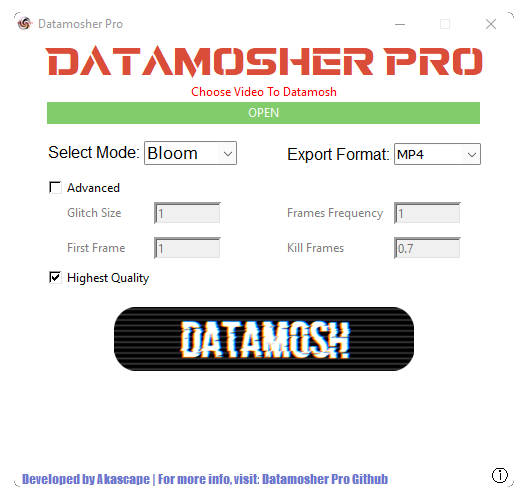
• Input the video file first (supported formats- mp4, gif, avi, mov, mkv, wmv)
• Choose the desired datamosh mode, then select the export format
• Use advance options to get more accurate results
• Uncheck the highest quality box if needed (export time will be reduced)
• Click on the datamosh button, then wait for a few seconds
• Then your video will be moshed and will be saved in the same directory
Effects Info:
All Effects:
TIP: Major Effects used for basic datamoshing: Classic, Bloom, Glide, Repeat, Motion, Fluid
• Buffer - creates ring buffers to mosh (NEW)
• Delay - another delaying ffglitch effect (NEW)
• Invert-Reverse - applies both inverse and reverse mode (NEW)
• Mirror - does the mosh with ffglitch but with mirrored X (NEW)
• Noise - makes large noisy mosh (NEW)
• Shear - tilt the video clockwise and merges the mosh (NEW)
• Shift - shifts random blocks of the video upwards (NEW)
• Sink - drowns the next frame of the video with the previous one (NEW)
• Slam Zoom - applies zoom with the sink effect (NEW)
• Slice - Zooms and slices the video in parts randomy (NEW)
• Stop - similar to sink but only stops the XY values randomly (NEW)
• Vibrate - works as a randomizer (NEW)
• Zoom - simply zooms inside the moshed video (NEW)
• Fluid - this is a ffglitch's average effect which gives a smooth liquid type motion to the video
• Repeat - repeats a series of p frames which gives the melting effect
• Motion - a powerful ffglitch feature that can transfer the vector motion data from one video to a different one
• Stretch - stretches the p-frames vertically
• Glide - duplicates number of n frames and show it as a flow before reaching the p-frame
• Sort - sorts video frames by data size in a rapid movement
• Echo - duplicates the single video and apply the mosh effect in the midpoint
• Shake - shakes the pixel movement throughout the video
• Classic - uses the traditional ffmpeg way to corrupt the video and then remove the i-frames
• Random - randomizes frame order
• Reverse - reverse frame order
• Invert - switches each consecutive frame witch each other
• Bloom - duplicates c times p-frame number n (c=Glitch Size; n=Frame Frequency)
• Pulse - duplicates groups of c p-frames every n frames
• Overlap - copy group of c frames taken from every nth position
• Jiggle - take frame from around current position. n parameter is spread size.
• Void - gives a clean output but with distorted pixels
How to use Advanced Options?
The advanced tab is very useful and you can use it to get accurate results.
• Glitch Size - tells how often to glitch
• Frame Frequency - tells how many frames to apply in the glitch
• First Frame - tells whether to keep first video frames
• Kill Frames - tells max framesize to kill while cleaning
NOTE:
- Some modes may not support all the 4 advanced options.
- You can try experimenting with the values and see the results but don't put huge values!
- Audio glitching is not available for all modes!
User Interface:
How It Works
The main issue with datamoshing is conversion of corrupted files but with Datamosher Pro you can use any video file type and get an usable datamoshed video file rendered. The files are first converted to the required file format using ffmpeg without losing much quality, then the effect is applied and the corrupted file is converted to stable version again using the same process so that the output video can be used directly in other softwares for further editing. All the unneccesary temp file will get deleted automatically.
Conclusion
You will not find this type of GUI program anywhere with so many free effects only for datamoshing.
I hope there is no error in the program but if you find any bug then raise an issue. You can also help to make new datamosh effects.
The effects are inspired from ItsKaspar's tomato.py, Joe Friedl's pymosh and FFglitch.
All the logo and designs are created by me.
Thanks! Made by Akash Bora (a.k.a Akascape).
DATAMOSHING MADE EASY!