mirror of
https://github.com/publiclab/image-sequencer.git
synced 2025-12-08 01:10:02 +01:00
Compare commits

1 Commits
test-jobs
...
dynamic-ma
| Author | SHA1 | Date | |
|---|---|---|---|

|
21abb92d2b |
11
.codecov.yml
11
.codecov.yml
@@ -1,11 +0,0 @@
|
||||
comment:
|
||||
layout: "reach, diff, flags, files"
|
||||
behavior: default
|
||||
require_changes: false # if true: only post the comment if coverage changes
|
||||
require_base: no # [yes :: must have a base report to post]
|
||||
require_head: yes # [yes :: must have a head report to post]
|
||||
branches: null # branch names that can post comment
|
||||
coverage:
|
||||
status:
|
||||
project: off
|
||||
patch: off
|
||||
@@ -1 +0,0 @@
|
||||
dist/*
|
||||
36
.eslintrc.js
36
.eslintrc.js
@@ -1,36 +0,0 @@
|
||||
module.exports = {
|
||||
'env': {
|
||||
'browser': true,
|
||||
'commonjs': true,
|
||||
'es6': true,
|
||||
'node': true
|
||||
},
|
||||
'extends': 'eslint:recommended',
|
||||
'globals': {
|
||||
'Atomics': 'readonly',
|
||||
'SharedArrayBuffer': 'readonly'
|
||||
},
|
||||
'parserOptions': {
|
||||
'ecmaVersion': 2018
|
||||
},
|
||||
'rules': {
|
||||
'indent': ['error',2],
|
||||
'linebreak-style': ['error','unix'],
|
||||
'quotes': ['error','single'],
|
||||
'semi': ['error','always'], //
|
||||
'no-undef': 0,
|
||||
'no-console': 'off',
|
||||
'no-unused-vars': 'off',
|
||||
'no-redeclare': 'off',
|
||||
'no-inner-declarations':'off',
|
||||
'no-empty':'off',
|
||||
'no-mixed-spaces-and-tabs':'off',
|
||||
'no-self-assign':'off',
|
||||
'no-constant-condition':'off',
|
||||
'no-dupe-keys':'off',
|
||||
'space-infix-ops': ['error', {'int32Hint': false}], // Enforce spaces around operators
|
||||
'comma-spacing': ['error', { "before": false, "after": true }], // require spacing after a comma
|
||||
'comma-style': ['error', 'last'], // requires comma after and on the same line
|
||||
'no-trailing-spaces': ['error', { 'skipBlankLines': true }], // Disallows trailing whitespace on end of lines and empty lines
|
||||
}
|
||||
};
|
||||
2
.github/ISSUE_TEMPLATE.md
vendored
2
.github/ISSUE_TEMPLATE.md
vendored
@@ -10,7 +10,7 @@
|
||||
|
||||
### Please show us where to look
|
||||
|
||||
https://beta.sequencer.publiclab.org
|
||||
http://sequencer.publiclab.org...
|
||||
|
||||
|
||||
### What's your PublicLab.org username?
|
||||
|
||||
10
.github/PULL_REQUEST_TEMPLATE.md
vendored
10
.github/PULL_REQUEST_TEMPLATE.md
vendored
@@ -1,16 +1,16 @@
|
||||
Fixes #0000 (<=== Replace `0000` with the Issue Number)
|
||||
Fixes #[Add issue number here.]
|
||||
|
||||
Make sure these boxes are checked before your pull request (PR) is ready to be reviewed and merged. Thanks!
|
||||
|
||||
* [ ] tests pass -- look for a green checkbox ✔️ a few minutes after opening your PR -- or run tests locally with `npm run test-all`
|
||||
* [ ] tests pass -- look for a green checkbox ✔️ a few minutes after opening your PR -- or run tests locally with `rake test`
|
||||
* [ ] code is in uniquely-named feature branch and has no merge conflicts
|
||||
* [ ] PR is descriptively titled
|
||||
* [ ] ask `@publiclab/is-reviewers` for help, in a comment below
|
||||
* [ ] Insert-step functionality is working correct as expected.
|
||||
* [ ] ask `@publiclab/reviewers` for help, in a comment below
|
||||
|
||||
> We're happy to help you get this ready -- don't be afraid to ask for help, and **don't be discouraged** if your tests fail at first!
|
||||
|
||||
If tests do fail, click on the red `X` to learn why by reading the logs.
|
||||
|
||||
Please be sure you've reviewed our contribution guidelines at https://publiclab.org/contributing-to-public-lab-software
|
||||
Please make sure to get at least two reviews before asking for merging the PR as that would make the PR more reliable on our part
|
||||
|
||||
Thanks!
|
||||
|
||||
4
.github/config.yml
vendored
4
.github/config.yml
vendored
@@ -10,14 +10,14 @@ newIssueWelcomeComment: |
|
||||
|
||||
# Comment to be posted to on PRs from first time contributors in your repository
|
||||
newPRWelcomeComment: |
|
||||
Thanks for opening this pull request!
|
||||
Thanks for opening this pull request! `Dangerbot` will test out your code and reply in a bit with some pointers and requests.
|
||||
There may be some errors, **but don't worry!** We're here to help! 👍🎉😄
|
||||
# Configuration for first-pr-merge - https://github.com/behaviorbot/first-pr-merge
|
||||
|
||||
# Comment to be posted to on pull requests merged by a first time user
|
||||
firstPRMergeComment: |
|
||||
Congrats on merging your first pull request! 🙌🎉⚡️
|
||||
Your code will be published to https://beta.sequencer.publiclab.org in a day or two.
|
||||
Your code will likely be published to https://sequencer.publiclab.org in the next few days.
|
||||
In the meantime, can you tell us your Twitter handle so we can thank you properly?
|
||||
Now that you've completed this, you can help someone else take their first step!
|
||||
See: [Public Lab's coding community!](https://code.publiclab.org)
|
||||
|
||||
12
.github/first-timers.yml
vendored
12
.github/first-timers.yml
vendored
@@ -1,12 +0,0 @@
|
||||
# You can change the labels to suit your needs if "first-timers-only" is not what you are looking for.
|
||||
# These are some examples.
|
||||
labels:
|
||||
- first-timers-only
|
||||
- help wanted
|
||||
|
||||
#If you would like to add your own template for the issue, add an .md file to your .github folder
|
||||
template: .github/fto-template.md
|
||||
|
||||
# You can create the issue in a different repo than where the problem is. Just make sure you installed the bot on the configured repository.
|
||||
# The issue will link back to the original repository where the contribution will be made.
|
||||
#repository: repo-name
|
||||
51
.github/fto-template.md
vendored
51
.github/fto-template.md
vendored
@@ -1,51 +0,0 @@
|
||||
Hi, this is a [first-timers-only issue](https://code.publiclab.org/#r=all). This means we've worked to make it more legible to folks who either **haven't contributed to our codebase before, or even folks who haven't contributed to open source before**.
|
||||
|
||||
If that's you, we're interested in helping you take the first step and can answer questions and help you out as you do. Note that we're especially interested in contributions from people from groups underrepresented in free and open source software!
|
||||
|
||||
We know that the process of creating a pull request is the biggest barrier for new contributors. This issue is for you 💝
|
||||
|
||||
If you have contributed before, **consider leaving this one for someone new**, and looking through our general [help wanted](https://github.com/publiclab/image-sequencer/labels/help-wanted) issues. Thanks!
|
||||
|
||||
### 🤔 What you will need to know.
|
||||
|
||||
Nothing. This issue is meant to welcome you to Open Source :) We are happy to walk you through the process.
|
||||
|
||||
### 📋 Step by Step
|
||||
|
||||
- [ ] 🙋 **Claim this issue**: Comment below. If someone else has claimed it, ask if they've opened a pull request already and if they're stuck -- maybe you can help them solve a problem or move it along!
|
||||
|
||||
- [ ] 📝 **Update** the file [$FILENAME]($BRANCH_URL) in the `$REPO` repository (press the little pen Icon) and edit the line as shown below.
|
||||
|
||||
[See this page](https://code.publiclab.org/#r=all) for some help in taking your first steps!
|
||||
|
||||
Below is a "diff" showing in red (and a `-`) which lines to remove, and in green (and a `+`) which lines to add:
|
||||
|
||||
```diff
|
||||
|
||||
$DIFF
|
||||
|
||||
```
|
||||
- [ ] 💾 **Commit** your changes
|
||||
|
||||
- [ ] 🔀 **Start a Pull Request**. There are two ways how you can start a pull request:
|
||||
|
||||
1. If you are familiar with the terminal or would like to learn it, [here is a great tutorial](https://egghead.io/series/how-to-contribute-to-an-open-source-project-on-github) on how to send a pull request using the terminal.
|
||||
|
||||
2. You can also [edit files directly in your browser](https://help.github.com/articles/editing-files-in-your-repository/) and open a pull request from there.
|
||||
|
||||
- [ ] 🏁 **Done** Ask in comments for a review :)
|
||||
|
||||
### Please keep us updated
|
||||
|
||||
💬⏰ - We encourage contributors to be respectful to the community and provide an update **within a week** of claiming a first-timers-only issue. We're happy to keep it assigned to you as long as you need if you update us with a request for more time or help, but if we don't see any activity a week after you claim it we may reassign it to give someone else a chance. Thank you in advance!
|
||||
|
||||
If this happens to you, don't sweat it! Grab another open issue.
|
||||
|
||||
### Is someone else already working on this?
|
||||
|
||||
🔗- We encourage contributors to link to the original issue in their pull request so all users can easily see if someone's already started on it.
|
||||
|
||||
👥- **If someone seems stuck, offer them some help!** Otherwise, [take a look at some other issues you can help with](https://code.publiclab.org/#r=all). Thanks!
|
||||
|
||||
### 🤔❓ Questions?
|
||||
Leave a comment below!
|
||||
8
.gitignore
vendored
8
.gitignore
vendored
@@ -27,10 +27,6 @@ build/Release
|
||||
node_modules
|
||||
node_modules/*
|
||||
|
||||
# Dist Files
|
||||
dist/*
|
||||
dist
|
||||
|
||||
# Optional npm cache directory
|
||||
.npm
|
||||
|
||||
@@ -44,9 +40,5 @@ todo.txt
|
||||
test.js
|
||||
output.txt
|
||||
output/
|
||||
test/core/modules/test_outputs
|
||||
test/core/modules/test_outputs/*
|
||||
node_modules/
|
||||
node_modules/*
|
||||
test_outputs
|
||||
/test_outputs
|
||||
|
||||
16
.gitpod.yml
16
.gitpod.yml
@@ -1,16 +0,0 @@
|
||||
tasks:
|
||||
- init: npm run setup
|
||||
command: npm start
|
||||
ports:
|
||||
- port: 3000
|
||||
onOpen: open-preview
|
||||
|
||||
github:
|
||||
prebuilds:
|
||||
branches: true
|
||||
pullRequests: true
|
||||
pullRequestsFromForks: true
|
||||
addCheck: true
|
||||
addComment: true
|
||||
addBadge: false
|
||||
addLabel: false
|
||||
@@ -37,8 +37,6 @@ test.js
|
||||
output.txt
|
||||
output/
|
||||
|
||||
|
||||
|
||||
examples/
|
||||
icons/
|
||||
|
||||
|
||||
37
.travis.yml
37
.travis.yml
@@ -1,35 +1,16 @@
|
||||
sudo: required
|
||||
language: node_js
|
||||
node_js:
|
||||
- '8'
|
||||
- '10'
|
||||
- '4'
|
||||
- '5'
|
||||
- '6'
|
||||
- '7' # Node.js 7 is most stable version
|
||||
env:
|
||||
- CXX=g++-4.8
|
||||
before_script:
|
||||
- npm install grunt-cli -g # for "grunt build"
|
||||
- curl -L https://codeclimate.com/downloads/test-reporter/test-reporter-latest-linux-amd64 > ./cc-test-reporter
|
||||
- chmod +x ./cc-test-reporter
|
||||
- ./cc-test-reporter before-build
|
||||
jobs:
|
||||
include:
|
||||
- name: "Base istanbul/tape node tests"
|
||||
script: npm test
|
||||
- name: "Benchmark tests"
|
||||
script: npm run benchmark
|
||||
- name: "Gif tests"
|
||||
script: npm run gif-test
|
||||
- name: "Browserify core tests and run"
|
||||
script: grunt tests && npm run core-tests
|
||||
- name: "Jasmine UI tests (mocked browser env)"
|
||||
script: npm run test-ui
|
||||
- name: "jest-puppeteer UI tests (full browser env)"
|
||||
script: npm run test-ui-2
|
||||
- name: "Grunt build test of dev environment"
|
||||
script: grunt build
|
||||
after_success:
|
||||
- bash <(curl -s https://codecov.io/bash)
|
||||
after_script:
|
||||
- ./cc-test-reporter after-build --exit-code $TRAVIS_TEST_RESULT
|
||||
script:
|
||||
- npm test
|
||||
- grunt build
|
||||
addons:
|
||||
apt:
|
||||
sources:
|
||||
@@ -37,10 +18,6 @@ addons:
|
||||
packages:
|
||||
- g++-4.8
|
||||
- xvfb # for tape-run
|
||||
before_install:
|
||||
- sudo apt-get update
|
||||
- sudo apt-get install xserver-xorg-dev libxext-dev libxi-dev
|
||||
- sudo apt-get install -y build-essential libxi-dev libglu1-mesa-dev libglew-dev pkg-config libglu1-mesa-dev freeglut3-dev mesa-common-dev
|
||||
install:
|
||||
- export DISPLAY=':99.0' # for tape-run
|
||||
- Xvfb :99 -screen 0 1024x768x24 > /dev/null 2>&1 & # for tape-run
|
||||
|
||||
@@ -1,11 +0,0 @@
|
||||
# Public Lab Code of Conduct
|
||||
|
||||
_Public Lab, 55 Cromwell Street, 1C, Providence, RI 02907_
|
||||
|
||||
We are coming together with an intent to care for ourselves and one another as we produce knowledge in pursuit of environmental justice. For this to work for everybody, individual decisions will not be allowed to run counter to the welfare of other people. We—visitors, community members, community moderators, staff, organizers, sponsors, and all others—hold ourselves accountable to the same values regardless of position or experience. This community aspires to be a respectful place both during online and in-person interactions so that all people are able to fully participate with their dignity intact. This document is a piece of the culture we're creating.
|
||||
|
||||
This code of conduct applies to all spaces managed by the Public Lab community and non-profit, both online and in person. It provides a clear set of practical guidelines for events led by organizers and community members, multi-day events such as Barnraisings, and online venues such as the website, comment threads on software platforms, chatrooms, our mailing lists, the issue tracker, and any other forums created by Public Lab which the community uses for communication. For interactions with additional groups, see our Partnership Guidelines at https://publiclab.org/partners.
|
||||
|
||||
To read the full Code of Conduct and learn how to contact the Conduct Committee or the Moderators group, see:
|
||||
|
||||
https://publiclab.org/conduct
|
||||
198
CONTRIBUTING.md
198
CONTRIBUTING.md
@@ -3,10 +3,6 @@ Contributing to Image Sequencer
|
||||
|
||||
Happily accepting pull requests; to edit the core library, modify files in `./src/`. To build, run `npm install` followed by `grunt build`.
|
||||
|
||||
On ARM based devices, the `gl` module may require some libraries to be re-installed:
|
||||
|
||||
`sudo apt-get install -y build-essential xserver-xorg-dev libxext-dev libxi-dev libglu1-mesa-dev libglew-dev pkg-config` -- see https://github.com/stackgl/headless-gl#ubuntudebian for more.
|
||||
|
||||
Most contribution (we imagine) would be in the form of API-compatible modules, which need not be directly included.
|
||||
|
||||
## Jump To
|
||||
@@ -14,15 +10,13 @@ Most contribution (we imagine) would be in the form of API-compatible modules, w
|
||||
* [README.md](https://github.com/publiclab/image-sequencer)
|
||||
* [Contributing Modules](#contributing-modules)
|
||||
* [Info File](#info-file)
|
||||
* [Ideas](#Contribution-ideas)
|
||||
* [Grunt Tasks](#grunt-tasks)
|
||||
* [UI Helper Methods](#ui-helper-methods)
|
||||
* [Ideas](#ideas)
|
||||
|
||||
****
|
||||
|
||||
## Contribution-ideas
|
||||
## Contribution ideas
|
||||
|
||||
See [this issue](https://github.com/publiclab/image-sequencer/issues/118) for a range of ideas for new contributions and links to possibly helpful libraries, or you can solve an [existing issue](https://github.com/publiclab/image-sequencer/labels/module). Also see the [new features issues list](https://github.com/publiclab/image-sequencer/labels/new-feature).
|
||||
See [this issue](https://github.com/publiclab/image-sequencer/issues/118) for a range of ideas for new contributions, and links to possibly helpful libraries. Also see the [new features issues list](https://github.com/publiclab/image-sequencer/labels/new-feature).
|
||||
|
||||
### Bugs
|
||||
|
||||
@@ -32,7 +26,7 @@ If you find a bug please list it here, and help us develop Image Sequencer by [o
|
||||
|
||||
## Contributing modules
|
||||
|
||||
Most contributions can happen in modules, rather than to core library code. Modules and their [corresponding info files](#info-file) are included into the library in this file: https://github.com/publiclab/image-sequencer/blob/main/src/Modules.js#L5-L7
|
||||
Most contributions can happen in modules, rather than to core library code. Modules and their [corresponding info files](#info-file) are included into the library in this file: https://github.com/publiclab/image-sequencer/blob/master/src/Modules.js#L5-L7
|
||||
|
||||
Module names, descriptions, and parameters are set in the `info.json` file -- [see below](#info-file).
|
||||
|
||||
@@ -68,8 +62,6 @@ Image Sequencer modules are designed to be run either in the browser or in a Nod
|
||||
|
||||
https://github.com/tech4gt/image-sequencer
|
||||
|
||||
### Browser/node compatibility
|
||||
|
||||
If you wish to offer a module without browser-compatibility, please indicate this in the returned `info` object as:
|
||||
|
||||
module.exports = [
|
||||
@@ -116,20 +108,7 @@ function ModuleName(options,UI) {
|
||||
// load a standard info.json file.
|
||||
];
|
||||
```
|
||||
### Running a browser-only module in node
|
||||
If your module has browser specific code or you are consuming a dependency which does the `gl-context` api. We designed this api especially for webl based modules but since it runs the module in a headless browser, ti supports all browser specific APIs.
|
||||
|
||||
The api must be used in the following format
|
||||
```js
|
||||
var step = this;
|
||||
|
||||
if (!options.inBrowser) {
|
||||
require('../_nomodule/gl-context')(input, callback, step, options);
|
||||
}
|
||||
else {
|
||||
/* Browser specific code */
|
||||
}
|
||||
```
|
||||
|
||||
### options
|
||||
|
||||
@@ -160,7 +139,7 @@ input = {
|
||||
pixelManipulation: "general purpose pixel manipulation API, see https://github.com/publiclab/image-sequencer/blob/master/src/modules/_nomodule/PixelManipulation.js"
|
||||
}
|
||||
```
|
||||
For example usage of pixelManipulation see https://github.com/publiclab/image-sequencer/blob/main/src/modules/Invert/Module.js
|
||||
For example usage for pixelManipulation see https://github.com/publiclab/image-sequencer/blob/master/src/modules/Invert/Module.js
|
||||
|
||||
**The module is included in the browser inside a script tag and since the code runs directly in the browser if any other module is required apart from the apis available on the input object, it should be either bundled with the module code and imported in es6 format or the module code must be browserified before distribution for browser**
|
||||
|
||||
@@ -196,7 +175,6 @@ There are four events in all:
|
||||
* `UI.onComplete(options.step)` must be emitted whenever the output of a draw call
|
||||
is ready. An argument, that is the DataURL of the output image must be passed in.
|
||||
* `UI.onRemove(options.step)` is emitted automatically and the module should not emit it.
|
||||
* `UI.notify(msg,id)` must be emmited when a notification has to be produced.
|
||||
|
||||
### Name and description
|
||||
|
||||
@@ -280,12 +258,11 @@ module.exports = function ModuleName(options,UI) {
|
||||
|
||||
The `progressObj` parameter of `draw()` is not consumed unless a custom progress bar needs to be drawn, for which this default spinner should be stopped with `progressObj.stop()` and image-sequencer is informed about the custom progress bar with `progressObj.overrideFlag = true;` following which this object can be overriden with custom progress object.
|
||||
|
||||
|
||||
### Module example
|
||||
|
||||
See existing module `channel` for an example: https://github.com/publiclab/image-sequencer/blob/main/src/modules/Channel/Module.js
|
||||
See existing module `green-channel` for an example: https://github.com/publiclab/image-sequencer/tree/master/src/modules/GreenChannel/Module.js
|
||||
|
||||
The `channel` module is included into the core modules here: https://github.com/publiclab/image-sequencer/blob/main/src/Modules.js#L5-L7
|
||||
The `green-channel` module is included into the core modules here: https://github.com/publiclab/image-sequencer/blob/master/src/Modules.js#L5-L7
|
||||
|
||||
For help integrating, please open an issue.
|
||||
|
||||
@@ -294,20 +271,16 @@ For help integrating, please open an issue.
|
||||
IMAGE SEQUENCER supports "meta modules" -- modules made of other modules. The syntax and structure of these meta modules is very similar to standard modules. Sequencer can also genarate meta modules dynamically with the function `createMetaModule` which can be called in the following ways
|
||||
|
||||
```js
|
||||
// stepsString is a stringified sequence
|
||||
sequencer.createMetaModule(stepsString,info)
|
||||
|
||||
/* Mapping function is a function which gets the inputs of the module as argument
|
||||
* and returns an array with steps mapped to their options
|
||||
* See https://github.com/publiclab/image-sequencer/blob/main/src/modules/Colorbar/Module.js for example
|
||||
*/
|
||||
|
||||
/* Module options is an object with the following keys
|
||||
* infoJson: the info.json object for the module
|
||||
*/
|
||||
sequencer.createMetaModule(mappingFunction,moduleOptions)
|
||||
|
||||
/* createMetaModule returns an array of module function and info just like normal
|
||||
* modules. These can also be loaded into sequencer dynamically like other modules
|
||||
/* stepsArray is the array of objects in this format
|
||||
* [
|
||||
* {name: "moduleName",options: {}},
|
||||
* {name: "moduleName",options: {}}
|
||||
* ]
|
||||
*/
|
||||
sequencer.createMetaModule(stepsArray,info)
|
||||
```
|
||||
|
||||
A Meta module can also be contributed like a normal module with an info and a Module.js. A basic Meta module shall follow the following format
|
||||
@@ -315,17 +288,12 @@ A Meta module can also be contributed like a normal module with an info and a Mo
|
||||
|
||||
```js
|
||||
// Module.js
|
||||
module.exports = require('../../util/createMetaModule.js')(
|
||||
function mapFunction(options) {
|
||||
|
||||
return [
|
||||
{ 'name': 'module-name', 'options': {} },
|
||||
{ 'name': 'module-name', 'options': {} },
|
||||
];
|
||||
}, {
|
||||
infoJson: require('./info.json')
|
||||
}
|
||||
)[0];
|
||||
module.exports = function metaModuleFun(){
|
||||
this.expandSteps([
|
||||
{ 'name': 'module-name', 'options': {} },
|
||||
{ 'name': 'module-name', options: {} }
|
||||
]);
|
||||
}
|
||||
```
|
||||
|
||||
```json
|
||||
@@ -333,8 +301,7 @@ A Meta module can also be contributed like a normal module with an info and a Mo
|
||||
{
|
||||
"name": "meta-moduleName",
|
||||
"description": "",
|
||||
"inputs": {
|
||||
}
|
||||
"length": //Integer representing number of steps in the metaModule
|
||||
}
|
||||
```
|
||||
|
||||
@@ -349,112 +316,19 @@ module.exports = [
|
||||
All of the above can also be combined together to form a single file module.
|
||||
|
||||
```js
|
||||
|
||||
// MetaModule.js
|
||||
module.exports =
|
||||
sequencer.createMetaModule(
|
||||
function mapFunction(options) {
|
||||
|
||||
return [
|
||||
{ 'name': 'module-name', 'options': {} },
|
||||
{ 'name': 'module-name', 'options': {} },
|
||||
];
|
||||
}, {
|
||||
infoJson: {
|
||||
"name": "meta-moduleName",
|
||||
"description": "",
|
||||
"inputs": {
|
||||
}
|
||||
}
|
||||
});
|
||||
```
|
||||
|
||||
## Linting
|
||||
|
||||
We are now using `eslint` and `husky` to help lint and format our code each time we commit. Eslint defines coding standards and helps in cleaning up the code. To run eslint for checking errors globally or within a specific file run:
|
||||
|
||||
```
|
||||
npx eslint .
|
||||
|
||||
npx eslint <file path>
|
||||
```
|
||||
And to fix those errors globally or in a file, run these in your terminal:
|
||||
```
|
||||
npx eslint . --fix
|
||||
|
||||
npx eslint <file path> --fix
|
||||
```
|
||||
Be sure to not include the angular brackets(<>).
|
||||
|
||||
Husky ensures automation of the above steps with git-hooks(eg. git add,git commit..). However we don't want to check and fix changes of the entire codebase with each commit and that the fixes made by eslint appear unstaged and require us to commit them again and that is where lint-staged helps.
|
||||
|
||||
If we want `husky` to not verify the commit and push it anyway, use `git commit -m "message" --no-verify.`
|
||||
|
||||
## Grunt Tasks
|
||||
|
||||
This repository has different grunt tasks for different uses. The source code is in the [Gruntfile](https://github.com/publiclab/image-sequencer/blob/main/Gruntfile.js).
|
||||
|
||||
The following command is used for running the tasks: `grunt [task-name]`. Here `[task-name]` should be replaced by the name of the task to be run. To run the default task run `grunt` without any options.
|
||||
|
||||
#### Tasks
|
||||
1. **compile**: Compiles/Browserifies the dist files in `/dist/image-sequencer.js` and `/dist/image-sequencer-ui.js`.
|
||||
2. **build**: Compiles the files as in the **compile** task and minifies/uglifies dist files in `/dist/image-sequencer.min.js` and `/dist/image-sequencer-ui.min.js`.
|
||||
3. **watch**: Checks for any changes in the source code and runs the **compile** task if any changes are found.
|
||||
4. **serve**: Compiles the dist files as in the **compile** task and starts a local server on `localhost:3000` to host the demo site in `/examples/` directory. Also runs the **watch** task.
|
||||
5. **production**: Compiles and minifies dist files in `/dist/image-sequencer.js` and `/dist/image-sequencer-ui.js` without the `.min.js` extension to include minified files in the demo site. This script should only be used in production mode while deploying.
|
||||
6. **default**: Runs the **watch** task as default.
|
||||
|
||||
## UI Helper Methods
|
||||
|
||||
### scopeQuery
|
||||
|
||||
###### Path: `/examples/lib/scopeQuery.js`
|
||||
|
||||
The method returns a scoped `jQuery` object which only searches for elements inside a given scope (a DOM element).
|
||||
|
||||
To use the method,
|
||||
* import the `scopeSelector` and `scopeSelectorAll` methods from `lib/scopeQuery.js`
|
||||
* call the methods with scope as a parameter
|
||||
|
||||
```js
|
||||
var scopeQuery = require('./scopeQuery');
|
||||
|
||||
var $step = scopeQuery.scopeSelector(scope),
|
||||
$stepAll = scopeQuery.scopeSelectorAll(scope);
|
||||
```
|
||||
This will return an object with a constructor which returns a `jQuery` object (from inside the scope) but with new `elem` and `elemAll` methods.
|
||||
|
||||
#### Methods of the Returned Object
|
||||
* `elem()`: Selects an element inside the scope.
|
||||
* `elemAll()`: Selects all the instances of a given element inside the scope.
|
||||
* `getScope()`: Returns the scope as a DOM element.
|
||||
* `getDomElem()`: Returns the scoped element as a DOM element instead of a jquery object.
|
||||
|
||||
#### Example
|
||||
|
||||
```js
|
||||
//The scope is a div element with id=“container“ and there are three divs in it
|
||||
//with ids „1“, „2“, and „3“, and all of them have a „child“ class attribute
|
||||
|
||||
var $step = require('./scopeQuery').scopeSelector(document.getElementById('container'));
|
||||
|
||||
$step('#1'); // returns the div element with id=“1“
|
||||
$step('#1').hide().elemAll('.child').fadeOut(); // abruptly hides the div element with id=“1“ and fades out all other div elements
|
||||
```
|
||||
|
||||
These two methods are chainable and will always return elements from inside the scope.
|
||||
|
||||
#### Usage
|
||||
|
||||
Instead of using
|
||||
|
||||
```js
|
||||
$(step.ui.querySelector('query')).show().hide();
|
||||
$(step.ui.querySelectorAll('q2')).show().hide();
|
||||
```
|
||||
The following code can be used
|
||||
|
||||
```js
|
||||
$step('query').show().hide();
|
||||
$stepAll('q2').show().hide();
|
||||
module.export = [
|
||||
function (){
|
||||
this.expandSteps([
|
||||
{ 'name': 'module-name', 'options': {} },
|
||||
{ 'name': 'module-name', options: {} }
|
||||
]);
|
||||
},
|
||||
{
|
||||
"name": "meta-moduleName",
|
||||
"description": "",
|
||||
"length": //Integer representing number of steps in the metaModule
|
||||
}
|
||||
]
|
||||
```
|
||||
The length is absolutely required for a meta-module, since sequencer is optimized to re-run minimum number of steps when a step is added in the UI which is 1 in the case of normal modules, if the added step is a meta-module the length of the sequence governs the number of steps to re-run.
|
||||
92
Gruntfile.js
92
Gruntfile.js
@@ -1,106 +1,50 @@
|
||||
module.exports = function(grunt) {
|
||||
grunt.loadNpmTasks('grunt-browserify');
|
||||
grunt.loadNpmTasks('grunt-contrib-uglify-es');
|
||||
grunt.loadNpmTasks('grunt-browser-sync');
|
||||
grunt.loadNpmTasks('grunt-text-replace');
|
||||
grunt.loadNpmTasks("grunt-browserify");
|
||||
grunt.loadNpmTasks("grunt-contrib-uglify-es");
|
||||
grunt.loadNpmTasks("grunt-browser-sync");
|
||||
|
||||
require('matchdep')
|
||||
.filterDev('grunt-*')
|
||||
require("matchdep")
|
||||
.filterDev("grunt-*")
|
||||
.forEach(grunt.loadNpmTasks);
|
||||
|
||||
grunt.initConfig({
|
||||
pkg: grunt.file.readJSON('package.json'),
|
||||
pkg: grunt.file.readJSON("package.json"),
|
||||
|
||||
watch: {
|
||||
options: {
|
||||
livereload: true
|
||||
},
|
||||
source: {
|
||||
files: ['src/**/*', 'Gruntfile.js', 'examples/lib/*', 'examples/demo.js'],
|
||||
tasks: ['compile']
|
||||
files: ["src/**/*", "Gruntfile.js"],
|
||||
tasks: ["build:js"]
|
||||
}
|
||||
},
|
||||
|
||||
browserify: {
|
||||
options: {
|
||||
alias: {
|
||||
'gpu.js': './node_modules/gpu.js/src/index.js'
|
||||
}
|
||||
},
|
||||
core: {
|
||||
src: ['src/ImageSequencer.js'],
|
||||
dest: 'dist/image-sequencer.js'
|
||||
},
|
||||
ui: {
|
||||
src: ['examples/demo.js'],
|
||||
dest: 'dist/image-sequencer-ui.js'
|
||||
},
|
||||
prodcore: {
|
||||
src: ['src/ImageSequencer.js'],
|
||||
dest: 'dist/image-sequencer.brow.js'
|
||||
},
|
||||
produi: {
|
||||
src: ['examples/demo.js'],
|
||||
dest: 'dist/image-sequencer-ui.brow.js'
|
||||
},
|
||||
tests: {
|
||||
src: ['test/core/sequencer/meta-modules.js',
|
||||
'test/core/sequencer/image-sequencer.js',
|
||||
'test/core/sequencer/chain.js',
|
||||
'test/core/sequencer/replace.js',
|
||||
'test/core/sequencer/import-export.js',
|
||||
'test/core/sequencer/run.js',
|
||||
'test/core/sequencer/dynamic-imports.js',
|
||||
'test/core/util/*.js'],
|
||||
dest: './output/core-tests.js'
|
||||
}
|
||||
},
|
||||
|
||||
replace: {
|
||||
version: {
|
||||
src: ['examples/sw.js'],
|
||||
overwrite: true,
|
||||
replacements: [{
|
||||
from: /image-sequencer-static-v.*/g,
|
||||
to: "image-sequencer-static-v<%= pkg.version %>';"
|
||||
}]
|
||||
dist: {
|
||||
src: ["src/ImageSequencer.js"],
|
||||
dest: "dist/image-sequencer.js"
|
||||
}
|
||||
},
|
||||
|
||||
uglify: {
|
||||
core: {
|
||||
src: ['./dist/image-sequencer.js'],
|
||||
dest: './dist/image-sequencer.min.js'
|
||||
},
|
||||
ui: {
|
||||
src: ['dist/image-sequencer-ui.js'],
|
||||
dest: 'dist/image-sequencer-ui.min.js'
|
||||
},
|
||||
prodcore: {
|
||||
src: ['dist/image-sequencer.brow.js'],
|
||||
dest: 'dist/image-sequencer.js'
|
||||
},
|
||||
produi: {
|
||||
src: ['dist/image-sequencer-ui.brow.js'],
|
||||
dest: 'dist/image-sequencer-ui.js'
|
||||
dist: {
|
||||
src: ["./dist/image-sequencer.js"],
|
||||
dest: "./dist/image-sequencer.min.js"
|
||||
}
|
||||
},
|
||||
browserSync: {
|
||||
dev: {
|
||||
options: {
|
||||
watchTask: true,
|
||||
server: './'
|
||||
server: "./"
|
||||
}
|
||||
}
|
||||
}
|
||||
});
|
||||
|
||||
/* Default (development): Watch files and build on change. */
|
||||
grunt.registerTask('default', ['watch']);
|
||||
grunt.registerTask('build', ['browserify:core', 'browserify:ui', 'replace:version', 'uglify:core', 'uglify:ui']);
|
||||
grunt.registerTask('serve', ['browserify:core', 'browserify:ui', 'replace:version', 'browserSync', 'watch']);
|
||||
grunt.registerTask('compile', ['browserify:core', 'browserify:ui']);
|
||||
grunt.registerTask('production', ['browserify:prodcore', 'browserify:produi', 'replace:version', 'uglify:prodcore', 'uglify:produi']);
|
||||
|
||||
grunt.registerTask('tests', ['browserify:tests']);
|
||||
grunt.registerTask("default", ["watch"]);
|
||||
grunt.registerTask("build", ["browserify:dist", "uglify:dist"]);
|
||||
grunt.registerTask("serve", ["browserify:dist", "uglify:dist", "browserSync", "watch"]);
|
||||
};
|
||||
|
||||
421
README.md
421
README.md
@@ -1,46 +1,34 @@
|
||||
Image Sequencer
|
||||
====
|
||||
|
||||
[](https://publiclab.org/conduct)
|
||||
[](https://travis-ci.org/publiclab/image-sequencer) [](https://codeclimate.com/github/publiclab/image-sequencer/maintainability) [](https://codecov.io/gh/publiclab/image-sequencer)
|
||||
[](https://gitpod.io/from-referrer/)
|
||||
|
||||
- **Latest Stable Demo**: https://sequencer.publiclab.org
|
||||
- **Latest Beta Demo**: https://beta.sequencer.publiclab.org
|
||||
- **Stable Branch**: https://github.com/publiclab/image-sequencer/tree/stable/
|
||||
[](https://travis-ci.org/publiclab/image-sequencer)
|
||||
|
||||
## Why
|
||||
|
||||
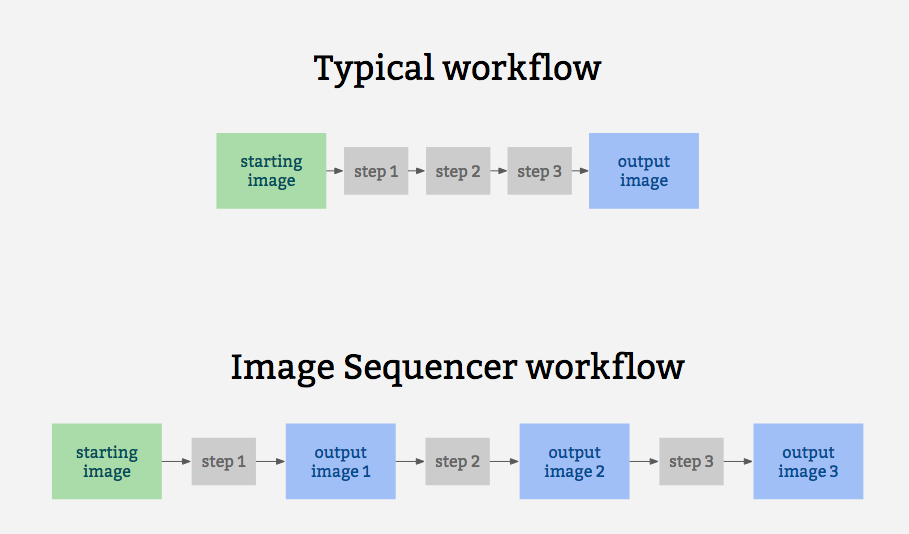
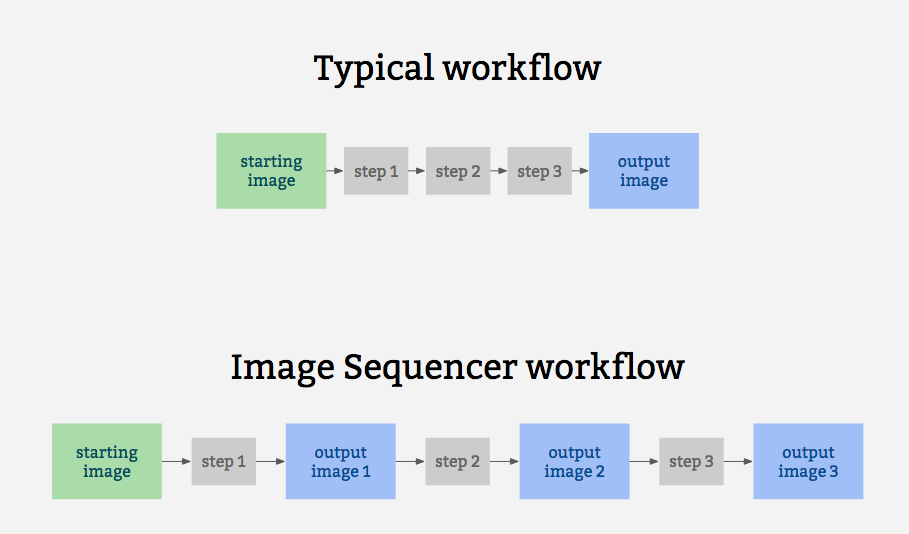
Image Sequencer is different from other image processing systems because it's _non-destructive_: instead of modifying the original image, it **creates a new image at each step in a sequence**. This is because it:
|
||||
Image Sequencer is different from other image processing systems in that it's _non-destructive_: instead of modifying the original image, it **creates a new image at each step in a sequence**. This is because it:
|
||||
|
||||
* produces a legible trail of operations, to "show your work" for evidential, educational, or reproducibility reasons
|
||||
* makes the creation of new tools or "modules" simpler -- each must accept an input image, and produce an output image
|
||||
* allows many images to run through the same sequence of steps
|
||||
* works identically in the browser, on Node.js, and on the command line
|
||||
* allows many images to be run through the same sequence of steps
|
||||
* works identically in the browser, on Node.js, and on the commandline
|
||||
|
||||
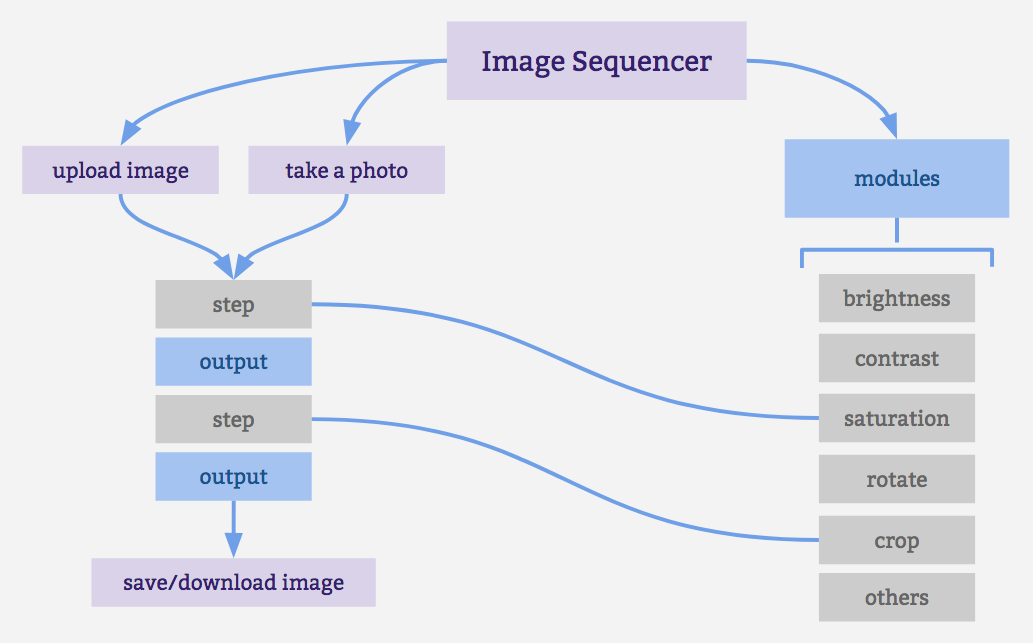
The following diagrams attempt to explain how the applications various components interconnect:
|
||||
|
||||
|
||||
|
||||
It is also for prototyping some other related ideas:
|
||||
|
||||
|
||||
|
||||
It also for prototypes other related ideas:
|
||||
|
||||
* filter-like image processing -- apply a transform to an image from a given source, like a proxy. I.e. [every image tile of a satellite imagery web map](https://publiclab.org/notes/warren/05-10-2018/prototype-filter-map-tiles-in-real-time-in-a-browser-with-imagesequencer-ndvi-landsat)
|
||||
* test-based image processing -- the ability to create a sequence of steps that do the same task as other image processing tools, provable with example before/after images to compare with
|
||||
* logging each step -- to produce an evidentiary record of modifications to an original image
|
||||
* filter-like image processing -- applying a transform to any image from a given source, like a proxy. I.e. every image tile of a satellite imagery web map
|
||||
* test-based image processing -- the ability to create a sequence of steps that do the same task as some other image processing tool, provable with example before/after images to compare with
|
||||
* logging of each step to produce an evidentiary record of modifications to an original image
|
||||
* cascading changes -- change an earlier step's settings, and see those changes affect later steps
|
||||
* "small modules" -- based extensibility: see [Contributing](https://github.com/publiclab/image-sequencer/blob/main/CONTRIBUTING.md)
|
||||
|
||||
* "small modules"-based extensibility: see [Contributing](https://github.com/publiclab/image-sequencer/blob/master/CONTRIBUTING.md)
|
||||
|
||||
## Examples
|
||||
|
||||
* [Simple Demo](https://sequencer.publiclab.org)
|
||||
* [Latest Beta Demo](https://beta.sequencer.publiclab.org)
|
||||
* [Simple Demo](https://publiclab.github.io/image-sequencer/)
|
||||
|
||||
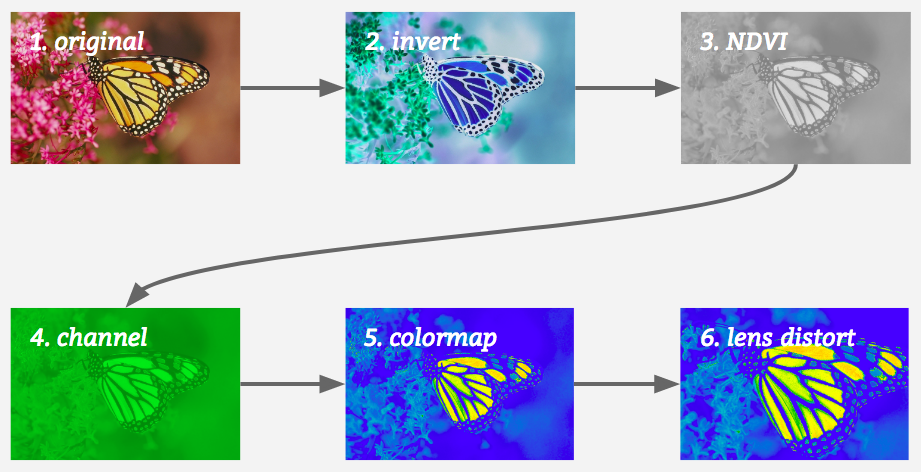
A diagram of this running 5 steps on a single sample image may help explain how it works:
|
||||
|
||||
|
||||
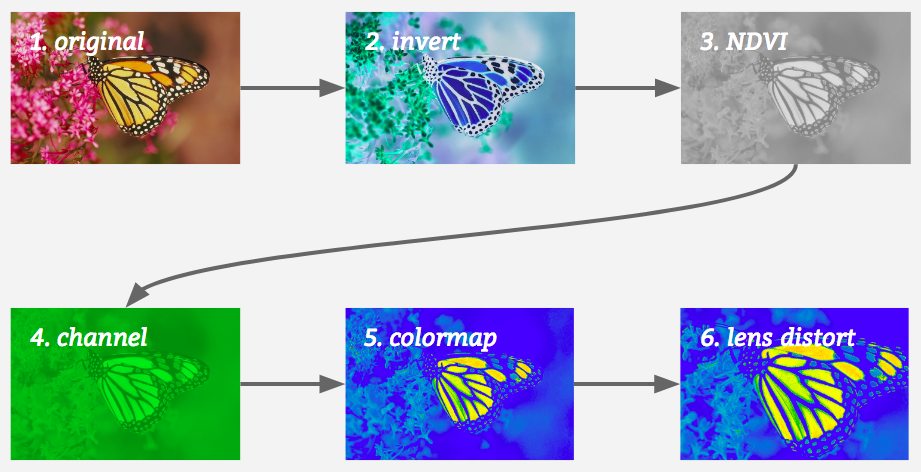
|
||||
|
||||
## Jump to:
|
||||
|
||||
@@ -51,41 +39,35 @@ A diagram of this running 5 steps on a single sample image may help explain how
|
||||
* [Method Chaining](#method-chaining)
|
||||
* [Multiple Images](#multiple-images)
|
||||
* [Creating a User Interface](#creating-a-user-interface)
|
||||
* [Contributing](https://github.com/publiclab/image-sequencer/blob/main/CONTRIBUTING.md)
|
||||
* [Submit a Module](https://github.com/publiclab/image-sequencer/blob/main/CONTRIBUTING.md#contributing-modules)
|
||||
* [Contributing](https://github.com/publiclab/image-sequencer/blob/master/CONTRIBUTING.md)
|
||||
* [Submit a Module](https://github.com/publiclab/image-sequencer/blob/master/CONTRIBUTING.md#contributing-modules)
|
||||
* [Get Demo Bookmarklet](https://publiclab.org/w/imagesequencerbookmarklet)
|
||||
|
||||
## Installation
|
||||
|
||||
This library conveniently works in the browser, in Node, and on the command line (CLI).
|
||||
This library works in the browser, in Node, and on the commandline (CLI), which we think is great.
|
||||
|
||||
### Unix based platforms
|
||||
You can set up a local environment to test the UI with `sudo npm run setup` followed by `npm start`.
|
||||
You can setup a local environement to test the UI with `sudo npm setup` followed by `npm start`
|
||||
|
||||
### Windows
|
||||
Our npm scripts do not support windows shells, please run the following snippet in PowerShell.
|
||||
Our npm scripts do not support windows shells, please run the following snippet in powershell.
|
||||
```powershell
|
||||
npm i ; npm i -g grunt grunt-cli ; grunt build; grunt serve
|
||||
npm i ; npm i -g grunt grunt-cli ; grunt serve
|
||||
```
|
||||
In case of a port conflict please run the following
|
||||
In case of a port conflict please run the folowing
|
||||
```powershell
|
||||
npm i -g http-server ; http-server -p 3000
|
||||
```
|
||||
|
||||
### Online one-click setup for contributing
|
||||
|
||||
Contribute to ImageSequencer using a fully featured online development environment that will automatically: clone the repo, install the dependencies and start the webserver.
|
||||
|
||||
[](https://gitpod.io/from-referrer/)
|
||||
|
||||
### Browser
|
||||
|
||||
Just include [image-sequencer.min.js](https://github.com/publiclab/image-sequencer/blob/stable/dist/image-sequencer.min.js) in the Head section of your web page. See the [demo here](https://sequencer.publiclab.org)!
|
||||
Just include [image-sequencer.js](https://publiclab.github.io/image-sequencer/dist/image-sequencer.js) in the Head section of your web page. See the [demo here](https://publiclab.github.io/image-sequencer/)!
|
||||
|
||||
### Node (via NPM)
|
||||
|
||||
(You must have NPM for this)
|
||||
Add `image-sequencer` to your list of dependencies and run `npm install`
|
||||
Add `image-sequencer` to your list of dependancies and run `$ npm install`
|
||||
|
||||
### CLI
|
||||
|
||||
@@ -105,43 +87,27 @@ $ npm run debug invert
|
||||
|
||||
## Quick Usage
|
||||
|
||||
### Initializing the Sequencer
|
||||
|
||||
The Image Sequencer Library exports a function ImageSequencer which initializes a sequencer.
|
||||
|
||||
```js
|
||||
var sequencer = ImageSequencer();
|
||||
```
|
||||
|
||||
Image Sequencer can be used to run modules on an HTML Image Element using the
|
||||
`replaceImage` method, which accepts two parameters - `selector` and `steps`.
|
||||
`replaceImage` method. The method accepts two parameters - `selector` and `steps`.
|
||||
`selector` is a CSS selector. If it matches multiple images, all images will be
|
||||
modified. `steps` may be the name of a module or array of names of modules.
|
||||
|
||||
Note: Browser CORS Restrictions apply. Some browsers may not allow local images
|
||||
from other folders, and throw a Security Error instead.
|
||||
form other folders, and throw a Security Error instead.
|
||||
|
||||
```js
|
||||
sequencer.replaceImage(selector,steps,optional_options);
|
||||
sequencer.replaceImage(selector,steps,optional_options);
|
||||
```
|
||||
|
||||
`optional_options` allows passing additional arguments to the module itself.
|
||||
`optional_options` allows to pass additional arguments to the module itself.
|
||||
|
||||
For example:
|
||||
|
||||
```js
|
||||
sequencer.replaceImage('#photo','invert');
|
||||
sequencer.replaceImage('#photo',['invert','ndvi-red']);
|
||||
sequencer.replaceImage('#photo','invert');
|
||||
sequencer.replaceImage('#photo',['invert','ndvi-red']);
|
||||
```
|
||||
|
||||
### Data URL usage
|
||||
|
||||
Since Image Sequencer uses data-urls, you can initiate a new sequence by providing an image in the [data URL format](https://developer.mozilla.org/en-US/docs/Web/HTTP/Basics_of_HTTP/Data_URIs), which will import into the demo and run:
|
||||
|
||||
[Try this example link with a very small Data URL](http://sequencer.publiclab.org/examples/#src=data:image/jpeg;base64,/9j/4AAQSkZJRgABAQAAAQABAAD/2wBDAAYEBQYFBAYGBQYHBwYIChAKCgkJChQODwwQFxQYGBcUFhYaHSUfGhsjHBYWICwgIyYnKSopGR8tMC0oMCUoKSj/2wBDAQcHBwoIChMKChMoGhYaKCgoKCgoKCgoKCgoKCgoKCgoKCgoKCgoKCgoKCgoKCgoKCgoKCgoKCgoKCgoKCgoKCj/wAARCAAQABADASIAAhEBAxEB/8QAFQABAQAAAAAAAAAAAAAAAAAAAAf/xAAUEAEAAAAAAAAAAAAAAAAAAAAA/8QAFQEBAQAAAAAAAAAAAAAAAAAABgj/xAAUEQEAAAAAAAAAAAAAAAAAAAAA/9oADAMBAAIRAxEAPwCdABykX//Z&steps=invert{})
|
||||
|
||||
To produce a data URL from an HTML image, see [this nice blog post with example code](https://davidwalsh.name/convert-image-data-uri-javascript).
|
||||
|
||||
## CLI Usage
|
||||
|
||||
Image Sequencer also provides a CLI for applying operations to local files. The CLI takes the following arguments:
|
||||
@@ -157,7 +123,7 @@ Image Sequencer also provides a CLI for applying operations to local files. The
|
||||
The basic format for using the CLI is as follows:
|
||||
|
||||
```
|
||||
$ ./index.js -i [PATH] -s step-name
|
||||
$ ./index.js -i [PATH] -s step-name
|
||||
```
|
||||
|
||||
*NOTE:* On Windows you'll have to use `node index.js` instead of `./index.js`.
|
||||
@@ -165,17 +131,17 @@ $ ./index.js -i [PATH] -s step-name
|
||||
The CLI also can take multiple steps at once, like so:
|
||||
|
||||
```
|
||||
$ ./index.js -i [PATH] -s "step-name-1 step-name-2 ..."
|
||||
$ ./index.js -i [PATH] -s "step-name-1 step-name-2 ..."
|
||||
```
|
||||
|
||||
But for this, double quotes must wrap the space-separated steps.
|
||||
|
||||
Options for the steps can be passed in one line as JSON in the details option like
|
||||
Options for the steps can be passed in one line as json in the details option like
|
||||
```
|
||||
$ ./index.js -i [PATH] -s "brightness" -c '{"brightness":50}'
|
||||
|
||||
```
|
||||
Or the values can be given through the terminal prompt like
|
||||
Or the values can be given through terminal prompt like
|
||||
|
||||
<img width="1436" alt="screen shot 2018-02-14 at 5 18 50 pm" src="https://user-images.githubusercontent.com/25617855/36202790-3c6e8204-11ab-11e8-9e17-7f3387ab0158.png">
|
||||
|
||||
@@ -184,7 +150,7 @@ Or the values can be given through the terminal prompt like
|
||||
sequencer --save-sequence "invert-colormap invert(),colormap()"
|
||||
```
|
||||
|
||||
`install-module` option can be used to install new modules from npm. You can register this module in your sequencer with a custom namespace separated with the npm package name. Below is an example of the `image-sequencer-invert` module.
|
||||
`install-module` option can be used to install new modules from npm. You can register this module in your sequencer with a custom name space sepated with the npm package name. Below is an example for the `image-sequencer-invert` module.
|
||||
```shell
|
||||
sequencer --install-module "invert image-sequencer-invert"
|
||||
```
|
||||
@@ -208,27 +174,25 @@ var sequencer = ImageSequencer();
|
||||
### Loading an Image into the Sequencer
|
||||
|
||||
The `loadImage` method is used to load an image into the sequencer. It accepts
|
||||
an image `src`, either a URL or a data-url. The method also accepts an optional callback.
|
||||
a name and an image. The method also accepts an optional callback.
|
||||
|
||||
```js
|
||||
sequencer.loadImage(image_src, optional_callback);
|
||||
sequencer.loadImage(image_src,optional_callback);
|
||||
```
|
||||
|
||||
On `Node.js` the `image_src` may be a DataURI or a local path or a URL.
|
||||
|
||||
On browsers, it may be a DatURI, a local image or a URL (Unless this violates
|
||||
CORS Restrictions). To sum up, these are accepted:
|
||||
|
||||
* Images in the same domain (or directory - for a local implementation)
|
||||
* CORS-Proof images in another domain.
|
||||
* DataURLs
|
||||
|
||||
return value: **none** (A callback should be used to ensure the image gets loaded)
|
||||
The callback is called within the scope of a sequencer. For example:
|
||||
The callback is called within the scope of a the sequencer. For example:
|
||||
(addSteps is defined later)
|
||||
|
||||
```js
|
||||
sequencer.loadImage('SRC', function(){
|
||||
sequencer.loadImage('SRC',function(){
|
||||
this.addSteps('module-name');
|
||||
});
|
||||
```
|
||||
@@ -238,7 +202,7 @@ In this case, only `'SRC'`.
|
||||
|
||||
### Adding steps to the image
|
||||
|
||||
The `addSteps` method is used to add steps to the image. One or more steps can
|
||||
The `addSteps` method is used to add steps on the image. One or more steps can
|
||||
be added at a time. Each step is called a module.
|
||||
|
||||
```js
|
||||
@@ -246,43 +210,11 @@ sequencer.addSteps(modules, optional_options);
|
||||
```
|
||||
|
||||
If only one module is to be added, `modules` is simply the name of the module.
|
||||
If multiple images are to be added, `modules` is an array, which holds the names of modules
|
||||
to be added, in that particular order.
|
||||
If multiple images are to be added, `modules` is an array of the names of modules
|
||||
which are to be added, in that particular order.
|
||||
|
||||
optional_options is just an optional parameter, in object form, which you might
|
||||
want to provide to the modules.
|
||||
|
||||
A variety of syntaxes are supported by Image Sequencer to add multiple steps and configurations quickly for module chaining. The project supports the string syntax, designed to be compact and URL friendly, and JSON, for handling more complex sequences. This can be achieved by passing strings to `sequencer.addStep()`:
|
||||
|
||||
|
||||
```js
|
||||
sequencer.addSteps('invert,channel');
|
||||
sequencer.addSteps(['invert','channel']);
|
||||
```
|
||||
|
||||
For passing default configurations ({} is optional):
|
||||
|
||||
```js
|
||||
sequencer.addSteps('brightness{}');
|
||||
```
|
||||
|
||||
For passing custom configurations:
|
||||
|
||||
```js
|
||||
sequencer.addSteps('brightness{brightness:80}');
|
||||
```
|
||||
|
||||
For passing multiple custom configurations:
|
||||
|
||||
```js
|
||||
sequencer.addSteps('crop{x:120|y:90}')
|
||||
```
|
||||
|
||||
For passing multiple custom configurable modules:
|
||||
|
||||
```js
|
||||
sequencer.addSteps('crop{x:130|y:80},brightness{brightness:80}')
|
||||
```
|
||||
optional_otions is just additional parameters, in object form, which you might
|
||||
want to provide to the modules. It's an optional parameter.
|
||||
|
||||
return value: **`sequencer`** (To allow method chaining)
|
||||
|
||||
@@ -299,7 +231,7 @@ sequencer.run();
|
||||
Sequencer can be run with a custom config object
|
||||
|
||||
```js
|
||||
// The config object enables custom progress bars in a node environment and
|
||||
// The config object enables custom progress bars in node environment and
|
||||
// ability to run the sequencer from a particular index(of the steps array)
|
||||
|
||||
sequencer.run(config);
|
||||
@@ -323,7 +255,7 @@ sequencer.run(function callback(out){
|
||||
// "out" is the DataURL of the final image.
|
||||
});
|
||||
sequencer.run(config,function callback(out){
|
||||
// the callback is supported by all types of invocations
|
||||
// the callback is supported with all types of invocations
|
||||
});
|
||||
```
|
||||
|
||||
@@ -333,7 +265,7 @@ return value: **`sequencer`** (To allow method chaining)
|
||||
### Removing a step from the sequencer
|
||||
|
||||
The `removeSteps` method is used to remove unwanted steps from the sequencer.
|
||||
It accepts the index of the step as an input or an array of the unwanted indices,
|
||||
It accepts the index of the step as an input, or an array of the unwanted indices
|
||||
if there are more than one.
|
||||
|
||||
For example, if the modules ['ndvi-red','crop','invert'] were added in this order,
|
||||
@@ -353,14 +285,14 @@ return value: **`sequencer`** (To allow method chaining)
|
||||
### Inserting a step in between the sequencer
|
||||
|
||||
The `insertSteps` method can be used to insert one or more steps at a given index
|
||||
in the sequencer. It accepts the index where the module is to be inserted, the name of
|
||||
in the sequencer. It accepts the index where the module is to be inserted, name of
|
||||
the module, and an optional options parameter. `index` is the index of the inserted
|
||||
step. Only one step can be inserted at a time. `optional_options` plays the same
|
||||
role it played in `addSteps`.
|
||||
|
||||
Indexes can be negative. Negative sign with an index means that counting will be
|
||||
done in reverse order. If the index is out of bounds, the counting will wrap in
|
||||
the original direction of counting. So, an `index` of -1 means the module is
|
||||
the original direction of counting. So, an `index` of -1 means that the module is
|
||||
inserted at the end.
|
||||
|
||||
```js
|
||||
@@ -371,7 +303,7 @@ return value: **`sequencer`** (To allow method chaining)
|
||||
|
||||
### Importing an independent module
|
||||
|
||||
The `loadNewModule` method can be used to import a new module inside the sequencer. Modules can be downloaded via npm, yarn or CDN and are imported with a custom name. If you wish to load a new module at runtime, it will need to avoid using `require()` -- unless it is compiled with a system like browserify or webpack.
|
||||
The `loadNewModule` method can be used to import a new module inside sequencer. Modules can be downloaded via npm, yarn or cdn and are imported with a custom name. If you wish to load a new module at runtime, it will need to avoid using `require()` -- unless it is compiled with a system like browserify or webpack.
|
||||
|
||||
```js
|
||||
const module = require('sequencer-moduleName')
|
||||
@@ -386,11 +318,12 @@ Methods can be chained on the Image Sequencer:
|
||||
* run() can not be in the middle of the chain.
|
||||
* If the chain starts with loadImage() or loadImages(), the following methods are
|
||||
applied only to the newly loaded images.
|
||||
|
||||
* If no name is provided to the image, a name will be generated for it. The name will
|
||||
be of the form "image<number>". For ex: "image1", "image2", "image3", etc.
|
||||
|
||||
Valid Chains:
|
||||
```js
|
||||
sequencer.loadImage(function(){
|
||||
sequencer.loadImage('red',function(){
|
||||
this.addSteps('invert').run(function(out){
|
||||
//do something with ouptut.
|
||||
});
|
||||
@@ -405,20 +338,156 @@ sequencer.addSteps('invert').run().addSteps('ndvi-red');
|
||||
```
|
||||
|
||||
|
||||
## Multiple Images
|
||||
Image Sequencer is capable of handling multiple images at once.
|
||||
|
||||
## Fetching current steps
|
||||
|
||||
The `getSteps` method can be used to get the array of current steps in `this` instance of sequencer.For example
|
||||
|
||||
### Initializing a sequencer with multiple images.
|
||||
This is just like before.
|
||||
```js
|
||||
sequencer.getSteps()
|
||||
var sequencer = ImageSequencer();
|
||||
```
|
||||
|
||||
returns an array of steps associated with the current sequencer.
|
||||
### Loading Multiple Images into the Sequencer
|
||||
|
||||
Multiple images can be loaded by the method `loadImages`. Everything is the same,
|
||||
except that now, a unique identification called `image_name` has to be provided
|
||||
with each image. This is a string literal.
|
||||
|
||||
* 3/2 parameters :
|
||||
```js
|
||||
sequencer.loadImages(image_name,
|
||||
image_src,optional_callback);
|
||||
```
|
||||
* 1/2 parameters (JSON) :
|
||||
```js
|
||||
sequencer.loadImages({
|
||||
images: {
|
||||
image1_name: image_src,
|
||||
image2_name: image_src,
|
||||
...
|
||||
},
|
||||
callback: optional_callback
|
||||
});
|
||||
```
|
||||
|
||||
return value: **none**
|
||||
|
||||
|
||||
### Adding Steps on Multiple Images
|
||||
|
||||
The same method `addSteps` is used for this. There's just a slight obvious change
|
||||
in the syntax that the image name has to be supplied too. `image_name` as well as
|
||||
`module_name` in the following examples can be either strings or arrays of strings.
|
||||
|
||||
```js
|
||||
sequencer.addSteps(image_name,module_name,optional_options);
|
||||
```
|
||||
|
||||
If no Image Name is specified, the module is added to **all** images.
|
||||
|
||||
```js
|
||||
sequencer.addSteps(module_name,optional_options);
|
||||
```
|
||||
|
||||
All this can be passed in as JSON:
|
||||
|
||||
```js
|
||||
sequencer.addSteps({
|
||||
image1_name: {name: module_name, o: optional_options},
|
||||
image2_name: {name: module_name, o: optional_options},
|
||||
...
|
||||
});
|
||||
```
|
||||
|
||||
return value: **`sequencer`** (To allow method chaining)
|
||||
|
||||
|
||||
### Running a Sequencer with multiple images
|
||||
|
||||
The same `run` method can be used with a slight change in syntax.
|
||||
The `run` method accepts parameters `image` and `from`. `from` is the index from
|
||||
where the function starts generating output. By default, it will run across all
|
||||
the steps. (from = 1) If no image is specified, the sequencer will be run over **all
|
||||
the images**. `image_name` may be an array of image names.
|
||||
|
||||
```js
|
||||
sequencer.run(); //All images from first step
|
||||
```
|
||||
|
||||
```js
|
||||
sequencer.run(image_name,from); //Image 'image' from 'from'
|
||||
```
|
||||
|
||||
The `run` method also accepts an optional callback just like before:
|
||||
|
||||
```js
|
||||
sequencer.run(image_name,from,function(out){
|
||||
// This gets called back.
|
||||
// "out" is the DataURL of final image.
|
||||
});
|
||||
```
|
||||
|
||||
JSON Input is also acceptable.
|
||||
|
||||
```js
|
||||
sequencer.run({
|
||||
image1_name: from,
|
||||
image2_name: from,
|
||||
...
|
||||
});
|
||||
```
|
||||
|
||||
return value: **`sequencer`** (To allow method chaining)
|
||||
|
||||
|
||||
### Removing Steps from an Image
|
||||
|
||||
Similarly, `removeSteps` can also accept an `image_name` parameter. Either, both,
|
||||
or none of `image_name` and `steps` them may be an array. JSON input is also acceptable.
|
||||
|
||||
```js
|
||||
sequencer.removeSteps("image_name",[steps]);
|
||||
```
|
||||
|
||||
```js
|
||||
sequencer.removeSteps("image_name",step);
|
||||
```
|
||||
|
||||
```js
|
||||
sequencer.removeSteps({
|
||||
image1_name: [steps],
|
||||
image2_name: [steps],
|
||||
...
|
||||
});
|
||||
```
|
||||
return value: **`sequencer`** (To allow method chaining)
|
||||
|
||||
|
||||
### Inserting steps on an image
|
||||
|
||||
The `insertSteps` method can also accept an `image_name` parameter. `image_name`
|
||||
may be an array. Everything else remains the same. JSON Inout is acceptable too.
|
||||
|
||||
```js
|
||||
sequencer.insertSteps("image",index,"module_name",o);
|
||||
```
|
||||
```js
|
||||
sequencer.insertSteps([image],index,"module_name",o);
|
||||
```
|
||||
```js
|
||||
sequencer.insertSteps({
|
||||
image1: [
|
||||
{index:index1, name: module_name1, o:optional_options1},
|
||||
{index:index2, name: module_name2, o:optional_options2},
|
||||
...
|
||||
]
|
||||
});
|
||||
```
|
||||
return value: **`sequencer`** (To allow method chaining)
|
||||
|
||||
## Saving Sequences
|
||||
|
||||
IMAGE SEQUENCER supports saving a sequence of modules and their associated settings in a simple string syntax. These sequences can be saved in the local storage of the browser and inside a JSON file in node.js. sequences can be saved in node context using the CLI option
|
||||
IMAGE SEQUENCER supports saving a sequence of modules and their associated settings in a simple string syntax. These sequences can be saved in the local storage inside the browser and inside a json file in node.js. sequences can be saved in node context using the CLI option
|
||||
|
||||
```shell
|
||||
--save-sequence "name stringified-sequence"
|
||||
@@ -439,7 +508,7 @@ Image sequencer supports stringifying a sequence which is appended to the url an
|
||||
channel{channel:green},invert{}
|
||||
```
|
||||
|
||||
The use of `()` in place of `{}` for backward compatibility with older links is now **deprecated**. (There is no longer support for the following syntax, and should be avoided)
|
||||
Sequencer also supports use of `()` in place of `{}` for backwards compatibility with older links.(This syntax is deprecated and should be avoided as far as possible)
|
||||
```
|
||||
channel(channel:green),invert()
|
||||
```
|
||||
@@ -458,29 +527,6 @@ Image Sequencer can also generate a string for usage in the CLI for the current
|
||||
sequencer.toCliString()
|
||||
```
|
||||
|
||||
|
||||
## Importing steps using JSON array
|
||||
|
||||
Image sequencer provides the following core API function to import the given sequence of JSON steps into sequencer.
|
||||
|
||||
```js
|
||||
sequencer.importJSON(obj)
|
||||
```
|
||||
It can be implemented the following way for example:
|
||||
|
||||
```js
|
||||
sequencer.importJSON([
|
||||
{ name: 'blur', options: {} }
|
||||
]);
|
||||
```
|
||||
where name is the name of step to be added, options object can be the one used to provide various params to the sequencer which can customise the default ones.
|
||||
|
||||
To see this in action, please refer to line # 51 of the following:
|
||||
|
||||
[test/core/modules/import-export.js](https://github.com/publiclab/image-sequencer/blob/main/test/core/modules/import-export.js)
|
||||
|
||||
|
||||
|
||||
## Creating a User Interface
|
||||
|
||||
Image Sequencer provides the following events which can be used to generate a UI:
|
||||
@@ -495,10 +541,6 @@ for a module. This can be used, for instance, to update the DIV with the new ima
|
||||
and remove the loading GIF generated above.
|
||||
* `onRemove` : This event is triggered when a module is removed. This can be used,
|
||||
for instance, to remove the DIV generated above.
|
||||
* `notify` : This event is triggered whenever we need to shoot a notification to the
|
||||
user-interface.For example when the step is not available, we can shoot a notification,
|
||||
by sending appropriate message.For HTML UI it adds a DOM node to the browser, for CLI
|
||||
and node , it logs the notification output to the respective console.
|
||||
|
||||
How to define these functions:
|
||||
|
||||
@@ -507,8 +549,7 @@ sequencer.setUI({
|
||||
onSetup: function(step) {},
|
||||
onDraw: function(step) {},
|
||||
onComplete: function(step) {},
|
||||
onRemove: function(step) {},
|
||||
notify: function(msg,id) {}
|
||||
onRemove: function(step) {}
|
||||
});
|
||||
```
|
||||
|
||||
@@ -551,72 +592,10 @@ sequencer.setUI({
|
||||
});
|
||||
```
|
||||
|
||||
## Using multiple images on same sequencer:
|
||||
Note: `identity.imageName` is the "name" of that particular image. This name can
|
||||
be specified while loading the image via `sequencer.loadImage("name","SRC")`. If
|
||||
not specified, the name of a loaded image defaults to a name like "image1",
|
||||
"image2", et cetra.
|
||||
|
||||
Image Sequencer object supports one imageURL at a time.
|
||||
|
||||
Adding a seccond image to same sequencer will result to adding same set of steps added to prior image and flushing out the previous one.
|
||||
|
||||
```js
|
||||
s1 = new ImageSequencer(...);
|
||||
s1.loadImage(url1);
|
||||
s1.addSteps('blur');
|
||||
s1.run();
|
||||
s1.addImage(url2);
|
||||
s1.run();
|
||||
```
|
||||
However if we want to use more than one image, we can either initialize a sequencer for each image like:
|
||||
|
||||
```js
|
||||
sequencer1 = new ImageSequencer(...);
|
||||
sequencer1.loadImage(...);
|
||||
sequencer1.addSteps(steps);
|
||||
sequencer1.run();
|
||||
|
||||
sequencer2 = new ImageSequencer(...);
|
||||
sequencer2.loadImage(...);
|
||||
sequencer2.addSteps(steps);
|
||||
sequencer2.run();
|
||||
```
|
||||
|
||||
|
||||
|
||||
**Note**: Details of all modules can be sought using `sequencer.modulesInfo()`.
|
||||
Details of all modules can be sought using `sequencer.modulesInfo()`.
|
||||
This method returns an object which defines the name and inputs of the modules. If a module name (hyphenated) is passed in the method, then only the details of that module are returned.
|
||||
|
||||
The `notify` function takes two parameters `msg` and `id`, former being the message to be displayed on console (in case of CLI and node ) and a HTML component(in browser). The id is optional and is useful for HTML interface to give appropriate IDs.
|
||||
|
||||
## Using WebAssembly for heavy pixel processing
|
||||
|
||||
Any module which uses the `changePixel` function gets WebAssembly acceleration (`wasm`). Both node and browser code use WebAssembly and the only code which falls back to non-`wasm` code is the [browserified unit tests](https://github.com/publiclab/image-sequencer/blob/main/test/core/sequencer/benchmark.js).
|
||||
|
||||
The main advantage we get using `wasm` is blazing fast speed attained in processing pixels for many modules that is very clear from [checking module benchmarks](https://travis-ci.org/publiclab/image-sequencer/jobs/544415673#L1931).
|
||||
|
||||
|
||||
The only limitation is that browser and node code for `wasm` had to be written separately, and switched between. This is because in browser we use `fetch` to retrieve the compiled `wasm` program while in node we use the `fs` module, each of which cannot be used in the other's environment.
|
||||
|
||||
|
||||
`wasm` mode is enabled by default. If you need to force this mode to be on or off, you can use the `useWasm` option when initializing ImageSequencer:
|
||||
|
||||
```js
|
||||
let sequencer = ImageSequencer({useWasm:true}) // for wasm mode or simply
|
||||
|
||||
let sequencer = ImageSequencer() // also for wasm mode i.e. default mode
|
||||
|
||||
let sequencer = ImageSequencer({useWasm:false}) //for non-wasm mode
|
||||
|
||||
```
|
||||
|
||||
## Experimental GIF processing support
|
||||
|
||||
ImageSequencer currently can process GIFs but only for most of the modules. Every frame of the GIF is manipulated sequentially (parallel processing would be preferable in the future).
|
||||
The final frames are then converted back to a GIF but in the process, the time duration of each frame is lost and defaults to `0.1s`.
|
||||
|
||||
Modules that do not work:
|
||||
1. ColorBar (Will get fixed upon fixing overlay as this is a meta module which uses overlay)
|
||||
2. FisheyeGL
|
||||
4. Overlay
|
||||
5. Text Overlay (Almost fixed)
|
||||
6. Blend
|
||||
7. Histogram
|
||||
8. WebGL Distort
|
||||
61344
dist/image-sequencer.js
vendored
Normal file
61344
dist/image-sequencer.js
vendored
Normal file
File diff suppressed because one or more lines are too long
1
dist/image-sequencer.min.js
vendored
Normal file
1
dist/image-sequencer.min.js
vendored
Normal file
File diff suppressed because one or more lines are too long
BIN
dist/manipulation.wasm
vendored
BIN
dist/manipulation.wasm
vendored
Binary file not shown.
706
docs/MODULES.md
706
docs/MODULES.md
@@ -1,259 +1,10 @@
|
||||
Documentation of various Modules
|
||||
===
|
||||
|
||||
List of Module Documentations
|
||||
|
||||
1. [Add QR](#Add-QR-module)
|
||||
2. [Average](#average-module)
|
||||
3. [Blend](#blend-module)
|
||||
4. [Blur](#blur-module)
|
||||
5. [Brightness](#brightness-module)
|
||||
6. [Canvas-Resize](#canvas-resize-module)
|
||||
7. [Channel](#channel-module)
|
||||
8. [Colorbar](#colorbar-module)
|
||||
9. [Colormap](#colormap-module)
|
||||
10. [ColorTemperature](#color-temperature)
|
||||
11. [Contrast](#contrast-module)
|
||||
12. [Convolution](#convolution-module)
|
||||
13. [Crop](#crop-module)
|
||||
14. [DecodeQr](#decodeQr-module)
|
||||
15. [Dither](#dither-module)
|
||||
16. [DrawRectangle](#draw-rectangle-module)
|
||||
17. [Dynamic](#dynamic-module)
|
||||
18. [Edge-Detect](#edge-detect-module)
|
||||
19. [Exposure](#exposure-module)
|
||||
20. [FisheyeGl](#fisheyeGl-module)
|
||||
21. [FlipImage](#flipimage-module)
|
||||
22. [Gamma-Correction](#gamma-correction-module)
|
||||
23. [Gradient](#gradient-module)
|
||||
24. [Grid-Overlay](#grid-overlay)
|
||||
25. [Histogram](#histogram-module)
|
||||
26. [Import-image](#import-image-module)
|
||||
27. [Invert](#invert-module)
|
||||
28. [MinifyImage](#minify-image)
|
||||
29. [Ndvi](#ndvi-module)
|
||||
30. [Ndvi-Colormap](#ndvi-colormap-module)
|
||||
31. [NoiseReduction](#noise-reduction)
|
||||
32. [Overlay](#overlay-module)
|
||||
33. [PaintBucket](#paint-bucket-module)
|
||||
34. [ReplaceColor](#replacecolor-module)
|
||||
35. [Resize](#resize-module)
|
||||
36. [Rotate](#rotate-module)
|
||||
37. [Saturation](#saturation-module)
|
||||
38. [Segmented-Colormap](#segmented-colormap-module)
|
||||
39. [Text-Overlay](#text-overlay)
|
||||
40. [Threshold](#threshold)
|
||||
41. [Tint](#tint)
|
||||
42. [WebGL-Distort](#webgl-distort-module)
|
||||
43. [White-Balance](#white-balance-module)
|
||||
|
||||
|
||||
## add-qr-module
|
||||
|
||||
This module Adds QR corresponding to the given string.
|
||||
#### Usage
|
||||
|
||||
```js
|
||||
sequencer.loadImage('PATH')
|
||||
.addSteps('add-qr',options)
|
||||
.run()
|
||||
```
|
||||
|
||||
where `options` is an object with the following properties:
|
||||
* size : size of QR code in pixels (default 200)
|
||||
* qrCodeString : input string to generate QR code
|
||||
|
||||
|
||||
## average-module
|
||||
|
||||
This module is used for averaging all the pixels of the image.
|
||||
#### Usage
|
||||
|
||||
```js
|
||||
sequencer.loadImage('PATH')
|
||||
.addSteps('average',options)
|
||||
.run()
|
||||
```
|
||||
|
||||
|
||||
## blend-module
|
||||
|
||||
This module is used for blending two images. For More info read: _[wiki](https://en.wikipedia.org/wiki/Blend_modes)_
|
||||
|
||||
#### Usage
|
||||
|
||||
```js
|
||||
sequencer.loadImage('PATH')
|
||||
.addSteps('blend',options)
|
||||
.run()
|
||||
```
|
||||
|
||||
where `options` is an object with the following properties:
|
||||
* offset: step of image with which current image is to be blended(Two steps back is -2, three steps back is -3 etc; default -2)
|
||||
* blendMode: Blending mode to use for blending two images by default it uses the given function
|
||||
* func: function used to blend two images (default : function(r1, g1, b1, a1, r2, g2, b2, a2) { return [ r1, g2, b2, a2 ] })
|
||||
|
||||
[More info for different blend modes can be found here](http://docs.gimp.org/en/gimp-concepts-layer-modes.html)
|
||||
|
||||
|
||||
## Blob Analysis
|
||||
|
||||
This module uses Opencv.js for detecting and marking blob/region in microscopic images. It requires an opencv.js file to
|
||||
be loaded before using the functionalities which is currently being loaded to the webpage via script.It supports both environments, Node.js and browser for processing.
|
||||
|
||||
As the size of opencv.js file is quite large, the future versions will focus on loading it asynchronously, on demand of the the module to optimise performance.
|
||||
|
||||
#### Usage
|
||||
```js
|
||||
sequencer.loadImage('PATH')
|
||||
.addSteps('blob-analysis')
|
||||
.run()
|
||||
```
|
||||
|
||||
## blur-module
|
||||
|
||||
This module is used for applying a Gaussian blur effect.
|
||||
#### Usage
|
||||
|
||||
```js
|
||||
sequencer.loadImage('PATH')
|
||||
.addSteps('blur',options)
|
||||
.run()
|
||||
```
|
||||
|
||||
where `options` is an object with the following property:
|
||||
* blur : Intensity of Gaussian blur (0 to 5; default 2)
|
||||
|
||||
|
||||
## brightness-module
|
||||
|
||||
This module is used for changing the brightness of the image.
|
||||
#### Usage
|
||||
|
||||
```js
|
||||
sequencer.loadImage('PATH')
|
||||
.addSteps('brightness',options)
|
||||
.run()
|
||||
```
|
||||
|
||||
where `options` is an object with the following property:
|
||||
* brightness : brightness of the image in percentage (0 to 100; default 100)
|
||||
|
||||
|
||||
## canvas-resize-module
|
||||
|
||||
This module is used for resizing the canvas of the image.
|
||||
#### Usage
|
||||
|
||||
```js
|
||||
sequencer.loadImage('PATH')
|
||||
.addSteps('canvas-resize',options)
|
||||
.run()
|
||||
```
|
||||
|
||||
where `options` is an object with the following property:
|
||||
* width: final width of the canvas (default 1000)
|
||||
* height: final height of the canvas (default 1000)
|
||||
* x: x-coordinate of the top left of the image on the canvas (default 500)
|
||||
* y: y-coordinate of the top left of the image on the canvas (default 500)
|
||||
|
||||
|
||||
## channel-module
|
||||
|
||||
This module is used for forming a grayscale image by applying one of the three primary colors.
|
||||
#### Usage
|
||||
|
||||
```js
|
||||
sequencer.loadImage('PATH')
|
||||
.addSteps('channel',options)
|
||||
.run()
|
||||
```
|
||||
|
||||
where `options` is an object with the following property:
|
||||
* channel : color of the channel (red, green, blue; default green)
|
||||
|
||||
|
||||
## colorbar-module
|
||||
|
||||
This module is used for displaying an image with a colorbar.
|
||||
#### Usage
|
||||
|
||||
```js
|
||||
sequencer.loadImage('PATH')
|
||||
.addSteps('colorbar',options)
|
||||
.run()
|
||||
```
|
||||
|
||||
where `options` is an object with the following properties:
|
||||
* colormap : Name of the Colormap(default, greyscale, stretched, fastie, brntogrn, blutoredjet, colors16; default: default)
|
||||
* x : X-position of the image on which the new image is overlayed (default 0)
|
||||
* y : Y-position of the image on which the new image is overlayed (default 0)
|
||||
* h : height of resulting cropped image (default : 50% of input image width )
|
||||
|
||||
|
||||
## colormap-module
|
||||
|
||||
This module is used for mapping brightness values (average of red, green & blue) to a given color lookup table, made up of a set of one more color gradients.
|
||||
#### Usage
|
||||
|
||||
```js
|
||||
sequencer.loadImage('PATH')
|
||||
.addSteps('colormap',options)
|
||||
.run()
|
||||
```
|
||||
|
||||
where `options` is an object with the following property:
|
||||
* colormap : Name of the Colormap ( greyscale, stretched, fastie, brntogrn, blutoredjet, colors16)
|
||||
|
||||
|
||||
## Color Temperature
|
||||
|
||||
This changes the color temperature of the image.
|
||||
## Usage
|
||||
|
||||
```js
|
||||
sequencer.loadImage('PATH')
|
||||
.addSteps('color-temperature',options)
|
||||
.run()
|
||||
```
|
||||
where `options` is an object with the following property:
|
||||
* temperature : temperature between 0 - 40,000 kelvin (default 6000)
|
||||
|
||||
|
||||
## contrast-module
|
||||
|
||||
This module is used for changing the contrast of the image.
|
||||
#### Usage
|
||||
|
||||
```js
|
||||
sequencer.loadImage('PATH')
|
||||
.addSteps('contrast',options)
|
||||
.run()
|
||||
```
|
||||
|
||||
where `options` is an object with the following property:
|
||||
* contrast : contrast for the given image (-100 to 100; default : 70)
|
||||
|
||||
|
||||
## convolution-module
|
||||
|
||||
This module is used for performing image-convolution.
|
||||
#### Usage
|
||||
|
||||
```js
|
||||
sequencer.loadImage('PATH')
|
||||
.addSteps('convolution',options)
|
||||
.run()
|
||||
```
|
||||
|
||||
where `options` is an object with the following properties:
|
||||
* constantFactor : a constant factor, multiplies all the kernel values by that factor (default : 1/9)
|
||||
* kernelValues : nine space separated numbers representing the kernel values in left to right and top to bottom format(default : 1 1 1 1 1 1 1 1 1)
|
||||
|
||||
|
||||
## crop-module
|
||||
## Crop Module (crop)
|
||||
|
||||
This module is used to crop an image.
|
||||
|
||||
#### Usage
|
||||
|
||||
```js
|
||||
@@ -273,379 +24,10 @@ Where `options` is an object having the properties `x`, `y`, `w`, `h`. This diag
|
||||
* `options.h` : half of image height
|
||||
|
||||
|
||||
## decodeQr-module
|
||||
|
||||
This module is used for decoding a QR in image (if present).
|
||||
#### Usage
|
||||
|
||||
```js
|
||||
sequencer.loadImage('PATH')
|
||||
.addSteps('decode-qr',options)
|
||||
.run()
|
||||
```
|
||||
|
||||
## dither-module
|
||||
|
||||
This module approximates a color from a mixture of other colors when the required color is not available, creating illusions of the color that is not present actually.
|
||||
|
||||
[more info on wikipedia](https://en.wikipedia.org/wiki/Dither)
|
||||
#### Usage
|
||||
|
||||
```js
|
||||
sequencer.loadImage('PATH')
|
||||
.addSteps('dither',options)
|
||||
.run()
|
||||
```
|
||||
where `options` is an object with the following property:
|
||||
* dither : Can select the name of the Dithering Algorithm(default none)
|
||||
|
||||
|
||||
## draw-rectangle-module
|
||||
|
||||
This module helps to draw a rectangle on the image with a starting and ending corner with the specified thickness and color of the border.
|
||||
## Usage
|
||||
|
||||
```js
|
||||
sequencer.loadImage('PATH')
|
||||
.addSteps('draw-rectangle',options)
|
||||
.run()
|
||||
```
|
||||
where `options` is an object with the following properties:
|
||||
* startingX : starting x position of the rectangle (default 0)
|
||||
* startingY : starting y position of the rectangle (default 0)
|
||||
* endX : last x position of the rectangle (default "width")
|
||||
* endY : last y position of the rectangle (default "height")
|
||||
* thickness : thickness of the border (default 1)
|
||||
* color : RGBA values separated by a space (default "0 0 0 255")
|
||||
|
||||
|
||||
## dynamic-module
|
||||
|
||||
This module is used for producing each color channel based on the original image's color.
|
||||
#### Usage
|
||||
|
||||
```js
|
||||
sequencer.loadImage('PATH')
|
||||
.addSteps('dynamic',options)
|
||||
.run()
|
||||
```
|
||||
|
||||
where `options` is an object with the following properties:
|
||||
* red : expression for red channel (R, G, B and A as inputs; default r)
|
||||
* green : expression for green channel (R, G, B and A as inputs; default g)
|
||||
* blue : expression for blue channel (R, G, B and A as inputs; default b)
|
||||
* monochrome: fallback for other channels if none provided (default : r+g+b/3)
|
||||
|
||||
|
||||
## edge-detect-module
|
||||
|
||||
This module is used for detecting images.
|
||||
#### Usage
|
||||
|
||||
```js
|
||||
sequencer.loadImage('PATH')
|
||||
.addSteps('edge-detect',options)
|
||||
.run()
|
||||
```
|
||||
|
||||
where `options` is an object with the following properties:
|
||||
* blur : Intensity of Gaussian blur (0 to 5; default 2)
|
||||
* highThresholdRatio : Upper Threshold Ratio ( default : 0.2)
|
||||
* lowThresholdratio : Lower Threshold Ratio ( default : 0.2)
|
||||
|
||||
|
||||
## exposure-module
|
||||
|
||||
This module is used for changing the exposure of the image.
|
||||
#### Usage
|
||||
|
||||
```js
|
||||
sequencer.loadImage('PATH')
|
||||
.addSteps('exposure',options)
|
||||
.run()
|
||||
```
|
||||
|
||||
where `options` is an object with the following property:
|
||||
* exposure: exposure value for the new image (-3 to 4; default 1)
|
||||
|
||||
|
||||
## fisheyeGl-module
|
||||
|
||||
This module is used for correcting Fisheye or Lens Distortion
|
||||
#### Usage
|
||||
|
||||
```js
|
||||
sequencer.loadImage('PATH')
|
||||
.addSteps('fisheye-gl',options)
|
||||
.run()
|
||||
```
|
||||
|
||||
where `options` is an object with the following properties:
|
||||
* a : a correction (0 to 4; default 1)
|
||||
* b : b correction (0 to 4; default 1)
|
||||
* Fx : x correction (0 to 4; default 1)
|
||||
* Fy : y correction (0 to 4; default 1)
|
||||
* scale : The ratio to which the original image is to be scaled (0 to 20; default 1.5)
|
||||
* x : Field of View x (0 to 2; default 1)
|
||||
* y : Field of View y (0 to 2; default 1)
|
||||
|
||||
|
||||
## flipimage-module
|
||||
|
||||
This module is used for flipping the image on the selected axis.
|
||||
#### Usage
|
||||
|
||||
```js
|
||||
sequencer.loadImage('PATH')
|
||||
.addSteps('flip-image',options)
|
||||
.run()
|
||||
```
|
||||
|
||||
where `options` is an object with the following properties:
|
||||
* Axis : select the required axis (default : vertical)
|
||||
|
||||
|
||||
## gamma-correction-module
|
||||
|
||||
This module is used for applying gamma correction.
|
||||
#### Usage
|
||||
|
||||
```js
|
||||
sequencer.loadImage('PATH')
|
||||
.addSteps('gamma-correction',options)
|
||||
.run()
|
||||
```
|
||||
|
||||
where `options` is an object with the following property:
|
||||
* adjustment : Inverse of actual gamma factor (default 0.2)
|
||||
|
||||
|
||||
## gradient-module
|
||||
|
||||
This module is used for finding gradient of the image.
|
||||
#### Usage
|
||||
|
||||
```js
|
||||
sequencer.loadImage('PATH')
|
||||
.addSteps('gradient',options)
|
||||
.run()
|
||||
```
|
||||
|
||||
|
||||
## Grid Overlay
|
||||
|
||||
This adds the grid over an image.
|
||||
## Usage
|
||||
|
||||
```js
|
||||
sequencer.loadImage('PATH')
|
||||
.addSteps('grid-overlay',options)
|
||||
.run()
|
||||
```
|
||||
where `options` is an object with the following property:
|
||||
* options.x : The value at which the grid line should start in x-axis.
|
||||
* options.y : The value at which the grid line should start in y-axis.
|
||||
* color : Color for the grid on the image.
|
||||
|
||||
|
||||
## histogram-module
|
||||
|
||||
This module is used for calculating histogram of the image.
|
||||
#### Usage
|
||||
|
||||
```js
|
||||
sequencer.loadImage('PATH')
|
||||
.addSteps('histogram',options)
|
||||
.run()
|
||||
```
|
||||
|
||||
where `options` is an object with the following property:
|
||||
* gradient : boolean value used to toggle gradient along x-axis (true or false; default true)
|
||||
|
||||
|
||||
## import-image-module
|
||||
|
||||
This module is used for importing a new image and replacing the original with it.
|
||||
#### Usage
|
||||
|
||||
```js
|
||||
sequencer.loadImage('PATH')
|
||||
.addSteps('import-image',options)
|
||||
.run()
|
||||
```
|
||||
|
||||
where `options` is an object with the following property:
|
||||
* url : url of the new image (local image url or data url;default : "./images/monarch.png")
|
||||
|
||||
|
||||
## invert-module
|
||||
|
||||
This module is used for inverting the image.
|
||||
#### Usage
|
||||
|
||||
```js
|
||||
sequencer.loadImage('PATH')
|
||||
.addSteps('invert',options)
|
||||
.run()
|
||||
```
|
||||
|
||||
|
||||
## Minify Image
|
||||
|
||||
This module minifies the image using lossy compression that is the image-dimensions are not lost but the size is reduced.
|
||||
|
||||
The module supports jpg/jpeg/webp images in browser; but the node version supports all of the types.
|
||||
#### Usage
|
||||
|
||||
```js
|
||||
sequencer.loadImage('PATH')
|
||||
.addSteps('minify-image')
|
||||
.run()
|
||||
```
|
||||
|
||||
|
||||
## ndvi-module
|
||||
|
||||
This module is used for applying ndvi technique to the image.
|
||||
#### Usage
|
||||
|
||||
```js
|
||||
sequencer.loadImage('PATH')
|
||||
.addSteps('ndvi',options)
|
||||
.run()
|
||||
```
|
||||
|
||||
where `options` is an object with the following property:
|
||||
* filter : filter for NDVI (blue or red; default red)
|
||||
|
||||
|
||||
## ndvi-colormap-module
|
||||
|
||||
This module is used for demonstrating ndvi and colormap properties consecutively.
|
||||
#### Usage
|
||||
|
||||
```js
|
||||
sequencer.loadImage('PATH')
|
||||
.addSteps('ndvi-colormap',options)
|
||||
.run()
|
||||
```
|
||||
|
||||
|
||||
## Noise-Reduction
|
||||
|
||||
Noise in an image are atypical pixels that are not representing the color or the exposure of the scene correctly. This Noise Reduction module reduces the noise in the image by using either median filtering or mean filtering techniques to change the RGB value of the pixels to create a smoother and fuller image.
|
||||
|
||||
#### Usage
|
||||
```js
|
||||
sequencer.loadImage('PATH')
|
||||
.addSteps('noise-reduction',options)
|
||||
.run()
|
||||
```
|
||||
where `options` is an object with the property `method`. `options.method` can be:
|
||||
* Median Filtering: Set the RGB value of the pixel to the median RGB pixel value of all adjacent pixels (maximum 8 adjacent pixels and itself)
|
||||
* Mean Filtering: Set the RGB value of the pixel to the mean RGB pixel value of all adjacent pixels (maximum 8 adjacent pixels and itself)
|
||||
|
||||
|
||||
## overlay-module
|
||||
|
||||
This module is used for overlaying an Image over another .
|
||||
#### Usage
|
||||
|
||||
```js
|
||||
sequencer.loadImage('PATH')
|
||||
.addSteps('overlay',options)
|
||||
.run()
|
||||
```
|
||||
|
||||
where `options` is an object with the following properties:
|
||||
* x : X-position of the image on which the new image is overlayed (default 0)
|
||||
* y : Y-position of the image on which the new image is overlayed (default 0)
|
||||
* offset : offset to the step on which the output of the last step is overlayed (default -2)
|
||||
|
||||
|
||||
## paint-bucket-module
|
||||
|
||||
This module fills any polygonal shape with the specified color in pixels.
|
||||
## Usage
|
||||
|
||||
```js
|
||||
sequencer.loadImage('PATH')
|
||||
.addSteps('paint-bucket',options)
|
||||
.run()
|
||||
```
|
||||
|
||||
where `options` is an object with the following property:
|
||||
* startingX : it is the value of the starting x-cordinate (default 10)
|
||||
* startingY : it is the value of the starting y-cordinate (default 10)
|
||||
* fillColor : they are four spaced seperated numbers representing the RGBA values of fill-color (default "100 100 100 255")
|
||||
* tolerance : it is the % tolerance (default 10)
|
||||
|
||||
|
||||
## replacecolor-module
|
||||
|
||||
This module is used in replacing the color with grey or any desired color.
|
||||
#### Usage
|
||||
|
||||
```js
|
||||
sequencer.loadImage('PATH')
|
||||
.addSteps('replace-color',options)
|
||||
.run()
|
||||
```
|
||||
where `options` is an object with the following properties:
|
||||
* replaceMethod : replaces with the desired color (default greyscale)
|
||||
* replaceColor : three space separated numbers representing the RGB values of color to be filled (default "0 0 255")
|
||||
* color : three space separated numbers representing the RGB values of color to be replaced (default "228 86 81")
|
||||
* tolerance : it is the % tolerance (default 50)
|
||||
|
||||
|
||||
## resize-module
|
||||
|
||||
This module is used for resizing an image.
|
||||
#### Usage
|
||||
|
||||
```js
|
||||
sequencer.loadImage('PATH')
|
||||
.addSteps('resize',options)
|
||||
.run()
|
||||
```
|
||||
|
||||
where `options` is an object with the following property:
|
||||
* resize : Percentage value of resize (default 125%)
|
||||
|
||||
|
||||
## rotate-module
|
||||
|
||||
This module is used for rotating an image.
|
||||
#### Usage
|
||||
|
||||
```js
|
||||
sequencer.loadImage('PATH')
|
||||
.addSteps('rotate',options)
|
||||
.run()
|
||||
```
|
||||
|
||||
where `options` is an object with the following property:
|
||||
* rotate : angular value for rotation in degrees (between 0 and 360; default 0)
|
||||
|
||||
|
||||
## saturation-module
|
||||
|
||||
This module is used for changing the saturation of the image.
|
||||
#### Usage
|
||||
|
||||
```js
|
||||
sequencer.loadImage('PATH')
|
||||
.addSteps('saturation',options)
|
||||
.run()
|
||||
```
|
||||
|
||||
where `options` is an object with the following property:
|
||||
* saturation : saturation for the new image (between 0 and 2; default 0)
|
||||
|
||||
|
||||
## segmented-colormap-module
|
||||
## Segmented Colormap Module (segmented-colormap)
|
||||
|
||||
This module is used to map the pixels of the image to a segmented colormap.
|
||||
|
||||
#### Usage
|
||||
|
||||
```js
|
||||
@@ -666,81 +48,23 @@ where `options` is an object with the property `colormap`. `options.colormap` ca
|
||||
|
||||
* A custom array.
|
||||
|
||||
## FisheyeGl (fisheye-gl)
|
||||
|
||||
## Text Overlay
|
||||
This module is used for correcting Fisheye or Lens Distortion
|
||||
|
||||
The modules allows to add text to image in both browser and node environment. We have the options to modify the font-size and also support few font-styles. The text color can also be modified.
|
||||
#### Usage
|
||||
|
||||
```js
|
||||
sequencer.loadImage('PATH')
|
||||
.addSteps('grid-overlay',options)
|
||||
.run()
|
||||
```
|
||||
The options can take various attributes like,
|
||||
var options = { text : 'Hello World', size : '12'};
|
||||
|
||||
|
||||
## Threshold
|
||||
|
||||
Thresholding is used to create binary images.
|
||||
#### Usage
|
||||
|
||||
```js
|
||||
sequencer.loadImage('PATH')
|
||||
.addSteps('threshold',options)
|
||||
.run()
|
||||
```
|
||||
where `options` is an object with the following property:
|
||||
* threshold : it allows to select the types of thresholding (default "manual thresholding")
|
||||
* input : it allows to select the range of thresholding value (default 120)
|
||||
|
||||
|
||||
## Tint
|
||||
|
||||
It adds color tint to an image
|
||||
#### Usage
|
||||
|
||||
```js
|
||||
sequencer.loadImage('PATH')
|
||||
.addSteps('tint',options)
|
||||
.run()
|
||||
```
|
||||
where `options` is an object with the following property:
|
||||
* color : RGB values seperated by a space (default "0 0 255")
|
||||
* factor : amount of tint (default 0.5)
|
||||
|
||||
|
||||
## webgl-distort-module
|
||||
|
||||
This module is used for transforming the perspective of images based on corner coordinates.
|
||||
#### Usage
|
||||
|
||||
```js
|
||||
sequencer.loadImage('PATH')
|
||||
.addSteps('webgl-distort',options)
|
||||
.addSteps('fisheye-gl',options)
|
||||
.run()
|
||||
```
|
||||
|
||||
where `options` is an object with the following property:
|
||||
* nw: top-left corner x and y coordinates separated by a comma (default "0,100")
|
||||
* ne: top-right corner x and y coordinates separated by a comma (default "1023,-50")
|
||||
* se: bottom-right corner x and y coordinates separated by a comma (default "1223,867")
|
||||
* sw: bottom-left corner x and y coordinates separated by a comma (default "100,767")
|
||||
|
||||
|
||||
## white-balance-module
|
||||
|
||||
This module is used for rendering neutral colors of an image correctly based on the whitest pixel in the image.
|
||||
#### Usage
|
||||
|
||||
```js
|
||||
sequencer.loadImage('PATH')
|
||||
.addSteps('white-balance',options)
|
||||
.run()
|
||||
```
|
||||
|
||||
where `options` is an object with the following property:
|
||||
* red: red component of the whitest pixel (default 255)
|
||||
* green: green component of the whitest pixel (default 255)
|
||||
* blue: blue component of the whitest pixel (default 255)
|
||||
where `options` is an object with the following properties:
|
||||
* a : a correction (0 to 4; default 1)
|
||||
* b : b correction (0 to 4; default 1)
|
||||
* Fx : x correction (0 to 4; default 1)
|
||||
* Fy : y correction (0 to 4; default 1)
|
||||
* scale : The ratio to which the original image is to be scaled (0 to 20; default 1.5)
|
||||
* x : Field of View x (0 to 2; default 1)
|
||||
* y : Field of View y (0 to 2; default 1)
|
||||
|
||||
@@ -1,14 +1,14 @@
|
||||
/* https://github.com/theleagueof/league-spartan */
|
||||
@font-face {
|
||||
font-family: 'League Spartan';
|
||||
src: url('https://raw.githubusercontent.com/theleagueof/league-spartan/master/_webfonts/leaguespartan-bold.eot');
|
||||
src: url('https://raw.githubusercontent.com/theleagueof/league-spartan/master/_webfonts/leaguespartan-bold.eot?#iefix') format('embedded-opentype'),
|
||||
url('https://raw.githubusercontent.com/theleagueof/league-spartan/master/_webfonts/leaguespartan-bold.woff2') format('woff2'),
|
||||
url('https://raw.githubusercontent.com/theleagueof/league-spartan/master/_webfonts/leaguespartan-bold.woff') format('woff'),
|
||||
url('https://raw.githubusercontent.com/theleagueof/league-spartan/master/_webfonts/leaguespartan-bold.ttf') format('truetype'),
|
||||
url('https://raw.githubusercontent.com/theleagueof/league-spartan/master/_webfonts/leaguespartan-bold.svg#league_spartanbold') format('svg');
|
||||
font-weight: bold;
|
||||
font-style: normal;
|
||||
font-family: 'League Spartan';
|
||||
src: url('https://raw.githubusercontent.com/theleagueof/league-spartan/master/_webfonts/leaguespartan-bold.eot');
|
||||
src: url('https://raw.githubusercontent.com/theleagueof/league-spartan/master/_webfonts/leaguespartan-bold.eot?#iefix') format('embedded-opentype'),
|
||||
url('https://raw.githubusercontent.com/theleagueof/league-spartan/master/_webfonts/leaguespartan-bold.woff2') format('woff2'),
|
||||
url('https://raw.githubusercontent.com/theleagueof/league-spartan/master/_webfonts/leaguespartan-bold.woff') format('woff'),
|
||||
url('https://raw.githubusercontent.com/theleagueof/league-spartan/master/_webfonts/leaguespartan-bold.ttf') format('truetype'),
|
||||
url('https://raw.githubusercontent.com/theleagueof/league-spartan/master/_webfonts/leaguespartan-bold.svg#league_spartanbold') format('svg');
|
||||
font-weight: bold;
|
||||
font-style: normal;
|
||||
}
|
||||
|
||||
body {
|
||||
@@ -18,75 +18,36 @@ body {
|
||||
background: #f8f8fa;
|
||||
}
|
||||
|
||||
footer {
|
||||
margin-top: 40px;
|
||||
}
|
||||
|
||||
h1 {
|
||||
font-family: 'League Spartan';
|
||||
color: #445;
|
||||
}
|
||||
|
||||
body > .container,
|
||||
body > .container-fluid {
|
||||
}
|
||||
|
||||
.center-align {
|
||||
display: flex;
|
||||
justify-content: left;
|
||||
text-align:center;
|
||||
}
|
||||
|
||||
.header {
|
||||
text-align: center;
|
||||
}
|
||||
|
||||
.panel {
|
||||
margin-left: 20px;
|
||||
margin-right: 20px;
|
||||
min-width:400px;
|
||||
}
|
||||
|
||||
.mouse {
|
||||
cursor: pointer !important;
|
||||
}
|
||||
|
||||
.nomargin {
|
||||
margin: 0 !important;
|
||||
}
|
||||
|
||||
.form-control[type="range"] {
|
||||
padding: 0px 0px;
|
||||
}
|
||||
|
||||
.dropzone {
|
||||
#dropzone {
|
||||
padding: 30px;
|
||||
margin: 0 20% 30px;
|
||||
border: 4px dashed #ccc;
|
||||
border-radius: 8px;
|
||||
text-align: center;
|
||||
color: #444;
|
||||
min-width:300px;
|
||||
}
|
||||
|
||||
.dropzone input {
|
||||
max-width: 100%;
|
||||
}
|
||||
|
||||
.import-image-zone {
|
||||
margin: 10px auto 30px auto;
|
||||
max-width: 250px;
|
||||
min-width: 230px;
|
||||
}
|
||||
|
||||
.import-image-zone input {
|
||||
max-width: 100%;
|
||||
}
|
||||
|
||||
.hover {
|
||||
background: #eee;
|
||||
}
|
||||
|
||||
#dropzone input {
|
||||
max-width: 100%;
|
||||
}
|
||||
|
||||
.step {
|
||||
margin-bottom: 20px;
|
||||
}
|
||||
@@ -95,6 +56,17 @@ body > .container-fluid {
|
||||
margin-bottom: 20px;
|
||||
}
|
||||
|
||||
.details {
|
||||
border-top: 3px solid #444;
|
||||
padding-left: 6px;
|
||||
}
|
||||
|
||||
.details h3 {
|
||||
font-family: monospace;
|
||||
margin-top: 12px;
|
||||
font-size: 1.3em;
|
||||
}
|
||||
|
||||
.det {
|
||||
padding: 10px 16px;
|
||||
text-decoration: italic;
|
||||
@@ -119,10 +91,7 @@ body > .container-fluid {
|
||||
}
|
||||
|
||||
#add-step-btn{
|
||||
width: 100%
|
||||
}
|
||||
.selectize-input {
|
||||
width: 100%;
|
||||
margin: 10px;
|
||||
}
|
||||
|
||||
#addStep .labels {
|
||||
@@ -144,8 +113,7 @@ body > .container-fluid {
|
||||
}
|
||||
#save-seq {
|
||||
display: block;
|
||||
margin: 0px 10px 0px 0px;
|
||||
width: 250px;
|
||||
margin: 0 auto;
|
||||
}
|
||||
.info {
|
||||
padding: 8px;
|
||||
@@ -153,12 +121,13 @@ body > .container-fluid {
|
||||
}
|
||||
#gif {
|
||||
display: block;
|
||||
margin: 0px 0px 0px 10px;
|
||||
width: 250px;
|
||||
margin: 0 auto;
|
||||
margin-top: 4px;
|
||||
}
|
||||
#dwnld {
|
||||
max-width: 500px;
|
||||
max-width: 200px;
|
||||
margin: 20px auto;
|
||||
margin-left: 5px;
|
||||
}
|
||||
|
||||
#gif_element {
|
||||
@@ -168,202 +137,24 @@ body > .container-fluid {
|
||||
height: auto;
|
||||
}
|
||||
|
||||
#move-up {
|
||||
position: fixed;
|
||||
bottom: 50px;
|
||||
right: 40px;
|
||||
z-index: 550;
|
||||
display: none;
|
||||
background:transparent;
|
||||
border:none;
|
||||
.move-up {
|
||||
position: fixed;
|
||||
bottom: 50px;
|
||||
right: 40px;
|
||||
z-index: 3;
|
||||
display: none;
|
||||
z-index:1000;
|
||||
}
|
||||
|
||||
#move-up i {
|
||||
font-size:60px;
|
||||
opacity:0.7;
|
||||
color:#BABABA;
|
||||
.move-up button {
|
||||
background:transparent;
|
||||
border:none;
|
||||
}
|
||||
|
||||
.btn-circle{
|
||||
min-width: 80px;
|
||||
min-height: 80px;
|
||||
text-align: center;
|
||||
display: flex !important;
|
||||
flex-direction: column;
|
||||
padding: 6px 0;
|
||||
font-size: 12px;
|
||||
line-height: 1.42;
|
||||
border-radius: 10px;
|
||||
margin-left: 5px;
|
||||
margin-right: 5px;
|
||||
.move-up button:active:hover {
|
||||
padding-right:4px !important;
|
||||
margin-right:2px;
|
||||
}
|
||||
.radio{
|
||||
cursor:pointer;
|
||||
overflow: hidden;
|
||||
height: 80px;
|
||||
width: 80px;
|
||||
margin-left: 5px;
|
||||
margin-right: 5px;
|
||||
}
|
||||
|
||||
.radio-group {
|
||||
margin-bottom: 20px;
|
||||
overflow: auto;
|
||||
}
|
||||
|
||||
.no-border {
|
||||
border: 0px;
|
||||
}
|
||||
|
||||
.savesequencemsg{
|
||||
display: none;
|
||||
text-align: center;
|
||||
}
|
||||
|
||||
.notification {
|
||||
background-color: #808b96;
|
||||
padding:4px;
|
||||
color:white;
|
||||
border-radius:3px;
|
||||
font-size:2rem;
|
||||
position:fixed;
|
||||
bottom:2px;
|
||||
left:50%;
|
||||
min-width:14rem;
|
||||
text-align:center;
|
||||
display:none;
|
||||
transform: translate(-50%, -50%);
|
||||
}
|
||||
|
||||
#resetButton {
|
||||
margin-top: 20px;
|
||||
}
|
||||
|
||||
.i-over {
|
||||
position: absolute;
|
||||
left: 15px;
|
||||
top: 15px;
|
||||
z-index: 2;
|
||||
color: white;
|
||||
}
|
||||
|
||||
.i-small {
|
||||
left: 25px;
|
||||
}
|
||||
|
||||
@media all and (max-width: 767px) {
|
||||
.center-align {
|
||||
justify-content: space-between;
|
||||
}
|
||||
}
|
||||
a.name-header{
|
||||
text-decoration: none;
|
||||
color: #445;
|
||||
}
|
||||
|
||||
.step-column{
|
||||
display:flex;
|
||||
align-content: center;
|
||||
justify-content: center;
|
||||
}
|
||||
|
||||
.trash-container button.btn-xs {
|
||||
position: relative;
|
||||
bottom: 7px;
|
||||
}
|
||||
|
||||
.toggleIcon {
|
||||
transition: transform 0.2s;
|
||||
}
|
||||
|
||||
.rotated {
|
||||
transform: rotate(180deg);
|
||||
}
|
||||
|
||||
#gif{
|
||||
margin-left:0px;
|
||||
margin-top:5px;
|
||||
width:100%;
|
||||
}
|
||||
.save-button{
|
||||
margin-top:20px;
|
||||
margin-bottom:0px;
|
||||
align:center;
|
||||
width:100%;
|
||||
}
|
||||
|
||||
.toggle {
|
||||
cursor: default;
|
||||
}
|
||||
|
||||
.general-tooltip:hover{
|
||||
text-decoration: none;
|
||||
}
|
||||
|
||||
.general-tooltip:focus{
|
||||
outline: none;
|
||||
}
|
||||
|
||||
.general-tooltip:focus-within{
|
||||
outline: none;
|
||||
}
|
||||
|
||||
.general-tooltip{
|
||||
position: relative;
|
||||
bottom: 7px;
|
||||
font-size: 16px;
|
||||
color: #444;
|
||||
}
|
||||
|
||||
#version-number-text {
|
||||
text-align: center;
|
||||
padding-top: 100px;
|
||||
color: gray;
|
||||
}
|
||||
#version-number-top-right {
|
||||
position: fixed;
|
||||
right: 2%;
|
||||
top: 5%;
|
||||
color: lightgray;
|
||||
}
|
||||
/* Non float rightward alignment*/
|
||||
.right {
|
||||
margin-left: auto;
|
||||
display: block;
|
||||
}
|
||||
|
||||
#update-prompt-modal {
|
||||
visibility: hidden;
|
||||
min-width: 250px;
|
||||
margin-left: -125px;
|
||||
background-color: #333;
|
||||
color: #fff;
|
||||
text-align: center;
|
||||
border-radius: 2px;
|
||||
padding: 16px;
|
||||
position: fixed;
|
||||
z-index: 1000;
|
||||
left: 10%;
|
||||
top: 30px;
|
||||
}
|
||||
#update-prompt-modal.show {
|
||||
visibility: visible;
|
||||
-webkit-animation: fadein 0.5s;
|
||||
animation: fadein 0.5s;
|
||||
}
|
||||
@-webkit-keyframes fadein {
|
||||
from {
|
||||
opacity: 0;
|
||||
}
|
||||
to {
|
||||
opacity: 1;
|
||||
}
|
||||
}
|
||||
@keyframes fadein {
|
||||
from {
|
||||
opacity: 0;
|
||||
}
|
||||
to {
|
||||
opacity: 1;
|
||||
}
|
||||
.move-up i {
|
||||
font-size:60px;
|
||||
opacity:0.5;
|
||||
color:#BABABA;
|
||||
}
|
||||
|
||||
348
examples/demo.js
348
examples/demo.js
@@ -1,207 +1,101 @@
|
||||
var defaultHtmlSequencerUi = require('./lib/defaultHtmlSequencerUi.js'),
|
||||
setupCache = require('./lib/cache.js'),
|
||||
intermediateHtmlStepUi = require('./lib/intermediateHtmlStepUi.js'),
|
||||
DefaultHtmlStepUi = require('./lib/defaultHtmlStepUi.js'),
|
||||
urlHash = require('./lib/urlHash.js'),
|
||||
insertPreview = require('./lib/insertPreview.js'),
|
||||
versionManagement = require('./lib/versionManagement.js'),
|
||||
isGIF = require('../src/util/isGif');
|
||||
window.onload = function() {
|
||||
sequencer = ImageSequencer();
|
||||
|
||||
|
||||
window.onload = function () {
|
||||
sequencer = ImageSequencer(); // Set the global sequencer variable
|
||||
|
||||
options = {
|
||||
sortField: 'text',
|
||||
openOnFocus: false,
|
||||
onInitialize: function () {
|
||||
this.$control.on('click', () => {
|
||||
this.ignoreFocusOpen = true;
|
||||
setTimeout(() => {
|
||||
// Trigger onFocus and open dropdown.
|
||||
this.ignoreFocusOpen = false;
|
||||
}, 50);
|
||||
});
|
||||
},
|
||||
// Open dropdown after timeout of onClick.
|
||||
onFocus: function () {
|
||||
if (!this.ignoreFocusOpen) {
|
||||
this.open();
|
||||
}
|
||||
}
|
||||
};
|
||||
|
||||
versionManagement.getLatestVersionNumber(function(versionNumber) {
|
||||
console.log('The latest NPM version number for Image Sequencer (from GitHub) is v' + versionNumber);
|
||||
});
|
||||
console.log('The local version number for Image Sequencer is v' + versionManagement.getLocalVersionNumber());
|
||||
|
||||
function displayVersionNumber() {
|
||||
$('#version-number-text').text('Image Sequencer v' + versionManagement.getLocalVersionNumber());
|
||||
$('#version-number-top-right').text('v' + versionManagement.getLocalVersionNumber());
|
||||
}
|
||||
displayVersionNumber();
|
||||
|
||||
function refreshOptions(options) {
|
||||
// Default options if parameter is empty.
|
||||
if (options == undefined) options = { sortField: 'text' };
|
||||
function refreshOptions() {
|
||||
// Load information of all modules (Name, Inputs, Outputs)
|
||||
var modulesInfo = sequencer.modulesInfo();
|
||||
|
||||
var addStepSelect = $('#addStep select');
|
||||
addStepSelect.html('');
|
||||
var addStepSelect = $("#addStep select");
|
||||
addStepSelect.html("");
|
||||
|
||||
// Add modules to the addStep dropdown
|
||||
for (var m in modulesInfo) {
|
||||
if (modulesInfo[m] && modulesInfo[m].name)
|
||||
addStepSelect.append(
|
||||
'<option value="' + m + '">' + modulesInfo[m].name + '</option>'
|
||||
);
|
||||
addStepSelect.append(
|
||||
'<option value="' + m + '">' + modulesInfo[m].name + "</option>"
|
||||
);
|
||||
}
|
||||
// Null option
|
||||
addStepSelect.append('<option value="" disabled selected>Select a Module</option>');
|
||||
addStepSelect.selectize(options);
|
||||
}
|
||||
refreshOptions(options);
|
||||
|
||||
$(window).on('scroll', scrollFunction);
|
||||
|
||||
/**
|
||||
* @description Method to toggle the scroll-up arrow.
|
||||
*/
|
||||
function scrollFunction(A, B) {
|
||||
var shouldDisplay = $('body').scrollTop() > 20 || $(':root').scrollTop() > 20;
|
||||
|
||||
$('#move-up').css({
|
||||
display: shouldDisplay ? 'block' : 'none'
|
||||
});
|
||||
}
|
||||
|
||||
/**
|
||||
* @description Method to scroll to the top of the page.
|
||||
*/
|
||||
function topFunction() {
|
||||
$('body').animate({scrollTop: 0});
|
||||
$(':root').animate({scrollTop: 0});
|
||||
}
|
||||
|
||||
$('#move-up').on('click', topFunction);
|
||||
|
||||
refreshOptions();
|
||||
|
||||
// UI for each step:
|
||||
sequencer.setUI(DefaultHtmlStepUi(sequencer));
|
||||
|
||||
// UI for the overall demo:
|
||||
var ui = defaultHtmlSequencerUi(sequencer);
|
||||
var ui = DefaultHtmlSequencerUi(sequencer);
|
||||
|
||||
// Load image data from URL `src` parameter.
|
||||
if (urlHash.getUrlHashParameter('src')) {
|
||||
sequencer.loadImage(urlHash.getUrlHashParameter('src'), ui.onLoad);
|
||||
// find any `src` parameters in URL hash and attempt to source image from them and run the sequencer
|
||||
if (getUrlHashParameter('src')) {
|
||||
sequencer.loadImage(getUrlHashParameter('src'), ui.onLoad);
|
||||
} else {
|
||||
sequencer.loadImage('images/tulips.png', ui.onLoad);
|
||||
sequencer.loadImage("images/tulips.png", ui.onLoad);
|
||||
}
|
||||
|
||||
var resetSequence = function () {
|
||||
var r = confirm('Do you want to reset the sequence?');
|
||||
if (r)
|
||||
{
|
||||
window.location.hash = '';
|
||||
location.reload();
|
||||
}
|
||||
};
|
||||
$("#addStep select").on("change", ui.selectNewStepUi);
|
||||
$("#addStep #add-step-btn").on("click", ui.addStepUi);
|
||||
|
||||
$('#addStep select').on('change', ui.selectNewStepUi);
|
||||
$('#addStep #add-step-btn').on('click', ui.addStepUi);
|
||||
$('#resetButton').on('click', resetSequence);
|
||||
$('#download-btn').click(function() {
|
||||
$('.img-thumbnail:last()').trigger("click");
|
||||
|
||||
// Module Selector quick buttons click handler.
|
||||
$('.radio-group .radio').on('click', function () {
|
||||
$(this).parent().find('.radio').removeClass('selected');
|
||||
$(this).addClass('selected');
|
||||
newStep = $(this).attr('data-value');
|
||||
|
||||
$('#addStep select').val(newStep);
|
||||
ui.selectNewStepUi(newStep);
|
||||
ui.addStepUi(newStep);
|
||||
$(this).removeClass('selected');
|
||||
return false;
|
||||
});
|
||||
|
||||
/**
|
||||
* @method displayMessageOnSaveSequence
|
||||
* @description When a sequence is saved to a browser, notification is displayed.
|
||||
* @returns {Null}
|
||||
*/
|
||||
function displayMessageOnSaveSequence() {
|
||||
$('.savesequencemsg').fadeIn();
|
||||
setTimeout(function () {
|
||||
$('.savesequencemsg').fadeOut();
|
||||
}, 3000);
|
||||
}
|
||||
|
||||
$('body').on('click', 'button.remove', ui.removeStepUi);
|
||||
function saveSequence() { // 1. save seq
|
||||
var result = window.prompt('Please give a name to your sequence... (Saved sequence will only be available in this browser).');
|
||||
if (result) {
|
||||
result = result + ' (local)';
|
||||
sequencer.saveSequence(result, sequencer.toString()); // 1.a study saveSequence
|
||||
sequencer.loadModules();
|
||||
displayMessageOnSaveSequence();
|
||||
refreshOptions();
|
||||
}
|
||||
}
|
||||
$('#saveButton').on('click', function () {
|
||||
// Different handlers triggered for different dropdown options.
|
||||
|
||||
let dropDownValue = $('#selectSaveOption option:selected').val();
|
||||
|
||||
if (dropDownValue == 'save-image') {
|
||||
$('.download-btn:last()').trigger('click');
|
||||
}
|
||||
else if (dropDownValue == 'save-gif') {
|
||||
handleSavePNG();
|
||||
}
|
||||
else if (dropDownValue == 'save-seq') {
|
||||
saveSequence();
|
||||
} else if(dropDownValue == 'save-pdf') {
|
||||
savePDF(getLastImage());
|
||||
}
|
||||
else if (dropDownValue == 'save-to-publiclab.org' ){
|
||||
SaveToPubliclab();
|
||||
}
|
||||
$('#save-seq').click(() => {
|
||||
sequencer.saveSequence(window.prompt("Please give a name to your sequence..."), sequencer.toString());
|
||||
sequencer.loadModules();
|
||||
refreshOptions();
|
||||
});
|
||||
|
||||
let isWorkingOnGifGeneration = false;
|
||||
var isWorkingOnGifGeneration = false;
|
||||
|
||||
$('.js-view-as-gif').on('click', function (event) { // GIF generation and display
|
||||
if (isWorkingOnGifGeneration) return; // Prevent multiple button clicks
|
||||
$('.js-view-as-gif').on('click', function(event) {
|
||||
// Prevent user from triggering generation multiple times
|
||||
if (isWorkingOnGifGeneration) return;
|
||||
|
||||
isWorkingOnGifGeneration = true;
|
||||
|
||||
var button = event.target;
|
||||
button.disabled = true;
|
||||
button.innerHTML = '<i class="fa fa-circle-o-notch fa-spin"></i>';
|
||||
|
||||
|
||||
try {
|
||||
// Get GIF resources from previous steps
|
||||
let options = getGifResources();
|
||||
// Select all images from previous steps
|
||||
var imgs = document.getElementsByClassName("img-thumbnail");
|
||||
|
||||
gifshot.createGIF(options, function (obj) { // GIF generation
|
||||
if (!obj.error) {
|
||||
// Final GIF encoded with base64 format
|
||||
var imgSrcs = [];
|
||||
|
||||
for (var i = 0; i < imgs.length; i++) {
|
||||
imgSrcs.push(imgs[i].src);
|
||||
}
|
||||
|
||||
var options = {
|
||||
'gifWidth': imgs[0].width,
|
||||
'gifHeight': imgs[0].height,
|
||||
'images': imgSrcs,
|
||||
'frameDuration': 7,
|
||||
}
|
||||
|
||||
gifshot.createGIF(options, function(obj) {
|
||||
if(!obj.error) {
|
||||
// Final gif encoded with base64 format
|
||||
var image = obj.image;
|
||||
var animatedImage = document.createElement('img');
|
||||
|
||||
animatedImage.id = 'gif_element';
|
||||
animatedImage.id = "gif_element";
|
||||
animatedImage.src = image;
|
||||
|
||||
let modal = $('#js-download-gif-modal');
|
||||
|
||||
$('#js-download-as-gif-button').one('click', function () {
|
||||
downloadGif(image); // Trigger GIF download
|
||||
var modal = $('#js-download-gif-modal');
|
||||
|
||||
$("#js-download-as-gif-button").one("click", function() {
|
||||
// Trigger download
|
||||
download(image, "index.gif", "image/gif");
|
||||
|
||||
// Close modal
|
||||
modal.modal('hide');
|
||||
});
|
||||
})
|
||||
|
||||
var gifContainer = document.getElementById('js-download-modal-gif-container');
|
||||
var gifContainer = document.getElementById("js-download-modal-gif-container");
|
||||
|
||||
// Clear previous results
|
||||
gifContainer.innerHTML = '';
|
||||
@@ -209,145 +103,33 @@ window.onload = function () {
|
||||
// Insert image
|
||||
gifContainer.appendChild(animatedImage);
|
||||
|
||||
|
||||
// Open modal
|
||||
modal.modal();
|
||||
|
||||
button.disabled = false;
|
||||
button.innerHTML = 'View GIF';
|
||||
isWorkingOnGifGeneration = false;
|
||||
}
|
||||
});
|
||||
}
|
||||
catch (e) {
|
||||
catch(e) {
|
||||
console.error(e);
|
||||
button.disabled = false;
|
||||
button.innerHTML = 'View GIF';
|
||||
isWorkingOnGifGeneration = false;
|
||||
|
||||
}
|
||||
});
|
||||
|
||||
function getGifResources() {
|
||||
// Returns an object with specific gif options
|
||||
let imgs = document.getElementsByClassName('step-thumbnail');
|
||||
var imgSrcs = [];
|
||||
|
||||
// Pushes image sources of all the modules in the DOM
|
||||
for (var i = 0; i < imgs.length; i++) {
|
||||
imgSrcs.push(imgs[i].src);
|
||||
}
|
||||
|
||||
var options = { // GIF frame options
|
||||
'gifWidth': imgs[0].width,
|
||||
'gifHeight': imgs[0].height,
|
||||
'images': imgSrcs,
|
||||
'frameDuration': 7,
|
||||
};
|
||||
|
||||
return options;
|
||||
}
|
||||
|
||||
function handleSavePNG() {
|
||||
let options = getGifResources();
|
||||
gifshot.createGIF(options, function(obj){
|
||||
|
||||
downloadGif(obj.image);
|
||||
|
||||
});
|
||||
}
|
||||
|
||||
/**
|
||||
* Get the data URL for the last image in the sequence.
|
||||
* @return {string} The data URL for the last image in the sequence.
|
||||
*/
|
||||
function getLastImage() {
|
||||
// Get the image from the last step.
|
||||
let imgs = document.getElementsByClassName('step-thumbnail');
|
||||
let lastStepImage = imgs[imgs.length - 1];
|
||||
return lastStepImage.getAttribute('src');
|
||||
}
|
||||
|
||||
/**
|
||||
* Download the given image URL as a PDF file.
|
||||
* @param {string} imageDataURL - The data URL for the image.
|
||||
*/
|
||||
function savePDF(imageDataURL) {
|
||||
sequencer.getImageDimensions(imageDataURL, function(dimensions) {
|
||||
if (isGIF(imageDataURL)) {
|
||||
// Get the dimensions of the image.
|
||||
let pageWidth = dimensions.width;
|
||||
let pageHeight = dimensions.height;
|
||||
|
||||
// Create a new pdf with the same dimensions as the image.
|
||||
const pdf = new jsPDF({
|
||||
orientation: pageHeight > pageWidth ? 'portrait' : 'landscape',
|
||||
unit: 'px',
|
||||
format: [pageHeight, pageWidth]
|
||||
});
|
||||
|
||||
// Add the image to the pdf with dimensions equal to the internal dimensions of the page.
|
||||
pdf.addImage(imageDataURL, 0, 0, pdf.internal.pageSize.getWidth(), pdf.internal.pageSize.getHeight());
|
||||
|
||||
// Save the pdf with the filename specified here:
|
||||
pdf.save('index.pdf');
|
||||
}
|
||||
else console.log('GIFs cannot be converted to PDF');
|
||||
});
|
||||
}
|
||||
|
||||
|
||||
|
||||
function downloadGif(image) {
|
||||
download(image, 'index.gif', 'image/gif'); // Downloadjs library function
|
||||
}
|
||||
|
||||
function SaveToPubliclab() {
|
||||
function postToPL(imgSrc) {
|
||||
var uniq = Date.now();
|
||||
$('body').append('<form method="post" id="postToPL' + uniq + '" action="https://publiclab.org/post" target="postToPLWindow"><input type="hidden" name="datauri_main_image" /></form>');
|
||||
f = $('#postToPL' + uniq)[0];
|
||||
f.datauri_main_image.value = imgSrc;
|
||||
window.open('', 'postToPLWindow');
|
||||
f.submit();
|
||||
}
|
||||
postToPL($('img')[sequencer.steps.length - 1].src);
|
||||
}
|
||||
|
||||
// Image selection and drag/drop handling from examples/lib/imageSelection.js
|
||||
// image selection and drag/drop handling from examples/lib/imageSelection.js
|
||||
sequencer.setInputStep({
|
||||
dropZoneSelector: '#dropzone',
|
||||
fileInputSelector: '#fileInput',
|
||||
takePhotoSelector: '#take-photo',
|
||||
dropZoneSelector: "#dropzone",
|
||||
fileInputSelector: "#fileInput",
|
||||
onLoad: function onFileReaderLoad(progress) {
|
||||
var reader = progress.target;
|
||||
var step = sequencer.steps[0];
|
||||
var util = intermediateHtmlStepUi(sequencer);
|
||||
var step = sequencer.images.image1.steps[0];
|
||||
step.output.src = reader.result;
|
||||
sequencer.run({ index: 0 });
|
||||
if (typeof step.options !== 'undefined')
|
||||
step.options.step.imgElement.src = reader.result;
|
||||
else
|
||||
step.imgElement.src = reader.result;
|
||||
|
||||
insertPreview.updatePreviews(reader.result, document.querySelector('#addStep'));
|
||||
DefaultHtmlStepUi(sequencer).updateDimensions(step);
|
||||
},
|
||||
onTakePhoto: function (url) {
|
||||
var step = sequencer.steps[0];
|
||||
step.output.src = url;
|
||||
sequencer.run({ index: 0 });
|
||||
if (typeof step.options !== 'undefined')
|
||||
step.options.step.imgElement.src = url;
|
||||
else
|
||||
step.imgElement.src = url;
|
||||
insertPreview.updatePreviews(url, document.querySelector('#addStep'));
|
||||
step.options.step.imgElement.src = reader.result;
|
||||
}
|
||||
});
|
||||
|
||||
setupCache();
|
||||
|
||||
if (urlHash.getUrlHashParameter('src')) { // Gets the sequence from the URL
|
||||
insertPreview.updatePreviews(urlHash.getUrlHashParameter('src'), document.querySelector('#addStep'));
|
||||
} else {
|
||||
insertPreview.updatePreviews('images/tulips.png', document.querySelector('#addStep'));
|
||||
}
|
||||
};
|
||||
};
|
||||
|
||||
2839
examples/gifshot.js
Normal file
2839
examples/gifshot.js
Normal file
File diff suppressed because it is too large
Load Diff
File diff suppressed because one or more lines are too long

File diff suppressed because one or more lines are too long

File diff suppressed because one or more lines are too long
@@ -2,23 +2,13 @@
|
||||
|
||||
<html>
|
||||
|
||||
|
||||
<head>
|
||||
|
||||
<meta name="viewport" content="width=device-width, initial-scale=1.0">
|
||||
<meta http-equiv="content-type" content="text/html; charset=UTF8">
|
||||
<meta name="theme-color" content="#428bca">
|
||||
<link rel="icon" sizes="192x192" href="../icons/ic_192.png">
|
||||
<link rel="manifest" href="manifest.json">
|
||||
|
||||
<!--Adding meta Tag for search engine optimisation-->
|
||||
<meta property="og:description"
|
||||
content="A pure JavaScript sequential image processing system, inspired by storyboards. Instead of modifying the original image, it creates a new image at each step in a sequence.">
|
||||
<meta property="og:site_name" content="sequencer.publiclab.org">
|
||||
<meta property="og:url" content="https://sequencer.publiclab.org">
|
||||
<meta property="og:title" content="Image Sequencer">
|
||||
<meta name="Description"
|
||||
content="Image Sequencer is an image editing tool that creates a new downloadble image at each step.It works in browser and supports both node and CLI.">
|
||||
<meta name="Keywords" content="image editing downloadable browser node CLI">
|
||||
|
||||
<title>Image Sequencer</title>
|
||||
|
||||
@@ -26,224 +16,124 @@
|
||||
<script src="../node_modules/bootstrap/dist/js/bootstrap.min.js"></script>
|
||||
<script src="../src/ui/prepareDynamic.js"></script>
|
||||
<script src="../dist/image-sequencer.js" charset="utf-8"></script>
|
||||
<script src="../dist/image-sequencer-ui.js" charset="utf-8"></script>
|
||||
<script src="../node_modules/bootstrap-colorpicker/dist/js/bootstrap-colorpicker.js"></script>
|
||||
<script src="lib/urlHash.js" charset="utf-8"></script>
|
||||
<script src="lib/defaultHtmlStepUi.js" charset="utf-8"></script>
|
||||
<script src="lib/defaultHtmlSequencerUi.js" charset="utf-8"></script>
|
||||
<script src="demo.js" charset="utf-8"></script>
|
||||
<!-- for crop module: -->
|
||||
<script src="../node_modules/imgareaselect/jquery.imgareaselect.dev.js"></script>
|
||||
<script src="../node_modules/gifshot/dist/gifshot.min.js" type="text/javascript"></script>
|
||||
<script src="gifshot.js" type="text/javascript"></script>
|
||||
|
||||
<!-- Download.js for large files -->
|
||||
<script src="../node_modules/downloadjs/download.min.js" type="text/javascript" ></script>
|
||||
|
||||
<!-- jspdf to enable save image as pdf -->
|
||||
<script src="../node_modules/jspdf/dist/jspdf.min.js" type="text/javascript" ></script>
|
||||
|
||||
<!-- <script src="lib/scrollToTop.js"></script> -->
|
||||
<script src="../node_modules/selectize/dist/js/standalone/selectize.min.js"></script>
|
||||
<script src="../node_modules/downloadjs/download.min.js" type="text/javascript"/>
|
||||
|
||||
<script src="lib/scrollToTop.js"></script>
|
||||
|
||||
</head>
|
||||
|
||||
|
||||
<body>
|
||||
|
||||
<link href="../node_modules/bootstrap/dist/css/bootstrap.min.css" rel="stylesheet">
|
||||
<link href="../node_modules/bootstrap-colorpicker/dist/css/bootstrap-colorpicker.css" rel="stylesheet">
|
||||
|
||||
<link rel="stylesheet" href="demo.css">
|
||||
<link href="../node_modules/font-awesome/css/font-awesome.min.css" rel="stylesheet">
|
||||
<link href="../node_modules/selectize/dist/css/selectize.default.css" rel="stylesheet">
|
||||
<!-- for crop module: -->
|
||||
<link href="../node_modules/bootstrap/dist/css/bootstrap.min.css" rel="stylesheet">
|
||||
<link href="../node_modules/font-awesome/css/font-awesome.min.css" rel="stylesheet">
|
||||
<!-- for crop module: -->
|
||||
<link href="../node_modules/imgareaselect/distfiles/css/imgareaselect-default.css" rel="stylesheet">
|
||||
<link href="./selectize.default.css" rel="stylesheet">
|
||||
<link rel="stylesheet" href="demo.css">
|
||||
|
||||
<div id="update-prompt-modal">A new version of image sequencer is available. Click <a href="#" id="reload">here</a> to update.</div>
|
||||
|
||||
<div class="container-fluid">
|
||||
|
||||
<header class="text-center" style="min-width: 450px">
|
||||
<h1><a href="/" target='_blank' class="name-header">Image Sequencer</a></h1>
|
||||
<header class="text-center">
|
||||
<h1>Image Sequencer</h1>
|
||||
<p>
|
||||
A pure JavaScript sequential image processing system, inspired by storyboards. Instead of modifying the original
|
||||
image, it
|
||||
A pure JavaScript sequential image processing system, inspired by storyboards. Instead of modifying the original image, it
|
||||
creates a new image at each step in a sequence.
|
||||
<a href="https://github.com/publiclab/image-sequencer/blob/main/README.md">Learn more</a>
|
||||
<a href="https://publiclab.org/image-sequencer">Learn more</a>
|
||||
</p>
|
||||
<p>
|
||||
Open Source
|
||||
<a href="https://github.com/publiclab/image-sequencer">
|
||||
<i class="fa fa-github"></i>
|
||||
</a>
|
||||
by <a href="https://publiclab.org" title="Publiclab Website"><i class="fa fa-globe"></i> Publiclab</a>
|
||||
by <a href= "https://publiclab.org" title = "Publiclab Website"><i class = "fa fa-globe"></i> Publiclab</a>
|
||||
</p>
|
||||
<span id="version-number-top-right"></span>
|
||||
</header>
|
||||
|
||||
<div id="dropzone" class="dropzone">
|
||||
<p id="dropzone-text">
|
||||
<div id="dropzone">
|
||||
<p>
|
||||
<i>Select or drag in an image to start!</i>
|
||||
</p>
|
||||
<center>
|
||||
<input type="file" id="fileInput" value="" accept="image/*"><br />
|
||||
<button type="button" id="take-photo" class="btn btn-primary btn-block btn-lg ">Take a Photo</button>
|
||||
<video id="video" width="100%" height="100%" style="display:none"></video>
|
||||
<a href="#" id="capture" style="display:none" class="btn btn-primary btn-md">Click Picture</a>
|
||||
<a href="#" id="close" style="display:none" class="btn btn-default btn-md">Close</a>
|
||||
<canvas id="canvas" width="400" height="300" style="display:none"></canvas>
|
||||
<input type="file" id="fileInput" value="" accept="image/*">
|
||||
</center>
|
||||
</div>
|
||||
|
||||
<section id="steps" class="row">
|
||||
<div id="load-image"></div>
|
||||
</section>
|
||||
<section id="steps" class="row"></section>
|
||||
|
||||
<hr />
|
||||
<p class="alert alert-success savesequencemsg">Saved Sequence Success. Sequence can be found among other modules in browser's localStorage.
|
||||
</p>
|
||||
<div class="row">
|
||||
<div class="col-sm-8">
|
||||
<section id="addStep" class="panel panel-primary">
|
||||
<div class="form-inline">
|
||||
<div class="panel-body">
|
||||
<div style="display:flex; justify-content:center;">
|
||||
</div>
|
||||
<p class="info">Select a new module to add to your sequence.</p>
|
||||
<div class="row center-align radio-group">
|
||||
<div>
|
||||
<div class="radio" data-value="resize">
|
||||
<i class="fa fa-arrows-alt fa-4x i-over"></i>
|
||||
</div>
|
||||
<p>Resize</p>
|
||||
</div>
|
||||
<div>
|
||||
<div class="radio" data-value="brightness">
|
||||
<i class="fa fa-sun-o fa-4x i-over"></i>
|
||||
</div>
|
||||
<p>Brightness</p>
|
||||
</div>
|
||||
<div>
|
||||
<div class="radio" data-value="contrast">
|
||||
<i class="fa fa-adjust fa-4x i-over"></i>
|
||||
</div>
|
||||
<p>Contrast</p>
|
||||
</div>
|
||||
<div>
|
||||
<div class="radio" data-value="saturation">
|
||||
<i class="fa fa-tint fa-4x i-over i-small"></i>
|
||||
</div>
|
||||
<p>Saturation</p>
|
||||
</div>
|
||||
<div>
|
||||
<div class="radio" data-value="rotate">
|
||||
<i class="fa fa-rotate-right fa-4x i-over"></i>
|
||||
</div>
|
||||
<p>Rotate</p>
|
||||
</div>
|
||||
<div>
|
||||
<div class="radio" data-value="crop">
|
||||
<i class="fa fa-crop fa-4x i-over"></i>
|
||||
</div>
|
||||
<p>Crop</p>
|
||||
</div>
|
||||
</div>
|
||||
<div class="row justify-content-center">
|
||||
<div class="col-lg-8">
|
||||
|
||||
<select id="selectStep" class="text-center">
|
||||
<!-- The default null selection has been appended manually in demo.js
|
||||
This is because the options in select are overritten when options are appended.-->
|
||||
</select>
|
||||
</div>
|
||||
<div class="col-lg-4">
|
||||
<button class="btn btn-primary btn-lg" name="add" id="add-step-btn">Add Step</button></div>
|
||||
</div>
|
||||
<div class="row center-align">
|
||||
<button id="resetButton" class="btn btn-default btn-lg"
|
||||
style=" margin: 20px 35px 0px 35px; width:100%;">Clear All Steps</button>
|
||||
</div>
|
||||
</div>
|
||||
</div>
|
||||
</section>
|
||||
|
||||
<div class="modal fade" id="js-download-gif-modal" tabindex="-1" role="dialog">
|
||||
<div class="modal-dialog" role="document">
|
||||
<div class="modal-content">
|
||||
<div class="modal-header">
|
||||
<button type="button" class="close" data-dismiss="modal" aria-label="Close"><span
|
||||
aria-hidden="true">×</span></button>
|
||||
<h4 class="modal-title">Your gif is ready</h4>
|
||||
</div>
|
||||
<div class="modal-body">
|
||||
<div id="js-download-modal-gif-container">
|
||||
<!-- Gif should appear here -->
|
||||
</div>
|
||||
</div>
|
||||
<div class="modal-footer">
|
||||
<button type="button" class="btn btn-default" data-dismiss="modal">Done</button>
|
||||
|
||||
<button id="js-download-as-gif-button" class="btn btn-primary">Download</button>
|
||||
</div>
|
||||
</div>
|
||||
<div class="row">
|
||||
<div class="col-sm-8">
|
||||
<section id="addStep" class="panel panel-primary">
|
||||
<div class="form-inline">
|
||||
<div class="panel-body">
|
||||
<div style="text-align:center;">
|
||||
<select class="form-control input-lg" id="selectStep">
|
||||
<option value="none" disabled selected>Select a new step...</option>
|
||||
</select>
|
||||
<button class="btn btn-success btn-lg" name="add" id="add-step-btn">Add Step</button>
|
||||
</div>
|
||||
<br />
|
||||
<p class="info">Select a new module to add to your sequence.</p>
|
||||
</div>
|
||||
|
||||
</div>
|
||||
<div class="col-sm-4">
|
||||
<section id="dwnld" class="panel panel-primary">
|
||||
<div class="form-inline">
|
||||
<div class="panel-body">
|
||||
<div style="text-align:center;">
|
||||
<h2 style="margin-top:20px">Save</h2>
|
||||
<select class="form-control input-md mouse" id="selectSaveOption" style="margin-top:20px">
|
||||
<option value="save-image">Save as PNG</option>
|
||||
<option value="save-gif">Save as GIF (all steps)</option>
|
||||
<option value="save-pdf">Save as PDF</option>
|
||||
<option value="save-seq">Save sequence</option>
|
||||
<option value="save-seq-string">Save sequence string</option>
|
||||
<option value="save-to-publiclab.org">Save to PublicLab.org</option>>
|
||||
</select>
|
||||
<p><button id="saveButton" class="btn btn-primary btn-lg save-button">Save</button></p>
|
||||
<p><button class="btn btn-default btn-lg js-view-as-gif" id="gif">Preview GIF</button></p>
|
||||
</div>
|
||||
</div>
|
||||
</div>
|
||||
</section>
|
||||
</div>
|
||||
</section>
|
||||
</div>
|
||||
<div class="col-sm-4">
|
||||
<section id="dwnld" class="panel panel-primary">
|
||||
<div class="form-inline">
|
||||
<div class="panel-body">
|
||||
<div style="text-align:center;">
|
||||
<button class="btn btn-success btn-lg" id="download-btn" name="download">Download PNG</button>
|
||||
<button class="btn btn-success btn-lg js-view-as-gif" id="gif">View Gif</button>
|
||||
|
||||
<div class="modal fade" id="js-download-gif-modal" tabindex="-1" role="dialog">
|
||||
<div class="modal-dialog" role="document">
|
||||
<div class="modal-content">
|
||||
<div class="modal-header">
|
||||
<button type="button" class="close" data-dismiss="modal" aria-label="Close"><span aria-hidden="true">×</span></button>
|
||||
<h4 class="modal-title">Your gif is ready</h4>
|
||||
</div>
|
||||
<div class="modal-body">
|
||||
<div id="js-download-modal-gif-container">
|
||||
<!-- Gif should appear here -->
|
||||
</div>
|
||||
</div>
|
||||
<div class="modal-footer">
|
||||
<button type="button" class="btn btn-default" data-dismiss="modal">Done</button>
|
||||
|
||||
<button id="js-download-as-gif-button" class="btn btn-primary">Download</button>
|
||||
</div>
|
||||
</div>
|
||||
</div>
|
||||
</div>
|
||||
</div>
|
||||
|
||||
<footer>
|
||||
<hr style="margin:20px;">
|
||||
<center><button class="btn btn-default btn-sm" id="clear-cache">Clear offline cache</button></center>
|
||||
<div class="row">
|
||||
<div class="col-md-6">
|
||||
<h2>Need Help?</h2>
|
||||
<p>
|
||||
<a class="btn btn-default" href="https://github.com/publiclab/image-sequencer/issues">Ask a question</a>
|
||||
<a class="btn btn-default" href="https://publiclab.org/chat">Ask in our chatroom</a>
|
||||
</p>
|
||||
</div>
|
||||
<div class="col-md-6">
|
||||
<h2>Improve this tool</h2>
|
||||
<p>
|
||||
This is an open source toolkit which you can help improve on Github
|
||||
</p>
|
||||
<p>
|
||||
<a class="btn btn-default" href="https://github.com/publiclab/image-sequencer">View the code »</a>
|
||||
</p>
|
||||
</div>
|
||||
</div>
|
||||
<div class="row">
|
||||
<p id="version-number-text">Unable to load version number</p>
|
||||
</div>
|
||||
</footer>
|
||||
|
||||
<button id="move-up"><i class="fa fa-arrow-circle-o-up"></i></button>
|
||||
|
||||
<script type="text/javascript">
|
||||
$(function () {
|
||||
var sequencer;
|
||||
})
|
||||
</script>
|
||||
<script async src="../node_modules/opencv.js/opencv.js" type="text/javascript"></script>
|
||||
</section>
|
||||
</div>
|
||||
</div>
|
||||
<button class="btn btn-primary btn-lg" name="save-sequence" id="save-seq">Save Sequence</button>
|
||||
</div>
|
||||
<form class="move-up" action="#up">
|
||||
<button><i class="fa fa-arrow-circle-o-up"></i></button>
|
||||
</form>
|
||||
<script type="text/javascript">
|
||||
$(function() {
|
||||
var sequencer;
|
||||
})
|
||||
</script>
|
||||
|
||||
</body>
|
||||
|
||||
|
||||
@@ -1,89 +0,0 @@
|
||||
var setupCache = function() {
|
||||
let newWorker; // When sw.js is changed, this is the new service worker generated.
|
||||
|
||||
// Toggle a CSS class to display a popup prompting the user to fetch a new version.
|
||||
function showUpdateModal() {
|
||||
$('#update-prompt-modal').addClass('show');
|
||||
}
|
||||
|
||||
/**
|
||||
* When a new service worker has been loaded, the button in the update prompt
|
||||
* modal should trigger the skipWaiting event to replace the current
|
||||
* service worker with the new one.
|
||||
*/
|
||||
$('#reload').on('click', function() {
|
||||
newWorker.postMessage({ action: 'skipWaiting' });
|
||||
});
|
||||
|
||||
if ('serviceWorker' in navigator) {
|
||||
// Register the service worker.
|
||||
navigator.serviceWorker.register('sw.js', { scope: '/examples/' })
|
||||
.then(function(registration) {
|
||||
registration.addEventListener('updatefound', () => {
|
||||
// When sw.js has been changed, get a reference to the new service worker.
|
||||
newWorker = registration.installing;
|
||||
newWorker.addEventListener('statechange', () => {
|
||||
// Check if service worker state has changed.
|
||||
switch(newWorker.state) {
|
||||
case 'installed':
|
||||
if(navigator.serviceWorker.controller) {
|
||||
// New service worker available; prompt the user to update.
|
||||
showUpdateModal();
|
||||
}
|
||||
// No updates available; do nothing.
|
||||
break;
|
||||
}
|
||||
});
|
||||
});
|
||||
|
||||
const installingWorker = registration.installing;
|
||||
installingWorker.onstatechange = () => {
|
||||
console.log(installingWorker);
|
||||
if (installingWorker.state === 'installed') {
|
||||
location.reload();
|
||||
}
|
||||
};
|
||||
console.log('Registration successful, scope is:', registration.scope);
|
||||
})
|
||||
.catch(function(error) {
|
||||
console.log('Service worker registration failed, error:', error);
|
||||
});
|
||||
|
||||
/**
|
||||
* This is the event listener for when the service worker updates.
|
||||
* When the service worker updates, reload the page.
|
||||
*/
|
||||
let refreshing;
|
||||
navigator.serviceWorker.addEventListener('controllerchange', function() {
|
||||
if(refreshing) return;
|
||||
window.location.reload();
|
||||
refreshing = true;
|
||||
});
|
||||
}
|
||||
|
||||
if ('serviceWorker' in navigator) {
|
||||
caches.keys().then(function(cacheNames) {
|
||||
cacheNames.forEach(function(cacheName) {
|
||||
$('#clear-cache').append(' ' + cacheName);
|
||||
});
|
||||
});
|
||||
}
|
||||
|
||||
$('#clear-cache').click(function() {
|
||||
if ('serviceWorker' in navigator) {
|
||||
caches.keys().then(function(cacheNames) {
|
||||
cacheNames.forEach(function(cacheName) {
|
||||
caches.delete(cacheName);
|
||||
});
|
||||
});
|
||||
}
|
||||
location.reload();
|
||||
});
|
||||
|
||||
|
||||
|
||||
|
||||
|
||||
};
|
||||
|
||||
module.exports = setupCache;
|
||||
@@ -1,59 +1,45 @@
|
||||
var urlHash = require('./urlHash.js');
|
||||
insertPreview = require('./insertPreview.js');
|
||||
function DefaultHtmlSequencerUi(_sequencer, options) {
|
||||
|
||||
options = options || {};
|
||||
var addStepSel = options.addStepSel = options.addStepSel || '#addStep';
|
||||
var removeStepSel = options.removeStepSel = options.removeStepSel || 'button.remove';
|
||||
var selectStepSel = options.selectStepSel = options.selectStepSel || '#selectStep';
|
||||
var addStepSel = options.addStepSel = options.addStepSel || "#addStep";
|
||||
var removeStepSel = options.removeStepSel = options.removeStepSel || "button.remove";
|
||||
var selectStepSel = options.selectStepSel = options.selectStepSel || "#selectStep";
|
||||
|
||||
function onLoad() {
|
||||
importStepsFromUrlHash();
|
||||
if ($('#selectStep').val() === 'none')
|
||||
$(addStepSel + ' #add-step-btn').prop('disabled', true);
|
||||
handleSaveSequence();
|
||||
if (!$('#selectStep').val())
|
||||
$(addStepSel + " #add-step-btn").prop("disabled", true);
|
||||
}
|
||||
|
||||
// look up needed steps from Url Hash:
|
||||
function importStepsFromUrlHash() {
|
||||
var hash = urlHash.getUrlHashParameter('steps');
|
||||
var hash = getUrlHashParameter("steps");
|
||||
|
||||
if (hash) {
|
||||
_sequencer.importString(hash);
|
||||
_sequencer.run({ index: 0 });
|
||||
}
|
||||
urlHash.setUrlHashParameter('steps', sequencer.toString());
|
||||
setUrlHashParameter("steps", sequencer.toString());
|
||||
}
|
||||
|
||||
function selectNewStepUi() {
|
||||
var m = $(addStepSel + ' select').val();
|
||||
if(!m) m = arguments[0];
|
||||
$(addStepSel + ' .info').html(_sequencer.modulesInfo(m).description);
|
||||
$(addStepSel + ' #add-step-btn').prop('disabled', false);
|
||||
var m = $(addStepSel + " select").val();
|
||||
$(addStepSel + " .info").html(_sequencer.modulesInfo(m).description);
|
||||
$(addStepSel + " #add-step-btn").prop("disabled", false);
|
||||
}
|
||||
|
||||
function removeStepUi() {
|
||||
var index = $(removeStepSel).index(this) + 1;
|
||||
// If last step is removed.
|
||||
if(sequencer.steps.length==index+1){
|
||||
console.log("inside")
|
||||
insertPreview.updatePreviews(sequencer.steps[index-1].output.src, document.querySelector('#addStep'));
|
||||
}
|
||||
sequencer.removeSteps(index).run({ index: index - 1 });
|
||||
// remove from URL hash too
|
||||
urlHash.setUrlHashParameter('steps', sequencer.toString());
|
||||
//disable save-sequence button if all steps are removed
|
||||
handleSaveSequence();
|
||||
setUrlHashParameter("steps", sequencer.toString());
|
||||
}
|
||||
|
||||
function addStepUi() {
|
||||
if ($(addStepSel + ' select').val() == 'none') return;
|
||||
var newStepName;
|
||||
if(typeof arguments[0] !== 'string')
|
||||
newStepName = $(addStepSel + ' select option').html().toLowerCase().split(' ').join('-');
|
||||
else newStepName = arguments[0];
|
||||
if ($(addStepSel + " select").val() == "none") return;
|
||||
|
||||
var newStepName = $(addStepSel + " select").val();
|
||||
|
||||
|
||||
/*
|
||||
* after adding the step we run the sequencer from defined step
|
||||
* and since loadImage is not a part of the drawarray the step lies at current
|
||||
@@ -62,28 +48,15 @@ function DefaultHtmlSequencerUi(_sequencer, options) {
|
||||
var sequenceLength = 1;
|
||||
if (sequencer.sequences[newStepName]) {
|
||||
sequenceLength = sequencer.sequences[newStepName].length;
|
||||
} else if (sequencer.modules[newStepName][1]['length']) {
|
||||
sequenceLength = sequencer.modules[newStepName][1]['length'];
|
||||
} else if (sequencer.modules[newStepName][1]["length"]) {
|
||||
sequenceLength = sequencer.modules[newStepName][1]["length"];
|
||||
}
|
||||
_sequencer
|
||||
.addSteps(newStepName, options)
|
||||
.run({ index: _sequencer.steps.length - sequenceLength - 1 });
|
||||
$(addStepSel + ' .info').html('Select a new module to add to your sequence.');
|
||||
$(addStepSel + ' select').val('none');
|
||||
|
||||
//enable save-sequence button if disabled initially
|
||||
handleSaveSequence();
|
||||
.run({ index: _sequencer.images.image1.steps.length - sequenceLength - 1 });
|
||||
|
||||
// add to URL hash too
|
||||
urlHash.setUrlHashParameter('steps', _sequencer.toString());
|
||||
}
|
||||
|
||||
function handleSaveSequence(){
|
||||
var stepCount = sequencer.steps.length;
|
||||
if(stepCount < 2)
|
||||
$(' #save-seq').prop('disabled', true);
|
||||
else
|
||||
$(' #save-seq').prop('disabled', false);
|
||||
setUrlHashParameter("steps", _sequencer.toString());
|
||||
}
|
||||
|
||||
return {
|
||||
@@ -92,8 +65,5 @@ function DefaultHtmlSequencerUi(_sequencer, options) {
|
||||
selectNewStepUi: selectNewStepUi,
|
||||
removeStepUi: removeStepUi,
|
||||
addStepUi: addStepUi
|
||||
};
|
||||
}
|
||||
}
|
||||
|
||||
module.exports = DefaultHtmlSequencerUi;
|
||||
|
||||
|
||||
@@ -7,468 +7,213 @@
|
||||
// The variable 'step' stores useful data like input and
|
||||
// output values, step information.
|
||||
// See documetation for more details.
|
||||
|
||||
const intermediateHtmlStepUi = require('./intermediateHtmlStepUi.js'),
|
||||
urlHash = require('./urlHash.js'),
|
||||
_ = require('lodash'),
|
||||
insertPreview = require('./insertPreview.js');
|
||||
mapHtmlTypes = require('./mapHtmltypes'),
|
||||
scopeQuery = require('./scopeQuery'),
|
||||
isGIF = require('../../src/util/isGif');
|
||||
|
||||
function DefaultHtmlStepUi(_sequencer, options) {
|
||||
options = options || {};
|
||||
var stepsEl = options.stepsEl || document.querySelector('#steps');
|
||||
var selectStepSel = options.selectStepSel = options.selectStepSel || '#selectStep';
|
||||
|
||||
function onSetup(step, stepOptions) {
|
||||
options = options || {};
|
||||
var stepsEl = options.stepsEl || document.querySelector("#steps");
|
||||
var selectStepSel = options.selectStepSel = options.selectStepSel || "#selectStep";
|
||||
|
||||
function onSetup(step) {
|
||||
if (step.options && step.options.description)
|
||||
step.description = step.options.description;
|
||||
|
||||
step.ui = // Basic UI markup for the step
|
||||
step.ui =
|
||||
'\
|
||||
<div class="container-fluid step-container">\
|
||||
<div class="panel panel-default">\
|
||||
<div class="panel-heading">\
|
||||
<div class="trash-container pull-right">\
|
||||
<a type="button" target="_blank" href="https://developer.mozilla.org/en-US/docs/WebAssembly" style="display: none;" class="btn btn-link general-tooltip wasm-tooltip" data-toggle="tooltip" data-html="true" data-original-title="<div style=\'text-align: center\'><p>This step is Web Assembly accelerated. Click to Read More</div>">\
|
||||
<i class="fa fa-bolt"></i>\
|
||||
</a>\
|
||||
<button type="button" class="btn btn-link ' + step.name + ' general-tooltip dimension-tooltip" data-toggle="tooltip" data-html="true" data-original-title="">\
|
||||
<i class="fa fa-info-circle"></i>\
|
||||
</button>\
|
||||
</div>\
|
||||
<h3 class="panel-title">' +
|
||||
'<span class="toggle mouse">' + step.name + ' <span class="caret toggleIcon rotated"></span>\
|
||||
<span class="load-spin pull-right" style="display:none;padding:1px 8px;"><i class="fa fa-circle-o-notch fa-spin"></i></span>\
|
||||
</h3>\
|
||||
</div>\
|
||||
<form class="input-form">\
|
||||
<div class="panel-body cal collapse in">\
|
||||
<div class="row step">\
|
||||
<div class="col-md-4 details container-fluid">\
|
||||
<div class="cal collapse in"><p>' +
|
||||
'<a href="https://github.com/publiclab/image-sequencer/blob/main/docs/MODULES.md#' + step.name + '-module">' + (step.description || '') + '</a>' +
|
||||
'</p></div>\
|
||||
</div>\
|
||||
<div class="col-md-8 cal collapse in step-column">\
|
||||
<div class="load load-spin" style="display:none;"><i class="fa fa-circle-o-notch fa-spin"></i></div>\
|
||||
<div class="step-image">\
|
||||
<a class="cal collapse in"><img class="img-thumbnail step-thumbnail"/></a>\
|
||||
</div>\
|
||||
</div>\
|
||||
</div>\
|
||||
</div>\
|
||||
<div class="panel-footer cal collapse in"></div>\
|
||||
</form>\
|
||||
</div>\
|
||||
</div>';
|
||||
<div class="row step">\
|
||||
<div class="col-md-4 details">\
|
||||
<h3>' +
|
||||
step.name +
|
||||
"</h3>\
|
||||
<p><i>" +
|
||||
(step.description || "") +
|
||||
'</i></p>\
|
||||
</div>\
|
||||
<div class="col-md-8">\
|
||||
<div class="load" style="display:none;"><i class="fa fa-circle-o-notch fa-spin"></i></div>\
|
||||
<a><img alt="" style="max-width=100%" class="img-thumbnail" /></a>\
|
||||
</div>\
|
||||
</div>\
|
||||
';
|
||||
|
||||
var tools =
|
||||
'<div class="trash" style="display: inline-block">\
|
||||
<button confirm="Are you sure?" class="remove btn btn-default btn-xs">\
|
||||
<i class="fa fa-trash"></i>\
|
||||
</button>\
|
||||
'<div class="tools btn-group">\
|
||||
<button confirm="Are you sure?" class="remove btn btn btn-default">\
|
||||
<i class="fa fa-trash"></i>\
|
||||
</button>\
|
||||
</div>';
|
||||
|
||||
var util = intermediateHtmlStepUi(_sequencer, step);
|
||||
|
||||
var parser = new DOMParser();
|
||||
step.ui = parser.parseFromString(step.ui, 'text/html'); // Convert the markup string to a DOM node.
|
||||
step.ui = step.ui.querySelector('div.container-fluid');
|
||||
|
||||
step.$step = scopeQuery.scopeSelector(step.ui); // Shorthand methods for scoped DOM queries. Read the docs [CONTRIBUTING.md](https://github.com/publiclab/image-sequencer/blob/main/CONTRIBUTING.md) for more info.
|
||||
step.$stepAll = scopeQuery.scopeSelectorAll(step.ui);
|
||||
let {$step, $stepAll} = step;
|
||||
|
||||
step.linkElements = step.ui.querySelectorAll('a'); // All the anchor tags in the step UI
|
||||
step.imgElement = $step('a img.img-thumbnail')[0]; // The output image
|
||||
step.ui = parser.parseFromString(step.ui, "text/html");
|
||||
step.ui = step.ui.querySelector("div.row");
|
||||
step.linkElements = step.ui.querySelectorAll("a");
|
||||
step.imgElement = step.ui.querySelector("a img");
|
||||
|
||||
if (_sequencer.modulesInfo().hasOwnProperty(step.name)) {
|
||||
var inputs = _sequencer.modulesInfo(step.name).inputs;
|
||||
var outputs = _sequencer.modulesInfo(step.name).outputs;
|
||||
var merged = Object.assign(inputs, outputs); // Combine outputs with inputs
|
||||
var merged = Object.assign(inputs, outputs); // combine outputs w inputs
|
||||
|
||||
for (var paramName in merged) {
|
||||
var isInput = inputs.hasOwnProperty(paramName);
|
||||
var html = '';
|
||||
var inputDesc = isInput ? mapHtmlTypes(inputs[paramName]) : {};
|
||||
var html = "";
|
||||
var inputDesc = isInput ? inputs[paramName] : {};
|
||||
if (!isInput) {
|
||||
html += '<span class="output"></span>';
|
||||
}
|
||||
else if (inputDesc.type.toLowerCase() == 'select') {
|
||||
|
||||
} else if (inputDesc.type.toLowerCase() == "select") {
|
||||
html += '<select class="form-control target" name="' + paramName + '">';
|
||||
for (var option in inputDesc.values) {
|
||||
html += '<option>' + inputDesc.values[option] + '</option>';
|
||||
html += "<option>" + inputDesc.values[option] + "</option>";
|
||||
}
|
||||
html += '</select>';
|
||||
}
|
||||
else {
|
||||
let paramVal = step.options[paramName] || inputDesc.default;
|
||||
html += "</select>";
|
||||
} else {
|
||||
let paramVal = step.options[paramName] || inputDesc.default;
|
||||
html =
|
||||
'<input class="form-control target" type="' +
|
||||
inputDesc.type +
|
||||
'" name="' +
|
||||
paramName +
|
||||
'" value="' +
|
||||
paramVal +
|
||||
'" placeholder ="' +
|
||||
(inputDesc.placeholder || "");
|
||||
|
||||
if(inputDesc.type.toLowerCase() == "range")
|
||||
{
|
||||
html+=
|
||||
'"min="'+
|
||||
inputDesc.min +
|
||||
'"max="'+
|
||||
inputDesc.max +
|
||||
'"step="' +
|
||||
inputDesc.step + '">'+'<span>'+paramVal+'</span>';
|
||||
|
||||
if (inputDesc.id == 'color-picker') { // Separate input field for color-picker
|
||||
html +=
|
||||
'<div id="color-picker" class="input-group colorpicker-component">' +
|
||||
'<input class="form-control color-picker-target" type="' +
|
||||
inputDesc.type +
|
||||
'" name="' +
|
||||
paramName +
|
||||
'" value="' +
|
||||
paramVal + '">' + '<span class="input-group-addon"><i></i></span>' +
|
||||
'</div>';
|
||||
}
|
||||
else { // Non color-picker input types
|
||||
html =
|
||||
'<input class="form-control target" type="' +
|
||||
inputDesc.type +
|
||||
'" name="' +
|
||||
paramName +
|
||||
'" value="' +
|
||||
paramVal +
|
||||
'" placeholder ="' +
|
||||
(inputDesc.placeholder || '');
|
||||
|
||||
if (inputDesc.type.toLowerCase() == 'range') {
|
||||
html +=
|
||||
'"min="' +
|
||||
inputDesc.min +
|
||||
'"max="' +
|
||||
inputDesc.max +
|
||||
'"step="' +
|
||||
(inputDesc.step ? inputDesc.step : 1) + '">' + '<span>' + paramVal + '</span>';
|
||||
|
||||
}
|
||||
else html += '">';
|
||||
}
|
||||
}
|
||||
else html+= '">';
|
||||
}
|
||||
|
||||
var div = document.createElement('div');
|
||||
div.className = 'row';
|
||||
div.setAttribute('name', paramName);
|
||||
var div = document.createElement("div");
|
||||
div.className = "row";
|
||||
div.setAttribute("name", paramName);
|
||||
var description = inputs[paramName].desc || paramName;
|
||||
div.innerHTML =
|
||||
'<div class=\'det cal collapse in\'>\
|
||||
<label for=\'' +
|
||||
"<div class='det'>\
|
||||
<label for='" +
|
||||
paramName +
|
||||
'\'>' +
|
||||
"'>" +
|
||||
description +
|
||||
'</label>\
|
||||
' +
|
||||
"</label>\
|
||||
" +
|
||||
html +
|
||||
'\
|
||||
</div>';
|
||||
$step('div.details').append(div);
|
||||
}
|
||||
$step('div.panel-footer').append( // Save button
|
||||
'<div class="cal collapse in"><button type="submit" class="btn btn-sm btn-default btn-save" disabled = "true" >Apply</button> <small style="padding-top:2px;">Press apply to see changes</small></div>'
|
||||
);
|
||||
$step('div.panel-footer').prepend( // Markup for tools: download and insert step buttons
|
||||
'<button class="pull-right btn btn-default btn-sm insert-step" >\
|
||||
<span class="insert-text"><i class="fa fa-plus"></i> Insert Step</span><span class="no-insert-text" style="display:none">Close</span></button>\
|
||||
<button class="pull-right btn btn-default btn-sm download-btn" style="margin-right:2px" >\
|
||||
<i class="fa fa-download"></i>\
|
||||
</button>'
|
||||
);
|
||||
}
|
||||
|
||||
if (step.name != 'load-image') {
|
||||
$step('div.trash-container')
|
||||
.prepend(
|
||||
parser.parseFromString(tools, 'text/html').querySelector('div')
|
||||
);
|
||||
|
||||
$stepAll('.remove').on('click', function() {notify('Step Removed', 'remove-notification');}); // Notification on removal of a step
|
||||
$step('.insert-step').on('click', function() { util.insertStep(step.ID); }); // Insert a step in between the sequence
|
||||
// Insert the step's UI in the right place
|
||||
|
||||
if (stepOptions.index == _sequencer.steps.length) {
|
||||
stepsEl.appendChild(step.ui);
|
||||
$('#steps .step-container:nth-last-child(1) .insert-step').prop('disabled', true);
|
||||
if($('#steps .step-container:nth-last-child(2)'))
|
||||
$('#steps .step-container:nth-last-child(2) .insert-step').prop('disabled', false);
|
||||
}
|
||||
else {
|
||||
stepsEl.insertBefore(step.ui, $(stepsEl).children()[stepOptions.index]);
|
||||
"\
|
||||
</div>";
|
||||
step.ui.querySelector("div.details").appendChild(div);
|
||||
}
|
||||
|
||||
// Enable the load-image insert-step button when there are steps after load-image
|
||||
// The logical operator is `> 0` because the number of steps is found before adding the step, actual logic is `steps.length + 1 > 1` which is later simplified.
|
||||
if (_sequencer.steps.length > 0) $('#load-image .insert-step').prop('disabled', false);
|
||||
else $('#load-image .insert-step').prop('disabled', true);
|
||||
}
|
||||
else {
|
||||
$('#load-image').append(step.ui); // Default UI without extra tools for the first step(load image)
|
||||
function toggleSaveButton(){
|
||||
$(step.ui.querySelector("div.details .btn-save")).prop("disabled",false);
|
||||
}
|
||||
|
||||
$step('div.panel-footer').prepend( `
|
||||
<button class="right btn btn-default btn-sm insert-step" disabled="true">
|
||||
<span class="insert-text"><i class="fa fa-plus"></i> Insert Step</span>
|
||||
<span class="no-insert-text" style="display:none">Close</span>
|
||||
</button>`
|
||||
$(step.ui.querySelectorAll(".target")).focus(toggleSaveButton);
|
||||
|
||||
$(step.ui.querySelector("div.details")).append(
|
||||
"<p><button class='btn btn-default btn-save' disabled = 'true' >Save</button><span> Press save to see changes</span></p>"
|
||||
);
|
||||
|
||||
$step('.insert-step').on('click', function() { util.insertStep(step.ID); });
|
||||
}
|
||||
$step('.toggle').on('click', () => { // Step container dropdown
|
||||
$step('.toggleIcon').toggleClass('rotated');
|
||||
$stepAll('.cal').collapse('toggle');
|
||||
});
|
||||
|
||||
$(step.imgElement).on('mousemove', _.debounce(() => imageHover(step), 150)); // Shows the pixel coordinates on hover
|
||||
$(step.imgElement).on('click', (e) => {e.preventDefault(); });
|
||||
$stepAll('#color-picker').colorpicker();
|
||||
|
||||
function saveOptions(e) { // 1. SAVE OPTIONS
|
||||
e.preventDefault();
|
||||
if (optionsChanged){
|
||||
$step('div.details')
|
||||
.find('input,select')
|
||||
function saveOptions() {
|
||||
$(step.ui.querySelector("div.details"))
|
||||
.find("input,select")
|
||||
.each(function(i, input) {
|
||||
$(input)
|
||||
.data('initValue', $(input).val())
|
||||
.data('hasChangedBefore', false);
|
||||
step.options[$(input).attr('name')] = $(input).val();
|
||||
step.options[$(input).attr("name")] = input.value;
|
||||
});
|
||||
_sequencer.run({ index: step.index - 1 });
|
||||
|
||||
// Modify the URL hash
|
||||
urlHash.setUrlHashParameter('steps', _sequencer.toString());
|
||||
// Disable the save button
|
||||
$step('.btn-save').prop('disabled', true);
|
||||
optionsChanged = false;
|
||||
changedInputs = 0;
|
||||
// modify the url hash
|
||||
setUrlHashParameter("steps", _sequencer.toString());
|
||||
// disable the save button
|
||||
$(step.ui.querySelector("div.details .btn-save")).prop("disabled",true);
|
||||
}
|
||||
|
||||
// on clicking Save in the details pane of the step
|
||||
$(step.ui.querySelector("div.details .btn-save")).click(saveOptions);
|
||||
}
|
||||
|
||||
/**
|
||||
* @method handleInputValueChange
|
||||
* @description Enables the save button on input change
|
||||
* @param {*} currentValue The current value of the input
|
||||
* @param {*} initValue The initial/old value of the input
|
||||
* @param {Boolean} hasChangedBefore Whether the input was changed before
|
||||
* @returns {Boolean} True if the value has changed
|
||||
*/
|
||||
function handleInputValueChange(currentValue, initValue, hasChangedBefore) {
|
||||
var inputChanged = !(isNaN(initValue) || isNaN(currentValue) ? currentValue === initValue : currentValue - initValue === 0);
|
||||
changedInputs += hasChangedBefore ? inputChanged ? 0 : -1 : inputChanged ? 1 : 0;
|
||||
optionsChanged = changedInputs > 0;
|
||||
if (step.name != "load-image")
|
||||
step.ui
|
||||
.querySelector("div.details")
|
||||
.appendChild(
|
||||
parser.parseFromString(tools, "text/html").querySelector("div")
|
||||
);
|
||||
|
||||
$step('.btn-save').prop('disabled', !optionsChanged);
|
||||
return inputChanged;
|
||||
stepsEl.appendChild(step.ui);
|
||||
|
||||
var inputs = document.querySelectorAll('input[type="range"]')
|
||||
for(i in inputs)
|
||||
inputs[i].oninput = function(e) {
|
||||
e.target.nextSibling.innerHTML = e.target.value;
|
||||
}
|
||||
|
||||
var
|
||||
changedInputs = 0,
|
||||
optionsChanged = false;
|
||||
$step('.input-form').on('submit', saveOptions);
|
||||
$stepAll('.target').each(function(i, input) {
|
||||
$(input)
|
||||
.data('initValue', $(input).val())
|
||||
.data('hasChangedBefore', false)
|
||||
.on('input change', function() {
|
||||
$(this)
|
||||
.focus()
|
||||
.data('hasChangedBefore',
|
||||
handleInputValueChange(
|
||||
$(this).val(),
|
||||
$(this).data('initValue'),
|
||||
$(this).data('hasChangedBefore')
|
||||
)
|
||||
);
|
||||
});
|
||||
});
|
||||
|
||||
$stepAll('.color-picker-target').each(function(i, input) {
|
||||
$(input)
|
||||
.data('initValue', $(input).val())
|
||||
.data('hasChangedBefore', false)
|
||||
.on('input change', function() {
|
||||
$(this)
|
||||
.data('hasChangedBefore',
|
||||
handleInputValueChange(
|
||||
$(this).val(),
|
||||
$(this).data('initValue'),
|
||||
$(this).data('hasChangedBefore')
|
||||
)
|
||||
);
|
||||
});
|
||||
});
|
||||
|
||||
|
||||
$('input[type="range"]').on('input', function() {
|
||||
$(this).next().html($(this).val());
|
||||
});
|
||||
}
|
||||
|
||||
|
||||
function onDraw({$step, $stepAll}) {
|
||||
$step('.load').show();
|
||||
$step('img').hide();
|
||||
$stepAll('.load-spin').show();
|
||||
function onDraw(step) {
|
||||
$(step.ui.querySelector(".load")).show();
|
||||
$(step.ui.querySelector("img")).hide();
|
||||
}
|
||||
|
||||
function onComplete(step) {
|
||||
let {$step, $stepAll} = step;
|
||||
$step('img').show();
|
||||
$stepAll('.load-spin').hide();
|
||||
$step('.load').hide();
|
||||
$(step.ui.querySelector(".load")).hide();
|
||||
$(step.ui.querySelector("img")).show();
|
||||
|
||||
$stepAll('.download-btn').off('click');
|
||||
|
||||
step.imgElement.src = (step.name == 'load-image') ? step.output.src : step.output;
|
||||
var imgthumbnail = $step('.img-thumbnail').getDomElem();
|
||||
for (let index = 0; index < step.linkElements.length; index++) {
|
||||
if (step.linkElements[index].contains(imgthumbnail))
|
||||
step.linkElements[index].href = step.imgElement.src;
|
||||
step.imgElement.src = step.output;
|
||||
var imgthumbnail = step.ui.querySelector(".img-thumbnail");
|
||||
for(let index=0; index < step.linkElements.length; index++) {
|
||||
if(step.linkElements[index].contains(imgthumbnail))
|
||||
step.linkElements[index].href = step.output;
|
||||
}
|
||||
|
||||
// TODO: use a generalized version of this.
|
||||
// TODO: use a generalized version of this
|
||||
function fileExtension(output) {
|
||||
return output.split('/')[1].split(';')[0];
|
||||
return output.split("/")[1].split(";")[0];
|
||||
}
|
||||
|
||||
$stepAll('.download-btn').on('click', () => {
|
||||
for(let index=0; index < step.linkElements.length; index++) {
|
||||
step.linkElements[index].download = step.name + "." + fileExtension(step.output);
|
||||
step.linkElements[index].target = "_blank";
|
||||
}
|
||||
|
||||
var element = document.createElement('a');
|
||||
element.setAttribute('href', step.output);
|
||||
element.setAttribute('download', step.name + '.' + fileExtension(step.imgElement.src));
|
||||
element.style.display = 'none';
|
||||
document.body.appendChild(element);
|
||||
|
||||
element.click();
|
||||
});
|
||||
|
||||
// Fill inputs with stored step options
|
||||
// fill inputs with stored step options
|
||||
if (_sequencer.modulesInfo().hasOwnProperty(step.name)) {
|
||||
var inputs = _sequencer.modulesInfo(step.name).inputs;
|
||||
var outputs = _sequencer.modulesInfo(step.name).outputs;
|
||||
for (var i in inputs) {
|
||||
if (step.options[i] !== undefined) {
|
||||
if (inputs[i].type.toLowerCase() === 'input')
|
||||
$step('div[name="' + i + '"] input')
|
||||
.val(step.options[i])
|
||||
.data('initValue', step.options[i]);
|
||||
if (inputs[i].type.toLowerCase() === 'select')
|
||||
$step('div[name="' + i + '"] select')
|
||||
.val(String(step.options[i]))
|
||||
.data('initValue', step.options[i]);
|
||||
}
|
||||
if (inputs[i].type.toLowerCase() === "input")
|
||||
step.ui.querySelector('div[name="' + i + '"] input').value =
|
||||
step.options[i];
|
||||
if (inputs[i].type.toLowerCase() === "select")
|
||||
step.ui.querySelector('div[name="' + i + '"] select').value =
|
||||
step.options[i];
|
||||
}
|
||||
}
|
||||
for (var i in outputs) {
|
||||
if (step[i] !== undefined)
|
||||
$step('div[name="' + i + '"] input')
|
||||
.val(step[i]);
|
||||
step.ui.querySelector('div[name="' + i + '"] input').value =
|
||||
step[i];
|
||||
}
|
||||
}
|
||||
|
||||
$(function () {
|
||||
$('[data-toggle="tooltip"]').tooltip();
|
||||
updateDimensions(step);
|
||||
});
|
||||
|
||||
if (step.name === 'load-image') insertPreview.updatePreviews(step.output.src, document.querySelector('#addStep'));
|
||||
else insertPreview.updatePreviews(step.output, document.querySelector('#addStep'));
|
||||
|
||||
// Handle the wasm bolt display
|
||||
|
||||
if (step.useWasm) {
|
||||
if (step.wasmSuccess) $step('.wasm-tooltip').fadeIn();
|
||||
else $step('.wasm-tooltip').fadeOut();
|
||||
}
|
||||
else $step('.wasm-tooltip').fadeOut();
|
||||
}
|
||||
/**
|
||||
* @description Updates Dimension of the image
|
||||
* @param {Object} step - Current Step
|
||||
* @returns {void}
|
||||
*
|
||||
*/
|
||||
function updateDimensions(step){
|
||||
_sequencer.getImageDimensions(step.imgElement.src, function (dim) {
|
||||
step.ui.querySelector('.' + step.name).attributes['data-original-title'].value = `<div style="text-align: center"><p>Image Width: ${dim.width}<br>Image Height: ${dim.height}</br>${isGIF(step.output) ? `Frames: ${dim.frames}` : ''}</div>`;
|
||||
});
|
||||
}
|
||||
|
||||
/**
|
||||
* @method imageHover
|
||||
* @description Handler to display image coordinates on hover.
|
||||
* @param {Object} step Current step variable
|
||||
* @returns {Null}
|
||||
*/
|
||||
function imageHover(step){
|
||||
|
||||
var img = $(step.imgElement);
|
||||
|
||||
img.mousemove(function(e) {
|
||||
var canvas = document.createElement('canvas');
|
||||
canvas.width = img.width();
|
||||
canvas.height = img.height();
|
||||
var context = canvas.getContext('2d');
|
||||
context.drawImage(this, 0, 0);
|
||||
|
||||
var offset = $(this).offset();
|
||||
var xPos = e.pageX - offset.left;
|
||||
var yPos = e.pageY - offset.top;
|
||||
var myData = context.getImageData(xPos, yPos, 1, 1);
|
||||
img[0].title = 'rgb: ' + myData.data[0] + ',' + myData.data[1] + ',' + myData.data[2];//+ rgbdata;
|
||||
});
|
||||
}
|
||||
|
||||
function onRemove(step) {
|
||||
step.ui.remove();
|
||||
$('#steps .step-container:nth-last-child(1) .insert-step').prop('disabled', true);
|
||||
|
||||
// Enable the load-image insert-step button when there are steps after load-image
|
||||
// The logical operator is `> 2` because the number of steps is found before removing the step, actual logic is `steps.length - 1 > 1` which is later simplified.
|
||||
if (_sequencer.steps.length - 1 > 1) $('#load-image .insert-step').prop('disabled', false);
|
||||
else $('#load-image .insert-step').prop('disabled', true);
|
||||
|
||||
$(step.imgElement).imgAreaSelect({
|
||||
remove: true
|
||||
});
|
||||
}
|
||||
|
||||
function getPreview() {
|
||||
return step.imgElement;
|
||||
}
|
||||
|
||||
/**
|
||||
* @method notify
|
||||
* @description General purpose DOM toast notification
|
||||
* @param {String} msg Message to be displayed
|
||||
* @param {String} id A unique identifier for the notification
|
||||
* @returns {Null}
|
||||
*/
|
||||
function notify(msg, id){
|
||||
if ($('#' + id).length == 0) {
|
||||
var notification = document.createElement('span');
|
||||
notification.innerHTML = ' <i class="fa fa-info-circle" aria-hidden="true"></i> ' + msg ;
|
||||
notification.id = id;
|
||||
notification.classList.add('notification');
|
||||
|
||||
$('body').append(notification);
|
||||
}
|
||||
|
||||
$('#' + id).fadeIn(500).delay(200).fadeOut(500);
|
||||
}
|
||||
|
||||
|
||||
return {
|
||||
getPreview: getPreview,
|
||||
onSetup: onSetup,
|
||||
onComplete: onComplete,
|
||||
onRemove: onRemove,
|
||||
onDraw: onDraw,
|
||||
notify: notify,
|
||||
imageHover: imageHover,
|
||||
updateDimensions: updateDimensions
|
||||
};
|
||||
onDraw: onDraw
|
||||
}
|
||||
}
|
||||
|
||||
if(typeof window === 'undefined'){
|
||||
module.exports = {
|
||||
DefaultHtmlStepUi: DefaultHtmlStepUi
|
||||
};
|
||||
}
|
||||
|
||||
module.exports = DefaultHtmlStepUi;
|
||||
|
||||
@@ -1,79 +0,0 @@
|
||||
// Generate downscaled preview images for quick buttons.
|
||||
function generatePreview(previewStepName, customValues, path, DomNode) {
|
||||
var previewSequencer = ImageSequencer();
|
||||
function insertPreview(src) {
|
||||
var img = document.createElement('img');
|
||||
img.classList.add('img-thumbnail');
|
||||
img.classList.add('no-border');
|
||||
img.src = src;
|
||||
$(img).css('max-width', '200%');
|
||||
$(img).css('transform', 'translateX(-20%)');
|
||||
$(DomNode.querySelector('.radio-group')).find('.radio').each(function() {
|
||||
if ($(this).attr('data-value') === previewStepName) {
|
||||
$(this).find('img').remove();
|
||||
$(this).append(img);
|
||||
}
|
||||
});
|
||||
}
|
||||
|
||||
function loadPreview() {
|
||||
if (previewStepName === 'crop') {
|
||||
previewSequencer.addSteps(previewStepName, customValues).run(insertPreview);
|
||||
}
|
||||
else {
|
||||
previewSequencer.addSteps(previewStepName, { [previewStepName]: customValues }).run(insertPreview);
|
||||
}
|
||||
}
|
||||
if(previewStepName === 'resize')
|
||||
insertPreview(path);
|
||||
else
|
||||
previewSequencer.loadImage(path, loadPreview);
|
||||
}
|
||||
|
||||
function updatePreviews(src, DomNode) {
|
||||
$(DomNode).find('img').remove();
|
||||
|
||||
var previewSequencerSteps = {
|
||||
'resize': '125%',
|
||||
'brightness': '175',
|
||||
'saturation': '0.5',
|
||||
'rotate': 90,
|
||||
'contrast': 90,
|
||||
'crop': {
|
||||
'x': 0,
|
||||
'y': 0,
|
||||
'w': '50%',
|
||||
'h': '50%',
|
||||
'noUI': true
|
||||
}
|
||||
};
|
||||
|
||||
var img = new Image();
|
||||
|
||||
img.onload = function(){
|
||||
var height = img.height;
|
||||
var width = img.width;
|
||||
|
||||
let percentage = (80 / height) * 100; // Take the min resize value that fits the preview area => (new-width/orig_ht) - '80 as the preview area has 80*80 dimension.
|
||||
percentage = Math.max((80 / width) * 100, percentage); // Make sure that one dimension doesn't resize greater, leading distorting preview-area fitting.
|
||||
percentage = Math.ceil(percentage);
|
||||
|
||||
var sequencer = ImageSequencer();
|
||||
|
||||
sequencer.loadImage(src, function(){
|
||||
this.addSteps('resize', {['resize']: percentage + '%'});
|
||||
this.run((src)=>{
|
||||
Object.keys(previewSequencerSteps).forEach(function (step, index) {
|
||||
generatePreview(step, Object.values(previewSequencerSteps)[index], src, DomNode);
|
||||
});
|
||||
});
|
||||
});
|
||||
};
|
||||
img.src = src;
|
||||
}
|
||||
|
||||
|
||||
module.exports = {
|
||||
generatePreview : generatePreview,
|
||||
updatePreviews : updatePreviews
|
||||
};
|
||||
@@ -1,172 +0,0 @@
|
||||
var urlHash = require('./urlHash.js'),
|
||||
insertPreview = require('./insertPreview.js');
|
||||
|
||||
/**
|
||||
* @method IntermediateHtmlStepUi
|
||||
* @description Inserts a module selector in between the current sequence
|
||||
* @param {Object} _sequencer Sequencer instance
|
||||
* @param {Object} step Current step variable
|
||||
* @param {Object} options Optional options Object
|
||||
* @returns {Object} Object containing the insertStep function
|
||||
*/
|
||||
function IntermediateHtmlStepUi(_sequencer, step, options) {
|
||||
function stepUI() {
|
||||
// Basic markup for the selector
|
||||
return '<div class="row insertDiv collapse">\
|
||||
<section class="panel panel-primary .insert-step">\
|
||||
<button class="btn btn-default close-insert-box"><i class="fa fa-times" aria-hidden="true"></i> Close</button>\
|
||||
<div class="form-inline">\
|
||||
<div class="panel-body">\
|
||||
<p class="info">Select a new module to add to your sequence.</p>\
|
||||
<div class="row center-align radio-group">\
|
||||
<div>\
|
||||
<div class="radio" data-value="resize">\
|
||||
<i class="fa fa-arrows-alt fa-4x i-over"></i>\
|
||||
</div>\
|
||||
<p>Resize</p>\
|
||||
</div>\
|
||||
<div>\
|
||||
<div class="radio" data-value="brightness">\
|
||||
<i class="fa fa-sun-o fa-4x i-over"></i>\
|
||||
</div>\
|
||||
<p>Brightness</p>\
|
||||
</div>\
|
||||
<div>\
|
||||
<div class="radio" data-value="contrast">\
|
||||
<i class="fa fa-adjust fa-4x i-over"></i>\
|
||||
</div>\
|
||||
<p>Contrast</p>\
|
||||
</div>\
|
||||
<div>\
|
||||
<div class="radio" data-value="saturation">\
|
||||
<i class="fa fa-tint fa-4x i-over i-small"></i>\
|
||||
</div>\
|
||||
<p>Saturation</p>\
|
||||
</div>\
|
||||
<div>\
|
||||
<div class="radio" data-value="rotate">\
|
||||
<i class="fa fa-rotate-right fa-4x i-over"></i>\
|
||||
</div>\
|
||||
<p>Rotate</p>\
|
||||
</div>\
|
||||
<div>\
|
||||
<div class="radio" data-value="crop">\
|
||||
<i class="fa fa-crop fa-4x i-over"></i>\
|
||||
</div>\
|
||||
<p>Crop</p>\
|
||||
</div>\
|
||||
</div>\
|
||||
<div class="row center-align">\
|
||||
<div class="col-md-8">\
|
||||
<select class="insert-step-select">\
|
||||
<!-- The default null selection has been appended manually in demo.js\
|
||||
This is because the options in select are overritten when options are appended.-->\
|
||||
</select>\
|
||||
<div>\
|
||||
<div class="col-md-4">\
|
||||
<button class="btn btn-primary btn-lg insert-save-btn add-step-btn" name="add">Add Step</button>\
|
||||
<div>\
|
||||
</div>\
|
||||
</div>\
|
||||
</div>\
|
||||
</section>\
|
||||
</div>';
|
||||
}
|
||||
|
||||
/**
|
||||
* @method toggleDiv
|
||||
* @description Toggles the module selector dropdown.
|
||||
* @param {Object} $step $step util function
|
||||
* @param {Fucntion} callback Optional callback function
|
||||
* @returns {Null}
|
||||
*/
|
||||
var toggleDiv = function($step, callback = function(){}){
|
||||
$step('.insertDiv').collapse('toggle');
|
||||
if ($step('.insert-text').css('display') != 'none'){
|
||||
$step('.insert-text').fadeToggle(200, function(){$step('.no-insert-text').fadeToggle(200, callback);});
|
||||
}
|
||||
else {
|
||||
$step('.no-insert-text').fadeToggle(200, function(){$step('.insert-text').fadeToggle(200, callback);});
|
||||
}
|
||||
};
|
||||
|
||||
/**
|
||||
* @method insertStep
|
||||
* @description Handler to insert selected module in the sequence
|
||||
* @returns {Null}
|
||||
*/
|
||||
insertStep = function (id) {
|
||||
const $step = step.$step,
|
||||
$stepAll = step.$stepAll;
|
||||
var modulesInfo = _sequencer.modulesInfo();
|
||||
var parser = new DOMParser();
|
||||
var addStepUI = stepUI();
|
||||
addStepUI = parser.parseFromString(addStepUI, 'text/html').querySelector('div');
|
||||
|
||||
if ($step('.insertDiv').length > 0){
|
||||
toggleDiv($step);
|
||||
}
|
||||
else {
|
||||
step.ui
|
||||
.querySelector('div.step')
|
||||
.insertAdjacentElement('afterend',
|
||||
addStepUI
|
||||
);
|
||||
toggleDiv($step, function(){
|
||||
if (step.name === 'load-image') insertPreview.updatePreviews(step.output.src, $step('.insertDiv').getDomElem());
|
||||
else insertPreview.updatePreviews(step.output, $step('.insertDiv').getDomElem());
|
||||
});
|
||||
}
|
||||
|
||||
|
||||
$step('.insertDiv .close-insert-box').off('click').on('click', function(){
|
||||
toggleDiv($step);
|
||||
$step('.insertDiv').removeClass('insertDiv');
|
||||
});
|
||||
|
||||
var insertStepSelect = $step('.insert-step-select');
|
||||
insertStepSelect.html('');
|
||||
|
||||
// Add modules to the insertStep dropdown
|
||||
for (var m in modulesInfo) {
|
||||
if (modulesInfo[m] && modulesInfo[m].name)
|
||||
insertStepSelect.append(
|
||||
'<option value="' + m + '">' + modulesInfo[m].name + '</option>'
|
||||
);
|
||||
}
|
||||
|
||||
insertStepSelect.selectize({
|
||||
sortField: 'text'
|
||||
});
|
||||
|
||||
$('.insertDiv .radio-group .radio').on('click', function () {
|
||||
var newStepName = $(this).attr('data-value'); // Get the name of the module to be inserted
|
||||
id = $($step('.insertDiv').parents()[3]).prevAll().length;
|
||||
insert(id, $step, newStepName); // Insert the selected module
|
||||
});
|
||||
|
||||
$step('.insertDiv .add-step-btn').on('click', function () {
|
||||
var newStepName = insertStepSelect.val();
|
||||
id = $($step('.insertDiv').parents()[3]).prevAll().length;
|
||||
insert(id, $step, newStepName); });
|
||||
};
|
||||
|
||||
/**
|
||||
* @method insert
|
||||
* @description Inserts the specified step at the specified index in the sequence
|
||||
* @param {Number} id Index of the step
|
||||
* @param {Function} $step $step util function
|
||||
* @param {String} newStepName Name of the new step
|
||||
*/
|
||||
function insert(id, $step, newStepName) {
|
||||
toggleDiv($step);
|
||||
$step('.insertDiv').removeClass('insertDiv');
|
||||
_sequencer.insertSteps(id + 1, newStepName).run({ index: id });
|
||||
urlHash.setUrlHashParameter('steps', _sequencer.toString());
|
||||
}
|
||||
|
||||
return {
|
||||
insertStep
|
||||
};
|
||||
}
|
||||
module.exports = IntermediateHtmlStepUi;
|
||||
@@ -1,32 +0,0 @@
|
||||
/**
|
||||
* @description Maps module input types to their respective html <input> tag types.
|
||||
* @param {Object} inputInfo Object containing the type and optionally min/max for range type inputs.
|
||||
*/
|
||||
function mapHtmlTypes(inputInfo){
|
||||
var htmlType;
|
||||
switch(inputInfo.type.toLowerCase()){
|
||||
case 'integer':
|
||||
htmlType = inputInfo.min != undefined ? 'range' : 'number';
|
||||
break;
|
||||
case 'string':
|
||||
htmlType = 'text';
|
||||
break;
|
||||
case 'select':
|
||||
htmlType = 'select';
|
||||
break;
|
||||
case 'percentage':
|
||||
htmlType = 'number';
|
||||
break;
|
||||
case 'float':
|
||||
htmlType = inputInfo.min != undefined ? 'range' : 'text';
|
||||
break;
|
||||
default:
|
||||
htmlType = 'text';
|
||||
break;
|
||||
}
|
||||
var response = Object.assign({}, inputInfo);
|
||||
response.type = htmlType;
|
||||
return response;
|
||||
}
|
||||
|
||||
module.exports = mapHtmlTypes;
|
||||
@@ -1,72 +0,0 @@
|
||||
/**
|
||||
* @method $scope
|
||||
* @param {"DOMNode"} scope A DOM Node as the scope
|
||||
* @returns {Function} Constructor for the scopeSelector Object.
|
||||
*/
|
||||
function $scope(scope) {
|
||||
return function(queryString){
|
||||
var element = $(scope.querySelector(queryString));
|
||||
|
||||
element.elem = function(queryString){
|
||||
return new $scope(scope)(queryString);
|
||||
};
|
||||
element.elemAll = function(queryString){
|
||||
return new $scopeAll(scope)(queryString);
|
||||
};
|
||||
element.getDomElem = function(i = 0){
|
||||
return element[i];
|
||||
};
|
||||
element.getScope = () => scope;
|
||||
|
||||
return element;
|
||||
};
|
||||
}
|
||||
|
||||
/**
|
||||
* @method $scopeAll
|
||||
* @param {"DOMNode"} scope A DOM Node as the scope
|
||||
* @returns {Function} Constructor for the scopeSelectorAll Object.
|
||||
*/
|
||||
function $scopeAll(scope){
|
||||
return function(queryString){
|
||||
var element = $(scope.querySelectorAll(queryString));
|
||||
|
||||
element.elem = function(queryString){
|
||||
return new $scope(scope)(queryString);
|
||||
};
|
||||
element.elemAll = function(queryString){
|
||||
return new $scopeAll(scope)(queryString);
|
||||
};
|
||||
element.getDomElem = function(i = 0){
|
||||
return element[i];
|
||||
};
|
||||
element.getScope = () => scope;
|
||||
|
||||
return element;
|
||||
};
|
||||
}
|
||||
|
||||
/**
|
||||
* @method scopeSelector
|
||||
* @description A scoped jQuery selector
|
||||
* @param {"DOMNode"} scope A DOM Node as the scope
|
||||
* @returns {Function}
|
||||
*/
|
||||
function scopeSelector(scope){
|
||||
return $scope(scope);
|
||||
}
|
||||
|
||||
/**
|
||||
* @method scopeSelectorAll
|
||||
* @description A scoped jQuery multiple selector
|
||||
* @param {"DOMNode} scope A DOM Node as the scope
|
||||
* @returns {Function}
|
||||
*/
|
||||
function scopeSelectorAll(scope){
|
||||
return $scopeAll(scope);
|
||||
}
|
||||
|
||||
module.exports = {
|
||||
scopeSelector,
|
||||
scopeSelectorAll
|
||||
};
|
||||
17
examples/lib/scrollToTop.js
Normal file
17
examples/lib/scrollToTop.js
Normal file
@@ -0,0 +1,17 @@
|
||||
$(document).ready(function($){
|
||||
$(function(){
|
||||
$(window).scroll(function(){
|
||||
if ($(this).scrollTop() > 100){
|
||||
$('.move-up').fadeIn();
|
||||
} else {
|
||||
$('.move-up').fadeOut();
|
||||
}
|
||||
});
|
||||
$('.move-up button').click(function(){
|
||||
$('body,html').animate({
|
||||
scrollTop: 0
|
||||
}, 800);
|
||||
return false;
|
||||
});
|
||||
});
|
||||
});
|
||||
@@ -40,10 +40,3 @@ function setUrlHashParameter(param, value) {
|
||||
setUrlHashParameters(params);
|
||||
|
||||
}
|
||||
|
||||
module.exports = {
|
||||
getUrlHashParameter: getUrlHashParameter,
|
||||
setUrlHashParameter: setUrlHashParameter,
|
||||
getUrlHashParameters: getUrlHashParameters,
|
||||
setUrlHashParameters: setUrlHashParameters
|
||||
};
|
||||
|
||||
@@ -1,43 +0,0 @@
|
||||
/**
|
||||
* Functions for getting version information.
|
||||
* Note: these functions are not used by the service worker to check for updates;
|
||||
* the service worker updates whenever sw.js has changed.
|
||||
* sw.js is changed when grunt replace:version is run. This task is run during
|
||||
* grunt build, serve, and productions tasks.
|
||||
*/
|
||||
|
||||
const package = require('../../package.json');
|
||||
|
||||
/**
|
||||
* Get the current version number from package.json on the homepage.
|
||||
* @param {function} callback The function that uses the version number.
|
||||
*/
|
||||
function getLatestVersionNumber(callback) {
|
||||
// Get the homepage reference from the local package.json.
|
||||
var homepage = package.homepage;
|
||||
var request = new XMLHttpRequest();
|
||||
request.onreadystatechange = function() {
|
||||
if (request.readyState == 4 && request.status == 200) {
|
||||
var response = JSON.parse(this.responseText);
|
||||
var latestVersionNumber = response.version;
|
||||
|
||||
// Do something with the version number using a callback function.
|
||||
if (callback)
|
||||
callback(latestVersionNumber);
|
||||
}
|
||||
}
|
||||
|
||||
// Get the package.json file from online using a GET request.
|
||||
request.open("GET", homepage + "/package.json", true);
|
||||
request.send();
|
||||
}
|
||||
|
||||
// Get the version number from the local package.json file.
|
||||
function getLocalVersionNumber() {
|
||||
return package.version;
|
||||
}
|
||||
|
||||
module.exports = {
|
||||
getLatestVersionNumber,
|
||||
getLocalVersionNumber
|
||||
}
|
||||
@@ -1,21 +0,0 @@
|
||||
{
|
||||
"short_name": "IS",
|
||||
"name": "Image Sequencer",
|
||||
"icons": [
|
||||
{
|
||||
"src": "../icons/ic_192.png",
|
||||
"type": "image/png",
|
||||
"sizes": "192x192"
|
||||
},
|
||||
{
|
||||
"src": "../icons/ic_512.png",
|
||||
"type": "image/png",
|
||||
"sizes": "512x512"
|
||||
}
|
||||
],
|
||||
"start_url": "/examples/#steps=",
|
||||
"background_color": "#428bca",
|
||||
"display": "standalone",
|
||||
"scope": "/examples/",
|
||||
"theme_color": "#428bca"
|
||||
}
|
||||
@@ -1,403 +0,0 @@
|
||||
/**
|
||||
* selectize.default.css (v0.12.6) - Default Theme
|
||||
* Copyright (c) 2013–2015 Brian Reavis & contributors
|
||||
*
|
||||
* Licensed under the Apache License, Version 2.0 (the "License"); you may not use this
|
||||
* file except in compliance with the License. You may obtain a copy of the License at:
|
||||
* http://www.apache.org/licenses/LICENSE-2.0
|
||||
*
|
||||
* Unless required by applicable law or agreed to in writing, software distributed under
|
||||
* the License is distributed on an "AS IS" BASIS, WITHOUT WARRANTIES OR CONDITIONS OF
|
||||
* ANY KIND, either express or implied. See the License for the specific language
|
||||
* governing permissions and limitations under the License.
|
||||
*
|
||||
* @author Brian Reavis <brian@thirdroute.com>
|
||||
*/
|
||||
.selectize-control.plugin-drag_drop.multi > .selectize-input > div.ui-sortable-placeholder {
|
||||
visibility: visible !important;
|
||||
background: #f2f2f2 !important;
|
||||
background: rgba(0, 0, 0, 0.06) !important;
|
||||
border: 0 none !important;
|
||||
-webkit-box-shadow: inset 0 0 12px 4px #fff;
|
||||
box-shadow: inset 0 0 12px 4px #fff;
|
||||
}
|
||||
.selectize-control.plugin-drag_drop .ui-sortable-placeholder::after {
|
||||
content: '!';
|
||||
visibility: hidden;
|
||||
}
|
||||
.selectize-control.plugin-drag_drop .ui-sortable-helper {
|
||||
-webkit-box-shadow: 0 2px 5px rgba(0, 0, 0, 0.2);
|
||||
box-shadow: 0 2px 5px rgba(0, 0, 0, 0.2);
|
||||
}
|
||||
.selectize-dropdown-header {
|
||||
position: relative;
|
||||
padding: 5px 8px;
|
||||
border-bottom: 1px solid #d0d0d0;
|
||||
background: #f8f8f8;
|
||||
-webkit-border-radius: 3px 3px 0 0;
|
||||
-moz-border-radius: 3px 3px 0 0;
|
||||
border-radius: 3px 3px 0 0;
|
||||
}
|
||||
.selectize-dropdown-header-close {
|
||||
position: absolute;
|
||||
right: 8px;
|
||||
top: 50%;
|
||||
color: #303030;
|
||||
opacity: 0.4;
|
||||
margin-top: -12px;
|
||||
line-height: 20px;
|
||||
font-size: 20px !important;
|
||||
}
|
||||
.selectize-dropdown-header-close:hover {
|
||||
color: #000000;
|
||||
}
|
||||
.selectize-dropdown.plugin-optgroup_columns .optgroup {
|
||||
border-right: 1px solid #f2f2f2;
|
||||
border-top: 0 none;
|
||||
float: left;
|
||||
-webkit-box-sizing: border-box;
|
||||
-moz-box-sizing: border-box;
|
||||
box-sizing: border-box;
|
||||
}
|
||||
.selectize-dropdown.plugin-optgroup_columns .optgroup:last-child {
|
||||
border-right: 0 none;
|
||||
}
|
||||
.selectize-dropdown.plugin-optgroup_columns .optgroup:before {
|
||||
display: none;
|
||||
}
|
||||
.selectize-dropdown.plugin-optgroup_columns .optgroup-header {
|
||||
border-top: 0 none;
|
||||
}
|
||||
.selectize-control.plugin-remove_button [data-value] {
|
||||
position: relative;
|
||||
padding-right: 24px !important;
|
||||
}
|
||||
.selectize-control.plugin-remove_button [data-value] .remove {
|
||||
z-index: 1;
|
||||
/* fixes ie bug (see #392) */
|
||||
position: absolute;
|
||||
top: 0;
|
||||
right: 0;
|
||||
bottom: 0;
|
||||
width: 17px;
|
||||
text-align: center;
|
||||
font-weight: bold;
|
||||
font-size: 12px;
|
||||
color: inherit;
|
||||
text-decoration: none;
|
||||
vertical-align: middle;
|
||||
display: inline-block;
|
||||
padding: 2px 0 0 0;
|
||||
border-left: 1px solid #0073bb;
|
||||
-webkit-border-radius: 0 2px 2px 0;
|
||||
-moz-border-radius: 0 2px 2px 0;
|
||||
border-radius: 0 2px 2px 0;
|
||||
-webkit-box-sizing: border-box;
|
||||
-moz-box-sizing: border-box;
|
||||
box-sizing: border-box;
|
||||
}
|
||||
.selectize-control.plugin-remove_button [data-value] .remove:hover {
|
||||
background: rgba(0, 0, 0, 0.05);
|
||||
}
|
||||
.selectize-control.plugin-remove_button [data-value].active .remove {
|
||||
border-left-color: #00578d;
|
||||
}
|
||||
.selectize-control.plugin-remove_button .disabled [data-value] .remove:hover {
|
||||
background: none;
|
||||
}
|
||||
.selectize-control.plugin-remove_button .disabled [data-value] .remove {
|
||||
border-left-color: #aaaaaa;
|
||||
}
|
||||
.selectize-control.plugin-remove_button .remove-single {
|
||||
position: absolute;
|
||||
right: 0;
|
||||
top: 0;
|
||||
font-size: 23px;
|
||||
}
|
||||
.selectize-control {
|
||||
position: relative;
|
||||
}
|
||||
.selectize-dropdown,
|
||||
.selectize-input,
|
||||
.selectize-input input {
|
||||
color: #303030;
|
||||
font-family: inherit;
|
||||
font-size: 18px;
|
||||
line-height: 18px;
|
||||
-webkit-font-smoothing: inherit;
|
||||
}
|
||||
.selectize-input,
|
||||
.selectize-control.single .selectize-input.input-active {
|
||||
background: #fff;
|
||||
cursor: text;
|
||||
display: inline-block;
|
||||
}
|
||||
.selectize-input {
|
||||
border: 1px solid #d0d0d0;
|
||||
padding: 10px 0px;
|
||||
display: inline-block;
|
||||
width: 24vw;
|
||||
overflow: hidden;
|
||||
position: relative;
|
||||
z-index: 1;
|
||||
-webkit-box-sizing: border-box;
|
||||
-moz-box-sizing: border-box;
|
||||
box-sizing: border-box;
|
||||
-webkit-box-shadow: inset 0 1px 1px rgba(0, 0, 0, 0.1);
|
||||
box-shadow: inset 0 1px 1px rgba(0, 0, 0, 0.1);
|
||||
-webkit-border-radius: 3px;
|
||||
-moz-border-radius: 3px;
|
||||
border-radius: 3px;
|
||||
}
|
||||
.selectize-control.multi .selectize-input.has-items {
|
||||
padding: 5px 8px 2px;
|
||||
}
|
||||
.selectize-input.full {
|
||||
background-color: #fff;
|
||||
}
|
||||
.selectize-input.disabled,
|
||||
.selectize-input.disabled * {
|
||||
cursor: default !important;
|
||||
}
|
||||
.selectize-input.focus {
|
||||
-webkit-box-shadow: inset 0 1px 2px rgba(0, 0, 0, 0.15);
|
||||
box-shadow: inset 0 1px 2px rgba(0, 0, 0, 0.15);
|
||||
}
|
||||
.selectize-input.dropdown-active {
|
||||
-webkit-border-radius: 3px 3px 0 0;
|
||||
-moz-border-radius: 3px 3px 0 0;
|
||||
border-radius: 3px 3px 0 0;
|
||||
}
|
||||
.selectize-input > * {
|
||||
vertical-align: baseline;
|
||||
display: -moz-inline-stack;
|
||||
display: inline-block;
|
||||
zoom: 1;
|
||||
*display: inline;
|
||||
}
|
||||
.selectize-control.multi .selectize-input > div {
|
||||
cursor: pointer;
|
||||
margin: 0 3px 3px 0;
|
||||
padding: 2px 6px;
|
||||
background: #1da7ee;
|
||||
color: #fff;
|
||||
border: 1px solid #0073bb;
|
||||
}
|
||||
.selectize-control.multi .selectize-input > div.active {
|
||||
background: #92c836;
|
||||
color: #fff;
|
||||
border: 1px solid #00578d;
|
||||
}
|
||||
.selectize-control.multi .selectize-input.disabled > div,
|
||||
.selectize-control.multi .selectize-input.disabled > div.active {
|
||||
color: #ffffff;
|
||||
background: #d2d2d2;
|
||||
border: 1px solid #aaaaaa;
|
||||
}
|
||||
.selectize-input > input {
|
||||
display: inline-block !important;
|
||||
padding: 0 !important;
|
||||
min-height: 0 !important;
|
||||
max-height: none !important;
|
||||
max-width: 100% !important;
|
||||
margin: 0 1px !important;
|
||||
text-indent: 0 !important;
|
||||
border: 0 none !important;
|
||||
background: none !important;
|
||||
line-height: inherit !important;
|
||||
-webkit-user-select: auto !important;
|
||||
-webkit-box-shadow: none !important;
|
||||
box-shadow: none !important;
|
||||
}
|
||||
.selectize-input > input::-ms-clear {
|
||||
display: none;
|
||||
}
|
||||
.selectize-input > input:focus {
|
||||
outline: none !important;
|
||||
}
|
||||
.selectize-input::after {
|
||||
content: ' ';
|
||||
display: block;
|
||||
clear: left;
|
||||
}
|
||||
.selectize-input.dropdown-active::before {
|
||||
content: ' ';
|
||||
display: block;
|
||||
position: absolute;
|
||||
background: #f0f0f0;
|
||||
height: 1px;
|
||||
bottom: 0;
|
||||
left: 0;
|
||||
right: 0;
|
||||
}
|
||||
.selectize-dropdown {
|
||||
position: absolute;
|
||||
z-index: 10;
|
||||
border: 1px solid #d0d0d0;
|
||||
background: #fff;
|
||||
margin: -1px 0 0 0;
|
||||
border-top: 0 none;
|
||||
-webkit-box-sizing: border-box;
|
||||
-moz-box-sizing: border-box;
|
||||
box-sizing: border-box;
|
||||
-webkit-box-shadow: 0 1px 3px rgba(0, 0, 0, 0.1);
|
||||
box-shadow: 0 1px 3px rgba(0, 0, 0, 0.1);
|
||||
-webkit-border-radius: 0 0 3px 3px;
|
||||
-moz-border-radius: 0 0 3px 3px;
|
||||
border-radius: 0 0 3px 3px;
|
||||
}
|
||||
.selectize-dropdown [data-selectable] {
|
||||
cursor: pointer;
|
||||
overflow: hidden;
|
||||
}
|
||||
.selectize-dropdown [data-selectable] .highlight {
|
||||
background: rgba(125, 168, 208, 0.2);
|
||||
-webkit-border-radius: 1px;
|
||||
-moz-border-radius: 1px;
|
||||
border-radius: 1px;
|
||||
}
|
||||
.selectize-dropdown .option,
|
||||
.selectize-dropdown .optgroup-header {
|
||||
padding: 5px 8px;
|
||||
}
|
||||
.selectize-dropdown .option,
|
||||
.selectize-dropdown [data-disabled],
|
||||
.selectize-dropdown [data-disabled] [data-selectable].option {
|
||||
cursor: inherit;
|
||||
opacity: 0.5;
|
||||
}
|
||||
.selectize-dropdown [data-selectable].option {
|
||||
opacity: 1;
|
||||
}
|
||||
.selectize-dropdown .optgroup:first-child .optgroup-header {
|
||||
border-top: 0 none;
|
||||
}
|
||||
.selectize-dropdown .optgroup-header {
|
||||
color: #303030;
|
||||
background: #fff;
|
||||
cursor: default;
|
||||
}
|
||||
.selectize-dropdown .active {
|
||||
background-color: #f5fafd;
|
||||
color: #495c68;
|
||||
}
|
||||
.selectize-dropdown .active.create {
|
||||
color: #495c68;
|
||||
}
|
||||
.selectize-dropdown .create {
|
||||
color: rgba(48, 48, 48, 0.5);
|
||||
}
|
||||
.selectize-dropdown-content {
|
||||
overflow-y: auto;
|
||||
overflow-x: hidden;
|
||||
max-height: 200px;
|
||||
-webkit-overflow-scrolling: touch;
|
||||
}
|
||||
.selectize-control.single .selectize-input,
|
||||
.selectize-control.single .selectize-input input {
|
||||
cursor: pointer;
|
||||
}
|
||||
.selectize-control.single .selectize-input.input-active,
|
||||
.selectize-control.single .selectize-input.input-active input {
|
||||
cursor: text;
|
||||
}
|
||||
.selectize-control.single .selectize-input:after {
|
||||
content: ' ';
|
||||
display: block;
|
||||
position: absolute;
|
||||
top: 50%;
|
||||
right: 15px;
|
||||
margin-top: -3px;
|
||||
width: 0;
|
||||
height: 0;
|
||||
border-style: solid;
|
||||
border-width: 5px 5px 0 5px;
|
||||
border-color: #808080 transparent transparent transparent;
|
||||
}
|
||||
.selectize-control.single .selectize-input.dropdown-active:after {
|
||||
margin-top: -4px;
|
||||
border-width: 0 5px 5px 5px;
|
||||
border-color: transparent transparent #808080 transparent;
|
||||
}
|
||||
.selectize-control.rtl.single .selectize-input:after {
|
||||
left: 15px;
|
||||
right: auto;
|
||||
}
|
||||
.selectize-control.rtl .selectize-input > input {
|
||||
margin: 0 4px 0 -2px !important;
|
||||
}
|
||||
.selectize-control .selectize-input.disabled {
|
||||
opacity: 0.5;
|
||||
background-color: #fafafa;
|
||||
}
|
||||
.selectize-control.multi .selectize-input.has-items {
|
||||
padding-left: 5px;
|
||||
padding-right: 5px;
|
||||
}
|
||||
.selectize-control.multi .selectize-input.disabled [data-value] {
|
||||
color: #999;
|
||||
text-shadow: none;
|
||||
background: none;
|
||||
-webkit-box-shadow: none;
|
||||
box-shadow: none;
|
||||
}
|
||||
.selectize-control.multi .selectize-input.disabled [data-value],
|
||||
.selectize-control.multi .selectize-input.disabled [data-value] .remove {
|
||||
border-color: #e6e6e6;
|
||||
}
|
||||
.selectize-control.multi .selectize-input.disabled [data-value] .remove {
|
||||
background: none;
|
||||
}
|
||||
.selectize-control.multi .selectize-input [data-value] {
|
||||
text-shadow: 0 1px 0 rgba(0, 51, 83, 0.3);
|
||||
-webkit-border-radius: 3px;
|
||||
-moz-border-radius: 3px;
|
||||
border-radius: 3px;
|
||||
background-color: #1b9dec;
|
||||
background-image: -moz-linear-gradient(top, #1da7ee, #178ee9);
|
||||
background-image: -webkit-gradient(linear, 0 0, 0 100%, from(#1da7ee), to(#178ee9));
|
||||
background-image: -webkit-linear-gradient(top, #1da7ee, #178ee9);
|
||||
background-image: -o-linear-gradient(top, #1da7ee, #178ee9);
|
||||
background-image: linear-gradient(to bottom, #1da7ee, #178ee9);
|
||||
background-repeat: repeat-x;
|
||||
filter: progid:DXImageTransform.Microsoft.gradient(startColorstr='#ff1da7ee', endColorstr='#ff178ee9', GradientType=0);
|
||||
-webkit-box-shadow: 0 1px 0 rgba(0,0,0,0.2),inset 0 1px rgba(255,255,255,0.03);
|
||||
box-shadow: 0 1px 0 rgba(0,0,0,0.2),inset 0 1px rgba(255,255,255,0.03);
|
||||
}
|
||||
.selectize-control.multi .selectize-input [data-value].active {
|
||||
background-color: #0085d4;
|
||||
background-image: -moz-linear-gradient(top, #008fd8, #0075cf);
|
||||
background-image: -webkit-gradient(linear, 0 0, 0 100%, from(#008fd8), to(#0075cf));
|
||||
background-image: -webkit-linear-gradient(top, #008fd8, #0075cf);
|
||||
background-image: -o-linear-gradient(top, #008fd8, #0075cf);
|
||||
background-image: linear-gradient(to bottom, #008fd8, #0075cf);
|
||||
background-repeat: repeat-x;
|
||||
filter: progid:DXImageTransform.Microsoft.gradient(startColorstr='#ff008fd8', endColorstr='#ff0075cf', GradientType=0);
|
||||
}
|
||||
.selectize-control.single .selectize-input {
|
||||
-webkit-box-shadow: 0 1px 0 rgba(0,0,0,0.05), inset 0 1px 0 rgba(255,255,255,0.8);
|
||||
box-shadow: 0 1px 0 rgba(0,0,0,0.05), inset 0 1px 0 rgba(255,255,255,0.8);
|
||||
background-color: #f9f9f9;
|
||||
background-image: -moz-linear-gradient(top, #fefefe, #f2f2f2);
|
||||
background-image: -webkit-gradient(linear, 0 0, 0 100%, from(#fefefe), to(#f2f2f2));
|
||||
background-image: -webkit-linear-gradient(top, #fefefe, #f2f2f2);
|
||||
background-image: -o-linear-gradient(top, #fefefe, #f2f2f2);
|
||||
background-image: linear-gradient(to bottom, #fefefe, #f2f2f2);
|
||||
background-repeat: repeat-x;
|
||||
filter: progid:DXImageTransform.Microsoft.gradient(startColorstr='#fffefefe', endColorstr='#fff2f2f2', GradientType=0);
|
||||
}
|
||||
/* .selectize-control.single .selectize-input,
|
||||
.selectize-dropdown.single {
|
||||
border-color: #b8b8b8;
|
||||
} */
|
||||
.selectize-dropdown .optgroup-header {
|
||||
padding-top: 7px;
|
||||
font-weight: bold;
|
||||
font-size: 0.85em;
|
||||
}
|
||||
.selectize-dropdown .optgroup {
|
||||
border-top: 1px solid #f0f0f0;
|
||||
}
|
||||
.selectize-dropdown .optgroup:first-child {
|
||||
border-top: 0 none;
|
||||
}
|
||||
@@ -1,41 +0,0 @@
|
||||
const staticCacheName = 'image-sequencer-static-v3.5.1';
|
||||
self.addEventListener('install', event => {
|
||||
console.log('Attempting to install service worker');
|
||||
});
|
||||
|
||||
self.addEventListener('activate', function(e) {
|
||||
console.log('[ServiceWorker] Activate');
|
||||
e.waitUntil(
|
||||
caches.keys().then(function(cacheNames) {
|
||||
return Promise.all(
|
||||
cacheNames.filter(function(cacheName){
|
||||
return cacheName.startsWith('image-sequencer-') &&
|
||||
cacheName != staticCacheName;
|
||||
}).map(function(cacheName){
|
||||
return caches.delete(cacheName);
|
||||
})
|
||||
);
|
||||
})
|
||||
);
|
||||
});
|
||||
|
||||
self.addEventListener('fetch', function(event) {
|
||||
event.respondWith(
|
||||
caches.open(staticCacheName).then(function(cache) {
|
||||
return cache.match(event.request).then(function (response) {
|
||||
return response || fetch(event.request).then(function(response) {
|
||||
if(event.request.method == 'GET')
|
||||
cache.put(event.request, response.clone());
|
||||
return response;
|
||||
});
|
||||
});
|
||||
})
|
||||
);
|
||||
});
|
||||
|
||||
// When the update modal sends a 'skipWaiting' message, call the skipWaiting method.
|
||||
self.addEventListener('message', function(event) {
|
||||
if(event.data.action === 'skipWaiting') {
|
||||
self.skipWaiting();
|
||||
}
|
||||
});
|
||||
BIN
icons/ic_512.png
BIN
icons/ic_512.png

Binary file not shown.
|
Before Width: | Height: | Size: 48 KiB |
192
index.js
192
index.js
@@ -1,14 +1,11 @@
|
||||
#!/usr/bin/env node
|
||||
|
||||
require('./src/ImageSequencer');
|
||||
sequencer = ImageSequencer({ ui: true });
|
||||
var fs = require('fs');
|
||||
var program = require('commander');
|
||||
var utils = require('./src/CliUtils');
|
||||
require("./src/ImageSequencer");
|
||||
sequencer = ImageSequencer({ ui: false });
|
||||
var Spinner = require("ora");
|
||||
|
||||
var saveSequence = require('./src/cli/saveSequence.js');
|
||||
var installModule = require('./src/cli/installModule.js');
|
||||
var sequencerSteps = require('./src/cli/sequencerSteps.js');
|
||||
var program = require("commander");
|
||||
var readlineSync = require("readline-sync");
|
||||
|
||||
function exit(message) {
|
||||
console.error(message);
|
||||
@@ -16,39 +13,50 @@ function exit(message) {
|
||||
}
|
||||
|
||||
program
|
||||
.version('0.1.0')
|
||||
.option('-i, --image [PATH/URL]', 'Input image URL')
|
||||
.option('-s, --step [step-name]', 'Name of the step to be added.')
|
||||
.option('-o, --output [PATH]', 'Directory where output will be stored.')
|
||||
.option('-b, --basic', 'Basic mode outputs only final image')
|
||||
.option('-c, --config [Object]', 'Options for the step')
|
||||
.option('--save-sequence [string]', 'Name space separated with Stringified sequence')
|
||||
.option('--install-module [string]', 'Module name space seaprated npm package name')
|
||||
.version("0.1.0")
|
||||
.option("-i, --image [PATH/URL]", "Input image URL")
|
||||
.option("-s, --step [step-name]", "Name of the step to be added.")
|
||||
.option("-o, --output [PATH]", "Directory where output will be stored.")
|
||||
.option("-b, --basic", "Basic mode outputs only final image")
|
||||
.option("-c, --config [Object]", "Options for the step")
|
||||
.option("--save-sequence [string]", "Name space separated with Stringified sequence")
|
||||
.option('--install-module [string]', "Module name space seaprated npm package name")
|
||||
.parse(process.argv);
|
||||
|
||||
if (program.saveSequence) saveSequence(program, sequencer);
|
||||
|
||||
else if (program.installModule) installModule(program, sequencer);
|
||||
|
||||
else {
|
||||
if (program.saveSequence) {
|
||||
var params = program.saveSequence.split(' ');
|
||||
sequencer.saveSequence(params[0], params[1]);
|
||||
} else if (program.installModule) {
|
||||
console.log(
|
||||
"\x1b[33m%s\x1b[0m",
|
||||
"Please wait while your Module is being Installed...\nThis may take a while!"
|
||||
);
|
||||
|
||||
var params = program.installModule.split(' ');
|
||||
var spinner = Spinner("Now Installing...").start();
|
||||
require('child_process').execSync(`npm i ${params[1]}`)
|
||||
sequencer.saveNewModule(params[0], params[1]);
|
||||
sequencer.loadNewModule(params[0], require(params[1]));
|
||||
spinner.stop();
|
||||
} else {
|
||||
// Parse step into an array to allow for multiple steps.
|
||||
if (!program.step) exit('No steps passed');
|
||||
program.step = program.step.split(' ');
|
||||
if (!program.step) exit("No steps passed");
|
||||
program.step = program.step.split(" ");
|
||||
|
||||
// User must input an image.
|
||||
if (!program.image) exit('Can\'t read file.');
|
||||
if (!program.image) exit("Can't read file.");
|
||||
|
||||
// User must input an image.
|
||||
fs.access(program.image, function(err) {
|
||||
if (err) exit('Can\'t read file.');
|
||||
require("fs").access(program.image, function(err) {
|
||||
if (err) exit("Can't read file.");
|
||||
});
|
||||
|
||||
// User must input a step. If steps exist, check that every step is a valid step.
|
||||
if (!program.step || !(utils.validateSteps(program.step, sequencer)))
|
||||
exit('Please ensure all steps are valid.');
|
||||
if (!program.step || !validateSteps(program.step))
|
||||
exit("Please ensure all steps are valid.");
|
||||
|
||||
// If there's no user defined output directory, select a default directory.
|
||||
program.output = program.output || './output/';
|
||||
program.output = program.output || "./output/";
|
||||
|
||||
// Set sequencer to log module outputs, if any.
|
||||
sequencer.setUI({
|
||||
@@ -57,19 +65,16 @@ else {
|
||||
step.info = sequencer.modulesInfo(step.name);
|
||||
|
||||
for (var output in step.info.outputs) {
|
||||
console.log('[' + program.step + ']: ' + output + ' = ' + step[output]);
|
||||
console.log("[" + program.step + "]: " + output + " = " + step[output]);
|
||||
}
|
||||
},
|
||||
notify: function(msg) {
|
||||
console.log('\x1b[36m%s\x1b[0m', '🌟 ' + msg);
|
||||
}
|
||||
});
|
||||
|
||||
// Finally, if everything is alright, load the image, add the steps and run the sequencer.
|
||||
sequencer.loadImages(program.image, function() {
|
||||
console.warn(
|
||||
'\x1b[33m%s\x1b[0m',
|
||||
'Please wait \n output directory generated will be empty until the execution is complete'
|
||||
"\x1b[33m%s\x1b[0m",
|
||||
"Please wait \n output directory generated will be empty until the execution is complete"
|
||||
);
|
||||
|
||||
//Generate the Output Directory
|
||||
@@ -81,9 +86,124 @@ else {
|
||||
else {
|
||||
outputFilename = null;
|
||||
}
|
||||
require("./src/CliUtils").makedir(program.output, () => {
|
||||
console.log('Files will be exported to "' + program.output + '"');
|
||||
|
||||
sequencerSteps(program, sequencer, outputFilename);
|
||||
if (program.basic)
|
||||
console.log("Basic mode is enabled, outputting only final image");
|
||||
|
||||
// Iterate through the steps and retrieve their inputs.
|
||||
program.step.forEach(function(step) {
|
||||
var options = Object.assign({}, sequencer.modulesInfo(step).inputs);
|
||||
|
||||
// If inputs exists, print to console.
|
||||
if (Object.keys(options).length) {
|
||||
console.log("[" + step + "]: Inputs");
|
||||
}
|
||||
|
||||
// If inputs exists, print them out with descriptions.
|
||||
Object.keys(options).forEach(function(input) {
|
||||
// The array below creates a variable number of spaces. This is done with (length + 1).
|
||||
// The extra 4 that makes it (length + 5) is to account for the []: characters
|
||||
console.log(
|
||||
new Array(step.length + 5).join(" ") +
|
||||
input +
|
||||
": " +
|
||||
options[input].desc
|
||||
);
|
||||
});
|
||||
|
||||
if (program.config) {
|
||||
try {
|
||||
var config = JSON.parse(program.config);
|
||||
console.log(`The parsed options object: `, config);
|
||||
} catch (e) {
|
||||
console.error(
|
||||
"\x1b[31m%s\x1b[0m",
|
||||
`Options(Config) is not a not valid JSON Fallback activate`
|
||||
);
|
||||
program.config = false;
|
||||
console.log(e);
|
||||
}
|
||||
}
|
||||
if (program.config && validateConfig(config, options)) {
|
||||
console.log("Now using Options object");
|
||||
Object.keys(options).forEach(function(input) {
|
||||
options[input] = config[input];
|
||||
});
|
||||
} else {
|
||||
// If inputs exist, iterate through them and prompt for values.
|
||||
Object.keys(options).forEach(function(input) {
|
||||
var value = readlineSync.question(
|
||||
"[" +
|
||||
step +
|
||||
"]: Enter a value for " +
|
||||
input +
|
||||
" (" +
|
||||
options[input].type +
|
||||
", default: " +
|
||||
options[input].default +
|
||||
"): "
|
||||
);
|
||||
options[input] = value;
|
||||
});
|
||||
}
|
||||
// Add the step and its inputs to the sequencer.
|
||||
sequencer.addSteps(step, options);
|
||||
});
|
||||
|
||||
var spinnerObj = { succeed: () => { }, stop: () => { } };
|
||||
if (!process.env.TEST)
|
||||
spinnerObj = Spinner("Your Image is being processed..").start();
|
||||
|
||||
// Run the sequencer.
|
||||
sequencer.run({ progressObj: spinnerObj }, function() {
|
||||
// Export all images or final image as binary files.
|
||||
sequencer.exportBin(program.output, program.basic, outputFilename);
|
||||
|
||||
//check if spinner was not overriden stop it
|
||||
if (!spinnerObj.overrideFlag) {
|
||||
spinnerObj.succeed();
|
||||
console.log(`\nDone!!`);
|
||||
}
|
||||
});
|
||||
});
|
||||
});
|
||||
|
||||
// Takes an array of steps and checks if they are valid steps for the sequencer.
|
||||
function validateSteps(steps) {
|
||||
// Assume all are valid in the beginning.
|
||||
var valid = true;
|
||||
steps.forEach(function(step) {
|
||||
// If any step in the array is not valid (not a property of modulesInfo), set valid to false.
|
||||
if (!sequencer.modulesInfo().hasOwnProperty(step)) {
|
||||
valid = false;
|
||||
}
|
||||
});
|
||||
|
||||
// Return valid. (If all of the steps are valid properties, valid will have remained true).
|
||||
return valid;
|
||||
}
|
||||
|
||||
//Takes config and options object and checks if all the keys exist in config
|
||||
function validateConfig(config_, options_) {
|
||||
options_ = Object.keys(options_);
|
||||
if (
|
||||
(function() {
|
||||
for (var input in options_) {
|
||||
if (!config_[options_[input]]) {
|
||||
console.error(
|
||||
"\x1b[31m%s\x1b[0m",
|
||||
`Options Object does not have the required details "${
|
||||
options_[input]
|
||||
}" not specified. Fallback case activated`
|
||||
);
|
||||
return false;
|
||||
}
|
||||
}
|
||||
})() == false
|
||||
)
|
||||
return false;
|
||||
else return true;
|
||||
}
|
||||
}
|
||||
|
||||
@@ -1,11 +0,0 @@
|
||||
module.exports = {
|
||||
launch: {
|
||||
headless: process.env.HEADLESS !== 'false',
|
||||
},
|
||||
server: {
|
||||
command: 'grunt serve',
|
||||
port:3000,
|
||||
launchTimeout: 5000000,
|
||||
},
|
||||
|
||||
};
|
||||
@@ -1,6 +0,0 @@
|
||||
module.exports = {
|
||||
preset: 'jest-puppeteer',
|
||||
testRegex: './*\\.test\\.js$',
|
||||
verbose: true,
|
||||
};
|
||||
|
||||
11918
package-lock.json
generated
11918
package-lock.json
generated
File diff suppressed because it is too large
Load Diff
98
package.json
98
package.json
@@ -1,26 +1,14 @@
|
||||
{
|
||||
"name": "image-sequencer",
|
||||
"version": "3.5.1",
|
||||
"version": "2.2.3",
|
||||
"description": "A modular JavaScript image manipulation library modeled on a storyboard.",
|
||||
"main": "src/ImageSequencer.js",
|
||||
"scripts": {
|
||||
"debug": "TEST=true node ./index.js -i ./examples/images/monarch.png -s invert",
|
||||
"test": "TEST=true istanbul cover tape test/core/*.js test/core/ui/user-interface.js test/core/modules/*.js | tap-spec;",
|
||||
"benchmark" : "node test/core/sequencer/benchmark.js | tap-spec;",
|
||||
"gif-test" : "node test/core/gifs/gif-test.js | tap-spec;",
|
||||
"core-tests" : "cat ./output/core-tests.js | tape-run --render=\"tap-spec\"",
|
||||
"test-all": "npm run test && npm run benchmark && npm run gif-test && grunt tests && npm run core-tests",
|
||||
"test-ui": "node node_modules/jasmine/bin/jasmine test/ui/spec/*.js",
|
||||
"test-ui-2": "node ./node_modules/.bin/jest",
|
||||
"setup": "npm i && npm i -g grunt grunt-cli && npm rebuild --build-from-source && grunt build",
|
||||
"test": "TEST=true tape test/**/*.js test/*.js | tap-spec; browserify test/modules/image-sequencer.js test/modules/chain.js test/modules/meta-modules.js test/modules/replace.js test/modules/import-export.js test/modules/run.js test/modules/dynamic-imports.js | tape-run --render=\"tap-spec\"",
|
||||
"setup": "npm i && npm i -g grunt grunt-cli",
|
||||
"start": "grunt serve"
|
||||
},
|
||||
"lint-staged": {
|
||||
"*.js": [
|
||||
"./node_modules/.bin/eslint --fix",
|
||||
"git add"
|
||||
]
|
||||
},
|
||||
"repository": {
|
||||
"type": "git",
|
||||
"url": "git+https://github.com/publiclab/image-sequencer.git"
|
||||
@@ -35,88 +23,46 @@
|
||||
"url": "https://github.com/publiclab/image-sequencer/issues"
|
||||
},
|
||||
"dependencies": {
|
||||
"atob": "^2.1.2",
|
||||
"base64-img": "^1.0.4",
|
||||
"bootstrap": "^3.4.1",
|
||||
"bootstrap-colorpicker": "^2.5.3",
|
||||
"buffer": "~5.6.0",
|
||||
"commander": "^4.0.1",
|
||||
"compressorjs": "^1.0.5",
|
||||
"data-uri-to-buffer": "^3.0.0",
|
||||
"bootstrap": "~3.2.0",
|
||||
"buffer": "~5.0.2",
|
||||
"commander": "^2.11.0",
|
||||
"data-uri-to-buffer": "^2.0.0",
|
||||
"downloadjs": "^1.4.7",
|
||||
"eslint": "^6.1.0",
|
||||
"fisheyegl": "^0.1.2",
|
||||
"font-awesome": "~4.7.0",
|
||||
"geotiff": "^1.0.0-beta.6",
|
||||
"font-awesome": "~4.5.0",
|
||||
"get-pixels": "~3.3.0",
|
||||
"gifshot": "^0.4.5",
|
||||
"glfx": "0.0.4",
|
||||
"gpu.js": "^2.3.1",
|
||||
"image-sequencer-invert": "^1.0.0",
|
||||
"imagejs": "0.0.9",
|
||||
"imagemin": "^7.0.1",
|
||||
"imagemin-jpegtran": "^6.0.0",
|
||||
"imagemin-pngquant": "^8.0.0",
|
||||
"imgareaselect": "git://github.com/jywarren/imgareaselect.git#v1.0.0-rc.2",
|
||||
"istanbul": "^0.4.5",
|
||||
"jasmine": "^3.4.0",
|
||||
"jpegtran-bin": "^4.0.0",
|
||||
"jquery": "^3.3.1",
|
||||
"jsdom": "^15.0.0",
|
||||
"jspdf": "^1.5.3",
|
||||
"jsqr": "^1.1.1",
|
||||
"lodash": "^4.17.11",
|
||||
"ndarray": "^1.0.18",
|
||||
"opencv.js": "^1.2.1",
|
||||
"ora": "^4.0.3",
|
||||
"jsqr": "^0.2.2",
|
||||
"lodash": "^4.17.5",
|
||||
"ndarray-gaussian-filter": "^1.0.0",
|
||||
"ora": "^2.0.0",
|
||||
"pace": "0.0.4",
|
||||
"pngquant-bin": "^5.0.2",
|
||||
"puppeteer": "^1.14.0",
|
||||
"qrcode": "^1.3.3",
|
||||
"readline-sync": "^1.4.7",
|
||||
"save-pixels": "~2.3.4",
|
||||
"selectize": "^0.12.6",
|
||||
"spawn-sync": "^2.0.0",
|
||||
"urify": "^2.1.1",
|
||||
"webgl-distort": "0.0.2"
|
||||
"urify": "^2.1.1"
|
||||
},
|
||||
"devDependencies": {
|
||||
"@babel/core": "^7.4.3",
|
||||
"@babel/plugin-proposal-object-rest-spread": "^7.4.3",
|
||||
"@babel/plugin-syntax-object-rest-spread": "^7.2.0",
|
||||
"babelify": "^10.0.0",
|
||||
"browserify": "16.5.0",
|
||||
"eslint": "^6.1.0",
|
||||
"browserify": "13.0.0",
|
||||
"grunt": "^1.0.3",
|
||||
"grunt-browser-sync": "^2.2.0",
|
||||
"grunt-browserify": "^5.0.0",
|
||||
"grunt-contrib-concat": "^1.0.1",
|
||||
"grunt-contrib-concat": "^0.5.0",
|
||||
"grunt-contrib-uglify-es": "^3.3.0",
|
||||
"grunt-contrib-watch": "^1.1.0",
|
||||
"grunt-text-replace": "^0.4.0",
|
||||
"husky": "^3.0.5",
|
||||
"image-filter-core": "~2.0.2",
|
||||
"image-filter-threshold": "~2.0.1",
|
||||
"jasmine-core": "^3.3.0",
|
||||
"jasmine-jquery": "^2.1.1",
|
||||
"jasmine-spec-reporter": "^4.2.1",
|
||||
"jest": "^25.1.0",
|
||||
"jest-puppeteer": "^4.3.0",
|
||||
"lint-staged": "^10.0.3",
|
||||
"looks-same": "^7.0.0",
|
||||
"image-filter-core": "~1.0.0",
|
||||
"image-filter-threshold": "~1.0.0",
|
||||
"looks-same": "^3.2.1",
|
||||
"matchdep": "^2.0.0",
|
||||
"tap-spec": "^5.0.0",
|
||||
"tape": "^4.9.2",
|
||||
"tape-run": "^7.0.0",
|
||||
"tape": ">=4.7.0",
|
||||
"tape-run": "^3.0.0",
|
||||
"uglify-es": "^3.3.7"
|
||||
},
|
||||
"husky": {
|
||||
"hooks": {
|
||||
"pre-commit": "lint-staged"
|
||||
}
|
||||
},
|
||||
"homepage": "https://sequencer.publiclab.org",
|
||||
"homepage": "https://github.com/publiclab/image-sequencer",
|
||||
"bin": {
|
||||
"sequencer": "./index.js"
|
||||
}
|
||||
}
|
||||
}
|
||||
|
||||
@@ -1,5 +1,5 @@
|
||||
// add steps to the sequencer
|
||||
function AddStep(_sequencer, name, o) {
|
||||
return require('./InsertStep')(_sequencer, -1, name, o);
|
||||
function AddStep(_sequencer, image, name, o) {
|
||||
return require('./InsertStep')(_sequencer,image,-1,name,o);
|
||||
}
|
||||
module.exports = AddStep;
|
||||
|
||||
@@ -1,58 +1,21 @@
|
||||
var fs = require('fs');
|
||||
const fs = require('fs')
|
||||
|
||||
|
||||
|
||||
/*
|
||||
* This function checks if the directory exists, if not it creates one on the given path
|
||||
* Callback is called with argument error if an error is encountered
|
||||
*/
|
||||
function makedir(path, callback){
|
||||
fs.access(path, function(err){
|
||||
if(err) fs.mkdir(path, function(err){
|
||||
if(err) callback(err);
|
||||
callback();
|
||||
function makedir(path,callback){
|
||||
fs.access(path,function(err){
|
||||
if(err) fs.mkdir(path,function(err){
|
||||
if(err) callback(err);
|
||||
callback();
|
||||
});
|
||||
else callback()
|
||||
});
|
||||
else callback();
|
||||
});
|
||||
}
|
||||
|
||||
// Takes an array of steps and checks if they are valid steps for the sequencer.
|
||||
function validateSteps(steps, sequencer) {
|
||||
// Assume all are valid in the beginning.
|
||||
var valid = true;
|
||||
steps.forEach(function(step) {
|
||||
// If any step in the array is not valid (not a property of modulesInfo), set valid to false.
|
||||
if (!sequencer.modulesInfo().hasOwnProperty(step)) {
|
||||
valid = false;
|
||||
}
|
||||
});
|
||||
|
||||
// Return valid. (If all of the steps are valid properties, valid will have remained true).
|
||||
return valid;
|
||||
}
|
||||
|
||||
//Takes config and options object and checks if all the keys exist in config
|
||||
function validateConfig(config_, options_) {
|
||||
options_ = Object.keys(options_);
|
||||
if (
|
||||
(function() {
|
||||
for (var input in options_) {
|
||||
if (!config_[options_[input]]) {
|
||||
console.error(
|
||||
'\x1b[31m%s\x1b[0m',
|
||||
`Options Object does not have the required details "${
|
||||
options_[input]
|
||||
}" not specified. Fallback case activated`
|
||||
);
|
||||
return false;
|
||||
}
|
||||
}
|
||||
})() == false
|
||||
)
|
||||
return false;
|
||||
else return true;
|
||||
}
|
||||
};
|
||||
|
||||
module.exports = exports = {
|
||||
makedir: makedir,
|
||||
validateSteps: validateSteps,
|
||||
validateConfig: validateConfig
|
||||
};
|
||||
makedir: makedir
|
||||
}
|
||||
@@ -2,7 +2,7 @@ var fs = require('fs');
|
||||
var getDirectories = function(rootDir, cb) {
|
||||
fs.readdir(rootDir, function(err, files) {
|
||||
var dirs = [];
|
||||
if (typeof (files) == 'undefined' || files.length == 0) {
|
||||
if (typeof (files) == "undefined" || files.length == 0) {
|
||||
cb(dirs);
|
||||
return [];
|
||||
}
|
||||
@@ -21,22 +21,24 @@ var getDirectories = function(rootDir, cb) {
|
||||
}
|
||||
}
|
||||
});
|
||||
};
|
||||
}
|
||||
|
||||
module.exports = function ExportBin(dir = './output/', ref, basic, filename) {
|
||||
module.exports = function ExportBin(dir = "./output/", ref, basic, filename) {
|
||||
|
||||
// If user did not give an output filename so we can continue without doing anything
|
||||
dir = (dir[dir.length - 1] == '/') ? dir : dir + '/';
|
||||
dir = (dir[dir.length - 1] == "/") ? dir : dir + "/";
|
||||
if (ref.options.inBrowser) return false;
|
||||
fs.access(dir, function(err) {
|
||||
if (err) console.error(err);
|
||||
if (err) console.error(err)
|
||||
});
|
||||
if (filename && basic) {
|
||||
var steps = ref.steps;
|
||||
var datauri = steps.slice(-1)[0].output.src;
|
||||
var ext = steps.slice(-1)[0].output.format;
|
||||
var buffer = require('data-uri-to-buffer')(datauri);
|
||||
fs.writeFile(dir + filename, buffer, function() { });
|
||||
for (var image in ref.images) {
|
||||
var steps = ref.images[image].steps;
|
||||
var datauri = steps.slice(-1)[0].output.src;
|
||||
var ext = steps.slice(-1)[0].output.format;
|
||||
var buffer = require('data-uri-to-buffer')(datauri);
|
||||
fs.writeFile(dir + filename, buffer, function() { });
|
||||
}
|
||||
}
|
||||
else {
|
||||
getDirectories(dir, function(dirs) {
|
||||
@@ -48,22 +50,24 @@ module.exports = function ExportBin(dir = './output/', ref, basic, filename) {
|
||||
}
|
||||
fs.mkdir(dir + 'sequencer' + num, function() {
|
||||
var root = dir + 'sequencer' + num + '/';
|
||||
var steps = ref.steps;
|
||||
if (basic) {
|
||||
var datauri = steps.slice(-1)[0].output.src;
|
||||
var ext = steps.slice(-1)[0].output.format;
|
||||
var buffer = require('data-uri-to-buffer')(datauri);
|
||||
fs.writeFile(root + 'image' + '_' + (steps.length - 1) + '.' + ext, buffer, function() { });
|
||||
}
|
||||
else {
|
||||
for (var i in steps) {
|
||||
var datauri = steps[i].output.src;
|
||||
var ext = steps[i].output.format;
|
||||
for (var image in ref.images) {
|
||||
var steps = ref.images[image].steps;
|
||||
if (basic) {
|
||||
var datauri = steps.slice(-1)[0].output.src;
|
||||
var ext = steps.slice(-1)[0].output.format;
|
||||
var buffer = require('data-uri-to-buffer')(datauri);
|
||||
fs.writeFile(root + 'image' + '_' + i + '.' + ext, buffer, function() { });
|
||||
fs.writeFile(root + image + "_" + (steps.length - 1) + "." + ext, buffer, function() { });
|
||||
}
|
||||
else {
|
||||
for (var i in steps) {
|
||||
var datauri = steps[i].output.src;
|
||||
var ext = steps[i].output.format;
|
||||
var buffer = require('data-uri-to-buffer')(datauri);
|
||||
fs.writeFile(root + image + "_" + i + "." + ext, buffer, function() { });
|
||||
}
|
||||
}
|
||||
}
|
||||
});
|
||||
});
|
||||
}
|
||||
};
|
||||
}
|
||||
|
||||
@@ -1,19 +1,19 @@
|
||||
function objTypeOf(object){
|
||||
return Object.prototype.toString.call(object).split(' ')[1].slice(0, -1);
|
||||
return Object.prototype.toString.call(object).split(" ")[1].slice(0,-1)
|
||||
}
|
||||
|
||||
function getPrimitive(object){
|
||||
return (objTypeOf(object) == 'Array') ? object[0] : object;
|
||||
return (objTypeOf(object)=='Array')?object[0]:object;
|
||||
}
|
||||
|
||||
function makeArray(input) {
|
||||
return (objTypeOf(input) == 'Array') ? input : [input];
|
||||
return (objTypeOf(input)=="Array")?input:[input];
|
||||
}
|
||||
|
||||
function copy(a) {
|
||||
if (!typeof(a) == 'object') return a;
|
||||
if (objTypeOf(a) == 'Array') return a.slice();
|
||||
if (objTypeOf(a) == 'Object') {
|
||||
if (!typeof(a) == "object") return a;
|
||||
if (objTypeOf(a) == "Array") return a.slice();
|
||||
if (objTypeOf(a) == "Object") {
|
||||
var b = {};
|
||||
for (var v in a) {
|
||||
b[v] = copy(a[v]);
|
||||
@@ -23,84 +23,141 @@ function copy(a) {
|
||||
return a;
|
||||
}
|
||||
|
||||
function formatInput(args, format, images) {
|
||||
function formatInput(args,format,images) {
|
||||
images = [];
|
||||
for (var image in this.images) {
|
||||
images.push(image);
|
||||
}
|
||||
var json_q = {};
|
||||
var format_i = format;
|
||||
if (format == '+')
|
||||
format = ['string_a', 'o_object'];
|
||||
else if (format == '-')
|
||||
format = ['number_a'];
|
||||
else if (format == '^')
|
||||
format = ['number', 'string', 'o_object'];
|
||||
else if (format == 'r')
|
||||
format = ['o_number'];
|
||||
else if (format == 'l')
|
||||
format = ['string', 'o_function'];
|
||||
|
||||
if (format == "+")
|
||||
format = ['o_string_a', 'string_a', 'o_object'];
|
||||
else if (format == "-")
|
||||
format = ['o_string_a', 'number_a'];
|
||||
else if (format == "^")
|
||||
format = ['o_string_a', 'number', 'string', 'o_object'];
|
||||
else if (format == "r")
|
||||
format = ['o_string_a', 'o_number'];
|
||||
else if (format == "l")
|
||||
format = ['o_string','string','o_function'];
|
||||
|
||||
if(format[format.length - 1] == 'o_object') {
|
||||
if(objTypeOf(args[args.length - 1]) != 'Object')
|
||||
/*
|
||||
formats:
|
||||
addSteps :: o_image_a, name_a, o_o
|
||||
o_string_a, string_a, o_object => { image: [{name,o}] }
|
||||
removeSteps :: o_image_a, index_a
|
||||
o_string_a, number_a => { image: [index] }
|
||||
insertSteps :: o_image_a, index, name, o_o
|
||||
o_string_a, number, string, o_object => { image: [{index,name,o}] }
|
||||
run :: o_image_a, o_from
|
||||
o_string_a, o_number => { image: index }
|
||||
loadImages :: image, src, o_function
|
||||
string, string, o_function => { images: [{image:src}], callback }
|
||||
|
||||
optionals:
|
||||
image: o_string_a
|
||||
options: o_object
|
||||
from: o_number
|
||||
callback: o_function
|
||||
*/
|
||||
|
||||
if(format[format.length-1] == "o_object") {
|
||||
if(objTypeOf(args[args.length-1]) != "Object")
|
||||
args.push({});
|
||||
}
|
||||
else if (format[format.length - 1] == 'o_number') {
|
||||
if(typeof(args[args.length - 1]) != 'number' && objTypeOf(args[0]) != 'Object')
|
||||
else if (format[format.length-1] == "o_number") {
|
||||
if(typeof(args[args.length-1]) != "number" && objTypeOf(args[0])!="Object")
|
||||
args.push(1);
|
||||
}
|
||||
else if (format[format.length - 1] == 'o_function') {
|
||||
if(objTypeOf(args[args.length - 1]) != 'Function' && objTypeOf(args[0]) != 'Object')
|
||||
else if (format[format.length-1] == "o_function") {
|
||||
if(objTypeOf(args[args.length-1]) != "Function" && objTypeOf(args[0])!="Object")
|
||||
args.push(function(){});
|
||||
}
|
||||
|
||||
if(format[0] == "o_string_a") {
|
||||
if(args.length == format.length - 1) {
|
||||
var insert = false;
|
||||
for (var i in args) {
|
||||
if (format[parseInt(i)+1].includes( typeof(getPrimitive(args[i])) )){
|
||||
insert = true;
|
||||
}
|
||||
else {insert = false; break;}
|
||||
}
|
||||
if(insert)
|
||||
args.splice(0,0,copy(images));
|
||||
}
|
||||
}
|
||||
else if (format[0] == "o_string" && format_i == "l" && args.length == 2) {
|
||||
if (typeof(args[0]) == "string") {
|
||||
var identifier = "image";
|
||||
var number = 1;
|
||||
while (this.images.hasOwnProperty(identifier+number)) number++;
|
||||
args.splice(0,0,identifier+number);
|
||||
}
|
||||
}
|
||||
|
||||
if(args.length == format.length) {//making of arrays
|
||||
if(args.length == format.length) {
|
||||
for (var i in format) {
|
||||
if (format[i].substr(format[i].length - 2, 2) == '_a')
|
||||
if (format[i].substr(format[i].length-2,2)=="_a")
|
||||
args[i] = makeArray(args[i]);
|
||||
}
|
||||
}
|
||||
|
||||
if (args.length == 1 ) {
|
||||
if(format_i == 'r') json_q = {0:copy(args[0])};
|
||||
else if(format_i == '-') {
|
||||
json_q = [];
|
||||
json_q = copy(args[0]);
|
||||
if (args.length == 1) {
|
||||
json_q = copy(args[0]);
|
||||
if(!(format_i == "r" || format_i == "l")) {
|
||||
for (var img in json_q)
|
||||
json_q[img] = makeArray(json_q[img]);
|
||||
}
|
||||
}
|
||||
else if (format_i == 'r' ) {
|
||||
for (var img in args[0]) json_q = {0:args[0]};
|
||||
else if (format_i == "r") {
|
||||
for (var img in args[0]) json_q[args[0][img]] = args[1];
|
||||
}
|
||||
else if (format_i == 'l') {
|
||||
else if (format_i == "l") {
|
||||
json_q = {
|
||||
image: args[0],
|
||||
callback: args[1]
|
||||
};
|
||||
images: {},
|
||||
callback: args[2]
|
||||
}
|
||||
json_q.images[args[0]] = args[1];
|
||||
}
|
||||
else {
|
||||
json_q = [];
|
||||
if(format_i == '+') {
|
||||
for(var s in args[0]) {
|
||||
json_q.push({
|
||||
name: args[0][s],
|
||||
o: args[1]
|
||||
for (var img in args[0]) {
|
||||
var image = args[0][img];
|
||||
json_q[image] = [];
|
||||
|
||||
if(format_i == "+") {
|
||||
for(var s in args[1]) {
|
||||
json_q[image].push({
|
||||
name: args[1][s],
|
||||
o: args[2]
|
||||
});
|
||||
}
|
||||
}
|
||||
|
||||
if(format_i == "-") {
|
||||
json_q[image] = args[1];
|
||||
}
|
||||
|
||||
if(format_i == "^") {
|
||||
var size = this.images[image].steps.length;
|
||||
var index = args[1];
|
||||
index = (index==size)?index:index%size;
|
||||
if (index<0) index += size+1;
|
||||
json_q[image].push({
|
||||
index: index,
|
||||
name: args[2],
|
||||
o: args[3]
|
||||
});
|
||||
}
|
||||
}
|
||||
|
||||
|
||||
if(format_i == '^') {
|
||||
var size = this.steps.length;
|
||||
var index = args[0];
|
||||
index = (index == size) ? index : index % size;
|
||||
if (index < 0) index += size + 1;
|
||||
json_q.push({
|
||||
index: index,
|
||||
name: args[1],
|
||||
o: args[2]
|
||||
});
|
||||
|
||||
}
|
||||
}
|
||||
|
||||
if(format_i == "l") {
|
||||
json_q.loadedimages = [];
|
||||
for (var i in json_q.images) json_q.loadedimages.push(i);
|
||||
}
|
||||
|
||||
return json_q;
|
||||
|
||||
}
|
||||
|
||||
@@ -1,47 +1,29 @@
|
||||
if (typeof window !== 'undefined') { isBrowser = true; }
|
||||
else { var isBrowser = false; }
|
||||
if (typeof window !== 'undefined') { isBrowser = true }
|
||||
else { var isBrowser = false }
|
||||
require('./util/getStep.js');
|
||||
|
||||
/**
|
||||
* @method ImageSequencer
|
||||
* @param {Object|Float32Array} options Optional options
|
||||
* @returns {Object}
|
||||
*/
|
||||
ImageSequencer = function ImageSequencer(options) {
|
||||
|
||||
var str = require('./Strings.js')(this.steps, modulesInfo, addSteps, copy);
|
||||
|
||||
var sequencer = (this.name == 'ImageSequencer') ? this : this.sequencer;
|
||||
var sequencer = (this.name == "ImageSequencer") ? this : this.sequencer;
|
||||
options = options || {};
|
||||
options.inBrowser = options.inBrowser === undefined ? isBrowser : options.inBrowser;
|
||||
options.inBrowser = options.inBrowser || isBrowser;
|
||||
options.sequencerCounter = 0;
|
||||
|
||||
function objTypeOf(object) {
|
||||
return Object.prototype.toString.call(object).split(' ')[1].slice(0, -1);
|
||||
return Object.prototype.toString.call(object).split(" ")[1].slice(0, -1)
|
||||
}
|
||||
|
||||
/**
|
||||
* @method log
|
||||
* @description Logs colored messages to the console using ASCII color codes
|
||||
* @param {String} color ASCII color code
|
||||
* @param {String} msg Message to be logged to the console
|
||||
*/
|
||||
function log(color, msg) {
|
||||
if (options.ui != 'none') {
|
||||
if (options.ui != "none") {
|
||||
if (arguments.length == 1) console.log(arguments[0]);
|
||||
else if (arguments.length == 2) console.log(color, msg);
|
||||
}
|
||||
}
|
||||
|
||||
/**
|
||||
* @method copy
|
||||
* @description Returns a clone of the input object.
|
||||
* @param {Object|Float32Array} a The Object/Array to be cloned
|
||||
* @returns {Object|Float32Array}
|
||||
*/
|
||||
function copy(a) {
|
||||
if (!typeof (a) == 'object') return a;
|
||||
if (objTypeOf(a) == 'Array') return a.slice();
|
||||
if (objTypeOf(a) == 'Object') {
|
||||
if (!typeof (a) == "object") return a;
|
||||
if (objTypeOf(a) == "Array") return a.slice();
|
||||
if (objTypeOf(a) == "Object") {
|
||||
var b = {};
|
||||
for (var v in a) {
|
||||
b[v] = copy(a[v]);
|
||||
@@ -52,7 +34,7 @@ ImageSequencer = function ImageSequencer(options) {
|
||||
}
|
||||
|
||||
function makeArray(input) {
|
||||
return (objTypeOf(input) == 'Array') ? input : [input];
|
||||
return (objTypeOf(input) == "Array") ? input : [input];
|
||||
}
|
||||
|
||||
var image,
|
||||
@@ -60,6 +42,7 @@ ImageSequencer = function ImageSequencer(options) {
|
||||
modules = require('./Modules'),
|
||||
sequences = require('./SavedSequences.json'),
|
||||
formatInput = require('./FormatInput'),
|
||||
images = {},
|
||||
inputlog = [],
|
||||
events = require('./ui/UserInterface')(),
|
||||
fs = require('fs');
|
||||
@@ -70,10 +53,10 @@ ImageSequencer = function ImageSequencer(options) {
|
||||
for (o in sequencer) {
|
||||
modules[o] = sequencer[o];
|
||||
}
|
||||
sequences = JSON.parse(window.localStorage.getItem('sequences')); // Get saved sequences from localStorage
|
||||
sequences = JSON.parse(window.localStorage.getItem('sequences'));
|
||||
if (!sequences) {
|
||||
sequences = {};
|
||||
window.localStorage.setItem('sequences', JSON.stringify(sequences)); // Set the localStorage entry as an empty Object by default
|
||||
window.localStorage.setItem('sequences', JSON.stringify(sequences));
|
||||
}
|
||||
}
|
||||
|
||||
@@ -81,241 +64,302 @@ ImageSequencer = function ImageSequencer(options) {
|
||||
// if (options.imageSelect || options.inBrowser) addStep('image-select');
|
||||
// else if (options.imageUrl) loadImage(imageUrl);
|
||||
|
||||
/**
|
||||
* @method addSteps
|
||||
* @description Adds one of more steps to the sequence.
|
||||
* @return {Object}
|
||||
*/
|
||||
function addSteps() {
|
||||
var this_ = (this.name == 'ImageSequencer') ? this : this.sequencer;
|
||||
var args = [];
|
||||
var this_ = (this.name == "ImageSequencer") ? this : this.sequencer;
|
||||
var args = (this.name == "ImageSequencer") ? [] : [this.images];
|
||||
var json_q = {};
|
||||
for (var arg in arguments) { args.push(copy(arguments[arg])); } // Get all the module names from the arguments
|
||||
json_q = formatInput.call(this_, args, '+');
|
||||
for (var arg in arguments) { args.push(copy(arguments[arg])); }
|
||||
json_q = formatInput.call(this_, args, "+");
|
||||
|
||||
inputlog.push({ method: "addSteps", json_q: copy(json_q) });
|
||||
|
||||
for (var i in json_q)
|
||||
for (var j in json_q[i])
|
||||
require("./AddStep")(this_, i, json_q[i][j].name, json_q[i][j].o);
|
||||
|
||||
inputlog.push({ method: 'addSteps', json_q: copy(json_q) });
|
||||
for (var j in json_q)
|
||||
require('./AddStep')(this_, json_q[j].name, json_q[j].o);
|
||||
return this;
|
||||
}
|
||||
|
||||
/**
|
||||
* @method removeStep
|
||||
* @description Removes the step at the specified index from the sequence.
|
||||
* @param {Object} ref ImageSequencer instance
|
||||
* @param {Number} index Index of the step to be removed
|
||||
* @returns {Null}
|
||||
*/
|
||||
function removeStep(ref, index) {
|
||||
// Remove the step from images[image].steps and redraw remaining images
|
||||
function removeStep(image, index) {
|
||||
//remove the step from images[image].steps and redraw remaining images
|
||||
if (index > 0) {
|
||||
// var this_ = (this.name == "ImageSequencer") ? this : this.sequencer;
|
||||
thisStep = ref.steps[index];
|
||||
thisStep = images[image].steps[index];
|
||||
thisStep.UI.onRemove(thisStep.options.step);
|
||||
ref.steps.splice(index, 1);
|
||||
images[image].steps.splice(index, 1);
|
||||
}
|
||||
//tell the UI a step has been removed
|
||||
}
|
||||
|
||||
/**
|
||||
* @method removeSteps
|
||||
* @description Removes one or more steps from the sequence
|
||||
* @returns {Object}
|
||||
*/
|
||||
function removeSteps() {
|
||||
var indices;
|
||||
var this_ = (this.name == 'ImageSequencer') ? this : this.sequencer;
|
||||
var args = [];
|
||||
function removeSteps(image, index) {
|
||||
var run = {}, indices;
|
||||
var this_ = (this.name == "ImageSequencer") ? this : this.sequencer;
|
||||
var args = (this.name == "ImageSequencer") ? [] : [this.images];
|
||||
for (var arg in arguments) args.push(copy(arguments[arg]));
|
||||
|
||||
var json_q = formatInput.call(this_, args, '-');
|
||||
inputlog.push({ method: 'removeSteps', json_q: copy(json_q) });
|
||||
var json_q = formatInput.call(this_, args, "-");
|
||||
inputlog.push({ method: "removeSteps", json_q: copy(json_q) });
|
||||
|
||||
indices = json_q.sort(function(a, b) { return b - a; });
|
||||
for (var i in indices)
|
||||
removeStep(this_, indices[i]);
|
||||
for (var img in json_q) {
|
||||
indices = json_q[img].sort(function(a, b) { return b - a });
|
||||
run[img] = indices[indices.length - 1];
|
||||
for (var i in indices)
|
||||
removeStep(img, indices[i]);
|
||||
}
|
||||
// this.run(run); // This is creating problems
|
||||
return this;
|
||||
}
|
||||
|
||||
/**
|
||||
* @method insertSteps
|
||||
* @description Inserts steps at the specified index
|
||||
* @returns {Object}
|
||||
*/
|
||||
function insertSteps() {
|
||||
var this_ = (this.name == 'ImageSequencer') ? this : this.sequencer;
|
||||
var args = [];
|
||||
function insertSteps(image, index, name, o) {
|
||||
var run = {};
|
||||
var this_ = (this.name == "ImageSequencer") ? this : this.sequencer;
|
||||
var args = (this.name == "ImageSequencer") ? [] : [this.images];
|
||||
for (var arg in arguments) args.push(arguments[arg]);
|
||||
|
||||
var json_q = formatInput.call(this_, args, '^');
|
||||
inputlog.push({ method: 'insertSteps', json_q: copy(json_q) });
|
||||
var json_q = formatInput.call(this_, args, "^");
|
||||
inputlog.push({ method: "insertSteps", json_q: copy(json_q) });
|
||||
|
||||
var details = json_q;
|
||||
details = details.sort(function(a, b) { return b.index - a.index; });
|
||||
for (var i in details)
|
||||
require('./InsertStep')(this_, details[i].index, details[i].name, details[i].o);
|
||||
for (var img in json_q) {
|
||||
var details = json_q[img];
|
||||
details = details.sort(function(a, b) { return b.index - a.index });
|
||||
for (var i in details)
|
||||
require("./InsertStep")(this_, img, details[i].index, details[i].name, details[i].o);
|
||||
run[img] = details[details.length - 1].index;
|
||||
}
|
||||
// this.run(run); // This is Creating issues
|
||||
return this;
|
||||
}
|
||||
|
||||
/**
|
||||
* @method run
|
||||
* @param {Object} config Object which contains the runtime configuration like progress bar information and index from which the sequencer should run.
|
||||
* @returns {Boolean}
|
||||
*/
|
||||
function run(config) {
|
||||
var progressObj, index = 0;
|
||||
// Config is an object which contains the runtime configuration like progress bar
|
||||
// information and index from which the sequencer should run
|
||||
function run(config, t_image, t_from) {
|
||||
let progressObj, index = 0;
|
||||
config = config || { mode: 'no-arg' };
|
||||
if (config.index) index = config.index;
|
||||
|
||||
if (config.mode != 'no-arg' && typeof config != 'function') {
|
||||
if (config.progressObj) progressObj = config.progressObj;
|
||||
delete arguments['0'];
|
||||
if (config.mode != 'test') {
|
||||
if (config.mode != "no-arg" && typeof config != 'function') {
|
||||
if (config.progressObj) progressObj = config.progressObj;
|
||||
delete arguments['0'];
|
||||
}
|
||||
}
|
||||
else {
|
||||
arguments['0'] = config.mode;
|
||||
}
|
||||
|
||||
var this_ = (this.name == 'ImageSequencer') ? this : this.sequencer;
|
||||
var args = [];
|
||||
var this_ = (this.name == "ImageSequencer") ? this : this.sequencer;
|
||||
var args = (this.name == "ImageSequencer") ? [] : [this.images];
|
||||
for (var arg in arguments) args.push(copy(arguments[arg]));
|
||||
|
||||
var callback = function() { };
|
||||
for (var arg in args)
|
||||
if (objTypeOf(args[arg]) == 'Function')
|
||||
callback = args.splice(arg, 1)[0]; // Callback is formed
|
||||
if (objTypeOf(args[arg]) == "Function")
|
||||
callback = args.splice(arg, 1)[0];
|
||||
|
||||
var json_q = formatInput.call(this_, args, 'r');
|
||||
var json_q = formatInput.call(this_, args, "r");
|
||||
|
||||
require('./Run')(this_, json_q, callback, index, progressObj);
|
||||
|
||||
return true;
|
||||
}
|
||||
|
||||
/**
|
||||
* @method loadImages
|
||||
* @description Loads an image via dataURL or normal URL. Read the docs(https://github.com/publiclab/image-sequencer/blob/main/README.md) for more info.
|
||||
* @returns {Null}
|
||||
*/
|
||||
function loadImages() {
|
||||
var args = [];
|
||||
var prevSteps = this.getSteps().slice(1).map(step=>step.options.name);
|
||||
var sequencer = this;
|
||||
sequencer.image = arguments[0];
|
||||
for (var arg in arguments) args.push(copy(arguments[arg]));
|
||||
var json_q = formatInput.call(this, args, 'l');
|
||||
if(this.getSteps().length != 0){
|
||||
this.options.sequencerCounter = 0;
|
||||
inputlog = [];
|
||||
this.steps = [];
|
||||
}
|
||||
inputlog.push({ method: 'loadImages', json_q: copy(json_q) });
|
||||
var json_q = formatInput.call(this, args, "l");
|
||||
|
||||
inputlog.push({ method: "loadImages", json_q: copy(json_q) });
|
||||
var loadedimages = this.copy(json_q.loadedimages);
|
||||
|
||||
var ret = {
|
||||
name: 'ImageSequencer Wrapper',
|
||||
name: "ImageSequencer Wrapper",
|
||||
sequencer: this,
|
||||
addSteps: this.addSteps,
|
||||
removeSteps: this.removeSteps,
|
||||
insertSteps: this.insertSteps,
|
||||
run: this.run,
|
||||
UI: this.UI,
|
||||
setUI: this.setUI
|
||||
setUI: this.setUI,
|
||||
images: loadedimages
|
||||
};
|
||||
function loadPrevSteps(ref){
|
||||
if(prevSteps.length != 0){
|
||||
ref.addSteps(prevSteps);
|
||||
prevSteps = [];
|
||||
}
|
||||
}
|
||||
require('./ui/LoadImage')(sequencer, 'image', json_q.image, function() {
|
||||
loadPrevSteps(sequencer);
|
||||
json_q.callback.call(ret);
|
||||
});
|
||||
|
||||
function load(i) {
|
||||
if (i == loadedimages.length) {
|
||||
json_q.callback.call(ret);
|
||||
return;
|
||||
}
|
||||
var img = loadedimages[i];
|
||||
require('./ui/LoadImage')(sequencer, img, json_q.images[img], function() {
|
||||
load(++i);
|
||||
});
|
||||
}
|
||||
|
||||
load(0);
|
||||
}
|
||||
|
||||
/**
|
||||
* @method replaceImage
|
||||
* @description Replaces the current image in the sequencer
|
||||
* @param {String} selector DOM selector string for the image input
|
||||
* @param {*} steps Current steps Object
|
||||
* @param {Object} options
|
||||
* @returns {*}
|
||||
*/
|
||||
function replaceImage(selector, steps, options) {
|
||||
options = options || {};
|
||||
options.callback = options.callback || function() { };
|
||||
return require('./ReplaceImage')(this, selector, steps, options);
|
||||
}
|
||||
|
||||
/**
|
||||
* @method getSteps
|
||||
* @description Returns the current sequence of steps
|
||||
* @returns {Object}
|
||||
*/
|
||||
function getSteps(){
|
||||
return this.steps;
|
||||
}
|
||||
|
||||
/**
|
||||
* @method setUI
|
||||
* @description To set up a UI for ImageSequencer via different callback methods. Read the docs(https://github.com/publiclab/image-sequencer/blob/main/README.md) for more info.
|
||||
* @param {Object} UI Object containing UI callback methods. Read the docs(https://github.com/publiclab/image-sequencer/blob/main/README.md) for more info.
|
||||
* @returns {Null}
|
||||
*/
|
||||
function setUI(UI) {
|
||||
this.events = require('./ui/UserInterface')(UI);
|
||||
}
|
||||
|
||||
var exportBin = function(dir, basic, filename) {
|
||||
return require('./ExportBin')(dir, this, basic, filename);
|
||||
};
|
||||
}
|
||||
|
||||
/**
|
||||
* @method modulesInfo
|
||||
* @description Returns information about the given module or all the available modules
|
||||
* @param {String} name Module name
|
||||
* @returns {Object}
|
||||
*/
|
||||
function modulesInfo(name) {
|
||||
var modulesdata = {};
|
||||
if (name == 'load-image') return {};
|
||||
var modulesdata = {}
|
||||
if (name == "load-image") return {};
|
||||
if (arguments.length == 0) {
|
||||
for (var modulename in this.modules) {
|
||||
modulesdata[modulename] = modules[modulename][1];
|
||||
}
|
||||
for (var sequencename in this.sequences) {
|
||||
modulesdata[sequencename] = { name: sequencename, steps: this.sequences[sequencename] };
|
||||
modulesdata[sequencename] = { name: sequencename, steps: sequences[sequencename] };
|
||||
}
|
||||
}
|
||||
else {
|
||||
if (modules[name]){
|
||||
if (modules[name])
|
||||
modulesdata = modules[name][1];
|
||||
}
|
||||
else
|
||||
modulesdata = { 'inputs': sequences[name]['options'] };
|
||||
}
|
||||
return modulesdata;
|
||||
}
|
||||
|
||||
/**
|
||||
* @method loadNewModule
|
||||
* @description Adds a new local module to sequencer. Read the docs(https://github.com/publiclab/image-sequencer/blob/main/README.md) for mode info.
|
||||
* @param {String} name Name of the new module
|
||||
* @param {Object} options An Object containing path and info about the new module.
|
||||
* @returns {Object}
|
||||
*/
|
||||
// Genates a CLI string for the current sequence
|
||||
function toCliString() {
|
||||
var cliStringSteps = `"`, cliOptions = {};
|
||||
for (var step in this.steps) {
|
||||
if (this.steps[step].options.name !== "load-image")
|
||||
cliStringSteps += `${this.steps[step].options.name} `;
|
||||
for (var inp in modulesInfo(this.steps[step].options.name).inputs) {
|
||||
cliOptions[inp] = this.steps[step].options[inp];
|
||||
}
|
||||
}
|
||||
cliStringSteps = cliStringSteps.substr(0, cliStringSteps.length - 1) + `"`;
|
||||
return `sequencer -i [PATH] -s ${cliStringSteps} -d '${JSON.stringify(cliOptions)}'`
|
||||
}
|
||||
|
||||
// Strigifies the current sequence
|
||||
function toString(step) {
|
||||
if (step) {
|
||||
return stepToString(step);
|
||||
} else {
|
||||
return copy(this.images.image1.steps).map(stepToString).slice(1).join(',');
|
||||
}
|
||||
}
|
||||
|
||||
// Stringifies one step of the sequence
|
||||
function stepToString(step) {
|
||||
let inputs = copy(modulesInfo(step.options.name).inputs);
|
||||
inputs = inputs || {};
|
||||
|
||||
for (let input in inputs) {
|
||||
inputs[input] = step.options[input] || inputs[input].default;
|
||||
inputs[input] = encodeURIComponent(inputs[input]);
|
||||
}
|
||||
|
||||
var configurations = Object.keys(inputs).map(key => key + ':' + inputs[key]).join('|');
|
||||
return `${step.options.name}{${configurations}}`;
|
||||
}
|
||||
|
||||
// exports the current sequence as an array of JSON steps
|
||||
function toJSON() {
|
||||
return this.stringToJSON(this.toString());
|
||||
}
|
||||
|
||||
// Coverts stringified sequence into an array of JSON steps
|
||||
function stringToJSON(str) {
|
||||
let steps;
|
||||
if (str.includes(','))
|
||||
steps = str.split(',');
|
||||
else
|
||||
steps = [str];
|
||||
return steps.map(stringToJSONstep);
|
||||
}
|
||||
|
||||
// Converts one stringified step into JSON
|
||||
function stringToJSONstep(str) {
|
||||
var bracesStrings;
|
||||
if (str.includes('{'))
|
||||
if (str.includes('(') && str.indexOf('(') < str.indexOf('{'))
|
||||
bracesStrings = ['(', ')'];
|
||||
else
|
||||
bracesStrings = ['{', '}'];
|
||||
else
|
||||
bracesStrings = ['(', ')'];
|
||||
|
||||
if (str.indexOf(bracesStrings[0]) === -1) { // if there are no settings specified
|
||||
var moduleName = str.substr(0);
|
||||
stepSettings = "";
|
||||
} else {
|
||||
var moduleName = str.substr(0, str.indexOf(bracesStrings[0]));
|
||||
stepSettings = str.slice(str.indexOf(bracesStrings[0]) + 1, -1);
|
||||
}
|
||||
|
||||
stepSettings = stepSettings.split('|').reduce(function formatSettings(accumulator, current, i) {
|
||||
var settingName = current.substr(0, current.indexOf(':')),
|
||||
settingValue = current.substr(current.indexOf(':') + 1);
|
||||
settingValue = settingValue.replace(/^\(/, '').replace(/\)$/, ''); // strip () at start/end
|
||||
settingValue = settingValue.replace(/^\{/, '').replace(/\}$/, ''); // strip {} at start/end
|
||||
settingValue = decodeURIComponent(settingValue);
|
||||
current = [
|
||||
settingName,
|
||||
settingValue
|
||||
];
|
||||
if (!!settingName) accumulator[settingName] = settingValue;
|
||||
return accumulator;
|
||||
}, {});
|
||||
|
||||
return {
|
||||
name: moduleName,
|
||||
options: stepSettings
|
||||
}
|
||||
}
|
||||
|
||||
// imports a string into the sequencer steps
|
||||
function importString(str) {
|
||||
let sequencer = this;
|
||||
if (this.name != "ImageSequencer")
|
||||
sequencer = this.sequencer;
|
||||
var stepsFromString = stringToJSON(str);
|
||||
stepsFromString.forEach(function eachStep(stepObj) {
|
||||
sequencer.addSteps(stepObj.name, stepObj.options);
|
||||
});
|
||||
}
|
||||
|
||||
// imports a array of JSON steps into the sequencer steps
|
||||
function importJSON(obj) {
|
||||
let sequencer = this;
|
||||
if (this.name != "ImageSequencer")
|
||||
sequencer = this.sequencer;
|
||||
obj.forEach(function eachStep(stepObj) {
|
||||
sequencer.addSteps(stepObj.name, stepObj.options);
|
||||
});
|
||||
}
|
||||
|
||||
function loadNewModule(name, options) {
|
||||
|
||||
if (!options) {
|
||||
return this;
|
||||
|
||||
} else if (Array.isArray(options)) {
|
||||
// Contains the array of module and info
|
||||
// contains the array of module and info
|
||||
this.modules[name] = options;
|
||||
|
||||
} else if (options.func && options.info) {
|
||||
// Passed in options object
|
||||
// passed in options object
|
||||
this.modules[name] = [
|
||||
options.func, options.info
|
||||
];
|
||||
|
||||
} else if (options.path && !this.inBrowser) {
|
||||
// Load from path(only in node)
|
||||
// load from path(only in node)
|
||||
const module = [
|
||||
require(`${options.path}/Module.js`),
|
||||
require(`${options.path}/info.json`)
|
||||
@@ -325,32 +369,31 @@ ImageSequencer = function ImageSequencer(options) {
|
||||
return this;
|
||||
}
|
||||
|
||||
/**
|
||||
* @method saveNewModule
|
||||
* @description Saves a new local module to ImageSequencer
|
||||
* @param {String} name Name of the new module
|
||||
* @param {String} path Path to the new module
|
||||
* @returns {Null}
|
||||
*/
|
||||
function saveNewModule(name, path) {
|
||||
if (options.inBrowser) {
|
||||
// Not for browser context
|
||||
return;
|
||||
}
|
||||
var mods = fs.readFileSync('./src/Modules.js').toString();
|
||||
mods = mods.substr(0, mods.length - 1) + ' \'' + name + '\': require(\'' + path + '\'),\n}';
|
||||
mods = mods.substr(0, mods.length - 1) + " '" + name + "': require('" + path + "'),\n}";
|
||||
fs.writeFileSync('./src/Modules.js', mods);
|
||||
}
|
||||
|
||||
/**
|
||||
* @method saveSequence
|
||||
* @description Saves a sequence on the browser localStorage.
|
||||
* @param {String} name Name for the sequence
|
||||
* @param {String} sequenceString Sequence data as a string
|
||||
* @returns {Null}
|
||||
*/
|
||||
function saveSequence(name, sequenceString) { // 4. save sequence
|
||||
const sequence = str.stringToJSON(sequenceString);
|
||||
function createMetaModule(stepsCollection, info) {
|
||||
var stepsArr = stepsCollection;
|
||||
if (typeof stepsCollection === 'string')
|
||||
stepsArr = stringToJSON(stepsCollection);
|
||||
var metaMod = function() {
|
||||
this.expandSteps(stepsArr);
|
||||
return {
|
||||
isMeta: true
|
||||
}
|
||||
}
|
||||
return [metaMod, info];
|
||||
}
|
||||
|
||||
function saveSequence(name, sequenceString) {
|
||||
const sequence = stringToJSON(sequenceString);
|
||||
// Save the given sequence string as a module
|
||||
if (options.inBrowser) {
|
||||
// Inside the browser we save the meta-modules using the Web Storage API
|
||||
@@ -367,7 +410,7 @@ ImageSequencer = function ImageSequencer(options) {
|
||||
}
|
||||
|
||||
function loadModules() {
|
||||
// loadModules function loads the modules and saved sequences.
|
||||
// This function loads the modules and saved sequences
|
||||
this.modules = require('./Modules');
|
||||
if (options.inBrowser)
|
||||
this.sequences = JSON.parse(window.localStorage.getItem('sequences'));
|
||||
@@ -375,19 +418,17 @@ ImageSequencer = function ImageSequencer(options) {
|
||||
this.sequences = require('./SavedSequences.json');
|
||||
}
|
||||
|
||||
|
||||
return {
|
||||
// Literals and objects
|
||||
name: 'ImageSequencer',
|
||||
//literals and objects
|
||||
name: "ImageSequencer",
|
||||
options: options,
|
||||
inputlog: inputlog,
|
||||
modules: modules,
|
||||
sequences: sequences,
|
||||
images: images,
|
||||
events: events,
|
||||
steps: steps,
|
||||
image: image,
|
||||
|
||||
// User functions
|
||||
//user functions
|
||||
loadImages: loadImages,
|
||||
loadImage: loadImages,
|
||||
addSteps: addSteps,
|
||||
@@ -398,32 +439,27 @@ ImageSequencer = function ImageSequencer(options) {
|
||||
setUI: setUI,
|
||||
exportBin: exportBin,
|
||||
modulesInfo: modulesInfo,
|
||||
toCliString: str.toCliString,
|
||||
detectStringSyntax: str.detectStringSyntax,
|
||||
parseStringSyntax: str.parseStringSyntax,
|
||||
stringToSteps: str.stringToSteps,
|
||||
toString: str.toString,
|
||||
stepToString: str.stepToString,
|
||||
toJSON: str.toJSON,
|
||||
stringToJSON: str.stringToJSON,
|
||||
stringToJSONstep: str.stringToJSONstep,
|
||||
importString: str.importString,
|
||||
importJSON: str.importJSON,
|
||||
toCliString: toCliString,
|
||||
toString: toString,
|
||||
stepToString: stepToString,
|
||||
toJSON: toJSON,
|
||||
stringToJSON: stringToJSON,
|
||||
stringToJSONstep: stringToJSONstep,
|
||||
importString: importString,
|
||||
importJSON: importJSON,
|
||||
loadNewModule: loadNewModule,
|
||||
saveNewModule: saveNewModule,
|
||||
createMetaModule: require('./util/createMetaModule'),
|
||||
createMetaModule: createMetaModule,
|
||||
saveSequence: saveSequence,
|
||||
loadModules: loadModules,
|
||||
getSteps:getSteps,
|
||||
|
||||
// Other functions
|
||||
//other functions
|
||||
log: log,
|
||||
objTypeOf: objTypeOf,
|
||||
copy: copy,
|
||||
getImageDimensions: require('./util/getImageDimensions'),
|
||||
|
||||
setInputStep: require('./ui/SetInputStep')(sequencer)
|
||||
};
|
||||
}
|
||||
|
||||
};
|
||||
}
|
||||
module.exports = ImageSequencer;
|
||||
|
||||
@@ -1,58 +1,49 @@
|
||||
const getStepUtils = require('./util/getStep.js');
|
||||
|
||||
// insert one or more steps at a given index in the sequencer
|
||||
function InsertStep(ref, index, name, o) {
|
||||
function InsertStep(ref, image, index, name, o) {
|
||||
if (ref.sequences[name]) {
|
||||
return ref.importJSON(ref.sequences[name]);
|
||||
}
|
||||
|
||||
if (ref.detectStringSyntax(name)) {
|
||||
return ref.stringToSteps(name);
|
||||
}
|
||||
|
||||
function insertStep(index, name, o_) {
|
||||
function insertStep(image, index, name, o_) {
|
||||
if (ref.modules[name]) var moduleInfo = ref.modules[name][1];
|
||||
else {
|
||||
console.log('Module ' + name + ' not found.');
|
||||
}
|
||||
|
||||
var o = ref.copy(o_);
|
||||
|
||||
o.number = ref.options.sequencerCounter++; //Gives a Unique ID to each step
|
||||
o.name = o_.name || name || moduleInfo.name;
|
||||
o.description = o_.description || moduleInfo.description;
|
||||
o.moduleInfo = o_.moduleInfo || moduleInfo;
|
||||
o.selector = o_.selector || 'ismod-' + name;
|
||||
o.container = o_.container || ref.options.selector;
|
||||
o.image = image;
|
||||
o.inBrowser = ref.options.inBrowser;
|
||||
o.useWasm = (ref.options.useWasm === false) ? false : true;
|
||||
if (index == -1) index = ref.steps.length;
|
||||
|
||||
if (index == -1) index = ref.images[image].steps.length;
|
||||
|
||||
o.step = {
|
||||
name: o.name,
|
||||
description: o.description,
|
||||
moduleInfo: o.moduleInfo,
|
||||
ID: o.number,
|
||||
imageName: o.image,
|
||||
inBrowser: ref.options.inBrowser,
|
||||
ui: ref.options.ui,
|
||||
options: o
|
||||
};
|
||||
var UI = ref.events;
|
||||
|
||||
// define the expandSteps function for sequencer
|
||||
ref.modules[name].expandSteps = function expandSteps(stepsArray) {
|
||||
for (var i in stepsArray) {
|
||||
let step = stepsArray[i];
|
||||
ref.insertSteps(index + Number.parseInt(i), step['name'], step['options']);
|
||||
}
|
||||
};
|
||||
|
||||
// Tell UI that a step has been set up.
|
||||
o = o || {};
|
||||
|
||||
ref.modules[name].expandSteps = function expandSteps(stepsArray) {
|
||||
for (var step of stepsArray) {
|
||||
ref.addSteps(step['name'], step['options']);
|
||||
}
|
||||
}
|
||||
if (!ref.modules[name][1].length) {
|
||||
UI.onSetup(o.step, { index: index });
|
||||
ref.steps.splice(index, 0, ref.modules[name][0](o, UI));
|
||||
UI.onSetup(o.step);
|
||||
ref.images[image].steps.splice(index, 0, ref.modules[name][0](o, UI));
|
||||
} else {
|
||||
ref.modules[name][0](o, UI);
|
||||
}
|
||||
@@ -60,8 +51,8 @@ function InsertStep(ref, index, name, o) {
|
||||
return true;
|
||||
}
|
||||
|
||||
insertStep(index, name, o);
|
||||
ref.steps = ref.steps;
|
||||
insertStep(image, index, name, o);
|
||||
ref.steps = ref.images[image].steps;
|
||||
|
||||
}
|
||||
module.exports = InsertStep;
|
||||
|
||||
@@ -2,50 +2,27 @@
|
||||
* Core modules and their info files
|
||||
*/
|
||||
module.exports = {
|
||||
'add-qr': require('./modules/AddQR'),
|
||||
'channel': require('./modules/Channel'),
|
||||
'brightness': require('./modules/Brightness'),
|
||||
'edge-detect': require('./modules/EdgeDetect'),
|
||||
'ndvi': require('./modules/Ndvi'),
|
||||
'crop': require('./modules/Crop'),
|
||||
'colormap': require('./modules/Colormap'),
|
||||
'decode-qr': require('./modules/DecodeQr'),
|
||||
'fisheye-gl': require('./modules/FisheyeGl'),
|
||||
'dynamic': require('./modules/Dynamic'),
|
||||
'blur': require('./modules/Blur'),
|
||||
'saturation': require('./modules/Saturation'),
|
||||
'average': require('./modules/Average'),
|
||||
'blend': require('./modules/Blend'),
|
||||
'blob-analysis': require('./modules/BlobAnalysis'),
|
||||
'blur': require('./modules/Blur'),
|
||||
'brightness': require('./modules/Brightness'),
|
||||
'canvas-resize': require('./modules/CanvasResize'),
|
||||
'channel': require('./modules/Channel'),
|
||||
'import-image': require('./modules/ImportImage'),
|
||||
'overlay': require('./modules/Overlay'),
|
||||
'gradient': require('./modules/Gradient'),
|
||||
'invert': require('image-sequencer-invert'),
|
||||
'ndvi-colormap': require('./modules/NdviColormap'),
|
||||
'colorbar': require('./modules/Colorbar'),
|
||||
'color-halftone': require('./modules/ColorHalftone'),
|
||||
'color-temperature': require('./modules/ColorTemperature'),
|
||||
'colormap': require('./modules/Colormap'),
|
||||
'constrained-crop': require('./modules/ConstrainedCrop'),
|
||||
'contrast': require('./modules/Contrast'),
|
||||
'convolution': require('./modules/Convolution'),
|
||||
'crop': require('./modules/Crop'),
|
||||
'decode-qr': require('./modules/DecodeQr'),
|
||||
'dither': require('./modules/Dither'),
|
||||
'draw-rectangle': require('./modules/DrawRectangle'),
|
||||
'dynamic': require('./modules/Dynamic'),
|
||||
'edge-detect': require('./modules/EdgeDetect'),
|
||||
'exposure': require('./modules/Exposure'),
|
||||
'flip-image': require('./modules/FlipImage'),
|
||||
'fisheye-gl': require('./modules/FisheyeGl'),
|
||||
'histogram': require('./modules/Histogram'),
|
||||
'gamma-correction': require('./modules/GammaCorrection'),
|
||||
'gradient': require('./modules/Gradient'),
|
||||
'grid-overlay': require('./modules/GridOverlay'),
|
||||
'import-image': require('./modules/ImportImage'),
|
||||
'minify-image': require('./modules/MinifyImage'),
|
||||
// 'invert': require('image-sequencer-invert'),
|
||||
'invert': require('./modules/Invert'),
|
||||
'ndvi': require('./modules/Ndvi'),
|
||||
'ndvi-colormap': require('./modules/NdviColormap'),
|
||||
'noise-reduction': require('./modules/NoiseReduction'),
|
||||
'overlay': require('./modules/Overlay'),
|
||||
'paint-bucket': require('./modules/PaintBucket'),
|
||||
'replace-color': require('./modules/ReplaceColor'),
|
||||
'resize': require('./modules/Resize'),
|
||||
'rotate': require('./modules/Rotate'),
|
||||
'saturation': require('./modules/Saturation'),
|
||||
'text-overlay': require('./modules/TextOverlay'),
|
||||
'threshold': require('./modules/Threshold'),
|
||||
'tint': require('./modules/Tint'),
|
||||
'webgl-distort': require('./modules/WebglDistort'),
|
||||
'white-balance': require('./modules/WhiteBalance')
|
||||
};
|
||||
'convolution': require('./modules/Convolution'),
|
||||
'resize': require('./modules/Resize')
|
||||
}
|
||||
@@ -1,6 +1,6 @@
|
||||
// Uses a given image as input and replaces it with the output.
|
||||
// Works only in the browser.
|
||||
function ReplaceImage(ref, selector, steps, options) {
|
||||
function ReplaceImage(ref,selector,steps,options) {
|
||||
if(!ref.options.inBrowser) return false; // This isn't for Node.js
|
||||
var tempSequencer = ImageSequencer({ui: false});
|
||||
var this_ = ref;
|
||||
@@ -26,27 +26,23 @@ function ReplaceImage(ref, selector, steps, options) {
|
||||
// https://github.com/publiclab/image-sequencer/issues/241
|
||||
// https://stackoverflow.com/a/20048852/1116657
|
||||
var raw = '';
|
||||
var i, j, subArray, chunk = 5000;
|
||||
for (i = 0, j = arr.length; i < j; i += chunk) {
|
||||
subArray = arr.subarray(i, i + chunk);
|
||||
var i,j,subArray,chunk = 5000;
|
||||
for (i=0,j=arr.length; i<j; i+=chunk) {
|
||||
subArray = arr.subarray(i,i+chunk);
|
||||
raw += String.fromCharCode.apply(null, subArray);
|
||||
}
|
||||
|
||||
var base64 = btoa(raw);
|
||||
var dataURL = 'data:image/' + ext + ';base64,' + base64;
|
||||
var dataURL="data:image/"+ext+";base64," + base64;
|
||||
make(dataURL);
|
||||
};
|
||||
|
||||
if(url.substr(0, 11).toLowerCase() != 'data:image/') xmlHTTP.send();
|
||||
if(url.substr(0,11).toLowerCase()!="data:image/") xmlHTTP.send();
|
||||
else make(url);
|
||||
|
||||
function make(url) {
|
||||
tempSequencer.loadImage(url, function(){
|
||||
// this.addSteps(steps).run({stop:function(){}},function(out){
|
||||
var sequence = this.addSteps(steps);
|
||||
if (ref.detectStringSyntax(steps))
|
||||
sequence = this.stringToSteps(steps);
|
||||
sequence.run({stop:function(){}}, function(out){
|
||||
this.addSteps(steps).run({stop:function(){}},function(out){
|
||||
img.src = out;
|
||||
});
|
||||
});
|
||||
@@ -54,8 +50,8 @@ function ReplaceImage(ref, selector, steps, options) {
|
||||
}
|
||||
|
||||
for (var i = 0; i < images.length; i++) {
|
||||
replaceImage(images[i], steps);
|
||||
if (i == images.length - 1)
|
||||
replaceImage(images[i],steps);
|
||||
if (i == images.length-1)
|
||||
options.callback();
|
||||
}
|
||||
}
|
||||
|
||||
70
src/Run.js
70
src/Run.js
@@ -5,8 +5,9 @@ function Run(ref, json_q, callback, ind, progressObj) {
|
||||
|
||||
function drawStep(drawarray, pos) {
|
||||
if (pos == drawarray.length && drawarray[pos - 1] !== undefined) {
|
||||
if (ref.objTypeOf(callback) == 'Function' && ref.steps.slice(-1)[0].output) {
|
||||
var steps = ref.steps;
|
||||
var image = drawarray[pos - 1].image;
|
||||
if (ref.objTypeOf(callback) == "Function" && ref.images[image].steps.slice(-1)[0].output) {
|
||||
var steps = ref.images[image].steps;
|
||||
var out = steps[steps.length - 1].output.src;
|
||||
callback(out);
|
||||
return true;
|
||||
@@ -15,41 +16,39 @@ function Run(ref, json_q, callback, ind, progressObj) {
|
||||
|
||||
// so we don't run on the loadImage module:
|
||||
if (drawarray[pos] !== undefined) {
|
||||
var image = drawarray[pos].image;
|
||||
var i = drawarray[pos].i;
|
||||
var input = ref.steps[i - 1].output;
|
||||
var step = ref.steps[i];
|
||||
var input = ref.images[image].steps[i - 1].output;
|
||||
|
||||
step.getStep = function getStep(offset) {
|
||||
if (i + offset >= ref.steps.length) return { options: { name: undefined } };
|
||||
else return ref.steps.slice(i + offset)[0];
|
||||
ref.images[image].steps[i].getStep = function getStep(offset) {
|
||||
if (i + offset >= ref.images[image].steps.length) return { options: { name: undefined } };
|
||||
else return ref.images[image].steps.slice(i + offset)[0];
|
||||
};
|
||||
step.getIndex = function getIndex() {
|
||||
ref.images[image].steps[i].getIndex = function getIndex() {
|
||||
return i;
|
||||
};
|
||||
}
|
||||
|
||||
for (var util in getStepUtils) {
|
||||
if (getStepUtils.hasOwnProperty(util)) {
|
||||
step[util] = getStepUtils[util];
|
||||
ref.images[image].steps[i][util] = getStepUtils[util];
|
||||
}
|
||||
}
|
||||
|
||||
// Tell UI that a step is being drawn.
|
||||
step.UI.onDraw(step.options.step);
|
||||
ref.images[image].steps[i].UI.onDraw(ref.images[image].steps[i].options.step);
|
||||
|
||||
// provides a set of standard tools for each step
|
||||
var inputForNextStep = require('./RunToolkit')(ref.copy(input));
|
||||
|
||||
step.draw(
|
||||
ref.images[image].steps[i].draw(
|
||||
inputForNextStep,
|
||||
function onEachStep() {
|
||||
|
||||
// This output is accessible by UI
|
||||
ref.steps[i].options.step.output = ref.steps[i].output.src;
|
||||
ref.steps[i].options.step.wasmSuccess = ref.steps[i].output.wasmSuccess || false;
|
||||
ref.steps[i].options.step.useWasm = ref.steps[i].output.useWasm || false;
|
||||
ref.images[image].steps[i].options.step.output = ref.images[image].steps[i].output.src;
|
||||
|
||||
// Tell UI that step has been drawn.
|
||||
ref.steps[i].UI.onComplete(ref.steps[i].options.step);
|
||||
ref.images[image].steps[i].UI.onComplete(ref.images[image].steps[i].options.step);
|
||||
|
||||
drawStep(drawarray, ++pos);
|
||||
},
|
||||
@@ -59,33 +58,36 @@ function Run(ref, json_q, callback, ind, progressObj) {
|
||||
}
|
||||
|
||||
function drawSteps(json_q) {
|
||||
var drawarray = [],
|
||||
no_steps = ref.steps.length,
|
||||
init = json_q[0];
|
||||
for (var i = 0; i < no_steps - init; i++) {
|
||||
drawarray.push({i: init + i });
|
||||
var drawarray = [];
|
||||
for (var image in json_q) {
|
||||
var no_steps = ref.images[image].steps.length;
|
||||
var init = json_q[image];
|
||||
for (var i = 0; i < no_steps - init; i++) {
|
||||
drawarray.push({ image: image, i: init + i });
|
||||
}
|
||||
}
|
||||
drawStep(drawarray, ind);
|
||||
}
|
||||
|
||||
function filter(json_q) {
|
||||
|
||||
if (json_q[0] == 0 && ref.steps.length == 1)
|
||||
delete json_q[0];
|
||||
else if (json_q[0] == 0) json_q[0]++;
|
||||
var prevstep = ref.steps[json_q[0] - 1];
|
||||
while (
|
||||
typeof prevstep == 'undefined' ||
|
||||
typeof prevstep.output == 'undefined'
|
||||
) {
|
||||
prevstep = ref.steps[--json_q[0] - 1];
|
||||
for (var image in json_q) {
|
||||
if (json_q[image] == 0 && ref.images[image].steps.length == 1)
|
||||
delete json_q[image];
|
||||
else if (json_q[image] == 0) json_q[image]++;
|
||||
}
|
||||
for (var image in json_q) {
|
||||
var prevstep = ref.images[image].steps[json_q[image] - 1];
|
||||
while (
|
||||
typeof prevstep == "undefined" ||
|
||||
typeof prevstep.output == "undefined"
|
||||
) {
|
||||
prevstep = ref.images[image].steps[--json_q[image] - 1];
|
||||
}
|
||||
}
|
||||
|
||||
return json_q;
|
||||
}
|
||||
|
||||
|
||||
var json_q = filter(json_q);
|
||||
|
||||
return drawSteps(json_q);
|
||||
}
|
||||
module.exports = Run;
|
||||
|
||||
@@ -5,10 +5,10 @@ const dataUriToBuffer = require('data-uri-to-buffer');
|
||||
const savePixels = require('save-pixels');
|
||||
|
||||
module.exports = function(input) {
|
||||
input.getPixels = getPixels;
|
||||
input.pixelManipulation = pixelManipulation;
|
||||
input.lodash = lodash;
|
||||
input.dataUriToBuffer = dataUriToBuffer;
|
||||
input.savePixels = savePixels;
|
||||
return input;
|
||||
};
|
||||
input.getPixels = getPixels;
|
||||
input.pixelManipulation = pixelManipulation;
|
||||
input.lodash = lodash;
|
||||
input.dataUriToBuffer = dataUriToBuffer;
|
||||
input.savePixels = savePixels;
|
||||
return input;
|
||||
}
|
||||
159
src/Strings.js
159
src/Strings.js
@@ -1,159 +0,0 @@
|
||||
module.exports = function(steps, modulesInfo, addSteps, copy) {
|
||||
// Genates a CLI string for the current sequence
|
||||
function toCliString() {
|
||||
var cliStringSteps = '"', cliOptions = {};
|
||||
for (var step in this.steps) {
|
||||
var name = (typeof this.steps[step].options !== 'undefined') ? this.steps[step].options.name : this.steps[step].name;
|
||||
if (name !== 'load-image'){
|
||||
cliStringSteps += `${name} `;
|
||||
}
|
||||
for (var inp in modulesInfo(name).inputs) {
|
||||
cliOptions[inp] = this.steps[step].options[inp];
|
||||
}
|
||||
}
|
||||
cliStringSteps = cliStringSteps.substr(0, cliStringSteps.length - 1) + '"';
|
||||
return `sequencer -i [PATH] -s ${cliStringSteps} -d '${JSON.stringify(cliOptions)}'`;
|
||||
}
|
||||
|
||||
// Checks if input is a string of comma separated module names
|
||||
function detectStringSyntax(str) {
|
||||
let result = (str.includes(',') || str.includes('{')) ? true : false;
|
||||
return result;
|
||||
}
|
||||
|
||||
// Parses input string and returns array of module names
|
||||
function parseStringSyntax(str) {
|
||||
let stringifiedNames = str.replace(/\s/g, '');
|
||||
let moduleNames = stringifiedNames.split(',');
|
||||
return moduleNames;
|
||||
}
|
||||
|
||||
// imports string of comma separated module names to sequencer steps
|
||||
function stringToSteps(str) {
|
||||
let sequencer = this;
|
||||
let names = [];
|
||||
if (this.name != 'ImageSequencer')
|
||||
sequencer = this.sequencer;
|
||||
if (detectStringSyntax(str))
|
||||
names = stringToJSON(str);
|
||||
names.forEach(function eachStep(stepObj) {
|
||||
sequencer.addSteps(stepObj.name, stepObj.options);
|
||||
});
|
||||
}
|
||||
|
||||
// Strigifies the current sequence
|
||||
function toString(step) {
|
||||
if (step) {
|
||||
return stepToString(step);
|
||||
} else {
|
||||
return copy(this.steps.map(stepToString).slice(1).join(','));
|
||||
}
|
||||
}
|
||||
|
||||
// Stringifies one step of the sequence
|
||||
function stepToString(step) {
|
||||
var arg = (step.name) ? step.name : step.options.name;
|
||||
let inputs = modulesInfo(arg).inputs || {}, op = {};
|
||||
|
||||
for (let input in inputs) {
|
||||
|
||||
if (!!step.options[input] && step.options[input] != inputs[input].default) {
|
||||
op[input] = step.options[input];
|
||||
op[input] = encodeURIComponent(op[input]);
|
||||
}
|
||||
|
||||
}
|
||||
|
||||
var configurations = Object.keys(op).map(key => key + ':' + op[key]).join('|');
|
||||
return `${arg}{${configurations}}`;
|
||||
}
|
||||
|
||||
// exports the current sequence as an array of JSON steps
|
||||
function toJSON() {
|
||||
return this.stringToJSON(this.toString());
|
||||
}
|
||||
|
||||
// Coverts stringified sequence into an array of JSON steps
|
||||
function stringToJSON(str) {
|
||||
let steps;
|
||||
if (detectStringSyntax(str))
|
||||
steps = parseStringSyntax(str);
|
||||
else
|
||||
steps = [str];
|
||||
return steps.map(stringToJSONstep);
|
||||
}
|
||||
|
||||
// Converts one stringified step into JSON
|
||||
function stringToJSONstep(str) {
|
||||
var bracesStrings;
|
||||
if (str.includes('{'))
|
||||
if (str.includes('(') && str.indexOf('(') < str.indexOf('{'))
|
||||
bracesStrings = ['(', ')'];
|
||||
else
|
||||
bracesStrings = ['{', '}'];
|
||||
else
|
||||
bracesStrings = ['(', ')'];
|
||||
|
||||
if (str.indexOf(bracesStrings[0]) === -1) { // if there are no settings specified
|
||||
var moduleName = str.substr(0);
|
||||
stepSettings = '';
|
||||
} else {
|
||||
var moduleName = str.substr(0, str.indexOf(bracesStrings[0]));
|
||||
stepSettings = str.slice(str.indexOf(bracesStrings[0]) + 1, -1);
|
||||
}
|
||||
|
||||
stepSettings = stepSettings.split('|').reduce(function formatSettings(accumulator, current, i) {
|
||||
var settingName = current.substr(0, current.indexOf(':')),
|
||||
settingValue = current.substr(current.indexOf(':') + 1);
|
||||
settingValue = settingValue.replace(/^\(/, ''); // strip () at start/end
|
||||
settingValue = settingValue.replace(/^\{/, '').replace(/\}$/, ''); // strip {} at start/end
|
||||
settingValue = decodeURIComponent(settingValue);
|
||||
current = [
|
||||
settingName,
|
||||
settingValue
|
||||
];
|
||||
if (settingName) accumulator[settingName] = settingValue;
|
||||
return accumulator;
|
||||
}, {});
|
||||
|
||||
return {
|
||||
name: moduleName,
|
||||
options: stepSettings
|
||||
};
|
||||
}
|
||||
|
||||
// imports a string into the sequencer steps
|
||||
function importString(str) {
|
||||
let sequencer = this;
|
||||
if (this.name != 'ImageSequencer')
|
||||
sequencer = this.sequencer;
|
||||
var stepsFromString = stringToJSON(str);
|
||||
stepsFromString.forEach(function eachStep(stepObj) {
|
||||
sequencer.addSteps(stepObj.name, stepObj.options);
|
||||
});
|
||||
}
|
||||
|
||||
// imports a array of JSON steps into the sequencer steps
|
||||
function importJSON(obj) {
|
||||
let sequencer = this;
|
||||
if (this.name != 'ImageSequencer')
|
||||
sequencer = this.sequencer;
|
||||
obj.forEach(function eachStep(stepObj) {
|
||||
sequencer.addSteps(stepObj.name, stepObj.options);
|
||||
});
|
||||
}
|
||||
|
||||
return {
|
||||
toCliString: toCliString,
|
||||
detectStringSyntax: detectStringSyntax,
|
||||
parseStringSyntax: parseStringSyntax,
|
||||
stringToSteps: stringToSteps,
|
||||
toString: toString,
|
||||
stepToString: stepToString,
|
||||
toJSON: toJSON,
|
||||
stringToJSON: stringToJSON,
|
||||
stringToJSONstep: stringToJSONstep,
|
||||
importString: importString,
|
||||
importJSON: importJSON
|
||||
};
|
||||
};
|
||||
@@ -1,17 +0,0 @@
|
||||
var childProcess = require('child_process');
|
||||
var Spinner = require('ora');
|
||||
|
||||
module.exports = function (program, sequencer) {
|
||||
console.log(
|
||||
'\x1b[33m%s\x1b[0m',
|
||||
'Please wait while your Module is being Installed...\nThis may take a while!'
|
||||
);
|
||||
|
||||
var params = program.installModule.split(' ');
|
||||
var spinner = Spinner('Now Installing...').start();
|
||||
childProcess.execSync(`npm i ${params[1]}`);
|
||||
sequencer.saveNewModule(params[0], params[1]);
|
||||
sequencer.loadNewModule(params[0], require(params[1]));
|
||||
spinner.stop();
|
||||
console.log('\x1b[32m%s\x1b[0m', 'Your module was installed successfully!!');
|
||||
};
|
||||
@@ -1,7 +0,0 @@
|
||||
module.exports = function (program, sequencer) {
|
||||
|
||||
var params = program.saveSequence.split(' ');
|
||||
sequencer.saveSequence(params[0], params[1]);
|
||||
console.log('\x1b[32m', 'Your sequence was saved successfully!!');
|
||||
|
||||
};
|
||||
@@ -1,88 +0,0 @@
|
||||
var Spinner = require('ora');
|
||||
var readlineSync = require('readline-sync');
|
||||
var utils = require('../CliUtils');
|
||||
|
||||
module.exports = function (program, sequencer, outputFilename) {
|
||||
utils.makedir(program.output, () => {
|
||||
console.log('Files will be exported to "' + program.output + '"');
|
||||
|
||||
if (program.basic)
|
||||
console.log('Basic mode is enabled, outputting only final image');
|
||||
|
||||
// Iterate through the steps and retrieve their inputs.
|
||||
program.step.forEach(function(step) {
|
||||
var options = Object.assign({}, sequencer.modulesInfo(step).inputs);
|
||||
|
||||
// If inputs exists, print to console.
|
||||
if (Object.keys(options).length) {
|
||||
console.log('[' + step + ']: Inputs');
|
||||
}
|
||||
|
||||
// If inputs exists, print them out with descriptions.
|
||||
Object.keys(options).forEach(function(input) {
|
||||
// The array below creates a variable number of spaces. This is done with (length + 1).
|
||||
// The extra 4 that makes it (length + 5) is to account for the []: characters
|
||||
console.log(
|
||||
new Array(step.length + 5).join(' ') +
|
||||
input +
|
||||
': ' +
|
||||
options[input].desc
|
||||
);
|
||||
});
|
||||
|
||||
if (program.config) {
|
||||
try {
|
||||
var config = JSON.parse(program.config);
|
||||
console.log('The parsed options object: ', config);
|
||||
} catch (e) {
|
||||
console.error(
|
||||
'\x1b[31m%s\x1b[0m',
|
||||
'Options(Config) is not a not valid JSON Fallback activate'
|
||||
);
|
||||
program.config = false;
|
||||
console.log(e);
|
||||
}
|
||||
}
|
||||
if (program.config && utils.validateConfig(config, options)) {
|
||||
console.log('Now using Options object');
|
||||
Object.keys(options).forEach(function(input) {
|
||||
options[input] = config[input];
|
||||
});
|
||||
} else {
|
||||
// If inputs exist, iterate through them and prompt for values.
|
||||
Object.keys(options).forEach(function(input) {
|
||||
var value = readlineSync.question(
|
||||
'[' +
|
||||
step +
|
||||
']: Enter a value for ' +
|
||||
input +
|
||||
' (' +
|
||||
options[input].type +
|
||||
', default: ' +
|
||||
options[input].default +
|
||||
'): '
|
||||
);
|
||||
options[input] = value;
|
||||
});
|
||||
}
|
||||
// Add the step and its inputs to the sequencer.
|
||||
sequencer.addSteps(step, options);
|
||||
});
|
||||
|
||||
var spinnerObj = { succeed: () => { }, stop: () => { } };
|
||||
if (!process.env.TEST)
|
||||
spinnerObj = Spinner('Your Image is being processed..').start();
|
||||
|
||||
// Run the sequencer.
|
||||
sequencer.run({ progressObj: spinnerObj }, function() {
|
||||
// Export all images or final image as binary files.
|
||||
sequencer.exportBin(program.output, program.basic, outputFilename);
|
||||
|
||||
//check if spinner was not overriden stop it
|
||||
if (!spinnerObj.overrideFlag) {
|
||||
spinnerObj.succeed();
|
||||
console.log('\nDone!!');
|
||||
}
|
||||
});
|
||||
});
|
||||
};
|
||||
@@ -1,64 +0,0 @@
|
||||
const _ = require('lodash'),
|
||||
parseCornerCoordinateInputs = require('../../util/ParseInputCoordinates');
|
||||
module.exports = function AddQR(options, UI) {
|
||||
|
||||
var defaults = require('./../../util/getDefaults.js')(require('./info.json'));
|
||||
var output;
|
||||
getPixels = require('get-pixels');
|
||||
|
||||
function draw(input, callback, progressObj) {
|
||||
|
||||
options.size = Number(options.size || defaults.size);
|
||||
options.qrCodeString = options.qrCodeString || defaults.qrCodeString;
|
||||
options.startingX = options.startingX || defaults.startingX;
|
||||
options.startingY = options.startingY || defaults.startingY;
|
||||
progressObj.stop(true);
|
||||
progressObj.overrideFlag = true;
|
||||
|
||||
var step = this;
|
||||
|
||||
function extraManipulation(pixels, setRenderState, generateOutput) {
|
||||
let iw = pixels.shape[0], // Width of Original Image
|
||||
ih = pixels.shape[1]; // Height of Original Image
|
||||
const oldPixels = _.cloneDeep(pixels);
|
||||
setRenderState(false); // Prevent rendering of final output image until extraManipulation completes.
|
||||
|
||||
// Parse the inputs.
|
||||
parseCornerCoordinateInputs({iw, ih},
|
||||
{
|
||||
startingX: { valInp: options.startingX, type: 'horizontal'},
|
||||
startingY: { valInp: options.startingY, type: 'vertical' },
|
||||
}, function(opt, cord){
|
||||
options.startingX = Math.floor(cord.startingX.valInp);
|
||||
options.startingY = Math.floor(cord.startingY.valInp);
|
||||
});
|
||||
|
||||
require('./QR')(options, pixels, oldPixels, () => {
|
||||
setRenderState(true); // Allow rendering in the callback.
|
||||
generateOutput();
|
||||
});
|
||||
}
|
||||
|
||||
function output(image, datauri, mimetype, wasmSuccess) {
|
||||
step.output = { src: datauri, format: mimetype, wasmSuccess, useWasm: options.useWasm };
|
||||
}
|
||||
|
||||
return require('../_nomodule/PixelManipulation.js')(input, {
|
||||
output: output,
|
||||
ui: options.step.ui,
|
||||
extraManipulation: extraManipulation,
|
||||
format: input.format,
|
||||
image: options.image,
|
||||
inBrowser: options.inBrowser,
|
||||
callback: callback,
|
||||
useWasm:options.useWasm
|
||||
});
|
||||
}
|
||||
|
||||
return {
|
||||
options: options,
|
||||
draw: draw,
|
||||
output: output,
|
||||
UI: UI
|
||||
};
|
||||
};
|
||||
@@ -1,37 +0,0 @@
|
||||
const pixelSetter = require('../../util/pixelSetter.js'),
|
||||
getPixels = require('get-pixels'),
|
||||
QRCode = require('qrcode');
|
||||
module.exports = exports = function (options, pixels, oldPixels, cb) {
|
||||
|
||||
QRCode.toDataURL(options.qrCodeString, {width: options.size, scale: 1}, function (error, url) {
|
||||
getPixels(url, function (err, qrPixels) {
|
||||
if (err) {
|
||||
console.log('get-pixels error: ', err);
|
||||
}
|
||||
|
||||
const width = oldPixels.shape[0],
|
||||
height = oldPixels.shape[1];
|
||||
|
||||
const xe = Math.min(options.startingX, width - options.size), // Starting pixel coordinates
|
||||
ye = Math.min(options.startingY, height - options.size);
|
||||
|
||||
for (let x = xe; x < Math.min(xe + options.size, width); x++) {
|
||||
for (let y = ye; y < Math.min(ye + options.size, height); y++) {
|
||||
pixelSetter(
|
||||
x,
|
||||
y,
|
||||
[
|
||||
qrPixels.get(x - xe, y - ye, 0),
|
||||
qrPixels.get(x - xe, y - ye, 1),
|
||||
qrPixels.get(x - xe, y - ye, 2),
|
||||
qrPixels.get(x - xe, y - ye, 3)
|
||||
],
|
||||
pixels
|
||||
);
|
||||
}
|
||||
}
|
||||
|
||||
if(cb) cb();
|
||||
});
|
||||
});
|
||||
};
|
||||
@@ -1,4 +0,0 @@
|
||||
module.exports = [
|
||||
require('./Module'),
|
||||
require('./info.json')
|
||||
];
|
||||
@@ -1,29 +0,0 @@
|
||||
{
|
||||
"name": "add-qr",
|
||||
"description": "Adds QR corresponding to the given string",
|
||||
"url": "https://github.com/publiclab/image-sequencer/tree/master/MODULES.md",
|
||||
"inputs": {
|
||||
"size": {
|
||||
"type": "integer",
|
||||
"desc": "size of QR code in pixels",
|
||||
"default": 200
|
||||
},
|
||||
"qrCodeString":{
|
||||
"type": "string",
|
||||
"desc": "input string to generate QR code",
|
||||
"default": "https://github.com/publiclab/image-sequencer"
|
||||
},
|
||||
"startingX": {
|
||||
"type": "string",
|
||||
"desc": "X-position (measured from left) from where QR starts",
|
||||
"default": "0"
|
||||
},
|
||||
"startingY": {
|
||||
"type": "string",
|
||||
"desc": "Y-position (measured from top) from where QR starts",
|
||||
"default": "0"
|
||||
}
|
||||
},
|
||||
"docs-link":"https://github.com/publiclab/image-sequencer/blob/main/docs/MODULES.md#add-qr-module"
|
||||
}
|
||||
|
||||
@@ -1,72 +1,76 @@
|
||||
/*
|
||||
* Average all pixel colors
|
||||
*/
|
||||
module.exports = function Average(options, UI) {
|
||||
module.exports = function Average(options, UI){
|
||||
|
||||
var output;
|
||||
options.blur = options.blur || 2
|
||||
var output;
|
||||
|
||||
options.step.metadata = options.step.metadata || {};
|
||||
options.step.metadata = options.step.metadata || {};
|
||||
|
||||
function draw(input, callback, progressObj) {
|
||||
function draw(input,callback,progressObj){
|
||||
|
||||
progressObj.stop(true);
|
||||
progressObj.overrideFlag = true;
|
||||
progressObj.stop(true);
|
||||
progressObj.overrideFlag = true;
|
||||
|
||||
var step = this;
|
||||
var step = this;
|
||||
|
||||
// do the averaging
|
||||
function extraManipulation(pixels) {
|
||||
var i = 0, sum = [0, 0, 0, 0];
|
||||
while (i < pixels.data.length) {
|
||||
sum[0] += pixels.data[i++];
|
||||
sum[1] += pixels.data[i++];
|
||||
sum[2] += pixels.data[i++];
|
||||
sum[3] += pixels.data[i++];
|
||||
}
|
||||
function changePixel(r, g, b, a){
|
||||
return [r,g,b,a]
|
||||
}
|
||||
|
||||
let divisor = pixels.data.length / 4;
|
||||
// do the averaging
|
||||
function extraManipulation(pixels){
|
||||
var sum = [0,0,0,0];
|
||||
for (var i = 0; i < pixels.data.length; i += 4) {
|
||||
sum[0] += pixels.data[i + 0];
|
||||
sum[1] += pixels.data[i + 1];
|
||||
sum[2] += pixels.data[i + 2];
|
||||
sum[3] += pixels.data[i + 3];
|
||||
}
|
||||
|
||||
sum[0] = Math.floor(sum[0] / divisor);
|
||||
sum[1] = Math.floor(sum[1] / divisor);
|
||||
sum[2] = Math.floor(sum[2] / divisor);
|
||||
sum[3] = Math.floor(sum[3] / divisor);
|
||||
sum[0] = parseInt(sum[0] / (pixels.data.length / 4));
|
||||
sum[1] = parseInt(sum[1] / (pixels.data.length / 4));
|
||||
sum[2] = parseInt(sum[2] / (pixels.data.length / 4));
|
||||
sum[3] = parseInt(sum[3] / (pixels.data.length / 4));
|
||||
|
||||
i = 0;
|
||||
while (i < pixels.data.length) {
|
||||
pixels.data[i++] = sum[0];
|
||||
pixels.data[i++] = sum[1];
|
||||
pixels.data[i++] = sum[2];
|
||||
pixels.data[i++] = sum[3];
|
||||
}
|
||||
for (var i = 0; i < pixels.data.length; i += 4) {
|
||||
pixels.data[i + 0] = sum[0];
|
||||
pixels.data[i + 1] = sum[1];
|
||||
pixels.data[i + 2] = sum[2];
|
||||
pixels.data[i + 3] = sum[3];
|
||||
}
|
||||
// report back and store average in metadata:
|
||||
options.step.metadata.averages = sum;
|
||||
console.log("average: ", sum);
|
||||
// TODO: refactor into a new "display()" method as per https://github.com/publiclab/image-sequencer/issues/242
|
||||
if (options.step.inBrowser && options.step.ui) $(options.step.ui).find('.details').append("<p><b>Averages</b> (r, g, b, a): " + sum.join(', ') + "</p>");
|
||||
return pixels;
|
||||
}
|
||||
|
||||
// report back and store average in metadata:
|
||||
options.step.metadata.averages = sum;
|
||||
function output(image, datauri, mimetype){
|
||||
|
||||
// This output is accessible by Image Sequencer
|
||||
step.output = {
|
||||
src: datauri,
|
||||
format: mimetype
|
||||
};
|
||||
}
|
||||
|
||||
return require('../_nomodule/PixelManipulation.js')(input, {
|
||||
output: output,
|
||||
changePixel: changePixel,
|
||||
extraManipulation: extraManipulation,
|
||||
format: input.format,
|
||||
image: options.image,
|
||||
callback: callback
|
||||
});
|
||||
|
||||
if (options.step.average === undefined) options.step.average = '';
|
||||
options.step.average += 'rgba(' + sum.join(', ') + ')';
|
||||
return pixels;
|
||||
}
|
||||
|
||||
function output(image, datauri, mimetype, wasmSuccess) {
|
||||
step.output = { src: datauri, format: mimetype, wasmSuccess, useWasm: options.useWasm };
|
||||
return {
|
||||
options: options,
|
||||
draw: draw,
|
||||
output: output,
|
||||
UI: UI
|
||||
}
|
||||
|
||||
return require('../_nomodule/PixelManipulation.js')(input, {
|
||||
output: output,
|
||||
ui: options.step.ui,
|
||||
inBrowser: options.inBrowser,
|
||||
extraManipulation: extraManipulation,
|
||||
format: input.format,
|
||||
image: options.image,
|
||||
callback: callback,
|
||||
useWasm:options.useWasm
|
||||
});
|
||||
|
||||
}
|
||||
return {
|
||||
options: options,
|
||||
draw: draw,
|
||||
output: output,
|
||||
UI: UI
|
||||
};
|
||||
};
|
||||
}
|
||||
|
||||
@@ -1,4 +1,4 @@
|
||||
module.exports = [
|
||||
require('./Module'),
|
||||
require('./info.json')
|
||||
];
|
||||
require('./Module'),
|
||||
require('./info.json')
|
||||
]
|
||||
@@ -1,13 +1,6 @@
|
||||
{
|
||||
"name": "average",
|
||||
"name": "Average",
|
||||
"description": "Average all pixel color",
|
||||
"inputs": {
|
||||
},
|
||||
"outputs": {
|
||||
"average": {
|
||||
"type": "string",
|
||||
"desc": "The average value of all the pixels."
|
||||
}
|
||||
},
|
||||
"docs-link":"https://github.com/publiclab/image-sequencer/blob/main/docs/MODULES.md#average-module"
|
||||
}
|
||||
}
|
||||
|
||||
@@ -1,132 +1,67 @@
|
||||
module.exports = function Blend(options, UI, util) {
|
||||
module.exports = function Dynamic(options, UI, util) {
|
||||
|
||||
var defaults = require('./../../util/getDefaults.js')(require('./info.json'));
|
||||
options.func = options.func || "function(r1, g1, b1, a1, r2, g2, b2, a2) { return [ r1, g2, b2, a2 ] }";
|
||||
options.offset = options.offset || -2;
|
||||
|
||||
options.func = options.blend || defaults.blend;
|
||||
options.offset = options.offset || defaults.offset;
|
||||
options.blendMode = options.blendMode || defaults.blendMode;
|
||||
var output;
|
||||
|
||||
var output;
|
||||
// This function is called on every draw.
|
||||
function draw(input, callback, progressObj) {
|
||||
|
||||
// This function is called on every draw.
|
||||
function draw(input, callback, progressObj) {
|
||||
progressObj.stop(true);
|
||||
progressObj.overrideFlag = true;
|
||||
|
||||
progressObj.stop(true);
|
||||
progressObj.overrideFlag = true;
|
||||
var step = this;
|
||||
|
||||
var step = this;
|
||||
// convert to runnable code:
|
||||
if (typeof options.func === "string") eval('options.func = ' + options.func);
|
||||
|
||||
var getPixels = require('get-pixels');
|
||||
var getPixels = require('get-pixels');
|
||||
|
||||
// convert offset as string to int
|
||||
if (typeof options.offset === 'string') options.offset = parseInt(options.offset);
|
||||
// convert offset as string to int
|
||||
if(typeof options.offset === "string") options.offset = parseInt(options.offset);
|
||||
|
||||
// save first image's pixels
|
||||
var priorStep = this.getStep(options.offset);
|
||||
// save first image's pixels
|
||||
var priorStep = this.getStep(options.offset);
|
||||
|
||||
if (priorStep.output === undefined) {
|
||||
this.output = input;
|
||||
UI.notify('Offset Unavailable', 'offset-notification');
|
||||
callback();
|
||||
getPixels(priorStep.output.src, function(err, pixels) {
|
||||
options.firstImagePixels = pixels;
|
||||
|
||||
function changePixel(r2, g2, b2, a2, x, y) {
|
||||
// blend!
|
||||
var p = options.firstImagePixels;
|
||||
return options.func(
|
||||
r2, g2, b2, a2,
|
||||
p.get(x, y, 0),
|
||||
p.get(x, y, 1),
|
||||
p.get(x, y, 2),
|
||||
p.get(x, y, 3)
|
||||
)
|
||||
}
|
||||
|
||||
function output(image, datauri, mimetype) {
|
||||
|
||||
// This output is accessible by Image Sequencer
|
||||
step.output = { src: datauri, format: mimetype };
|
||||
|
||||
}
|
||||
|
||||
// run PixelManipulatin on second image's pixels
|
||||
return require('../_nomodule/PixelManipulation.js')(input, {
|
||||
output: output,
|
||||
changePixel: changePixel,
|
||||
format: input.format,
|
||||
image: options.image,
|
||||
inBrowser: options.inBrowser,
|
||||
callback: callback
|
||||
});
|
||||
});
|
||||
}
|
||||
|
||||
// see http://docs.gimp.org/en/gimp-concepts-layer-modes.html for other blend modes
|
||||
|
||||
const multiply_mode = function (i, m) {
|
||||
return ~~( (i * m) / 255 );
|
||||
};
|
||||
const divide_mode = function (i, m) {
|
||||
return ~~( (256 * i) / (m + 1) );
|
||||
};
|
||||
|
||||
const overlay_mode = function (i, m) {
|
||||
return ~~( (i / 255) * (i + ((2 * m) / 255) * (255 - i)) );
|
||||
};
|
||||
|
||||
const screen_mode = function (i, m) {
|
||||
return ~~( 255 - ((255 - m) * (255 - i)) / 255 );
|
||||
};
|
||||
|
||||
const sof_light_mode = function (i, m) {
|
||||
var Rs = screen_mode(i, m);
|
||||
return ~~( ((((255 - i) * m) + Rs) * i) / 255 );
|
||||
};
|
||||
|
||||
const color_dodge = function (i, m) {
|
||||
return ~~( (256 * i) / (255 - m + 1) );
|
||||
};
|
||||
|
||||
const burn_mode = function (i, m) {
|
||||
return ~~( 255 - (256 * (255 - i)) / (m + 1));
|
||||
};
|
||||
|
||||
const grain_extract_mode = function (i, m) {
|
||||
return ~~( i - m + 128 );
|
||||
};
|
||||
|
||||
const grain_merge_mode = function (i, m) {
|
||||
return ~~( i + m - 128 );
|
||||
};
|
||||
|
||||
|
||||
getPixels(priorStep.output.src, function(err, pixels) {
|
||||
options.firstImagePixels = pixels;
|
||||
|
||||
// Convert to runnable code.
|
||||
if (typeof options.func === 'string') eval('options.func = ' + options.func);
|
||||
|
||||
function changePixel(r2, g2, b2, a2, x, y) {
|
||||
// blend!
|
||||
let p = options.firstImagePixels;
|
||||
let r1 = p.get(x, y, 0),
|
||||
g1 = p.get(x, y, 1),
|
||||
b1 = p.get(x, y, 2),
|
||||
a1 = p.get(x, y, 3);
|
||||
|
||||
const blends = {
|
||||
'Color Dodge': () => [color_dodge(r2, r1), color_dodge(g2, g1), color_dodge(b2, b1), 255],
|
||||
'Multiply': () => [multiply_mode(r2, r1), multiply_mode(g2, g1), multiply_mode(b2, b1), multiply_mode(a2, a1)],
|
||||
'Divide': () => [divide_mode(r2, r1), divide_mode(g2, g1), divide_mode(b2, b1), 255],
|
||||
'Overlay': () => [overlay_mode(r2, r1), overlay_mode(g2, g1), overlay_mode(b2, b1), 255],
|
||||
'Screen': () => [screen_mode(r2, r1), screen_mode(g2, g1), screen_mode(b2, b1), 255],
|
||||
'Soft Light': () => [sof_light_mode(r2, r1), sof_light_mode(g2, g1), sof_light_mode(b2, b1), 255],
|
||||
'Color Burn': () => [burn_mode(r2, r1), burn_mode(g2, g1), burn_mode(b2, b1), 255],
|
||||
'Grain Extract': () => [grain_extract_mode(r2, r1), grain_extract_mode(g2, g1), grain_extract_mode(b2, b1), 255],
|
||||
'Grain Merge': () => [grain_merge_mode(r2, r1), grain_merge_mode(g2, g1), grain_merge_mode(b2, b1), 255]
|
||||
};
|
||||
|
||||
if(options.blendMode == 'custom')
|
||||
return options.func(
|
||||
r2, g2, b2, a2, r1, g1, b1, a1
|
||||
);
|
||||
else {
|
||||
return blends[options.blendMode]();
|
||||
}
|
||||
|
||||
}
|
||||
|
||||
function output(image, datauri, mimetype, wasmSuccess) {
|
||||
step.output = { src: datauri, format: mimetype, wasmSuccess, useWasm: options.useWasm };
|
||||
}
|
||||
|
||||
// run PixelManipulatin on second image's pixels
|
||||
return require('../_nomodule/PixelManipulation.js')(input, {
|
||||
return {
|
||||
options: options,
|
||||
draw: draw,
|
||||
output: output,
|
||||
ui: options.step.ui,
|
||||
changePixel: changePixel,
|
||||
format: input.format,
|
||||
image: options.image,
|
||||
inBrowser: options.inBrowser,
|
||||
callback: callback,
|
||||
useWasm:options.useWasm
|
||||
});
|
||||
});
|
||||
}
|
||||
|
||||
return {
|
||||
options: options,
|
||||
draw: draw,
|
||||
output: output,
|
||||
UI: UI
|
||||
};
|
||||
};
|
||||
UI: UI
|
||||
}
|
||||
}
|
||||
|
||||
@@ -1,4 +1,4 @@
|
||||
module.exports = [
|
||||
require('./Module'),
|
||||
require('./info.json')
|
||||
];
|
||||
require('./Module'),
|
||||
require('./info.json')
|
||||
]
|
||||
@@ -1,34 +1,16 @@
|
||||
{
|
||||
"name": "blend",
|
||||
"description": "Blend two chosen image steps with the given function. Defaults to using the red channel from image 1 and the green and blue and alpha channels of image 2.",
|
||||
"name": "Blend",
|
||||
"description": "Blend two chosen image steps with the given function. Defaults to using the red channel from image 1 and the green and blue and alpha channels of image 2. Easier to use interfaces coming soon!",
|
||||
"inputs": {
|
||||
"offset": {
|
||||
"type": "integer",
|
||||
"desc": "Choose which image to blend the current image with. Two steps back is -2, three steps back is -3 etc.",
|
||||
"default": -2
|
||||
},
|
||||
"blendMode": {
|
||||
"type": "select",
|
||||
"desc": "Name of the Blend Mode to use",
|
||||
"default": "custom",
|
||||
"values": [
|
||||
"custom",
|
||||
"Multiply",
|
||||
"Divide",
|
||||
"Overlay",
|
||||
"Screen",
|
||||
"Soft Light",
|
||||
"Color Burn",
|
||||
"Color Dodge",
|
||||
"Grain Extract",
|
||||
"Grain Merge"
|
||||
]
|
||||
},
|
||||
"blend": {
|
||||
"type": "string",
|
||||
"type": "input",
|
||||
"desc": "Function to use to blend the two images.",
|
||||
"default": "function(r1, g1, b1, a1, r2, g2, b2, a2, x, y) { return [ r2, g2, b2, a2 ] }"
|
||||
"default": "function(r1, g1, b1, a1, r2, g2, b2, a2) { return [ r1, g2, b2, a2 ] }"
|
||||
}
|
||||
},
|
||||
"docs-link": "https://github.com/publiclab/image-sequencer/blob/main/docs/MODULES.md#blend-module"
|
||||
}
|
||||
}
|
||||
|
||||
@@ -1,74 +0,0 @@
|
||||
module.exports = function(pixels){
|
||||
var canvas = document.createElement('canvas');
|
||||
canvas.width = pixels.shape[0];
|
||||
canvas.height = pixels.shape[1];
|
||||
var ctx = canvas.getContext('2d');
|
||||
ctx.putImageData(new ImageData(new Uint8ClampedArray(pixels.data), pixels.shape[0], pixels.shape[1]), 0, 0);
|
||||
|
||||
let imgData = ctx.getImageData(0, 0, canvas.width, canvas.height);
|
||||
|
||||
|
||||
let src = cv.matFromImageData(imgData);
|
||||
let dst = new cv.Mat();
|
||||
let gray = new cv.Mat();
|
||||
let opening = new cv.Mat();
|
||||
let imageBg = new cv.Mat();
|
||||
let imageFg = new cv.Mat();
|
||||
let distTrans = new cv.Mat();
|
||||
let unknown = new cv.Mat();
|
||||
let markers = new cv.Mat();
|
||||
|
||||
// Gray and Threshold the image
|
||||
cv.cvtColor(src, gray, cv.COLOR_RGBA2GRAY, 0);
|
||||
cv.threshold(gray, gray, 0, 255, cv.THRESH_BINARY_INV + cv.THRESH_OTSU);
|
||||
|
||||
// Get background
|
||||
let M = cv.Mat.ones(3, 3, cv.CV_8U);
|
||||
cv.erode(gray, gray, M);
|
||||
cv.dilate(gray, opening, M);
|
||||
cv.dilate(opening, imageBg, M, new cv.Point(-1, -1), 3);
|
||||
|
||||
// Distance transform
|
||||
cv.distanceTransform(opening, distTrans, cv.DIST_L2, 5);
|
||||
cv.normalize(distTrans, distTrans, 1, 0, cv.NORM_INF);
|
||||
|
||||
// Get foreground
|
||||
cv.threshold(distTrans, imageFg, 0.7 * 1, 255, cv.THRESH_BINARY);
|
||||
imageFg.convertTo(imageFg, cv.CV_8U, 1, 0);
|
||||
cv.subtract(imageBg, imageFg, unknown);
|
||||
|
||||
// Get connected components markers
|
||||
cv.connectedComponents(imageFg, markers);
|
||||
for (let i = 0; i < markers.rows; i++) {
|
||||
for (let j = 0; j < markers.cols; j++) {
|
||||
markers.intPtr(i, j)[0] = markers.ucharPtr(i, j)[0] + 1;
|
||||
if (unknown.ucharPtr(i, j)[0] == 255) {
|
||||
markers.intPtr(i, j)[0] = 0;
|
||||
}
|
||||
}
|
||||
}
|
||||
|
||||
cv.cvtColor(src, src, cv.COLOR_RGBA2RGB, 0);
|
||||
cv.watershed(src, markers);
|
||||
|
||||
// Grow barriers
|
||||
for (let i = 0; i < markers.rows; i++) {
|
||||
for (let j = 0; j < markers.cols; j++) {
|
||||
if (markers.intPtr(i, j)[0] == -1) {
|
||||
src.ucharPtr(i, j)[0] = 255; // Red
|
||||
src.ucharPtr(i, j)[1] = 0; // Green
|
||||
src.ucharPtr(i, j)[2] = 0; // Blue
|
||||
}
|
||||
}
|
||||
}
|
||||
|
||||
cv.imshow(canvas, src);
|
||||
|
||||
src.delete(); dst.delete(); gray.delete(); opening.delete(); imageBg.delete();
|
||||
imageFg.delete(); distTrans.delete(); unknown.delete(); markers.delete(); M.delete();
|
||||
|
||||
var myImageData = ctx.getImageData(0, 0, canvas.width, canvas.height);
|
||||
pixels.data = myImageData.data;
|
||||
|
||||
return pixels;
|
||||
};
|
||||
@@ -1,40 +0,0 @@
|
||||
|
||||
module.exports = function BlobAnalysis(options, UI){
|
||||
|
||||
var output;
|
||||
|
||||
function draw(input, callback, progressObj) {
|
||||
|
||||
progressObj.stop(true);
|
||||
progressObj.overrideFlag = true;
|
||||
|
||||
var step = this;
|
||||
|
||||
function extraManipulation(pixels){
|
||||
|
||||
pixels = require('./BlobAnalysis')(pixels);
|
||||
return pixels;
|
||||
}
|
||||
|
||||
function output(image, datauri, mimetype, wasmSuccess) {
|
||||
step.output = { src: datauri, format: mimetype, wasmSuccess, useWasm: options.useWasm };
|
||||
}
|
||||
|
||||
return require('../_nomodule/PixelManipulation.js')(input, {
|
||||
output: output,
|
||||
extraManipulation: extraManipulation,
|
||||
format: input.format,
|
||||
image: options.image,
|
||||
inBrowser: options.inBrowser,
|
||||
callback: callback
|
||||
});
|
||||
|
||||
}
|
||||
|
||||
return {
|
||||
options: options,
|
||||
draw: draw,
|
||||
output: output,
|
||||
UI: UI
|
||||
};
|
||||
};
|
||||
@@ -1,4 +0,0 @@
|
||||
module.exports = [
|
||||
require('./Module'),
|
||||
require('./info.json')
|
||||
];
|
||||
@@ -1,7 +0,0 @@
|
||||
{
|
||||
"name": "Blob Analysis",
|
||||
"description": "Blob/Region identification for microscopic images.",
|
||||
"inputs": {},
|
||||
"requires": ["webgl", "browser"],
|
||||
"docs-link":"https://github.com/publiclab/image-sequencer/blob/main/docs/MODULES.md#blob-analysis"
|
||||
}
|
||||
@@ -1,65 +1,84 @@
|
||||
// Generates a 5x5 Gaussian kernel
|
||||
function kernelGenerator(sigma = 1) {
|
||||
|
||||
let kernel = [],
|
||||
sum = 0;
|
||||
|
||||
if (sigma == 0) sigma += 0.05;
|
||||
|
||||
const s = 2 * Math.pow(sigma, 2);
|
||||
|
||||
for (let y = -2; y <= 2; y++) {
|
||||
kernel.push([]);
|
||||
for (let x = -2; x <= 2; x++) {
|
||||
let r = Math.sqrt(Math.pow(x, 2) + Math.pow(y, 2));
|
||||
kernel[y + 2].push(Math.exp(-(r / s)));
|
||||
sum += kernel[y + 2][x + 2];
|
||||
}
|
||||
}
|
||||
|
||||
for (let x = 0; x < 5; x++){
|
||||
for (let y = 0; y < 5; y++){
|
||||
kernel[y][x] = (kernel[y][x] / sum);
|
||||
}
|
||||
}
|
||||
|
||||
return kernel;
|
||||
}
|
||||
|
||||
module.exports = exports = function(pixels, blur) {
|
||||
const pixelSetter = require('../../util/pixelSetter.js');
|
||||
let kernel = kernelGenerator(blur, 1), oldpix = pixels;
|
||||
kernel = flipKernel(kernel);
|
||||
|
||||
let kernel = kernelGenerator(blur), // Generate the Gaussian kernel based on the sigma input.
|
||||
pixs = { // Separates the rgb channel pixels to convolve on the GPU.
|
||||
r: [],
|
||||
g: [],
|
||||
b: [],
|
||||
};
|
||||
|
||||
for (let y = 0; y < pixels.shape[1]; y++){
|
||||
pixs.r.push([]);
|
||||
pixs.g.push([]);
|
||||
pixs.b.push([]);
|
||||
|
||||
for (let x = 0; x < pixels.shape[0]; x++){
|
||||
pixs.r[y].push(pixels.get(x, y, 0));
|
||||
pixs.g[y].push(pixels.get(x, y, 1));
|
||||
pixs.b[y].push(pixels.get(x, y, 2));
|
||||
for (let i = 0; i < pixels.shape[0]; i++) {
|
||||
for (let j = 0; j < pixels.shape[1]; j++) {
|
||||
let neighboutPos = getNeighbouringPixelPositions([i, j]);
|
||||
let acc = [0.0, 0.0, 0.0, 0.0];
|
||||
for (let a = 0; a < kernel.length; a++) {
|
||||
for (let b = 0; b < kernel.length; b++) {
|
||||
acc[0] += (oldpix.get(neighboutPos[a][b][0], neighboutPos[a][b][1], 0) * kernel[a][b]);
|
||||
acc[1] += (oldpix.get(neighboutPos[a][b][0], neighboutPos[a][b][1], 1) * kernel[a][b]);
|
||||
acc[2] += (oldpix.get(neighboutPos[a][b][0], neighboutPos[a][b][1], 2) * kernel[a][b]);
|
||||
acc[3] += (oldpix.get(neighboutPos[a][b][0], neighboutPos[a][b][1], 3) * kernel[a][b]);
|
||||
}
|
||||
}
|
||||
pixels.set(i, j, 0, acc[0]);
|
||||
pixels.set(i, j, 1, acc[1]);
|
||||
pixels.set(i, j, 2, acc[2]);
|
||||
}
|
||||
}
|
||||
}
|
||||
return pixels;
|
||||
|
||||
const convolve = require('../_nomodule/gpuUtils').convolve; // GPU convolution function.
|
||||
|
||||
const conPix = convolve([pixs.r, pixs.g, pixs.b], kernel); // Convolves the pixels (all channels separately) on the GPU.
|
||||
|
||||
for (let y = 0; y < pixels.shape[1]; y++){
|
||||
for (let x = 0; x < pixels.shape[0]; x++){
|
||||
var pixelvalue = [Math.max(0, Math.min(conPix[0][y][x], 255)),
|
||||
Math.max(0, Math.min(conPix[1][y][x], 255)),
|
||||
Math.max(0, Math.min(conPix[2][y][x], 255))];
|
||||
pixelSetter(x, y, pixelvalue, pixels); // Sets the image pixels according to the blurred values.
|
||||
//Generates a 3x3 Gaussian kernel
|
||||
function kernelGenerator(sigma, size) {
|
||||
|
||||
/*
|
||||
Trying out a variable radius kernel not working as of now
|
||||
*/
|
||||
// const coeff = (1.0/(2.0*Math.PI*sigma*sigma))
|
||||
// const expCoeff = -1 * (1.0/2.0 * sigma * sigma)
|
||||
// let e = Math.E
|
||||
// let result = []
|
||||
// for(let i = -1 * size;i<=size;i++){
|
||||
// let arr = []
|
||||
// for(let j= -1 * size;j<=size;j++){
|
||||
// arr.push(coeff * Math.pow(e,expCoeff * ((i * i) + (j*j))))
|
||||
// }
|
||||
// result.push(arr)
|
||||
// }
|
||||
// let sum = result.reduce((sum,val)=>{
|
||||
// return val.reduce((sumInner,valInner)=>{
|
||||
// return sumInner+valInner
|
||||
// })
|
||||
// })
|
||||
// result = result.map(arr=>arr.map(val=>(val + 0.0)/(sum + 0.0)))
|
||||
|
||||
// return result
|
||||
|
||||
return [
|
||||
[2.0 / 159.0, 4.0 / 159.0, 5.0 / 159.0, 4.0 / 159.0, 2.0 / 159.0],
|
||||
[4.0 / 159.0, 9.0 / 159.0, 12.0 / 159.0, 9.0 / 159.0, 4.0 / 159.0],
|
||||
[5.0 / 159.0, 12.0 / 159.0, 15.0 / 159.0, 12.0 / 159.0, 5.0 / 159.0],
|
||||
[4.0 / 159.0, 9.0 / 159.0, 12.0 / 159.0, 9.0 / 159.0, 4.0 / 159.0],
|
||||
[2.0 / 159.0, 4.0 / 159.0, 5.0 / 159.0, 4.0 / 159.0, 2.0 / 159.0]
|
||||
];
|
||||
}
|
||||
}
|
||||
function getNeighbouringPixelPositions(pixelPosition) {
|
||||
let x = pixelPosition[0], y = pixelPosition[1], result = [];
|
||||
|
||||
return pixels;
|
||||
};
|
||||
for (let i = -2; i <= 2; i++) {
|
||||
let arr = [];
|
||||
for (let j = -2; j <= 2; j++)
|
||||
arr.push([x + i, y + j]);
|
||||
|
||||
result.push(arr);
|
||||
}
|
||||
return result;
|
||||
}
|
||||
|
||||
function flipKernel(kernel) {
|
||||
let result = [];
|
||||
for (let i = kernel.length - 1; i >= 0; i--) {
|
||||
let arr = [];
|
||||
for (let j = kernel[i].length - 1; j >= 0; j--) {
|
||||
arr.push(kernel[i][j]);
|
||||
}
|
||||
result.push(arr);
|
||||
}
|
||||
return result;
|
||||
}
|
||||
}
|
||||
@@ -3,43 +3,46 @@
|
||||
*/
|
||||
module.exports = function Blur(options, UI) {
|
||||
|
||||
var defaults = require('./../../util/getDefaults.js')(require('./info.json'));
|
||||
options.blur = options.blur || defaults.blur;
|
||||
options.blur = parseFloat(options.blur);
|
||||
var output;
|
||||
options.blur = options.blur || 2
|
||||
var output;
|
||||
|
||||
function draw(input, callback, progressObj) {
|
||||
function draw(input, callback, progressObj) {
|
||||
|
||||
progressObj.stop(true);
|
||||
progressObj.overrideFlag = true;
|
||||
progressObj.stop(true);
|
||||
progressObj.overrideFlag = true;
|
||||
|
||||
var step = this;
|
||||
var step = this;
|
||||
|
||||
function changePixel(r, g, b, a) {
|
||||
return [r, g, b, a]
|
||||
}
|
||||
|
||||
function extraManipulation(pixels) {
|
||||
pixels = require('./Blur')(pixels, options.blur)
|
||||
return pixels
|
||||
}
|
||||
|
||||
function output(image, datauri, mimetype) {
|
||||
|
||||
// This output is accessible by Image Sequencer
|
||||
step.output = { src: datauri, format: mimetype };
|
||||
|
||||
}
|
||||
|
||||
return require('../_nomodule/PixelManipulation.js')(input, {
|
||||
output: output,
|
||||
changePixel: changePixel,
|
||||
extraManipulation: extraManipulation,
|
||||
format: input.format,
|
||||
image: options.image,
|
||||
callback: callback
|
||||
});
|
||||
|
||||
function extraManipulation(pixels) {
|
||||
pixels = require('./Blur')(pixels, options.blur);
|
||||
return pixels;
|
||||
}
|
||||
|
||||
function output(image, datauri, mimetype, wasmSuccess) {
|
||||
step.output = { src: datauri, format: mimetype, wasmSuccess, useWasm: options.useWasm };
|
||||
return {
|
||||
options: options,
|
||||
draw: draw,
|
||||
output: output,
|
||||
UI: UI
|
||||
}
|
||||
|
||||
return require('../_nomodule/PixelManipulation.js')(input, {
|
||||
output: output,
|
||||
ui: options.step.ui,
|
||||
inBrowser: options.inBrowser,
|
||||
extraManipulation: extraManipulation,
|
||||
format: input.format,
|
||||
image: options.image,
|
||||
callback: callback,
|
||||
useWasm:options.useWasm
|
||||
});
|
||||
|
||||
}
|
||||
return {
|
||||
options: options,
|
||||
draw: draw,
|
||||
output: output,
|
||||
UI: UI
|
||||
};
|
||||
};
|
||||
}
|
||||
|
||||
@@ -1,4 +1,4 @@
|
||||
module.exports = [
|
||||
require('./Module'),
|
||||
require('./info.json')
|
||||
];
|
||||
require('./Module'),
|
||||
require('./info.json')
|
||||
]
|
||||
@@ -1,15 +1,14 @@
|
||||
{
|
||||
"name": "blur",
|
||||
"name": "Blur",
|
||||
"description": "Applies a Gaussian blur given by the intensity value",
|
||||
"inputs": {
|
||||
"blur": {
|
||||
"type": "float",
|
||||
"type": "range",
|
||||
"desc": "Amount of gaussian blur(Less blur gives more detail, typically 0-5)",
|
||||
"default": 2,
|
||||
"min": 0,
|
||||
"max": 5,
|
||||
"step": 0.05
|
||||
"default": "2",
|
||||
"min": "0",
|
||||
"max": "5",
|
||||
"step": "0.25"
|
||||
}
|
||||
},
|
||||
"docs-link":"https://github.com/publiclab/image-sequencer/blob/main/docs/MODULES.md#blur-module"
|
||||
}
|
||||
}
|
||||
|
||||
@@ -1,56 +1,54 @@
|
||||
/*
|
||||
* Changes the Image Brightness
|
||||
*/
|
||||
module.exports = function Brightness(options, UI) {
|
||||
|
||||
var defaults = require('./../../util/getDefaults.js')(require('./info.json'));
|
||||
var output;
|
||||
module.exports = function Brightness(options,UI){
|
||||
|
||||
var output;
|
||||
|
||||
function draw(input,callback,progressObj){
|
||||
|
||||
function draw(input, callback, progressObj) {
|
||||
progressObj.stop(true);
|
||||
progressObj.overrideFlag = true;
|
||||
|
||||
options.brightness = options.brightness || defaults.brightness;
|
||||
|
||||
progressObj.stop(true);
|
||||
progressObj.overrideFlag = true;
|
||||
|
||||
/*
|
||||
/*
|
||||
In this case progress is handled by changepixel internally otherwise progressObj
|
||||
needs to be overriden and used
|
||||
For eg. progressObj = new SomeProgressModule()
|
||||
*/
|
||||
|
||||
var step = this, val = (options.brightness) / 100.0;
|
||||
var step = this;
|
||||
|
||||
function changePixel(r, g, b, a) {
|
||||
function changePixel(r, g, b, a){
|
||||
var val = (options.brightness)/100.0
|
||||
|
||||
r = val*r<255?val*r:255
|
||||
g = val*g<255?val*g:255
|
||||
b = val*b<255?val*b:255
|
||||
return [r , g, b, a]
|
||||
}
|
||||
|
||||
function output(image,datauri,mimetype){
|
||||
|
||||
// This output is accessible by Image Sequencer
|
||||
step.output = {src:datauri,format:mimetype};
|
||||
|
||||
}
|
||||
|
||||
return require('../_nomodule/PixelManipulation.js')(input, {
|
||||
output: output,
|
||||
changePixel: changePixel,
|
||||
format: input.format,
|
||||
image: options.image,
|
||||
inBrowser: options.inBrowser,
|
||||
callback: callback
|
||||
});
|
||||
|
||||
r = Math.min(val * r, 255);
|
||||
g = Math.min(val * g, 255);
|
||||
b = Math.min(val * b, 255);
|
||||
return [r, g, b, a];
|
||||
}
|
||||
|
||||
function output(image, datauri, mimetype, wasmSuccess) {
|
||||
step.output = { src: datauri, format: mimetype, wasmSuccess, useWasm: options.useWasm };
|
||||
return {
|
||||
options: options,
|
||||
draw: draw,
|
||||
output: output,
|
||||
UI: UI
|
||||
}
|
||||
|
||||
return require('../_nomodule/PixelManipulation.js')(input, {
|
||||
output: output,
|
||||
ui: options.step.ui, //don't pass this in if you don't want your module to support progress bars
|
||||
changePixel: changePixel,
|
||||
format: input.format,
|
||||
image: options.image,
|
||||
inBrowser: options.inBrowser,
|
||||
callback: callback,
|
||||
useWasm:options.useWasm
|
||||
});
|
||||
|
||||
}
|
||||
return {
|
||||
options: options,
|
||||
draw: draw,
|
||||
output: output,
|
||||
UI: UI
|
||||
};
|
||||
};
|
||||
}
|
||||
|
||||
@@ -1,4 +1,4 @@
|
||||
module.exports = [
|
||||
require('./Module'),
|
||||
require('./info.json')
|
||||
];
|
||||
require('./Module'),
|
||||
require('./info.json')
|
||||
]
|
||||
@@ -1,14 +1,14 @@
|
||||
{
|
||||
"name": "brightness",
|
||||
"name": "Brightness",
|
||||
"description": "Change the brightness of the image by given percent value",
|
||||
"inputs": {
|
||||
"brightness": {
|
||||
"type": "integer",
|
||||
"type": "range",
|
||||
"desc": "% brightness for the new image",
|
||||
"default": "175",
|
||||
"default": "0",
|
||||
"min": "0",
|
||||
"max": "200"
|
||||
"max": "100",
|
||||
"step": "1"
|
||||
}
|
||||
},
|
||||
"docs-link":"https://github.com/publiclab/image-sequencer/blob/main/docs/MODULES.md#brightness-module"
|
||||
}
|
||||
}
|
||||
|
||||
@@ -1,60 +0,0 @@
|
||||
/*
|
||||
* Changes the Canvas Size
|
||||
*/
|
||||
module.exports = function canvasResize(options, UI) {
|
||||
|
||||
var defaults = require('./../../util/getDefaults.js')(require('./info.json'));
|
||||
const pixelSetter = require('../../util/pixelSetter.js');
|
||||
|
||||
var output;
|
||||
|
||||
function draw(input, callback, progressObj) {
|
||||
|
||||
options.width = parseInt(options.width || defaults.width);
|
||||
options.height = parseInt(options.height || defaults.height);
|
||||
options.x = parseInt(options.x || defaults.x);
|
||||
options.y = parseInt(options.y || defaults.y);
|
||||
|
||||
progressObj.stop(true);
|
||||
progressObj.overrideFlag = true;
|
||||
|
||||
var step = this;
|
||||
|
||||
function extraManipulation(pixels) {
|
||||
|
||||
let newPixels = require('ndarray')(new Uint8Array(4 * options.width * options.height).fill(0), [options.width, options.height, 4]);
|
||||
let iMax = options.width - options.x,
|
||||
jMax = options.height - options.y;
|
||||
for (let i = 0; i < iMax && i < pixels.shape[0]; i++) {
|
||||
for (let j = 0; j < jMax && j < pixels.shape[1]; j++) {
|
||||
let x = i + options.x, y = j + options.y;
|
||||
pixelSetter(x, y, [pixels.get(i, j, 0), pixels.get(i, j, 1), pixels.get(i, j, 2), pixels.get(i, j, 3)], newPixels);
|
||||
|
||||
}
|
||||
}
|
||||
return newPixels;
|
||||
}
|
||||
|
||||
function output(image, datauri, mimetype, wasmSuccess) {
|
||||
step.output = { src: datauri, format: mimetype, wasmSuccess, useWasm: options.useWasm };
|
||||
}
|
||||
|
||||
return require('../_nomodule/PixelManipulation.js')(input, {
|
||||
output: output,
|
||||
ui: options.step.ui,
|
||||
extraManipulation: extraManipulation,
|
||||
format: input.format,
|
||||
image: options.image,
|
||||
inBrowser: options.inBrowser,
|
||||
callback: callback,
|
||||
useWasm:options.useWasm
|
||||
});
|
||||
|
||||
}
|
||||
return {
|
||||
options: options,
|
||||
draw: draw,
|
||||
output: output,
|
||||
UI: UI
|
||||
};
|
||||
};
|
||||
@@ -1,4 +0,0 @@
|
||||
module.exports = [
|
||||
require('./Module'),
|
||||
require('./info.json')
|
||||
];
|
||||
@@ -1,27 +0,0 @@
|
||||
{
|
||||
"name": "canvas-resize",
|
||||
"description": "This module resizes the canvas and overlays the ouput of the previous step at given location",
|
||||
"inputs": {
|
||||
"width": {
|
||||
"type": "integer",
|
||||
"desc": "Final width of the canvas",
|
||||
"default": 1000
|
||||
},
|
||||
"height": {
|
||||
"type": "integer",
|
||||
"desc": "Final height of the canvas",
|
||||
"default": 1000
|
||||
},
|
||||
"x": {
|
||||
"type": "integer",
|
||||
"desc": "X-cord of the top left corner of the image on the canvas",
|
||||
"default": 500
|
||||
},
|
||||
"y": {
|
||||
"type": "float",
|
||||
"desc": "Y-cord of the top left corner of the image on the canvas",
|
||||
"default": 500
|
||||
}
|
||||
},
|
||||
"docs-link":"https://github.com/publiclab/image-sequencer/blob/main/docs/MODULES.md#canvas-resize-module"
|
||||
}
|
||||
@@ -3,9 +3,7 @@
|
||||
*/
|
||||
module.exports = function Channel(options, UI) {
|
||||
|
||||
var defaults = require('./../../util/getDefaults.js')(require('./info.json'));
|
||||
|
||||
options.channel = options.channel || defaults.channel;
|
||||
options.channel = options.channel || "green";
|
||||
|
||||
var output;
|
||||
|
||||
@@ -17,24 +15,25 @@ module.exports = function Channel(options, UI) {
|
||||
var step = this;
|
||||
|
||||
function changePixel(r, g, b, a) {
|
||||
if (options.channel === 'red') return [r, 0, 0, a];
|
||||
if (options.channel === 'green') return [0, g, 0, a];
|
||||
if (options.channel === 'blue') return [0, 0, b, a];
|
||||
if (options.channel == "red") return [r, 0, 0, a];
|
||||
if (options.channel == "green") return [0, g, 0, a];
|
||||
if (options.channel == "blue") return [0, 0, b, a];
|
||||
}
|
||||
|
||||
function output(image, datauri, mimetype, wasmSuccess) {
|
||||
step.output = { src: datauri, format: mimetype, wasmSuccess, useWasm: options.useWasm };
|
||||
function output(image, datauri, mimetype) {
|
||||
|
||||
// This output is accesible by Image Sequencer
|
||||
step.output = { src: datauri, format: mimetype };
|
||||
|
||||
}
|
||||
|
||||
return require('../_nomodule/PixelManipulation.js')(input, {
|
||||
output: output,
|
||||
ui: options.step.ui,
|
||||
changePixel: changePixel,
|
||||
format: input.format,
|
||||
image: options.image,
|
||||
inBrowser: options.inBrowser,
|
||||
callback: callback,
|
||||
useWasm:options.useWasm
|
||||
callback: callback
|
||||
});
|
||||
|
||||
}
|
||||
@@ -45,5 +44,5 @@ module.exports = function Channel(options, UI) {
|
||||
draw: draw,
|
||||
output: output,
|
||||
UI: UI
|
||||
};
|
||||
};
|
||||
}
|
||||
}
|
||||
|
||||
@@ -1,4 +1,4 @@
|
||||
module.exports = [
|
||||
require('./Module'),
|
||||
require('./info.json')
|
||||
];
|
||||
require('./Module'),
|
||||
require('./info.json')
|
||||
]
|
||||
@@ -1,5 +1,5 @@
|
||||
{
|
||||
"name": "channel",
|
||||
"name": "Channel",
|
||||
"description": "Displays only one color channel of an image -- default is green",
|
||||
"inputs": {
|
||||
"channel": {
|
||||
@@ -8,6 +8,5 @@
|
||||
"default": "green",
|
||||
"values": ["red", "green", "blue"]
|
||||
}
|
||||
},
|
||||
"docs-link":"https://github.com/publiclab/image-sequencer/blob/main/docs/MODULES.md#channel-module"
|
||||
}
|
||||
}
|
||||
|
||||
@@ -1,135 +0,0 @@
|
||||
/*
|
||||
* Generate halftone versions of CMYK channels and blend them with varying rotations as in analog print color separation processes.
|
||||
* Simulates a CMYK halftone rendering of the image by multiplying pixel values with a four rotated 2D sine wave patterns, one each for cyan, magenta, yellow, and black.
|
||||
* http://evanw.github.io/glfx.js/docs/#colorHalftone
|
||||
*/
|
||||
module.exports = function ColorHalftone(options, UI) {
|
||||
|
||||
var defaults = require('./../../util/getDefaults.js')(require('./info.json'));
|
||||
|
||||
var output;
|
||||
var fx = require('glfx');
|
||||
|
||||
var dataURItoBlob = function dataURItoBlob(dataURI) {
|
||||
// convert base64/URLEncoded data component to raw binary data held in a string
|
||||
var byteString;
|
||||
if (dataURI.split(',')[0].indexOf('base64') >= 0)
|
||||
byteString = atob(dataURI.split(',')[1]);
|
||||
else
|
||||
byteString = unescape(dataURI.split(',')[1]);
|
||||
|
||||
// separate out the mime component
|
||||
var mimeString = dataURI.split(',')[0].split(':')[1].split(';')[0];
|
||||
|
||||
// write the bytes of the string to a typed array
|
||||
var ia = new Uint8Array(byteString.length);
|
||||
for (var i = 0; i < byteString.length; i++) {
|
||||
ia[i] = byteString.charCodeAt(i);
|
||||
}
|
||||
|
||||
return new Blob([ia], { type: mimeString });
|
||||
};
|
||||
|
||||
var canvasToBlobUrl = function canvasToBlobUrl(canvas) {
|
||||
|
||||
var blob = dataURItoBlob(canvas.toDataURL('image/png'));
|
||||
return window.URL.createObjectURL(blob);
|
||||
|
||||
};
|
||||
|
||||
var colorHalftone = function colorHalftone(id, options, download) {
|
||||
|
||||
// try to create a WebGL canvas (will fail if WebGL isn't supported)
|
||||
try {
|
||||
var canvas = fx.canvas(1500, 1500);
|
||||
} catch (e) {
|
||||
alert(e);
|
||||
return;
|
||||
}
|
||||
|
||||
// convert the image to a texture
|
||||
var imageEl = document.getElementById(id);
|
||||
|
||||
var image = new Image();
|
||||
|
||||
image.onload = function() {
|
||||
|
||||
var texture = canvas.texture(image);
|
||||
|
||||
canvas.draw(texture,
|
||||
image.width, // * ratio,
|
||||
image.height// * ratio
|
||||
);
|
||||
|
||||
canvas.colorHalftone(
|
||||
image.width / 2,
|
||||
image.height / 2,
|
||||
parseFloat(options.angle),
|
||||
parseFloat(options.size)
|
||||
).update();
|
||||
|
||||
var burl = canvasToBlobUrl(canvas);
|
||||
|
||||
if (download) {
|
||||
|
||||
window.open(burl);
|
||||
|
||||
} else { // replace the image
|
||||
|
||||
// keep non-blob version in case we have to fall back:
|
||||
// image.src = canvas.toDataURL('image/png');
|
||||
// window.location = canvas.toDataURL('image/png');
|
||||
imageEl.src = burl;
|
||||
|
||||
}
|
||||
|
||||
};
|
||||
|
||||
$(image).hide();
|
||||
image.src = imageEl.src;
|
||||
|
||||
};
|
||||
|
||||
function draw(input, callback) {
|
||||
|
||||
var step = this;
|
||||
|
||||
options.angle = options.angle || defaults.angle;
|
||||
options.size = options.size || defaults.size;
|
||||
|
||||
if (!options.inBrowser) {
|
||||
// this.output = input;
|
||||
// callback();
|
||||
require('../_nomodule/gl-context')(input, callback, step, options);
|
||||
}
|
||||
else {
|
||||
var image = document.createElement('img');
|
||||
image.onload = () => {
|
||||
colorHalftone(
|
||||
'img',
|
||||
options
|
||||
);
|
||||
image.onload = () => {
|
||||
var canvas = document.createElement('canvas');
|
||||
canvas.width = image.naturalWidth; // or 'width' if you want a special/scaled size
|
||||
canvas.height = image.naturalHeight; // or 'height' if you want a special/scaled size
|
||||
canvas.getContext('2d').drawImage(image, 0, 0);
|
||||
|
||||
step.output = { src: canvas.toDataURL('image/png'), format: 'png' };
|
||||
image.remove();
|
||||
callback();
|
||||
};
|
||||
};
|
||||
image.src = input.src;
|
||||
image.id = 'img';
|
||||
document.body.appendChild(image);
|
||||
}
|
||||
}
|
||||
|
||||
return {
|
||||
options: options,
|
||||
draw: draw,
|
||||
output: output,
|
||||
UI: UI
|
||||
};
|
||||
};
|
||||
@@ -1,4 +0,0 @@
|
||||
module.exports = [
|
||||
require('./Module'),
|
||||
require('./info.json')
|
||||
];
|
||||
@@ -1,22 +0,0 @@
|
||||
{
|
||||
"name": "color-halftone",
|
||||
"requires": ["webgl"],
|
||||
"description": "Generate halftone versions of CMYK channels and blend them with varying rotations as in analog print color separation processes.",
|
||||
"inputs": {
|
||||
"angle": {
|
||||
"type": "float",
|
||||
"desc": "angle of rotation of the halftone patterns in radians",
|
||||
"default": "0.25",
|
||||
"min": "0",
|
||||
"max": "1.57"
|
||||
},
|
||||
"size": {
|
||||
"type": "integer",
|
||||
"desc": "the diameter of a dot in pixels",
|
||||
"default": "4",
|
||||
"min": "3",
|
||||
"max": "20"
|
||||
}
|
||||
},
|
||||
"docs-link":"https://github.com/publiclab/image-sequencer/blob/main/docs/MODULES.md#color-halftone-module"
|
||||
}
|
||||
@@ -1,81 +0,0 @@
|
||||
module.exports = function ColorTemperature(options, UI) {
|
||||
|
||||
const pixelSetter = require('../../util/pixelSetter.js');
|
||||
var defaults = require('./../../util/getDefaults.js')(require('./info.json'));
|
||||
|
||||
var output;
|
||||
|
||||
function draw(input, callback, progressObj) {
|
||||
|
||||
options.temperature = options.temperature || defaults.temperature;
|
||||
options.temperature = (options.temperature > 40000) ? 40000 : options.temperature;
|
||||
options.temperature = (options.temperature < 0) ? 0 : options.temperature;
|
||||
|
||||
progressObj.stop(true);
|
||||
progressObj.overrideFlag = true;
|
||||
|
||||
var step = this;
|
||||
|
||||
function extraManipulation(pixels) {
|
||||
|
||||
let temp = parseInt(options.temperature);
|
||||
temp /= 100;
|
||||
|
||||
let r, g, b;
|
||||
|
||||
if (temp <= 66) {
|
||||
r = 255;
|
||||
g = Math.min(Math.max(99.4708025861 * Math.log(temp) - 161.1195681661, 0), 255);
|
||||
} else {
|
||||
r = Math.min(Math.max(329.698727446 * Math.pow(temp - 60, -0.1332047592), 0), 255);
|
||||
g = Math.min(Math.max(288.1221695283 * Math.pow(temp - 60, -0.0755148492), 0), 255);
|
||||
}
|
||||
|
||||
if (temp >= 66) {
|
||||
b = 255;
|
||||
} else if (temp <= 19) {
|
||||
b = 0;
|
||||
} else {
|
||||
b = temp - 10;
|
||||
b = Math.min(Math.max(138.5177312231 * Math.log(b) - 305.0447927307, 0), 255);
|
||||
}
|
||||
|
||||
for (let i = 0; i < pixels.shape[0]; i++) {
|
||||
for (let j = 0; j < pixels.shape[1]; j++) {
|
||||
|
||||
var rgbdata = [pixels.get(i, j, 0), pixels.get(i, j, 1), pixels.get(i, j, 2)];
|
||||
rgbdata[0] = (255 / r) * rgbdata[0];
|
||||
rgbdata[1] = (255 / g) * rgbdata[1];
|
||||
rgbdata[2] = (255 / b) * rgbdata[2];
|
||||
pixelSetter(i, j, rgbdata, pixels);
|
||||
|
||||
}
|
||||
}
|
||||
|
||||
return pixels;
|
||||
}
|
||||
|
||||
function output(image, datauri, mimetype, wasmSuccess) {
|
||||
step.output = { src: datauri, format: mimetype, wasmSuccess, useWasm: options.useWasm };
|
||||
}
|
||||
|
||||
return require('../_nomodule/PixelManipulation.js')(input, {
|
||||
output: output,
|
||||
ui: options.step.ui,
|
||||
extraManipulation: extraManipulation,
|
||||
format: input.format,
|
||||
image: options.image,
|
||||
inBrowser: options.inBrowser,
|
||||
callback: callback,
|
||||
useWasm:options.useWasm
|
||||
});
|
||||
}
|
||||
|
||||
return {
|
||||
options: options,
|
||||
draw: draw,
|
||||
output: output,
|
||||
UI: UI
|
||||
};
|
||||
|
||||
};
|
||||
@@ -1,4 +0,0 @@
|
||||
module.exports = [
|
||||
require('./Module'),
|
||||
require('./info.json')
|
||||
];
|
||||
@@ -1,12 +0,0 @@
|
||||
{
|
||||
"name": "color-temperature",
|
||||
"description": "Changes the color temperature of the image.",
|
||||
"inputs": {
|
||||
"temperature": {
|
||||
"type": "integer",
|
||||
"desc": "Temperature between 0 - 40,000 Kelvin",
|
||||
"default": 6000
|
||||
}
|
||||
},
|
||||
"docs-link":"https://github.com/publiclab/image-sequencer/blob/main/docs/MODULES.md#color-temperature"
|
||||
}
|
||||
@@ -1,14 +1,16 @@
|
||||
module.exports = require('../../util/createMetaModule.js')(
|
||||
function mapFunction(options) {
|
||||
var defaults = require('./../../util/getDefaults.js')(require('./info.json'));
|
||||
// return steps with options:
|
||||
return [
|
||||
{ 'name': 'gradient', 'options': {} },
|
||||
{ 'name': 'colormap', 'options': { colormap: options.colormap || defaults.colormap } },
|
||||
{ 'name': 'crop', 'options': { 'y': 0, 'w': '100%', 'h': options.h || defaults.h } },
|
||||
{ 'name': 'overlay', 'options': { 'x': options.x || defaults.h, 'y': options.y || defaults.y, 'offset': -4 } }
|
||||
];
|
||||
}, {
|
||||
infoJson: require('./info.json')
|
||||
}
|
||||
)[0];
|
||||
module.exports = function NdviColormapfunction(options, UI) {
|
||||
|
||||
options.x = options.x || 0;
|
||||
options.y = options.y || 0;
|
||||
options.colormap = options.colormap || "default";
|
||||
options.h = options.h || 10;
|
||||
this.expandSteps([
|
||||
{ 'name': 'gradient', 'options': {} },
|
||||
{ 'name': 'colormap', 'options': { colormap: options.colormap } },
|
||||
{ 'name': 'crop', 'options': { 'y': 0, 'h': options.h } },
|
||||
{ 'name': 'overlay', 'options': { 'x': options.x, 'y': options.y, 'offset': -4 } }
|
||||
]);
|
||||
return {
|
||||
isMeta: true
|
||||
}
|
||||
}
|
||||
@@ -1,4 +1,4 @@
|
||||
module.exports = [
|
||||
require('./Module'),
|
||||
require('./info.json')
|
||||
];
|
||||
require('./Module'),
|
||||
require('./info.json')
|
||||
]
|
||||
@@ -1,5 +1,5 @@
|
||||
{
|
||||
"name": "colorbar",
|
||||
"name": "Colorbar",
|
||||
"description": "Generates a colorbar to lay over the image",
|
||||
"inputs": {
|
||||
"colormap": {
|
||||
@@ -24,10 +24,10 @@
|
||||
"default": 0
|
||||
},
|
||||
"h": {
|
||||
"type": "integer",
|
||||
"type": "iinteger",
|
||||
"desc": "height of the colorbar",
|
||||
"default": 10
|
||||
}
|
||||
},
|
||||
"docs-link": "https://github.com/publiclab/image-sequencer/blob/main/docs/MODULES.md#colorbar-module"
|
||||
}
|
||||
"length": 4
|
||||
}
|
||||
@@ -1,28 +1,27 @@
|
||||
/*
|
||||
* Accepts a value from 0-255 and returns the new color-mapped pixel
|
||||
* from a lookup table, which can be specified as an array of [begin, end]
|
||||
* gradients, where begin and end are represented as [r, g, b] colors. In
|
||||
* Accepts a value from 0-255 and returns the new color-mapped pixel
|
||||
* from a lookup table, which can be specified as an array of [begin, end]
|
||||
* gradients, where begin and end are represented as [r, g, b] colors. In
|
||||
* combination, a lookup table which maps values from 0 - 255 smoothly from black to white looks like:
|
||||
* [
|
||||
* [0, [0, 0, 0], [255, 255, 255]],
|
||||
* [1, [255, 255, 255], [255, 255, 255]]
|
||||
* ]
|
||||
*
|
||||
*
|
||||
* Adapted from bgamari's work in Infragram: https://github.com/p-v-o-s/infragram-js/commit/346c97576a07b71a55671d17e0153b7df74e803b
|
||||
*/
|
||||
|
||||
module.exports = function Colormap(value, options) {
|
||||
var defaults = require('./../../util/getDefaults.js')(require('./info.json'));
|
||||
options.colormap = options.colormap || defaults.colormap;
|
||||
options.colormap = options.colormap || colormaps.default;
|
||||
// if a lookup table is provided as an array:
|
||||
if(typeof(options.colormap) == 'object')
|
||||
if(typeof(options.colormap) == "object")
|
||||
colormapFunction = colormap(options.colormap);
|
||||
// if a stored colormap is named with a string like "fastie":
|
||||
else if(colormaps.hasOwnProperty(options.colormap))
|
||||
colormapFunction = colormaps[options.colormap];
|
||||
else colormapFunction = colormaps.default;
|
||||
return colormapFunction(value / 255.00);
|
||||
};
|
||||
}
|
||||
|
||||
function colormap(segments) {
|
||||
return function(x) {
|
||||
@@ -50,149 +49,39 @@ function colormap(segments) {
|
||||
}
|
||||
return result;
|
||||
};
|
||||
}
|
||||
};
|
||||
|
||||
var colormaps = {
|
||||
greyscale: colormap([
|
||||
[0, [0, 0, 0], [255, 255, 255] ],
|
||||
[1, [255, 255, 255], [255, 255, 255] ]
|
||||
]),
|
||||
|
||||
bluwhtgrngis: colormap([
|
||||
[0, [6, 23, 86], [6, 25, 84] ],
|
||||
[0.0625, [6, 25, 84], [6, 25, 84] ], //1
|
||||
[0.125, [6, 25, 84], [6, 25, 84] ], //2
|
||||
[0.1875, [6, 25, 84], [6, 25, 84] ],
|
||||
[0.25, [6, 25, 84], [6, 25, 84] ],
|
||||
[0.3125, [6, 25, 84], [9, 24, 84] ], //5
|
||||
[0.3438, [9, 24, 84], [119, 120, 162] ], //5
|
||||
[0.375, [119, 129, 162], [249, 250, 251] ], //6
|
||||
[0.406, [249, 250, 251], [255, 255, 255] ], //6.5
|
||||
[0.4375, [255, 255, 255], [255, 255, 255] ], //7 white
|
||||
[0.50, [255, 255, 255], [214, 205, 191] ], //8
|
||||
[0.52, [214, 205, 191], [178, 175, 96] ], //8.2
|
||||
[0.5625, [178, 175, 96], [151, 176, 53] ], //9
|
||||
[0.593, [151, 176, 53], [146, 188, 12] ], //9.5
|
||||
[0.625, [146, 188, 12], [96, 161, 1] ], //10
|
||||
[0.6875, [96, 161, 1], [30, 127, 3] ], //11
|
||||
[0.75, [30, 127, 3], [0, 99, 1] ], //12
|
||||
[0.8125, [0, 99, 1], [0, 74, 1] ], //13
|
||||
[0.875, [0, 74, 1], [0, 52, 0] ], //14
|
||||
[0.9375, [0, 52, 0], [0, 34, 0] ], //15
|
||||
[0.968, [0, 34, 0], [68, 70, 67] ] //16
|
||||
]),
|
||||
|
||||
|
||||
brntogrn: colormap([
|
||||
[0, [110, 12, 3], [118, 6, 1] ],
|
||||
[0.0625, [118, 6, 1], [141, 19, 6] ],
|
||||
[0.125, [141, 19, 6], [165, 35, 13] ],
|
||||
[0.1875, [165, 35, 13], [177, 59, 25] ],
|
||||
[0.2188, [177, 59, 25], [192, 91, 36] ],
|
||||
[0.25, [192, 91, 36], [214, 145, 76] ],
|
||||
[0.3125, [214, 145, 76], [230, 183, 134] ],
|
||||
[0.375, [230, 183, 134], [243, 224, 194]],
|
||||
[0.4375, [243, 224, 194], [250, 252, 229] ],
|
||||
[0.50, [250, 252, 229], [217, 235, 185] ],
|
||||
[0.5625, [217, 235, 185], [184, 218, 143] ],
|
||||
[0.625, [184, 218, 143], [141, 202, 89] ],
|
||||
[0.6875, [141, 202, 89], [80, 176, 61] ],
|
||||
[0.75, [80, 176, 61], [0, 147, 32] ],
|
||||
[0.8125, [0, 147, 32], [1, 122, 22] ],
|
||||
[0.875, [1, 122, 22], [0, 114, 19] ],
|
||||
[0.90, [0, 114, 19], [0, 105, 18] ],
|
||||
[0.9375, [0, 105, 18], [7, 70, 14] ]
|
||||
|
||||
]),
|
||||
|
||||
|
||||
blutoredjet: colormap([
|
||||
[0, [0, 0, 140], [1, 1, 186] ],
|
||||
[0.0625, [1, 1, 186], [0, 1, 248] ],
|
||||
[0.125, [0, 1, 248], [0, 70, 254] ],
|
||||
[0.1875, [0, 70, 254], [0, 130, 255] ],
|
||||
[0.25, [0, 130, 255], [2, 160, 255] ],
|
||||
[0.2813, [2, 160, 255], [0, 187, 255] ], //inset
|
||||
[0.3125, [0, 187, 255], [6, 250, 255] ],
|
||||
// [0.348, [0,218,255], [8,252,251] ],//inset
|
||||
[0.375, [8, 252, 251], [27, 254, 228] ],
|
||||
[0.406, [27, 254, 228], [70, 255, 187] ], //insert
|
||||
[0.4375, [70, 255, 187], [104, 254, 151]],
|
||||
[0.47, [104, 254, 151], [132, 255, 19] ], //insert
|
||||
[0.50, [132, 255, 19], [195, 255, 60] ],
|
||||
[0.5625, [195, 255, 60], [231, 254, 25] ],
|
||||
[0.5976, [231, 254, 25], [253, 246, 1] ], //insert
|
||||
[0.625, [253, 246, 1], [252, 210, 1] ], //yellow
|
||||
[0.657, [252, 210, 1], [255, 183, 0] ], //insert
|
||||
[0.6875, [255, 183, 0], [255, 125, 2] ],
|
||||
[0.75, [255, 125, 2], [255, 65, 1] ],
|
||||
[0.8125, [255, 65, 1], [247, 1, 1] ],
|
||||
[0.875, [247, 1, 1], [200, 1, 3] ],
|
||||
[0.9375, [200, 1, 3], [122, 3, 2] ]
|
||||
|
||||
]),
|
||||
|
||||
|
||||
colors16: colormap([
|
||||
[0, [0, 0, 0], [0, 0, 0] ],
|
||||
[0.0625, [3, 1, 172], [3, 1, 172] ],
|
||||
[0.125, [3, 1, 222], [3, 1, 222] ],
|
||||
[0.1875, [0, 111, 255], [0, 111, 255] ],
|
||||
[0.25, [3, 172, 255], [3, 172, 255] ],
|
||||
[0.3125, [1, 226, 255], [1, 226, 255] ],
|
||||
[0.375, [2, 255, 0], [2, 255, 0] ],
|
||||
[0.4375, [198, 254, 0], [190, 254, 0] ],
|
||||
[0.50, [252, 255, 0], [252, 255, 0] ],
|
||||
[0.5625, [255, 223, 3], [255, 223, 3] ],
|
||||
[0.625, [255, 143, 3], [255, 143, 3] ],
|
||||
[0.6875, [255, 95, 3], [255, 95, 3] ],
|
||||
[0.75, [242, 0, 1], [242, 0, 1] ],
|
||||
[0.8125, [245, 0, 170], [245, 0, 170] ],
|
||||
[0.875, [223, 180, 225], [223, 180, 225] ],
|
||||
[0.9375, [255, 255, 255], [255, 255, 255]]
|
||||
|
||||
]),
|
||||
|
||||
default: colormap([
|
||||
[0, [45, 1, 121], [25, 1, 137] ],
|
||||
[0.125, [25, 1, 137], [0, 6, 156] ],
|
||||
[0.1875, [0, 6, 156], [7, 41, 172] ],
|
||||
[0.25, [7, 41, 172], [22, 84, 187] ],
|
||||
[0.3125, [22, 84, 187], [25, 125, 194] ],
|
||||
[0.375, [25, 125, 194], [26, 177, 197] ],
|
||||
[0.4375, [26, 177, 197], [23, 199, 193] ],
|
||||
[0.47, [23, 199, 193], [25, 200, 170] ],
|
||||
[0.50, [25, 200, 170], [21, 209, 27] ],
|
||||
[0.5625, [21, 209, 27], [108, 215, 18] ],
|
||||
[0.625, [108, 215, 18], [166, 218, 19] ],
|
||||
[0.6875, [166, 218, 19], [206, 221, 20] ],
|
||||
[0.75, [206, 221, 20], [222, 213, 19 ] ],
|
||||
[0.7813, [222, 213, 19], [222, 191, 19]],
|
||||
[0.8125, [222, 191, 19], [227, 133, 17] ],
|
||||
[0.875, [227, 133, 17], [231, 83, 16] ],
|
||||
[0.9375, [231, 83, 16], [220, 61, 48] ]
|
||||
|
||||
]),
|
||||
|
||||
|
||||
fastie: colormap([
|
||||
[0, [255, 255, 255], [0, 0, 0] ],
|
||||
[0.167, [0, 0, 0], [255, 255, 255] ],
|
||||
[0.33, [255, 255, 255], [0, 0, 0] ],
|
||||
[0.5, [0, 0, 0], [140, 140, 255] ],
|
||||
[0.55, [140, 140, 255], [0, 255, 0] ],
|
||||
[0.63, [0, 255, 0], [255, 255, 0] ],
|
||||
[0.75, [255, 255, 0], [255, 0, 0] ],
|
||||
[0.95, [255, 0, 0], [255, 0, 255] ]
|
||||
]),
|
||||
|
||||
|
||||
[0, [0, 0, 0], [255, 255, 255] ],
|
||||
[1, [255, 255, 255], [255, 255, 255] ]
|
||||
]),
|
||||
default: colormap([
|
||||
[0, [0, 0, 255], [0, 255, 0] ],
|
||||
[0.25, [0, 255, 0], [255, 255, 0] ],
|
||||
[0.50, [0, 255, 255], [255, 255, 0] ],
|
||||
[0.75, [255, 255, 0], [255, 0, 0] ]
|
||||
]),
|
||||
ndvi: colormap([
|
||||
[0, [0, 0, 255], [38, 195, 195] ],
|
||||
[0.5, [0, 150, 0], [255, 255, 0] ],
|
||||
[0.75, [255, 255, 0], [255, 50, 50] ]
|
||||
]),
|
||||
stretched: colormap([
|
||||
[0, [0, 0, 255], [0, 0, 255] ],
|
||||
[0.1, [0, 0, 255], [38, 195, 195] ],
|
||||
[0.5, [0, 150, 0], [255, 255, 0] ],
|
||||
[0.7, [255, 255, 0], [255, 50, 50] ],
|
||||
[0.9, [255, 50, 50], [255, 50, 50] ]
|
||||
])
|
||||
|
||||
};
|
||||
[0, [0, 0, 255], [0, 0, 255] ],
|
||||
[0.1, [0, 0, 255], [38, 195, 195] ],
|
||||
[0.5, [0, 150, 0], [255, 255, 0] ],
|
||||
[0.7, [255, 255, 0], [255, 50, 50] ],
|
||||
[0.9, [255, 50, 50], [255, 50, 50] ]
|
||||
]),
|
||||
fastie: colormap([
|
||||
[0, [255, 255, 255], [0, 0, 0] ],
|
||||
[0.167, [0, 0, 0], [255, 255, 255] ],
|
||||
[0.33, [255, 255, 255], [0, 0, 0] ],
|
||||
[0.5, [0, 0, 0], [140, 140, 255] ],
|
||||
[0.55, [140, 140, 255], [0, 255, 0] ],
|
||||
[0.63, [0, 255, 0], [255, 255, 0] ],
|
||||
[0.75, [255, 255, 0], [255, 0, 0] ],
|
||||
[0.95, [255, 0, 0], [255, 0, 255] ]
|
||||
])
|
||||
}
|
||||
|
||||
@@ -1,9 +1,9 @@
|
||||
module.exports = function Colormap(options, UI) {
|
||||
module.exports = function Colormap(options,UI) {
|
||||
|
||||
var output;
|
||||
|
||||
// This function is called on every draw.
|
||||
function draw(input, callback, progressObj) {
|
||||
function draw(input,callback,progressObj) {
|
||||
|
||||
progressObj.stop(true);
|
||||
progressObj.overrideFlag = true;
|
||||
@@ -16,19 +16,19 @@ module.exports = function Colormap(options, UI) {
|
||||
return [res[0], res[1], res[2], 255];
|
||||
}
|
||||
|
||||
function output(image, datauri, mimetype, wasmSuccess) {
|
||||
step.output = { src: datauri, format: mimetype, wasmSuccess, useWasm: options.useWasm };
|
||||
function output(image,datauri,mimetype){
|
||||
|
||||
// This output is accessible by Image Sequencer
|
||||
step.output = { src: datauri, format: mimetype };
|
||||
|
||||
}
|
||||
|
||||
return require('../_nomodule/PixelManipulation.js')(input, {
|
||||
output: output,
|
||||
ui: options.step.ui,
|
||||
changePixel: changePixel,
|
||||
format: input.format,
|
||||
image: options.image,
|
||||
inBrowser: options.inBrowser,
|
||||
callback: callback,
|
||||
useWasm:options.useWasm
|
||||
callback: callback
|
||||
});
|
||||
|
||||
}
|
||||
@@ -38,5 +38,5 @@ module.exports = function Colormap(options, UI) {
|
||||
draw: draw,
|
||||
output: output,
|
||||
UI: UI
|
||||
};
|
||||
};
|
||||
}
|
||||
}
|
||||
|
||||
@@ -1,4 +1,4 @@
|
||||
module.exports = [
|
||||
require('./Module'),
|
||||
require('./info.json')
|
||||
];
|
||||
require('./Module'),
|
||||
require('./info.json')
|
||||
]
|
||||
@@ -1,13 +1,12 @@
|
||||
{
|
||||
"name": "colormap",
|
||||
"name": "Colormap",
|
||||
"description": "Maps brightness values (average of red, green & blue) to a given color lookup table, made up of a set of one more color gradients.\n\nFor example, 'cooler' colors like blue could represent low values, while 'hot' colors like red could represent high values.",
|
||||
"inputs": {
|
||||
"colormap": {
|
||||
"type": "select",
|
||||
"desc": "Name of the Colormap",
|
||||
"default": "default",
|
||||
"values": ["default","greyscale","bluwhtgrngis","stretched","fastie","brntogrn","blutoredjet","colors16"]
|
||||
"values": ["default","greyscale","stretched","fastie"]
|
||||
}
|
||||
},
|
||||
"docs-link":"https://github.com/publiclab/image-sequencer/blob/main/docs/MODULES.md#colormap-module"
|
||||
}
|
||||
}
|
||||
|
||||
Some files were not shown because too many files have changed in this diff Show More
Reference in New Issue
Block a user