mirror of
https://github.com/publiclab/image-sequencer.git
synced 2025-12-08 01:10:02 +01:00
Compare commits

60 Commits
| Author | SHA1 | Date | |
|---|---|---|---|

|
b8beec96be | ||

|
5e33c69736 | ||
|
|
bd68245a12 | ||
|
|
c6457323cc | ||

|
e1a113cde1 | ||

|
24fb0ca9e4 | ||

|
a2fb2689a6 | ||

|
0be9e3f33b | ||

|
30e9f359d5 | ||

|
3c1b6f2019 | ||

|
96299ed6f7 | ||
|
|
2f21bec80a | ||

|
3d1bbe5940 | ||

|
0865bc44d2 | ||

|
055b17c75f | ||
|
|
bf2fd7ede6 | ||
|
|
1e08d7c1da | ||
|
|
ac57b32ec6 | ||

|
9f5a7bb49a | ||
|
|
af033d15c6 | ||

|
273f1eb494 | ||

|
6a450c743e | ||

|
bed23c8974 | ||
|
|
3c5f0a2a30 | ||
|
|
ffed3d1af1 | ||
|
|
92aaaa9a42 | ||
|
|
6dd7738476 | ||
|
|
600ddece58 | ||

|
29b0571c64 | ||
|
|
cc0c5411d9 | ||
|
|
194e6fc441 | ||
|
|
fdb38f7fdf | ||
|
|
c3abdaf3aa | ||
|
|
761142d9d3 | ||
|
|
81b06d1b42 | ||
|
|
75dc23fb55 | ||
|
|
f42aa2fd67 | ||
|
|
e0ed73a24e | ||
|
|
c2bc12a112 | ||
|
|
fa30c1b30f | ||

|
53db6bd2ce | ||
|
|
f4a80a0490 | ||
|
|
9836314f1f | ||
|
|
6e193d48fc | ||
|
|
1a0ae054c8 | ||
|
|
b638ceb1db | ||
|
|
f09df0d042 | ||
|
|
044a120468 | ||
|
|
2d8b93020a | ||
|
|
90c57af332 | ||
|
|
78cbaa262b | ||
|
|
ddde6e1e2e | ||
|
|
2d8bb53402 | ||
|
|
b47de40292 | ||
|
|
0a091a611f | ||
|
|
2274ce6785 | ||
|
|
58c6cbff24 | ||
|
|
6153dbfdaa | ||
|
|
6b305a02f5 | ||
|
|
57e4849d35 |
2
.github/PULL_REQUEST_TEMPLATE.md
vendored
2
.github/PULL_REQUEST_TEMPLATE.md
vendored
@@ -5,7 +5,7 @@ Make sure these boxes are checked before your pull request (PR) is ready to be r
|
||||
* [ ] tests pass -- look for a green checkbox ✔️ a few minutes after opening your PR -- or run tests locally with `npm test`
|
||||
* [ ] code is in uniquely-named feature branch and has no merge conflicts
|
||||
* [ ] PR is descriptively titled
|
||||
* [ ] ask `@publiclab/reviewers` and `@publiclab/is-reviewers` for help, in a comment below
|
||||
* [ ] ask `@publiclab/is-reviewers` for help, in a comment below
|
||||
|
||||
> We're happy to help you get this ready -- don't be afraid to ask for help, and **don't be discouraged** if your tests fail at first!
|
||||
|
||||
|
||||
4
.gitignore
vendored
4
.gitignore
vendored
@@ -40,5 +40,9 @@ todo.txt
|
||||
test.js
|
||||
output.txt
|
||||
output/
|
||||
test/core/modules/test_outputs
|
||||
test/core/modules/test_outputs/*
|
||||
node_modules/
|
||||
node_modules/*
|
||||
test_outputs
|
||||
/test_outputs
|
||||
@@ -7,6 +7,7 @@ env:
|
||||
- CXX=g++-4.8
|
||||
before_script:
|
||||
- npm install grunt-cli -g # for "grunt build"
|
||||
- npm install jasmine -g
|
||||
- curl -L https://codeclimate.com/downloads/test-reporter/test-reporter-latest-linux-amd64 > ./cc-test-reporter
|
||||
- chmod +x ./cc-test-reporter
|
||||
- ./cc-test-reporter before-build
|
||||
|
||||
@@ -44,6 +44,7 @@ __Moderators Group:__ The moderators group is responsible for addressing immedia
|
||||
We begin interactions by acknowledging that we are part of a community with complementary goals. Different views are allowed to respectfully coexist in the same space. When something's happened and someone is uncomfortable, our first choice is to work through it. Endeavor to listen and appropriately adjust your behavior if someone approaches you privately with a request that you apologize or publicly requests that you stop an ongoing presentation. If someone questions your words, actions or motives, or "calls you out", hear their feedback and respond respectfully. It’s okay to not understand why something is hurtful or causes discomfort, as long as you approach it respectfully, with empathy. Repeating hurtful behavior after it has been addressed is disrespectful and is not allowed. Doing so will result in removal and subsequent banning from in-person events and being placed into moderation in online spaces.
|
||||
|
||||
### The first rule of engaging with others is consent
|
||||
|
||||
During in-person gatherings, consent is important to highlight because the negotiation of consent can be subtle, and it’s easy to miss each other’s non-verbal cues, resulting in miscommunication and/or offense. During online interactions, consent can be even harder to distinguish.
|
||||
|
||||
We make guesses or assessments of consent (willingness, welcome, invitation) all the time. Then we stay open to signs that the consent isn't there. Handshakes are a clear example of consent: someone offers a hand, and you take it if you want to shake it. A friendly smile might indicate consent to start a conversation. It might not. We learn that in the interaction. Sometimes we ask directly. We are open to making mistakes, and learning from them. The more we learn to be empathetic and see other people, the more we're able to talk about consent.
|
||||
|
||||
@@ -272,16 +272,20 @@ For help integrating, please open an issue.
|
||||
IMAGE SEQUENCER supports "meta modules" -- modules made of other modules. The syntax and structure of these meta modules is very similar to standard modules. Sequencer can also genarate meta modules dynamically with the function `createMetaModule` which can be called in the following ways
|
||||
|
||||
```js
|
||||
// stepsString is a stringified sequence
|
||||
sequencer.createMetaModule(stepsString,info)
|
||||
|
||||
/* stepsArray is the array of objects in this format
|
||||
* [
|
||||
* {name: "moduleName",options: {}},
|
||||
* {name: "moduleName",options: {}}
|
||||
* ]
|
||||
/* Mapping function is a function which gets the inputs of the module as argument
|
||||
* and returns an array with steps mapped to their options
|
||||
* See https://github.com/publiclab/image-sequencer/blob/main/src/modules/Colorbar/Module.js for example
|
||||
*/
|
||||
|
||||
/* Module options is an object with the following keys
|
||||
* infoJson: the info.json object for the module
|
||||
*/
|
||||
sequencer.createMetaModule(mappingFunction,moduleOptions)
|
||||
|
||||
/* createMetaModule returns an array of module function and info just like normal
|
||||
* modules. These can also be loaded into sequencer dynamically like other modules
|
||||
*/
|
||||
sequencer.createMetaModule(stepsArray,info)
|
||||
```
|
||||
|
||||
A Meta module can also be contributed like a normal module with an info and a Module.js. A basic Meta module shall follow the following format
|
||||
@@ -289,12 +293,17 @@ A Meta module can also be contributed like a normal module with an info and a Mo
|
||||
|
||||
```js
|
||||
// Module.js
|
||||
module.exports = function metaModuleFun(){
|
||||
this.expandSteps([
|
||||
{ 'name': 'module-name', 'options': {} },
|
||||
{ 'name': 'module-name', options: {} }
|
||||
]);
|
||||
}
|
||||
module.exports = require('../../util/createMetaModule.js')(
|
||||
function mapFunction(options) {
|
||||
|
||||
return [
|
||||
{ 'name': 'module-name', 'options': {} },
|
||||
{ 'name': 'module-name', 'options': {} },
|
||||
];
|
||||
}, {
|
||||
infoJson: require('./info.json')
|
||||
}
|
||||
)[0];
|
||||
```
|
||||
|
||||
```json
|
||||
@@ -302,7 +311,8 @@ module.exports = function metaModuleFun(){
|
||||
{
|
||||
"name": "meta-moduleName",
|
||||
"description": "",
|
||||
"length": //Integer representing number of steps in the metaModule
|
||||
"inputs": {
|
||||
}
|
||||
}
|
||||
```
|
||||
|
||||
@@ -317,19 +327,22 @@ module.exports = [
|
||||
All of the above can also be combined together to form a single file module.
|
||||
|
||||
```js
|
||||
|
||||
// MetaModule.js
|
||||
module.export = [
|
||||
function (){
|
||||
this.expandSteps([
|
||||
{ 'name': 'module-name', 'options': {} },
|
||||
{ 'name': 'module-name', options: {} }
|
||||
]);
|
||||
},
|
||||
{
|
||||
"name": "meta-moduleName",
|
||||
"description": "",
|
||||
"length": //Integer representing number of steps in the metaModule
|
||||
}
|
||||
]
|
||||
```
|
||||
The length is absolutely required for a meta-module, since sequencer is optimized to re-run minimum number of steps when a step is added in the UI which is 1 in the case of normal modules, if the added step is a meta-module the length of the sequence governs the number of steps to re-run.
|
||||
module.exports =
|
||||
sequencer.createMetaModule(
|
||||
function mapFunction(options) {
|
||||
|
||||
return [
|
||||
{ 'name': 'module-name', 'options': {} },
|
||||
{ 'name': 'module-name', 'options': {} },
|
||||
];
|
||||
}, {
|
||||
infoJson: {
|
||||
"name": "meta-moduleName",
|
||||
"description": "",
|
||||
"inputs": {
|
||||
}
|
||||
}
|
||||
});
|
||||
```
|
||||
17
Gruntfile.js
17
Gruntfile.js
@@ -15,28 +15,28 @@ module.exports = function(grunt) {
|
||||
livereload: true
|
||||
},
|
||||
source: {
|
||||
files: ["src/**/*", "Gruntfile.js"],
|
||||
tasks: ["build:js"]
|
||||
files: ["src/**/*", "Gruntfile.js", "examples/lib/*","examples/demo.js"],
|
||||
tasks: ["browserify"]
|
||||
}
|
||||
},
|
||||
|
||||
browserify: {
|
||||
dist: {
|
||||
core: {
|
||||
src: ["src/ImageSequencer.js"],
|
||||
dest: "dist/image-sequencer.js"
|
||||
},
|
||||
js: {
|
||||
ui: {
|
||||
src: ["examples/demo.js"],
|
||||
dest: "dist/image-sequencer-ui.js"
|
||||
}
|
||||
},
|
||||
|
||||
uglify: {
|
||||
dist: {
|
||||
core: {
|
||||
src: ["./dist/image-sequencer.js"],
|
||||
dest: "./dist/image-sequencer.min.js"
|
||||
},
|
||||
js: {
|
||||
ui: {
|
||||
src: ['dist/image-sequencer-ui.js'],
|
||||
dest: 'dist/image-sequencer-ui.min.js'
|
||||
}
|
||||
@@ -53,6 +53,7 @@ module.exports = function(grunt) {
|
||||
|
||||
/* Default (development): Watch files and build on change. */
|
||||
grunt.registerTask("default", ["watch"]);
|
||||
grunt.registerTask("build", ["browserify:dist", "uglify:dist"]);
|
||||
grunt.registerTask("serve", ["browserify:dist","browserify:js","uglify:dist","uglify:js","browserSync", "watch"]);
|
||||
grunt.registerTask("build", ["browserify", "uglify"]);
|
||||
grunt.registerTask("serve", ["browserify", "browserSync", "watch"]);
|
||||
grunt.registerTask("compile", ["browserify"]);
|
||||
};
|
||||
|
||||
261
README.md
261
README.md
@@ -5,22 +5,26 @@ Image Sequencer
|
||||
|
||||
## Why
|
||||
|
||||
Image Sequencer is different from other image processing systems in that it's _non-destructive_: instead of modifying the original image, it **creates a new image at each step in a sequence**. This is because it:
|
||||
Image Sequencer is different from other image processing systems because it's _non-destructive_: instead of modifying the original image, it **creates a new image at each step in a sequence**. This is because it:
|
||||
|
||||
* produces a legible trail of operations, to "show your work" for evidential, educational, or reproducibility reasons
|
||||
* makes the creation of new tools or "modules" simpler -- each must accept an input image, and produce an output image
|
||||
* allows many images to be run through the same sequence of steps
|
||||
* allows many images to run through the same sequence of steps
|
||||
* works identically in the browser, on Node.js, and on the command line
|
||||
|
||||
The following diagrams attempt to explain how the applications various components interconnect:
|
||||
|
||||

|
||||
|
||||
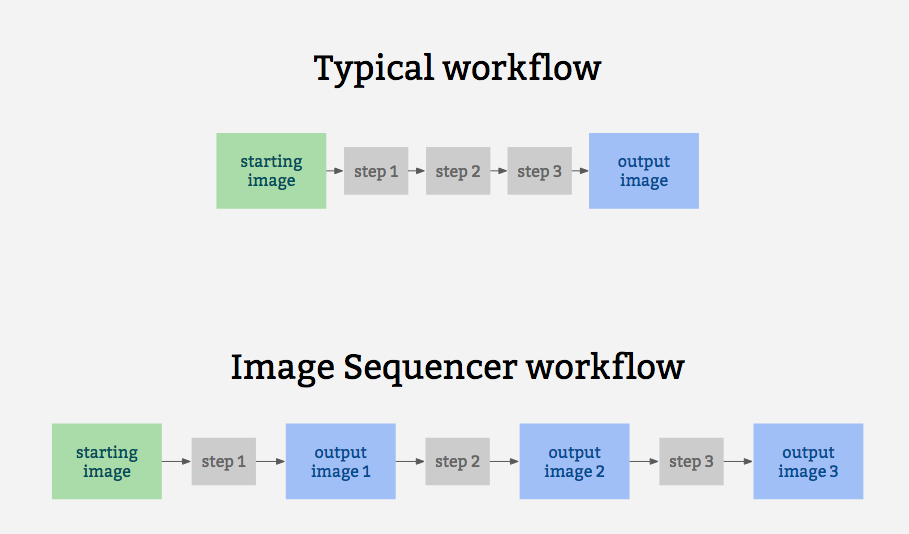
|
||||
|
||||
It is also for prototyping some other related ideas:
|
||||
It also for prototypes other related ideas:
|
||||
|
||||
* filter-like image processing -- applying a transform to an image from a given source, like a proxy. I.e. [every image tile of a satellite imagery web map](https://publiclab.org/notes/warren/05-10-2018/prototype-filter-map-tiles-in-real-time-in-a-browser-with-imagesequencer-ndvi-landsat)
|
||||
* test-based image processing -- the ability to create a sequence of steps that do the same task as some other image processing tool, provable with example before/after images to compare with
|
||||
* logging of each step to produce an evidentiary record of modifications to an original image
|
||||
* filter-like image processing -- apply a transform to an image from a given source, like a proxy. I.e. [every image tile of a satellite imagery web map](https://publiclab.org/notes/warren/05-10-2018/prototype-filter-map-tiles-in-real-time-in-a-browser-with-imagesequencer-ndvi-landsat)
|
||||
* test-based image processing -- the ability to create a sequence of steps that do the same task as other image processing tools, provable with example before/after images to compare with
|
||||
* logging each step -- to produce an evidentiary record of modifications to an original image
|
||||
* cascading changes -- change an earlier step's settings, and see those changes affect later steps
|
||||
* "small modules"-based extensibility: see [Contributing](https://github.com/publiclab/image-sequencer/blob/master/CONTRIBUTING.md)
|
||||
* "small modules" -- based extensibility: see [Contributing](https://github.com/publiclab/image-sequencer/blob/master/CONTRIBUTING.md)
|
||||
|
||||
## Examples
|
||||
|
||||
@@ -45,10 +49,10 @@ A diagram of this running 5 steps on a single sample image may help explain how
|
||||
|
||||
## Installation
|
||||
|
||||
This library works in the browser, in Node, and on the command line (CLI), which we think is great.
|
||||
This library conveniently works in the browser, in Node, and on the command line (CLI).
|
||||
|
||||
### Unix based platforms
|
||||
You can set up a local environment to test the UI with `sudo npm run setup` followed by `npm start`
|
||||
You can set up a local environment to test the UI with `sudo npm run setup` followed by `npm start`
|
||||
|
||||
### Windows
|
||||
Our npm scripts do not support windows shells, please run the following snippet in PowerShell.
|
||||
@@ -84,11 +88,19 @@ $ npm install image-sequencer -g
|
||||
```
|
||||
$ npm run debug invert
|
||||
```
|
||||
|
||||
|
||||
## Quick Usage
|
||||
|
||||
### Initializing the Sequencer
|
||||
|
||||
The Image Sequencer Library exports a function ImageSequencer which initializes a sequencer.
|
||||
|
||||
```js
|
||||
var sequencer = ImageSequencer();
|
||||
```
|
||||
|
||||
Image Sequencer can be used to run modules on an HTML Image Element using the
|
||||
`replaceImage` method. The method accepts two parameters - `selector` and `steps`.
|
||||
`replaceImage` method, which accepts two parameters - `selector` and `steps`.
|
||||
`selector` is a CSS selector. If it matches multiple images, all images will be
|
||||
modified. `steps` may be the name of a module or array of names of modules.
|
||||
|
||||
@@ -149,7 +161,7 @@ Options for the steps can be passed in one line as JSON in the details option li
|
||||
$ ./index.js -i [PATH] -s "brightness" -c '{"brightness":50}'
|
||||
|
||||
```
|
||||
Or the values can be given through terminal prompt like
|
||||
Or the values can be given through the terminal prompt like
|
||||
|
||||
<img width="1436" alt="screen shot 2018-02-14 at 5 18 50 pm" src="https://user-images.githubusercontent.com/25617855/36202790-3c6e8204-11ab-11e8-9e17-7f3387ab0158.png">
|
||||
|
||||
@@ -218,11 +230,11 @@ sequencer.addSteps(modules, optional_options);
|
||||
```
|
||||
|
||||
If only one module is to be added, `modules` is simply the name of the module.
|
||||
If multiple images are to be added, `modules` is an array of the names of modules
|
||||
which are to be added, in that particular order.
|
||||
If multiple images are to be added, `modules` is an array, which holds the names of modules
|
||||
to be added, in that particular order.
|
||||
|
||||
optional_otions is just additional parameters, in object form, which you might
|
||||
want to provide to the modules. It's an optional parameter.
|
||||
optional_otions is just an optional parameter, in object form, which you might
|
||||
want to provide to the modules.
|
||||
|
||||
return value: **`sequencer`** (To allow method chaining)
|
||||
|
||||
@@ -273,7 +285,7 @@ return value: **`sequencer`** (To allow method chaining)
|
||||
### Removing a step from the sequencer
|
||||
|
||||
The `removeSteps` method is used to remove unwanted steps from the sequencer.
|
||||
It accepts the index of the step as an input or an array of the unwanted indices
|
||||
It accepts the index of the step as an input or an array of the unwanted indices,
|
||||
if there are more than one.
|
||||
|
||||
For example, if the modules ['ndvi-red','crop','invert'] were added in this order,
|
||||
@@ -300,7 +312,7 @@ role it played in `addSteps`.
|
||||
|
||||
Indexes can be negative. Negative sign with an index means that counting will be
|
||||
done in reverse order. If the index is out of bounds, the counting will wrap in
|
||||
the original direction of counting. So, an `index` of -1 means that the module is
|
||||
the original direction of counting. So, an `index` of -1 means the module is
|
||||
inserted at the end.
|
||||
|
||||
```js
|
||||
@@ -326,12 +338,11 @@ Methods can be chained on the Image Sequencer:
|
||||
* run() can not be in the middle of the chain.
|
||||
* If the chain starts with loadImage() or loadImages(), the following methods are
|
||||
applied only to the newly loaded images.
|
||||
* If no name is provided to the image, a name will be generated for it. The name will
|
||||
be of the form "image<number>". For Ex: "image1", "image2", "image3", etc.
|
||||
|
||||
|
||||
Valid Chains:
|
||||
```js
|
||||
sequencer.loadImage('red',function(){
|
||||
sequencer.loadImage(function(){
|
||||
this.addSteps('invert').run(function(out){
|
||||
//do something with ouptut.
|
||||
});
|
||||
@@ -346,156 +357,20 @@ sequencer.addSteps('invert').run().addSteps('ndvi-red');
|
||||
```
|
||||
|
||||
|
||||
## Multiple Images
|
||||
Image Sequencer is capable of handling multiple images at once.
|
||||
|
||||
### Initializing a sequencer with multiple images.
|
||||
This is just like before.
|
||||
```js
|
||||
var sequencer = ImageSequencer();
|
||||
```
|
||||
## Fetching current steps
|
||||
|
||||
### Loading Multiple Images into the Sequencer
|
||||
|
||||
Multiple images can be loaded by the method `loadImages`. Everything is the same,
|
||||
except that now, a unique identification called `image_name` has to be provided
|
||||
with each image. This is a string literal.
|
||||
|
||||
* 3/2 parameters :
|
||||
```js
|
||||
sequencer.loadImages(image_name,
|
||||
image_src,optional_callback);
|
||||
```
|
||||
* 1/2 parameters (JSON) :
|
||||
```js
|
||||
sequencer.loadImages({
|
||||
images: {
|
||||
image1_name: image_src,
|
||||
image2_name: image_src,
|
||||
...
|
||||
},
|
||||
callback: optional_callback
|
||||
});
|
||||
```
|
||||
|
||||
return value: **none**
|
||||
|
||||
|
||||
### Adding Steps on Multiple Images
|
||||
|
||||
The same method `addSteps` is used for this. There's just a slight obvious change
|
||||
in the syntax that the image name has to be supplied too. `image_name` as well as,
|
||||
`module_name` in the following examples can be either strings or arrays of strings.
|
||||
The `getSteps` method can be used to get the array of current steps in `this` instance of sequencer.For example
|
||||
|
||||
```js
|
||||
sequencer.addSteps(image_name,module_name,optional_options);
|
||||
sequencer.getSteps()
|
||||
```
|
||||
|
||||
If no Image Name is specified, the module is added to **all** images.
|
||||
|
||||
```js
|
||||
sequencer.addSteps(module_name,optional_options);
|
||||
```
|
||||
|
||||
All this can be passed in as JSON:
|
||||
|
||||
```js
|
||||
sequencer.addSteps({
|
||||
image1_name: {name: module_name, o: optional_options},
|
||||
image2_name: {name: module_name, o: optional_options},
|
||||
...
|
||||
});
|
||||
```
|
||||
|
||||
return value: **`sequencer`** (To allow method chaining)
|
||||
|
||||
|
||||
### Running a Sequencer with multiple images
|
||||
|
||||
The same `run` method can be used with a slight change in syntax.
|
||||
The `run` method accepts parameters `image` and `from`. `from` is the index from
|
||||
where the function starts generating output. By default, it will run across all
|
||||
the steps. (from = 1) If no image is specified, the sequencer will be run over **all
|
||||
the images**. `image_name` may be an array of image names.
|
||||
|
||||
```js
|
||||
sequencer.run(); //All images from first step
|
||||
```
|
||||
|
||||
```js
|
||||
sequencer.run(image_name,from); //Image 'image' from 'from'
|
||||
```
|
||||
|
||||
The `run` method also accepts an optional callback just like before:
|
||||
|
||||
```js
|
||||
sequencer.run(image_name,from,function(out){
|
||||
// This gets called back.
|
||||
// "out" is the DataURL of final image.
|
||||
});
|
||||
```
|
||||
|
||||
JSON input is also acceptable.
|
||||
|
||||
```js
|
||||
sequencer.run({
|
||||
image1_name: from,
|
||||
image2_name: from,
|
||||
...
|
||||
});
|
||||
```
|
||||
|
||||
return value: **`sequencer`** (To allow method chaining)
|
||||
|
||||
|
||||
### Removing Steps from an Image
|
||||
|
||||
Similarly, `removeSteps` can also accept an `image_name` parameter. Either, both,
|
||||
or none of `image_name` and `steps` them may be an array. JSON input is also acceptable.
|
||||
|
||||
```js
|
||||
sequencer.removeSteps("image_name",[steps]);
|
||||
```
|
||||
|
||||
```js
|
||||
sequencer.removeSteps("image_name",step);
|
||||
```
|
||||
|
||||
```js
|
||||
sequencer.removeSteps({
|
||||
image1_name: [steps],
|
||||
image2_name: [steps],
|
||||
...
|
||||
});
|
||||
```
|
||||
return value: **`sequencer`** (To allow method chaining)
|
||||
|
||||
|
||||
### Inserting steps on an image
|
||||
|
||||
The `insertSteps` method can also accept an `image_name` parameter. `image_name`
|
||||
may be an array. Everything else remains the same. JSON Input is acceptable too.
|
||||
|
||||
```js
|
||||
sequencer.insertSteps("image",index,"module_name",o);
|
||||
```
|
||||
```js
|
||||
sequencer.insertSteps([image],index,"module_name",o);
|
||||
```
|
||||
```js
|
||||
sequencer.insertSteps({
|
||||
image1: [
|
||||
{index:index1, name: module_name1, o:optional_options1},
|
||||
{index:index2, name: module_name2, o:optional_options2},
|
||||
...
|
||||
]
|
||||
});
|
||||
```
|
||||
return value: **`sequencer`** (To allow method chaining)
|
||||
returns an array of steps associated with the current sequencer.
|
||||
|
||||
## Saving Sequences
|
||||
|
||||
IMAGE SEQUENCER supports saving a sequence of modules and their associated settings in a simple string syntax. These sequences can be saved in the local storage inside the browser and inside a JSON file in node.js. sequences can be saved in node context using the CLI option
|
||||
IMAGE SEQUENCER supports saving a sequence of modules and their associated settings in a simple string syntax. These sequences can be saved in the local storage of the browser and inside a JSON file in node.js. sequences can be saved in node context using the CLI option
|
||||
|
||||
```shell
|
||||
--save-sequence "name stringified-sequence"
|
||||
@@ -535,6 +410,29 @@ Image Sequencer can also generate a string for usage in the CLI for the current
|
||||
sequencer.toCliString()
|
||||
```
|
||||
|
||||
|
||||
## Importing steps using JSON array
|
||||
|
||||
Image sequencer provides the following core API function to import the given sequence of JSON steps into sequencer.
|
||||
|
||||
```js
|
||||
sequencer.importJSON(obj)
|
||||
```
|
||||
It can be implemented the following way for example:
|
||||
|
||||
```js
|
||||
sequencer.importJSON([
|
||||
{ name: 'blur', options: {} }
|
||||
]);
|
||||
```
|
||||
where name is the name of step to be added, options object can be the one used to provide various params to the sequencer which can customise the default ones.
|
||||
|
||||
To see this in action, please refer to line # 51 of the following:
|
||||
|
||||
[test/core/modules/import-export.js](https://github.com/publiclab/image-sequencer/blob/main/test/core/modules/import-export.js)
|
||||
|
||||
|
||||
|
||||
## Creating a User Interface
|
||||
|
||||
Image Sequencer provides the following events which can be used to generate a UI:
|
||||
@@ -551,7 +449,7 @@ and remove the loading GIF generated above.
|
||||
for instance, to remove the DIV generated above.
|
||||
* `notify` : This event is triggered whenever we need to shoot a notification to the
|
||||
user-interface.For example when the step is not available, we can shoot a notification,
|
||||
by sending appropriate message.For HTML UI it adds a DOM node to the browser, for CLI
|
||||
by sending appropriate message.For HTML UI it adds a DOM node to the browser, for CLI
|
||||
and node , it logs the notification output to the respective console.
|
||||
|
||||
How to define these functions:
|
||||
@@ -605,12 +503,37 @@ sequencer.setUI({
|
||||
});
|
||||
```
|
||||
|
||||
Note: `identity.imageName` is the "name" of that particular image. This name can
|
||||
be specified while loading the image via `sequencer.loadImage("name","SRC")`. If
|
||||
not specified, the name of a loaded image defaults to a name like "image1",
|
||||
"image2", et cetra.
|
||||
## Using multiple images on same sequencer:
|
||||
|
||||
Details of all modules can be sought using `sequencer.modulesInfo()`.
|
||||
Image Sequencer object supports one imageURL at a time.
|
||||
|
||||
Adding a seccond image to same sequencer will result to adding same set of steps added to prior image and flushing out the previous one.
|
||||
|
||||
```js
|
||||
s1 = new ImageSequencer(...);
|
||||
s1.loadImage(url1);
|
||||
s1.addSteps('blur');
|
||||
s1.run();
|
||||
s1.addImage(url2);
|
||||
s1.run();
|
||||
```
|
||||
However if we want to use more than one image, we can either initialize a sequencer for each image like:
|
||||
|
||||
```js
|
||||
sequencer1 = new ImageSequencer(...);
|
||||
sequencer1.loadImage(...);
|
||||
sequencer1.addSteps(steps);
|
||||
sequencer1.run();
|
||||
|
||||
sequencer2 = new ImageSequencer(...);
|
||||
sequencer2.loadImage(...);
|
||||
sequencer2.addSteps(steps);
|
||||
sequencer2.run();
|
||||
```
|
||||
|
||||
|
||||
|
||||
**Note**: Details of all modules can be sought using `sequencer.modulesInfo()`.
|
||||
This method returns an object which defines the name and inputs of the modules. If a module name (hyphenated) is passed in the method, then only the details of that module are returned.
|
||||
|
||||
The `notify` function takes two parameters `msg` and `id`, former being the message to be displayed on console (in case of CLI and node ) and a HTML component(in browser). The id is optional and is useful for HTML interface to give appropriate IDs.
|
||||
The `notify` function takes two parameters `msg` and `id`, former being the message to be displayed on console (in case of CLI and node ) and a HTML component(in browser). The id is optional and is useful for HTML interface to give appropriate IDs.
|
||||
|
||||
17261
dist/image-sequencer-ui.js
vendored
17261
dist/image-sequencer-ui.js
vendored
File diff suppressed because it is too large
Load Diff
6
dist/image-sequencer-ui.min.js
vendored
6
dist/image-sequencer-ui.min.js
vendored
File diff suppressed because one or more lines are too long
6452
dist/image-sequencer.js
vendored
6452
dist/image-sequencer.js
vendored
File diff suppressed because one or more lines are too long
6
dist/image-sequencer.min.js
vendored
6
dist/image-sequencer.min.js
vendored
File diff suppressed because one or more lines are too long
204
docs/MODULES.md
204
docs/MODULES.md
@@ -6,30 +6,38 @@ List of Module Documentations
|
||||
1. [Crop](#crop-module)
|
||||
2. [Segmented-Colormap](#segmented-colormap-module)
|
||||
3. [FisheyeGl](#fisheyeGl-module)
|
||||
4. [Average](#average-module)
|
||||
5. [Blend](#blend-module)
|
||||
6. [Blur](#blur-module)
|
||||
7. [Brightness](#brightness-module)
|
||||
8. [Channel](#channel-module)
|
||||
9. [Colorbar](#colorbar-module)
|
||||
10. [Colormap](#colormap-module)
|
||||
11. [Contrast](#contrast-module)
|
||||
12. [Convolution](#convolutioon-module)
|
||||
13. [DecodeQr](#decodeQr-module)
|
||||
14. [Dynamic](#dynamic-module)
|
||||
15. [Edge-Detect](#edge-detect-module)
|
||||
16. [Gamma-Correction](#gamma-correction-module)
|
||||
17. [Gradient](#gradient-module)
|
||||
18. [Histogram](#histogram-module)
|
||||
19. [Import-image](#import-image-module)
|
||||
20. [Invert](#invert-module)
|
||||
21. [Ndvi](#ndvi-module)
|
||||
22. [Ndvi-Colormap](#ndvi-colormap-module)
|
||||
23. [Overlay](#overlay-module)
|
||||
24. [Resize](#resize-module)
|
||||
25. [Rotate](#rotate-module)
|
||||
26. [Saturation](#saturation-module)
|
||||
|
||||
4. [Add QR](#Add-QR-module)
|
||||
5. [Average](#average-module)
|
||||
6. [Blend](#blend-module)
|
||||
7. [Blur](#blur-module)
|
||||
8. [Brightness](#brightness-module)
|
||||
9. [Channel](#channel-module)
|
||||
10. [Colorbar](#colorbar-module)
|
||||
11. [Colormap](#colormap-module)
|
||||
12. [Contrast](#contrast-module)
|
||||
13. [Convolution](#convolution-module)
|
||||
14. [DecodeQr](#decodeQr-module)
|
||||
15. [Dither](#dither-module)
|
||||
16. [DrawRectangle](#draw-rectangle-module)
|
||||
17. [Dynamic](#dynamic-module)
|
||||
18. [Edge-Detect](#edge-detect-module)
|
||||
19. [FlipImage](#flipimage-module)
|
||||
20. [Gamma-Correction](#gamma-correction-module)
|
||||
21. [Gradient](#gradient-module)
|
||||
22. [Histogram](#histogram-module)
|
||||
23. [Import-image](#import-image-module)
|
||||
24. [Invert](#invert-module)
|
||||
25. [Ndvi](#ndvi-module)
|
||||
26. [Ndvi-Colormap](#ndvi-colormap-module)
|
||||
27. [Overlay](#overlay-module)
|
||||
28. [PaintBucket](#paint-bucket-module)
|
||||
29. [Resize](#resize-module)
|
||||
30. [ReplaceColor](#replacecolor-module)
|
||||
31. [Rotate](#rotate-module)
|
||||
32. [Saturation](#saturation-module)
|
||||
33. [Threshold](#threshold)
|
||||
34. [Tint](#tint)
|
||||
35. [WhiteBalance](#white-balance)
|
||||
|
||||
|
||||
## crop-module
|
||||
@@ -100,6 +108,23 @@ where `options` is an object with the following properties:
|
||||
* x : Field of View x (0 to 2; default 1)
|
||||
* y : Field of View y (0 to 2; default 1)
|
||||
|
||||
## add-qr-module
|
||||
|
||||
This module Adds QR corresponding to the given string.
|
||||
|
||||
#### Usage
|
||||
|
||||
```js
|
||||
sequencer.loadImage('PATH')
|
||||
.addSteps('add-qr',options)
|
||||
.run()
|
||||
```
|
||||
|
||||
where `options` is an object with the following properties:
|
||||
* size : size of QR code in pixels (default 200)
|
||||
* qrCodeString : input string to generate QR code
|
||||
|
||||
|
||||
## average-module
|
||||
|
||||
This module is used for averaging all the pixels of the image.
|
||||
@@ -247,6 +272,42 @@ This module is used for decoding a QR in image (if present).
|
||||
.addSteps('decode-qr',options)
|
||||
.run()
|
||||
```
|
||||
|
||||
## dither-module
|
||||
|
||||
This module approximates a color from a mixture of other colors when the required color is not available, creating illusions of the color that is not present actually.
|
||||
|
||||
[more info on wikipedia](https://en.wikipedia.org/wiki/Dither)
|
||||
|
||||
## Usage
|
||||
|
||||
```js
|
||||
sequencer.loadImage('PATH')
|
||||
.addSteps('dither',options)
|
||||
.run()
|
||||
```
|
||||
where `options` is an object with the following property:
|
||||
* dither : Can select the name of the Dithering Algorithm(default none)
|
||||
|
||||
## draw-rectangle-module
|
||||
|
||||
This module helps to draw a rectangle on the image with a starting and ending corner with the specified thickness and color of the border.
|
||||
|
||||
## Usage
|
||||
|
||||
```js
|
||||
sequencer.loadImage('PATH')
|
||||
.addSteps('draw-rectangle',options)
|
||||
.run()
|
||||
```
|
||||
where `options` is an object with the following properties:
|
||||
* startingX : starting x position of the rectangle (default 0)
|
||||
* startingY : starting y position of the rectangle (default 0)
|
||||
* endX : last x position of the rectangle (default "width")
|
||||
* endY : last y position of the rectangle (default "height")
|
||||
* thickness : thickness of the border (default 1)
|
||||
* color : RGBA values separated by a space (default "0 0 0 255")
|
||||
|
||||
## dynamic-module
|
||||
|
||||
This module is used for producing each color channel based on the original image's color.
|
||||
@@ -281,6 +342,22 @@ where `options` is an object with the following properties:
|
||||
* highThresholdRatio : Upper Threshold Ratio ( default : 0.2)
|
||||
* lowThresholdratio : Lower Threshold Ratio ( default : 0.2)
|
||||
|
||||
## flipimage-module
|
||||
|
||||
This module is used for flipping the image on the selected axis.
|
||||
#### Usage
|
||||
|
||||
|
||||
```js
|
||||
sequencer.loadImage('PATH')
|
||||
.addSteps('flip-image',options)
|
||||
.run()
|
||||
```
|
||||
|
||||
where `options` is an object with the following properties:
|
||||
* Axis : select the required axis (default : vertical)
|
||||
|
||||
|
||||
## gamma-correction-module
|
||||
|
||||
This module is used for applying gamma correction.
|
||||
@@ -386,6 +463,24 @@ where `options` is an object with the following properties:
|
||||
* y : Y-position of the image on which the new image is overlayed (default 0)
|
||||
* offset : offset to the step on which the output of the last step is overlayed (default -2)
|
||||
|
||||
## paint-bucket-module
|
||||
|
||||
This module fills any polygonal shape with the specified color in pixels.
|
||||
|
||||
## Usage
|
||||
|
||||
```js
|
||||
sequencer.loadImage('PATH')
|
||||
.addSteps('paint-bucket',options)
|
||||
.run()
|
||||
```
|
||||
|
||||
where `options` is an object with the following property:
|
||||
* startingX : it is the value of the starting x-cordinate (default 10)
|
||||
* startingY : it is the value of the starting y-cordinate (default 10)
|
||||
* fillColor : they are four spaced seperated numbers representing the RGBA values of fill-color (default "100 100 100 255")
|
||||
* tolerance : it is the % tolerance (default 10)
|
||||
|
||||
## resize-module
|
||||
|
||||
This module is used for resizing an image.
|
||||
@@ -400,6 +495,22 @@ This module is used for resizing an image.
|
||||
where `options` is an object with the following property:
|
||||
* resize : Percentage value of resize (default 125%)
|
||||
|
||||
## replacecolor-module
|
||||
|
||||
This module is used in replacing the color with grey or any desired color.
|
||||
#### Usage
|
||||
|
||||
```js
|
||||
sequencer.loadImage('PATH')
|
||||
.addSteps('replace-color',options)
|
||||
.run()
|
||||
```
|
||||
where `options` is an object with the following properties:
|
||||
* replaceMethod : replaces with the desired color (default greyscale)
|
||||
* replaceColor : three space separated numbers representing the RGB values of color to be filled (default "0 0 255")
|
||||
* color : three space separated numbers representing the RGB values of color to be replaced (default "228 86 81")
|
||||
* tolerance : it is the % tolerance (default 50)
|
||||
|
||||
## rotate-module
|
||||
|
||||
This module is used for rotating an image.
|
||||
@@ -428,4 +539,49 @@ This module is used for changing the saturation of the image.
|
||||
where `options` is an object with the following property:
|
||||
* saturation : saturation for the new image (between 0 and 2; default 0)
|
||||
|
||||
## Threshold
|
||||
|
||||
Thresholding is used to create binary images.
|
||||
|
||||
## Usage
|
||||
|
||||
```js
|
||||
sequencer.loadImage('PATH')
|
||||
.addSteps('threshold',options)
|
||||
.run()
|
||||
```
|
||||
where `options` is an object with the following property:
|
||||
* threshold : it allows to select the types of thresholding (default "manual thresholding")
|
||||
* input : it allows to select the range of thresholding value (default 120)
|
||||
|
||||
|
||||
## Tint
|
||||
|
||||
It adds color tint to an image
|
||||
|
||||
## Usage
|
||||
|
||||
```js
|
||||
sequencer.loadImage('PATH')
|
||||
.addSteps('tint',options)
|
||||
.run()
|
||||
```
|
||||
where `options` is an object with the following property:
|
||||
* color : RGB values seperated by a space (default "0 0 255")
|
||||
* factor : amount of tint (default 0.5)
|
||||
|
||||
|
||||
## White Balance
|
||||
|
||||
This Change the colour balance of the image by adjusting the colour temperature.
|
||||
|
||||
## Usage
|
||||
|
||||
```js
|
||||
sequencer.loadImage('PATH')
|
||||
.addSteps('white-balance',options)
|
||||
.run()
|
||||
```
|
||||
where `options` is an object with the following property:
|
||||
* temperature : temperature between 0 - 40,000 kelvin (default 6000)
|
||||
|
||||
|
||||
@@ -250,3 +250,15 @@ a.name-header{
|
||||
text-decoration: none;
|
||||
color: #445;
|
||||
}
|
||||
|
||||
.step-column{
|
||||
display:flex;
|
||||
flex-direction:row;
|
||||
align-items:center;
|
||||
}
|
||||
.step-image{
|
||||
width:100%;
|
||||
display:flex;
|
||||
flex-direction:column;
|
||||
align-items:center;
|
||||
}
|
||||
|
||||
@@ -1,5 +1,6 @@
|
||||
var defaultHtmlSequencerUi = require('./lib/defaultHtmlSequencerUi.js'),
|
||||
setupCache = require('./lib/cache.js'),
|
||||
intermediateHtmlStepUi = require('./lib/intermediateHtmlStepUi.js'),
|
||||
DefaultHtmlStepUi = require('./lib/defaultHtmlStepUi.js'),
|
||||
urlHash = require('./lib/urlHash.js'),
|
||||
insertPreview = require('./lib/insertPreview.js');
|
||||
@@ -23,6 +24,9 @@ window.onload = function() {
|
||||
}
|
||||
// Null option
|
||||
addStepSelect.append('<option value="none" disabled selected>More modules...</option>');
|
||||
addStepSelect.selectize({
|
||||
sortField: 'text'
|
||||
});
|
||||
}
|
||||
refreshOptions();
|
||||
|
||||
@@ -185,19 +189,27 @@ window.onload = function() {
|
||||
takePhotoSelector: "#take-photo",
|
||||
onLoad: function onFileReaderLoad(progress) {
|
||||
var reader = progress.target;
|
||||
var step = sequencer.images.image1.steps[0];
|
||||
var util=IntermediateHtmlStepUi(sequencer);
|
||||
var step = sequencer.steps[0];
|
||||
var util= intermediateHtmlStepUi(sequencer);
|
||||
step.output.src = reader.result;
|
||||
sequencer.run({ index: 0 });
|
||||
step.options.step.imgElement.src = reader.result;
|
||||
if(typeof step.options !=="undefined")
|
||||
step.options.step.imgElement.src = reader.result;
|
||||
else
|
||||
step.imgElement.src = reader.result;
|
||||
insertPreview.updatePreviews(reader.result,'addStep');
|
||||
insertPreview.updatePreviews(sequencer.images.image1.steps[0].options.step.imgElement.src,'insertStep');
|
||||
insertPreview.updatePreviews(sequencer.steps[0].imgElement.src,'insertStep');
|
||||
},
|
||||
onTakePhoto: function (url) {
|
||||
var step = sequencer.images.image1.steps[0];
|
||||
var step = sequencer.steps[0];
|
||||
step.output.src = url;
|
||||
sequencer.run({ index: 0 });
|
||||
step.options.step.imgElement.src = url;
|
||||
if(typeof step.options !=="undefined")
|
||||
step.options.step.imgElement.src = url;
|
||||
else
|
||||
step.imgElement.src = url;
|
||||
insertPreview.updatePreviews(url,'addStep');
|
||||
insertPreview.updatePreviews(sequencer.steps[0].imgElement.src,'insertStep');
|
||||
}
|
||||
});
|
||||
|
||||
|
||||
@@ -26,17 +26,18 @@
|
||||
<script src="../node_modules/downloadjs/download.min.js" type="text/javascript"/>
|
||||
|
||||
<script src="lib/scrollToTop.js"></script>
|
||||
|
||||
<script src="../node_modules/selectize/dist/js/standalone/selectize.min.js"></script>
|
||||
</head>
|
||||
|
||||
|
||||
<body>
|
||||
|
||||
<link href="../node_modules/bootstrap/dist/css/bootstrap.min.css" rel="stylesheet">
|
||||
<link rel="stylesheet" href="demo.css">
|
||||
<link href="../node_modules/font-awesome/css/font-awesome.min.css" rel="stylesheet">
|
||||
|
||||
<link href="../node_modules/selectize/dist/css/selectize.default.css" rel="stylesheet">
|
||||
<!-- for crop module: -->
|
||||
<link href="../node_modules/imgareaselect/distfiles/css/imgareaselect-default.css" rel="stylesheet">
|
||||
<link href="./selectize.default.css" rel="stylesheet">
|
||||
<link rel="stylesheet" href="demo.css">
|
||||
|
||||
<div class="container-fluid">
|
||||
@@ -63,7 +64,7 @@
|
||||
</p>
|
||||
<center>
|
||||
<input type="file" id="fileInput" value="" accept="image/*"><br />
|
||||
<button type="button" id="take-photo">Take a Photo</button>
|
||||
<button type="button" id="take-photo" class="btn btn-primary btn-block btn-lg ">Take a Photo</button>
|
||||
<video id="video" width="400" height="300" style="display:none"></video>
|
||||
<a href="#" id="capture" style="display:none" class="btn btn-primary btn-md">Click Picture</a>
|
||||
<a href="#" id="close" style="display:none" class="btn btn-default btn-md">Close</a>
|
||||
@@ -82,8 +83,16 @@
|
||||
<section id="addStep" class="panel panel-primary">
|
||||
<div class="form-inline">
|
||||
<div class="panel-body">
|
||||
<div style="display:flex; justify-content:center;">
|
||||
</div>
|
||||
<p class="info">Select a new module to add to your sequence.</p>
|
||||
<div class="row center-align radio-group">
|
||||
<div>
|
||||
<div class="radio" data-value="resize">
|
||||
<i class="fa fa-arrows-alt fa-4x i-over"></i>
|
||||
</div>
|
||||
<p>Resize</p>
|
||||
</div>
|
||||
<div>
|
||||
<div class="radio" data-value="brightness">
|
||||
<i class="fa fa-sun-o fa-4x i-over"></i>
|
||||
@@ -116,12 +125,15 @@
|
||||
</div>
|
||||
</div>
|
||||
<div class="center-align">
|
||||
<select class="form-control input-lg" id="selectStep">
|
||||
<select id="selectStep" >
|
||||
<!-- The default null selection has been appended manually in demo.js
|
||||
This is because the options in select are overritten when options are appended.-->
|
||||
</select>
|
||||
<button class="btn btn-success btn-lg" name="add" id="add-step-btn">Add Step</button>
|
||||
</div>
|
||||
<div class="row center-align">
|
||||
<button id="resetButton" class="btn btn-default btn-lg" style=" margin: 20px 35px 0px 35px; width:100%;">Clear All Steps</button>
|
||||
</div>
|
||||
</div>
|
||||
</div>
|
||||
</section>
|
||||
@@ -130,8 +142,9 @@
|
||||
<div class="panel-body">
|
||||
|
||||
<div class="row center-align">
|
||||
<button class="btn btn-primary btn-block btn-lg" name="save-sequence" id="save-seq">Save Sequence</button>
|
||||
<button class="btn btn-primary btn-block btn-lg js-view-as-gif" id="gif">View GIF</button>
|
||||
<!--<button class="btn btn-primary btn-block btn-lg" name="save-sequence" id="save-seq">Save Sequence</button> -->
|
||||
<!--<button class="btn btn-primary btn-block btn-lg" id="download-btn" name="download" style="display: block; margin: 0px 10px 0px 0px; width: 250px;">Download PNG</button> -->
|
||||
<button class="btn btn-primary btn-block btn-lg js-view-as-gif" id="gif" style="margin: 0px 35px 0px 35px;width:100%;">View GIF</button>
|
||||
</div>
|
||||
|
||||
|
||||
@@ -165,8 +178,15 @@
|
||||
<div class="form-inline">
|
||||
<div class="panel-body">
|
||||
<div style="text-align:center;">
|
||||
<button class="btn btn-success btn-lg" id="download-btn" name="download">Download PNG</button>
|
||||
<button id="resetButton" class="btn btn-default btn-lg">Clear All Steps</button>
|
||||
<h2 style="margin-top:20px">Save</h2>
|
||||
<p>Or click ARROW to save the entire sequence as a workflow for future use.</p>
|
||||
<select class="form-control input-md" id="selectSaveOption" style="margin-top:20px">
|
||||
<option>Save as PNG</option>
|
||||
<option>Save as GIF (all steps)</option>
|
||||
<option>Save sequence</option>
|
||||
<option>Save sequence string</option>
|
||||
</select>
|
||||
<button id="saveButton" class="btn btn-primary btn-lg" style="margin-top:20px; margin-bottom:0px;align:center; width:100%;">Save</button>
|
||||
</div>
|
||||
</div>
|
||||
</div>
|
||||
@@ -176,6 +196,26 @@
|
||||
|
||||
<footer>
|
||||
<hr style="margin:20px;"><center><a class="color:grey;" id="clear-cache">Clear offline cache</a></center>
|
||||
<div class="row">
|
||||
<div class="col-md-6">
|
||||
<h2>Need Help?</h2>
|
||||
<p>
|
||||
Post a link to this and ask help from other community members on <a href="https://github.com/publiclab/image-sequencer/issues/new">Github Issues</a>
|
||||
</p>
|
||||
<p>
|
||||
<a class="btn btn-primary" href="https://gitter.im/publiclab/publiclab">Ask a question on Gitter</a>
|
||||
</p>
|
||||
</div>
|
||||
<div class="col-md-6">
|
||||
<h2>Improve this tool</h2>
|
||||
<p>
|
||||
This is an open source toolkit which you can help add to and improve on <a href="https://github.com/publiclab/image-sequencer/">Github</a>
|
||||
</p>
|
||||
<p>
|
||||
<a class="btn btn-primary" href="https://github.com/publiclab/image-sequencer">View the code »</a>
|
||||
</p>
|
||||
</div>
|
||||
</div>
|
||||
</footer>
|
||||
|
||||
<button id="move-up"><i class="fa fa-arrow-circle-o-up"></i></button>
|
||||
|
||||
@@ -8,8 +8,8 @@ function DefaultHtmlSequencerUi(_sequencer, options) {
|
||||
|
||||
function onLoad() {
|
||||
importStepsFromUrlHash();
|
||||
if (!$('#selectStep').val())
|
||||
$(addStepSel + " #add-step-btn").prop("disabled", true);
|
||||
if ($('#selectStep').val()==='none')
|
||||
$(addStepSel + " #add-step-btn").prop("disabled", true);
|
||||
handleSaveSequence();
|
||||
}
|
||||
|
||||
@@ -57,7 +57,7 @@ function DefaultHtmlSequencerUi(_sequencer, options) {
|
||||
}
|
||||
_sequencer
|
||||
.addSteps(newStepName, options)
|
||||
.run({ index: _sequencer.images.image1.steps.length - sequenceLength - 1 });
|
||||
.run({ index: _sequencer.steps.length - sequenceLength - 1 });
|
||||
$(addStepSel + " .info").html("Select a new module to add to your sequence.");
|
||||
$(addStepSel + " select").val("none");
|
||||
|
||||
@@ -65,11 +65,11 @@ function DefaultHtmlSequencerUi(_sequencer, options) {
|
||||
handleSaveSequence();
|
||||
|
||||
// add to URL hash too
|
||||
urlHash.setUrlHashParameter("steps", _sequencer.toString());
|
||||
urlHash.setUrlHashParameter("steps", _sequencer.toString())
|
||||
}
|
||||
|
||||
function handleSaveSequence(){
|
||||
var stepCount=sequencer.images.image1.steps.length;
|
||||
var stepCount=sequencer.steps.length;
|
||||
if(stepCount<2)
|
||||
$(" #save-seq").prop("disabled", true);
|
||||
else
|
||||
|
||||
@@ -10,6 +10,8 @@
|
||||
|
||||
var intermediateHtmlStepUi = require('./intermediateHtmlStepUi.js');
|
||||
var urlHash = require('./urlHash.js');
|
||||
var _ = require('lodash');
|
||||
var mapHtmlTypes = require('./mapHtmltypes');
|
||||
|
||||
function DefaultHtmlStepUi(_sequencer, options) {
|
||||
|
||||
@@ -24,9 +26,9 @@ function DefaultHtmlStepUi(_sequencer, options) {
|
||||
step.ui =
|
||||
'\
|
||||
<div class="container">\
|
||||
<div class="row step">\
|
||||
<div class="row step" style="display:flex">\
|
||||
<form class="input-form">\
|
||||
<div class="col-md-4 details">\
|
||||
<div class="col-md-4 details" style="flex:1">\
|
||||
<h3>\
|
||||
<span class = "toggle">' +step.name + ' <i class="fa fa-caret-up toggleIcon" aria-hidden="true"></i></span>' +
|
||||
'<span class="load-spin" style="display:none;"><i class="fa fa-circle-o-notch fa-spin"></i></span>' +
|
||||
@@ -35,9 +37,11 @@ function DefaultHtmlStepUi(_sequencer, options) {
|
||||
'</i></p></div>\
|
||||
</div>\
|
||||
</form>\
|
||||
<div class="col-md-8 cal">\
|
||||
<div class="load" style="display:none;"><i class="fa fa-circle-o-notch fa-spin"></i></div>\
|
||||
<a><img alt="" style="max-width=100%" class="img-thumbnail step-thumbnail"/></a>\
|
||||
<div class="col-md-8 cal step-column">\
|
||||
<div class="load" style="display:none;"><i class="fa fa-circle-o-notch fa-spin"></i></div>\
|
||||
<div class="step-image">\
|
||||
<a><img alt="" class="img-thumbnail step-thumbnail"/></a>\
|
||||
</div>\
|
||||
</div>\
|
||||
</div>\
|
||||
</div>\
|
||||
@@ -70,7 +74,7 @@ function DefaultHtmlStepUi(_sequencer, options) {
|
||||
for (var paramName in merged) {
|
||||
var isInput = inputs.hasOwnProperty(paramName);
|
||||
var html = "";
|
||||
var inputDesc = isInput ? inputs[paramName] : {};
|
||||
var inputDesc = isInput ? mapHtmlTypes(inputs[paramName]) : {};
|
||||
if (!isInput) {
|
||||
html += '<span class="output"></span>';
|
||||
} else if (inputDesc.type.toLowerCase() == "select") {
|
||||
@@ -98,7 +102,7 @@ function DefaultHtmlStepUi(_sequencer, options) {
|
||||
'"max="' +
|
||||
inputDesc.max +
|
||||
'"step="' +
|
||||
inputDesc.step + '">' + '<span>' + paramVal + '</span>';
|
||||
(inputDesc.step ? inputDesc.step : 1)+ '">' + '<span>' + paramVal + '</span>';
|
||||
|
||||
}
|
||||
else html += '">';
|
||||
@@ -139,7 +143,7 @@ function DefaultHtmlStepUi(_sequencer, options) {
|
||||
$(step.ui.querySelectorAll(".insert-step")).on('click', function() { util.insertStep(step.ID) });
|
||||
|
||||
// Insert the step's UI in the right place
|
||||
if (stepOptions.index == _sequencer.images.image1.steps.length) {
|
||||
if (stepOptions.index == _sequencer.steps.length) {
|
||||
stepsEl.appendChild(step.ui);
|
||||
$("#steps .container:nth-last-child(1) .insert-step").prop('disabled',true);
|
||||
if($("#steps .container:nth-last-child(2)"))
|
||||
@@ -156,6 +160,7 @@ function DefaultHtmlStepUi(_sequencer, options) {
|
||||
$(step.ui.querySelectorAll(".cal")).toggleClass("collapse");
|
||||
});
|
||||
|
||||
$(step.imgElement).on("mousemove", _.debounce(() => imageHover(step), 150));
|
||||
|
||||
function saveOptions(e) {
|
||||
e.preventDefault();
|
||||
@@ -171,8 +176,7 @@ function DefaultHtmlStepUi(_sequencer, options) {
|
||||
_sequencer.run({ index: step.index - 1 });
|
||||
|
||||
// modify the url hash
|
||||
urlHash.setUrlHashParameter("steps", _sequencer.toString());
|
||||
|
||||
urlHash.setUrlHashParameter("steps", _sequencer.toString())
|
||||
// disable the save button
|
||||
$(step.ui.querySelector('.btn-save')).prop('disabled', true);
|
||||
optionsChanged = false;
|
||||
@@ -232,11 +236,11 @@ function DefaultHtmlStepUi(_sequencer, options) {
|
||||
$(step.ui.querySelector("img")).show();
|
||||
$(step.ui.querySelector(".load-spin")).hide();
|
||||
|
||||
step.imgElement.src = step.output;
|
||||
step.imgElement.src = (step.name == "load-image") ? step.output.src : step.output;
|
||||
var imgthumbnail = step.ui.querySelector(".img-thumbnail");
|
||||
for (let index = 0; index < step.linkElements.length; index++) {
|
||||
if (step.linkElements[index].contains(imgthumbnail))
|
||||
step.linkElements[index].href = step.output;
|
||||
step.linkElements[index].href = step.imgElement.src;
|
||||
}
|
||||
|
||||
// TODO: use a generalized version of this
|
||||
@@ -245,7 +249,8 @@ function DefaultHtmlStepUi(_sequencer, options) {
|
||||
}
|
||||
|
||||
for (let index = 0; index < step.linkElements.length; index++) {
|
||||
step.linkElements[index].download = step.name + "." + fileExtension(step.output);
|
||||
|
||||
step.linkElements[index].download = step.name + "." + fileExtension(step.imgElement.src);
|
||||
step.linkElements[index].target = "_blank";
|
||||
}
|
||||
|
||||
@@ -273,10 +278,29 @@ function DefaultHtmlStepUi(_sequencer, options) {
|
||||
}
|
||||
}
|
||||
|
||||
function imageHover(step){
|
||||
|
||||
var img = $(step.imgElement);
|
||||
|
||||
img.mousemove(function(e) {
|
||||
var canvas = document.createElement('canvas');
|
||||
canvas.width = img.width();
|
||||
canvas.height = img.height();
|
||||
var context = canvas.getContext('2d');
|
||||
context.drawImage(this,0,0);
|
||||
|
||||
var offset = $(this).offset();
|
||||
var xPos = e.pageX - offset.left;
|
||||
var yPos = e.pageY - offset.top;
|
||||
var myData = context.getImageData(xPos, yPos, 1, 1);
|
||||
img[0].title = "rgb: " +myData.data[0]+","+ myData.data[1]+","+myData.data[2];//+ rgbdata;
|
||||
});
|
||||
}
|
||||
|
||||
function onRemove(step) {
|
||||
step.ui.remove();
|
||||
$("#steps .container:nth-last-child(1) .insert-step").prop('disabled',true);
|
||||
$('div[class^=imgareaselect-]').remove();
|
||||
$('div[class*=imgareaselect-]').remove();
|
||||
}
|
||||
|
||||
function getPreview() {
|
||||
@@ -302,7 +326,8 @@ function DefaultHtmlStepUi(_sequencer, options) {
|
||||
onComplete: onComplete,
|
||||
onRemove: onRemove,
|
||||
onDraw: onDraw,
|
||||
notify: notify
|
||||
notify: notify,
|
||||
imageHover: imageHover
|
||||
}
|
||||
}
|
||||
|
||||
|
||||
@@ -16,7 +16,6 @@ function generatePreview(previewStepName, customValues, path, selector) {
|
||||
}
|
||||
|
||||
function loadPreview() {
|
||||
previewSequencer = previewSequencer.addSteps('resize', { resize: "40%" });
|
||||
if (previewStepName === "crop") {
|
||||
previewSequencer.addSteps(previewStepName, customValues).run(insertPreview);
|
||||
}
|
||||
@@ -31,8 +30,9 @@ function generatePreview(previewStepName, customValues, path, selector) {
|
||||
$('#'+selector+' img').remove();
|
||||
|
||||
var previewSequencerSteps = {
|
||||
"brightness": "20",
|
||||
"saturation": "5",
|
||||
"resize": "125%",
|
||||
"brightness": "175",
|
||||
"saturation": "0.5",
|
||||
"rotate": 90,
|
||||
"contrast": 90,
|
||||
"crop": {
|
||||
@@ -52,4 +52,4 @@ function generatePreview(previewStepName, customValues, path, selector) {
|
||||
module.exports = {
|
||||
generatePreview : generatePreview,
|
||||
updatePreviews : updatePreviews
|
||||
}
|
||||
}
|
||||
|
||||
@@ -1,4 +1,6 @@
|
||||
var urlHash = require('./urlHash.js');
|
||||
var urlHash = require('./urlHash.js'),
|
||||
insertPreview = require('./insertPreview.js');
|
||||
|
||||
function IntermediateHtmlStepUi(_sequencer, step, options) {
|
||||
function stepUI() {
|
||||
return '<div class="row insertDiv">\
|
||||
@@ -8,6 +10,12 @@ function IntermediateHtmlStepUi(_sequencer, step, options) {
|
||||
<div class="panel-body">\
|
||||
<p class="info">Select a new module to add to your sequence.</p>\
|
||||
<div class="row center-align radio-group">\
|
||||
<div>\
|
||||
<div class="radio" data-value="resize">\
|
||||
<i class="fa fa-arrows-alt fa-4x i-over"></i>\
|
||||
</div>\
|
||||
<p>Resize</p>\
|
||||
</div>\
|
||||
<div>\
|
||||
<div class="radio" data-value="brightness">\
|
||||
<i class="fa fa-sun-o fa-4x i-over"></i>\
|
||||
@@ -68,7 +76,7 @@ function IntermediateHtmlStepUi(_sequencer, step, options) {
|
||||
.insertAdjacentElement('afterend',
|
||||
addStepUI
|
||||
);
|
||||
updatePreviews(step.output,'insertStep');
|
||||
insertPreview.updatePreviews(step.output,'insertStep');
|
||||
var insertStepSelect = $("#insertStep select");
|
||||
insertStepSelect.html("");
|
||||
// Add modules to the insertStep dropdown
|
||||
@@ -78,7 +86,9 @@ function IntermediateHtmlStepUi(_sequencer, step, options) {
|
||||
'<option value="' + m + '">' + modulesInfo[m].name + "</option>"
|
||||
);
|
||||
}
|
||||
|
||||
$('#insertStep #add-step-btn').selectize({
|
||||
sortField: 'text'
|
||||
});
|
||||
$('#insertStep #add-step-btn').prop('disabled', true);
|
||||
|
||||
insertStepSelect.append('<option value="none" disabled selected>More modules...</option>');
|
||||
|
||||
28
examples/lib/mapHtmltypes.js
Normal file
28
examples/lib/mapHtmltypes.js
Normal file
@@ -0,0 +1,28 @@
|
||||
function mapHtmlTypes(inputInfo){
|
||||
var htmlType;
|
||||
switch(inputInfo.type.toLowerCase()){
|
||||
case 'integer':
|
||||
htmlType = inputInfo.min != undefined ? 'range' : 'number';
|
||||
break;
|
||||
case 'string':
|
||||
htmlType = 'text';
|
||||
break;
|
||||
case 'select':
|
||||
htmlType = 'select';
|
||||
break;
|
||||
case 'percentage':
|
||||
htmlType = 'number';
|
||||
break;
|
||||
case 'float':
|
||||
htmlType = inputInfo.min != undefined ? 'range' : 'text';
|
||||
break;
|
||||
default:
|
||||
htmlType = 'text';
|
||||
break;
|
||||
}
|
||||
var response = inputInfo;
|
||||
response.type = htmlType;
|
||||
return response;
|
||||
}
|
||||
|
||||
module.exports = mapHtmlTypes;
|
||||
@@ -1,17 +0,0 @@
|
||||
$(document).ready(function($){
|
||||
$(function(){
|
||||
$(window).scroll(function(){
|
||||
if ($(this).scrollTop() > 100){
|
||||
$('.move-up').fadeIn();
|
||||
} else {
|
||||
$('.move-up').fadeOut();
|
||||
}
|
||||
});
|
||||
$('.move-up button').click(function(){
|
||||
$('body,html').animate({
|
||||
scrollTop: 0
|
||||
}, 800);
|
||||
return false;
|
||||
});
|
||||
});
|
||||
});
|
||||
403
examples/selectize.default.css
Normal file
403
examples/selectize.default.css
Normal file
@@ -0,0 +1,403 @@
|
||||
/**
|
||||
* selectize.default.css (v0.12.6) - Default Theme
|
||||
* Copyright (c) 2013–2015 Brian Reavis & contributors
|
||||
*
|
||||
* Licensed under the Apache License, Version 2.0 (the "License"); you may not use this
|
||||
* file except in compliance with the License. You may obtain a copy of the License at:
|
||||
* http://www.apache.org/licenses/LICENSE-2.0
|
||||
*
|
||||
* Unless required by applicable law or agreed to in writing, software distributed under
|
||||
* the License is distributed on an "AS IS" BASIS, WITHOUT WARRANTIES OR CONDITIONS OF
|
||||
* ANY KIND, either express or implied. See the License for the specific language
|
||||
* governing permissions and limitations under the License.
|
||||
*
|
||||
* @author Brian Reavis <brian@thirdroute.com>
|
||||
*/
|
||||
.selectize-control.plugin-drag_drop.multi > .selectize-input > div.ui-sortable-placeholder {
|
||||
visibility: visible !important;
|
||||
background: #f2f2f2 !important;
|
||||
background: rgba(0, 0, 0, 0.06) !important;
|
||||
border: 0 none !important;
|
||||
-webkit-box-shadow: inset 0 0 12px 4px #fff;
|
||||
box-shadow: inset 0 0 12px 4px #fff;
|
||||
}
|
||||
.selectize-control.plugin-drag_drop .ui-sortable-placeholder::after {
|
||||
content: '!';
|
||||
visibility: hidden;
|
||||
}
|
||||
.selectize-control.plugin-drag_drop .ui-sortable-helper {
|
||||
-webkit-box-shadow: 0 2px 5px rgba(0, 0, 0, 0.2);
|
||||
box-shadow: 0 2px 5px rgba(0, 0, 0, 0.2);
|
||||
}
|
||||
.selectize-dropdown-header {
|
||||
position: relative;
|
||||
padding: 5px 8px;
|
||||
border-bottom: 1px solid #d0d0d0;
|
||||
background: #f8f8f8;
|
||||
-webkit-border-radius: 3px 3px 0 0;
|
||||
-moz-border-radius: 3px 3px 0 0;
|
||||
border-radius: 3px 3px 0 0;
|
||||
}
|
||||
.selectize-dropdown-header-close {
|
||||
position: absolute;
|
||||
right: 8px;
|
||||
top: 50%;
|
||||
color: #303030;
|
||||
opacity: 0.4;
|
||||
margin-top: -12px;
|
||||
line-height: 20px;
|
||||
font-size: 20px !important;
|
||||
}
|
||||
.selectize-dropdown-header-close:hover {
|
||||
color: #000000;
|
||||
}
|
||||
.selectize-dropdown.plugin-optgroup_columns .optgroup {
|
||||
border-right: 1px solid #f2f2f2;
|
||||
border-top: 0 none;
|
||||
float: left;
|
||||
-webkit-box-sizing: border-box;
|
||||
-moz-box-sizing: border-box;
|
||||
box-sizing: border-box;
|
||||
}
|
||||
.selectize-dropdown.plugin-optgroup_columns .optgroup:last-child {
|
||||
border-right: 0 none;
|
||||
}
|
||||
.selectize-dropdown.plugin-optgroup_columns .optgroup:before {
|
||||
display: none;
|
||||
}
|
||||
.selectize-dropdown.plugin-optgroup_columns .optgroup-header {
|
||||
border-top: 0 none;
|
||||
}
|
||||
.selectize-control.plugin-remove_button [data-value] {
|
||||
position: relative;
|
||||
padding-right: 24px !important;
|
||||
}
|
||||
.selectize-control.plugin-remove_button [data-value] .remove {
|
||||
z-index: 1;
|
||||
/* fixes ie bug (see #392) */
|
||||
position: absolute;
|
||||
top: 0;
|
||||
right: 0;
|
||||
bottom: 0;
|
||||
width: 17px;
|
||||
text-align: center;
|
||||
font-weight: bold;
|
||||
font-size: 12px;
|
||||
color: inherit;
|
||||
text-decoration: none;
|
||||
vertical-align: middle;
|
||||
display: inline-block;
|
||||
padding: 2px 0 0 0;
|
||||
border-left: 1px solid #0073bb;
|
||||
-webkit-border-radius: 0 2px 2px 0;
|
||||
-moz-border-radius: 0 2px 2px 0;
|
||||
border-radius: 0 2px 2px 0;
|
||||
-webkit-box-sizing: border-box;
|
||||
-moz-box-sizing: border-box;
|
||||
box-sizing: border-box;
|
||||
}
|
||||
.selectize-control.plugin-remove_button [data-value] .remove:hover {
|
||||
background: rgba(0, 0, 0, 0.05);
|
||||
}
|
||||
.selectize-control.plugin-remove_button [data-value].active .remove {
|
||||
border-left-color: #00578d;
|
||||
}
|
||||
.selectize-control.plugin-remove_button .disabled [data-value] .remove:hover {
|
||||
background: none;
|
||||
}
|
||||
.selectize-control.plugin-remove_button .disabled [data-value] .remove {
|
||||
border-left-color: #aaaaaa;
|
||||
}
|
||||
.selectize-control.plugin-remove_button .remove-single {
|
||||
position: absolute;
|
||||
right: 0;
|
||||
top: 0;
|
||||
font-size: 23px;
|
||||
}
|
||||
.selectize-control {
|
||||
position: relative;
|
||||
}
|
||||
.selectize-dropdown,
|
||||
.selectize-input,
|
||||
.selectize-input input {
|
||||
color: #303030;
|
||||
font-family: inherit;
|
||||
font-size: 18px;
|
||||
line-height: 18px;
|
||||
-webkit-font-smoothing: inherit;
|
||||
}
|
||||
.selectize-input,
|
||||
.selectize-control.single .selectize-input.input-active {
|
||||
background: #fff;
|
||||
cursor: text;
|
||||
display: inline-block;
|
||||
}
|
||||
.selectize-input {
|
||||
border: 1px solid #d0d0d0;
|
||||
padding: 10px 0px;
|
||||
display: inline-block;
|
||||
width: 24vw;
|
||||
overflow: hidden;
|
||||
position: relative;
|
||||
z-index: 1;
|
||||
-webkit-box-sizing: border-box;
|
||||
-moz-box-sizing: border-box;
|
||||
box-sizing: border-box;
|
||||
-webkit-box-shadow: inset 0 1px 1px rgba(0, 0, 0, 0.1);
|
||||
box-shadow: inset 0 1px 1px rgba(0, 0, 0, 0.1);
|
||||
-webkit-border-radius: 3px;
|
||||
-moz-border-radius: 3px;
|
||||
border-radius: 3px;
|
||||
}
|
||||
.selectize-control.multi .selectize-input.has-items {
|
||||
padding: 5px 8px 2px;
|
||||
}
|
||||
.selectize-input.full {
|
||||
background-color: #fff;
|
||||
}
|
||||
.selectize-input.disabled,
|
||||
.selectize-input.disabled * {
|
||||
cursor: default !important;
|
||||
}
|
||||
.selectize-input.focus {
|
||||
-webkit-box-shadow: inset 0 1px 2px rgba(0, 0, 0, 0.15);
|
||||
box-shadow: inset 0 1px 2px rgba(0, 0, 0, 0.15);
|
||||
}
|
||||
.selectize-input.dropdown-active {
|
||||
-webkit-border-radius: 3px 3px 0 0;
|
||||
-moz-border-radius: 3px 3px 0 0;
|
||||
border-radius: 3px 3px 0 0;
|
||||
}
|
||||
.selectize-input > * {
|
||||
vertical-align: baseline;
|
||||
display: -moz-inline-stack;
|
||||
display: inline-block;
|
||||
zoom: 1;
|
||||
*display: inline;
|
||||
}
|
||||
.selectize-control.multi .selectize-input > div {
|
||||
cursor: pointer;
|
||||
margin: 0 3px 3px 0;
|
||||
padding: 2px 6px;
|
||||
background: #1da7ee;
|
||||
color: #fff;
|
||||
border: 1px solid #0073bb;
|
||||
}
|
||||
.selectize-control.multi .selectize-input > div.active {
|
||||
background: #92c836;
|
||||
color: #fff;
|
||||
border: 1px solid #00578d;
|
||||
}
|
||||
.selectize-control.multi .selectize-input.disabled > div,
|
||||
.selectize-control.multi .selectize-input.disabled > div.active {
|
||||
color: #ffffff;
|
||||
background: #d2d2d2;
|
||||
border: 1px solid #aaaaaa;
|
||||
}
|
||||
.selectize-input > input {
|
||||
display: inline-block !important;
|
||||
padding: 0 !important;
|
||||
min-height: 0 !important;
|
||||
max-height: none !important;
|
||||
max-width: 100% !important;
|
||||
margin: 0 1px !important;
|
||||
text-indent: 0 !important;
|
||||
border: 0 none !important;
|
||||
background: none !important;
|
||||
line-height: inherit !important;
|
||||
-webkit-user-select: auto !important;
|
||||
-webkit-box-shadow: none !important;
|
||||
box-shadow: none !important;
|
||||
}
|
||||
.selectize-input > input::-ms-clear {
|
||||
display: none;
|
||||
}
|
||||
.selectize-input > input:focus {
|
||||
outline: none !important;
|
||||
}
|
||||
.selectize-input::after {
|
||||
content: ' ';
|
||||
display: block;
|
||||
clear: left;
|
||||
}
|
||||
.selectize-input.dropdown-active::before {
|
||||
content: ' ';
|
||||
display: block;
|
||||
position: absolute;
|
||||
background: #f0f0f0;
|
||||
height: 1px;
|
||||
bottom: 0;
|
||||
left: 0;
|
||||
right: 0;
|
||||
}
|
||||
.selectize-dropdown {
|
||||
position: absolute;
|
||||
z-index: 10;
|
||||
border: 1px solid #d0d0d0;
|
||||
background: #fff;
|
||||
margin: -1px 0 0 0;
|
||||
border-top: 0 none;
|
||||
-webkit-box-sizing: border-box;
|
||||
-moz-box-sizing: border-box;
|
||||
box-sizing: border-box;
|
||||
-webkit-box-shadow: 0 1px 3px rgba(0, 0, 0, 0.1);
|
||||
box-shadow: 0 1px 3px rgba(0, 0, 0, 0.1);
|
||||
-webkit-border-radius: 0 0 3px 3px;
|
||||
-moz-border-radius: 0 0 3px 3px;
|
||||
border-radius: 0 0 3px 3px;
|
||||
}
|
||||
.selectize-dropdown [data-selectable] {
|
||||
cursor: pointer;
|
||||
overflow: hidden;
|
||||
}
|
||||
.selectize-dropdown [data-selectable] .highlight {
|
||||
background: rgba(125, 168, 208, 0.2);
|
||||
-webkit-border-radius: 1px;
|
||||
-moz-border-radius: 1px;
|
||||
border-radius: 1px;
|
||||
}
|
||||
.selectize-dropdown .option,
|
||||
.selectize-dropdown .optgroup-header {
|
||||
padding: 5px 8px;
|
||||
}
|
||||
.selectize-dropdown .option,
|
||||
.selectize-dropdown [data-disabled],
|
||||
.selectize-dropdown [data-disabled] [data-selectable].option {
|
||||
cursor: inherit;
|
||||
opacity: 0.5;
|
||||
}
|
||||
.selectize-dropdown [data-selectable].option {
|
||||
opacity: 1;
|
||||
}
|
||||
.selectize-dropdown .optgroup:first-child .optgroup-header {
|
||||
border-top: 0 none;
|
||||
}
|
||||
.selectize-dropdown .optgroup-header {
|
||||
color: #303030;
|
||||
background: #fff;
|
||||
cursor: default;
|
||||
}
|
||||
.selectize-dropdown .active {
|
||||
background-color: #f5fafd;
|
||||
color: #495c68;
|
||||
}
|
||||
.selectize-dropdown .active.create {
|
||||
color: #495c68;
|
||||
}
|
||||
.selectize-dropdown .create {
|
||||
color: rgba(48, 48, 48, 0.5);
|
||||
}
|
||||
.selectize-dropdown-content {
|
||||
overflow-y: auto;
|
||||
overflow-x: hidden;
|
||||
max-height: 200px;
|
||||
-webkit-overflow-scrolling: touch;
|
||||
}
|
||||
.selectize-control.single .selectize-input,
|
||||
.selectize-control.single .selectize-input input {
|
||||
cursor: pointer;
|
||||
}
|
||||
.selectize-control.single .selectize-input.input-active,
|
||||
.selectize-control.single .selectize-input.input-active input {
|
||||
cursor: text;
|
||||
}
|
||||
.selectize-control.single .selectize-input:after {
|
||||
content: ' ';
|
||||
display: block;
|
||||
position: absolute;
|
||||
top: 50%;
|
||||
right: 15px;
|
||||
margin-top: -3px;
|
||||
width: 0;
|
||||
height: 0;
|
||||
border-style: solid;
|
||||
border-width: 5px 5px 0 5px;
|
||||
border-color: #808080 transparent transparent transparent;
|
||||
}
|
||||
.selectize-control.single .selectize-input.dropdown-active:after {
|
||||
margin-top: -4px;
|
||||
border-width: 0 5px 5px 5px;
|
||||
border-color: transparent transparent #808080 transparent;
|
||||
}
|
||||
.selectize-control.rtl.single .selectize-input:after {
|
||||
left: 15px;
|
||||
right: auto;
|
||||
}
|
||||
.selectize-control.rtl .selectize-input > input {
|
||||
margin: 0 4px 0 -2px !important;
|
||||
}
|
||||
.selectize-control .selectize-input.disabled {
|
||||
opacity: 0.5;
|
||||
background-color: #fafafa;
|
||||
}
|
||||
.selectize-control.multi .selectize-input.has-items {
|
||||
padding-left: 5px;
|
||||
padding-right: 5px;
|
||||
}
|
||||
.selectize-control.multi .selectize-input.disabled [data-value] {
|
||||
color: #999;
|
||||
text-shadow: none;
|
||||
background: none;
|
||||
-webkit-box-shadow: none;
|
||||
box-shadow: none;
|
||||
}
|
||||
.selectize-control.multi .selectize-input.disabled [data-value],
|
||||
.selectize-control.multi .selectize-input.disabled [data-value] .remove {
|
||||
border-color: #e6e6e6;
|
||||
}
|
||||
.selectize-control.multi .selectize-input.disabled [data-value] .remove {
|
||||
background: none;
|
||||
}
|
||||
.selectize-control.multi .selectize-input [data-value] {
|
||||
text-shadow: 0 1px 0 rgba(0, 51, 83, 0.3);
|
||||
-webkit-border-radius: 3px;
|
||||
-moz-border-radius: 3px;
|
||||
border-radius: 3px;
|
||||
background-color: #1b9dec;
|
||||
background-image: -moz-linear-gradient(top, #1da7ee, #178ee9);
|
||||
background-image: -webkit-gradient(linear, 0 0, 0 100%, from(#1da7ee), to(#178ee9));
|
||||
background-image: -webkit-linear-gradient(top, #1da7ee, #178ee9);
|
||||
background-image: -o-linear-gradient(top, #1da7ee, #178ee9);
|
||||
background-image: linear-gradient(to bottom, #1da7ee, #178ee9);
|
||||
background-repeat: repeat-x;
|
||||
filter: progid:DXImageTransform.Microsoft.gradient(startColorstr='#ff1da7ee', endColorstr='#ff178ee9', GradientType=0);
|
||||
-webkit-box-shadow: 0 1px 0 rgba(0,0,0,0.2),inset 0 1px rgba(255,255,255,0.03);
|
||||
box-shadow: 0 1px 0 rgba(0,0,0,0.2),inset 0 1px rgba(255,255,255,0.03);
|
||||
}
|
||||
.selectize-control.multi .selectize-input [data-value].active {
|
||||
background-color: #0085d4;
|
||||
background-image: -moz-linear-gradient(top, #008fd8, #0075cf);
|
||||
background-image: -webkit-gradient(linear, 0 0, 0 100%, from(#008fd8), to(#0075cf));
|
||||
background-image: -webkit-linear-gradient(top, #008fd8, #0075cf);
|
||||
background-image: -o-linear-gradient(top, #008fd8, #0075cf);
|
||||
background-image: linear-gradient(to bottom, #008fd8, #0075cf);
|
||||
background-repeat: repeat-x;
|
||||
filter: progid:DXImageTransform.Microsoft.gradient(startColorstr='#ff008fd8', endColorstr='#ff0075cf', GradientType=0);
|
||||
}
|
||||
.selectize-control.single .selectize-input {
|
||||
-webkit-box-shadow: 0 1px 0 rgba(0,0,0,0.05), inset 0 1px 0 rgba(255,255,255,0.8);
|
||||
box-shadow: 0 1px 0 rgba(0,0,0,0.05), inset 0 1px 0 rgba(255,255,255,0.8);
|
||||
background-color: #f9f9f9;
|
||||
background-image: -moz-linear-gradient(top, #fefefe, #f2f2f2);
|
||||
background-image: -webkit-gradient(linear, 0 0, 0 100%, from(#fefefe), to(#f2f2f2));
|
||||
background-image: -webkit-linear-gradient(top, #fefefe, #f2f2f2);
|
||||
background-image: -o-linear-gradient(top, #fefefe, #f2f2f2);
|
||||
background-image: linear-gradient(to bottom, #fefefe, #f2f2f2);
|
||||
background-repeat: repeat-x;
|
||||
filter: progid:DXImageTransform.Microsoft.gradient(startColorstr='#fffefefe', endColorstr='#fff2f2f2', GradientType=0);
|
||||
}
|
||||
/* .selectize-control.single .selectize-input,
|
||||
.selectize-dropdown.single {
|
||||
border-color: #b8b8b8;
|
||||
} */
|
||||
.selectize-dropdown .optgroup-header {
|
||||
padding-top: 7px;
|
||||
font-weight: bold;
|
||||
font-size: 0.85em;
|
||||
}
|
||||
.selectize-dropdown .optgroup {
|
||||
border-top: 1px solid #f0f0f0;
|
||||
}
|
||||
.selectize-dropdown .optgroup:first-child {
|
||||
border-top: 0 none;
|
||||
}
|
||||
@@ -1,35 +0,0 @@
|
||||
const staticCacheName = 'image-sequencer-static-v3';
|
||||
|
||||
self.addEventListener('install', event => {
|
||||
console.log('Attempting to install service worker');
|
||||
});
|
||||
|
||||
self.addEventListener('activate', function(e) {
|
||||
console.log('[ServiceWorker] Activate');
|
||||
e.waitUntil(
|
||||
caches.keys().then(function(cacheNames) {
|
||||
return Promise.all(
|
||||
cacheNames.filter(function(cacheName){
|
||||
return cacheName.startsWith('image-sequencer-') &&
|
||||
cacheName != staticCacheName;
|
||||
}).map(function(cacheName){
|
||||
return caches.delete(cacheName);
|
||||
})
|
||||
);
|
||||
})
|
||||
);
|
||||
});
|
||||
|
||||
self.addEventListener('fetch', function(event) {
|
||||
event.respondWith(
|
||||
caches.open(staticCacheName).then(function(cache) {
|
||||
return cache.match(event.request).then(function (response) {
|
||||
return response || fetch(event.request).then(function(response) {
|
||||
if(event.request.method == "GET")
|
||||
cache.put(event.request, response.clone());
|
||||
return response;
|
||||
});
|
||||
});
|
||||
})
|
||||
);
|
||||
});
|
||||
4170
package-lock.json
generated
4170
package-lock.json
generated
File diff suppressed because it is too large
Load Diff
13
package.json
13
package.json
@@ -1,12 +1,12 @@
|
||||
{
|
||||
"name": "image-sequencer",
|
||||
"version": "2.3.1",
|
||||
"version": "3.0.0",
|
||||
"description": "A modular JavaScript image manipulation library modeled on a storyboard.",
|
||||
"main": "src/ImageSequencer.js",
|
||||
"scripts": {
|
||||
"debug": "TEST=true node ./index.js -i ./examples/images/monarch.png -s invert",
|
||||
"test": "TEST=true tape test/core/*.js test/core/ui/user-interface.js | tap-spec; browserify test/core/modules/image-sequencer.js test/core/modules/chain.js test/core/modules/meta-modules.js test/core/modules/replace.js test/core/modules/import-export.js test/core/modules/run.js test/core/modules/dynamic-imports.js test/core/util/parse-input.js | tape-run --render=\"tap-spec\"",
|
||||
"test-ui": "jasmine",
|
||||
"test": "TEST=true tape test/core/*.js test/core/ui/user-interface.js test/core/modules/QR.js | tap-spec; browserify test/core/modules/image-sequencer.js test/core/modules/chain.js test/core/modules/meta-modules.js test/core/modules/replace.js test/core/modules/import-export.js test/core/modules/run.js test/core/modules/dynamic-imports.js test/core/util/parse-input.js test/core/modules/benchmark.js| tape-run --render=\"tap-spec\"",
|
||||
"test-ui": "jasmine test/spec/*.js",
|
||||
"setup": "npm i && npm i -g grunt grunt-cli",
|
||||
"start": "grunt serve"
|
||||
},
|
||||
@@ -39,15 +39,18 @@
|
||||
"jquery": "^3.3.1",
|
||||
"jsdom": "^13.1.0",
|
||||
"jsqr": "^1.1.1",
|
||||
"lodash": "^4.17.5",
|
||||
"lodash": "^4.17.11",
|
||||
"ndarray-gaussian-filter": "^1.0.0",
|
||||
"ora": "^3.0.0",
|
||||
"pace": "0.0.4",
|
||||
"qrcode": "^1.3.3",
|
||||
"readline-sync": "^1.4.7",
|
||||
"save-pixels": "~2.3.4",
|
||||
"selectize": "^0.12.6",
|
||||
"urify": "^2.1.1"
|
||||
},
|
||||
"devDependencies": {
|
||||
"base64-img": "^1.0.4",
|
||||
"browserify": "16.2.3",
|
||||
"grunt": "^1.0.3",
|
||||
"grunt-browser-sync": "^2.2.0",
|
||||
@@ -60,7 +63,7 @@
|
||||
"jasmine-core": "^3.3.0",
|
||||
"jasmine-jquery": "^2.1.1",
|
||||
"jasmine-spec-reporter": "^4.2.1",
|
||||
"looks-same": "^5.0.1",
|
||||
"looks-same": "^7.0.0",
|
||||
"matchdep": "^2.0.0",
|
||||
"tap-spec": "^5.0.0",
|
||||
"tape": "^4.9.2",
|
||||
|
||||
@@ -1,5 +1,5 @@
|
||||
// add steps to the sequencer
|
||||
function AddStep(_sequencer, image, name, o) {
|
||||
return require('./InsertStep')(_sequencer,image,-1,name,o);
|
||||
function AddStep(_sequencer, name, o) {
|
||||
return require('./InsertStep')(_sequencer,-1,name,o);
|
||||
}
|
||||
module.exports = AddStep;
|
||||
|
||||
@@ -32,13 +32,11 @@ module.exports = function ExportBin(dir = "./output/", ref, basic, filename) {
|
||||
if (err) console.error(err)
|
||||
});
|
||||
if (filename && basic) {
|
||||
for (var image in ref.images) {
|
||||
var steps = ref.images[image].steps;
|
||||
var steps = ref.steps;
|
||||
var datauri = steps.slice(-1)[0].output.src;
|
||||
var ext = steps.slice(-1)[0].output.format;
|
||||
var buffer = require('data-uri-to-buffer')(datauri);
|
||||
fs.writeFile(dir + filename, buffer, function() { });
|
||||
}
|
||||
}
|
||||
else {
|
||||
getDirectories(dir, function(dirs) {
|
||||
@@ -50,8 +48,7 @@ module.exports = function ExportBin(dir = "./output/", ref, basic, filename) {
|
||||
}
|
||||
fs.mkdir(dir + 'sequencer' + num, function() {
|
||||
var root = dir + 'sequencer' + num + '/';
|
||||
for (var image in ref.images) {
|
||||
var steps = ref.images[image].steps;
|
||||
var steps = ref.steps;
|
||||
if (basic) {
|
||||
var datauri = steps.slice(-1)[0].output.src;
|
||||
var ext = steps.slice(-1)[0].output.format;
|
||||
@@ -66,7 +63,6 @@ module.exports = function ExportBin(dir = "./output/", ref, basic, filename) {
|
||||
fs.writeFile(root + image + "_" + i + "." + ext, buffer, function() { });
|
||||
}
|
||||
}
|
||||
}
|
||||
});
|
||||
});
|
||||
}
|
||||
|
||||
@@ -24,42 +24,19 @@ function copy(a) {
|
||||
}
|
||||
|
||||
function formatInput(args,format,images) {
|
||||
images = [];
|
||||
for (var image in this.images) {
|
||||
images.push(image);
|
||||
}
|
||||
var json_q = {};
|
||||
var format_i = format;
|
||||
if (format == "+")
|
||||
format = ['o_string_a', 'string_a', 'o_object'];
|
||||
format = ['string_a', 'o_object'];
|
||||
else if (format == "-")
|
||||
format = ['o_string_a', 'number_a'];
|
||||
format = ['number_a'];
|
||||
else if (format == "^")
|
||||
format = ['o_string_a', 'number', 'string', 'o_object'];
|
||||
format = ['number', 'string', 'o_object'];
|
||||
else if (format == "r")
|
||||
format = ['o_string_a', 'o_number'];
|
||||
format = ['o_number'];
|
||||
else if (format == "l")
|
||||
format = ['o_string','string','o_function'];
|
||||
|
||||
/*
|
||||
formats:
|
||||
addSteps :: o_image_a, name_a, o_o
|
||||
o_string_a, string_a, o_object => { image: [{name,o}] }
|
||||
removeSteps :: o_image_a, index_a
|
||||
o_string_a, number_a => { image: [index] }
|
||||
insertSteps :: o_image_a, index, name, o_o
|
||||
o_string_a, number, string, o_object => { image: [{index,name,o}] }
|
||||
run :: o_image_a, o_from
|
||||
o_string_a, o_number => { image: index }
|
||||
loadImages :: image, src, o_function
|
||||
string, string, o_function => { images: [{image:src}], callback }
|
||||
|
||||
optionals:
|
||||
image: o_string_a
|
||||
options: o_object
|
||||
from: o_number
|
||||
callback: o_function
|
||||
*/
|
||||
format = ['string','o_function'];
|
||||
|
||||
|
||||
if(format[format.length-1] == "o_object") {
|
||||
if(objTypeOf(args[args.length-1]) != "Object")
|
||||
@@ -74,90 +51,56 @@ function formatInput(args,format,images) {
|
||||
args.push(function(){});
|
||||
}
|
||||
|
||||
if(format[0] == "o_string_a") {
|
||||
if(args.length == format.length - 1) {
|
||||
var insert = false;
|
||||
for (var i in args) {
|
||||
if (format[parseInt(i)+1].includes( typeof(getPrimitive(args[i])) )){
|
||||
insert = true;
|
||||
}
|
||||
else {insert = false; break;}
|
||||
}
|
||||
if(insert)
|
||||
args.splice(0,0,copy(images));
|
||||
}
|
||||
}
|
||||
else if (format[0] == "o_string" && format_i == "l" && args.length == 2) {
|
||||
if (typeof(args[0]) == "string") {
|
||||
var identifier = "image";
|
||||
var number = 1;
|
||||
while (this.images.hasOwnProperty(identifier+number)) number++;
|
||||
args.splice(0,0,identifier+number);
|
||||
}
|
||||
}
|
||||
|
||||
if(args.length == format.length) {
|
||||
if(args.length == format.length) {//making of arrays
|
||||
for (var i in format) {
|
||||
if (format[i].substr(format[i].length-2,2)=="_a")
|
||||
args[i] = makeArray(args[i]);
|
||||
}
|
||||
}
|
||||
|
||||
if (args.length == 1) {
|
||||
json_q = copy(args[0]);
|
||||
if(!(format_i == "r" || format_i == "l")) {
|
||||
for (var img in json_q)
|
||||
json_q[img] = makeArray(json_q[img]);
|
||||
if (args.length == 1 ) {
|
||||
if(format_i == "r") json_q = {0:copy(args[0])};
|
||||
else if(format_i == "-") {
|
||||
json_q=[];
|
||||
json_q= copy(args[0]);
|
||||
}
|
||||
}
|
||||
else if (format_i == "r") {
|
||||
for (var img in args[0]) json_q[args[0][img]] = args[1];
|
||||
else if (format_i == "r" ) {
|
||||
for (var img in args[0]) json_q = {0:args[0]};
|
||||
}
|
||||
else if (format_i == "l") {
|
||||
json_q = {
|
||||
images: {},
|
||||
callback: args[2]
|
||||
image: args[0],
|
||||
callback: args[1]
|
||||
}
|
||||
json_q.images[args[0]] = args[1];
|
||||
}
|
||||
else {
|
||||
for (var img in args[0]) {
|
||||
var image = args[0][img];
|
||||
json_q[image] = [];
|
||||
|
||||
json_q = [];
|
||||
if(format_i == "+") {
|
||||
for(var s in args[1]) {
|
||||
json_q[image].push({
|
||||
name: args[1][s],
|
||||
o: args[2]
|
||||
for(var s in args[0]) {
|
||||
json_q.push({
|
||||
name: args[0][s],
|
||||
o: args[1]
|
||||
});
|
||||
}
|
||||
}
|
||||
|
||||
if(format_i == "-") {
|
||||
json_q[image] = args[1];
|
||||
}
|
||||
|
||||
if(format_i == "^") {
|
||||
var size = this.images[image].steps.length;
|
||||
var index = args[1];
|
||||
var size = this.steps.length;
|
||||
var index = args[0];
|
||||
index = (index==size)?index:index%size;
|
||||
if (index<0) index += size+1;
|
||||
json_q[image].push({
|
||||
json_q.push({
|
||||
index: index,
|
||||
name: args[2],
|
||||
o: args[3]
|
||||
name: args[1],
|
||||
o: args[2]
|
||||
});
|
||||
}
|
||||
|
||||
}
|
||||
}
|
||||
|
||||
if(format_i == "l") {
|
||||
json_q.loadedimages = [];
|
||||
for (var i in json_q.images) json_q.loadedimages.push(i);
|
||||
}
|
||||
|
||||
return json_q;
|
||||
|
||||
}
|
||||
|
||||
@@ -6,7 +6,7 @@ ImageSequencer = function ImageSequencer(options) {
|
||||
|
||||
var sequencer = (this.name == "ImageSequencer") ? this : this.sequencer;
|
||||
options = options || {};
|
||||
options.inBrowser = options.inBrowser || isBrowser;
|
||||
options.inBrowser = options.inBrowser === undefined ? isBrowser : options.inBrowser;
|
||||
options.sequencerCounter = 0;
|
||||
|
||||
function objTypeOf(object) {
|
||||
@@ -24,7 +24,7 @@ ImageSequencer = function ImageSequencer(options) {
|
||||
if (!typeof (a) == "object") return a;
|
||||
if (objTypeOf(a) == "Array") return a.slice();
|
||||
if (objTypeOf(a) == "Object") {
|
||||
var b = {};
|
||||
var b = {};
|
||||
for (var v in a) {
|
||||
b[v] = copy(a[v]);
|
||||
}
|
||||
@@ -42,7 +42,6 @@ ImageSequencer = function ImageSequencer(options) {
|
||||
modules = require('./Modules'),
|
||||
sequences = require('./SavedSequences.json'),
|
||||
formatInput = require('./FormatInput'),
|
||||
images = {},
|
||||
inputlog = [],
|
||||
events = require('./ui/UserInterface')(),
|
||||
fs = require('fs');
|
||||
@@ -66,66 +65,55 @@ ImageSequencer = function ImageSequencer(options) {
|
||||
|
||||
function addSteps() {
|
||||
var this_ = (this.name == "ImageSequencer") ? this : this.sequencer;
|
||||
var args = (this.name == "ImageSequencer") ? [] : [this.images];
|
||||
var args = [];
|
||||
var json_q = {};
|
||||
for (var arg in arguments) { args.push(copy(arguments[arg])); }
|
||||
json_q = formatInput.call(this_, args, "+");
|
||||
|
||||
inputlog.push({ method: "addSteps", json_q: copy(json_q) });
|
||||
|
||||
for (var i in json_q)
|
||||
for (var j in json_q[i])
|
||||
require("./AddStep")(this_, i, json_q[i][j].name, json_q[i][j].o);
|
||||
|
||||
for (var j in json_q)
|
||||
require("./AddStep")(this_, json_q[j].name, json_q[j].o);
|
||||
return this;
|
||||
}
|
||||
|
||||
function removeStep(image, index) {
|
||||
function removeStep(ref, index) {
|
||||
//remove the step from images[image].steps and redraw remaining images
|
||||
if (index > 0) {
|
||||
thisStep = images[image].steps[index];
|
||||
//var this_ = (this.name == "ImageSequencer") ? this : this.sequencer;
|
||||
thisStep = ref.steps[index];
|
||||
thisStep.UI.onRemove(thisStep.options.step);
|
||||
images[image].steps.splice(index, 1);
|
||||
ref.steps.splice(index, 1);
|
||||
}
|
||||
//tell the UI a step has been removed
|
||||
}
|
||||
|
||||
function removeSteps(image, index) {
|
||||
var run = {}, indices;
|
||||
function removeSteps(index) {
|
||||
var indices;
|
||||
var this_ = (this.name == "ImageSequencer") ? this : this.sequencer;
|
||||
var args = (this.name == "ImageSequencer") ? [] : [this.images];
|
||||
var args = [];
|
||||
for (var arg in arguments) args.push(copy(arguments[arg]));
|
||||
|
||||
var json_q = formatInput.call(this_, args, "-");
|
||||
inputlog.push({ method: "removeSteps", json_q: copy(json_q) });
|
||||
|
||||
for (var img in json_q) {
|
||||
indices = json_q[img].sort(function(a, b) { return b - a });
|
||||
run[img] = indices[indices.length - 1];
|
||||
indices = json_q.sort(function(a, b) { return b - a });
|
||||
for (var i in indices)
|
||||
removeStep(img, indices[i]);
|
||||
}
|
||||
// this.run(run); // This is creating problems
|
||||
removeStep(this_, indices[i]);
|
||||
return this;
|
||||
}
|
||||
|
||||
function insertSteps(image, index, name, o) {
|
||||
var run = {};
|
||||
var this_ = (this.name == "ImageSequencer") ? this : this.sequencer;
|
||||
var args = (this.name == "ImageSequencer") ? [] : [this.images];
|
||||
var args = []
|
||||
for (var arg in arguments) args.push(arguments[arg]);
|
||||
|
||||
var json_q = formatInput.call(this_, args, "^");
|
||||
inputlog.push({ method: "insertSteps", json_q: copy(json_q) });
|
||||
|
||||
for (var img in json_q) {
|
||||
var details = json_q[img];
|
||||
var details = json_q;
|
||||
details = details.sort(function(a, b) { return b.index - a.index });
|
||||
for (var i in details)
|
||||
require("./InsertStep")(this_, img, details[i].index, details[i].name, details[i].o);
|
||||
run[img] = details[details.length - 1].index;
|
||||
}
|
||||
// this.run(run); // This is Creating issues
|
||||
require("./InsertStep")(this_, details[i].index, details[i].name, details[i].o);
|
||||
return this;
|
||||
}
|
||||
|
||||
@@ -136,24 +124,19 @@ ImageSequencer = function ImageSequencer(options) {
|
||||
config = config || { mode: 'no-arg' };
|
||||
if (config.index) index = config.index;
|
||||
|
||||
if (config.mode != 'test') {
|
||||
if (config.mode != "no-arg" && typeof config != 'function') {
|
||||
if (config.progressObj) progressObj = config.progressObj;
|
||||
delete arguments['0'];
|
||||
}
|
||||
}
|
||||
else {
|
||||
arguments['0'] = config.mode;
|
||||
}
|
||||
|
||||
var this_ = (this.name == "ImageSequencer") ? this : this.sequencer;
|
||||
var args = (this.name == "ImageSequencer") ? [] : [this.images];
|
||||
var args = [];
|
||||
for (var arg in arguments) args.push(copy(arguments[arg]));
|
||||
|
||||
var callback = function() { };
|
||||
for (var arg in args)
|
||||
if (objTypeOf(args[arg]) == "Function")
|
||||
callback = args.splice(arg, 1)[0];
|
||||
callback = args.splice(arg, 1)[0]; //callback is formed
|
||||
|
||||
var json_q = formatInput.call(this_, args, "r");
|
||||
|
||||
@@ -164,13 +147,17 @@ ImageSequencer = function ImageSequencer(options) {
|
||||
|
||||
function loadImages() {
|
||||
var args = [];
|
||||
var prevSteps = this.getSteps().slice(1).map(step=>step.options.name)
|
||||
var sequencer = this;
|
||||
sequencer.image = arguments[0];
|
||||
for (var arg in arguments) args.push(copy(arguments[arg]));
|
||||
var json_q = formatInput.call(this, args, "l");
|
||||
|
||||
if(this.getSteps().length!=0){
|
||||
this.options.sequencerCounter = 0;
|
||||
inputlog = [];
|
||||
this.steps = [];
|
||||
}
|
||||
inputlog.push({ method: "loadImages", json_q: copy(json_q) });
|
||||
var loadedimages = this.copy(json_q.loadedimages);
|
||||
|
||||
var ret = {
|
||||
name: "ImageSequencer Wrapper",
|
||||
sequencer: this,
|
||||
@@ -179,22 +166,19 @@ ImageSequencer = function ImageSequencer(options) {
|
||||
insertSteps: this.insertSteps,
|
||||
run: this.run,
|
||||
UI: this.UI,
|
||||
setUI: this.setUI,
|
||||
images: loadedimages
|
||||
setUI: this.setUI
|
||||
};
|
||||
|
||||
function load(i) {
|
||||
if (i == loadedimages.length) {
|
||||
json_q.callback.call(ret);
|
||||
return;
|
||||
function loadPrevSteps(ref){
|
||||
if(prevSteps.length!=0){
|
||||
ref.addSteps(prevSteps)
|
||||
prevSteps=[];
|
||||
}
|
||||
var img = loadedimages[i];
|
||||
require('./ui/LoadImage')(sequencer, img, json_q.images[img], function() {
|
||||
load(++i);
|
||||
});
|
||||
}
|
||||
|
||||
load(0);
|
||||
require('./ui/LoadImage')(sequencer, "image", json_q.image, function() {
|
||||
loadPrevSteps(sequencer);
|
||||
json_q.callback.call(ret);
|
||||
});
|
||||
|
||||
}
|
||||
|
||||
function replaceImage(selector, steps, options) {
|
||||
@@ -203,6 +187,11 @@ ImageSequencer = function ImageSequencer(options) {
|
||||
return require('./ReplaceImage')(this, selector, steps, options);
|
||||
}
|
||||
|
||||
//returns the steps added
|
||||
function getSteps(){
|
||||
return this.steps;
|
||||
}
|
||||
|
||||
function setUI(UI) {
|
||||
this.events = require('./ui/UserInterface')(UI);
|
||||
}
|
||||
@@ -223,8 +212,9 @@ ImageSequencer = function ImageSequencer(options) {
|
||||
}
|
||||
}
|
||||
else {
|
||||
if (modules[name])
|
||||
modulesdata = modules[name][1];
|
||||
if (modules[name]){
|
||||
modulesdata = modules[name][1];
|
||||
}
|
||||
else
|
||||
modulesdata = { 'inputs': sequences[name]['options'] };
|
||||
}
|
||||
@@ -235,9 +225,11 @@ ImageSequencer = function ImageSequencer(options) {
|
||||
function toCliString() {
|
||||
var cliStringSteps = `"`, cliOptions = {};
|
||||
for (var step in this.steps) {
|
||||
if (this.steps[step].options.name !== "load-image")
|
||||
cliStringSteps += `${this.steps[step].options.name} `;
|
||||
for (var inp in modulesInfo(this.steps[step].options.name).inputs) {
|
||||
var name = (typeof this.steps[step].options !== "undefined")? this.steps[step].options.name : this.steps[step].name
|
||||
if (name !== "load-image"){
|
||||
cliStringSteps += `${name} `;
|
||||
}
|
||||
for (var inp in modulesInfo(name).inputs) {
|
||||
cliOptions[inp] = this.steps[step].options[inp];
|
||||
}
|
||||
}
|
||||
@@ -250,13 +242,14 @@ ImageSequencer = function ImageSequencer(options) {
|
||||
if (step) {
|
||||
return stepToString(step);
|
||||
} else {
|
||||
return copy(this.images.image1.steps).map(stepToString).slice(1).join(',');
|
||||
return copy(this.steps.map(stepToString).slice(1).join(','));
|
||||
}
|
||||
}
|
||||
|
||||
|
||||
// Stringifies one step of the sequence
|
||||
function stepToString(step) {
|
||||
let inputs = modulesInfo(step.options.name).inputs || {}, op = {};
|
||||
var arg = (step.name)?step.name:step.options.name;
|
||||
let inputs = modulesInfo(arg).inputs || {}, op = {};
|
||||
|
||||
for (let input in inputs) {
|
||||
|
||||
@@ -268,7 +261,7 @@ ImageSequencer = function ImageSequencer(options) {
|
||||
}
|
||||
|
||||
var configurations = Object.keys(op).map(key => key + ':' + op[key]).join('|');
|
||||
return `${step.options.name}{${configurations}}`;
|
||||
return `${arg}{${configurations}}`;
|
||||
}
|
||||
|
||||
// exports the current sequence as an array of JSON steps
|
||||
@@ -382,19 +375,6 @@ ImageSequencer = function ImageSequencer(options) {
|
||||
fs.writeFileSync('./src/Modules.js', mods);
|
||||
}
|
||||
|
||||
function createMetaModule(stepsCollection, info) {
|
||||
var stepsArr = stepsCollection;
|
||||
if (typeof stepsCollection === 'string')
|
||||
stepsArr = stringToJSON(stepsCollection);
|
||||
var metaMod = function() {
|
||||
this.expandSteps(stepsArr);
|
||||
return {
|
||||
isMeta: true
|
||||
}
|
||||
}
|
||||
return [metaMod, info];
|
||||
}
|
||||
|
||||
function saveSequence(name, sequenceString) {
|
||||
const sequence = stringToJSON(sequenceString);
|
||||
// Save the given sequence string as a module
|
||||
@@ -428,8 +408,9 @@ ImageSequencer = function ImageSequencer(options) {
|
||||
inputlog: inputlog,
|
||||
modules: modules,
|
||||
sequences: sequences,
|
||||
images: images,
|
||||
events: events,
|
||||
steps: steps,
|
||||
image: image,
|
||||
|
||||
//user functions
|
||||
loadImages: loadImages,
|
||||
@@ -452,9 +433,10 @@ ImageSequencer = function ImageSequencer(options) {
|
||||
importJSON: importJSON,
|
||||
loadNewModule: loadNewModule,
|
||||
saveNewModule: saveNewModule,
|
||||
createMetaModule: createMetaModule,
|
||||
createMetaModule: require('./util/createMetaModule'),
|
||||
saveSequence: saveSequence,
|
||||
loadModules: loadModules,
|
||||
getSteps:getSteps,
|
||||
|
||||
//other functions
|
||||
log: log,
|
||||
|
||||
@@ -1,33 +1,33 @@
|
||||
const getStepUtils = require('./util/getStep.js');
|
||||
|
||||
// insert one or more steps at a given index in the sequencer
|
||||
function InsertStep(ref, image, index, name, o) {
|
||||
function InsertStep(ref, index, name, o) {
|
||||
if (ref.sequences[name]) {
|
||||
return ref.importJSON(ref.sequences[name]);
|
||||
}
|
||||
|
||||
function insertStep(image, index, name, o_) {
|
||||
|
||||
function insertStep(index, name, o_) {
|
||||
if (ref.modules[name]) var moduleInfo = ref.modules[name][1];
|
||||
else {
|
||||
console.log('Module ' + name + ' not found.');
|
||||
}
|
||||
|
||||
var o = ref.copy(o_);
|
||||
|
||||
o.number = ref.options.sequencerCounter++; //Gives a Unique ID to each step
|
||||
o.name = o_.name || name || moduleInfo.name;
|
||||
o.description = o_.description || moduleInfo.description;
|
||||
o.selector = o_.selector || 'ismod-' + name;
|
||||
o.container = o_.container || ref.options.selector;
|
||||
o.image = image;
|
||||
o.inBrowser = ref.options.inBrowser;
|
||||
|
||||
if (index == -1) index = ref.images[image].steps.length;
|
||||
if (index == -1) index = ref.steps.length;
|
||||
|
||||
o.step = {
|
||||
name: o.name,
|
||||
description: o.description,
|
||||
ID: o.number,
|
||||
imageName: o.image,
|
||||
inBrowser: ref.options.inBrowser,
|
||||
ui: ref.options.ui,
|
||||
options: o
|
||||
@@ -38,10 +38,7 @@ function InsertStep(ref, image, index, name, o) {
|
||||
ref.modules[name].expandSteps = function expandSteps(stepsArray) {
|
||||
for (var i in stepsArray) {
|
||||
let step = stepsArray[i];
|
||||
console.log(step['name'])
|
||||
console.log(step['options'])
|
||||
ref.insertSteps(index + Number.parseInt(i), step['name'], step['options']);
|
||||
// ref.addSteps(step['name'], step['options']);
|
||||
}
|
||||
}
|
||||
|
||||
@@ -50,7 +47,7 @@ function InsertStep(ref, image, index, name, o) {
|
||||
|
||||
if (!ref.modules[name][1].length) {
|
||||
UI.onSetup(o.step, { index: index });
|
||||
ref.images[image].steps.splice(index, 0, ref.modules[name][0](o, UI));
|
||||
ref.steps.splice(index, 0, ref.modules[name][0](o, UI));
|
||||
} else {
|
||||
ref.modules[name][0](o, UI);
|
||||
}
|
||||
@@ -58,8 +55,8 @@ function InsertStep(ref, image, index, name, o) {
|
||||
return true;
|
||||
}
|
||||
|
||||
insertStep(image, index, name, o);
|
||||
ref.steps = ref.images[image].steps;
|
||||
insertStep(index, name, o);
|
||||
ref.steps = ref.steps;
|
||||
|
||||
}
|
||||
module.exports = InsertStep;
|
||||
|
||||
@@ -2,6 +2,7 @@
|
||||
* Core modules and their info files
|
||||
*/
|
||||
module.exports = {
|
||||
'add-qr': require('./modules/AddQR'),
|
||||
'average': require('./modules/Average'),
|
||||
'blend': require('./modules/Blend'),
|
||||
'blur': require('./modules/Blur'),
|
||||
@@ -17,6 +18,7 @@ module.exports = {
|
||||
'draw-rectangle': require('./modules/DrawRectangle'),
|
||||
'dynamic': require('./modules/Dynamic'),
|
||||
'edge-detect': require('./modules/EdgeDetect'),
|
||||
'flip-image': require('./modules/FlipImage'),
|
||||
'fisheye-gl': require('./modules/FisheyeGl'),
|
||||
'histogram': require('./modules/Histogram'),
|
||||
'gamma-correction': require('./modules/GammaCorrection'),
|
||||
@@ -27,8 +29,11 @@ module.exports = {
|
||||
'ndvi-colormap': require('./modules/NdviColormap'),
|
||||
'paint-bucket': require('./modules/PaintBucket'),
|
||||
'overlay': require('./modules/Overlay'),
|
||||
'replace-color':require('./modules/ReplaceColor'),
|
||||
'resize': require('./modules/Resize'),
|
||||
'rotate': require('./modules/Rotate'),
|
||||
'saturation': require('./modules/Saturation'),
|
||||
'threshold': require('./modules/Threshold'),
|
||||
'tint': require('./modules/Tint'),
|
||||
'white-balance': require('./modules/WhiteBalance')
|
||||
}
|
||||
60
src/Run.js
60
src/Run.js
@@ -5,9 +5,8 @@ function Run(ref, json_q, callback, ind, progressObj) {
|
||||
|
||||
function drawStep(drawarray, pos) {
|
||||
if (pos == drawarray.length && drawarray[pos - 1] !== undefined) {
|
||||
var image = drawarray[pos - 1].image;
|
||||
if (ref.objTypeOf(callback) == "Function" && ref.images[image].steps.slice(-1)[0].output) {
|
||||
var steps = ref.images[image].steps;
|
||||
if (ref.objTypeOf(callback) == "Function" && ref.steps.slice(-1)[0].output) {
|
||||
var steps = ref.steps;
|
||||
var out = steps[steps.length - 1].output.src;
|
||||
callback(out);
|
||||
return true;
|
||||
@@ -16,39 +15,39 @@ function Run(ref, json_q, callback, ind, progressObj) {
|
||||
|
||||
// so we don't run on the loadImage module:
|
||||
if (drawarray[pos] !== undefined) {
|
||||
var image = drawarray[pos].image;
|
||||
var i = drawarray[pos].i;
|
||||
var input = ref.images[image].steps[i - 1].output;
|
||||
var input = ref.steps[i - 1].output;
|
||||
var step = ref.steps[i];
|
||||
|
||||
ref.images[image].steps[i].getStep = function getStep(offset) {
|
||||
if (i + offset >= ref.images[image].steps.length) return { options: { name: undefined } };
|
||||
else return ref.images[image].steps.slice(i + offset)[0];
|
||||
step.getStep = function getStep(offset) {
|
||||
if (i + offset >= ref.steps.length) return { options: { name: undefined } };
|
||||
else return ref.steps.slice(i + offset)[0];
|
||||
};
|
||||
ref.images[image].steps[i].getIndex = function getIndex() {
|
||||
step.getIndex = function getIndex() {
|
||||
return i;
|
||||
}
|
||||
|
||||
for (var util in getStepUtils) {
|
||||
if (getStepUtils.hasOwnProperty(util)) {
|
||||
ref.images[image].steps[i][util] = getStepUtils[util];
|
||||
step[util] = getStepUtils[util];
|
||||
}
|
||||
}
|
||||
|
||||
// Tell UI that a step is being drawn.
|
||||
ref.images[image].steps[i].UI.onDraw(ref.images[image].steps[i].options.step);
|
||||
step.UI.onDraw(step.options.step);
|
||||
|
||||
// provides a set of standard tools for each step
|
||||
var inputForNextStep = require('./RunToolkit')(ref.copy(input));
|
||||
|
||||
ref.images[image].steps[i].draw(
|
||||
step.draw(
|
||||
inputForNextStep,
|
||||
function onEachStep() {
|
||||
|
||||
// This output is accessible by UI
|
||||
ref.images[image].steps[i].options.step.output = ref.images[image].steps[i].output.src;
|
||||
// This output is accessible by UI
|
||||
ref.steps[i].options.step.output = ref.steps[i].output.src;
|
||||
|
||||
// Tell UI that step has been drawn.
|
||||
ref.images[image].steps[i].UI.onComplete(ref.images[image].steps[i].options.step);
|
||||
ref.steps[i].UI.onComplete(ref.steps[i].options.step);
|
||||
|
||||
drawStep(drawarray, ++pos);
|
||||
},
|
||||
@@ -58,36 +57,33 @@ function Run(ref, json_q, callback, ind, progressObj) {
|
||||
}
|
||||
|
||||
function drawSteps(json_q) {
|
||||
var drawarray = [];
|
||||
for (var image in json_q) {
|
||||
var no_steps = ref.images[image].steps.length;
|
||||
var init = json_q[image];
|
||||
var drawarray = [],
|
||||
no_steps = ref.steps.length,
|
||||
init = json_q[0];
|
||||
for (var i = 0; i < no_steps - init; i++) {
|
||||
drawarray.push({ image: image, i: init + i });
|
||||
drawarray.push({i: init + i });
|
||||
}
|
||||
}
|
||||
drawStep(drawarray, ind);
|
||||
}
|
||||
|
||||
function filter(json_q) {
|
||||
for (var image in json_q) {
|
||||
if (json_q[image] == 0 && ref.images[image].steps.length == 1)
|
||||
delete json_q[image];
|
||||
else if (json_q[image] == 0) json_q[image]++;
|
||||
}
|
||||
for (var image in json_q) {
|
||||
var prevstep = ref.images[image].steps[json_q[image] - 1];
|
||||
|
||||
if (json_q[0] == 0 && ref.steps.length == 1)
|
||||
delete json_q[0];
|
||||
else if (json_q[0] == 0) json_q[0]++;
|
||||
var prevstep = ref.steps[json_q[0] - 1];
|
||||
while (
|
||||
typeof prevstep == "undefined" ||
|
||||
typeof prevstep.output == "undefined"
|
||||
) {
|
||||
prevstep = ref.images[image].steps[--json_q[image] - 1];
|
||||
) {
|
||||
prevstep = ref.steps[--json_q[0] - 1];
|
||||
}
|
||||
}
|
||||
|
||||
return json_q;
|
||||
}
|
||||
|
||||
|
||||
var json_q = filter(json_q);
|
||||
|
||||
return drawSteps(json_q);
|
||||
}
|
||||
module.exports = Run;
|
||||
|
||||
51
src/modules/AddQR/Module.js
Normal file
51
src/modules/AddQR/Module.js
Normal file
@@ -0,0 +1,51 @@
|
||||
module.exports = function AddQR(options, UI) {
|
||||
|
||||
var defaults = require('./../../util/getDefaults.js')(require('./info.json'));
|
||||
options.size = options.size || defaults.size;
|
||||
options.qrCodeString = options.qrCodeString || "https://github.com/publiclab/image-sequencer";
|
||||
var output;
|
||||
getPixels = require('get-pixels');
|
||||
|
||||
function draw(input, callback, progressObj) {
|
||||
|
||||
progressObj.stop(true);
|
||||
progressObj.overrideFlag = true;
|
||||
|
||||
var step = this;
|
||||
|
||||
return getPixels(input.src, function (err, oldPixels) {
|
||||
function changePixel(r, g, b, a) {
|
||||
return [r, g, b, a];
|
||||
}
|
||||
|
||||
function extraManipulation(pixels,generateOutput) {
|
||||
if (err) {
|
||||
console.log(err);
|
||||
return;
|
||||
}
|
||||
require('./QR')(options, pixels, oldPixels, generateOutput);
|
||||
}
|
||||
function output(image, datauri, mimetype) {
|
||||
step.output = { src: datauri, format: mimetype };
|
||||
}
|
||||
|
||||
return require('../_nomodule/PixelManipulation.js')(input, {
|
||||
output: output,
|
||||
changePixel: changePixel,
|
||||
extraManipulation: extraManipulation,
|
||||
format: input.format,
|
||||
image: options.image,
|
||||
inBrowser: options.inBrowser,
|
||||
callback: callback
|
||||
});
|
||||
})
|
||||
|
||||
}
|
||||
|
||||
return {
|
||||
options: options,
|
||||
draw: draw,
|
||||
output: output,
|
||||
UI: UI
|
||||
}
|
||||
}
|
||||
48
src/modules/AddQR/QR.js
Normal file
48
src/modules/AddQR/QR.js
Normal file
@@ -0,0 +1,48 @@
|
||||
module.exports = exports = function (options, pixels, oldPixels, callback) {
|
||||
var QRCode = require('qrcode')
|
||||
QRCode.toDataURL(options.qrCodeString, function (err, url) {
|
||||
var getPixels = require("get-pixels");
|
||||
getPixels(url, function (err, qrPixels) {
|
||||
if (err) {
|
||||
console.log("Bad image path", image);
|
||||
}
|
||||
|
||||
var imagejs = require('imagejs');
|
||||
var bitmap = new imagejs.Bitmap({ width: qrPixels.shape[0], height: qrPixels.shape[1] });
|
||||
bitmap._data.data = qrPixels.data;
|
||||
var resized = bitmap.resize({
|
||||
width: options.size, height: options.size,
|
||||
algorithm: "bicubicInterpolation"
|
||||
});
|
||||
|
||||
qrPixels.data = resized._data.data;
|
||||
qrPixels.shape = [options.size, options.size, 4];
|
||||
qrPixels.stride[1] = 4 * options.size;
|
||||
|
||||
var width = oldPixels.shape[0],
|
||||
height = oldPixels.shape[1];
|
||||
var xe = width - options.size,
|
||||
ye = height - options.size;
|
||||
for (var m = 0; m < width; m++) {
|
||||
for (var n = 0; n < height; n++) {
|
||||
if (m >= xe && n >= ye) {
|
||||
pixels.set(m, n, 0, qrPixels.get(m - xe, n - ye, 0))
|
||||
pixels.set(m, n, 1, qrPixels.get(m - xe, n - ye, 1))
|
||||
pixels.set(m, n, 2, qrPixels.get(m - xe, n - ye, 2))
|
||||
pixels.set(m, n, 3, qrPixels.get(m - xe, n - ye, 3))
|
||||
}
|
||||
|
||||
else {
|
||||
pixels.set(m, n, 0, oldPixels.get(m, n, 0))
|
||||
pixels.set(m, n, 1, oldPixels.get(m, n, 1))
|
||||
pixels.set(m, n, 2, oldPixels.get(m, n, 2))
|
||||
pixels.set(m, n, 3, oldPixels.get(m, n, 3))
|
||||
}
|
||||
|
||||
}
|
||||
}
|
||||
callback();
|
||||
|
||||
})
|
||||
})
|
||||
}
|
||||
4
src/modules/AddQR/index.js
Normal file
4
src/modules/AddQR/index.js
Normal file
@@ -0,0 +1,4 @@
|
||||
module.exports = [
|
||||
require('./Module'),
|
||||
require('./info.json')
|
||||
]
|
||||
19
src/modules/AddQR/info.json
Normal file
19
src/modules/AddQR/info.json
Normal file
@@ -0,0 +1,19 @@
|
||||
{
|
||||
"name": "Add QR",
|
||||
"description": "Adds QR corresponding to the given string",
|
||||
"url": "https://github.com/publiclab/image-sequencer/tree/master/MODULES.md",
|
||||
"inputs": {
|
||||
"size": {
|
||||
"type": "integer",
|
||||
"desc": "size of QR code in pixels",
|
||||
"default": 200
|
||||
},
|
||||
"qrCodeString":{
|
||||
"type": "string",
|
||||
"desc": "input string to generate QR code",
|
||||
"default": "https://github.com/publiclab/image-sequencer"
|
||||
}
|
||||
},
|
||||
"docs-link":"https://github.com/publiclab/image-sequencer/blob/main/docs/MODULES.md#add-qr-module"
|
||||
}
|
||||
|
||||
@@ -1,65 +1,63 @@
|
||||
/*
|
||||
* Average all pixel colors
|
||||
*/
|
||||
module.exports = function Average(options, UI){
|
||||
module.exports = function Average(options, UI) {
|
||||
|
||||
options.blur = options.blur || 2
|
||||
var output;
|
||||
|
||||
options.step.metadata = options.step.metadata || {};
|
||||
|
||||
function draw(input,callback,progressObj){
|
||||
function draw(input, callback, progressObj) {
|
||||
|
||||
progressObj.stop(true);
|
||||
progressObj.overrideFlag = true;
|
||||
|
||||
var step = this;
|
||||
|
||||
function changePixel(r, g, b, a){
|
||||
return [r,g,b,a]
|
||||
}
|
||||
|
||||
// do the averaging
|
||||
function extraManipulation(pixels){
|
||||
var sum = [0,0,0,0];
|
||||
for (var i = 0; i < pixels.data.length; i += 4) {
|
||||
sum[0] += pixels.data[i + 0];
|
||||
sum[1] += pixels.data[i + 1];
|
||||
sum[2] += pixels.data[i + 2];
|
||||
sum[3] += pixels.data[i + 3];
|
||||
function extraManipulation(pixels) {
|
||||
var i = 0, sum = [0, 0, 0, 0];
|
||||
while (i < pixels.data.length) {
|
||||
sum[0] += pixels.data[i++];
|
||||
sum[1] += pixels.data[i++];
|
||||
sum[2] += pixels.data[i++];
|
||||
sum[3] += pixels.data[i++];
|
||||
}
|
||||
|
||||
sum[0] = parseInt(sum[0] / (pixels.data.length / 4));
|
||||
sum[1] = parseInt(sum[1] / (pixels.data.length / 4));
|
||||
sum[2] = parseInt(sum[2] / (pixels.data.length / 4));
|
||||
sum[3] = parseInt(sum[3] / (pixels.data.length / 4));
|
||||
let divisor = pixels.data.length / 4;
|
||||
|
||||
for (var i = 0; i < pixels.data.length; i += 4) {
|
||||
pixels.data[i + 0] = sum[0];
|
||||
pixels.data[i + 1] = sum[1];
|
||||
pixels.data[i + 2] = sum[2];
|
||||
pixels.data[i + 3] = sum[3];
|
||||
sum[0] = Math.floor(sum[0] / divisor);
|
||||
sum[1] = Math.floor(sum[1] / divisor);
|
||||
sum[2] = Math.floor(sum[2] / divisor);
|
||||
sum[3] = Math.floor(sum[3] / divisor);
|
||||
|
||||
i = 0
|
||||
while (i < pixels.data.length) {
|
||||
pixels.data[i++] = sum[0];
|
||||
pixels.data[i++] = sum[1];
|
||||
pixels.data[i++] = sum[2];
|
||||
pixels.data[i++] = sum[3];
|
||||
}
|
||||
|
||||
// report back and store average in metadata:
|
||||
options.step.metadata.averages = sum;
|
||||
console.log("average: ", sum);
|
||||
|
||||
// TODO: refactor into a new "display()" method as per https://github.com/publiclab/image-sequencer/issues/242
|
||||
if (options.step.inBrowser && options.step.ui) $(options.step.ui).find('.details').append("<p><b>Averages</b> (r, g, b, a): " + sum.join(', ') + "</p>");
|
||||
return pixels;
|
||||
}
|
||||
|
||||
function output(image, datauri, mimetype){
|
||||
function output(image, datauri, mimetype) {
|
||||
|
||||
// This output is accessible by Image Sequencer
|
||||
step.output = {
|
||||
src: datauri,
|
||||
format: mimetype
|
||||
src: datauri,
|
||||
format: mimetype
|
||||
};
|
||||
}
|
||||
|
||||
return require('../_nomodule/PixelManipulation.js')(input, {
|
||||
output: output,
|
||||
changePixel: changePixel,
|
||||
extraManipulation: extraManipulation,
|
||||
format: input.format,
|
||||
image: options.image,
|
||||
@@ -69,7 +67,7 @@ module.exports = function Average(options, UI){
|
||||
}
|
||||
return {
|
||||
options: options,
|
||||
draw: draw,
|
||||
draw: draw,
|
||||
output: output,
|
||||
UI: UI
|
||||
}
|
||||
|
||||
@@ -3,5 +3,5 @@
|
||||
"description": "Average all pixel color",
|
||||
"inputs": {
|
||||
},
|
||||
"docs-link":"https://github.com/publiclab/image-sequencer/blob/main/docs/MODULES.md"
|
||||
"docs-link":"https://github.com/publiclab/image-sequencer/blob/main/docs/MODULES.md#average-module"
|
||||
}
|
||||
|
||||
@@ -1,7 +1,9 @@
|
||||
module.exports = function Dynamic(options, UI, util) {
|
||||
|
||||
options.func = options.func || "function(r1, g1, b1, a1, r2, g2, b2, a2) { return [ r1, g2, b2, a2 ] }";
|
||||
options.offset = options.offset || -2;
|
||||
var defaults = require('./../../util/getDefaults.js')(require('./info.json'));
|
||||
|
||||
options.func = options.func || defaults.blend;
|
||||
options.offset = options.offset || defaults.offset;
|
||||
|
||||
var output;
|
||||
|
||||
@@ -19,14 +21,14 @@ module.exports = function Dynamic(options, UI, util) {
|
||||
var getPixels = require('get-pixels');
|
||||
|
||||
// convert offset as string to int
|
||||
if(typeof options.offset === "string") options.offset = parseInt(options.offset);
|
||||
if (typeof options.offset === "string") options.offset = parseInt(options.offset);
|
||||
|
||||
// save first image's pixels
|
||||
var priorStep = this.getStep(options.offset);
|
||||
|
||||
if (priorStep.output === undefined) {
|
||||
this.output = input;
|
||||
UI.notify('Offset Unavailable','offset-notification');
|
||||
UI.notify('Offset Unavailable', 'offset-notification');
|
||||
callback();
|
||||
}
|
||||
|
||||
@@ -35,7 +37,7 @@ module.exports = function Dynamic(options, UI, util) {
|
||||
|
||||
function changePixel(r2, g2, b2, a2, x, y) {
|
||||
// blend!
|
||||
var p = options.firstImagePixels;
|
||||
let p = options.firstImagePixels;
|
||||
return options.func(
|
||||
r2, g2, b2, a2,
|
||||
p.get(x, y, 0),
|
||||
|
||||
@@ -8,10 +8,10 @@
|
||||
"default": -2
|
||||
},
|
||||
"blend": {
|
||||
"type": "input",
|
||||
"type": "string",
|
||||
"desc": "Function to use to blend the two images.",
|
||||
"default": "function(r1, g1, b1, a1, r2, g2, b2, a2) { return [ r1, g2, b2, a2 ] }"
|
||||
}
|
||||
},
|
||||
"docs-link":"https://github.com/publiclab/image-sequencer/blob/main/docs/MODULES.md"
|
||||
"docs-link":"https://github.com/publiclab/image-sequencer/blob/main/docs/MODULES.md#blend-module"
|
||||
}
|
||||
|
||||
@@ -1,5 +1,5 @@
|
||||
module.exports = exports = function(pixels, blur) {
|
||||
let kernel = kernelGenerator(blur, 1), oldpix = pixels;
|
||||
let kernel = kernelGenerator(blur, 1), oldpix = require('lodash').cloneDeep(pixels);
|
||||
kernel = flipKernel(kernel);
|
||||
|
||||
for (let i = 0; i < pixels.shape[0]; i++) {
|
||||
|
||||
@@ -3,7 +3,8 @@
|
||||
*/
|
||||
module.exports = function Blur(options, UI) {
|
||||
|
||||
options.blur = options.blur || 2
|
||||
var defaults = require('./../../util/getDefaults.js')(require('./info.json'));
|
||||
options.blur = options.blur || defaults.blur;
|
||||
var output;
|
||||
|
||||
function draw(input, callback, progressObj) {
|
||||
@@ -13,13 +14,9 @@ module.exports = function Blur(options, UI) {
|
||||
|
||||
var step = this;
|
||||
|
||||
function changePixel(r, g, b, a) {
|
||||
return [r, g, b, a]
|
||||
}
|
||||
|
||||
function extraManipulation(pixels) {
|
||||
pixels = require('./Blur')(pixels, options.blur)
|
||||
return pixels
|
||||
pixels = require('./Blur')(pixels, options.blur);
|
||||
return pixels;
|
||||
}
|
||||
|
||||
function output(image, datauri, mimetype) {
|
||||
@@ -31,7 +28,6 @@ module.exports = function Blur(options, UI) {
|
||||
|
||||
return require('../_nomodule/PixelManipulation.js')(input, {
|
||||
output: output,
|
||||
changePixel: changePixel,
|
||||
extraManipulation: extraManipulation,
|
||||
format: input.format,
|
||||
image: options.image,
|
||||
|
||||
@@ -3,13 +3,13 @@
|
||||
"description": "Applies a Gaussian blur given by the intensity value",
|
||||
"inputs": {
|
||||
"blur": {
|
||||
"type": "range",
|
||||
"type": "float",
|
||||
"desc": "Amount of gaussian blur(Less blur gives more detail, typically 0-5)",
|
||||
"default": "2",
|
||||
"min": "0",
|
||||
"max": "5",
|
||||
"step": "0.25"
|
||||
"default": 2,
|
||||
"min": 0,
|
||||
"max": 5,
|
||||
"step": 0.25
|
||||
}
|
||||
},
|
||||
"docs-link":"https://github.com/publiclab/image-sequencer/blob/main/docs/MODULES.md"
|
||||
"docs-link":"https://github.com/publiclab/image-sequencer/blob/main/docs/MODULES.md#blur-module"
|
||||
}
|
||||
|
||||
@@ -1,16 +1,17 @@
|
||||
/*
|
||||
* Changes the Image Brightness
|
||||
*/
|
||||
module.exports = function Brightness(options, UI) {
|
||||
|
||||
module.exports = function Brightness(options,UI){
|
||||
|
||||
|
||||
var defaults = require('./../../util/getDefaults.js')(require('./info.json'));
|
||||
var output;
|
||||
|
||||
function draw(input,callback,progressObj){
|
||||
|
||||
options.brightness = parseInt(options.brightness) || 100;
|
||||
var val = (options.brightness)/100.0;
|
||||
|
||||
function draw(input, callback, progressObj) {
|
||||
|
||||
options.brightness = options.brightness || defaults.brightness;
|
||||
|
||||
progressObj.stop(true);
|
||||
progressObj.overrideFlag = true;
|
||||
|
||||
@@ -20,20 +21,20 @@ module.exports = function Brightness(options,UI){
|
||||
For eg. progressObj = new SomeProgressModule()
|
||||
*/
|
||||
|
||||
var step = this;
|
||||
var step = this, val = (options.brightness) / 100.0;;
|
||||
|
||||
function changePixel(r, g, b, a){
|
||||
function changePixel(r, g, b, a) {
|
||||
|
||||
r = Math.min(val*r, 255)
|
||||
g = Math.min(val*g, 255)
|
||||
b = Math.min(val*b, 255)
|
||||
return [r, g, b, a]
|
||||
r = Math.min(val * r, 255);
|
||||
g = Math.min(val * g, 255);
|
||||
b = Math.min(val * b, 255);
|
||||
return [r, g, b, a];
|
||||
}
|
||||
|
||||
function output(image,datauri,mimetype){
|
||||
function output(image, datauri, mimetype) {
|
||||
|
||||
// This output is accessible by Image Sequencer
|
||||
step.output = {src:datauri,format:mimetype};
|
||||
step.output = { src: datauri, format: mimetype };
|
||||
|
||||
}
|
||||
|
||||
@@ -49,7 +50,7 @@ module.exports = function Brightness(options,UI){
|
||||
}
|
||||
return {
|
||||
options: options,
|
||||
draw: draw,
|
||||
draw: draw,
|
||||
output: output,
|
||||
UI: UI
|
||||
}
|
||||
|
||||
@@ -3,13 +3,12 @@
|
||||
"description": "Change the brightness of the image by given percent value",
|
||||
"inputs": {
|
||||
"brightness": {
|
||||
"type": "range",
|
||||
"type": "integer",
|
||||
"desc": "% brightness for the new image",
|
||||
"default": "175",
|
||||
"min": "0",
|
||||
"max": "200",
|
||||
"step": "1"
|
||||
"max": "200"
|
||||
}
|
||||
},
|
||||
"docs-link":"https://github.com/publiclab/image-sequencer/blob/main/docs/MODULES.md"
|
||||
"docs-link":"https://github.com/publiclab/image-sequencer/blob/main/docs/MODULES.md#brightness-module"
|
||||
}
|
||||
|
||||
@@ -3,7 +3,9 @@
|
||||
*/
|
||||
module.exports = function Channel(options, UI) {
|
||||
|
||||
options.channel = options.channel || "green";
|
||||
var defaults = require('./../../util/getDefaults.js')(require('./info.json'));
|
||||
|
||||
options.channel = options.channel || defaults.channel;
|
||||
|
||||
var output;
|
||||
|
||||
@@ -15,9 +17,9 @@ module.exports = function Channel(options, UI) {
|
||||
var step = this;
|
||||
|
||||
function changePixel(r, g, b, a) {
|
||||
if (options.channel == "red") return [r, 0, 0, a];
|
||||
if (options.channel == "green") return [0, g, 0, a];
|
||||
if (options.channel == "blue") return [0, 0, b, a];
|
||||
if (options.channel === "red") return [r, 0, 0, a];
|
||||
if (options.channel === "green") return [0, g, 0, a];
|
||||
if (options.channel === "blue") return [0, 0, b, a];
|
||||
}
|
||||
|
||||
function output(image, datauri, mimetype) {
|
||||
|
||||
@@ -9,5 +9,5 @@
|
||||
"values": ["red", "green", "blue"]
|
||||
}
|
||||
},
|
||||
"docs-link":"https://github.com/publiclab/image-sequencer/blob/main/docs/MODULES.md"
|
||||
"docs-link":"https://github.com/publiclab/image-sequencer/blob/main/docs/MODULES.md#channel-module"
|
||||
}
|
||||
|
||||
@@ -1,16 +1,14 @@
|
||||
module.exports = function NdviColormapfunction(options, UI) {
|
||||
module.exports = require('../../util/createMetaModule.js')(
|
||||
function mapFunction(options) {
|
||||
|
||||
options.x = options.x || 0;
|
||||
options.y = options.y || 0;
|
||||
options.colormap = options.colormap || "default";
|
||||
options.h = options.h || 10;
|
||||
this.expandSteps([
|
||||
{ 'name': 'gradient', 'options': {} },
|
||||
{ 'name': 'colormap', 'options': { colormap: options.colormap } },
|
||||
{ 'name': 'crop', 'options': { 'y': 0, 'h': options.h } },
|
||||
{ 'name': 'overlay', 'options': { 'x': options.x, 'y': options.y, 'offset': -4 } }
|
||||
]);
|
||||
return {
|
||||
isMeta: true
|
||||
}
|
||||
}
|
||||
// return steps with options:
|
||||
return [
|
||||
{ 'name': 'gradient', 'options': {} },
|
||||
{ 'name': 'colormap', 'options': { colormap: options.colormap } },
|
||||
{ 'name': 'crop', 'options': { 'y': 0, 'h': options.h } },
|
||||
{ 'name': 'overlay', 'options': { 'x': options.x, 'y': options.y, 'offset': -4 } }
|
||||
];
|
||||
}, {
|
||||
infoJson: require('./info.json')
|
||||
}
|
||||
)[0];
|
||||
|
||||
@@ -24,11 +24,10 @@
|
||||
"default": 0
|
||||
},
|
||||
"h": {
|
||||
"type": "iinteger",
|
||||
"type": "integer",
|
||||
"desc": "height of the colorbar",
|
||||
"default": 10
|
||||
}
|
||||
},
|
||||
"length": 4,
|
||||
"docs-link":"https://github.com/publiclab/image-sequencer/blob/main/docs/MODULES.md"
|
||||
}
|
||||
"docs-link": "https://github.com/publiclab/image-sequencer/blob/main/docs/MODULES.md#colorbar-module"
|
||||
}
|
||||
|
||||
@@ -1,9 +1,9 @@
|
||||
module.exports = function Colormap(options,UI) {
|
||||
module.exports = function Colormap(options, UI) {
|
||||
|
||||
var output;
|
||||
|
||||
// This function is called on every draw.
|
||||
function draw(input,callback,progressObj) {
|
||||
function draw(input, callback, progressObj) {
|
||||
|
||||
progressObj.stop(true);
|
||||
progressObj.overrideFlag = true;
|
||||
@@ -16,7 +16,7 @@ module.exports = function Colormap(options,UI) {
|
||||
return [res[0], res[1], res[2], 255];
|
||||
}
|
||||
|
||||
function output(image,datauri,mimetype){
|
||||
function output(image, datauri, mimetype) {
|
||||
|
||||
// This output is accessible by Image Sequencer
|
||||
step.output = { src: datauri, format: mimetype };
|
||||
|
||||
@@ -9,5 +9,5 @@
|
||||
"values": ["default","greyscale","bluwhtgrngis","stretched","fastie","brntogrn","blutoredjet","colors16"]
|
||||
}
|
||||
},
|
||||
"docs-link":"https://github.com/publiclab/image-sequencer/blob/main/docs/MODULES.md"
|
||||
"docs-link":"https://github.com/publiclab/image-sequencer/blob/main/docs/MODULES.md#colormap-module"
|
||||
}
|
||||
|
||||
@@ -1,41 +1,41 @@
|
||||
var _ = require('lodash');
|
||||
module.exports = exports = function(pixels , contrast){
|
||||
let oldpix = _.cloneDeep(pixels);
|
||||
|
||||
module.exports = exports = function(pixels, contrast) {
|
||||
let oldpix = _.cloneDeep(pixels);
|
||||
contrast = Number(contrast)
|
||||
if (contrast < -100) contrast = -100;
|
||||
if (contrast < -100) contrast = -100;
|
||||
if (contrast > 100) contrast = 100;
|
||||
contrast = (100.0 + contrast) / 100.0;
|
||||
contrast *= contrast;
|
||||
|
||||
for (let i = 0; i < oldpix.shape[0]; i++) {
|
||||
for (let j = 0; j < oldpix.shape[1]; j++) {
|
||||
var r = oldpix.get(i,j,0)/255.0;
|
||||
r -= 0.5;
|
||||
|
||||
for (let i = 0; i < pixels.shape[0]; i++) {
|
||||
for (let j = 0; j < pixels.shape[1]; j++) {
|
||||
var r = oldpix.get(i, j, 0) / 255.0;
|
||||
r -= 0.5;
|
||||
r *= contrast;
|
||||
r += 0.5;
|
||||
r += 0.5;
|
||||
r *= 255;
|
||||
if (r < 0) r = 0;
|
||||
if (r > 255) r = 255;
|
||||
|
||||
|
||||
var g = oldpix.get(i,j,1)/255.0;
|
||||
var g = oldpix.get(i, j, 1) / 255.0;
|
||||
g -= 0.5;
|
||||
g *= contrast;
|
||||
g += 0.5;
|
||||
g *= 255;
|
||||
if (g < 0) g = 0;
|
||||
if (g > 255) g = 255;
|
||||
|
||||
|
||||
|
||||
var b = oldpix.get(i,j,2)/255.0;
|
||||
var b = oldpix.get(i, j, 2) / 255.0;
|
||||
b -= 0.5;
|
||||
b *= contrast;
|
||||
b += 0.5;
|
||||
b *= 255;
|
||||
if (b < 0) b = 0;
|
||||
if (b > 255) b = 255;
|
||||
|
||||
|
||||
|
||||
pixels.set(i, j, 0, r);
|
||||
pixels.set(i, j, 1, g);
|
||||
|
||||
@@ -4,7 +4,8 @@
|
||||
|
||||
module.exports = function Contrast(options, UI) {
|
||||
|
||||
options.contrast = options.contrast || 70
|
||||
var defaults = require('./../../util/getDefaults.js')(require('./info.json'));
|
||||
options.contrast = options.contrast || defaults.contrast;
|
||||
var output;
|
||||
|
||||
function draw(input, callback, progressObj) {
|
||||
@@ -14,10 +15,6 @@ module.exports = function Contrast(options, UI) {
|
||||
|
||||
var step = this;
|
||||
|
||||
function changePixel(r, g, b, a) {
|
||||
return [r, g, b, a]
|
||||
}
|
||||
|
||||
function extraManipulation(pixels) {
|
||||
pixels = require('./Contrast')(pixels, options.contrast)
|
||||
return pixels
|
||||
@@ -32,7 +29,6 @@ module.exports = function Contrast(options, UI) {
|
||||
|
||||
return require('../_nomodule/PixelManipulation.js')(input, {
|
||||
output: output,
|
||||
changePixel: changePixel,
|
||||
extraManipulation: extraManipulation,
|
||||
format: input.format,
|
||||
image: options.image,
|
||||
|
||||
@@ -3,13 +3,12 @@
|
||||
"description": "Change the contrast of the image by given value",
|
||||
"inputs": {
|
||||
"contrast": {
|
||||
"type": "range",
|
||||
"type": "integer",
|
||||
"desc": "contrast for the new image, typically -100 to 100",
|
||||
"default": "70",
|
||||
"min": "-100",
|
||||
"max": "100",
|
||||
"step": "1"
|
||||
"default": 70,
|
||||
"min": -100,
|
||||
"max": 100
|
||||
}
|
||||
},
|
||||
"docs-link":"https://github.com/publiclab/image-sequencer/blob/main/docs/MODULES.md"
|
||||
"docs-link":"https://github.com/publiclab/image-sequencer/blob/main/docs/MODULES.md#contrast-module"
|
||||
}
|
||||
|
||||
@@ -1,9 +1,9 @@
|
||||
var _ = require('lodash');
|
||||
module.exports = exports = function(pixels, constantFactor, kernelValues){
|
||||
let kernel = kernelGenerator(constantFactor, kernelValues), oldpix = _.cloneDeep(pixels);
|
||||
kernel = flipKernel(kernel);
|
||||
module.exports = exports = function(pixels, constantFactor, kernelValues) {
|
||||
let kernel = kernelGenerator(constantFactor, kernelValues), oldpix = _.cloneDeep(pixels);
|
||||
kernel = flipKernel(kernel);
|
||||
|
||||
for (let i = 0; i < pixels.shape[0]; i++) {
|
||||
for (let i = 0; i < pixels.shape[0]; i++) {
|
||||
for (let j = 0; j < pixels.shape[1]; j++) {
|
||||
let neighboutPos = getNeighbouringPixelPositions([i, j]);
|
||||
let acc = [0.0, 0.0, 0.0, 0.0];
|
||||
@@ -15,9 +15,9 @@ module.exports = exports = function(pixels, constantFactor, kernelValues){
|
||||
acc[3] += (oldpix.get(neighboutPos[a][b][0], neighboutPos[a][b][1], 3) * kernel[a][b]);
|
||||
}
|
||||
}
|
||||
acc[0] = acc[0]%255;
|
||||
acc[1] = acc[1]%255;
|
||||
acc[2] = acc[2]%255;
|
||||
acc[0] = Math.min(acc[0], 255);
|
||||
acc[1] = Math.min(acc[1], 255);
|
||||
acc[2] = Math.min(acc[2], 255);
|
||||
pixels.set(i, j, 0, acc[0]);
|
||||
pixels.set(i, j, 1, acc[1]);
|
||||
pixels.set(i, j, 2, acc[2]);
|
||||
@@ -26,25 +26,25 @@ module.exports = exports = function(pixels, constantFactor, kernelValues){
|
||||
return pixels;
|
||||
|
||||
|
||||
function kernelGenerator(constantFactor, kernelValues){
|
||||
kernelValues = kernelValues.split(" ");
|
||||
for(i = 0 ; i < 9; i++){
|
||||
function kernelGenerator(constantFactor, kernelValues) {
|
||||
kernelValues = kernelValues.split(" ");
|
||||
for (i = 0; i < 9; i++) {
|
||||
kernelValues[i] = Number(kernelValues[i]) * constantFactor;
|
||||
}
|
||||
let k = 0;
|
||||
let arr = [];
|
||||
for(i = 0; i < 3; i++){
|
||||
let columns = [];
|
||||
for(j = 0; j < 3; j++){
|
||||
columns.push(kernelValues[k]);
|
||||
k += 1;
|
||||
}
|
||||
arr.push(columns);
|
||||
}
|
||||
return arr;
|
||||
}
|
||||
let arr = [];
|
||||
for (i = 0; i < 3; i++) {
|
||||
let columns = [];
|
||||
for (j = 0; j < 3; j++) {
|
||||
columns.push(kernelValues[k]);
|
||||
k += 1;
|
||||
}
|
||||
arr.push(columns);
|
||||
}
|
||||
return arr;
|
||||
}
|
||||
|
||||
function getNeighbouringPixelPositions(pixelPosition) {
|
||||
function getNeighbouringPixelPositions(pixelPosition) {
|
||||
let x = pixelPosition[0], y = pixelPosition[1], result = [];
|
||||
|
||||
for (let i = -1; i <= 1; i++) {
|
||||
@@ -57,7 +57,7 @@ module.exports = exports = function(pixels, constantFactor, kernelValues){
|
||||
return result;
|
||||
}
|
||||
|
||||
function flipKernel(kernel) {
|
||||
function flipKernel(kernel) {
|
||||
let result = [];
|
||||
for (let i = kernel.length - 1; i >= 0; i--) {
|
||||
let arr = [];
|
||||
|
||||
@@ -1,7 +1,9 @@
|
||||
module.exports = function Convolution(options, UI) {
|
||||
|
||||
options.kernelValues = options.kernelValues || '1 1 1 1 1 1 1 1 1';
|
||||
options.constantFactor = options.constantFactor || 1/9;
|
||||
var defaults = require('./../../util/getDefaults.js')(require('./info.json'));
|
||||
|
||||
options.kernelValues = options.kernelValues || defaults.kernelValues;
|
||||
options.constantFactor = options.constantFactor || defaults.constantFactor;
|
||||
var output;
|
||||
|
||||
function draw(input, callback, progressObj) {
|
||||
@@ -11,13 +13,9 @@ module.exports = function Convolution(options, UI) {
|
||||
|
||||
var step = this;
|
||||
|
||||
function changePixel(r, g, b, a) {
|
||||
return [r, g, b, a]
|
||||
}
|
||||
|
||||
function extraManipulation(pixels) {
|
||||
pixels = require('./Convolution')(pixels, options.constantFactor, options.kernelValues)
|
||||
return pixels
|
||||
pixels = require('./Convolution')(pixels, options.constantFactor, options.kernelValues);
|
||||
return pixels;
|
||||
}
|
||||
|
||||
function output(image, datauri, mimetype) {
|
||||
@@ -28,7 +26,6 @@ module.exports = function Convolution(options, UI) {
|
||||
|
||||
return require('../_nomodule/PixelManipulation.js')(input, {
|
||||
output: output,
|
||||
changePixel: changePixel,
|
||||
extraManipulation: extraManipulation,
|
||||
format: input.format,
|
||||
image: options.image,
|
||||
|
||||
@@ -3,18 +3,18 @@
|
||||
"description": "Image Convolution using a given 3x3 kernel matrix <a href='https://en.wikipedia.org/wiki/Kernel_(image_processing)'>Read more</a>",
|
||||
"inputs": {
|
||||
"constantFactor":{
|
||||
"type": "Float",
|
||||
"type": "float",
|
||||
"desc": "a constant factor, multiplies all the kernel values by that factor",
|
||||
"default": 0.1111,
|
||||
"placeholder": 0.1111
|
||||
},
|
||||
|
||||
"kernelValues": {
|
||||
"type": "String",
|
||||
"type": "string",
|
||||
"desc": "nine space separated numbers representing the kernel values in left to right and top to bottom format.",
|
||||
"default": "1 1 1 1 1 1 1 1 1",
|
||||
"placeholder": "1 1 1 1 1 1 1 1 1"
|
||||
}
|
||||
},
|
||||
"docs-link":"https://github.com/publiclab/image-sequencer/blob/main/docs/MODULES.md"
|
||||
"docs-link":"https://github.com/publiclab/image-sequencer/blob/main/docs/MODULES.md#convolution-module"
|
||||
}
|
||||
|
||||
@@ -1,15 +1,15 @@
|
||||
module.exports = function Crop(input,options,callback) {
|
||||
|
||||
var defaults = require('./../../util/getDefaults.js')(require('./info.json'));
|
||||
var getPixels = require('get-pixels'),
|
||||
savePixels = require('save-pixels');
|
||||
|
||||
options.x = parseInt(options.x) || 0;
|
||||
options.y = parseInt(options.y) || 0;
|
||||
options.x = parseInt(options.x) || defaults.x;
|
||||
options.y = parseInt(options.y) || defaults.y;
|
||||
|
||||
getPixels(input.src,function(err,pixels){
|
||||
options.w = parseInt(options.w) || Math.floor(pixels.shape[0]);
|
||||
options.h = parseInt(options.h) || Math.floor(pixels.shape[1]);
|
||||
options.backgroundColor = options.backgroundColor || '255 255 255 255';
|
||||
options.backgroundColor = options.backgroundColor || defaults.backgroundColor;
|
||||
var ox = options.x;
|
||||
var oy = options.y;
|
||||
var w = options.w;
|
||||
|
||||
@@ -24,11 +24,11 @@
|
||||
"default": "(50%)"
|
||||
},
|
||||
"backgroundColor": {
|
||||
"type": "String",
|
||||
"type": "string",
|
||||
"desc": "Background Color (Four space separated RGBA values)",
|
||||
"default": "255 255 255 255",
|
||||
"placeholder": "255 255 255 255"
|
||||
}
|
||||
},
|
||||
"docs-link":"https://github.com/publiclab/image-sequencer/blob/main/docs/MODULES.md"
|
||||
"docs-link":"https://github.com/publiclab/image-sequencer/blob/main/docs/MODULES.md#crop-module"
|
||||
}
|
||||
|
||||
@@ -8,7 +8,10 @@ module.exports = function DoNothing(options,UI) {
|
||||
var getPixels = require('get-pixels');
|
||||
|
||||
// This function is called everytime a step has to be redrawn
|
||||
function draw(input,callback) {
|
||||
function draw(input,callback,progressObj) {
|
||||
|
||||
progressObj.stop(true);
|
||||
progressObj.overrideFlag = true;
|
||||
|
||||
var step = this;
|
||||
|
||||
@@ -18,16 +21,25 @@ module.exports = function DoNothing(options,UI) {
|
||||
|
||||
var w = pixels.shape[0];
|
||||
var h = pixels.shape[1];
|
||||
var decoded = jsQR.decodeQRFromImage(pixels.data,w,h);
|
||||
var decoded = jsQR(pixels.data,w,h);
|
||||
|
||||
// This output is accessible to Image Sequencer
|
||||
step.output = input;
|
||||
step.output.data = decoded;
|
||||
|
||||
// Tell Image Sequencer that this step is complete
|
||||
callback();
|
||||
options.step.qrval = decoded;
|
||||
options.step.qrval = (decoded)?decoded.data:"undefined";
|
||||
});
|
||||
|
||||
function output(image, datauri, mimetype){
|
||||
// This output is accessible by Image Sequencer
|
||||
step.output = {
|
||||
src: datauri,
|
||||
format: mimetype
|
||||
};
|
||||
}
|
||||
return require('../_nomodule/PixelManipulation.js')(input, {
|
||||
output: output,
|
||||
format: input.format,
|
||||
image: options.image,
|
||||
callback: callback
|
||||
});
|
||||
|
||||
}
|
||||
|
||||
@@ -5,8 +5,8 @@
|
||||
},
|
||||
"outputs": {
|
||||
"qrval": {
|
||||
"type": "text"
|
||||
"type": "string"
|
||||
}
|
||||
},
|
||||
"docs-link":"https://github.com/publiclab/image-sequencer/blob/main/docs/MODULES.md"
|
||||
"docs-link":"https://github.com/publiclab/image-sequencer/blob/main/docs/MODULES.md#decodeqr-module"
|
||||
}
|
||||
|
||||
@@ -1,70 +1,76 @@
|
||||
module.exports = function Dither(pixels, type) {
|
||||
type = type || "none";
|
||||
var bayerThresholdMap = [
|
||||
[ 15, 135, 45, 165 ],
|
||||
[ 195, 75, 225, 105 ],
|
||||
[ 60, 180, 30, 150 ],
|
||||
[ 240, 120, 210, 90 ]
|
||||
];
|
||||
|
||||
var lumR = [];
|
||||
var lumG = [];
|
||||
var lumB = [];
|
||||
for (var i=0; i<256; i++) {
|
||||
lumR[i] = i*0.299;
|
||||
lumG[i] = i*0.587;
|
||||
lumB[i] = i*0.114;
|
||||
}
|
||||
var threshold = 129;
|
||||
var imageDataLength = pixels.data.length; //imageData.data.length;
|
||||
|
||||
// Greyscale luminance (sets r pixels to luminance of rgb)
|
||||
for (var i = 0; i <= imageDataLength; i += 4) {
|
||||
pixels.data[i] = Math.floor(lumR[pixels.data[i]] + lumG[pixels.data[i+1]] + lumB[pixels.data[i+2]]);
|
||||
}
|
||||
|
||||
var w = pixels.shape[0];
|
||||
var newPixel, err;
|
||||
|
||||
for (var currentPixel = 0; currentPixel <= imageDataLength; currentPixel+=4) {
|
||||
|
||||
if (type === "none") {
|
||||
// No dithering
|
||||
pixels.data[currentPixel] = pixels.data[currentPixel] < threshold ? 0 : 255;
|
||||
} else if (type === "bayer") {
|
||||
// 4x4 Bayer ordered dithering algorithm
|
||||
var x = currentPixel/4 % w;
|
||||
var y = Math.floor(currentPixel/4 / w);
|
||||
var map = Math.floor( (pixels.data[currentPixel] + bayerThresholdMap[x%4][y%4]) / 2 );
|
||||
pixels.data[currentPixel] = (map < threshold) ? 0 : 255;
|
||||
} else if (type === "floydsteinberg") {
|
||||
// Floyd–Steinberg dithering algorithm
|
||||
newPixel = pixels.data[currentPixel] < 129 ? 0 : 255;
|
||||
err = Math.floor((pixels.data[currentPixel] - newPixel) / 16);
|
||||
pixels.data[currentPixel] = newPixel;
|
||||
|
||||
pixels.data[currentPixel + 4 ] += err*7;
|
||||
pixels.data[currentPixel + 4*w - 4 ] += err*3;
|
||||
pixels.data[currentPixel + 4*w ] += err*5;
|
||||
pixels.data[currentPixel + 4*w + 4 ] += err*1;
|
||||
} else {
|
||||
// Bill Atkinson's dithering algorithm
|
||||
newPixel = pixels.data[currentPixel] < threshold ? 0 : 255;
|
||||
err = Math.floor((pixels.data[currentPixel] - newPixel) / 8);
|
||||
pixels.data[currentPixel] = newPixel;
|
||||
|
||||
pixels.data[currentPixel + 4 ] += err;
|
||||
pixels.data[currentPixel + 8 ] += err;
|
||||
pixels.data[currentPixel + 4*w - 4 ] += err;
|
||||
pixels.data[currentPixel + 4*w ] += err;
|
||||
pixels.data[currentPixel + 4*w + 4 ] += err;
|
||||
pixels.data[currentPixel + 8*w ] += err;
|
||||
}
|
||||
|
||||
// Set g and b pixels equal to r
|
||||
pixels.data[currentPixel + 1] = pixels.data[currentPixel + 2] = pixels.data[currentPixel];
|
||||
}
|
||||
return pixels;
|
||||
|
||||
type = type;
|
||||
let bayerThresholdMap = [
|
||||
[15, 135, 45, 165],
|
||||
[195, 75, 225, 105],
|
||||
[60, 180, 30, 150],
|
||||
[240, 120, 210, 90]
|
||||
];
|
||||
|
||||
let lumR = [];
|
||||
let lumG = [];
|
||||
let lumB = [];
|
||||
for (let i = 0; i < 256; i++) {
|
||||
lumR[i] = i * 0.299;
|
||||
lumG[i] = i * 0.587;
|
||||
lumB[i] = i * 0.114;
|
||||
}
|
||||
|
||||
let threshold = 129;
|
||||
let imageDataLength = pixels.data.length; //imageData.data.length;
|
||||
|
||||
// Greyscale luminance (sets r pixels to luminance of rgb)
|
||||
for (let i = 0; i <= imageDataLength; i++) {
|
||||
pixels.data[i] = Math.floor(lumR[pixels.data[i++]] + lumG[pixels.data[i++]] + lumB[pixels.data[i++]]);
|
||||
}
|
||||
|
||||
let w = pixels.shape[0];
|
||||
let newPixel, err;
|
||||
|
||||
for (let currentPixel = 0; currentPixel <= imageDataLength; currentPixel += 4) {
|
||||
|
||||
if (type === "none") {
|
||||
// No dithering
|
||||
pixels.data[currentPixel] = pixels.data[currentPixel] < threshold ? 0 : 255;
|
||||
|
||||
} else if (type === "bayer") {
|
||||
|
||||
// 4x4 Bayer ordered dithering algorithm
|
||||
let x = currentPixel / 4 % w;
|
||||
let y = Math.floor(currentPixel / 4 / w);
|
||||
let map = Math.floor((pixels.data[currentPixel] + bayerThresholdMap[x % 4][y % 4]) / 2);
|
||||
pixels.data[currentPixel] = (map < threshold) ? 0 : 255;
|
||||
|
||||
} else if (type === "floydsteinberg") {
|
||||
|
||||
// Floyd–Steinberg dithering algorithm
|
||||
newPixel = pixels.data[currentPixel] < 129 ? 0 : 255;
|
||||
err = Math.floor((pixels.data[currentPixel] - newPixel) / 16);
|
||||
pixels.data[currentPixel] = newPixel;
|
||||
|
||||
pixels.data[currentPixel + 4] += err * 7;
|
||||
pixels.data[currentPixel + 4 * w - 4] += err * 3;
|
||||
pixels.data[currentPixel + 4 * w] += err * 5;
|
||||
pixels.data[currentPixel + 4 * w + 4] += err * 1;
|
||||
|
||||
} else {
|
||||
|
||||
// Bill Atkinson's dithering algorithm
|
||||
newPixel = pixels.data[currentPixel] < threshold ? 0 : 255;
|
||||
err = Math.floor((pixels.data[currentPixel] - newPixel) / 8);
|
||||
pixels.data[currentPixel] = newPixel;
|
||||
|
||||
pixels.data[currentPixel + 4] += err;
|
||||
pixels.data[currentPixel + 8] += err;
|
||||
pixels.data[currentPixel + 4 * w - 4] += err;
|
||||
pixels.data[currentPixel + 4 * w] += err;
|
||||
pixels.data[currentPixel + 4 * w + 4] += err;
|
||||
pixels.data[currentPixel + 8 * w] += err;
|
||||
|
||||
}
|
||||
|
||||
// Set g and b pixels equal to r
|
||||
pixels.data[currentPixel + 1] = pixels.data[currentPixel + 2] = pixels.data[currentPixel];
|
||||
}
|
||||
return pixels;
|
||||
|
||||
}
|
||||
|
||||
@@ -1,5 +1,5 @@
|
||||
module.exports = function Dither(options, UI){
|
||||
|
||||
var defaults = require('./../../util/getDefaults.js')(require('./info.json'));
|
||||
var output;
|
||||
|
||||
function draw(input,callback,progressObj){
|
||||
@@ -8,6 +8,7 @@ module.exports = function Dither(options, UI){
|
||||
progressObj.overrideFlag = true;
|
||||
|
||||
var step = this;
|
||||
options.dither = options.dither || defaults.dither;
|
||||
|
||||
function extraManipulation(pixels) {
|
||||
pixels = require('./Dither')(pixels, options.dither)
|
||||
|
||||
@@ -8,6 +8,7 @@
|
||||
"default": "none",
|
||||
"values": ["none","floydsteinberg","bayer","Atkinson"]
|
||||
}
|
||||
}
|
||||
},
|
||||
"docs-link":"https://github.com/publiclab/image-sequencer/blob/main/docs/MODULES.md#dither-module"
|
||||
}
|
||||
|
||||
|
||||
|
||||
@@ -1,37 +1,32 @@
|
||||
module.exports = exports = function(pixels, options){
|
||||
options.startingX = options.startingX || 0;
|
||||
options.startingY = options.startingY || 0;
|
||||
var defaults = require('./../../util/getDefaults.js')(require('./info.json'));
|
||||
|
||||
options.startingX = options.startingX || defaults.startingX;
|
||||
options.startingY = options.startingY || defaults.startingY;
|
||||
var ox = Number(options.startingX),
|
||||
oy = Number(options.startingY),
|
||||
iw = pixels.shape[0],
|
||||
ih = pixels.shape[1],
|
||||
ex = options.endX = Number(options.endX) || iw - 1,
|
||||
ey = options.endY = Number(options.endY) || ih - 1,
|
||||
thickness = Number(options.thickness) || 1,
|
||||
color = options.color || "0 0 0 255";
|
||||
thickness = Number(options.thickness) || defaults.thickness,
|
||||
ex = options.endX = Number(options.endX) - thickness || iw - 1,
|
||||
ey = options.endY = Number(options.endY) -thickness || ih - 1,
|
||||
color = options.color || defaults.color;
|
||||
color = color.split(" ");
|
||||
|
||||
color = color.split(" ");
|
||||
|
||||
var drawSide = function(startY, startX, endY, endX, yIncrement, xIncrement, sign, incrementFactor = 1){
|
||||
for(var i = 0; i<thickness; i++){
|
||||
for(
|
||||
var n = (startY + i*yIncrement*sign)*4*iw + 4*(startX + i*xIncrement*sign);
|
||||
n <= (endY + i*yIncrement*sign)*4*iw + 4*(endX + i*xIncrement*sign);
|
||||
n = n+4*(incrementFactor)
|
||||
)
|
||||
{
|
||||
pixels.data[n] = color[0];
|
||||
pixels.data[n+1] = color[1];
|
||||
pixels.data[n+2] = color[2];
|
||||
pixels.data[n+3] = color[3];
|
||||
var drawSide = function(startX, startY, endX, endY){
|
||||
for (var n=startX; n <= endX+thickness; n++){
|
||||
for (var k=startY; k <= endY+thickness; k++){
|
||||
pixels.set(n, k, 0, color[0]);
|
||||
pixels.set(n, k, 1, color[1]);
|
||||
pixels.set(n, k, 2, color[2]);
|
||||
pixels.set(n, k, 3, color[3]);
|
||||
}
|
||||
}
|
||||
}
|
||||
|
||||
drawSide(oy, ox, oy, ex, 1, 0, 1); // Top
|
||||
drawSide(ey, ox, ey, ex, 1, 0, -1); // Bottom
|
||||
drawSide(oy, ox, ey, ox, 0, 1, 1, iw); // Left
|
||||
drawSide(oy, ex, ey, ex, 0, 1, -1, iw); // Right
|
||||
|
||||
drawSide(ox, oy, ox, ey); // Left
|
||||
drawSide(ex, oy, ex, ey); // Right
|
||||
drawSide(ox, oy, ex, oy); // Top
|
||||
drawSide(ox, ey, ex, ey); // Bottom
|
||||
return pixels;
|
||||
}
|
||||
@@ -3,13 +3,13 @@
|
||||
"description": "It draws a rectangle on the image",
|
||||
"inputs": {
|
||||
"startingX":{
|
||||
"type": "Number",
|
||||
"type": "integer",
|
||||
"desc": "starting x position of the rectangle",
|
||||
"default": 0
|
||||
},
|
||||
|
||||
"startingY": {
|
||||
"type": "Number",
|
||||
"type": "integer",
|
||||
"desc": "starting y position of the rectangle",
|
||||
"default": 0
|
||||
},
|
||||
@@ -33,9 +33,10 @@
|
||||
},
|
||||
|
||||
"color":{
|
||||
"type": "String",
|
||||
"type": "string",
|
||||
"desc": "RGBA values separated by a space",
|
||||
"default": "0 0 0 255"
|
||||
}
|
||||
}
|
||||
},
|
||||
"docs-link":"https://github.com/publiclab/image-sequencer/blob/main/docs/MODULES.md#draw-rectangle-module"
|
||||
}
|
||||
|
||||
@@ -3,25 +3,25 @@
|
||||
"description": "A module which accepts JavaScript math expressions to produce each color channel based on the original image's color. See <a href='https://publiclab.org/wiki/infragram-sandbox'>Infragrammar</a>.",
|
||||
"inputs": {
|
||||
"red": {
|
||||
"type": "input",
|
||||
"type": "string",
|
||||
"desc": "Expression to return for red channel with R, G, B, and A inputs",
|
||||
"default": "r"
|
||||
},
|
||||
"green": {
|
||||
"type": "input",
|
||||
"type": "string",
|
||||
"desc": "Expression to return for green channel with R, G, B, and A inputs",
|
||||
"default": "g"
|
||||
},
|
||||
"blue": {
|
||||
"type": "input",
|
||||
"type": "string",
|
||||
"desc": "Expression to return for blue channel with R, G, B, and A inputs",
|
||||
"default": "b"
|
||||
},
|
||||
"monochrome (fallback)": {
|
||||
"type": "input",
|
||||
"type": "string",
|
||||
"desc": "Expression to return with R, G, B, and A inputs; fallback for other channels if none provided",
|
||||
"default": "r + g + b"
|
||||
}
|
||||
},
|
||||
"docs-link":"https://github.com/publiclab/image-sequencer/blob/main/docs/MODULES.md"
|
||||
"docs-link":"https://github.com/publiclab/image-sequencer/blob/main/docs/MODULES.md#dynamic-module"
|
||||
}
|
||||
|
||||
@@ -1,174 +1,201 @@
|
||||
const _ = require('lodash')
|
||||
// Define kernels for the sobel filter
|
||||
const kernelx = [
|
||||
[-1, 0, 1],
|
||||
[-2, 0, 2],
|
||||
[-1, 0, 1]
|
||||
],
|
||||
kernely = [
|
||||
[-1,-2,-1],
|
||||
[ 0, 0, 0],
|
||||
[ 1, 2, 1]
|
||||
];
|
||||
|
||||
//define kernels for the sobel filter
|
||||
const kernelx = [[-1, 0, 1], [-2, 0, 2], [-1, 0, 1]],
|
||||
kernely = [[-1, -2, -1], [0, 0, 0], [1, 2, 1]];
|
||||
let pixelsToBeSupressed = [];
|
||||
|
||||
module.exports = function(pixels, highThresholdRatio, lowThresholdRatio, inBrowser) {
|
||||
let angles = [], mags = [], strongEdgePixels = [], weakEdgePixels = [], notInUI = !inBrowser;
|
||||
for (var x = 0; x < pixels.shape[0]; x++) {
|
||||
angles.push([]);
|
||||
mags.push([]);
|
||||
for (var y = 0; y < pixels.shape[1]; y++) {
|
||||
var result = changePixel(
|
||||
pixels,
|
||||
pixels.get(x, y, 0),
|
||||
pixels.get(x, y, 3),
|
||||
x,
|
||||
y
|
||||
);
|
||||
let pixel = result.pixel;
|
||||
module.exports = function(pixels, highThresholdRatio, lowThresholdRatio, hysteresis) {
|
||||
let angles = [], grads = [], strongEdgePixels = [], weakEdgePixels = [];
|
||||
for (var x = 0; x < pixels.shape[0]; x++) {
|
||||
grads.push([]);
|
||||
angles.push([]);
|
||||
for (var y = 0; y < pixels.shape[1]; y++) {
|
||||
var result = sobelFilter(
|
||||
pixels,
|
||||
x,
|
||||
y
|
||||
);
|
||||
let pixel = result.pixel;
|
||||
|
||||
pixels.set(x, y, 0, pixel[0]);
|
||||
pixels.set(x, y, 1, pixel[1]);
|
||||
pixels.set(x, y, 2, pixel[2]);
|
||||
pixels.set(x, y, 3, pixel[3]);
|
||||
|
||||
mags.slice(-1)[0].push(pixel[3]);
|
||||
angles.slice(-1)[0].push(result.angle);
|
||||
}
|
||||
grads.slice(-1)[0].push(pixel[3]);
|
||||
angles.slice(-1)[0].push(result.angle);
|
||||
}
|
||||
nonMaxSupress(pixels, mags, angles);
|
||||
doubleThreshold(pixels, highThresholdRatio, lowThresholdRatio, mags, strongEdgePixels, weakEdgePixels);
|
||||
return pixels;
|
||||
}
|
||||
nonMaxSupress(pixels, grads, angles);
|
||||
doubleThreshold(pixels, highThresholdRatio, lowThresholdRatio, grads, strongEdgePixels, weakEdgePixels);
|
||||
if(hysteresis.toLowerCase() == 'true') hysteresis(strongEdgePixels, weakEdgePixels);
|
||||
|
||||
strongEdgePixels.forEach(pixel => preserve(pixels, pixel));
|
||||
weakEdgePixels.forEach(pixel => supress(pixels, pixel));
|
||||
pixelsToBeSupressed.forEach(pixel => supress(pixels, pixel));
|
||||
|
||||
return pixels;
|
||||
}
|
||||
|
||||
//changepixel function that convolutes every pixel (sobel filter)
|
||||
function changePixel(pixels, val, a, x, y) {
|
||||
let magX = 0.0;
|
||||
for (let a = 0; a < 3; a++) {
|
||||
for (let b = 0; b < 3; b++) {
|
||||
|
||||
let xn = x + a - 1;
|
||||
let yn = y + b - 1;
|
||||
|
||||
magX += pixels.get(xn, yn, 0) * kernelx[a][b];
|
||||
}
|
||||
}
|
||||
let magY = 0.0;
|
||||
for (let a = 0; a < 3; a++) {
|
||||
for (let b = 0; b < 3; b++) {
|
||||
|
||||
let xn = x + a - 1;
|
||||
let yn = y + b - 1;
|
||||
|
||||
magY += pixels.get(xn, yn, 0) * kernely[a][b];
|
||||
}
|
||||
}
|
||||
let mag = Math.sqrt(Math.pow(magX, 2) + Math.pow(magY, 2));
|
||||
let angle = Math.atan2(magY, magX);
|
||||
return {
|
||||
pixel:
|
||||
[val, val, val, mag],
|
||||
angle: angle
|
||||
};
|
||||
function supress(pixels, pixel) {
|
||||
pixels.set(pixel[0], pixel[1], 0, 0);
|
||||
pixels.set(pixel[0], pixel[1], 1, 0);
|
||||
pixels.set(pixel[0], pixel[1], 2, 0);
|
||||
pixels.set(pixel[0], pixel[1], 3, 255);
|
||||
}
|
||||
|
||||
//Non Maximum Supression without interpolation
|
||||
function nonMaxSupress(pixels, mags, angles) {
|
||||
|
||||
angles = angles.map((arr) => arr.map(convertToDegrees));
|
||||
|
||||
for (let i = 1; i < pixels.shape[0] - 1; i++) {
|
||||
for (let j = 1; j < pixels.shape[1] - 1; j++) {
|
||||
|
||||
let angle = angles[i][j];
|
||||
let pixel = pixels.get(i, j);
|
||||
|
||||
if ((angle >= -22.5 && angle <= 22.5) ||
|
||||
(angle < -157.5 && angle >= -180))
|
||||
|
||||
if ((mags[i][j] >= mags[i][j + 1]) &&
|
||||
(mags[i][j] >= mags[i][j - 1]))
|
||||
pixels.set(i, j, 3, mags[i][j]);
|
||||
else
|
||||
pixels.set(i, j, 3, 0);
|
||||
|
||||
else if ((angle >= 22.5 && angle <= 67.5) ||
|
||||
(angle < -112.5 && angle >= -157.5))
|
||||
|
||||
if ((mags[i][j] >= mags[i + 1][j + 1]) &&
|
||||
(mags[i][j] >= mags[i - 1][j - 1]))
|
||||
pixels.set(i, j, 3, mags[i][j]);
|
||||
else
|
||||
pixels.set(i, j, 3, 0);
|
||||
|
||||
else if ((angle >= 67.5 && angle <= 112.5) ||
|
||||
(angle < -67.5 && angle >= -112.5))
|
||||
|
||||
if ((mags[i][i] >= mags[i + 1][j]) &&
|
||||
(mags[i][j] >= mags[i][j]))
|
||||
pixels.set(i, j, 3, mags[i][j]);
|
||||
else
|
||||
pixels.set(i, j, 3, 0);
|
||||
|
||||
else if ((angle >= 112.5 && angle <= 157.5) ||
|
||||
(angle < -22.5 && angle >= -67.5))
|
||||
|
||||
if ((mags[i][j] >= mags[i + 1][j - 1]) &&
|
||||
(mags[i][j] >= mags[i - 1][j + 1]))
|
||||
pixels.set(i, j, 3, mags[i][j]);
|
||||
else
|
||||
pixels.set(i, j, 3, 0);
|
||||
|
||||
}
|
||||
}
|
||||
function preserve(pixels, pixel) {
|
||||
pixels.set(pixel[0], pixel[1], 0, 255);
|
||||
pixels.set(pixel[0], pixel[1], 1, 255);
|
||||
pixels.set(pixel[0], pixel[1], 2, 255);
|
||||
pixels.set(pixel[0], pixel[1], 3, 255);
|
||||
}
|
||||
//Converts radians to degrees
|
||||
|
||||
// sobelFilter function that convolves sobel kernel over every pixel
|
||||
function sobelFilter(pixels, x, y) {
|
||||
let val = pixels.get(x, y, 0),
|
||||
gradX = 0.0,
|
||||
gradY = 0.0;
|
||||
|
||||
for (let a = 0; a < 3; a++) {
|
||||
for (let b = 0; b < 3; b++) {
|
||||
|
||||
let xn = x + a - 1,
|
||||
yn = y + b - 1;
|
||||
|
||||
if (isOutOfBounds(pixels, xn, yn)) {
|
||||
gradX += pixels.get(xn+1, yn+1, 0) * kernelx[a][b];
|
||||
gradY += pixels.get(xn+1, yn+1, 0) * kernely[a][b];
|
||||
}
|
||||
else {
|
||||
gradX += pixels.get(xn, yn, 0) * kernelx[a][b];
|
||||
gradY += pixels.get(xn, yn, 0) * kernely[a][b];
|
||||
}
|
||||
}
|
||||
}
|
||||
|
||||
const grad = Math.sqrt(Math.pow(gradX, 2) + Math.pow(gradY, 2)),
|
||||
angle = Math.atan2(gradY, gradX);
|
||||
return {
|
||||
pixel: [val, val, val, grad],
|
||||
angle: angle
|
||||
};
|
||||
}
|
||||
|
||||
function categorizeAngle(angle){
|
||||
if ((angle >= -22.5 && angle <= 22.5) || (angle < -157.5 && angle >= -180)) return 1;
|
||||
else if ((angle >= 22.5 && angle <= 67.5) || (angle < -112.5 && angle >= -157.5)) return 2;
|
||||
else if ((angle >= 67.5 && angle <= 112.5) || (angle < -67.5 && angle >= -112.5)) return 3;
|
||||
else if ((angle >= 112.5 && angle <= 157.5) || (angle < -22.5 && angle >= -67.5)) return 4;
|
||||
|
||||
/* Category Map
|
||||
* 1 => E-W
|
||||
* 2 => NE-SW
|
||||
* 3 => N-S
|
||||
* 4 => NW-SE
|
||||
*/
|
||||
}
|
||||
|
||||
function isOutOfBounds(pixels, x, y){
|
||||
return ((x < 0) || (y < 0) || (x >= pixels.shape[0]) || (y >= pixels.shape[1]));
|
||||
}
|
||||
|
||||
const removeElem = (arr = [], elem) => {
|
||||
return arr = arr.filter((arrelem) => {
|
||||
return arrelem !== elem;
|
||||
})
|
||||
}
|
||||
|
||||
// Non Maximum Supression without interpolation
|
||||
function nonMaxSupress(pixels, grads, angles) {
|
||||
angles = angles.map((arr) => arr.map(convertToDegrees));
|
||||
|
||||
for (let x = 0; x < pixels.shape[0]; x++) {
|
||||
for (let y = 0; y < pixels.shape[1]; y++) {
|
||||
|
||||
let angleCategory = categorizeAngle(angles[x][y]);
|
||||
|
||||
if (!isOutOfBounds(pixels, x - 1, y - 1) && !isOutOfBounds(pixels, x+1, y+1)){
|
||||
switch (angleCategory){
|
||||
case 1:
|
||||
if (!((grads[x][y] >= grads[x][y + 1]) && (grads[x][y] >= grads[x][y - 1]))) {
|
||||
pixelsToBeSupressed.push([x, y]);
|
||||
}
|
||||
break;
|
||||
|
||||
case 2:
|
||||
if (!((grads[x][y] >= grads[x + 1][y + 1]) && (grads[x][y] >= grads[x - 1][y - 1]))){
|
||||
pixelsToBeSupressed.push([x, y]);
|
||||
}
|
||||
break;
|
||||
|
||||
case 3:
|
||||
if (!((grads[x][y] >= grads[x + 1][y]) && (grads[x][y] >= grads[x - 1][y]))) {
|
||||
pixelsToBeSupressed.push([x, y]);
|
||||
}
|
||||
break;
|
||||
|
||||
case 4:
|
||||
if (!((grads[x][y] >= grads[x + 1][y - 1]) && (grads[x][y] >= grads[x - 1][y + 1]))) {
|
||||
pixelsToBeSupressed.push([x, y]);
|
||||
}
|
||||
break;
|
||||
}
|
||||
}
|
||||
}
|
||||
}
|
||||
}
|
||||
// Converts radians to degrees
|
||||
var convertToDegrees = radians => (radians * 180) / Math.PI;
|
||||
|
||||
//Finds the max value in a 2d array like mags
|
||||
// Finds the max value in a 2d array like grads
|
||||
var findMaxInMatrix = arr => Math.max(...arr.map(el => el.map(val => !!val ? val : 0)).map(el => Math.max(...el)));
|
||||
|
||||
//Applies the double threshold to the image
|
||||
function doubleThreshold(pixels, highThresholdRatio, lowThresholdRatio, mags, strongEdgePixels, weakEdgePixels) {
|
||||
// Applies the double threshold to the image
|
||||
function doubleThreshold(pixels, highThresholdRatio, lowThresholdRatio, grads, strongEdgePixels, weakEdgePixels) {
|
||||
|
||||
const highThreshold = findMaxInMatrix(mags) * highThresholdRatio;
|
||||
const lowThreshold = highThreshold * lowThresholdRatio;
|
||||
const highThreshold = findMaxInMatrix(grads) * highThresholdRatio,
|
||||
lowThreshold = highThreshold * lowThresholdRatio;
|
||||
|
||||
for (let i = 0; i < pixels.shape[0]; i++) {
|
||||
for (let j = 0; j < pixels.shape[1]; j++) {
|
||||
let pixelPos = [i, j];
|
||||
for (let x = 0; x < pixels.shape[0]; x++) {
|
||||
for (let y = 0; y < pixels.shape[1]; y++) {
|
||||
let pixelPos = [x, y];
|
||||
|
||||
mags[i][j] > lowThreshold
|
||||
? mags[i][j] > highThreshold
|
||||
? strongEdgePixels.push(pixelPos)
|
||||
: weakEdgePixels.push(pixelPos)
|
||||
: pixels.set(i, j, 3, 0);
|
||||
if (grads[x][y] > lowThreshold){
|
||||
if (grads[x][y] > highThreshold) {
|
||||
strongEdgePixels.push(pixelPos);
|
||||
}
|
||||
else {
|
||||
weakEdgePixels.push(pixelPos);
|
||||
}
|
||||
}
|
||||
else {
|
||||
pixelsToBeSupressed.push(pixelPos);
|
||||
}
|
||||
}
|
||||
|
||||
strongEdgePixels.forEach(pix => pixels.set(pix[0], pix[1], 3, 255));
|
||||
}
|
||||
}
|
||||
|
||||
// hysteresis edge tracking algorithm -- not working as of now
|
||||
/* function hysteresis(pixels) {
|
||||
function getNeighbouringPixelPositions(pixelPosition) {
|
||||
let x = pixelPosition[0], y = pixelPosition[1]
|
||||
return [[x + 1, y + 1],
|
||||
[x + 1, y],
|
||||
[x + 1, y - 1],
|
||||
[x, y + 1],
|
||||
[x, y - 1],
|
||||
[x - 1, y + 1],
|
||||
[x - 1, y],
|
||||
[x - 1, y - 1]]
|
||||
function hysteresis(strongEdgePixels, weakEdgePixels){
|
||||
strongEdgePixels.forEach(pixel => {
|
||||
let x = pixel[0],
|
||||
y = pixel[1];
|
||||
|
||||
if (weakEdgePixels.includes([x+1, y])) {
|
||||
removeElem(weakEdgePixels, [x+1, y]);
|
||||
}
|
||||
else if (weakEdgePixels.includes([x-1, y])) {
|
||||
removeElem(weakEdgePixels, [x-1, y]);
|
||||
}
|
||||
|
||||
//This can potentially be improved see https://en.wikipedia.org/wiki/Connected-component_labeling
|
||||
for (weakPixel in weakEdgePixels) {
|
||||
let neighbourPixels = getNeighbouringPixelPositions(weakEdgePixels[weakPixel])
|
||||
for (pixel in neighbourPixels) {
|
||||
if (strongEdgePixels.find(el => _.isEqual(el, neighbourPixels[pixel]))) {
|
||||
pixels.set(weakPixel[0], weakPixel[1], 3, 255)
|
||||
weakEdgePixels.splice(weakPixel, weakPixel)
|
||||
break
|
||||
}
|
||||
}
|
||||
}
|
||||
weakEdgePixels.forEach(pix => pixels.set(pix[0], pix[1], 3, 0))
|
||||
return pixels
|
||||
} */
|
||||
|
||||
|
||||
|
||||
else if (weakEdgePixels.includes([x, y+1])) {
|
||||
removeElem(weakEdgePixels, [x, y+1]);
|
||||
}
|
||||
else if(weakEdgePixels.includes([x, y-1])) {
|
||||
removeElem(weakEdgePixels, [x, y-1]);
|
||||
}
|
||||
})
|
||||
}
|
||||
|
||||
@@ -3,9 +3,11 @@
|
||||
*/
|
||||
module.exports = function edgeDetect(options, UI) {
|
||||
|
||||
options.blur = options.blur || 2;
|
||||
options.highThresholdRatio = options.highThresholdRatio || 0.2;
|
||||
options.lowThresholdRatio = options.lowThresholdRatio || 0.15;
|
||||
var defaults = require('./../../util/getDefaults.js')(require('./info.json'));
|
||||
options.blur = options.blur || defaults.blur;
|
||||
options.highThresholdRatio = options.highThresholdRatio || defaults.highThresholdRatio;
|
||||
options.lowThresholdRatio = options.lowThresholdRatio || defaults.lowThresholdRatio;
|
||||
options.hystereis = options.hysteresis || defaults.hysteresis;
|
||||
|
||||
var output;
|
||||
|
||||
@@ -18,22 +20,19 @@ module.exports = function edgeDetect(options, UI) {
|
||||
var step = this;
|
||||
|
||||
|
||||
// Extra Manipulation function used as an enveloper for applying gaussian blur and Convolution
|
||||
function extraManipulation(pixels) {
|
||||
pixels = require('ndarray-gaussian-filter')(pixels, options.blur);
|
||||
pixels = require('./EdgeUtils')(pixels, options.highThresholdRatio, options.lowThresholdRatio, options.inBrowser);
|
||||
return pixels;
|
||||
}
|
||||
|
||||
// Extra Manipulation function used as an enveloper for applying gaussian blur and Convolution
|
||||
function changePixel(r, g, b, a) {
|
||||
return [(r + g + b) / 3, (r + g + b) / 3, (r + g + b) / 3, a];
|
||||
}
|
||||
|
||||
function extraManipulation(pixels) {
|
||||
pixels = require('ndarray-gaussian-filter')(pixels, options.blur);
|
||||
pixels = require('./EdgeUtils')(pixels, options.highThresholdRatio, options.lowThresholdRatio, options.hystereis);
|
||||
return pixels;
|
||||
}
|
||||
|
||||
function output(image, datauri, mimetype) {
|
||||
|
||||
// This output is accessible by Image Sequencer
|
||||
step.output = { src: datauri, format: mimetype };
|
||||
|
||||
}
|
||||
|
||||
return require('../_nomodule/PixelManipulation.js')(input, {
|
||||
@@ -45,7 +44,6 @@ module.exports = function edgeDetect(options, UI) {
|
||||
inBrowser: options.inBrowser,
|
||||
callback: callback
|
||||
});
|
||||
|
||||
}
|
||||
|
||||
return {
|
||||
|
||||
@@ -3,23 +3,35 @@
|
||||
"description": "This module detects edges using the Canny method, which first Gaussian blurs the image to reduce noise (amount of blur configurable in settings as `options.blur`), then applies a number of steps to highlight edges, resulting in a greyscale image where the brighter the pixel, the stronger the detected edge.<a href='https://en.wikipedia.org/wiki/Canny_edge_detector'> Read more. </a>",
|
||||
"inputs": {
|
||||
"blur": {
|
||||
"type": "range",
|
||||
"type": "float",
|
||||
"desc": "Amount of gaussian blur(Less blur gives more detail, typically 0-5)",
|
||||
"default": "2",
|
||||
"min": "0",
|
||||
"max": "5",
|
||||
"step": "0.25"
|
||||
"default": 2,
|
||||
"min": 0,
|
||||
"max": 5,
|
||||
"step": 0.25
|
||||
},
|
||||
"highThresholdRatio":{
|
||||
"type": "float",
|
||||
"desc": "The high threshold ratio for the image",
|
||||
"default": 0.2
|
||||
"default": 0.2,
|
||||
"min": 0,
|
||||
"max": 1,
|
||||
"step": 0.25
|
||||
},
|
||||
"lowThresholdRatio": {
|
||||
"type": "float",
|
||||
"desc": "The low threshold value for the image",
|
||||
"default": 0.15
|
||||
}
|
||||
"default": 0.15,
|
||||
"min": 0,
|
||||
"max": 1,
|
||||
"step": 0.05
|
||||
},
|
||||
"hysteresis": {
|
||||
"type": "select",
|
||||
"desc": "Toggle Hysteresis",
|
||||
"values": ["false", "true"],
|
||||
"default": "false"
|
||||
}
|
||||
},
|
||||
"docs-link":"https://github.com/publiclab/image-sequencer/blob/main/docs/MODULES.md"
|
||||
"docs-link":"https://github.com/publiclab/image-sequencer/blob/main/docs/MODULES.md#edge-detect-module"
|
||||
}
|
||||
|
||||
@@ -63,5 +63,5 @@
|
||||
"default": "(inbuilt)"
|
||||
}
|
||||
},
|
||||
"docs-link":"https://github.com/publiclab/image-sequencer/blob/main/docs/MODULES.md"
|
||||
"docs-link":"https://github.com/publiclab/image-sequencer/blob/main/docs/MODULES.md#fisheyegl-module"
|
||||
}
|
||||
|
||||
51
src/modules/FlipImage/Module.js
Normal file
51
src/modules/FlipImage/Module.js
Normal file
@@ -0,0 +1,51 @@
|
||||
/*
|
||||
* Flip the image on vertical/horizontal axis.
|
||||
*/
|
||||
module.exports = function FlipImage(options, UI) {
|
||||
options.Axis = options.Axis || require('./info.json').inputs.Axis.default;
|
||||
|
||||
var output,
|
||||
getPixels = require('get-pixels');
|
||||
|
||||
function draw(input, callback, progressObj) {
|
||||
|
||||
progressObj.stop(true);
|
||||
progressObj.overrideFlag = true;
|
||||
|
||||
var step = this;
|
||||
|
||||
return getPixels(input.src, function(err, oldPixels){
|
||||
function changePixel(r, g, b, a) {
|
||||
return [r, g, b, a];
|
||||
}
|
||||
function extraManipulation(pixels) {
|
||||
if (err){
|
||||
console.log(err);
|
||||
return;
|
||||
}
|
||||
return require('./flipImage')(oldPixels, pixels, options.Axis);
|
||||
}
|
||||
function output(image, datauri, mimetype) {
|
||||
step.output = { src: datauri, format: mimetype };
|
||||
}
|
||||
|
||||
return require('../_nomodule/PixelManipulation.js')(input, {
|
||||
output: output,
|
||||
changePixel: changePixel,
|
||||
extraManipulation: extraManipulation,
|
||||
format: input.format,
|
||||
image: options.image,
|
||||
inBrowser: options.inBrowser,
|
||||
callback: callback
|
||||
});
|
||||
})
|
||||
|
||||
}
|
||||
|
||||
return {
|
||||
options: options,
|
||||
draw: draw,
|
||||
output: output,
|
||||
UI: UI
|
||||
}
|
||||
}
|
||||
31
src/modules/FlipImage/flipImage.js
Normal file
31
src/modules/FlipImage/flipImage.js
Normal file
@@ -0,0 +1,31 @@
|
||||
module.exports = function flipImage(oldPixels, pixels, axis) {
|
||||
var width = oldPixels.shape[0],
|
||||
height = oldPixels.shape[1];
|
||||
|
||||
function copyPixel(x1, y1, x2, y2){
|
||||
pixels.set(x1, y1, 0, oldPixels.get(x2, y2, 0))
|
||||
pixels.set(x1, y1, 1, oldPixels.get(x2, y2, 1))
|
||||
pixels.set(x1, y1, 2, oldPixels.get(x2, y2, 2))
|
||||
pixels.set(x1, y1, 3, oldPixels.get(x2, y2, 3))
|
||||
}
|
||||
|
||||
function flip(){
|
||||
if(axis.toLowerCase() == 'vertical'){
|
||||
for (var n=0; n < width; n++){
|
||||
for (var m=0; m < height; m++){
|
||||
copyPixel(n, m, n, height - m - 1);
|
||||
}
|
||||
}
|
||||
}
|
||||
else {
|
||||
for (var n=0; n < width; n++){
|
||||
for (var m=0; m < height; m++){
|
||||
copyPixel(n, m, width - n - 1, m);
|
||||
}
|
||||
}
|
||||
}
|
||||
}
|
||||
|
||||
flip();
|
||||
return pixels;
|
||||
}
|
||||
4
src/modules/FlipImage/index.js
Normal file
4
src/modules/FlipImage/index.js
Normal file
@@ -0,0 +1,4 @@
|
||||
module.exports = [
|
||||
require('./Module'),
|
||||
require('./info.json')
|
||||
]
|
||||
13
src/modules/FlipImage/info.json
Normal file
13
src/modules/FlipImage/info.json
Normal file
@@ -0,0 +1,13 @@
|
||||
{
|
||||
"name": "Flip Image",
|
||||
"description": "Flip The Image On The Specified Axis.",
|
||||
"inputs": {
|
||||
"Axis": {
|
||||
"type": "select",
|
||||
"desc": "Axis",
|
||||
"default": "Vertical",
|
||||
"values": ["Horizontal", "Vertical"]
|
||||
}
|
||||
},
|
||||
"docs-link":"https://github.com/publiclab/image-sequencer/blob/main/docs/MODULES.md#flipimage-module"
|
||||
}
|
||||
@@ -1,27 +1,30 @@
|
||||
module.exports = function Gamma(options,UI){
|
||||
module.exports = function Gamma(options, UI) {
|
||||
|
||||
var output;
|
||||
|
||||
function draw(input,callback,progressObj){
|
||||
function draw(input, callback, progressObj) {
|
||||
|
||||
progressObj.stop(true);
|
||||
progressObj.overrideFlag = true;
|
||||
|
||||
var step = this;
|
||||
|
||||
function changePixel(r, g, b, a){
|
||||
var val = options.adjustment || 0.2;
|
||||
var defaults = require('./../../util/getDefaults.js')(require('./info.json')),
|
||||
adjustment = options.adjustment || defaults.adjustment;
|
||||
var val = adjustment / defaults.adjustment;
|
||||
|
||||
function changePixel(r, g, b, a) {
|
||||
|
||||
r = Math.pow(r / 255, val) * 255;
|
||||
g = Math.pow(g / 255, val) * 255;
|
||||
b = Math.pow(b / 255, val) * 255;
|
||||
|
||||
return [r , g, b, a];
|
||||
return [r, g, b, a];
|
||||
}
|
||||
|
||||
function output(image,datauri,mimetype){
|
||||
function output(image, datauri, mimetype) {
|
||||
|
||||
step.output = {src:datauri,format:mimetype};
|
||||
step.output = { src: datauri, format: mimetype };
|
||||
|
||||
}
|
||||
|
||||
@@ -37,7 +40,7 @@ module.exports = function Gamma(options,UI){
|
||||
}
|
||||
return {
|
||||
options: options,
|
||||
draw: draw,
|
||||
draw: draw,
|
||||
output: output,
|
||||
UI: UI
|
||||
}
|
||||
|
||||
@@ -5,8 +5,10 @@
|
||||
"adjustment": {
|
||||
"type": "float",
|
||||
"desc": "gamma correction (inverse of actual gamma factor) for the new image",
|
||||
"default": 0.2
|
||||
"default": 0.2,
|
||||
"min": 2,
|
||||
"max": 1
|
||||
}
|
||||
},
|
||||
"docs-link":"https://github.com/publiclab/image-sequencer/blob/main/docs/MODULES.md"
|
||||
"docs-link":"https://github.com/publiclab/image-sequencer/blob/main/docs/MODULES.md#gamma-correction-module"
|
||||
}
|
||||
|
||||
@@ -15,9 +15,8 @@ module.exports = function Invert(options, UI) {
|
||||
console.log("Bad Image path");
|
||||
return;
|
||||
}
|
||||
var width = 0;
|
||||
|
||||
for (var i = 0; i < pixels.shape[0]; i++) width++;
|
||||
var width = pixels.shape[0];
|
||||
|
||||
for (var i = 0; i < pixels.shape[0]; i++) {
|
||||
for (var j = 0; j < pixels.shape[1]; j++) {
|
||||
|
||||
@@ -2,5 +2,5 @@
|
||||
"name": "Gradient",
|
||||
"description": "Gives a gradient of the image",
|
||||
"inputs": {},
|
||||
"docs-link":"https://github.com/publiclab/image-sequencer/blob/main/docs/MODULES.md"
|
||||
}
|
||||
"docs-link":"https://github.com/publiclab/image-sequencer/blob/main/docs/MODULES.md#gradient-module"
|
||||
}
|
||||
|
||||
@@ -7,7 +7,8 @@ module.exports = function Channel(options, UI) {
|
||||
|
||||
function draw(input, callback, progressObj) {
|
||||
|
||||
options.gradient = options.gradient || "true";
|
||||
var defaults = require('./../../util/getDefaults.js')(require('./info.json'));
|
||||
options.gradient = options.gradient || defaults.gradient;
|
||||
options.gradient = JSON.parse(options.gradient);
|
||||
|
||||
progressObj.stop(true);
|
||||
|
||||
@@ -12,5 +12,5 @@
|
||||
]
|
||||
}
|
||||
},
|
||||
"docs-link":"https://github.com/publiclab/image-sequencer/blob/main/docs/MODULES.md"
|
||||
}
|
||||
"docs-link":"https://github.com/publiclab/image-sequencer/blob/main/docs/MODULES.md#histogram-module"
|
||||
}
|
||||
|
||||
@@ -8,10 +8,11 @@
|
||||
*/
|
||||
module.exports = function ImportImageModule(options, UI) {
|
||||
|
||||
options.imageUrl = options.url || "./images/monarch.png";
|
||||
var defaults = require('./../../util/getDefaults.js')(require('./info.json'));
|
||||
options.imageUrl = options.url || defaults.url;
|
||||
|
||||
var output,
|
||||
imgObj = new Image();
|
||||
imgObj = new Image();
|
||||
|
||||
// we should get UI to return the image thumbnail so we can attach our own UI extensions
|
||||
|
||||
@@ -22,31 +23,36 @@ module.exports = function ImportImageModule(options, UI) {
|
||||
}
|
||||
|
||||
// This function is caled everytime the step has to be redrawn
|
||||
function draw(input,callback) {
|
||||
function draw(input, callback) {
|
||||
|
||||
var step = this;
|
||||
|
||||
step.metadata = step.metadata || {};
|
||||
// TODO: develop a standard API method for saving each input state,
|
||||
// for reference in future steps (for blending, for example)
|
||||
step.metadata.input = input;
|
||||
if (!options.inBrowser) { // This module is only for browser
|
||||
this.output = input;
|
||||
callback();
|
||||
} else {
|
||||
step.metadata = step.metadata || {};
|
||||
// TODO: develop a standard API method for saving each input state,
|
||||
// for reference in future steps (for blending, for example)
|
||||
step.metadata.input = input;
|
||||
|
||||
function onLoad() {
|
||||
function onLoad() {
|
||||
|
||||
// This output is accessible to Image Sequencer
|
||||
step.output = {
|
||||
src: imgObj.src,
|
||||
format: options.format
|
||||
// This output is accessible to Image Sequencer
|
||||
step.output = {
|
||||
src: imgObj.src,
|
||||
format: options.format
|
||||
}
|
||||
|
||||
// Tell Image Sequencer that step has been drawn
|
||||
callback();
|
||||
}
|
||||
|
||||
// Tell Image Sequencer that step has been drawn
|
||||
callback();
|
||||
options.format = require('../../util/GetFormat')(options.imageUrl);
|
||||
imgObj.onload = onLoad;
|
||||
imgObj.src = options.imageUrl;
|
||||
|
||||
}
|
||||
|
||||
options.format = require('../../util/GetFormat')(options.imageUrl);
|
||||
imgObj.onload = onLoad;
|
||||
imgObj.src = options.imageUrl;
|
||||
|
||||
}
|
||||
|
||||
return {
|
||||
|
||||
@@ -9,5 +9,5 @@
|
||||
"default": "./images/monarch.png"
|
||||
}
|
||||
},
|
||||
"docs-link":"https://github.com/publiclab/image-sequencer/blob/main/docs/MODULES.md"
|
||||
}
|
||||
"docs-link":"https://github.com/publiclab/image-sequencer/blob/main/docs/MODULES.md#import-image-module"
|
||||
}
|
||||
|
||||
@@ -3,5 +3,5 @@
|
||||
"description": "Inverts the image.",
|
||||
"inputs": {
|
||||
},
|
||||
"docs-link":"https://github.com/publiclab/image-sequencer/blob/main/docs/MODULES.md"
|
||||
"docs-link":"https://github.com/publiclab/image-sequencer/blob/main/docs/MODULES.md#invert-module"
|
||||
}
|
||||
|
||||
@@ -5,7 +5,8 @@ module.exports = function Ndvi(options, UI) {
|
||||
|
||||
if (options.step.inBrowser) var ui = require('./Ui.js')(options.step, UI);
|
||||
|
||||
options.filter = options.filter || "red";
|
||||
var defaults = require('./../../util/getDefaults.js')(require('./info.json'));
|
||||
options.filter = options.filter || defaults.filter;
|
||||
|
||||
var output;
|
||||
|
||||
|
||||
@@ -9,5 +9,5 @@
|
||||
"values": ["red", "blue"]
|
||||
}
|
||||
},
|
||||
"docs-link":"https://github.com/publiclab/image-sequencer/blob/main/docs/MODULES.md"
|
||||
"docs-link":"https://github.com/publiclab/image-sequencer/blob/main/docs/MODULES.md#ndvi-module"
|
||||
}
|
||||
|
||||
@@ -1,9 +1,14 @@
|
||||
/*
|
||||
* Sample Meta Module for demonstration purpose only
|
||||
*/
|
||||
module.exports = function NdviColormapfunction() {
|
||||
this.expandSteps([{ 'name': 'ndvi', 'options': {} }, { 'name': 'colormap', options: {} }]);
|
||||
return {
|
||||
isMeta: true
|
||||
module.exports = require('../../util/createMetaModule.js')(
|
||||
function mapFunction(options) {
|
||||
|
||||
return [
|
||||
{ 'name': 'ndvi', 'options': {} },
|
||||
{ 'name': 'colormap', 'options': { colormap: options.colormap } },
|
||||
];
|
||||
}, {
|
||||
infoJson: require('./info.json')
|
||||
}
|
||||
}
|
||||
)[0];
|
||||
@@ -2,6 +2,5 @@
|
||||
"name": "NDVI-Colormap",
|
||||
"description": "Sequentially Applies NDVI and Colormap steps",
|
||||
"inputs": {},
|
||||
"length": 2,
|
||||
"docs-link":"https://github.com/publiclab/image-sequencer/blob/main/docs/MODULES.md"
|
||||
}
|
||||
"docs-link": "https://github.com/publiclab/image-sequencer/blob/main/docs/MODULES.md#ndvi-colormap-module"
|
||||
}
|
||||
|
||||
@@ -1,7 +1,8 @@
|
||||
module.exports = function Dynamic(options, UI, util) {
|
||||
|
||||
options.x = options.x || 0;
|
||||
options.y = options.y || 0;
|
||||
var defaults = require('./../../util/getDefaults.js')(require('./info.json'));
|
||||
options.x = options.x || defaults.x;
|
||||
options.y = options.y || defaults.y;
|
||||
|
||||
var output;
|
||||
|
||||
|
||||
@@ -18,5 +18,5 @@
|
||||
"default": -2
|
||||
}
|
||||
},
|
||||
"docs-link":"https://github.com/publiclab/image-sequencer/blob/main/docs/MODULES.md"
|
||||
}
|
||||
"docs-link":"https://github.com/publiclab/image-sequencer/blob/main/docs/MODULES.md#overlay-module"
|
||||
}
|
||||
|
||||
@@ -9,17 +9,11 @@ module.exports = function PaintBucket(options, UI) {
|
||||
|
||||
var step = this;
|
||||
|
||||
|
||||
function changePixel(r, g, b, a) {
|
||||
return [r, g, b, a]
|
||||
}
|
||||
|
||||
function extraManipulation(pixels) {
|
||||
|
||||
|
||||
pixels = require('./PaintBucket')(pixels, options)
|
||||
return pixels
|
||||
|
||||
|
||||
}
|
||||
|
||||
function output(image, datauri, mimetype) {
|
||||
@@ -29,7 +23,6 @@ module.exports = function PaintBucket(options, UI) {
|
||||
|
||||
return require('../_nomodule/PixelManipulation.js')(input, {
|
||||
output: output,
|
||||
changePixel: changePixel,
|
||||
extraManipulation: extraManipulation,
|
||||
format: input.format,
|
||||
image: options.image,
|
||||
|
||||
@@ -1,64 +1,66 @@
|
||||
module.exports = exports = function(pixels, options){
|
||||
module.exports = exports = function(pixels, options) {
|
||||
|
||||
var fillColor = options.fillColor || '100 100 100 255',
|
||||
x = parseInt(options.startingX) || 10,
|
||||
y = parseInt(options.startingY) || 10,
|
||||
height = pixels.shape[1],
|
||||
width = pixels.shape[0],
|
||||
r = pixels.get(x, y, 0),
|
||||
g = pixels.get(x,y,1),
|
||||
b = pixels.get(x,y,2),
|
||||
a = pixels.get(x, y, 3),
|
||||
queuex = [x],
|
||||
queuey = [y],
|
||||
curry, currx,
|
||||
north,
|
||||
south,
|
||||
n,
|
||||
tolerance = parseInt(options.tolerance) || 10,
|
||||
maxFactor = (1 + tolerance/100),
|
||||
minFactor = (1 - tolerance/100);
|
||||
|
||||
fillColor = fillColor.split(" ");
|
||||
function isSimilar(currx, curry){
|
||||
return (pixels.get(currx, curry, 0) > r*minFactor && pixels.get(currx, curry, 0) < r*maxFactor &&
|
||||
pixels.get(currx, curry, 1) > g*minFactor && pixels.get(currx, curry, 1) < g*maxFactor &&
|
||||
pixels.get(currx, curry, 2) > b*minFactor && pixels.get(currx, curry, 2) < b*maxFactor &&
|
||||
pixels.get(currx, curry, 3) > a*minFactor && pixels.get(currx, curry, 3) < a*maxFactor);
|
||||
}
|
||||
let defaults = require('./../../util/getDefaults.js')(require('./info.json'));
|
||||
|
||||
while (queuey.length) {
|
||||
currx = queuex.pop()
|
||||
curry = queuey.pop()
|
||||
|
||||
let fillColor = options.fillColor || defaults.fillColor,
|
||||
x = parseInt(options.startingX) || defaults.startingX,
|
||||
y = parseInt(options.startingY) || defaults.startingY,
|
||||
height = pixels.shape[1],
|
||||
width = pixels.shape[0],
|
||||
r = pixels.get(x, y, 0),
|
||||
g = pixels.get(x, y, 1),
|
||||
b = pixels.get(x, y, 2),
|
||||
a = pixels.get(x, y, 3),
|
||||
queuex = [x],
|
||||
queuey = [y],
|
||||
curry, currx,
|
||||
north,
|
||||
south,
|
||||
n,
|
||||
tolerance = options.tolerance || defaults.tolerance,
|
||||
maxFactor = (1 + tolerance / 100),
|
||||
minFactor = (1 - tolerance / 100);
|
||||
|
||||
if (isSimilar(currx, curry)) {
|
||||
north = south = curry
|
||||
fillColor = fillColor.split(" ");
|
||||
function isSimilar(currx, curry) {
|
||||
return (pixels.get(currx, curry, 0) >= r * minFactor && pixels.get(currx, curry, 0) <= r * maxFactor &&
|
||||
pixels.get(currx, curry, 1) >= g * minFactor && pixels.get(currx, curry, 1) <= g * maxFactor &&
|
||||
pixels.get(currx, curry, 2) >= b * minFactor && pixels.get(currx, curry, 2) <= b * maxFactor &&
|
||||
pixels.get(currx, curry, 3) >= a * minFactor && pixels.get(currx, curry, 3) <= a * maxFactor);
|
||||
}
|
||||
|
||||
do {
|
||||
north -= 1
|
||||
} while (isSimilar(currx, north) && north >= 0)
|
||||
while (queuey.length) {
|
||||
currx = queuex.pop()
|
||||
curry = queuey.pop()
|
||||
|
||||
do {
|
||||
south += 1
|
||||
} while (isSimilar(currx, south) && south < height)
|
||||
|
||||
for (n = north + 1; n < south; n += 1) {
|
||||
pixels.set(currx, n, 0, fillColor[0]);
|
||||
pixels.set(currx, n, 1, fillColor[1]);
|
||||
pixels.set(currx, n, 2, fillColor[2]);
|
||||
pixels.set(currx, n, 3, fillColor[3]);
|
||||
if (isSimilar(currx - 1, n)) {
|
||||
queuex.push(currx - 1)
|
||||
queuey.push(n)
|
||||
}
|
||||
if (isSimilar(currx + 1, n)) {
|
||||
queuex.push(currx + 1)
|
||||
queuey.push(n)
|
||||
}
|
||||
}
|
||||
if (isSimilar(currx, curry)) {
|
||||
north = south = curry
|
||||
|
||||
do {
|
||||
north -= 1
|
||||
} while (isSimilar(currx, north) && north >= 0)
|
||||
|
||||
do {
|
||||
south += 1
|
||||
} while (isSimilar(currx, south) && south < height)
|
||||
|
||||
for (n = north + 1; n < south; n += 1) {
|
||||
pixels.set(currx, n, 0, fillColor[0]);
|
||||
pixels.set(currx, n, 1, fillColor[1]);
|
||||
pixels.set(currx, n, 2, fillColor[2]);
|
||||
pixels.set(currx, n, 3, fillColor[3]);
|
||||
if (isSimilar(currx - 1, n)) {
|
||||
queuex.push(currx - 1)
|
||||
queuey.push(n)
|
||||
}
|
||||
if (isSimilar(currx + 1, n)) {
|
||||
queuex.push(currx + 1)
|
||||
queuey.push(n)
|
||||
}
|
||||
}
|
||||
}
|
||||
}
|
||||
|
||||
return pixels;
|
||||
return pixels;
|
||||
}
|
||||
|
||||
@@ -22,9 +22,10 @@
|
||||
"type": "range",
|
||||
"desc": "% tolerance",
|
||||
"default": "10",
|
||||
"min": "5",
|
||||
"max": "15",
|
||||
"min": "0",
|
||||
"max": "100",
|
||||
"step": "1"
|
||||
}
|
||||
}
|
||||
}
|
||||
},
|
||||
"docs-link":"https://github.com/publiclab/image-sequencer/blob/main/docs/MODULES.md#paint-bucket-module"
|
||||
}
|
||||
|
||||
44
src/modules/ReplaceColor/Module.js
Normal file
44
src/modules/ReplaceColor/Module.js
Normal file
@@ -0,0 +1,44 @@
|
||||
module.exports = function ReplaceColor(options, UI) {
|
||||
|
||||
var output;
|
||||
|
||||
function draw(input, callback, progressObj) {
|
||||
|
||||
progressObj.stop(true);
|
||||
progressObj.overrideFlag = true;
|
||||
|
||||
var step = this;
|
||||
|
||||
function changePixel(r, g, b, a) {
|
||||
return [r, g, b, a]
|
||||
}
|
||||
|
||||
function extraManipulation(pixels) {
|
||||
pixels = require('./ReplaceColor')(pixels, options)
|
||||
return pixels
|
||||
}
|
||||
|
||||
function output(image, datauri, mimetype) {
|
||||
|
||||
// This output is accessible by Image Sequencer
|
||||
step.output = { src: datauri, format: mimetype };
|
||||
|
||||
}
|
||||
|
||||
return require('../_nomodule/PixelManipulation.js')(input, {
|
||||
output: output,
|
||||
changePixel: changePixel,
|
||||
extraManipulation: extraManipulation,
|
||||
format: input.format,
|
||||
image: options.image,
|
||||
callback: callback
|
||||
});
|
||||
|
||||
}
|
||||
return {
|
||||
options: options,
|
||||
draw: draw,
|
||||
output: output,
|
||||
UI: UI
|
||||
}
|
||||
}
|
||||
43
src/modules/ReplaceColor/ReplaceColor.js
Normal file
43
src/modules/ReplaceColor/ReplaceColor.js
Normal file
@@ -0,0 +1,43 @@
|
||||
module.exports = exports = function(pixels, options){
|
||||
var color = options.color || '228 86 81';
|
||||
var replaceColor = options.replaceColor || '0 0 255';
|
||||
var replaceMethod = options.replaceMethod || 'greyscale';
|
||||
color = color.split(' ');
|
||||
replaceColor = replaceColor.split(' ');
|
||||
|
||||
|
||||
var cr = color[0],
|
||||
cg = color[1],
|
||||
cb = color[2];
|
||||
|
||||
var tolerance = options.tolerance || 50;
|
||||
var maxFactor = (1 + tolerance/100);
|
||||
var minFactor = (1 - tolerance/100);
|
||||
|
||||
function isSimilar(r, g, b){
|
||||
return ( r >= cr*minFactor && r <= cr*maxFactor &&
|
||||
g >= cg*minFactor && g <= cg*maxFactor &&
|
||||
b >= cb*minFactor && b <= cb*maxFactor);
|
||||
}
|
||||
|
||||
for(var i = 0; i < pixels.shape[0]; i++){
|
||||
for(var j = 0; j < pixels.shape[1]; j++){
|
||||
var r = pixels.get(i,j,0),
|
||||
g = pixels.get(i,j,1),
|
||||
b = pixels.get(i,j,2);
|
||||
if(isSimilar(r,g,b)){
|
||||
if (replaceMethod == "greyscale"){
|
||||
var avg = (r + g + b)/3;
|
||||
pixels.set(i,j,0,avg);
|
||||
pixels.set(i,j,1,avg);
|
||||
pixels.set(i,j,2,avg);
|
||||
}else {
|
||||
pixels.set(i,j,0,replaceColor[0]);
|
||||
pixels.set(i,j,1,replaceColor[1]);
|
||||
pixels.set(i,j,2,replaceColor[2]);
|
||||
}
|
||||
}
|
||||
}
|
||||
}
|
||||
return pixels;
|
||||
}
|
||||
4
src/modules/ReplaceColor/index.js
Normal file
4
src/modules/ReplaceColor/index.js
Normal file
@@ -0,0 +1,4 @@
|
||||
module.exports = [
|
||||
require('./Module'),
|
||||
require('./info.json')
|
||||
]
|
||||
33
src/modules/ReplaceColor/info.json
Normal file
33
src/modules/ReplaceColor/info.json
Normal file
@@ -0,0 +1,33 @@
|
||||
{
|
||||
"name": "ReplaceColor",
|
||||
"description": "Replace color with grey or your desired color",
|
||||
"inputs": {
|
||||
"replaceMethod": {
|
||||
"type": "select",
|
||||
"desc": "Replace Method",
|
||||
"default": "greyscale",
|
||||
"values": ["greyscale","replaceByColor"]
|
||||
},
|
||||
"replaceColor": {
|
||||
"type": "String",
|
||||
"desc": "three space separated numbers representing the RGB values of color to be filled",
|
||||
"default": "0 0 255",
|
||||
"placeholder": "0 0 255"
|
||||
},
|
||||
"color": {
|
||||
"type": "String",
|
||||
"desc": "three space separated numbers representing the RGB values of color to be replaced",
|
||||
"default": "228 86 81",
|
||||
"placeholder": "228 86 81"
|
||||
},
|
||||
"tolerance": {
|
||||
"type": "range",
|
||||
"desc": "% tolerance",
|
||||
"default": "50",
|
||||
"min": "0",
|
||||
"max": "100",
|
||||
"step": "1"
|
||||
}
|
||||
},
|
||||
"docs-link":"https://github.com/publiclab/image-sequencer/blob/main/docs/MODULES.md#replacecolor-module"
|
||||
}
|
||||
@@ -7,7 +7,8 @@ module.exports = function Resize(options, UI) {
|
||||
|
||||
function draw(input, callback, progressObj) {
|
||||
|
||||
options.resize = options.resize || "125%";
|
||||
var defaults = require('./../../util/getDefaults.js')(require('./info.json'));
|
||||
options.resize = options.resize || defaults.resize;
|
||||
|
||||
progressObj.stop(true);
|
||||
progressObj.overrideFlag = true;
|
||||
|
||||
@@ -8,5 +8,5 @@
|
||||
"default": "125%"
|
||||
}
|
||||
},
|
||||
"docs-link":"https://github.com/publiclab/image-sequencer/blob/main/docs/MODULES.md"
|
||||
}
|
||||
"docs-link":"https://github.com/publiclab/image-sequencer/blob/main/docs/MODULES.md#resize-module"
|
||||
}
|
||||
|
||||
@@ -7,7 +7,8 @@ module.exports = function Rotate(options, UI) {
|
||||
|
||||
function draw(input, callback, progressObj) {
|
||||
|
||||
options.rotate = parseInt(options.rotate) || 0;
|
||||
var defaults = require('./../../util/getDefaults.js')(require('./info.json'));
|
||||
options.rotate = options.rotate || defaults.rotate;
|
||||
|
||||
progressObj.stop(true);
|
||||
progressObj.overrideFlag = true;
|
||||
|
||||
Some files were not shown because too many files have changed in this diff Show More
Reference in New Issue
Block a user